ChatGPT Plus costs $20 per month and generates roughly 50 images every 3 hours through GPT Image 1.5, OpenAI’s native image model that replaced DALL-E 3 in March 2025. It is the single best AI image tool for text rendering, spatial accuracy, and conversational editing right now. It is not the best tool for pure artistic quality (that is still Midjourney v7), and it has zero video generation capability after OpenAI permanently killed Sora in March 2026.
This guide breaks down exactly what you get at every ChatGPT pricing tier, the precise image generation limits you will actually hit, what GPT Image 1.5 does better than anything else on the market, where it still falls short, and the 10-part prompt framework that separates professional output from generic AI stock photos.
We ran the tests. We tracked the limits. Here is everything that matters.
Every ChatGPT Plan Compared for AI Image Creators
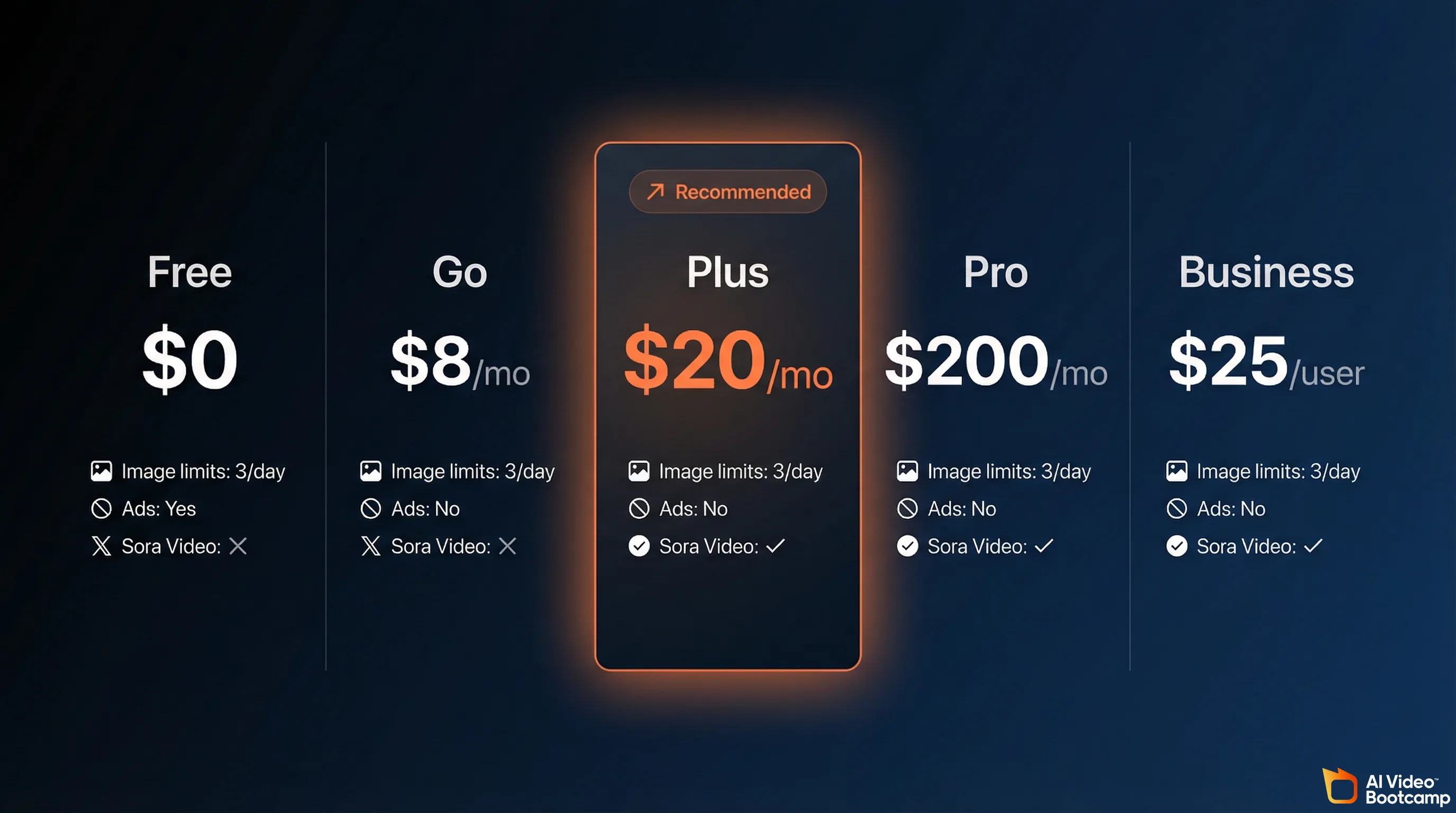
OpenAI offers six tiers in 2026: Free ($0), Go ($8), Plus ($20), Pro ($200), Business ($25/user), and Enterprise (custom). For AI image creators, Plus at $20 per month is the optimal tier, delivering roughly 200 images per day through GPT Image 1.5 with full model access and zero ads.
ChatGPT is no longer a simple free-or-paid product. As of April 2026, OpenAI offers six separate subscription tiers, each with different image generation access, model availability, and feature restrictions. The right tier depends entirely on how you plan to use image generation in your workflow.
OpenAI restructured its pricing in early 2026 after retiring several legacy models (GPT-4o, GPT-4.1, and early GPT-5 iterations) and transitioning to the GPT-5.2 architecture. The platform now segments its flagship model into “Instant” mode for fast responses and “Thinking” mode for deep reasoning tasks. Image generation through GPT Image 1.5 is available on every tier, but the limits vary dramatically.
| Plan | Monthly Price | Image Generation | Ad-Free | Deep Research | Sora Video |
|---|---|---|---|---|---|
| Free | $0 | ~3 images/day | No | No | No |
| Go | $8 | ~30 images/day | No | No | No |
| Plus | $20 | ~200 images/day | Yes | 10 runs/month | No (discontinued) |
| Pro | $200 | Unlimited | Yes | 250 runs/month | No (discontinued) |
| Business | $25/user | Same as Plus | Yes | Same as Plus | No (discontinued) |
| Enterprise | Custom | Custom limits | Yes | Custom | No (discontinued) |
Sources: OpenAI official pricing, CustomGPT Plus Limits 2026, ZDNET plan comparison
ChatGPT Free: The Bare Minimum
The free tier gives you access to GPT-5.2 Instant, capped at roughly 10 messages every 5 hours. Image generation is limited to approximately 3 images per day on a 24-hour rolling window. When you exhaust your message quota, the system silently downgrades you to a smaller “mini” model with noticeably worse output quality.
In early 2026, OpenAI introduced ads to the free tier to offset the infrastructure cost of hosting 68% of its user base who never pay. If you are generating images for any professional purpose, the free tier is not a viable option.
ChatGPT Go ($8/month): The Budget Trap
Go launched globally in early 2026 after a pilot phase in India. It removes the harshest free-tier throttling and offers roughly 10x the message and image capacity. But it still runs ads, it still excludes GPT-5.2 Thinking mode, and it blocks access to Deep Research, the o3 reasoning models, and advanced agentic features.
For AI image creators, Go is a trap. You pay $8 per month but miss the features that actually matter for professional image workflows: conversational editing at full model quality, Deep Research for reference gathering, and the priority server access that prevents degraded output during peak hours.
ChatGPT Plus ($20/month): The Sweet Spot for Creators
Plus has been $20 per month for three consecutive years. It is the tier most AI content creators should be on.
You get full access to GPT-5.2 Thinking and Instant modes, GPT Image 1.5 at its highest quality settings, Deep Research (10 runs per month), advanced voice capabilities, and zero ads. The 160-message rolling limit per 3-hour window is the practical ceiling, and each image generation prompt counts as one message against that cap.
At high usage, Plus works out to approximately $0.004 per message. For image generation specifically, if you are producing 100-200 images per day, the effective cost per image is well under $0.01. That is cheaper than every API-based alternative at comparable quality.
ChatGPT Pro ($200/month): Only If You Max Out Plus Daily
Pro offers virtually unlimited access to all models, including the exclusive GPT-5.4 Pro and o1 Pro reasoning modes. You get 250 Deep Research runs per month, double the context window, and maximum priority during peak server loads.
At $2,400 annually, Pro only makes financial sense if you are generating images continuously throughout the day, running extensive Deep Research queries, or using the o1 Pro reasoning chain for complex analytical work. For most creators, you will never hit the Plus ceiling often enough to justify the 10x price increase.
Business ($25/user/month) and Enterprise (Custom)
Business is Plus with team admin controls, SOC 2 compliance, SAML SSO, centralized billing, and a commitment that your workspace data is not used to train OpenAI models. It requires a minimum of two seats. Enterprise adds custom limits, expanded context windows, and dedicated support. Both tiers include the same GPT Image 1.5 access as Plus.
How ChatGPT Image Generation Actually Works (And Its Real Limits)
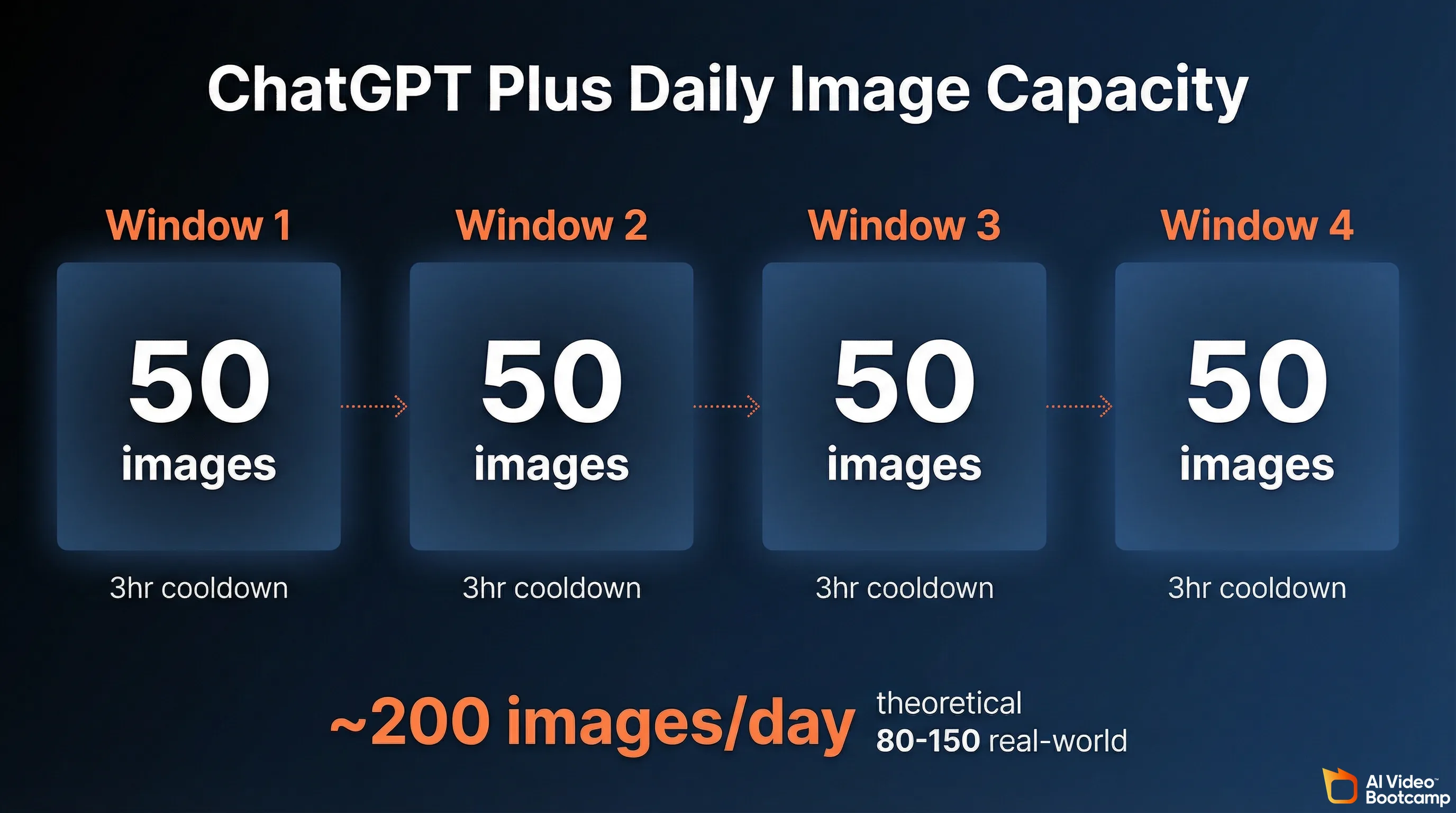
ChatGPT Plus generates images through GPT Image 1.5, an autoregressive model built directly into the GPT-5 architecture. You get approximately 50 image prompts per 3-hour rolling window. Each prompt counts against your 160-message limit. The theoretical daily max is 200 images, but real-world output is 80 to 150 after accounting for editing and text conversations.
Every image you generate inside ChatGPT now comes from GPT Image 1.5, a model that is architecturally different from anything OpenAI offered before. Understanding how it works explains both its strengths and its constraints.
DALL-E 3, which powered ChatGPT image generation from 2023 through early 2025, was a separate diffusion model. ChatGPT would translate your prompt into an optimized instruction, pass it to DALL-E 3 as an external API call, and return the result. The two systems were loosely connected.
GPT Image 1.5 is fundamentally different. It is an autoregressive model integrated directly into the GPT-5 neural network. The same architecture that processes your text also generates image tokens. This is not a cosmetic distinction. It means GPT Image 1.5 understands language at the same depth as the conversational model, which is why it can render accurate text, follow complex spatial instructions, and modify specific regions of an existing image through natural conversation.
DALL-E 3 is officially deprecated and loses support on May 12, 2026. If you are still using workflows that depend on DALL-E 3 through the API, plan your migration now.
The Rolling Window System
ChatGPT Plus does not give you a fixed daily image quota. Instead, it uses a rolling window mechanic that works like this:
- You have a pool of approximately 160 messages per 3-hour window.
- Each image generation prompt consumes one message from that pool.
- Each message slot “refills” exactly 3 hours after it was used.
- If you exhaust the pool, the interface warns you and downgrades to a smaller model (GPT-5.4 mini) until slots reopen.
The practical implication: if you dedicate your entire message allowance to image generation and time your sessions to maximize the rolling windows, the theoretical upper bound is approximately 200 images per 24-hour period (50 images across 4 rolling windows).
In practice, the real number is lower. You will spend messages on text conversations, iterative editing instructions, and refinement prompts. Peak-hour server throttling can also reduce throughput. A realistic daily output for a focused image creation session is 80 to 150 images.
The Hidden Lockout Risk
If you attempt to automate or programmatically exploit the web interface for bulk image generation, OpenAI’s security guardrails will trigger. Users have reported punitive lockouts lasting up to 720 hours (30 days) with error messages blocking all image generation. The system is designed to detect and prevent abusive extraction patterns. Do not try to bot it.
Image Specifications
GPT Image 1.5 outputs images in three primary aspect ratios:
- 1024x1024 (square)
- 1024x1536 (portrait)
- 1536x1024 (landscape)
Generation time ranges from 15 to 45 seconds per image, depending on prompt complexity and quality settings. This is notably slower than pure diffusion models like Midjourney or Flux, which typically produce results in 5 to 15 seconds. The tradeoff is higher prompt accuracy and text rendering quality.
API Pricing for Developers
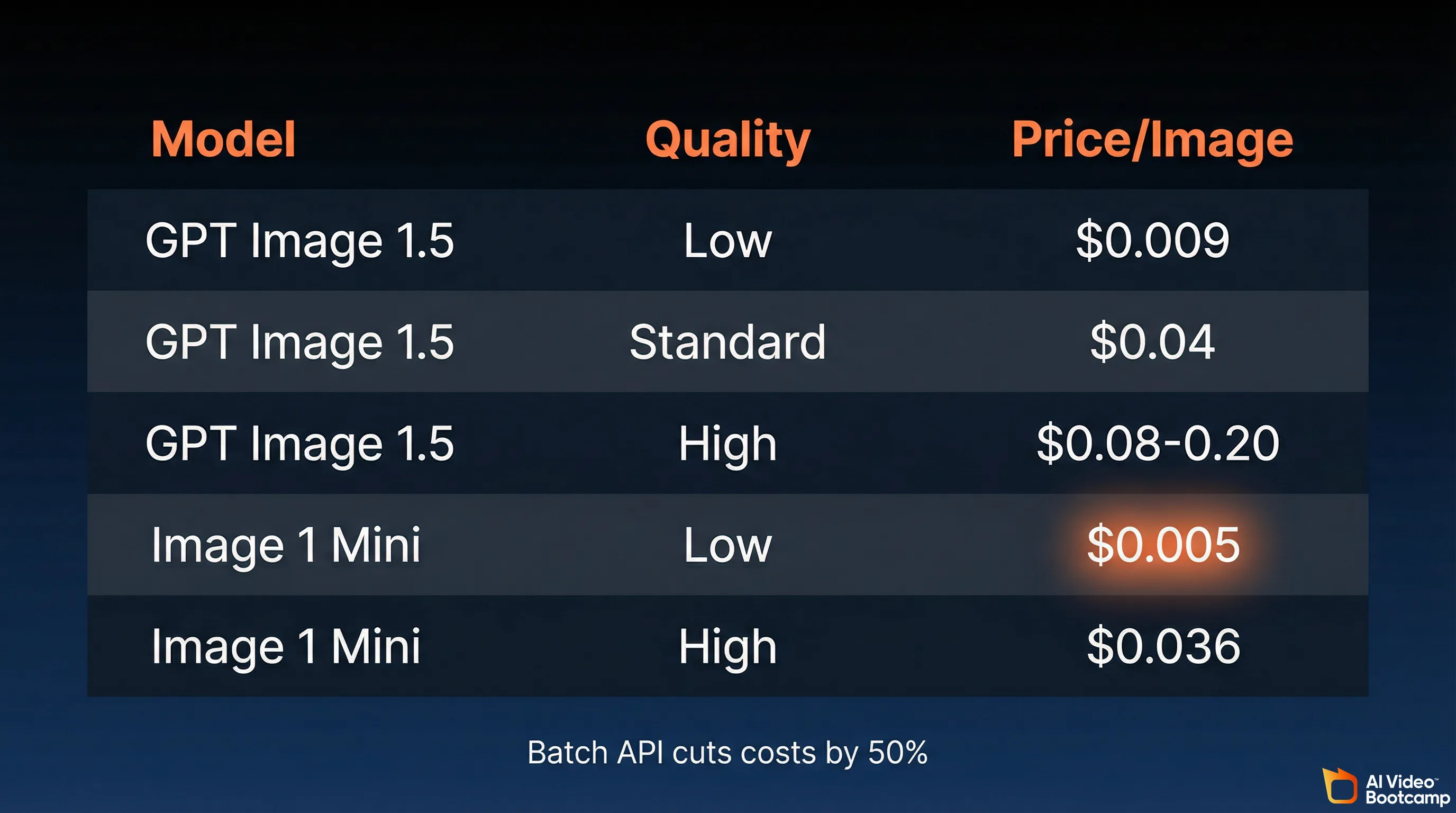
If you are building applications or need programmatic image generation, OpenAI offers GPT Image 1.5 through the Responses API:
| Model | Quality | Price per Image |
|---|---|---|
| GPT Image 1.5 | Low (1024x1024) | $0.009 |
| GPT Image 1.5 | Standard (1024x1024) | $0.04 |
| GPT Image 1.5 | High | $0.08-0.20 |
| GPT Image 1 Mini | Low (1024x1024) | $0.005 |
| GPT Image 1 Mini | High (1024x1024) | $0.036 |
Source: OpenAI API pricing, AIFreeAPI pricing analysis
Batch API processing cuts costs by 50%, bringing a 5,000-image run down to approximately $100-135. For high-volume production pipelines, the API is significantly more cost-effective than burning Plus message credits.
The Sora Shutdown: Why ChatGPT Lost Video Generation Entirely
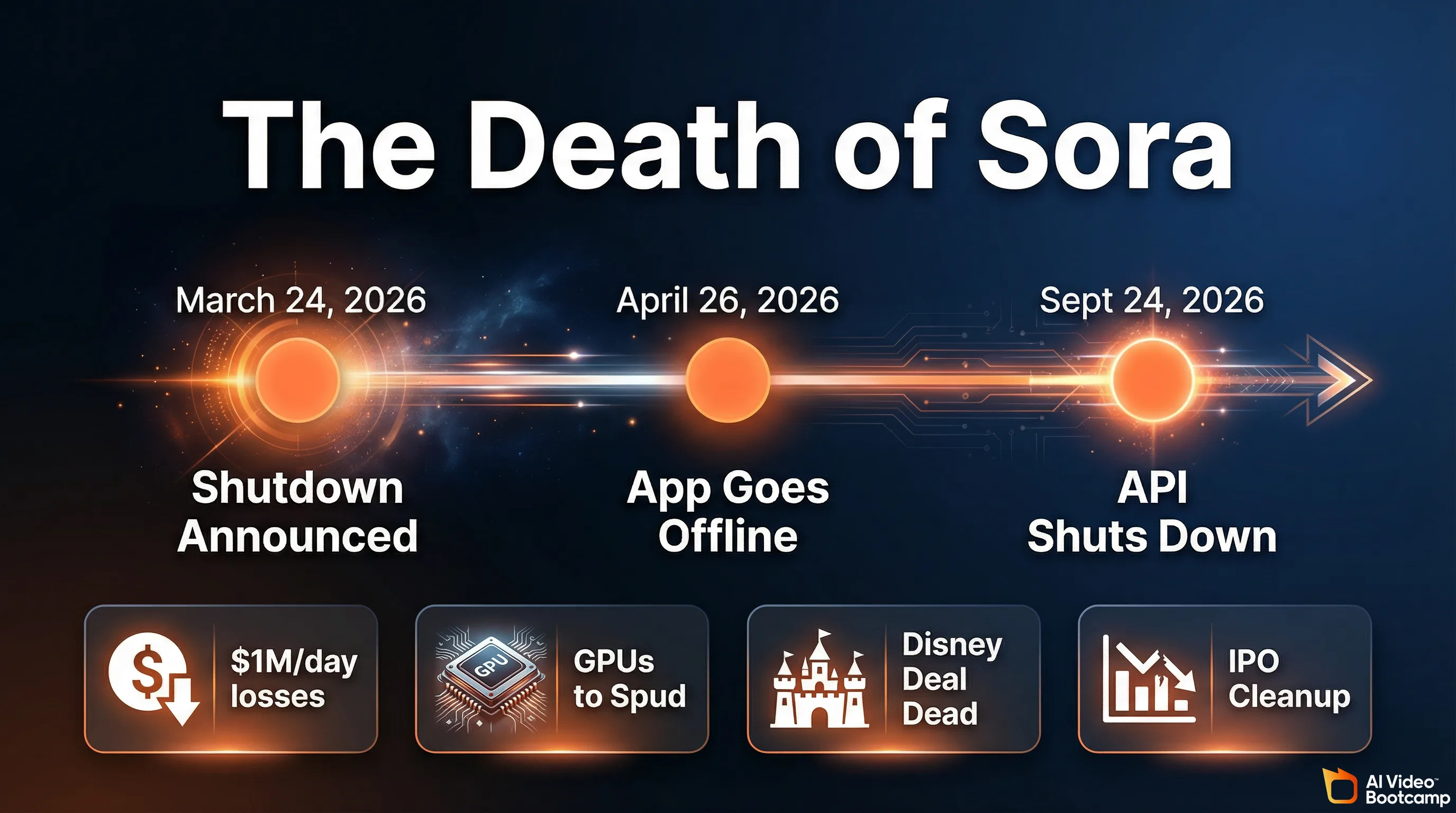
OpenAI permanently discontinued Sora on March 24, 2026. The web app closes April 26, 2026, and the API shuts down September 24, 2026. ChatGPT Plus has zero video generation capability remaining. The shutdown was driven by unsustainable compute costs (approximately $1 million per day) and fewer than 500,000 active users.
If you came to this article hoping ChatGPT Plus could handle both your image and video needs, here is the reality: it cannot. Not anymore.
On March 24, 2026, OpenAI officially and permanently discontinued Sora, its video generation model. The standalone sora.com website went offline. The developer APIs were severed. The “Generate Video” button was removed from the ChatGPT Plus dashboard. This was not a temporary suspension or a beta rollback. Sora is dead.
The shutdown happens in two stages:
- April 26, 2026: Sora web and mobile app go completely offline.
- September 24, 2026: Sora API shuts down permanently.
If you still have content stored in Sora, export it before April 26.
Why It Failed
Sora’s collapse was driven by four converging factors:
1. The compute costs were unsustainable. Generating high-fidelity video required orders of magnitude more compute than text or image generation. Industry reports indicate Sora was costing OpenAI between $500,000 and $15 million per day in server expenses, with the most widely cited figure around $1 million daily. Lifetime revenues for the entire Sora product barely crossed $2.1 million. The economics were fundamentally broken.
2. OpenAI needed the GPUs for “Spud.” As competition intensified against rivals like Anthropic, OpenAI urgently needed to reclaim GPU capacity for its next-generation frontier model, internally codenamed “Spud” (expected to launch as GPT-5.5 or GPT-6). The thousands of chips previously dedicated to rendering 720p Sora clips were immediately redirected to pre-training, reportedly including clusters of over 100,000 H100 GPUs at the Stargate facility.
3. The Disney deal collapsed. A highly anticipated billion-dollar strategic partnership with The Walt Disney Company fell apart in early 2026. The proposed agreement would have allowed Sora users to generate content featuring over 200 Marvel, Pixar, and Star Wars characters. Disney was reportedly informed of the shutdown less than an hour before the public announcement. Without this IP library and capital injection, Sora’s path to profitability evaporated.
4. IPO cleanup. With CEO Sam Altman preparing OpenAI for a massive Initial Public Offering in late 2026, eliminating a product burning $1 million per day with under 500,000 active users was an obvious balance sheet decision.
What This Means for Creators
ChatGPT Plus is now exclusively a text and image platform. There are zero residual video generation capabilities. The 1,000-credit monthly Sora allocation that Plus subscribers previously received is gone.
For AI video creation, you must use dedicated external tools. The current leaders are Kling 3.0, Google Veo 3, Runway Gen-3 Alpha, and the open-source Wan 2.1 model. We ranked all of them in our Best AI Video Generators 2026 comparison.
What GPT Image 1.5 Does Better Than Anything Else
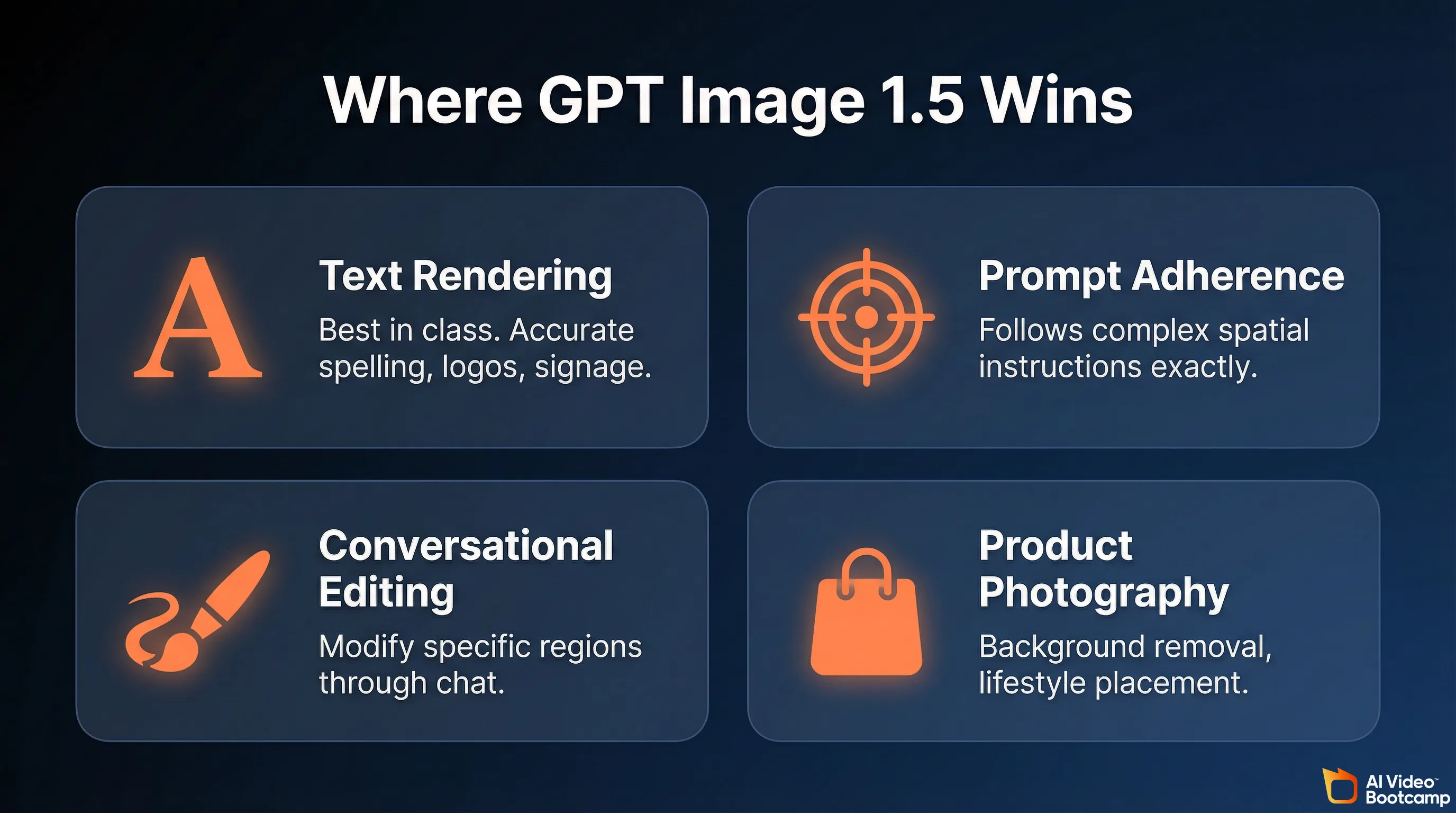
GPT Image 1.5 is the best AI image model for text rendering, prompt adherence, and conversational editing in 2026. It achieved an Elo rating of 1264 on the LM Arena Image Generation Leaderboard, placing it at the top for commercial visual tasks. Its ability to modify specific image regions through natural conversation is unmatched by any competitor.
On the LM Arena Image Generation Leaderboard, a blind human-preference testing matrix, GPT Image 1.5 achieved an Elo rating of 1264, placing it at the top of the industry for several specific commercial visual tasks. Here is exactly where it excels.
Text Rendering: The Single Biggest Advantage
This is the capability that separates GPT Image 1.5 from every competitor. Historically, AI image generators produced illegible gibberish when attempting to render words. Midjourney v7 still cannot reliably render multi-word text. Flux handles basic text but breaks down on longer passages.
GPT Image 1.5 can accurately spell complex brand names, format multi-line billboard text, generate readable menus, book covers, and directional signage. When you prompt it with a specific phrase like “SUMMER SALE 50% OFF,” it renders the typography cleanly with balanced kerning, spacing, and font contrast. It can even translate text within an existing image, replacing English text with Spanish while maintaining the original graphic design.
If your work involves logos, social media graphics with text overlays, infographics, memes, or any image where readable words matter, GPT Image 1.5 is the clear winner in 2026.
Prompt Adherence and Spatial Logic
Because GPT Image 1.5 shares the cognitive reasoning engine of ChatGPT, it demonstrates unparalleled adherence to complex, multi-constraint instructions. If you request a split-screen transformation image with casual attire on the left and formal attire on the right, or a precise arrangement of five products on a minimalist wooden desk, the model reliably places elements exactly where you specify.
It has a deep understanding of numbers, counting, spatial relationships, and object positioning that diffusion-based models like Midjourney and Stable Diffusion consistently struggle with.
Conversational Image Editing
This is the workflow feature that no competitor matches. GPT Image 1.5 treats images as collaborative drafts that you can surgically refine through natural conversation:
- “Move the logo to the top left.”
- “Change the jacket color to navy blue.”
- “Remove the person on the right side.”
- “Keep everything the same but make the sky more orange.”
The model understands the spatial context, isolates the relevant pixels, and modifies only what you asked for while preserving everything else: facial identity, lighting, background, and contact shadows. With DALL-E 3 and Midjourney, you had to regenerate the entire image from scratch for any change. This iterative editing capability turns GPT Image 1.5 into something closer to a professional photo retouching suite than a simple image generator.
E-Commerce and Product Photography
The model excels at generating pure-white background product photography. You can upload a base photograph of a product, strip the background via a conversational command (“Extract the product and output a transparent RGBA PNG”), and place it into a new lifestyle environment (“Place this shampoo bottle on a sunlit beach rock”) while maintaining accurate contact shadows and preserving the product’s precise geometry and label legibility.
For e-commerce teams generating product image catalogs with variants, scenes, and angles from a single source image, this is a significant workflow accelerator.
The GPT Image 1.5 Strengths Summary
| Capability | Performance | Best Use Cases |
|---|---|---|
| Text Rendering | Exceptional; crisp, accurate spelling and layout | Logos, billboards, UI mockups, infographics, memes |
| Prompt Adherence | Industry-leading; follows rigid spatial and color constraints | Concept art with specific rules, technical diagrams |
| Conversational Editing | Surgical; region-aware modifications without altering the whole | Retouching, background removal, color changes |
| Anatomical Accuracy | Highly reliable; human hands, biology, and spatial geometry | Portraits, fashion mockups, character sheets |
Where GPT Image 1.5 Falls Short (Honest Assessment)
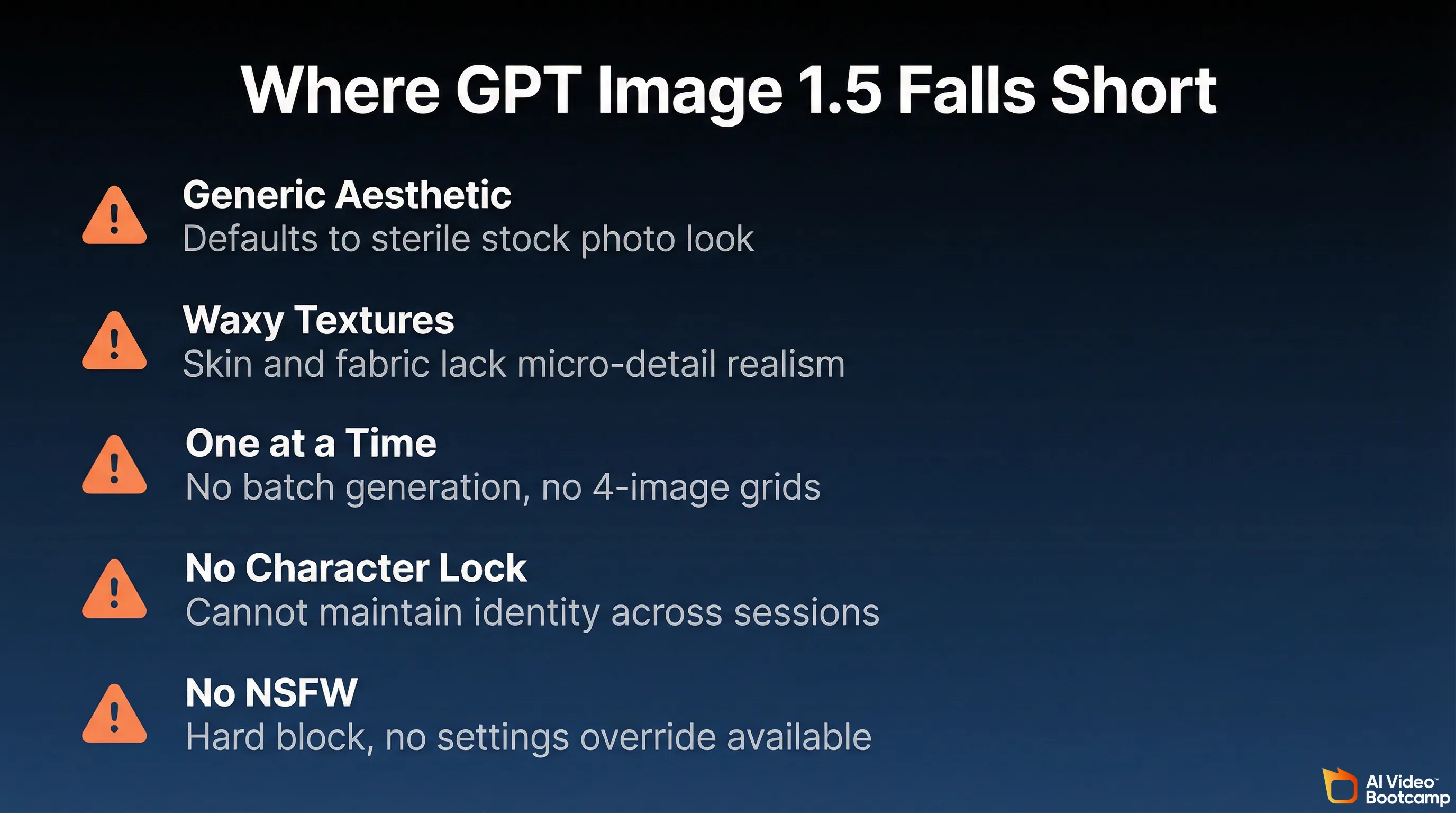
GPT Image 1.5 defaults to a recognizable “stock photo” aesthetic without heavy prompt engineering. It struggles with cinematic lighting, occasionally produces waxy skin textures, generates only one image at a time (no batch variations), and cannot maintain character consistency across sessions without LoRA training. It also blocks all NSFW content with no override option.
No tool is universally best. GPT Image 1.5 has distinct artistic and technical weaknesses that you need to understand before committing your workflow to it.
The “Generic ChatGPT” Aesthetic
This is the most frequent critique. Unless you heavily prompt with specific artistic constraints, GPT Image 1.5 defaults to a recognizable, uniform style that looks like high-quality yet sterile corporate stock photography. The output often lacks the subtle imperfections, emotional depth, and atmospheric texture that make visual art feel distinct and human.
The result: a vast majority of ChatGPT-generated images populating the internet share an identical aesthetic. If you are creating content that needs to stand out visually, this sameness is a real problem. Overcoming it requires the structured prompt engineering framework covered later in this article.
Lighting and Texture Issues
When attempting pure photorealism, the model occasionally struggles with nuanced light behavior. Common issues include:
- Failure to produce sophisticated shadow play, realistic light refraction, or dramatic bloom seen in high-end photography
- Aggressive insertion of unrealistic “lens flares” in outdoor and sunlit scenes
- Human skin and fabrics adopting a slightly waxy or plastic texture, lacking the micro-details of pores and fabric weave
- Inconsistent depth-of-field behavior
These issues are manageable with explicit prompting (more on that below), but they are present by default in ways that Midjourney v7 simply does not exhibit.
Compositional Blending Problems
In complex scenes lacking explicit depth-of-field instructions, the model can struggle with subject-background separation. If a subject is placed in front of a colorful, cluttered background, the colors and textures of the subject may “bleed” into the background elements. When you request a restricted color palette (strict duotone cyan and magenta, for example), the model often introduces unwanted reds and blacks into the composition.
One Image at a Time
GPT Image 1.5 generates only one image per request. You cannot batch-generate 4 variations simultaneously like you can with Midjourney. When you are in the exploration phase, trying to find the right visual direction, this limitation makes the process significantly slower.
No Character Consistency Across Sessions
Without LoRA-based training (available in tools like Flux and Stable Diffusion through ComfyUI), GPT Image 1.5 cannot maintain exact character consistency across dozens of images. Each generation may produce slightly different facial features, body proportions, or clothing details for the “same” character. For AI influencer pipelines where identity persistence is critical, this is a dealbreaker. Our character consistency guide covers the LoRA-based alternatives.
No NSFW Content
ChatGPT does not generate adult or NSFW content under any circumstances. There is no settings toggle, no premium unlock. This is a hard architectural filter. If you need NSFW generation, use Grok Spicy Mode, Flux (uncensored), or local Stable Diffusion.
ChatGPT (GPT Image 1.5) vs. Midjourney v7: Head-to-Head
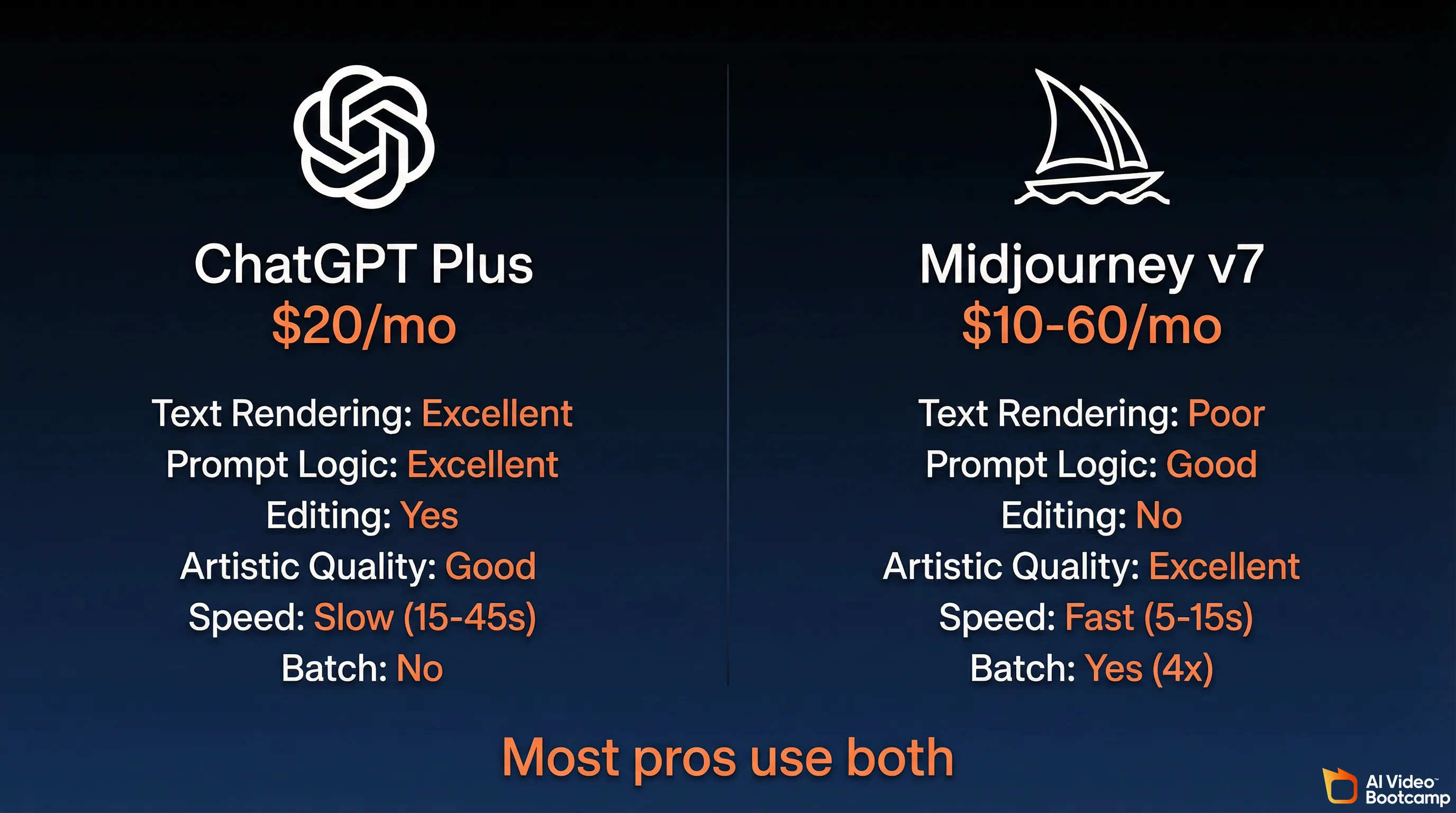
ChatGPT Plus excels at text rendering, prompt accuracy, and conversational editing at $20 per month. Midjourney v7 excels at artistic beauty, cinematic lighting, and atmospheric imagery starting at $10 per month. Most professionals in 2026 use both tools together: Midjourney for creative exploration and ChatGPT for precise editing and typography.
For AI creators choosing their primary image tool in 2026, the decision comes down to these two platforms. They represent fundamentally different philosophies.
Midjourney v7 is a style-driven diffusion model. It natively produces stunning, atmospheric imagery with rich textures, cinematic lighting, and deep emotional resonance. It acts like a digital painter who adds their own artistic interpretation. The tradeoff: it frequently ignores complex multi-layered instructions in favor of producing a more visually pleasing image, and it still cannot reliably render text.
GPT Image 1.5 is a logic-driven autoregressive model. It acts as an obedient, technically precise creative assistant. If you dictate that a scene must feature a cyan background, magenta lighting, and exactly three distinct objects on a desk, ChatGPT executes the logic flawlessly, even if the resulting image is aesthetically mundane.
| Feature | ChatGPT Plus (GPT Image 1.5) | Midjourney v7 |
|---|---|---|
| Core Strength | Prompt adherence, text rendering, editing | Artistic beauty, cinematic lighting, textures |
| Primary Weakness | ”Stock” feel, waxy textures, slower speed | Ignores complex logic, no text, no editing |
| Best For | Marketers, graphic designers, e-commerce, UI | Concept artists, illustrators, editorial art |
| Workflow | Conversational chat, iterative back-and-forth | Node-based or Discord, heavy prompt variation |
| Batch Generation | No (1 at a time) | Yes (4 at a time) |
| Character Consistency | Limited (no LoRA) | Limited (no LoRA) |
| Monthly Cost | $20 (Plus) | $10-60 (Basic to Mega) |
| API Access | Yes ($0.005-0.20/image) | Limited partners only |
| NSFW | No | No |
The Hybrid Workflow Most Professionals Use
Industry professionals in 2026 have largely abandoned single-platform loyalty. The optimal workflow uses Midjourney v7 for high-level ideation, creative exploration, and generating breathtaking base artistic assets. Those assets are then imported into ChatGPT Plus for precise conversational editing, background removal, anatomical correction, and overlaying accurate typographical elements.
This two-tool approach lets you exploit the aesthetic strengths of Midjourney and the technical precision of GPT Image 1.5 without being limited by either tool’s weaknesses. Read our Midjourney Complete Guide 2026 for the detailed setup.
The 10-Part Prompt Framework for Professional Results
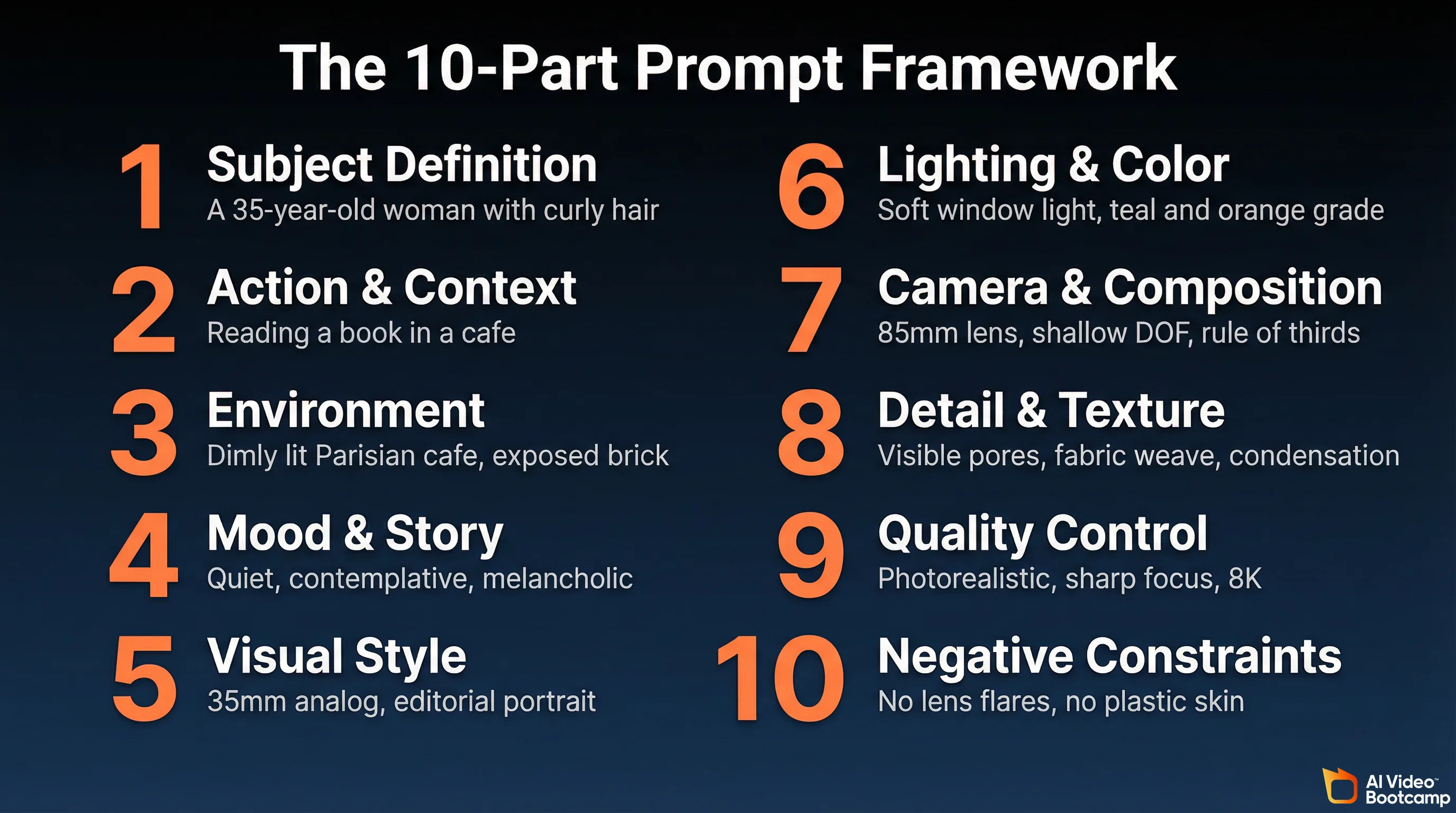
To bypass the default “generic ChatGPT” aesthetic, structure your prompts into 10 sequential blocks: subject definition, action and context, environment, mood, visual style, lighting, camera and composition, detail and texture, quality control, and negative constraints. Each block should be separated by a line break to prevent cognitive confusion within the model.
The difference between a generic ChatGPT image and a professional one is almost entirely in the prompt. Casual users write vague, declarative prompts (“Make a cool image of a woman in a cafe”), which forces the model to fall back on its bland, lowest-common-denominator defaults.
Professional practitioners use a structured, multi-part framework that mimics the instruction set of a cinematographer or art director. Here are the 10 components, each separated by line breaks in your prompt to avoid cognitive confusion within the model:
1. Subject Definition
The anchor of the image. Include 2 to 4 defining traits.
Example: “A 35-year-old woman with curly auburn hair and a confident expression.”
2. Action and Context
What the subject is actively doing and why it matters.
Example: “Reading a leather-bound book, completely absorbed, with a half-finished espresso beside her.”
3. Environment and Setting
The grounding location that establishes spatial logic.
Example: “Inside a dimly lit, rustic Parisian cafe with exposed brick walls and vintage pendant lighting.”
4. Mood and Story
The emotional tone and implied narrative.
Example: “Quiet, contemplative, melancholic. The kind of afternoon where time slows down.”
5. Visual Style and References
The aesthetic medium and historical inspirations.
Example: “35mm analog photography, editorial fashion portrait, in the style of Vermeer’s use of natural window light.”
6. Lighting and Color
The specific light setup and color grading.
Example: “Soft morning window light from the left, deep amber shadows, cinematic teal and orange color grading.”
7. Camera and Composition
Lens choice, angle, and framing data.
Example: “85mm lens, shallow depth of field, eye-level angle, rule of thirds with subject positioned left.”
8. Detail and Texture Control
Surface realism cues to combat the default waxy look.
Example: “Visible skin pores, fine fabric weave on the sweater, condensation on the coffee cup, dust particles in the light beam.”
9. Quality and Realism Control
Output fidelity parameters.
Example: “High-resolution, photorealistic, sharp focus, 8K detail.”
10. Negative Constraints
Crucial commands dictating what to strictly avoid.
Example: “Do not include neon signs, avoid plastic skin textures, no lens flares, no background text, no watermarks.”
Prompt Tips That Save You Messages
Keep text generation requests short (3 to 5 words optimally), enclosed in explicit quotation marks, and paired with rigid layout instructions. Requesting specific font names is less effective than describing the font’s physical characteristics (“clean serif” rather than “Times New Roman”).
Use the conversational memory aggressively. Instead of rewriting a full prompt for a minor change, generate an initial image on a lower quality setting, evaluate the composition, and then issue surgical commands like: “Keep the exact same lighting, pose, and background, but replace the coffee cup with a glass of water. Render the final version in maximum high-fidelity.” This iterative approach saves messages and produces better results than regenerating from scratch.
The Studio Ghibli Moment: Proof of Style Versatility
When OpenAI launched GPT-4o image generation in March 2025, the Studio Ghibli-style photo transformation trend added 1 million new ChatGPT users in a single hour and pushed the platform past 150 million total users. Search interest spiked over 1,200%, proving GPT Image 1.5 can convincingly replicate specific artistic styles when prompted correctly.
In March 2025, when OpenAI first launched GPT-4o native image generation, users immediately started transforming personal photos into Studio Ghibli-style art. The trend exploded. ChatGPT gained 1 million new users within a single hour. The platform pushed past 150 million total users. Search interest for “ChatGPT Studio Ghibli” spiked over 1,200%.
Viral examples included Ghibli-style versions of the “distracted boyfriend” meme, the “bro explaining” meme, and a widely shared transformation of Ben Affleck smoking. The trend demonstrated that GPT Image 1.5’s style versatility extends far beyond corporate stock photography when prompted with specific artistic references.
It also raised significant copyright questions. Studio Ghibli founder Hayao Miyazaki had previously described AI-generated art as “an insult to life itself.” The ease with which ChatGPT could replicate a specific studio’s decades-long visual identity in seconds became a flash point in the ongoing AI copyright debate.
For creators, the takeaway is practical: GPT Image 1.5 can convincingly reproduce a wide range of artistic styles when you reference them explicitly in your prompts. Anime, watercolor, oil painting, 3D render, flat design, pixel art, and editorial illustration all produce usable results with the right prompt structure.
What Comes Next: GPT Image 2
GPT Image 2 is in advanced development and is anticipated to enter early beta between mid-to-late 2026. Expected improvements include eliminating the default waxy skin texture, improved subsurface scattering for realistic human skin, enhanced environmental depth, and potentially native vector output. Until it ships, GPT Image 1.5 remains the flagship.
GPT Image 1.5 will not be the flagship forever. Industry trajectory analysis and early data leaks indicate that GPT Image 2 is currently in advanced development, with an anticipated early beta between mid-to-late 2026.
Preliminary information suggests the transition from 1.5 to 2.0 will focus on closing the aesthetic gap with Midjourney: eliminating the default “waxy” or “plastic” skin texture, improving subsurface scattering for realistic human skin rendering, enhancing environmental depth to prevent background blending, and potentially integrating native vector output capabilities.
Until GPT Image 2 ships, GPT Image 1.5 remains the best tool for logical, text-heavy, and conversationally edited visual content within the ChatGPT ecosystem.
The Bottom Line: Which Plan, Which Tool, Which Workflow
For most AI creators, ChatGPT Plus at $20 per month is the right choice: best-in-class text rendering, 200 images per day, and conversational editing. Pair it with Midjourney v7 for artistic work and a dedicated video tool like Kling 3.0 for video, since ChatGPT no longer generates video after the Sora shutdown.
If you generate AI images occasionally (a few per week for social media or blog posts): ChatGPT Free or Go will technically work, but the severe throttling and ad interruptions make it frustrating. Plus at $20 is worth the upgrade if you value your time.
If you are a content creator, marketer, or blogger generating images daily: ChatGPT Plus at $20/month is the correct choice. The combination of GPT Image 1.5 quality, 200-image daily capacity, conversational editing, and Deep Research access makes it the best value in AI image generation right now.
If you need maximum artistic quality for editorial, fine art, or cinematic work: Use Midjourney v7 for generation and ChatGPT Plus for editing and text overlay. The hybrid workflow produces better results than either tool alone.
If you need video: ChatGPT cannot help you. Use Kling 3.0, Google Veo 3, or the open-source Wan 2.1. Our AI video generators ranked guide has the full comparison.
If you need character consistency across hundreds of images for an AI influencer pipeline: Neither ChatGPT nor Midjourney is sufficient. Use Flux or Stable Diffusion with custom LoRA training through ComfyUI. Our photorealistic AI prompts guide covers the technical setup.
If you need NSFW image generation: ChatGPT blocks it entirely. See our Grok Spicy Mode guide or use uncensored open-source models.
The $20 ChatGPT Plus subscription has been the same price for three years. The image generation capability it now includes would have cost hundreds of dollars per month through separate tools in 2024. For most AI creators in 2026, it is the single best value in the entire generative AI ecosystem.