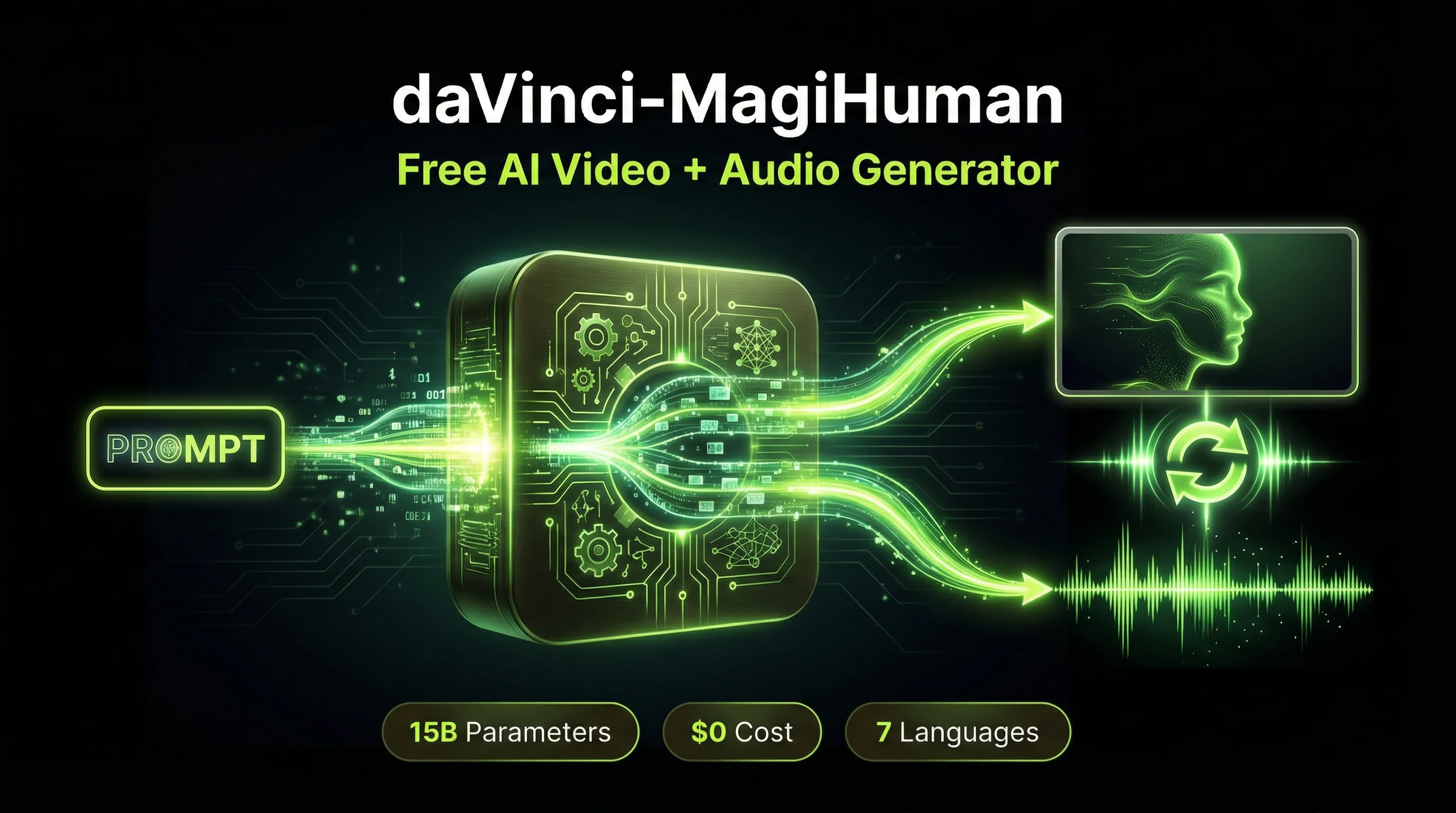
daVinci-MagiHuman is a free, open-source AI model that generates synchronized video and audio from a single text prompt, beating two major competitors in blind human testing while costing exactly $0 to use. Built by GAIR-NLP and Sand.ai, this 15-billion-parameter model produces 1080p video with lip-synced speech in 7 languages, and it is fully available under the Apache 2.0 license for commercial use. In a field where the average creator spends $20 to $250 per month on AI video tools, daVinci-MagiHuman represents the first serious free alternative that does not compromise on output quality.
What Is daVinci-MagiHuman? The Free AI Video Model Explained
daVinci-MagiHuman is an open-source audio-video generative foundation model that takes a text prompt and produces a video clip with synchronized speech, facial expressions, and body motion in a single generation pass. No separate voiceover tool. No lip-sync plugin. No post-production audio alignment. One prompt in, finished video with sound out.
The model was developed by GAIR-NLP (part of Shanghai Jiao Tong University’s research group) in collaboration with Sand.ai, and released in March 2026. The full technical paper, “Speed by Simplicity: A Single-Stream Architecture for Fast Audio-Video Generative Foundation Model,” is published on arXiv (2603.21986).
What makes this significant for content creators: most AI video tools either generate video without audio (Kling, Runway, Midjourney) or charge premium rates for audio-video sync (Veo 3.1 at $19.99 to $249.99/month). daVinci-MagiHuman delivers both at zero cost.
“The single-stream design avoids the complexity of multi-stream or cross-attention architectures while remaining easy to optimize with standard training and inference infrastructure.” GAIR-NLP research team, arXiv:2603.21986
How daVinci-MagiHuman Works: Single-Stream Transformer Architecture
Unlike most AI video generators that process audio and video through separate pipelines and stitch them together, daVinci-MagiHuman uses a single-stream Transformer that jointly processes text, video, and audio tokens through unified self-attention layers. This architectural decision is the core reason it generates faster and stays in sync better than multi-stream alternatives.
The model is built on a 15-billion-parameter, 40-layer backbone with a “sandwich” design:
- The first 4 layers handle modality-specific projections and normalisation (text, video, audio each get their own processing)
- The middle 32 layers are fully shared parameters across all modalities (this is where the unified generation happens)
- The final 4 layers convert back to modality-specific outputs
Two technical innovations set it apart. First, timestep-free denoising: the model infers its denoising state directly from noisy inputs rather than relying on explicit timestep embeddings, which simplifies the architecture and reduces computation. Second, per-head gating: learned scalar gates applied to attention heads improve training stability across the different modalities. Both innovations are documented in the arXiv paper.
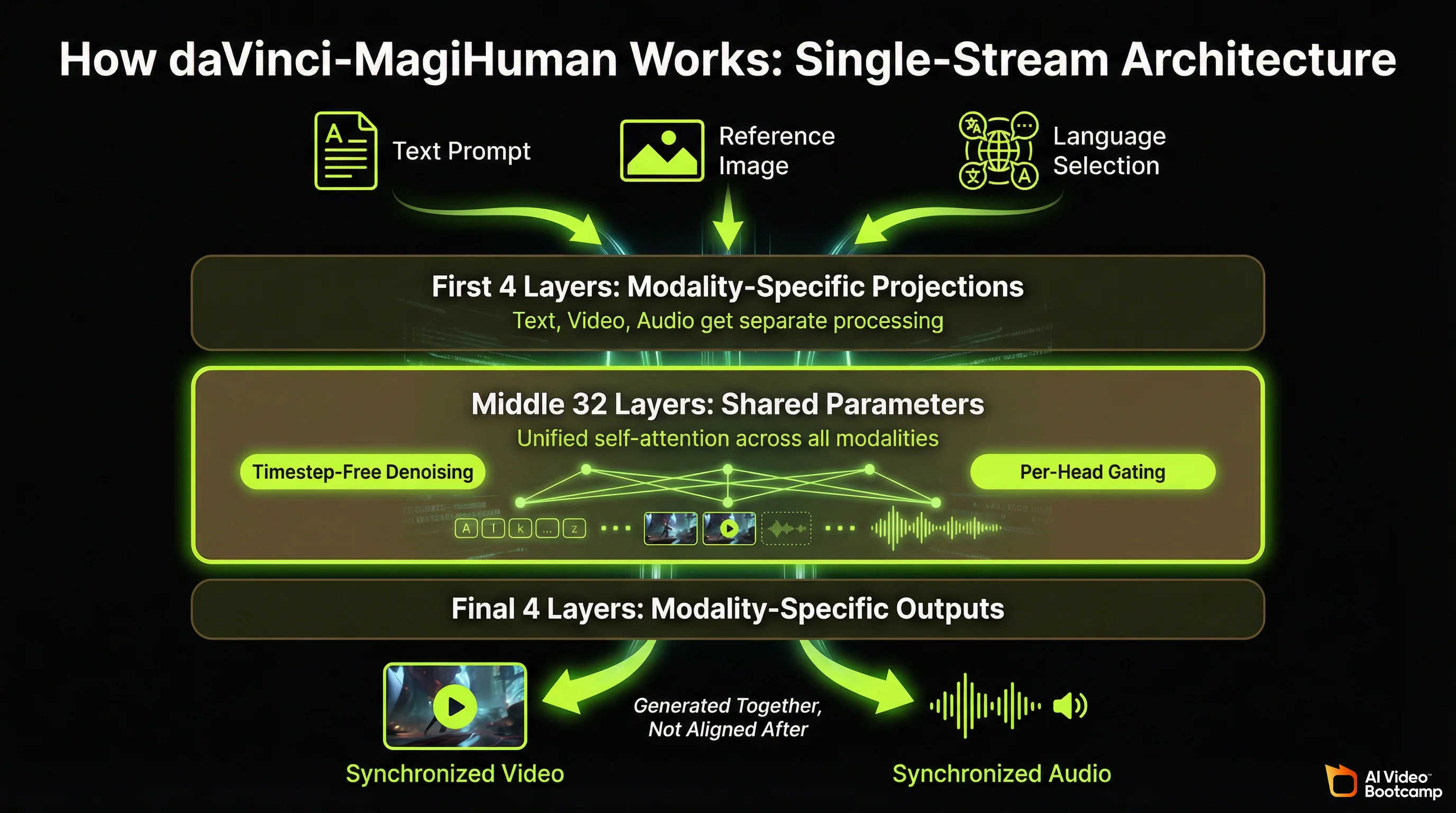
The practical result: a single forward pass produces both video frames and audio waveforms that are inherently synchronised because they were generated together, not aligned after the fact.
daVinci-MagiHuman Capabilities: What This Free Model Actually Does
This is what you get for $0.
Video Generation Quality
daVinci-MagiHuman scored 4.80 out of 5 for visual quality in the research team’s evaluation framework, outperforming both Ovi 1.1 (4.73) and LTX 2.3 (4.76) on the same benchmark. In over 2,000 pairwise human comparisons with 10 independent raters, the model achieved:
- 80.0% win rate against Ovi 1.1
- 60.9% win rate against LTX 2.3
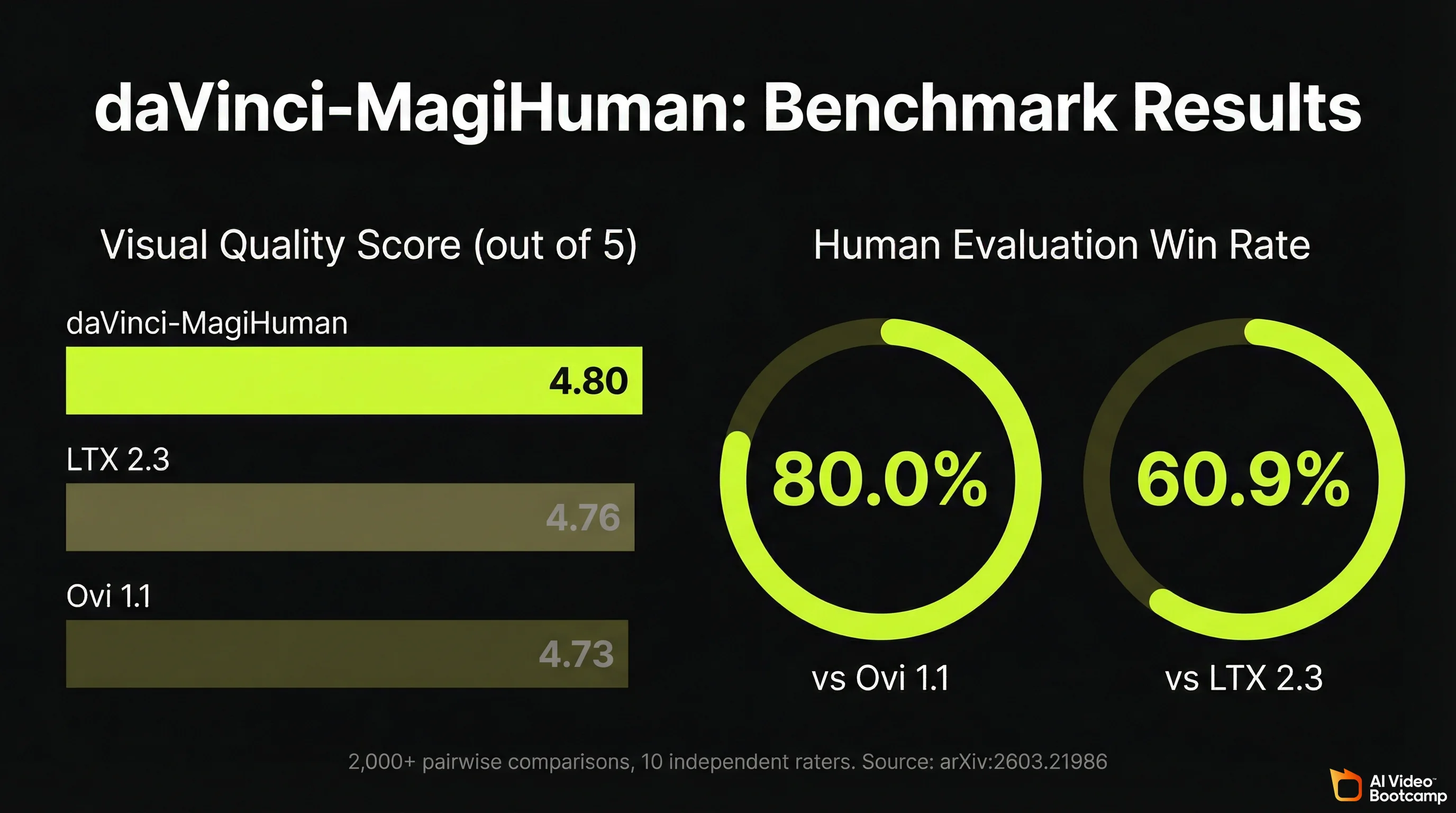
These are not self-reported marketing numbers. The evaluation methodology, rater instructions, and full statistical breakdown are published in the arXiv paper (Section 5).
The model generates human-centric video with expressive facial performance, natural speech-expression coordination, realistic body motion, and precise audio-video lip synchronisation. Its strongest output category is talking-head content: characters speaking to camera with accurate mouth movements, appropriate facial expressions, and natural gestures.
Audio Generation: Built-In Speech Synthesis in 7 Languages
This is where daVinci-MagiHuman separates itself from most competitors. The audio is not added after video generation. It is generated simultaneously with the video frames, producing:
- Lip-synced speech that matches mouth movements
- Facial expressions that match the emotional tone of the speech
- Body gestures that coordinate with speech emphasis
Supported languages:
| Language | Quality Level | Notes |
|---|---|---|
| English | Production-ready | Strongest overall performance |
| Mandarin | Production-ready | Native-level fluency |
| Cantonese | Production-ready | Distinct from Mandarin model |
| Japanese | Production-ready | Natural intonation |
| Korean | Production-ready | Accurate pronunciation |
| German | Good | Occasional accent artefacts |
| French | Good | Occasional accent artefacts |
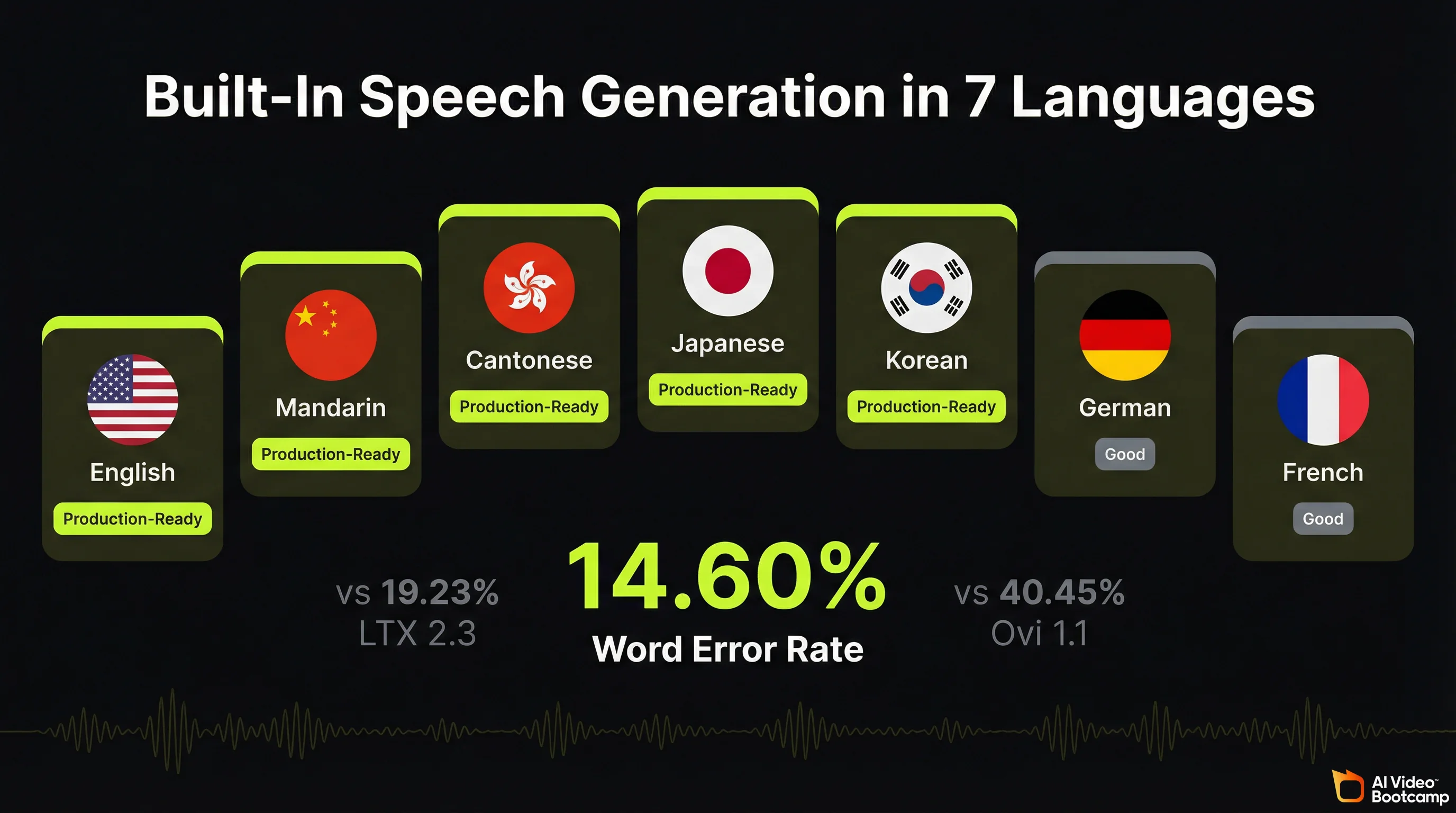
The Word Error Rate (WER) for generated speech is 14.60%, compared to 40.45% for Ovi 1.1 and 19.23% for LTX 2.3. Lower WER means the spoken words in the generated video more accurately match the intended text. A 14.60% WER is not perfect, but it is the best result among open-source models in 2026.
Resolution and Speed
| Resolution | Generation Time (Single H100) | Use Case |
|---|---|---|
| 256p | 2.0 seconds | Previews, rapid iteration |
| 540p | 8.0 seconds | Social media drafts |
| 1080p | 38.4 seconds | Final production output |
The model supports a latent-space super-resolution pipeline: generate at 256p for fast iteration, then upscale to 1080p for final output. First-time generation is slower due to model compilation, but subsequent runs hit the benchmarks above.
Current clip length: 5 seconds per generation. This is the model’s most significant practical limitation compared to paid tools. For context, Kling 3.0 generates up to 15-second multi-shot sequences, and Veo 3.1 produces 8-second clips. The 5-second limit means longer content requires stitching multiple clips together in editing.
daVinci-MagiHuman vs Kling 3.0 vs Veo 3.1 vs Seedance 2.0: Full Comparison
The honest question every creator asks: can this free tool actually replace what I am paying for? The answer depends on what you need. Here is the full breakdown.
Head-to-Head Comparison Table
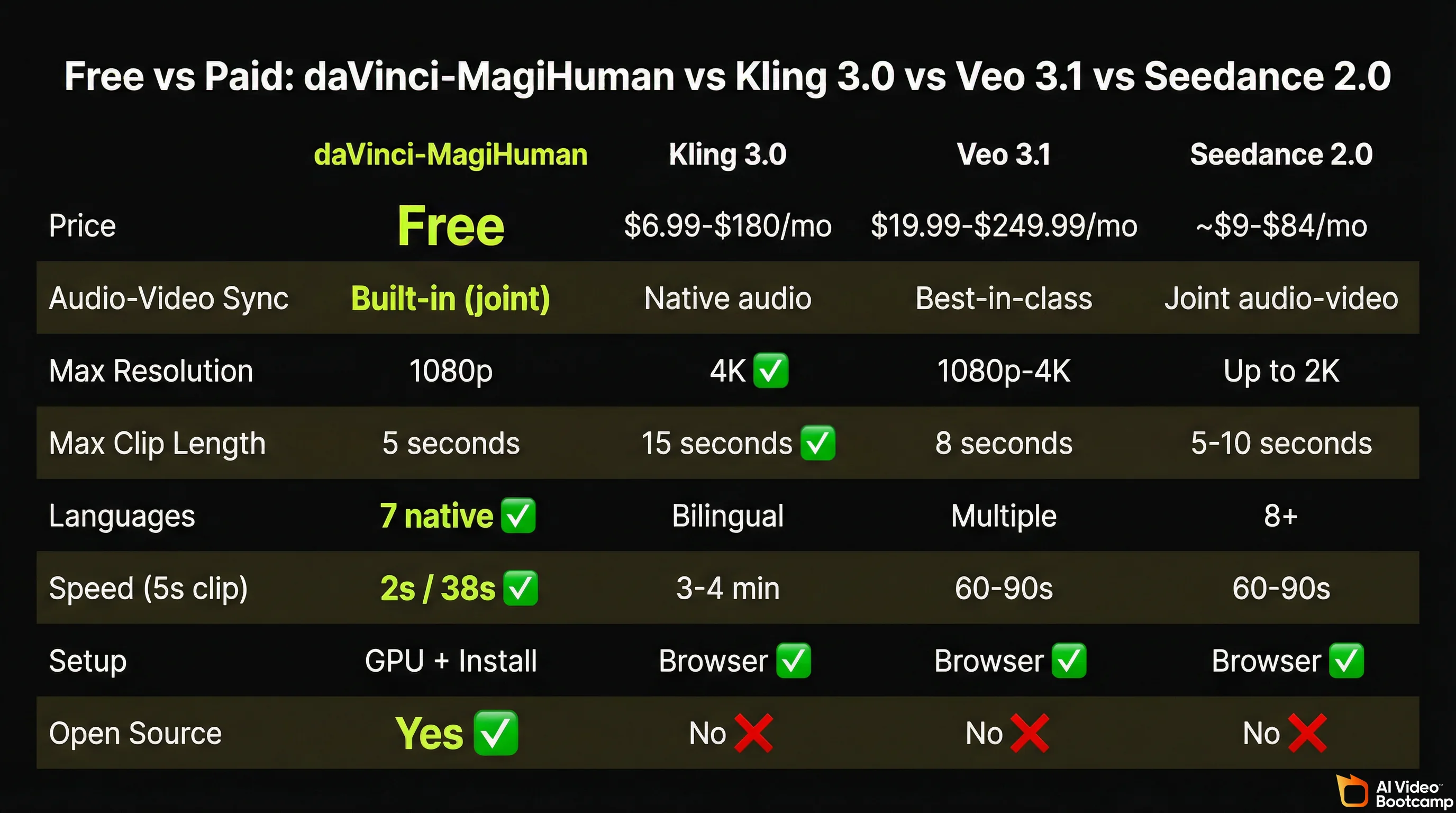
| Feature | daVinci-MagiHuman | Kling 3.0 | Veo 3.1 | Seedance 2.0 |
|---|---|---|---|---|
| Price | Free (Apache 2.0) | $6.99 to $180/month | $19.99 to $249.99/month | ~$9 to $84/month |
| Monthly cost for regular use | $0 | ~$30/month (Standard) | ~$20/month (AI Pro) | ~$18/month |
| Audio-video sync | Built-in (joint generation) | Native audio (can sound muffled) | Best-in-class lip sync | Joint audio-video |
| Max resolution | 1080p | 4K (3840x2160) | 1080p to 4K | Up to 2K |
| Max clip length | 5 seconds | 15 seconds (multi-shot) | 8 seconds | 5 to 10 seconds |
| Languages for speech | 7 native | Bilingual | Multiple | 8+ languages |
| Generation speed (5s clip) | 2s (256p) / 38s (1080p) | 3 to 4 minutes | 60 to 90 seconds | 60 to 90 seconds |
| Character consistency | Good (human-centric focus) | Excellent (identity lock) | Excellent (lip sync) | Good |
| Ease of setup | Technical (GPU + install) | Browser-based | Browser-based | Browser-based |
| Commercial use | Yes (Apache 2.0) | Yes (with plan) | Yes (with plan) | Yes (with plan) |
| Open source | Yes (full weights + code) | No | No | No |
| API costs | None | ~$0.10 to $0.18/sec | ~$0.20/sec | ~$0.14/sec |
| Model parameters | 15B | Proprietary | Proprietary | Proprietary |
Pricing data sourced from official documentation as of March 2026: Kling AI pricing, Google AI Pro, Seedance pricing.
Where daVinci-MagiHuman Wins
Cost. This is not a marginal difference. A creator using Veo 3.1’s AI Pro plan for a year spends $239.88. A Kling Standard user spends $359.88. A Seedance user spends approximately $216. daVinci-MagiHuman costs $0. For creators testing ideas, building a portfolio, or working on non-commercial projects, the savings are significant.
Audio-video joint generation at no cost. Tools with comparable built-in audio (Veo 3.1, Seedance 2.0) charge $20+/month. daVinci-MagiHuman matches this capability without a subscription.
Multilingual speech. Seven languages natively, with production-quality output in five of them. Creating content in Japanese, Korean, or German without paying for a separate voiceover tool or translation service is a real workflow advantage for international creators.
Speed at low resolution. 2 seconds for a 256p preview is dramatically faster than any cloud-based competitor. This makes rapid prompt iteration (testing 20 to 30 variations of a scene) practical in ways that 3 to 4 minute generation times do not allow.
Full transparency. The model weights, training methodology, architecture details, and evaluation data are all published. You know exactly what the model was trained on and how it works. No black box.
Where Paid Tools Still Win
Resolution ceiling. Kling 3.0 generates native 4K at 60fps. daVinci-MagiHuman maxes out at 1080p. For broadcast or large-screen content, this matters.
Clip length. 5 seconds is limiting for storytelling. Kling’s multi-shot system can generate 15-second sequences with connected scenes. Veo 3.1 produces 8-second clips. If you are producing narrative content, paid tools give you more to work with per generation.
Ease of use. Every paid tool listed above works in a browser. Type a prompt, click generate, download the result. daVinci-MagiHuman requires technical setup (covered in the installation section below). For creators who are not comfortable with command-line tools, paid options remain more accessible.
Polish and consistency. Kling 3.0 and Veo 3.1 have been refined through millions of user interactions and feedback loops. daVinci-MagiHuman is a research release. Edge cases, unusual prompts, and complex multi-character scenes will produce more variable results.
Character identity locking. Kling 3.0’s identity consistency across shots and Veo 3.1’s lip-sync precision (under 120ms accuracy based on AI Video Bootcamp testing) are still ahead of what daVinci-MagiHuman delivers for multi-scene character work.
daVinci-MagiHuman vs Other Free and Open-Source AI Video Models
daVinci-MagiHuman is not the only free option. Here is how it compares to other models you can use without paying.
| Feature | daVinci-MagiHuman | Wan 2.6 (Alibaba) | LTX 2.3 (Lightricks) | Stable Video (Stability AI) |
|---|---|---|---|---|
| Parameters | 15B | 14B | 22B | 1.5B |
| Audio generation | Built-in (7 languages) | Add-on (separate) | Add-on (separate) | None |
| Max resolution | 1080p | 1080p | 1080p | 576p |
| Speed (5s, 1080p) | 38.4 seconds | ~45 seconds | ~60 seconds | ~120 seconds |
| License | Apache 2.0 | Apache 2.0 | Restrictive | Research only |
| Human eval win rate | Baseline | Not tested head-to-head | Lost to MagiHuman (60.9%) | Not comparable |
| Best for | Talking heads with audio | General video, fast inference | High-detail scenes | Lightweight experiments |
The key differentiator: daVinci-MagiHuman is the only open-source model in 2026 that generates production-quality audio and video together. Every other free model requires you to generate video first, then add audio separately using tools like ElevenLabs or CapCut.
Best Use Cases for daVinci-MagiHuman in 2026
Based on the model’s strengths and limitations, these are the content types where daVinci-MagiHuman delivers the most value.
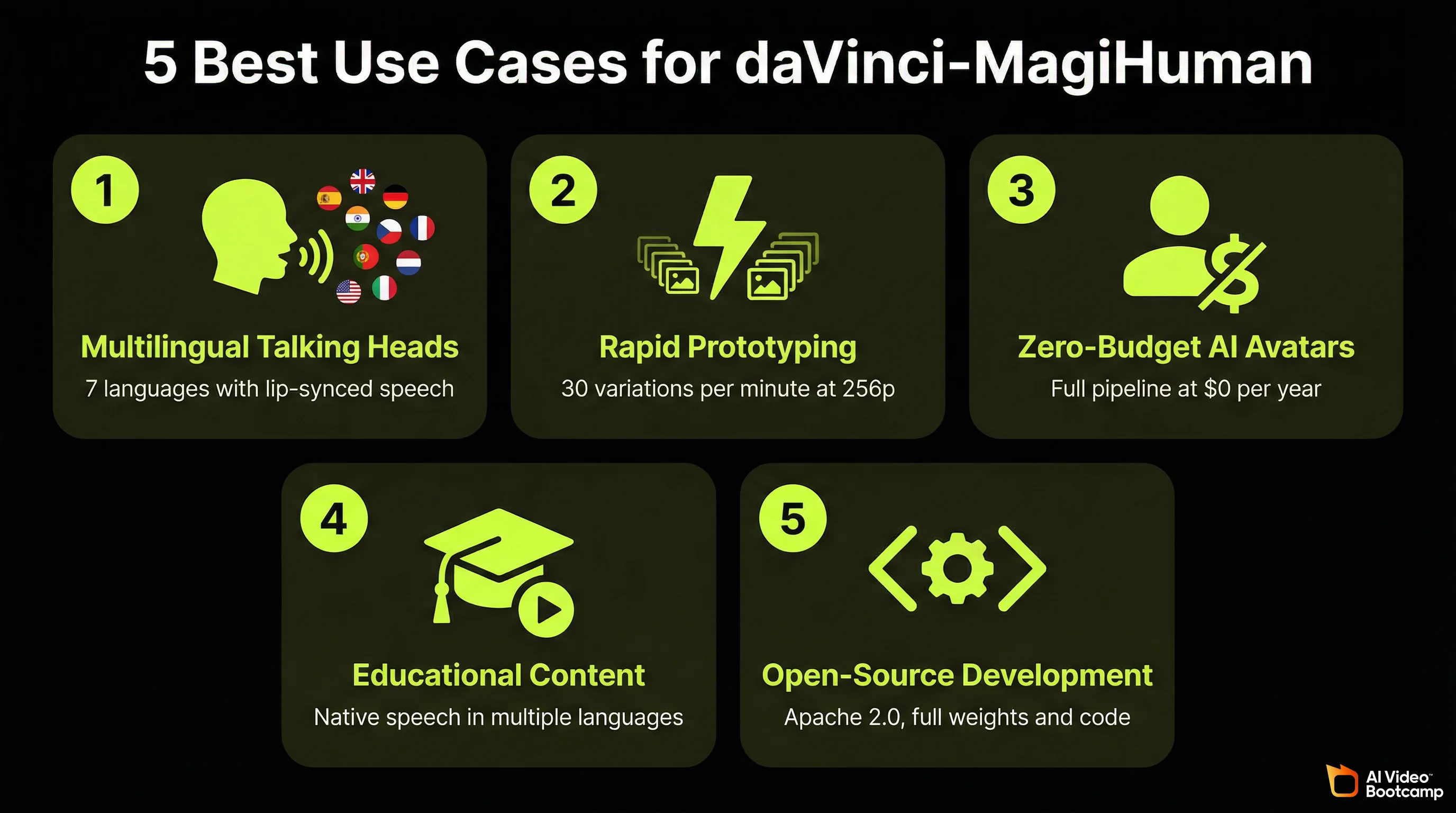
1. Multilingual Talking-Head Content
The model’s strongest output category. If you are creating YouTube Shorts, TikToks, or Instagram Reels featuring a character speaking to camera, daVinci-MagiHuman produces natural lip-sync, appropriate facial expressions, and coordinated body language in 7 languages. For creators targeting Japanese, Korean, or German-speaking audiences without budget for translation services, this is the most practical free tool available.
2. Rapid Prototyping and Prompt Testing
At 2 seconds per 256p generation, you can test 30 prompt variations in a minute. Paid tools with 3 to 4 minute generation times make this kind of rapid iteration impractical. Use daVinci-MagiHuman for testing prompts and scene ideas, then produce final versions at 1080p or switch to a paid tool for scenes that need higher resolution.
3. AI Avatar Channels on Zero Budget
For creators building AI avatar-based video channels who want to eliminate monthly tool costs entirely, daVinci-MagiHuman provides the full pipeline: character generation, speech, facial animation, and body motion. The 5-second clip limit means more editing work to assemble longer videos, but the cost savings over a year of Kling Standard ($359.88) or Veo AI Pro ($239.88) are substantial.
4. Educational and Training Content
The multilingual support combined with precise lip-sync makes daVinci-MagiHuman effective for educational content where a character explains concepts in multiple languages. Language learning channels, corporate training materials, and tutorial content all benefit from native-quality speech generation at no cost.
5. Open-Source Development and Research
The Apache 2.0 license means you can modify the model, fine-tune it on your own data, build products on top of it, and distribute derivatives commercially. For developers building AI video products or researchers extending the model’s capabilities, the full availability of weights, code, and training documentation provides a foundation that closed-source tools cannot offer.
The full open-source stack, from base model to super-resolution, is available now on GitHub and Hugging Face.
How to Prompt daVinci-MagiHuman for Best Results
The prompting approach for daVinci-MagiHuman follows similar principles to other AI video generators, but with specific considerations for its joint audio-video architecture.
Prompt Structure That Works
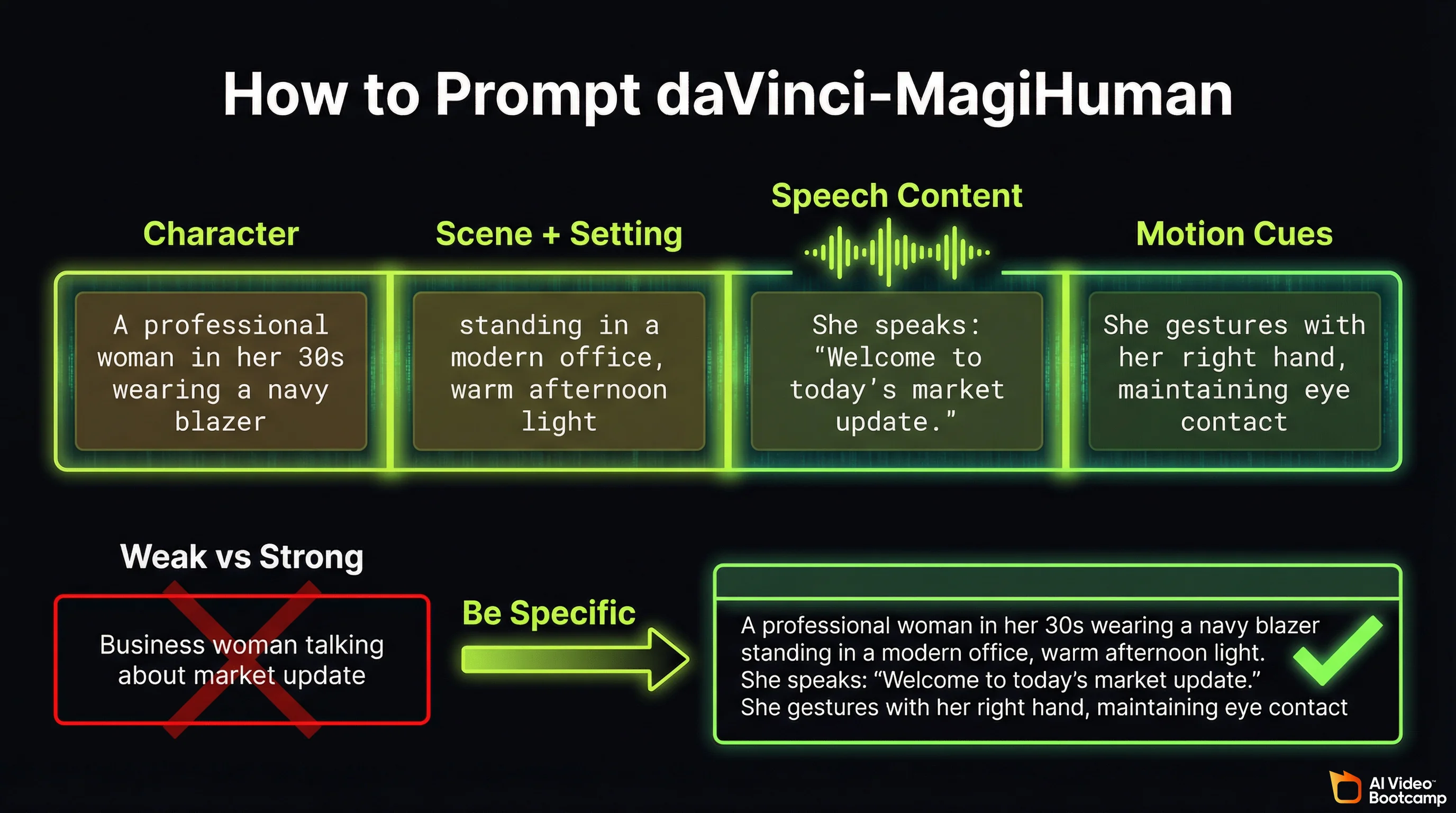
A strong daVinci-MagiHuman prompt includes four elements:
1. Character description. Physical appearance, clothing, age range, and expression. The model performs best with human-centric subjects.
2. Scene and setting. Environment, lighting, time of day, and camera angle. For camera angle terminology and examples, see our photorealistic AI prompts guide.
3. Speech content. What the character says. Be specific about the language and emotional tone. The model uses this to generate synchronised audio.
4. Motion cues. Body language, gestures, and movement direction. The model generates body motion alongside facial animation.
Example prompt (strong):
“A professional woman in her 30s wearing a navy blazer, standing in a modern office with floor-to-ceiling windows, warm afternoon light. She speaks directly to camera with confident energy: ‘Welcome to today’s market update. Three things you need to know.’ She gestures with her right hand on each point, maintaining eye contact.”
Example prompt (weak):
“Business woman talking about market update”
The strong prompt gives the model clear direction on appearance, environment, speech content, emotional tone, and physical movement. The weak prompt leaves all of these to the model’s defaults.
Language-Specific Prompting Tips
When generating content in non-English languages, specify the language explicitly in your prompt. The model defaults to English if no language is indicated.
For Japanese, Korean, German, or French content, write the speech portion of your prompt in the target language for best pronunciation accuracy. The model handles romanised input but produces more natural intonation from native script.
The Cost of Free: What You Need to Run daVinci-MagiHuman
Every capability described above is genuinely free to use. There are no credits, no subscriptions, no API fees, and no usage limits. The Apache 2.0 license allows unlimited commercial use. However, the model requires specific hardware to run.
Hardware Requirements
| Component | Minimum | Recommended |
|---|---|---|
| GPU | NVIDIA A100 (40GB VRAM) | NVIDIA H100 (80GB VRAM) |
| System RAM | 32GB | 64GB+ |
| Storage | ~50GB for model weights | SSD recommended |
| OS | Linux (Ubuntu 22.04+) | Linux with Docker |
| Python | 3.12+ | 3.12+ |
| PyTorch | 2.9+ | 2.9+ |
The benchmark speeds cited throughout this article (2 seconds for 256p, 38 seconds for 1080p) were measured on a single NVIDIA H100. Performance on an A100 will be approximately 40 to 50% slower based on the compute difference between the two GPUs.
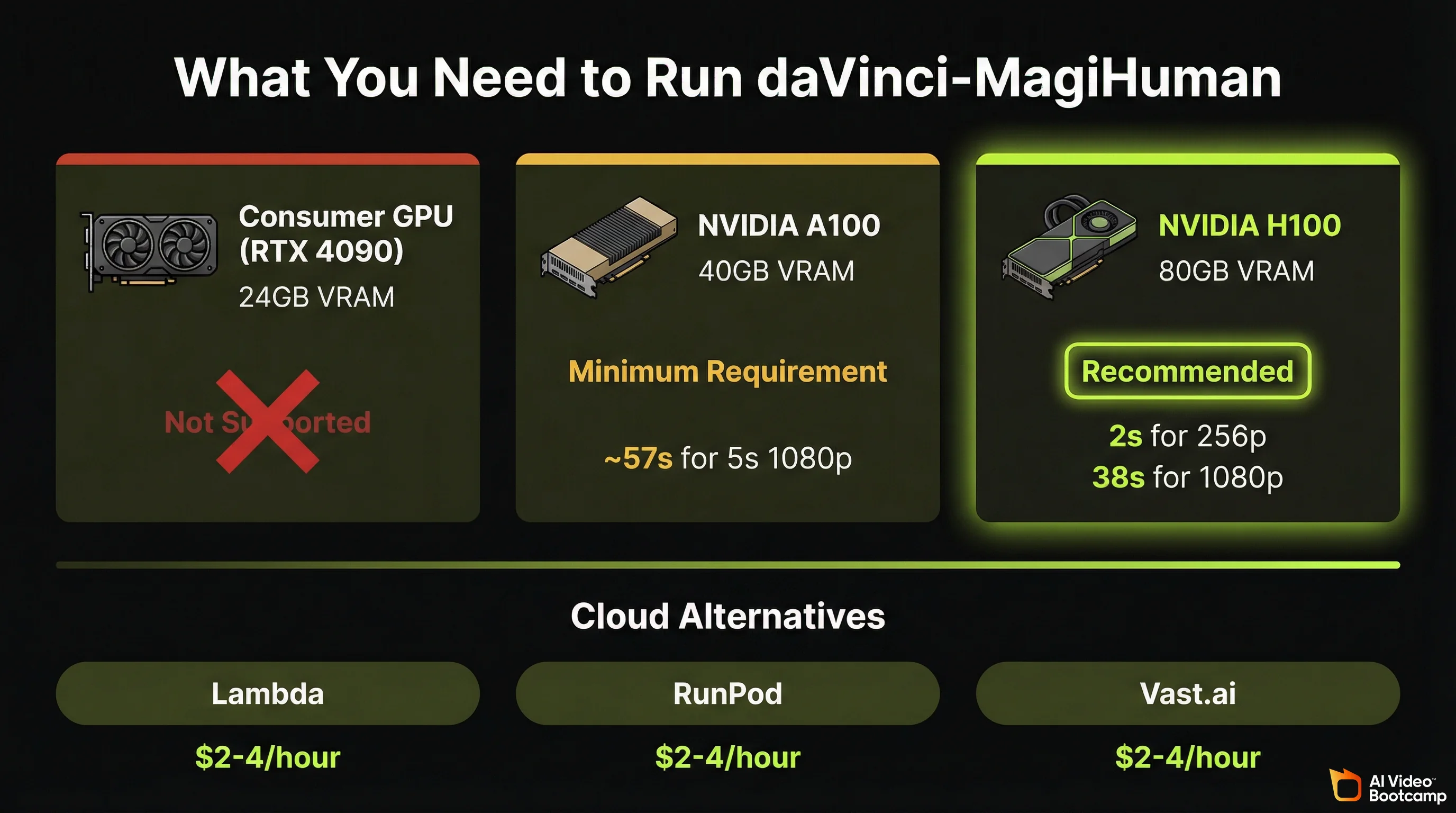
The honest assessment: An H100 costs approximately $25,000 to $30,000 to purchase, or $2 to $4 per hour to rent from cloud providers like Lambda, RunPod, or Vast.ai. At cloud rental rates, generating 100 clips at 1080p would cost roughly $1 to $2 in compute time, which is still dramatically cheaper than subscription-based tools for high-volume generation.
For creators who do not have access to high-end NVIDIA GPUs, the current options are: rent GPU time from a cloud provider (most cost-effective for occasional use), use the Hugging Face demo for testing (free but limited), or continue using paid browser-based tools like Kling or Veo until consumer GPU support improves.
Installation Overview
The recommended installation path uses Docker:
docker pull sandai/magi-human:latestThis image includes MagiCompiler (required for the full pipeline) pre-installed and supports generation up to 1080p. For manual installation via Conda, you need PyTorch 2.9.0, Flash Attention (Hopper architecture), MagiCompiler, and optionally MagiAttention v1.0.5 for 1080p super-resolution.
Full installation documentation is available on the official GitHub repository.
Efficiency Features That Reduce Compute Cost
The research team implemented several optimisations that make the model more practical to run:
- DMD-2 distillation reduces inference to 8 steps (most diffusion models require 25 to 50 steps), cutting generation time significantly
- Turbo VAE decoder reduces the overhead of converting latent representations to final video frames
- Full-graph PyTorch compilation provides approximately 1.2x speedup after the first run
- Latent-space super-resolution means you can generate at 256p and upscale to 1080p, saving compute on iterations that do not need full resolution
What daVinci-MagiHuman Means for AI Video in 2026
The release of daVinci-MagiHuman represents a shift in the open-source AI video landscape. Until now, open-source models like Wan 2.6 and Stable Video Diffusion could generate video but required separate tools for audio. The gap between free and paid tools was not just about quality; it was about capability. Free models could not do what paid models could.
That gap is narrowing. A free model now generates synchronised audio-video content that beats two commercial competitors in blind human evaluation. The Stanford Human-Centered AI Institute’s 2024 AI Index Report documented the accelerating pace at which open-source models close the gap with proprietary alternatives. daVinci-MagiHuman is the latest data point in that trend, and its impact will be felt most by creators who currently pay $20 to $250 per month for capabilities this model now offers at no cost. For broader context on how daVinci-MagiHuman and other tools fit into the 2026 AI video landscape and trends, see our comprehensive trends analysis.
The practical takeaway for content creators: if you have access to the required hardware (or are willing to rent GPU time), daVinci-MagiHuman eliminates the subscription cost of AI video generation without eliminating the quality. If you do not have the hardware, keep this model on your radar. Consumer GPU support, cloud-hosted versions, and community-optimised variants are likely within months, not years.
For the full landscape of free AI video tools including browser-based options that require no hardware, see our complete free AI video tools guide. For a comparison of the paid tools mentioned in this article, see our Seedance vs Kling vs Veo head-to-head breakdown and the definitive AI video generators ranking.
Frequently Asked Questions
Is daVinci-MagiHuman really free to use?
Yes. daVinci-MagiHuman is released under the Apache 2.0 open-source license by GAIR-NLP and Sand.ai. There are no subscription fees, no credits, no API costs, and no usage limits. The model weights, inference code, and training documentation are all freely available on GitHub and Hugging Face. Commercial use is explicitly permitted. The only cost is the GPU hardware required to run the model (NVIDIA A100 minimum, H100 recommended), or approximately $2 to $4 per hour if you rent cloud GPU time.
How does daVinci-MagiHuman compare to Kling 3.0 and Veo 3.1?
daVinci-MagiHuman wins on cost (free vs $6.99 to $249.99/month), built-in audio-video sync at no cost, multilingual speech (7 languages native), and generation speed at low resolution (2 seconds for 256p). Kling 3.0 wins on maximum resolution (native 4K), clip length (15 seconds multi-shot), ease of use (browser-based), and character identity consistency. Veo 3.1 wins on lip-sync precision and cinematic quality. The best tool depends on your priorities: budget, resolution needs, and technical comfort level.
What GPU do I need to run daVinci-MagiHuman?
The minimum GPU is an NVIDIA A100 with 40GB VRAM. The recommended GPU is an NVIDIA H100 with 80GB VRAM, which delivers the benchmark speeds cited in this guide (2 seconds for 256p, 38 seconds for 1080p). Consumer GPUs like the RTX 4090 are not officially supported due to VRAM limitations. If you do not have access to this hardware, cloud GPU rental from providers like Lambda, RunPod, or Vast.ai costs approximately $2 to $4 per hour for H100 access.
What languages does daVinci-MagiHuman support for speech generation?
Seven languages: English, Mandarin Chinese, Cantonese Chinese, Japanese, Korean, German, and French. English and the three Asian languages produce the highest quality output. German and French are rated as good quality with occasional accent artefacts. The Word Error Rate for generated speech is 14.60%, the lowest among open-source audio-video models in 2026.
Can I use daVinci-MagiHuman for commercial content?
Yes. The Apache 2.0 license explicitly permits commercial use, modification, and distribution. You can use daVinci-MagiHuman to create content for YouTube, TikTok, client work, products, or any other commercial purpose without paying licensing fees. The U.S. Copyright Office’s ongoing review of AI-generated content applies to all AI video tools equally, not specifically to open-source models.
Sources and Citations
- GAIR-NLP and Sand.ai, “Speed by Simplicity: A Single-Stream Architecture for Fast Audio-Video Generative Foundation Model”: arXiv:2603.21986
- daVinci-MagiHuman official repository: github.com/GAIR-NLP/daVinci-MagiHuman
- daVinci-MagiHuman model weights and demo: huggingface.co/GAIR/daVinci-MagiHuman
- Kling AI official pricing: klingai.com/global/dev/pricing
- Google AI Pro and Veo 3.1 pricing: one.google.com
- Seedance (ByteDance) official platform: seed.bytedance.com/en/seedance
- Stanford University Human-Centered AI Institute, AI Index Report: hai.stanford.edu
- U.S. Copyright Office, “Copyright and Artificial Intelligence” report series: copyright.gov/ai
- Apache Software Foundation, Apache License 2.0: apache.org/licenses/LICENSE-2.0
- AI Video Bootcamp community testing data, 16,500+ members, Q1 2026: aivideobootcamp.com
- TeamDay.ai, “15 AI Video Models Tested: Kling 3.0 vs Veo 3.1”: teamday.ai
Published by AI Video Bootcamp, the community of 16,500+ creators learning to build AI video content. Join the community.