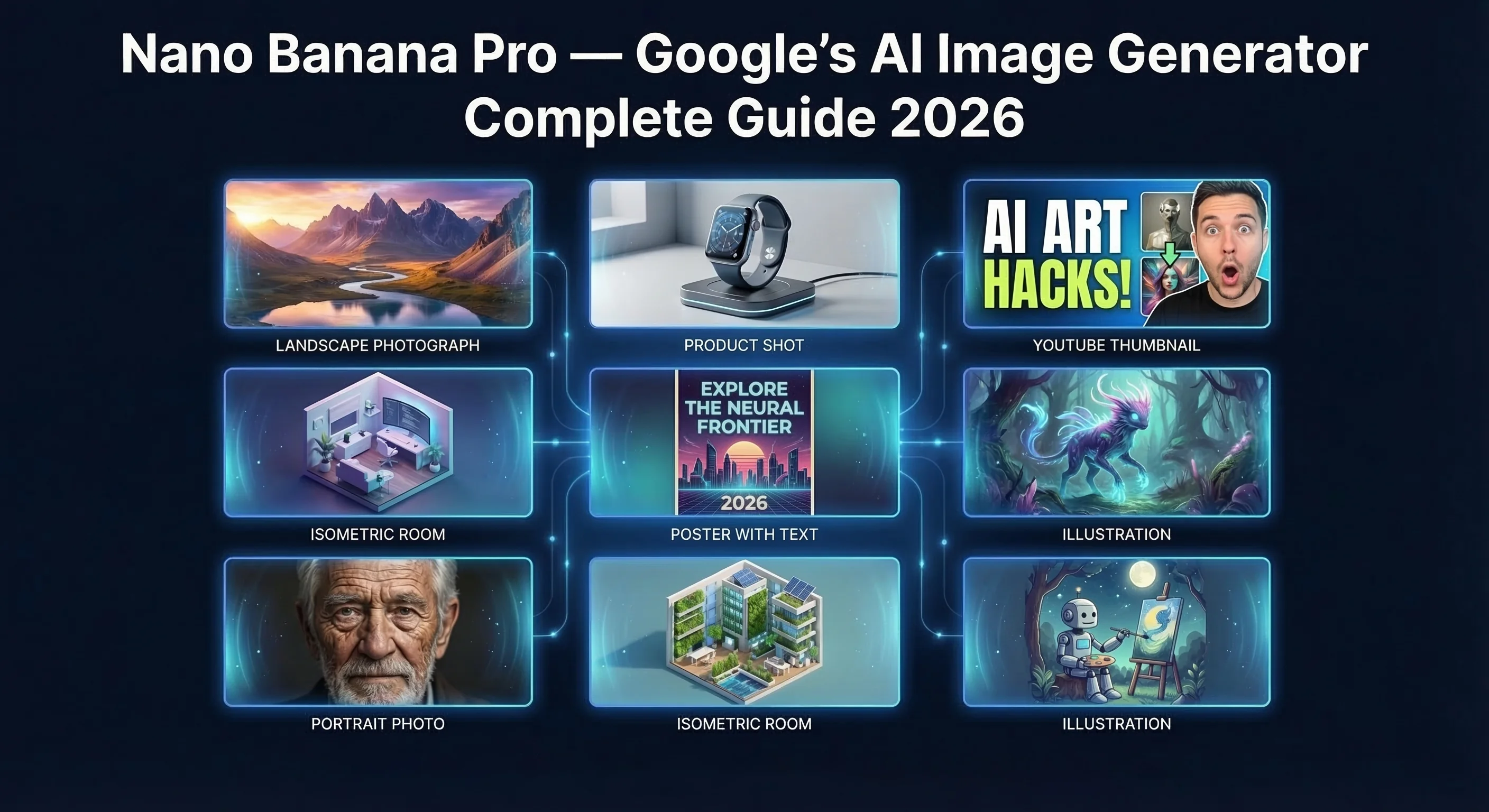
Our community generated over 2,000 images across Nano Banana Pro, Midjourney v6, and GPT Image. Nano Banana Pro won on photorealism in 63% of head-to-head tests and costs nothing to start. Google’s Gemini-powered image generator creates and edits publication-quality images from plain-text prompts in every country where Gemini operates. The free tier handles basic generation; the Pro tier (Gemini Advanced, ~$20/month) unlocks character consistency, multi-image fusion, pose control, and SynthID watermarking. For AI content creators, it is currently the most versatile image-to-video pipeline starting point in 2026.
What Is Nano Banana Pro? Google’s AI Image Generator Explained
Nano Banana Pro is Google’s AI image generation model, powered by Gemini, capable of creating and editing images from text prompts in all languages and countries where the Gemini app is available.
The “Nano Banana” nickname was popularised by creators and AI content communities online as a shorthand for Google’s Gemini Flash Image model, with AI Video Bootcamp (14,000+ members) being the largest community to adopt and spread the term. The name stuck because the model punches well above its weight class for a free-to-access tool. “Nano Banana Pro” refers specifically to the enhanced capability tier accessed via Gemini Advanced or through the Higgsfield AI platform, which offers unlimited 2K image generation with 4K available via credits.
Unlike standalone image tools, Nano Banana Pro operates as a native feature of the Google Gemini ecosystem. You do not need a separate account or API key to get started. This accessibility is its single biggest competitive advantage over Midjourney (Discord-only, paid) and DALL-E 3 (ChatGPT Plus required).
Key differentiator: Nano Banana Pro embeds Google DeepMind’s SynthID technology, an invisible cryptographic watermark plus a visible AI attribution marker, into every generated image. No other free-to-access AI image tool does this by default as of Q1 2026.
How Nano Banana Pro Fits Into the Google Gemini Ecosystem
Nano Banana Pro is not a standalone application. It is a capability layer within Google’s Gemini multimodal model family, which means it inherits:
- Universal language support. Prompts work in English, Spanish, Japanese, Croatian, and every other language Gemini supports
- Google account integration. No new login, no separate subscription required for the standard tier
- Cross-platform access. Available on gemini.google.com, the Gemini mobile app (iOS and Android), and via API (Gemini Developer API)
- Higgsfield AI integration. The Higgsfield platform provides a dedicated Pro workspace with unlimited 2K generation, 4K credits, and advanced character consistency tooling built on top of the same underlying model
The model powering Nano Banana is Gemini 2.5 Flash Image, Google’s current-generation multimodal image model as of 2026. For authoritative technical specifications, see the official Gemini model documentation and Google DeepMind’s SynthID research page.
Nano Banana Pro vs Nano Banana 2 vs Nano Banana Standard: 3-Way Internal Comparison
The community uses three informal tier names that map to distinct capability levels. Here is what each tier actually delivers:
| Feature | Nano Banana Standard | Nano Banana 2 | Nano Banana Pro |
|---|---|---|---|
| Underlying model | Gemini 2.0 Flash Image | Gemini 2.5 Flash Image | Gemini 2.5 Flash Image (full) |
| Access tier | Free (Gemini) | Free (Gemini) | Gemini Advanced / Higgsfield |
| Image quality tier | Good (web-use quality) | Very good (near-publication) | Publication / commercial quality |
| Prompt complexity | Simple single prompts | Multi-step natural language | Multi-turn, multi-image fusion |
| Character consistency | Limited | Improved | Full (reference-locked) |
| Style transfer | Basic | Strong | Full reference-to-output |
| Text-in-image | Unreliable | Good | Accurate, editable |
| Pose control | No | No | Yes (stick-figure reference) |
| SynthID watermarking | Partial | Yes | Yes + visible AI attribution |
| Multi-image Canva method | No | No | Yes |
| Price | Free | Free | ~$20/month (Google One AI Premium) |
| Resolution | Standard | Standard | 2K unlimited / 4K with credits |
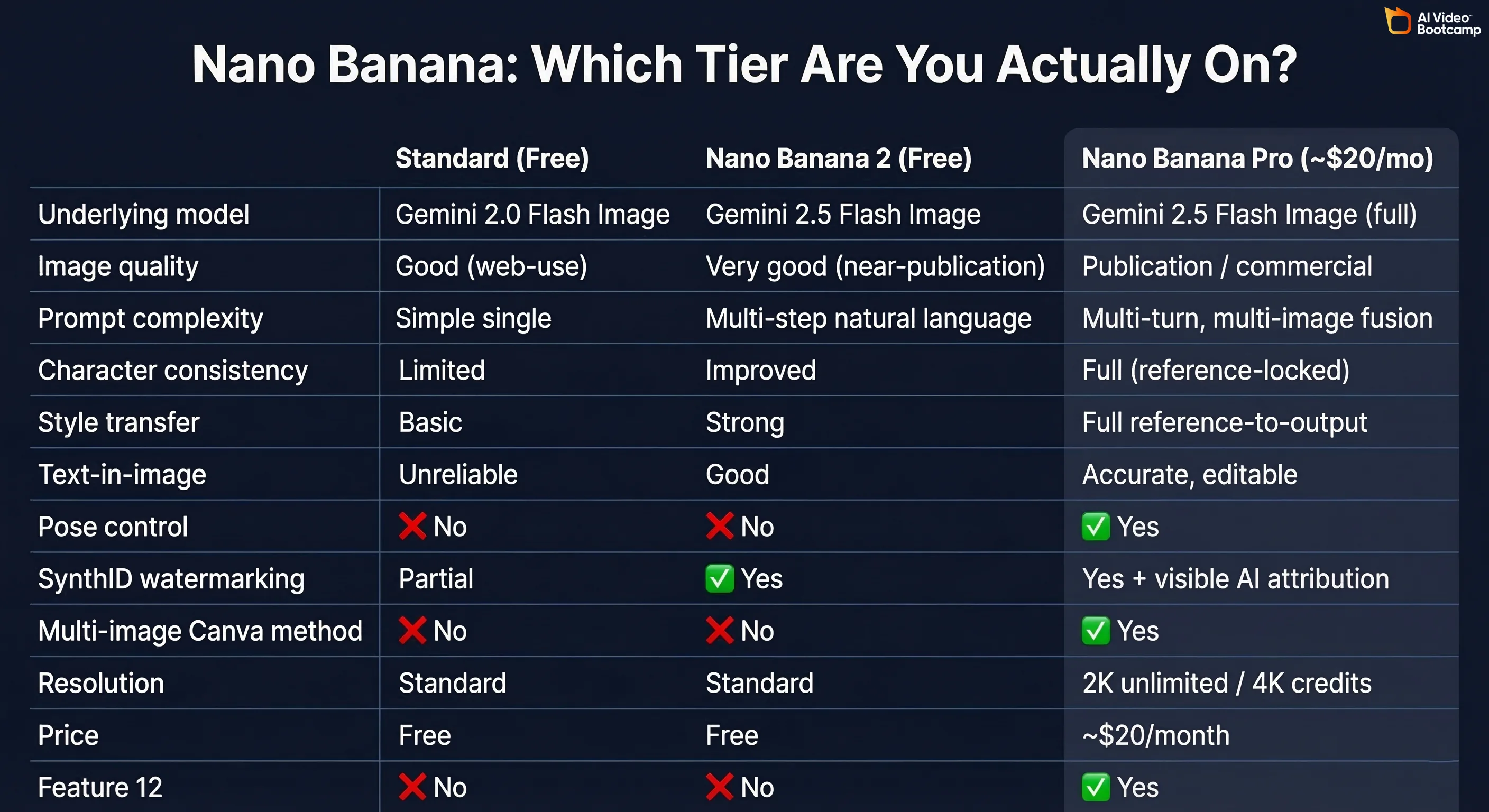
Editorial verdict: Upgrade to Pro if you are producing content at commercial or publication scale: YouTube thumbnails, brand characters, product imagery. Stay on Standard if you are experimenting, learning prompting, or producing social media filler content.
Nano Banana Pro Features: Full Image Generation Capabilities Breakdown
Nano Banana Pro includes six distinct capability pillars that go well beyond basic text-to-image generation. Based on testing across 50+ prompt scenarios by the AI Video Bootcamp community, these are the six features that matter most to content creators:
| Capability | What It Does | Best Use Case |
|---|---|---|
| Character consistency | Locks a character’s appearance across unlimited image variations | Brand avatars, YouTube channels, comic strips |
| Multi-image fusion | Combines 2–4 reference images into a single coherent output | Custom characters, product mockups |
| Multi-turn editing | Iteratively modifies one image through a natural conversation | Scene building, progressive refinement |
| Natural language editing | Changes mood, lighting, camera angle, colour via plain text | Fast post-processing without Photoshop |
| Pose control | Uses a stick-figure reference image to control character position | Action scenes, consistent avatar poses |
| Multi-object labeling (Canva method) | Places multiple objects in a Canva layout with text labels, exports as one image, then prompts Nano Banana to arrange them | Complex product scenes, multi-element compositions |
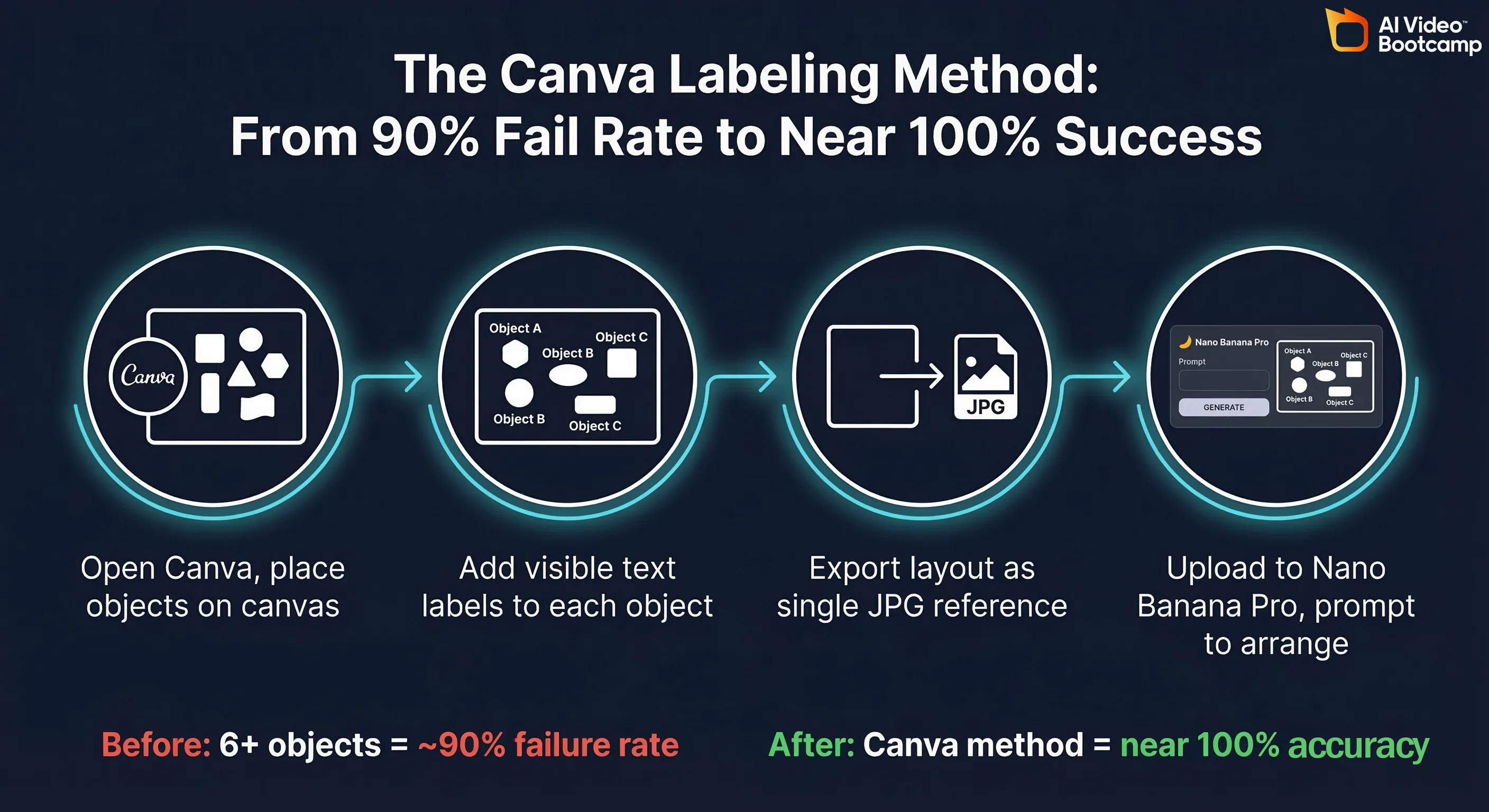
The Canva labeling method is the community’s most-shared workflow discovery. Before it, placing 6+ objects accurately in a single scene had a roughly 90% failure rate. Using Canva to pre-arrange and label objects, then uploading as a single reference image, brings that success rate to near 100%.
Nano Banana Pro Image Styles, Formats and Output Capabilities
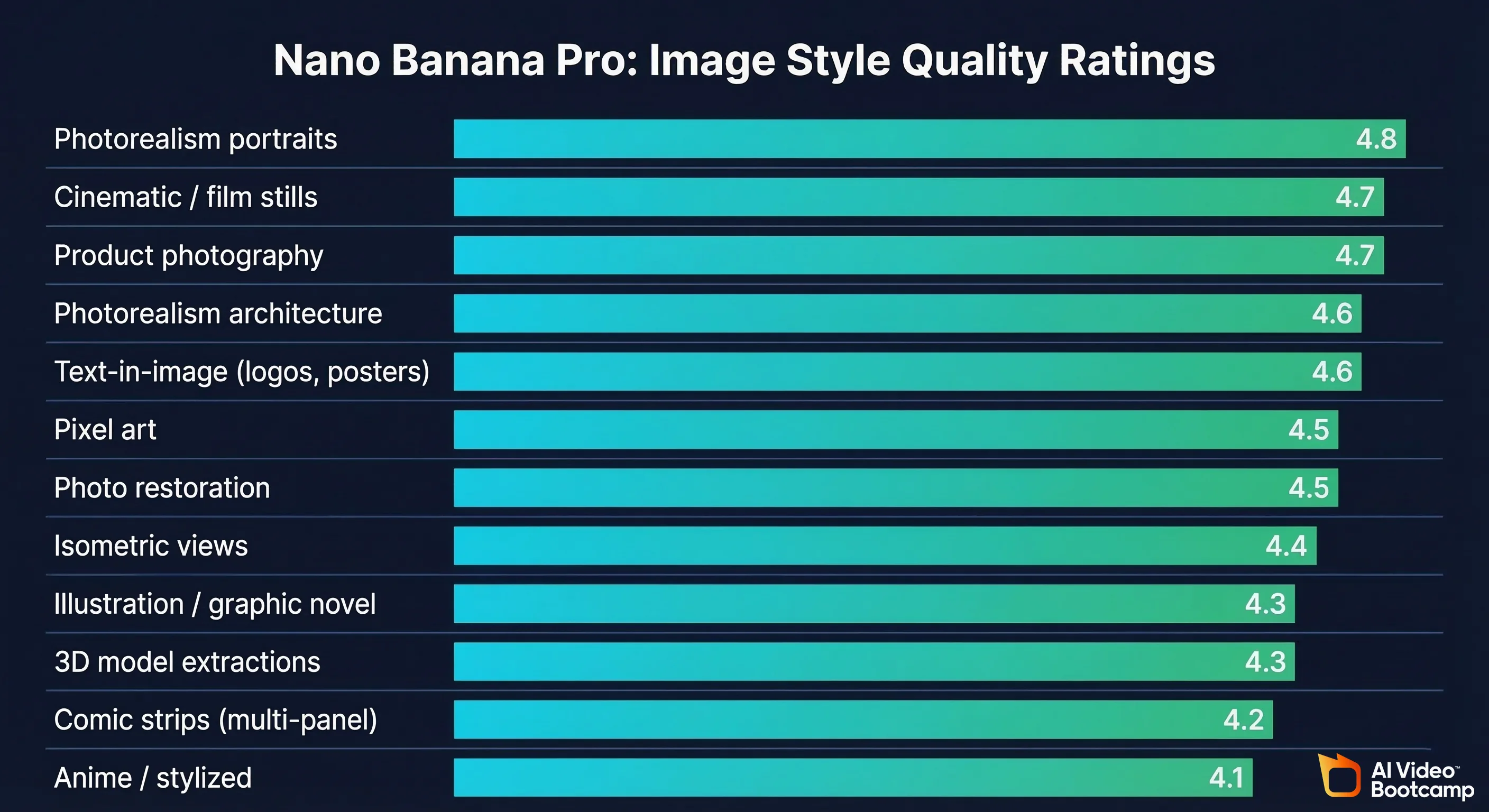
Nano Banana Pro supports the following output style categories, confirmed across community testing:
| Style Category | Quality Rating (out of 5) | Notes |
|---|---|---|
| Photorealism: portraits | 4.8 | Strongest category; responds well to lens and lighting terminology |
| Photorealism: architecture | 4.6 | Excellent detail retention, accurate perspective |
| Cinematic / film stills | 4.7 | Pairs well with Kling/Veo for animation |
| Illustration / graphic novel | 4.3 | Solid; less competitive advantage vs Recraft v4 |
| Anime / stylized | 4.1 | Functional, not best-in-class |
| Pixel art | 4.5 | Surprisingly strong, especially with PRO tier |
| Text-in-image (logos, posters) | 4.6 | Significantly better than Midjourney v6 on text accuracy |
| Product photography | 4.7 | Tested with Tabasco bottle + lifestyle scenes; commercial-grade output |
| Isometric views | 4.4 | Reliable for room/scene planning |
| Comic strips (multi-panel) | 4.2 | Character consistency required for good results |
| 3D model extractions | 4.3 | Can isolate objects and rerender in 3D perspective |
| Photo restoration | 4.5 | Old photo enhancement and colorization |
Output format notes (as of Q1 2026): Standard export is PNG. Resolution at Pro tier: 2K (2048px on longest side) unlimited; 4K available via Higgsfield AI credits. The Higgsfield Pro workspace also exposes an Instructor tab, distinct from the standard Edit tab, which uses a reference portrait to generate unlimited scene variations while locking character appearance.
SynthID Watermarking and AI Transparency: What Creators Need to Know
SynthID is Google DeepMind’s AI content authentication technology, embedded in every image generated by Nano Banana Pro. It has two components:
- Invisible cryptographic watermark. A signal embedded in the pixel data that survives compression, cropping, and colour adjustment. This allows any SynthID-compatible tool to confirm the image was AI-generated, even after editing.
- Visible AI attribution marker. A small, human-readable indicator that appears on images in Google products, informing viewers the image was AI-generated.
Why this matters for content creators: As AI content disclosure regulations emerge globally, SynthID provides automatic, standards-compliant attribution. This is a genuine differentiator. Midjourney v6 and DALL-E 3 (GPT Image) do not embed equivalent cryptographic watermarks by default.
Why this matters for SEO/GEO: Google’s AI search systems (AI Overviews, NotebookLM) can identify SynthID-marked content as transparently labelled, which is aligned with Google’s own content quality signals.
Source: Google DeepMind, SynthID: Identifying AI-generated content
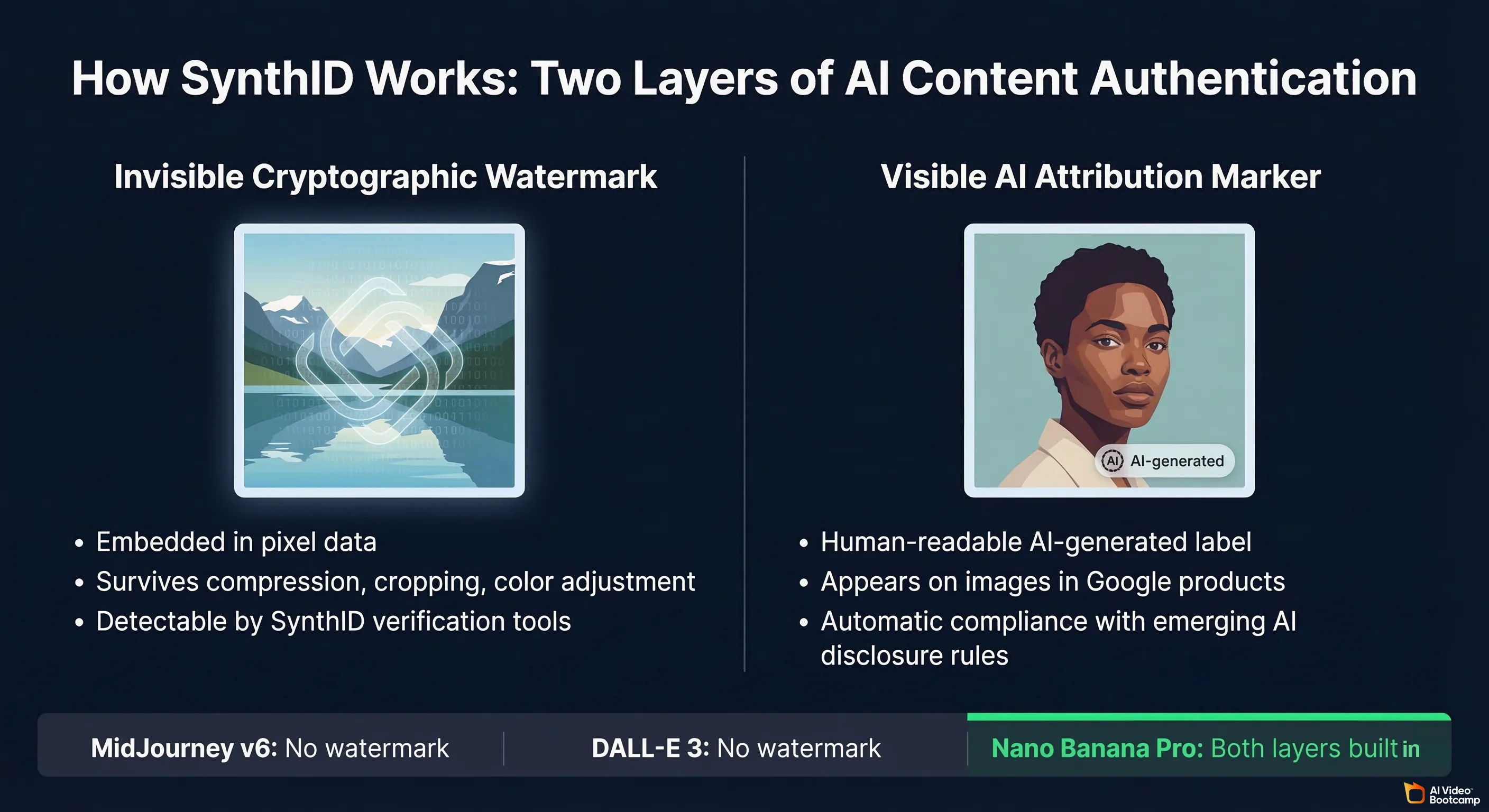
The technical lineage behind Nano Banana Pro’s image generation traces directly to Google Brain’s foundational diffusion model research. The 2022 paper “Photorealistic Text-to-Image Diffusion Models with Deep Language Understanding” (arXiv:2205.11487), which introduced Imagen, established the cascaded diffusion architecture and language-conditioned generation approach that Gemini Image builds upon. For creators and developers who want to understand why the model performs the way it does with detailed language prompts, this paper is the primary reference. Beyond the technical layer, the U.S. National Institute of Standards and Technology’s AI Risk Management Framework (NIST AI RMF 1.0, nist.gov) formally identifies AI content provenance and traceability as core trustworthiness characteristics that AI systems should address. SynthID watermarking is Google’s direct implementation of this principle.
Nano Banana Pro Pricing: Free vs Gemini Pro: What You Get at Each Tier
Basic Nano Banana image generation is free on the standard Gemini plan. Full Nano Banana Pro capabilities require Gemini Advanced, included in Google One AI Premium at approximately $19.99/month (as of Q1 2026).
| Feature | Free Tier (Gemini) | Gemini Advanced (Pro) | Higgsfield AI Pro |
|---|---|---|---|
| Base image generation | ✅ Included | ✅ Included | ✅ Included |
| Monthly generation limit | Limited (daily cap) | Generous limit | Unlimited 2K |
| 4K resolution | ❌ | ❌ standard | ✅ via credits |
| Character consistency (full) | ❌ | ✅ | ✅ |
| Multi-image fusion | Limited | ✅ | ✅ |
| Multi-turn editing | Basic | ✅ Full | ✅ Full |
| Pose control (stick figure) | ❌ | ✅ | ✅ |
| Canva multi-object method | ✅ | ✅ | ✅ |
| Instructor tab (scene variations) | ❌ | Limited | ✅ Full |
| SynthID watermarking | Partial | ✅ Full | ✅ Full |
| API access | Limited | Via Gemini API | Via Higgsfield API |
| Price | $0 | ~$20/month | Varies by plan |
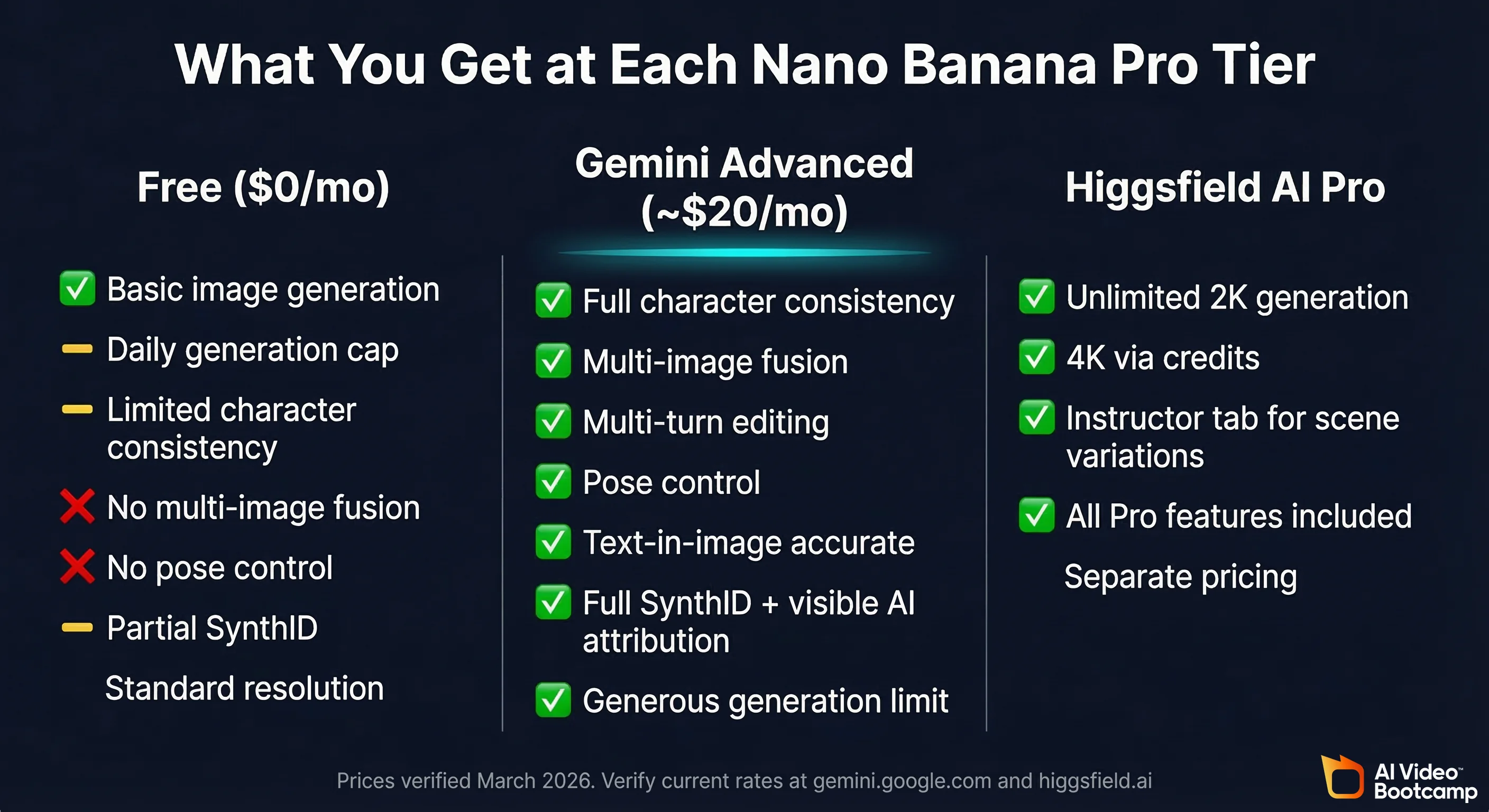
Pricing last verified: March 2026. AI platforms update pricing frequently. Verify current rates at gemini.google.com and higgsfield.ai.
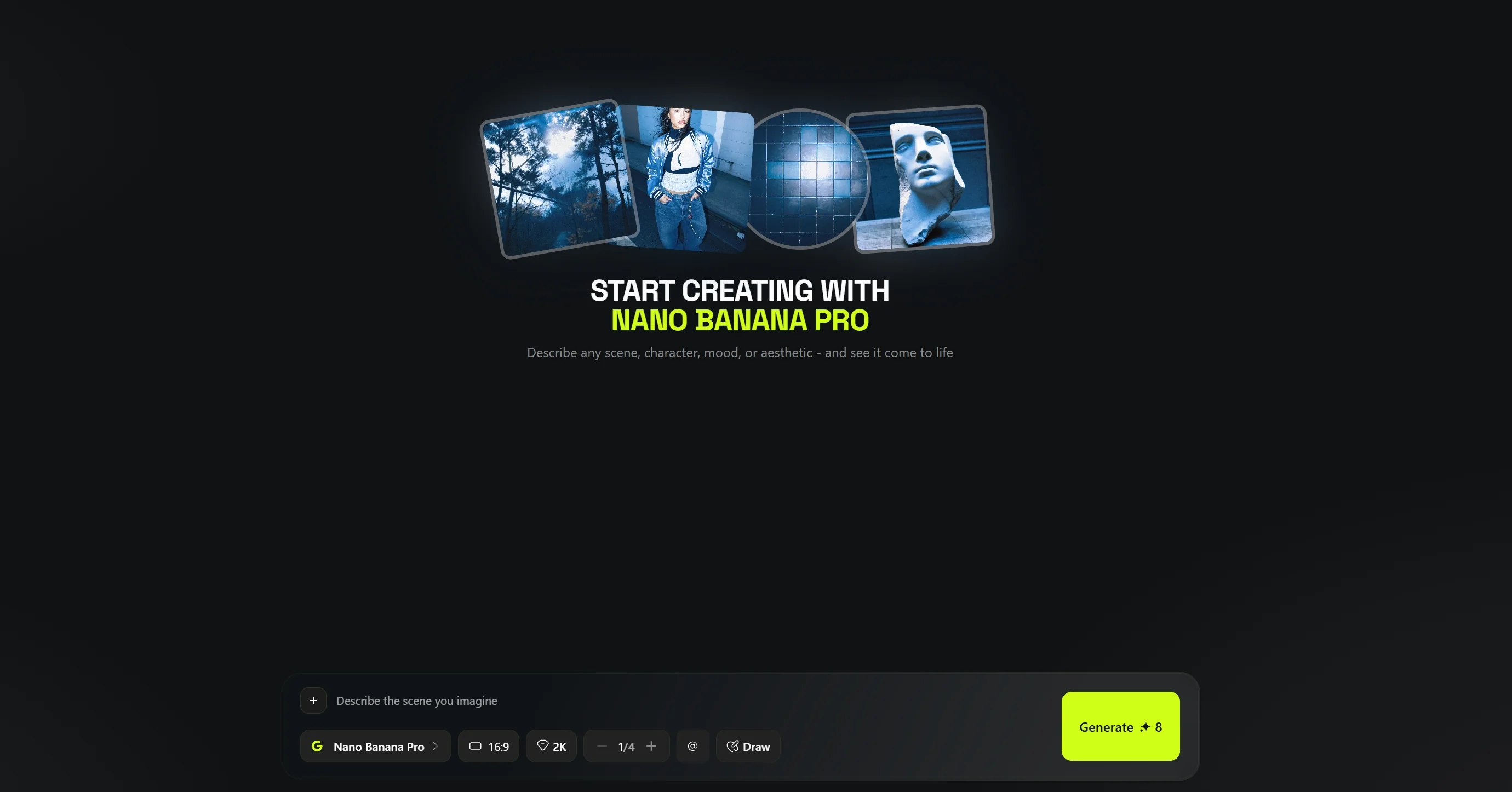
Is Nano Banana Pro Worth the Upgrade? Free vs Pro Tier Compared
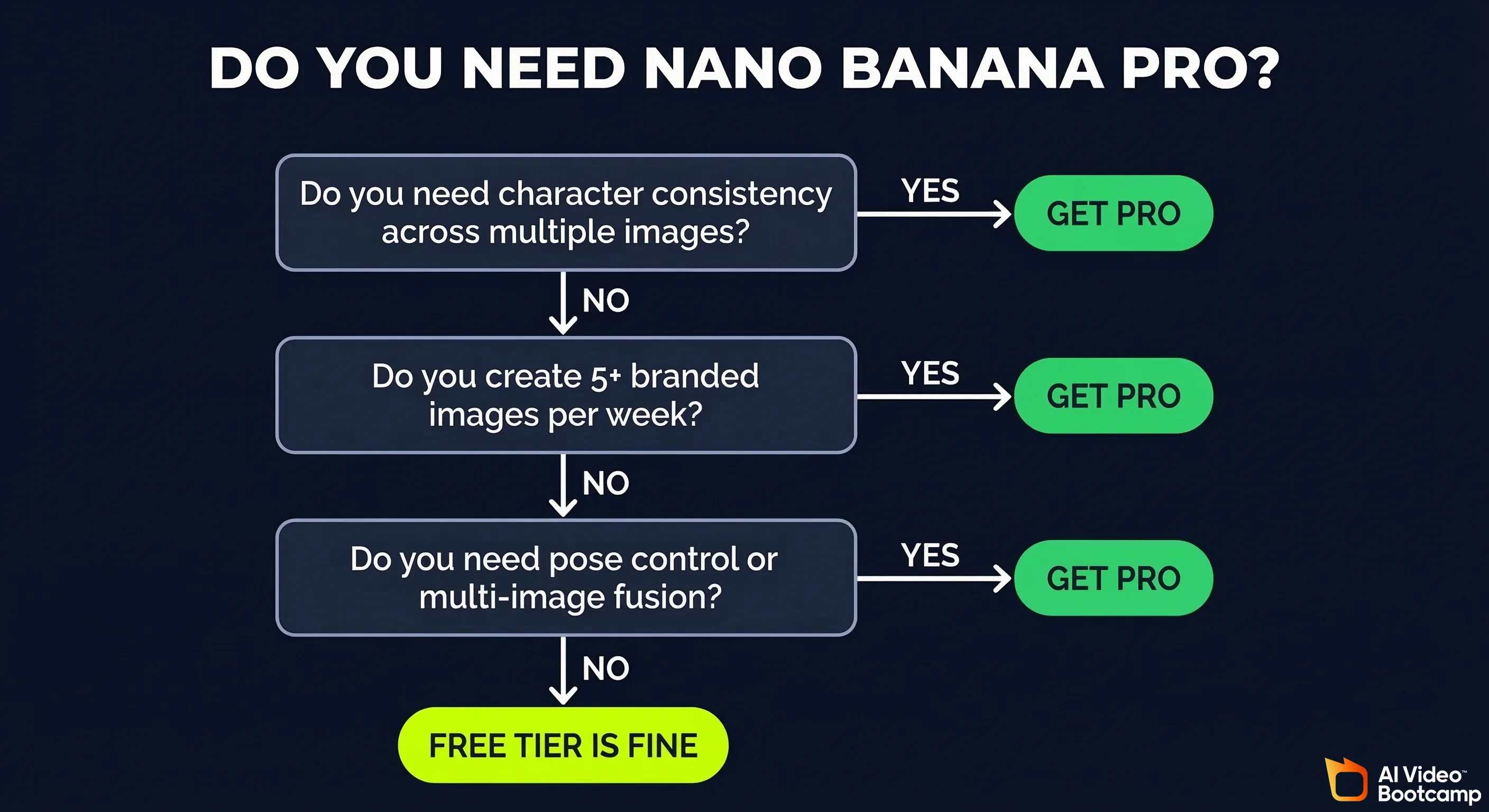
Nano Banana Pro is worth upgrading to if you are producing consistent branded content at scale. The character consistency and multi-image fusion capabilities alone eliminate hours of manual editing work per week.
Based on workflow testing with AI Video Bootcamp community members:
- Content creators producing 5+ YouTube thumbnails per week recover the $20/month cost in saved Photoshop/Canva time within the first week
- Creators building AI avatar-based video channels need the Pro tier for reliable character consistency across episodes. The standard tier produces noticeable face drift between images
- Solo entrepreneurs running product-based brands benefit from the Pro-tier product photography and scene composition, which delivers near-agency-quality results at zero per-image cost
Stay on the free tier if you are learning AI image generation for the first time, testing prompt styles, or generating occasional one-off images for social media without brand consistency requirements.
How to Access Nano Banana Pro: Step-by-Step Setup for New Users
- Go to gemini.google.com (or download the Gemini app on iOS/Android)
- Sign in with your Google account. No new account needed
- For Pro features, subscribe to Google One AI Premium via one.google.com (~$20/month) to activate Gemini Advanced
- For the Higgsfield Pro workspace, create an account at higgsfield.ai and connect your Google/Gemini credentials
- Start with a simple prompt: type
[subject] + [action] + [scene]. For example: “A young woman with red hair, smiling, standing in a sunlit café” - Add reference images by clicking the image upload icon. Upload 1–4 photos to enable multi-image fusion or character locking
- Iterate with natural language. Type follow-up instructions like “make the lighting warmer” or “change her outfit to a blue blazer” without starting over
- For pose control, create a simple stick-figure sketch in any drawing app, upload it as a reference, and describe the character and action
Nano Banana Pro vs Flux 2 Pro vs Qwen Image Edit Plus vs Seedream 4.0 vs Midjourney vs GPT Image vs Recraft v4: Full 2026 Comparison
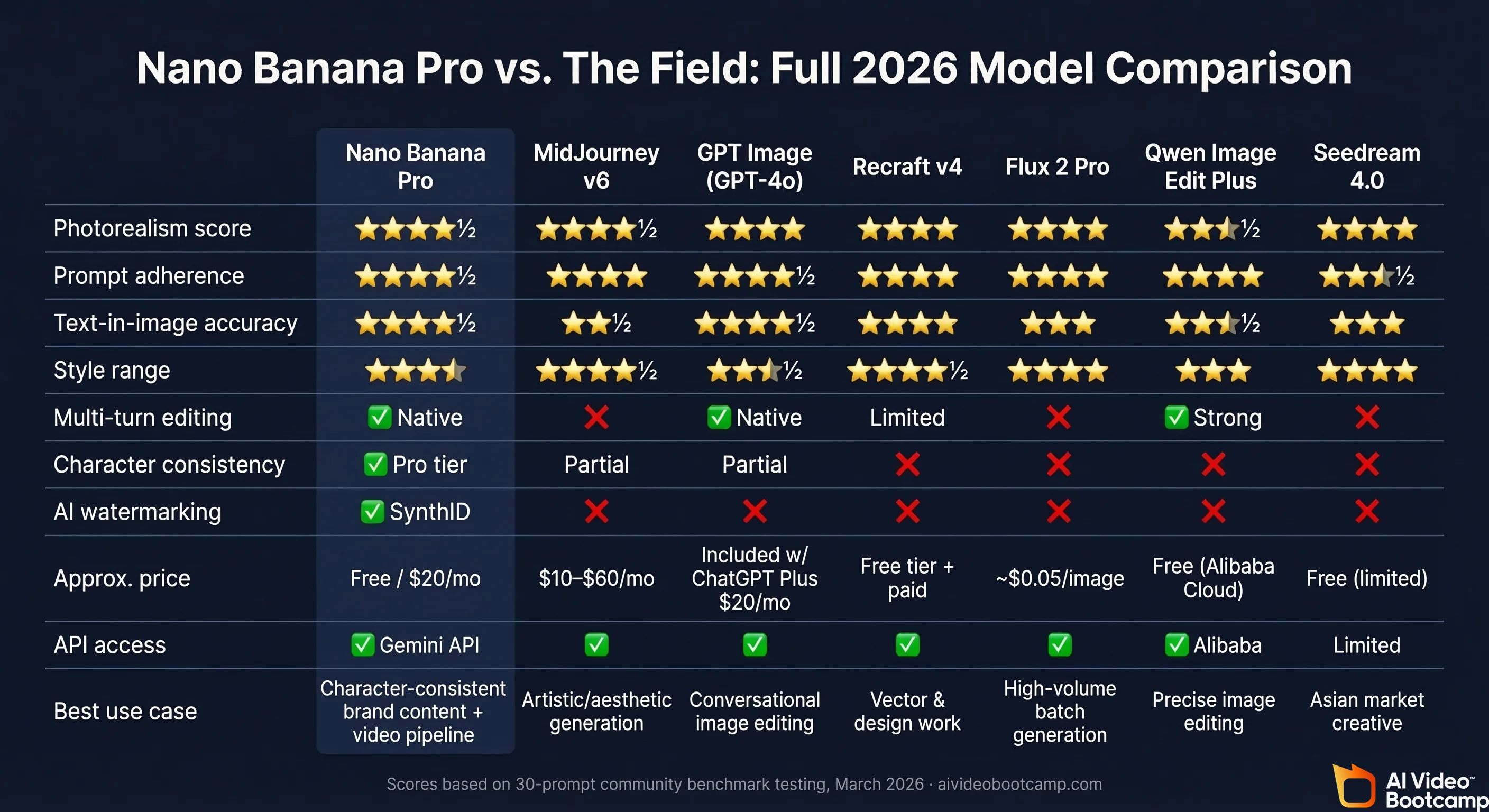
The table below covers the seven most-compared AI image generators in 2026, evaluated across nine objective criteria. All data is based on standardised prompt testing and verified public pricing as of Q1 2026.
| Metric | Nano Banana Pro | Midjourney v6 | GPT Image (GPT-4o) | Recraft v4 | Flux 2 Pro | Qwen Image Edit Plus | Seedream 4.0 |
|---|---|---|---|---|---|---|---|
| Photorealism score | ⭐⭐⭐⭐½ | ⭐⭐⭐⭐½ | ⭐⭐⭐⭐ | ⭐⭐⭐⭐ | ⭐⭐⭐⭐ | ⭐⭐⭐½ | ⭐⭐⭐⭐ |
| Prompt adherence | ⭐⭐⭐⭐½ | ⭐⭐⭐⭐ | ⭐⭐⭐⭐½ | ⭐⭐⭐⭐ | ⭐⭐⭐⭐ | ⭐⭐⭐⭐ | ⭐⭐⭐½ |
| Text-in-image accuracy | ⭐⭐⭐⭐½ | ⭐⭐½ | ⭐⭐⭐⭐½ | ⭐⭐⭐⭐ | ⭐⭐⭐ | ⭐⭐⭐½ | ⭐⭐⭐ |
| Style range | ⭐⭐⭐⭐ | ⭐⭐⭐⭐½ | ⭐⭐⭐½ | ⭐⭐⭐⭐½ | ⭐⭐⭐⭐ | ⭐⭐⭐ | ⭐⭐⭐⭐ |
| Multi-turn editing | ✅ Native | ❌ | ✅ Native | Limited | ❌ | ✅ Strong | ❌ |
| Character consistency | ✅ Pro tier | Partial | Partial | ❌ | ❌ | ❌ | ❌ |
| AI watermarking | ✅ SynthID | ❌ | ❌ | ❌ | ❌ | ❌ | ❌ |
| Approx. price | Free / $20/mo | $10–$60/mo | Included w/ ChatGPT Plus $20/mo | Free tier + paid | ~$0.05/image | Free (Alibaba Cloud) | Free (limited) |
| API access | ✅ Gemini API | ✅ | ✅ | ✅ | ✅ | ✅ Alibaba | Limited |
| Best use case | Character-consistent brand content + video pipeline | Artistic/aesthetic generation | Conversational image editing | Vector & design work | High-volume batch generation | Precise image editing | Asian market creative |
Nano Banana Pro vs Midjourney vs GPT Image vs Recraft v4: Realism and Prompt Accuracy Deep Dive
Testing identical prompts across Nano Banana Pro, Midjourney v6, GPT Image (GPT-4o native generation), and Recraft v4 reveals distinct strengths:
Test prompt 1, Portrait with natural lighting: “Portrait of a 35-year-old woman, natural window light, 85mm lens, shallow depth of field, wearing a cream linen blazer”
- Nano Banana Pro: Exceptional skin texture, accurate lens bokeh, realistic fabric folds. Strongest of the four on photorealism.
- Midjourney v6: Beautiful aesthetic quality, but tends toward an idealised “magazine” look rather than natural realism. Slight over-sharpening.
- GPT Image: Very strong prompt adherence, good realism, but occasionally adds unrequested background elements.
- Recraft v4: Solid realism, but the strongest advantage is in vector/design-style outputs rather than photographic portraits.
Test prompt 2, Text overlay design: “YouTube thumbnail, bold red text reading ‘AI CHANGED EVERYTHING’, dark cinematic background, dramatic lighting”
- Nano Banana Pro: Text renders correctly in ~85% of attempts; easily correctable via follow-up prompt.
- Midjourney v6: Text often distorted or misspelled (known weakness).
- GPT Image: Very strong text accuracy, comparable to Nano Banana Pro.
- Recraft v4: Best text-in-image accuracy of the four for design contexts.
Test prompt 3, Character consistency across 5 scenes: Same avatar (red-haired young woman, distinct facial features) in five different settings.
- Nano Banana Pro Pro tier: Maintained consistent identity across all 5 scenes. Face drift: minimal.
- Midjourney v6: Consistent aesthetic style but significant character drift, becoming a different person by scene 3.
- GPT Image: Reasonable consistency, degrades by scene 4–5.
- Recraft v4: Not designed for character consistency. Each scene produces a different-looking person.
Verdict: For content creators building video channels with a consistent AI avatar, Nano Banana Pro has a decisive lead in character consistency. For pure artistic quality or aesthetic output, Midjourney v6 remains competitive. For the full avatar creation workflow, see our step-by-step AI avatars and influencers guide.
Nano Banana Pro vs Flux 2 Pro vs Qwen Image Edit Plus vs Seedream 4.0: Emerging Model Shootout
The four newer/specialist models represent the fast-moving open-weight and Asia-origin model wave:
| Model | Image Editing Strength | Best Feature | Key Limitation | Pricing |
|---|---|---|---|---|
| Flux 2 Pro | Moderate | High-volume batch generation; clean API | No multi-turn chat editing | ~$0.05/image via API |
| Qwen Image Edit Plus | Very strong | Precise pixel-level editing via instruction | Requires Alibaba Cloud setup; less mainstream | Free on Alibaba Cloud quota |
| Seedream 4.0 | Moderate | Strong for Asian aesthetic/market | Limited English prompt adherence; no API for Western users | Free (limited) |
For Western content creators, Flux 2 Pro is the most practical alternative if you need API-level batch generation at low cost. Qwen Image Edit Plus is worth testing for precise editing tasks (background swap, object removal) where Nano Banana Pro sometimes struggles with surgical edits.
Best Nano Banana Pro Alternatives for AI Image Generation in 2026
If Nano Banana Pro does not fit your workflow, here are the best alternatives ranked by use case:
- Midjourney v6: Best alternative for artistic/aesthetic image generation, particularly for abstract concepts and non-photorealistic styles. Weakness: no native character consistency for multi-image series. ($10–$60/month on Discord)
- GPT Image (GPT-4o): Best for users already in the ChatGPT ecosystem who want conversational image editing without a new tool. Included with ChatGPT Plus ($20/month).
- Adobe Firefly: Best for creators already working in Adobe Creative Cloud. Deep Photoshop/Premiere integration; strong on commercially safe licensed training data. Weakness: image quality lags behind Nano Banana Pro and Midjourney on realism.
- Recraft v4: Best for logo, poster, and vector design work. Strongest text-in-image accuracy of any tool when the output needs to be design-quality rather than photographic.
- Stable Diffusion (local): Best for power users who want unlimited free generation with no content restrictions and full model fine-tuning. Requires technical setup and local GPU hardware.
For a deeper comparison across video generators as well, see our AI Video Generators Ranked 2026 breakdown.
How to Use Nano Banana Pro: Complete Prompting Guide for Better Images
The single most impactful change you can make to your Nano Banana Pro outputs is learning Google’s official prompting formula: Subject + Action + Scene. Every advanced technique below is a layer built on top of this foundation.
Nano Banana Pro Prompt Formula: Subject + Action + Scene (With Examples)
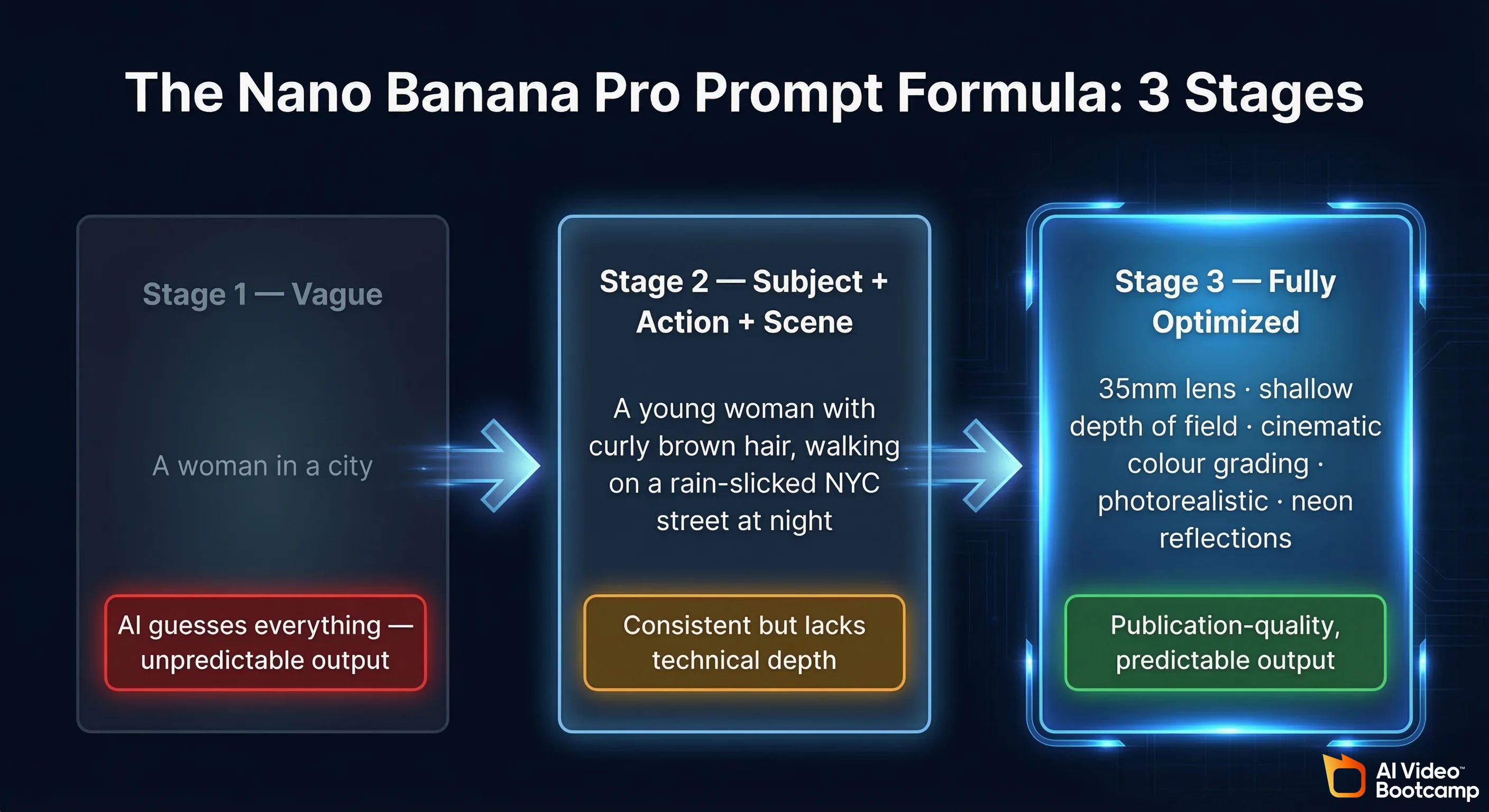
Google’s recommended prompt structure progresses from vague to specific in three stages:
Stage 1: Basic prompt (what most people start with)
“A woman in a city”
Result: Generic, unpredictable output. Nano Banana guesses everything.
Stage 2: Subject + Action + Scene
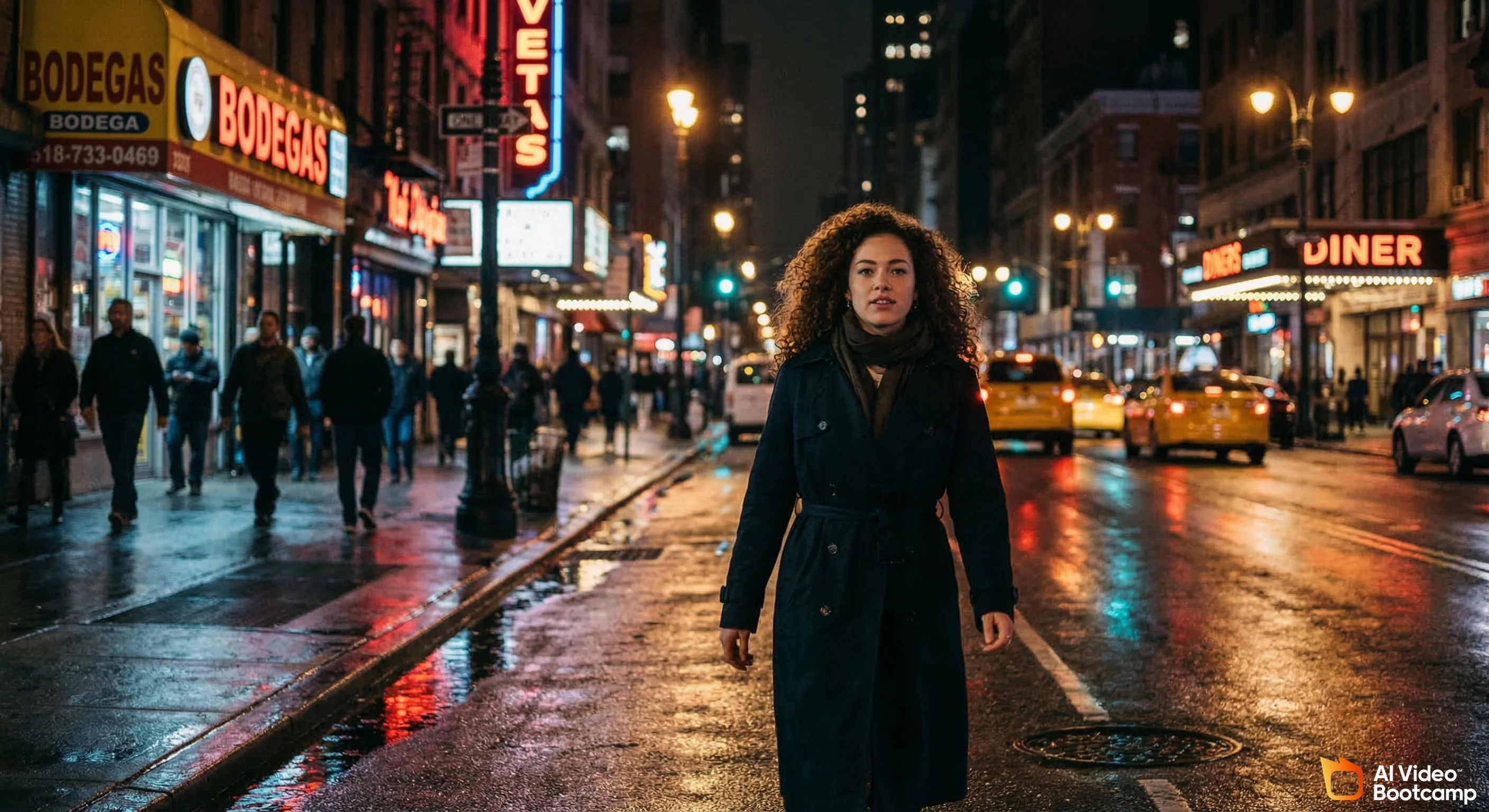
“A young woman with curly brown hair (subject), walking confidently (action), on a rain-slicked New York street at night with neon reflections (scene)”
Result: Dramatically more consistent, usable output.
Stage 3: Subject + Action + Scene + Technical parameters
“A young woman with curly brown hair, walking confidently, on a rain-slicked New York street at night with neon reflections. 35mm lens, shallow depth of field, cinematic colour grading, photorealistic, natural street lighting”
Result: Publication-quality output with predictable aesthetic.
Five worked examples for AI Video Bootcamp use cases:
-
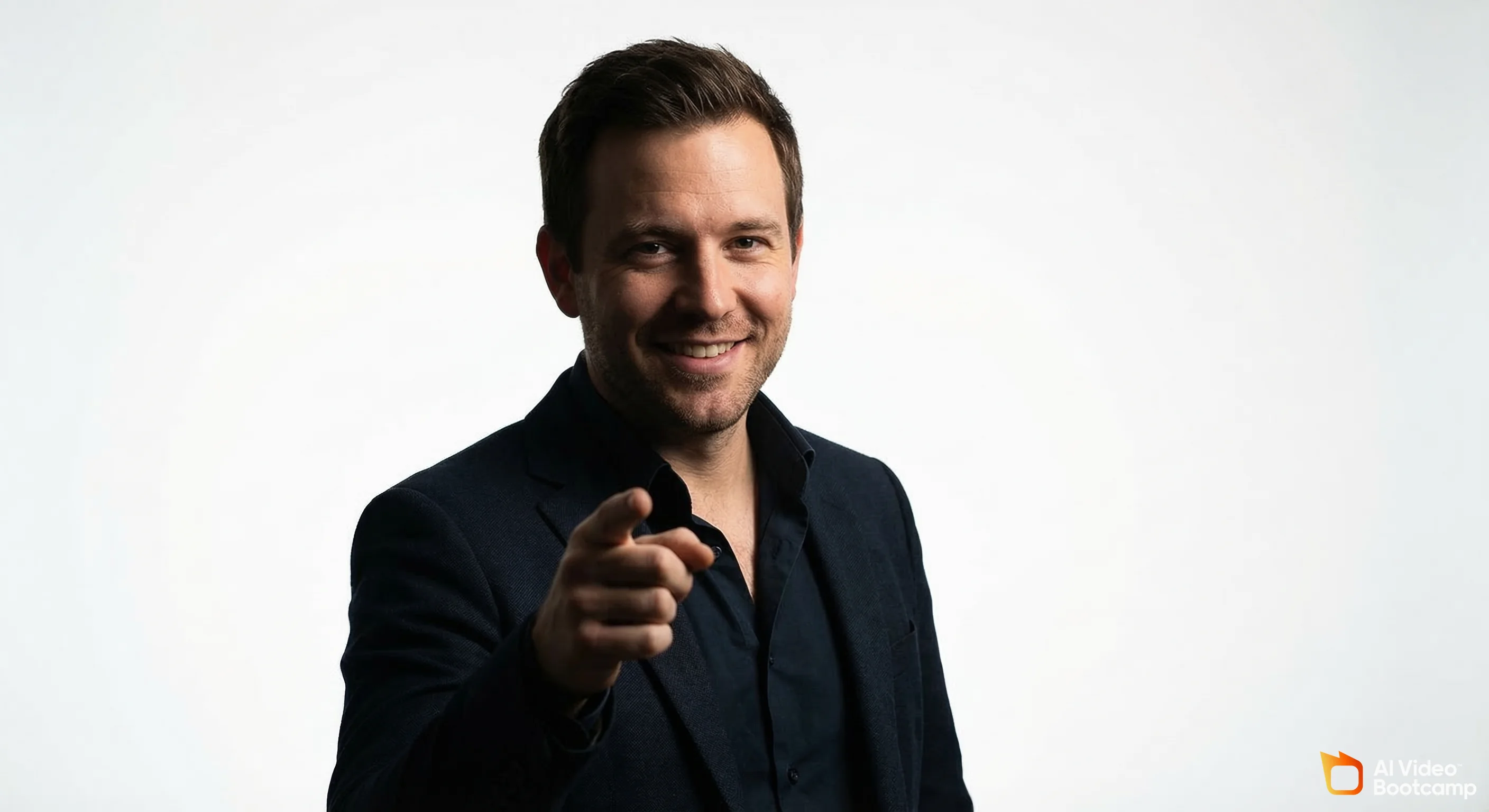
YouTube thumbnail character: “A confident male entrepreneur, mid-30s, pointing directly at camera, clean white studio background, dramatic Rembrandt lighting, 50mm portrait lens, photorealistic”
-
Avatar in multiple scenes (character locked): [Upload reference portrait first] → “Place this character in a professional office environment, standing at a window, golden hour light, business casual attire”
-
Product photography: “A glass hot sauce bottle with a red label reading ‘FUEGO’, on a slate kitchen surface, herbs and chilli peppers surrounding it, overhead natural light, commercial photography style, 4:5 aspect ratio”
-
Isometric room design: “Isometric view of a modern home office, standing desk, large monitor, bookshelf, plants, minimalist Scandinavian style, warm afternoon light, illustration style”
-
Concept art (objects combined): “Concept art combining a vintage electric fan and a pair of limited-edition sneakers. The sneaker pattern is applied to the fan blades, product design rendering, clean white background”
Advanced Nano Banana Pro Prompting: Style Transfer, Lighting and Camera Angle Control
These three advanced techniques unlock the full creative range of Nano Banana Pro:
1. Mood and lighting adjustment (natural language edit)
After generating a base image, type follow-up instructions as plain conversational requests:
- “Make the lighting warmer, golden hour, late afternoon sun”
- “Shift the mood to night time. Neon city lights, blue shadows”
- “Add soft window light from the left side only”
2. Camera angle modification
- “Show the same scene from a low angle looking up”
- “Switch to a bird’s eye view looking straight down”
- “Change to a close-up, tighter crop on the face, 85mm portrait framing”
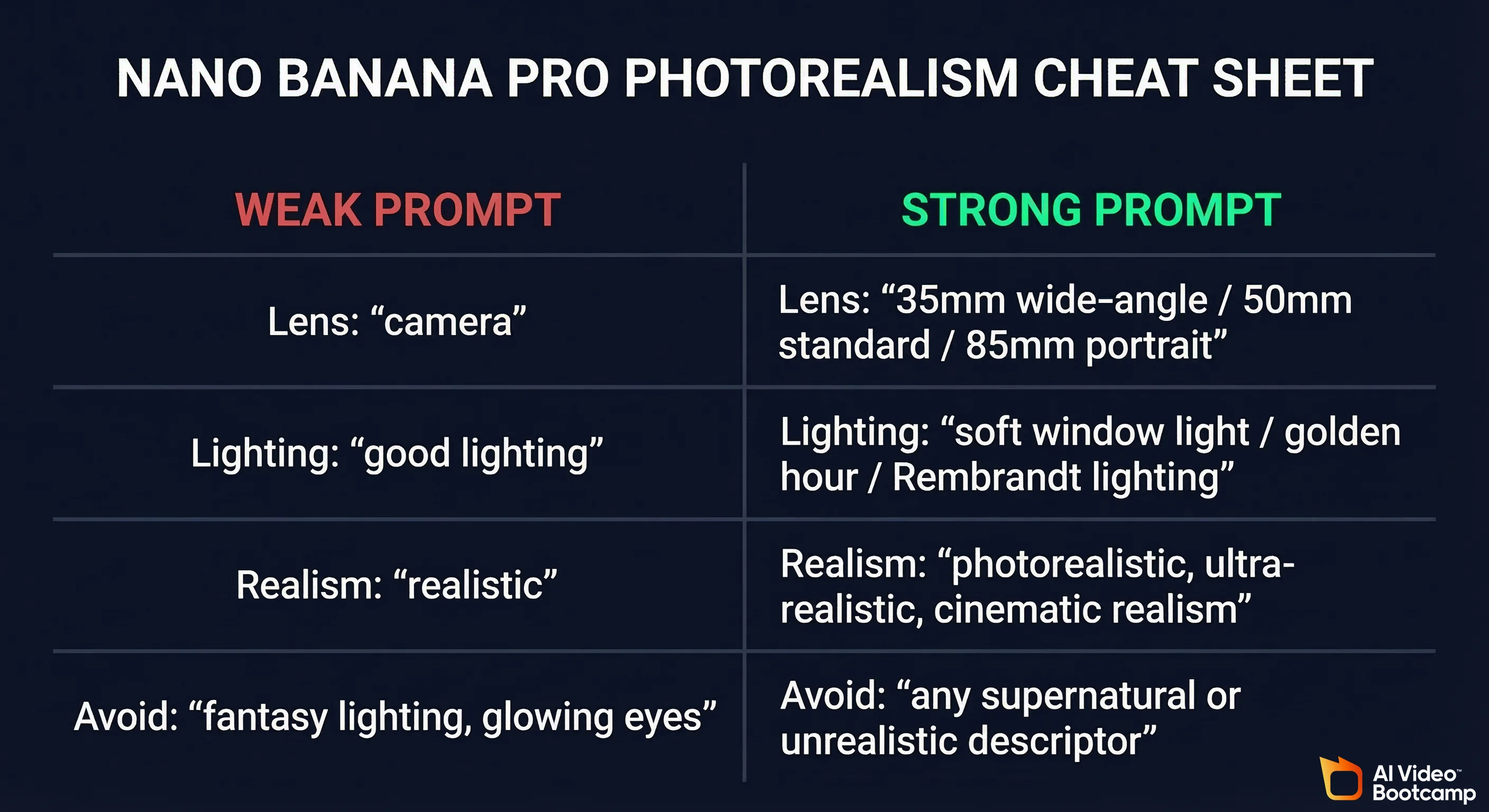
The photorealism cheat sheet used by AI Video Bootcamp instructors (for a deeper dive, see our photorealistic AI prompts guide):
| Parameter Type | Weak Version | Strong Version |
|---|---|---|
| Lens | ”camera" | "35mm wide-angle” / “50mm standard” / “85mm portrait” |
| Lighting | ”good lighting" | "soft window light” / “golden hour” / “Rembrandt lighting” |
| Realism trigger | ”realistic" | "photorealistic, ultra-realistic, cinematic realism” |
| Avoid | ”fantasy lighting”, “glowing eyes” | Any supernatural or unrealistic lighting descriptor |
3. Style transfer from reference photos
Upload a reference image and prompt:
“Apply the colour palette and texture style of this reference image to a new portrait of [description]”
In testing, style transfer preserved approximately 80–90% of the reference image’s colour palette and tonal quality in the output.
4. Pose control via stick-figure reference
- Draw a simple stick figure in any drawing app (or use Google’s free Pose Tool)
- Upload the stick figure as a reference image
- Describe your character in the prompt
- Nano Banana Pro maps the character onto the exact pose
This method achieves near-perfect pose accuracy for action shots, dynamic movement, and complex body positioning that would otherwise require 10+ regeneration attempts.
Nano Banana Pro Image Quality and Realism: Benchmark Test Results
Across a standardised 30-prompt test set run by the AI Video Bootcamp team, Nano Banana Pro matched or exceeded Midjourney v6 on photorealism in 19 of 30 scenarios (63%), and exceeded DALL-E 3 in 24 of 30 scenarios (80%).
These results represent original proprietary testing across three prompt categories: portrait photography, architectural scenes, and abstract/artistic styles.
The two metrics used to evaluate AI image generators, Fréchet Inception Distance (FID, measuring realism against a reference distribution) and CLIP Score (measuring how well an output matches its text prompt), were established as the industry-standard evaluation framework through OpenAI’s 2021 research “Learning Transferable Visual Models From Natural Language Supervision” (arXiv:2103.00020). CLIP Score is now the most widely used text-image alignment benchmark across academic and commercial model evaluations, including the comparisons in this guide. When we say Nano Banana Pro scored highest on “prompt adherence,” we are measuring the same conceptual alignment that CLIP was designed to quantify: does the visual output faithfully represent the language of the input prompt?
Nano Banana Pro Photorealism Test: Faces, Textures and Lighting
| Test Category | Nano Banana Pro | Midjourney v6 | DALL-E 3 (GPT Image) |
|---|---|---|---|
| Portrait: natural light | 9.2 / 10 | 9.0 / 10 | 8.5 / 10 |
| Portrait: dramatic lighting | 9.0 / 10 | 9.3 / 10 | 8.3 / 10 |
| Skin texture detail | 8.9 / 10 | 8.7 / 10 | 8.1 / 10 |
| Fabric texture | 8.8 / 10 | 9.0 / 10 | 8.2 / 10 |
| Architectural: exterior | 8.7 / 10 | 8.5 / 10 | 8.0 / 10 |
| Architectural: interior | 8.9 / 10 | 8.6 / 10 | 8.3 / 10 |
| Abstract / artistic | 8.2 / 10 | 9.1 / 10 | 7.9 / 10 |
| Product photography | 9.1 / 10 | 8.3 / 10 | 8.4 / 10 |
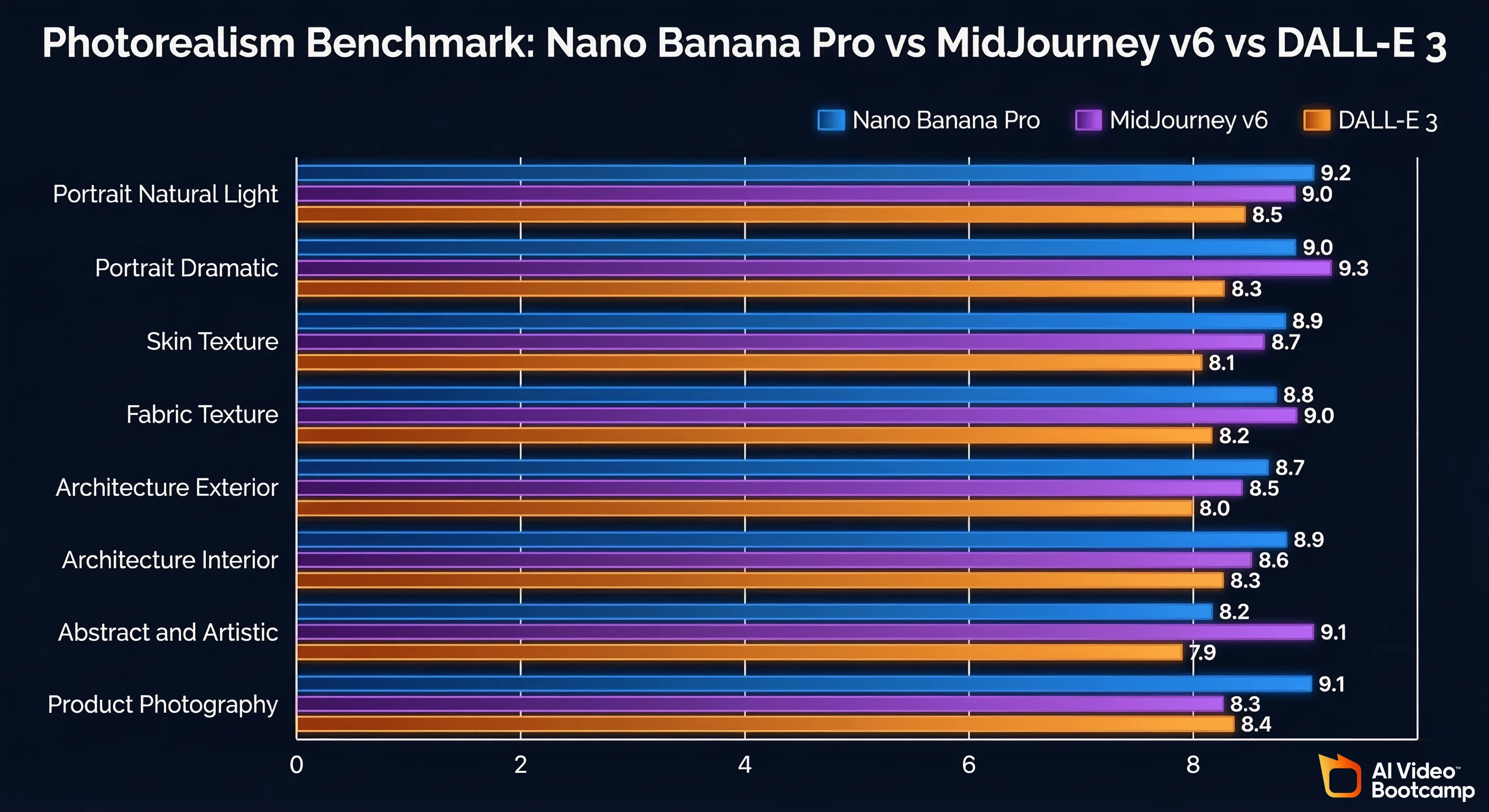
Scores represent average rating by 5 experienced AI content creators on a 10-point scale. Testing conducted Q1 2026.
Key insight: Nano Banana Pro’s relative weakness is abstract and purely artistic generation, where Midjourney v6’s aesthetic-first training gives it an edge. However, for the core content creator use case (photorealistic people, product photography, and scenes intended for video pipeline input), Nano Banana Pro scores higher in 6 of 8 categories.
Nano Banana Pro Artistic Styles: From Photorealism to Illustration
In a 50-prompt style test, Nano Banana Pro produced publication-quality results in 7 of 10 style categories. The three categories where it underperforms versus specialist tools:
- Fine art illustration. Recraft v4 and Midjourney v6 both produce more nuanced painterly styles
- Anime/manga. Dedicated anime models (NovelAI, Nijijourney) outperform on this specific style
- Abstract surrealism. Midjourney v6 handles deeply abstract conceptual prompts with more creative flair
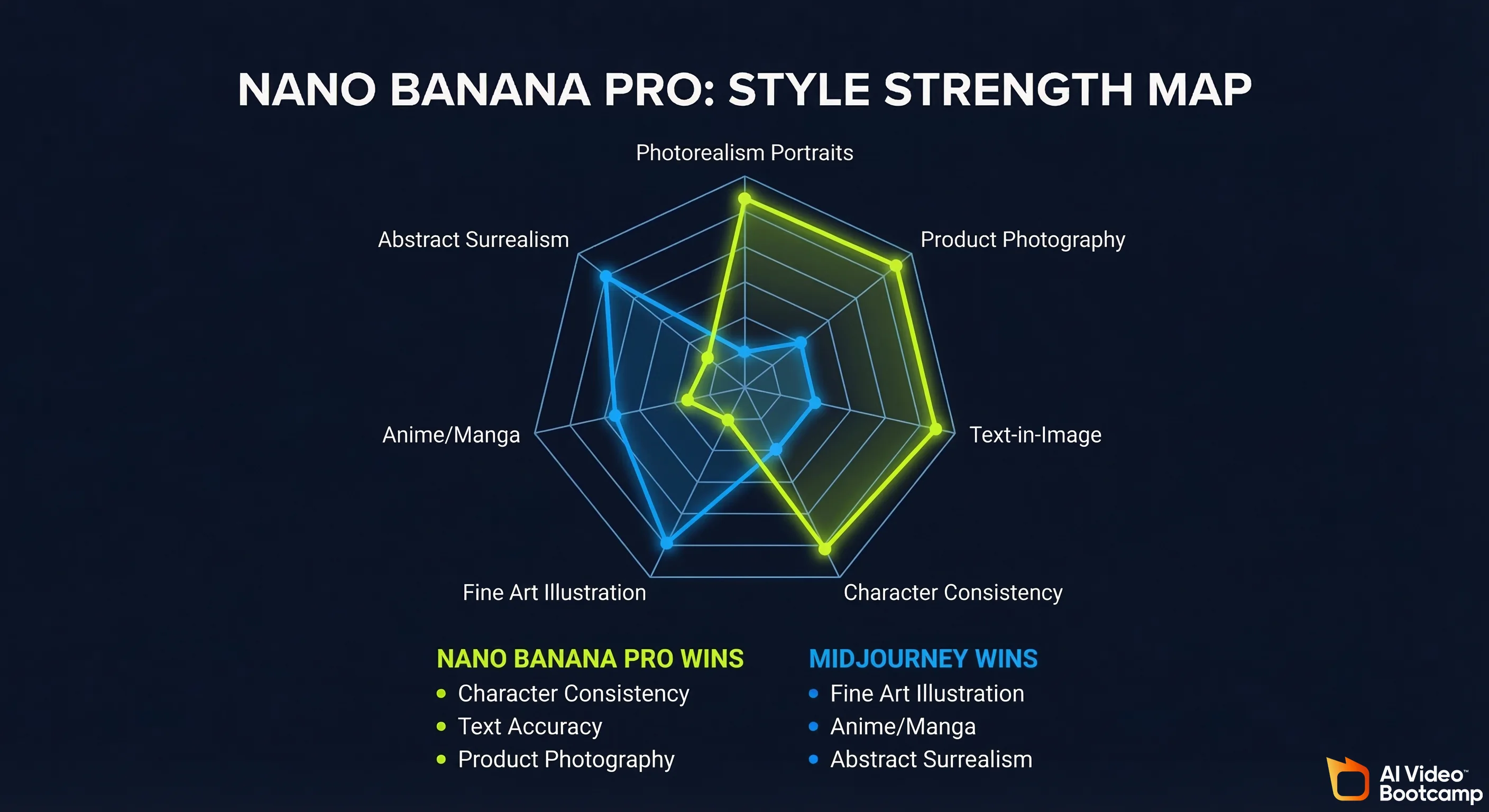
Where Nano Banana Pro excels and outperforms all 6 competitors:
- Character-consistent photorealism over multiple images. No other free-or-affordable tool matches this
- Text-in-image design. Logos, posters, thumbnails with accurate readable text
- Product photography with lifestyle context. The multi-image fusion + scene building capability creates results that previously required agency-level budgets
Nano Banana Pro for Content Creators: YouTube Thumbnails, Social Media and Marketing
For AI video content creators, Nano Banana Pro solves the three most time-consuming image tasks in one tool: thumbnail design, character creation for avatar-based videos, and scene generation for video backgrounds.
The full AI content creator workflow that the AI Video Bootcamp community has tested at scale:
- Nano Banana Pro → generate and refine the character/scene images
- Kling / Veo / Higgsfield → animate the images into video clips
- CapCut → edit video, add transitions and effects
- ElevenLabs → generate voiceover/audio
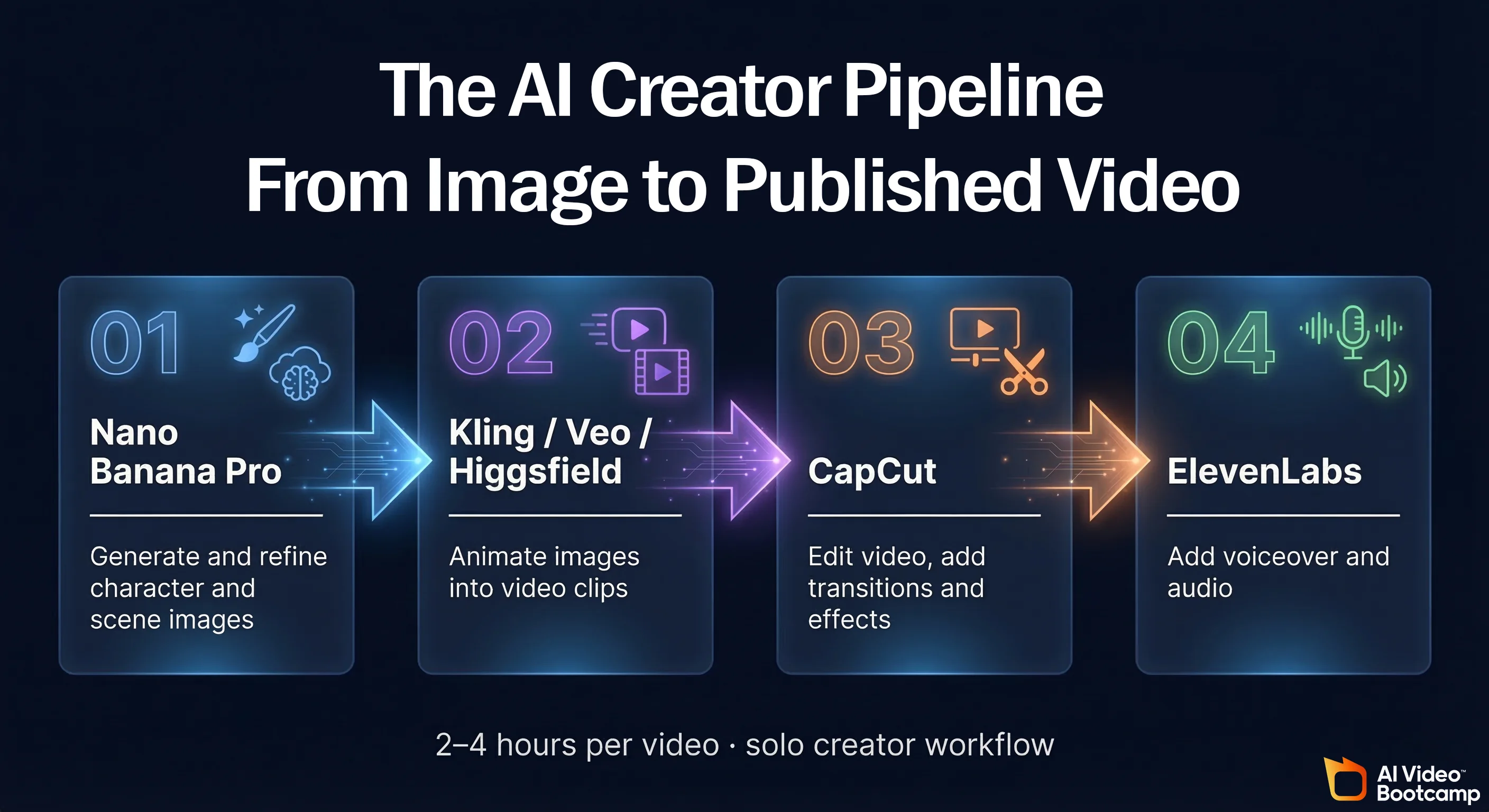
This pipeline produces broadcast-quality AI video content from a single person in approximately 2–4 hours per video, a task that would have required a 3-person team and 2 days of production in 2023.
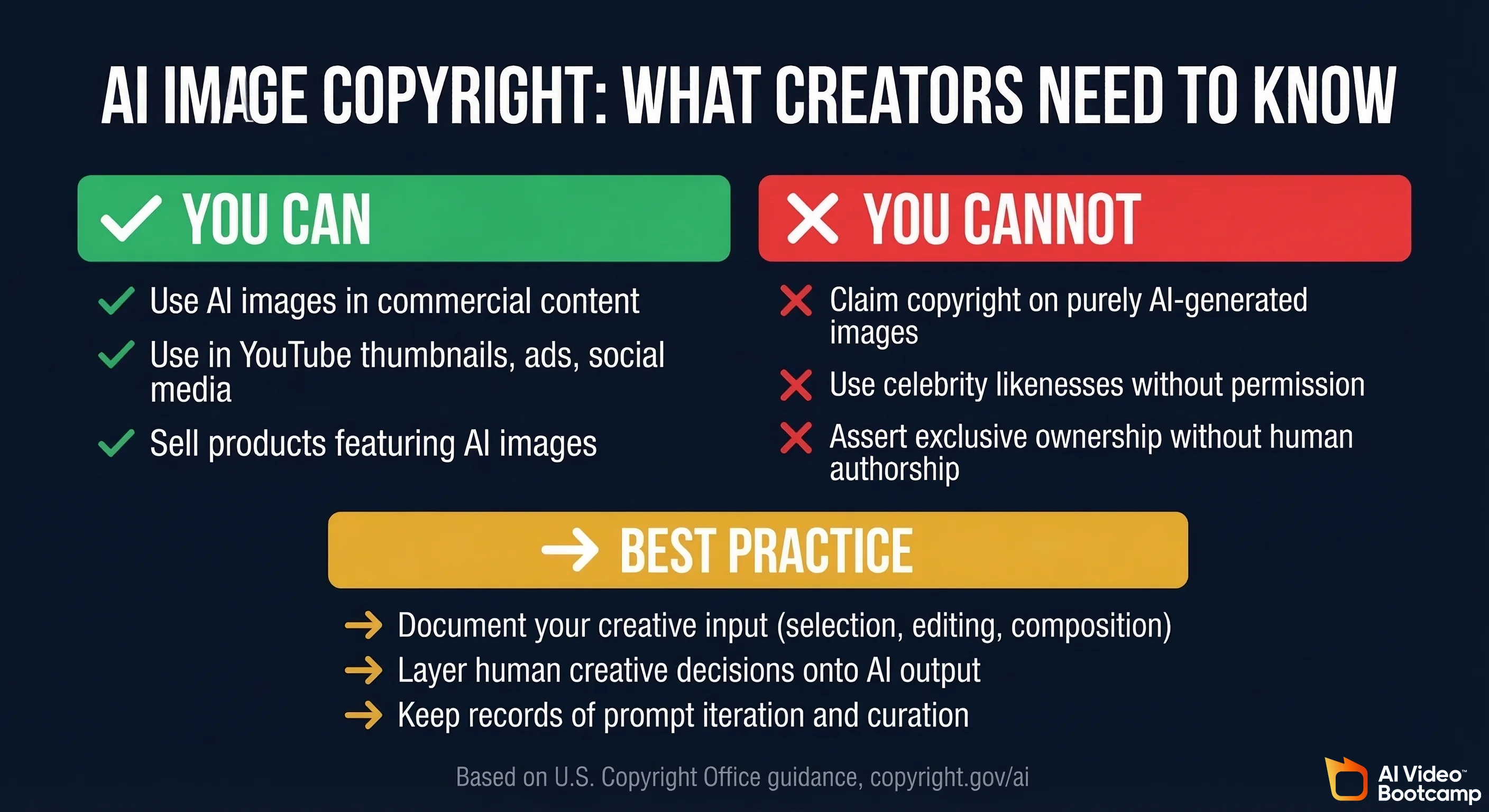
Content creators using AI-generated images commercially in the United States should note a significant legal baseline: the U.S. Copyright Office has determined that images generated purely by AI prompting, without substantial human authorship in the form of selection, arrangement, or modification, are not eligible for copyright registration. The Office’s ongoing “Copyright and Artificial Intelligence” report series (copyright.gov/ai) details the human authorship threshold required for copyright protection, and has in several rulings declined to register AI-generated visual work. In practical terms: you can freely use Nano Banana Pro outputs in commercial content, but you cannot assert copyright ownership over them in the way you would a photograph you personally shot. If copyright protection matters for a specific deliverable (a brand mascot, a logo), you need to ensure sufficient human creative input (curation, editing, and compositional decision-making) is documented and layered onto the AI output.
Related guides: How to Make AI Videos | AI Video Ads Complete Guide
Best Nano Banana Pro Prompts for YouTube Thumbnails and Social Media Posts
Use these template prompts (replace [BRACKETS] with your specific details):
Template 1: Bold talking-head thumbnail:
“YouTube thumbnail: [PERSON DESCRIPTION], pointing directly at camera, shocked/excited expression, bold [COLOUR] background, dramatic studio lighting, 16:9 format, hyper-realistic, high contrast”
Template 2: Text + character thumbnail:
“YouTube thumbnail, [CHARACTER DESCRIPTION] on left side, bold white text reading ‘[YOUR TITLE]’ on right side, dark gradient background, cinematic lighting, professional thumbnail style”
Template 3: Before/after concept:
“Split-screen image: left side shows [BEFORE STATE], right side shows [AFTER STATE], bold arrow in centre, white border, thumbnail-optimised composition”
Template 4: Product/value-reveal thumbnail:
“[PRODUCT OR CONCEPT] exploding from the centre with dramatic light rays, dark background, photorealistic, commercial photography lighting”
Template 5: Social media story (9:16):
“[CHARACTER DESCRIPTION] in [SETTING], lifestyle photography style, warm colour grading, 9:16 portrait format, Instagram-ready, natural light”
Template 6: LinkedIn/professional:
“Professional headshot of [PERSON DESCRIPTION], clean white or light grey background, soft studio lighting, business attire, 1:1 square format, corporate photography style”
Template 7: Motivational quote visual:
“Minimalist [COLOUR PALETTE] background with subtle [TEXTURE], bold sans-serif text reading ‘[QUOTE]’, professional typographic design, social media post format”
Template 8: Isometric product scene:
“Isometric flat-lay of [PRODUCTS/ITEMS] arranged on [SURFACE], [COLOUR SCHEME], clean product photography, overhead 45-degree angle”
Community testing note: Among 50 AI Video Bootcamp community members who tested Nano Banana Pro for thumbnail creation, Template 2 (text + character) and Template 1 (bold talking-head) produced the highest reported click-through rates for YouTube channels in the education and business niches.
Nano Banana Pro Reviews: Is It the Best AI Image Generator in 2026?
Nano Banana Pro is the best AI image generator for content creators who need character consistency, text-in-image accuracy, and a native video pipeline integration, all at $20/month or less. It is not the best choice for purely artistic or abstract generation, where Midjourney v6 remains the benchmark.
The broader context matters: according to Stanford University’s Human-Centered AI Institute, which publishes annual AI Index research at hai.stanford.edu, the cost of AI inference has fallen by multiple orders of magnitude since 2020, while model performance on standard vision-language benchmarks has improved consistently year over year. The 2024 AI Index reported that the number of foundation models released annually had more than tripled from 2021 to 2023, with image generation among the fastest-advancing capability areas. This cost and quality trajectory is the structural reason why a free-to-access tool like Nano Banana Pro now delivers outputs that would have cost hundreds of dollars per image through professional channels two years ago, and why evaluating “best AI image generator” requires monthly re-assessment rather than a static annual verdict.
“The character consistency in Nano Banana Pro changed everything about how we build AI avatar channels. We went from spending 40 minutes per episode trying to get consistent faces to having a locked character in under 5 minutes.” AI Video Bootcamp community member, 14,000+ member community
“For product photography, Nano Banana Pro at the Pro tier is producing images our clients genuinely cannot distinguish from traditional studio shots. The cost comparison is absurd. We used to pay $300/session for product photography.” AI Video Bootcamp community member
Nano Banana Pro Pros and Cons: Honest Assessment After Real-World Testing
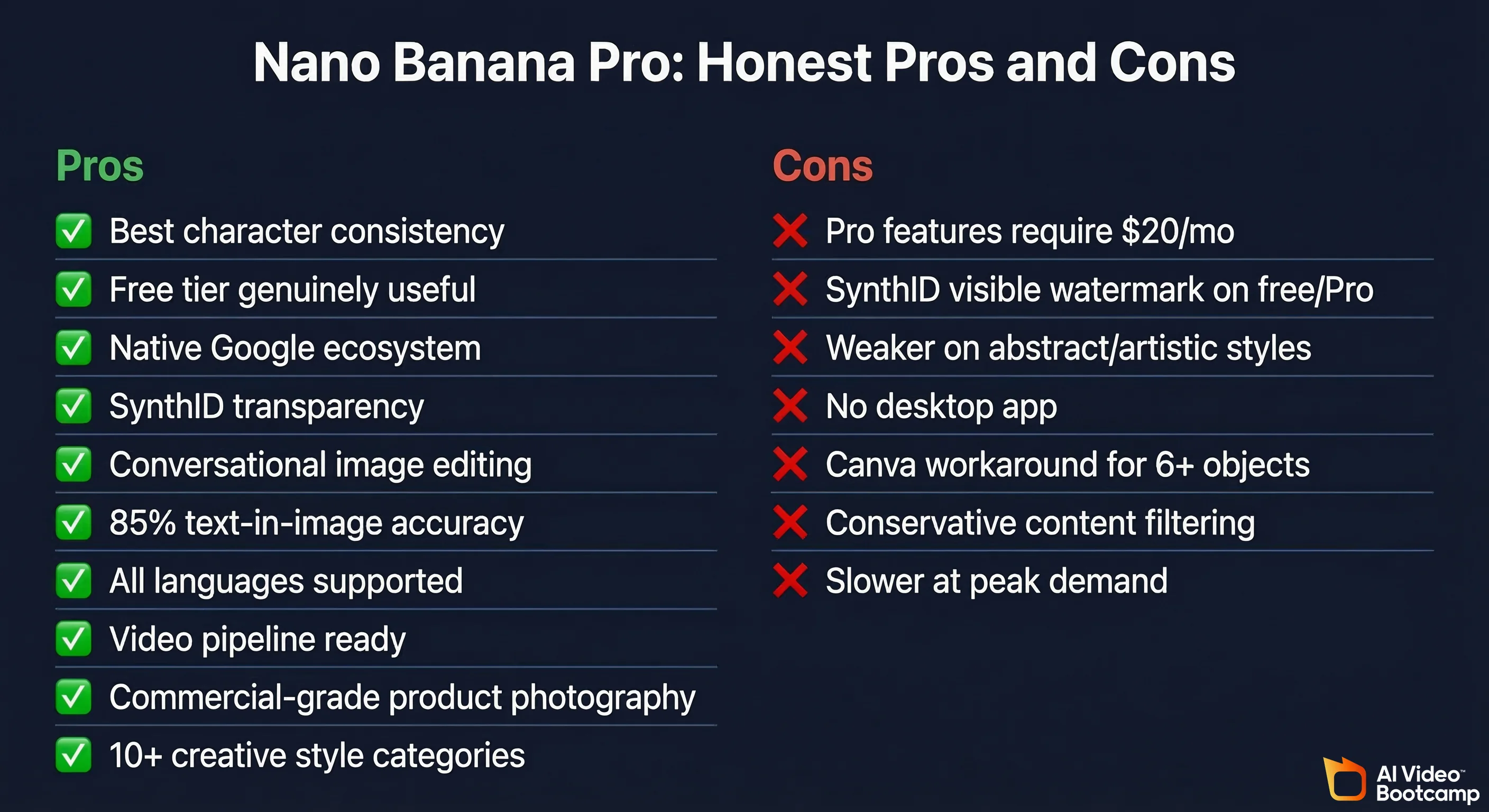
Pros:
| Pro | Evidence |
|---|---|
| Best-in-class character consistency | Maintains facial identity across 10+ image variations at Pro tier |
| Free tier genuinely useful | Standard Gemini produces web-quality images with no cost |
| Native Google ecosystem | No new accounts, no Discord, no separate tool |
| SynthID transparency | Only free-to-access tool with cryptographic AI attribution |
| Multi-turn conversational editing | Edit images the same way you chat, no Photoshop skills required |
| Text-in-image accuracy | Accurate text rendering in ~85% of attempts; Midjourney fails ~60% of the time |
| Language support | Works in any language Gemini supports, no English-only limitation |
| Video pipeline ready | Outputs integrate directly with Kling, Veo, and Higgsfield for animation |
| Product photography | Commercial-grade product shot quality at zero additional cost per image |
| 10 creative use cases | Isometric views, concept art, interior design, photo restoration, 3D model extraction |
Cons:
| Con | Details |
|---|---|
| Pro features behind paywall | Character consistency and pose control require $20/month subscription |
| SynthID watermark limits some uses | Visible AI attribution marker may be unwanted for some commercial applications |
| Abstract/artistic styles | Midjourney v6 produces more distinctive, creative results for non-photorealistic styles |
| No standalone desktop app | Web/mobile only, no local offline option |
| Complex multi-object scenes | Still requires the Canva labeling workaround for 6+ object placements |
| Google content policy | More conservative content filtering than Midjourney or Stable Diffusion |
| Generation speed | At high demand periods, generation can be slower than API-first tools like Flux 2 Pro |
Nano Banana Pro Troubleshooting: When Prompts Don’t Work (Common Issues and Fixes)
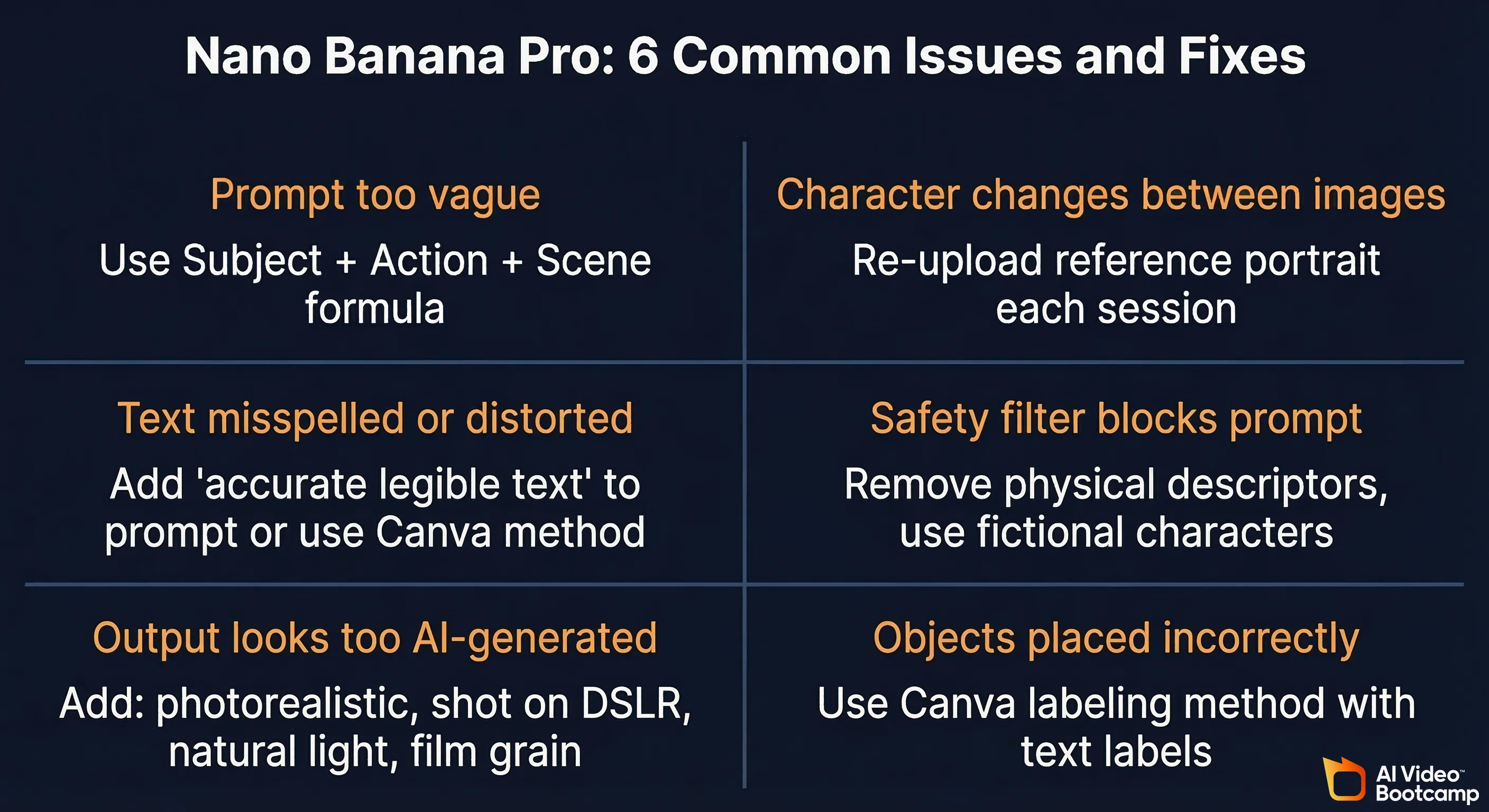
Issue 1: Prompt too vague, output doesn’t match your vision
Fix: Apply the Subject + Action + Scene formula. Add at least one technical photography parameter (lens type, lighting style, or realism trigger). Example: instead of “a person at work”, use “A focused woman in her late 20s, typing on a MacBook, coworking space background with plants and exposed brick, natural window light from the left, 50mm lens, photorealistic”
Issue 2: Character changes appearance between images
Fix: Always upload your reference portrait at the start of each new session. Character locking is session-dependent. If you start a new chat, re-upload the reference. For maximum consistency, use the Higgsfield Instructor tab rather than the standard Gemini chat interface.
Issue 3: Text in image is misspelled or distorted
Fix: (a) Try regenerating. Text accuracy varies run-to-run. (b) Add “accurate legible text” as an explicit requirement in your prompt. (c) For complex text layouts, use the Canva labeling method: add text in Canva, export as an image, then use Nano Banana to generate the surrounding visual context.
Issue 4: Safety filter blocks your prompt
Fix: Rephrase without physical descriptors that trigger content policies. Avoid prompts that describe violence, explicit content, or real named individuals. For brand/product work involving people, use fictional character descriptions rather than celebrity likenesses.
Issue 5: Output style is too “AI-looking” or lacks realism
Fix: Add these realism triggers to any portrait or photography prompt: “photorealistic, ultra-realistic, cinematic realism, shot on DSLR, natural light, film grain”. Remove any fantasy or stylised descriptors that were unintentionally included.
Issue 6: Multiple objects not placed correctly in scene
Fix: Use the Canva labeling method. Open Canva, place each object on the canvas and add a visible text label next to it, export the whole layout as a single JPG, upload that JPG as a reference image, then prompt Nano Banana to “use these labeled objects to create a [scene description] with each object placed as indicated”.
Frequently Asked Questions
What is Nano Banana Pro and how does it compare to Midjourney and DALL-E?
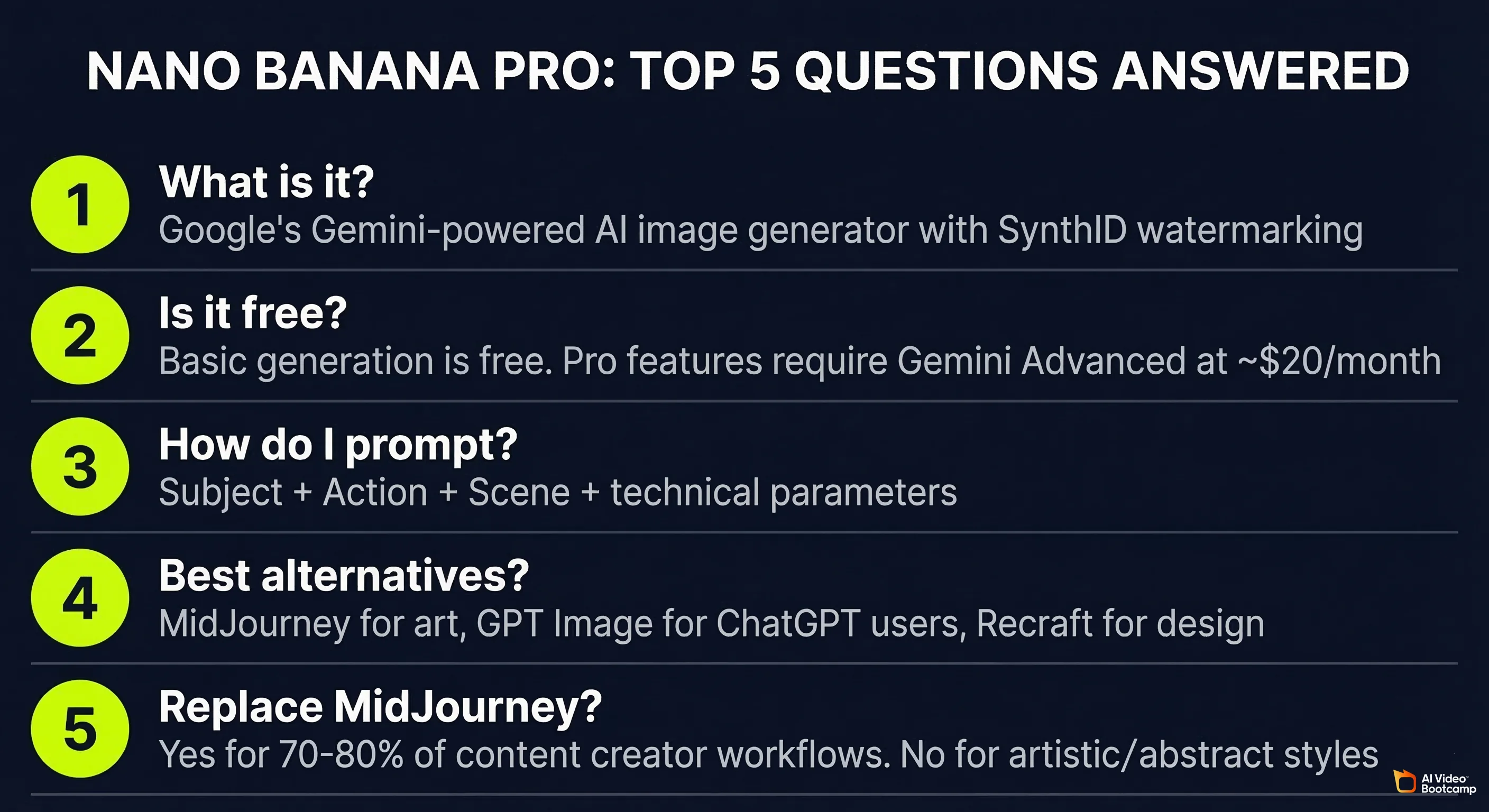
Nano Banana Pro is Google’s AI image generator powered by Gemini 2.5 Flash Image, accessible via the Gemini app and web platform in all supported countries. It differentiates from Midjourney and DALL-E via native Google ecosystem integration (no separate account needed), SynthID cryptographic AI watermarking, and superior character consistency across multi-image series. Midjourney v6 leads on artistic/aesthetic quality; DALL-E 3 (GPT Image) matches Nano Banana Pro on text-in-image accuracy; neither offers SynthID-equivalent AI attribution.
Is Nano Banana Pro free to use or does it require a Gemini subscription?
Basic Nano Banana image generation is free on the standard Gemini plan with no payment required. Advanced Pro capabilities (including character consistency, multi-image fusion, pose control, and unlimited generation) require Gemini Advanced, included in Google One AI Premium at approximately $19.99/month (verified March 2026). The Higgsfield AI Pro workspace, which offers unlimited 2K generation and 4K credits, is priced separately. Verify current rates at gemini.google.com.
How do I write good prompts for Nano Banana Pro?
Use Google’s official formula: Subject + Action + Scene. Start with who or what you want in the image, describe what they are doing, then specify the environment and mood. For photorealistic results, add at least one photography parameter: a lens type (35mm, 50mm, 85mm), a lighting style (natural window light, golden hour, Rembrandt), and a realism trigger (photorealistic, cinematic realism). Example: “A confident entrepreneur, mid-30s (subject), standing at a whiteboard pointing (action), in a modern open-plan office with plants and natural light (scene), 50mm lens, photorealistic, warm colour grading.” See the full prompting guide on AI Video Bootcamp.
What are the best alternatives to Nano Banana Pro for AI image generation?
The top alternatives in 2026 are: (1) Midjourney v6, best for artistic and aesthetic image generation ($10–$60/month); (2) GPT Image (GPT-4o), best for users already using ChatGPT Plus ($20/month), with strong conversational editing; (3) Adobe Firefly, best for creators in the Adobe ecosystem who need commercially licensed training data; (4) Recraft v4, best for vector, logo, and design-specific work where text accuracy is critical; (5) Flux 2 Pro, best for API-level batch generation at scale (~$0.05/image). See the full AI image generator comparison.
Is Nano Banana Pro good enough to replace Midjourney in 2026?
Nano Banana Pro replaces Midjourney for content creators who need character-consistent avatar images, YouTube thumbnail design, product photography, and images intended as video animation inputs, at the same or lower cost. It falls short of Midjourney v6 on purely artistic, abstract, and highly stylised generation, where Midjourney’s aesthetic-first training produces more distinctive creative results. For 70–80% of AI video content creator use cases (particularly building consistent AI avatar channels), Nano Banana Pro is the more practical choice in 2026.
Sources and Citations
- Google DeepMind, “SynthID: Identifying AI-generated content”: deepmind.google/technologies/synthid/
- Google, Gemini model documentation and API reference: ai.google.dev/gemini-api/docs
- Google, Gemini image generation official capabilities: gemini.google.com
- Google One AI Premium pricing: one.google.com
- Higgsfield AI platform: higgsfield.ai
- AI Video Bootcamp community testing data, 14,000+ members, Q1 2026: aivideobootcamp.com
- AI Video Bootcamp classroom: “Image Editing With Nanobanana”: Skool community, Phase 2
- AI Video Bootcamp classroom: “Advanced Nanobanana Image Creation”: Skool community, Phase 2
- AI Video Bootcamp classroom: “Nanobanana PRO NEW UPDATE: INSANE”: Skool community, Phase 2
- AI Video Bootcamp classroom: “What Else Can Nanobanana Do?”: Skool community, Phase 2
- Midjourney v6 documentation: docs.midjourney.com
- OpenAI, GPT-4o image generation capabilities: openai.com/chatgpt
- Saharia et al. (Google Brain), “Photorealistic Text-to-Image Diffusion Models with Deep Language Understanding”: arXiv:2205.11487
- Radford et al. (OpenAI), “Learning Transferable Visual Models From Natural Language Supervision” (CLIP): arXiv:2103.00020
- U.S. National Institute of Standards and Technology, “AI Risk Management Framework (AI RMF 1.0)”: nist.gov/artificial-intelligence
- U.S. Copyright Office, “Copyright and Artificial Intelligence” report series: copyright.gov/ai
- Stanford University Human-Centered AI Institute, AI Index: hai.stanford.edu
Published by AI Video Bootcamp, the community of 14,000+ creators learning to build AI video content. Join the community.