If you’ve been anywhere near social media in the last few weeks, you’ve seen AI-generated videos that made you do a double-take. A fake movie trailer that looks like it cost $50 million. A product demo that a solo creator made in their bedroom. A music video where the singer’s lips actually match the words.
Three tools are behind most of these viral moments right now: Seedance 2.0 from ByteDance, Kling 3.0 from Kuaishou, and Google’s Veo 3.1. They’re all incredible. They’re all different. And if you’re trying to figure out which one to actually use (and pay for), you’ve come to the right place. For broader context on how these tools fit into the 2026 AI video landscape and trends, see our comprehensive trends analysis.
I’ve spent the last few weeks testing all three extensively. This isn’t a spec sheet comparison — it’s an honest breakdown of what each tool actually delivers when you sit down and use it.
Let’s get into it.
The Quick Verdict (If You’re in a Hurry)
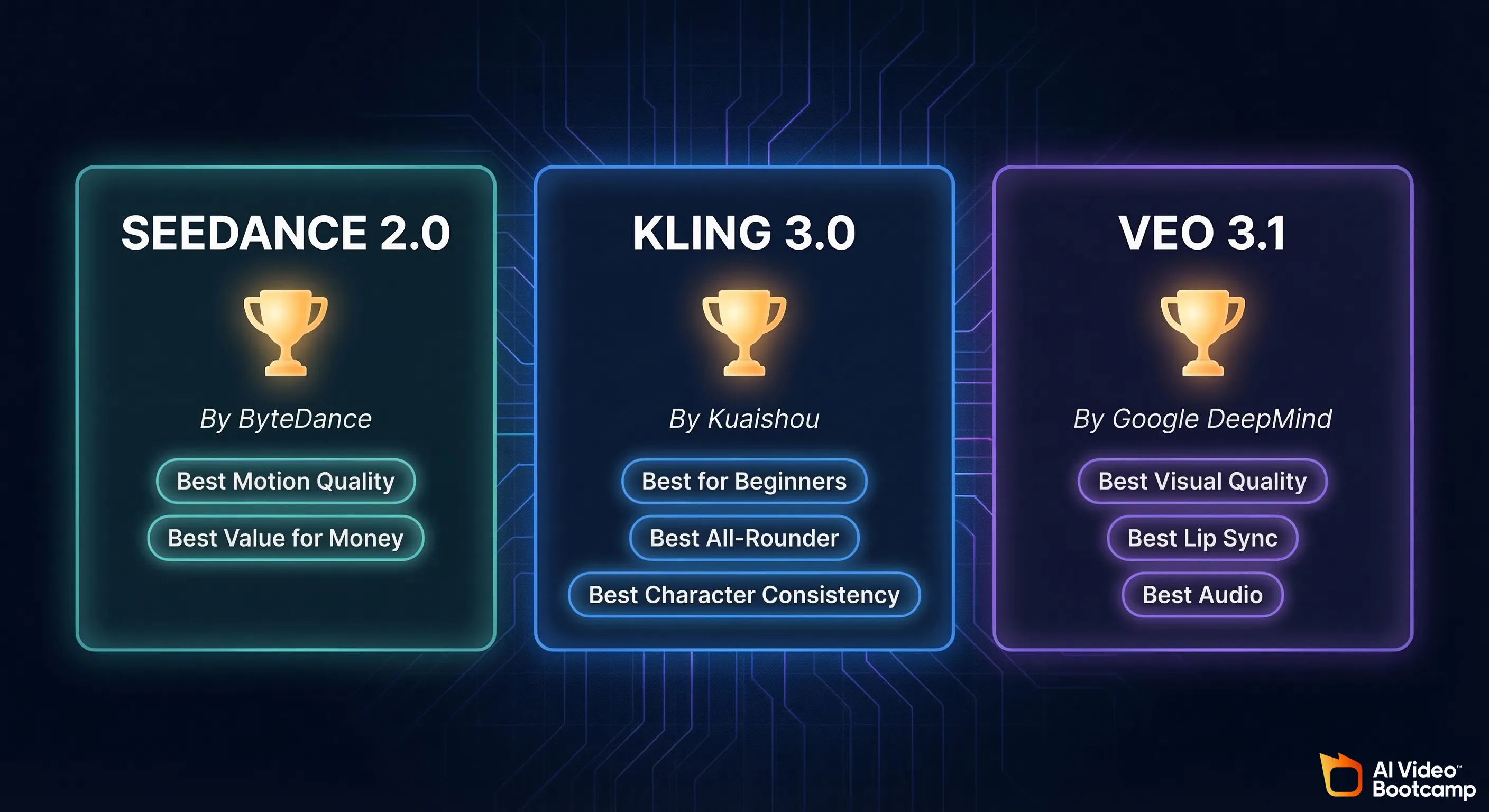
Here’s who wins for what:
| What You Need | The Winner | Why |
|---|---|---|
| Best overall quality | Veo 3.1 | Film-grade visuals with built-in audio that actually syncs |
| Best for beginners | Kling 3.0 | Most intuitive interface, generous free tier, tons of tutorials out there |
| Best bang for your buck | Seedance 2.0 | Pro starts at ~$9/month and the quality rivals tools 3x the price |
| Best lip sync / talking heads | Veo 3.1 | Under 120ms lip-sync accuracy — nothing else comes close |
| Best for storytelling / multi-shot | Kling 3.0 | Up to 6 connected shots with consistent characters |
| Best motion / action scenes | Seedance 2.0 | ByteDance’s motion synthesis is absurdly good for dynamic clips |
| Cheapest way to start | Kling 3.0 or Seedance 2.0 | Both have usable free tiers |
If you just want one answer: Kling 3.0 is the best all-rounder for most creators in 2026. It has the widest feature set, the most accessible pricing, and the smoothest learning curve. But Veo 3.1 produces the highest-quality output if you can afford it, and Seedance 2.0 is the scrappy underdog that punches way above its price tag.
Now let’s break each one down properly.
What Each Tool Actually Does (Plain English)
Seedance 2.0 — The Viral Newcomer
Seedance 2.0 is ByteDance’s AI video generator (yes, the TikTok people). It launched in February 2026 and immediately went viral — people were using it to create eerily realistic clips of actors, fake movie scenes, and product videos that looked professionally shot.
What it does: You type a description of a video (or upload an image), and Seedance turns it into a short video clip. It supports both text-to-video and image-to-video. The output is up to 1080p quality.
What makes it special: The motion. Seedance 2.0’s motion synthesis is genuinely a step ahead. When a character walks, runs, dances, or fights — the movement looks natural. Other tools still struggle with weird floaty movements or limbs that bend wrong. Seedance nails this more often than not.
Where you use it: Through the browser at Dreamina (ByteDance’s creative platform) or through various third-party platforms that have integrated the model. No downloads, no installations, no coding required.
Who made it: ByteDance (the company behind TikTok and Douyin). The model was originally available in China through Jimeng/Dreamina and went global in February 2026.
Kling 3.0 — The Versatile Workhorse
Kling AI has been a favorite among creators since it launched in 2024, and version 3.0 (released early February 2026) is a massive leap. It’s made by Kuaishou, another major Chinese tech company.
What it does: Text-to-video, image-to-video, and — this is the big one — multi-shot storyboarding. You can plan up to 6 connected shots that maintain the same characters, style, and setting. It also generates native audio now, including dialogue, sound effects, and ambient noise.
What makes it special: The combination of features. Kling 3.0 isn’t just a “type a prompt, get a clip” tool anymore. It’s becoming a mini film production suite. The Elements feature lets you upload up to 4 reference photos to keep characters consistent across videos. The multi-shot storyboard feature means you can actually tell a story instead of just making random clips.
Where you use it: At klingai.com/global/ in your browser. Clean, straightforward interface.
Who made it: Kuaishou Technology — a major Chinese tech company with over 6 million global users on the Kling platform.
Veo 3.1 — The Premium Powerhouse
Google’s Veo 3.1 is the latest version of their AI video model, and it’s the most technically impressive of the three. It’s available through Google’s AI subscription plans (Google AI Pro and Google AI Ultra).
What it does: Text-to-video generation with native audio — and not just background music. We’re talking dialogue, ambient sounds, and sound effects, all generated together with the video in a single pass. The lip sync is the best in the industry right now.
What makes it special: Quality. Pure, jaw-dropping visual quality. Veo 3.1 produces footage that looks like it came from a professional camera. The lighting is natural, the textures are rich, and the “film look” is baked in. But the real killer feature is the integrated audio. Other tools make you generate video first, then figure out audio separately. Veo generates both together, so the footsteps match the walking, the dialogue matches the mouth, and the ambient sounds match the environment.
Where you use it: Through Google’s AI tools at ai.google (part of the Gemini ecosystem). You need a Google AI Pro or Ultra subscription.
Who made it: Google DeepMind.
Pricing Comparison — Real Numbers, No BS
This is where things get interesting. Let’s talk actual dollars.
Seedance 2.0 Pricing
| Plan | Monthly Cost | What You Get |
|---|---|---|
| Free | $0 | A few clips per day, 720p, watermarked |
| Pro | ~$9–10/month | More daily generations, 1080p, no watermark, API access |
| Enterprise | Custom pricing | 4K output, SLA, dedicated support, high volume |
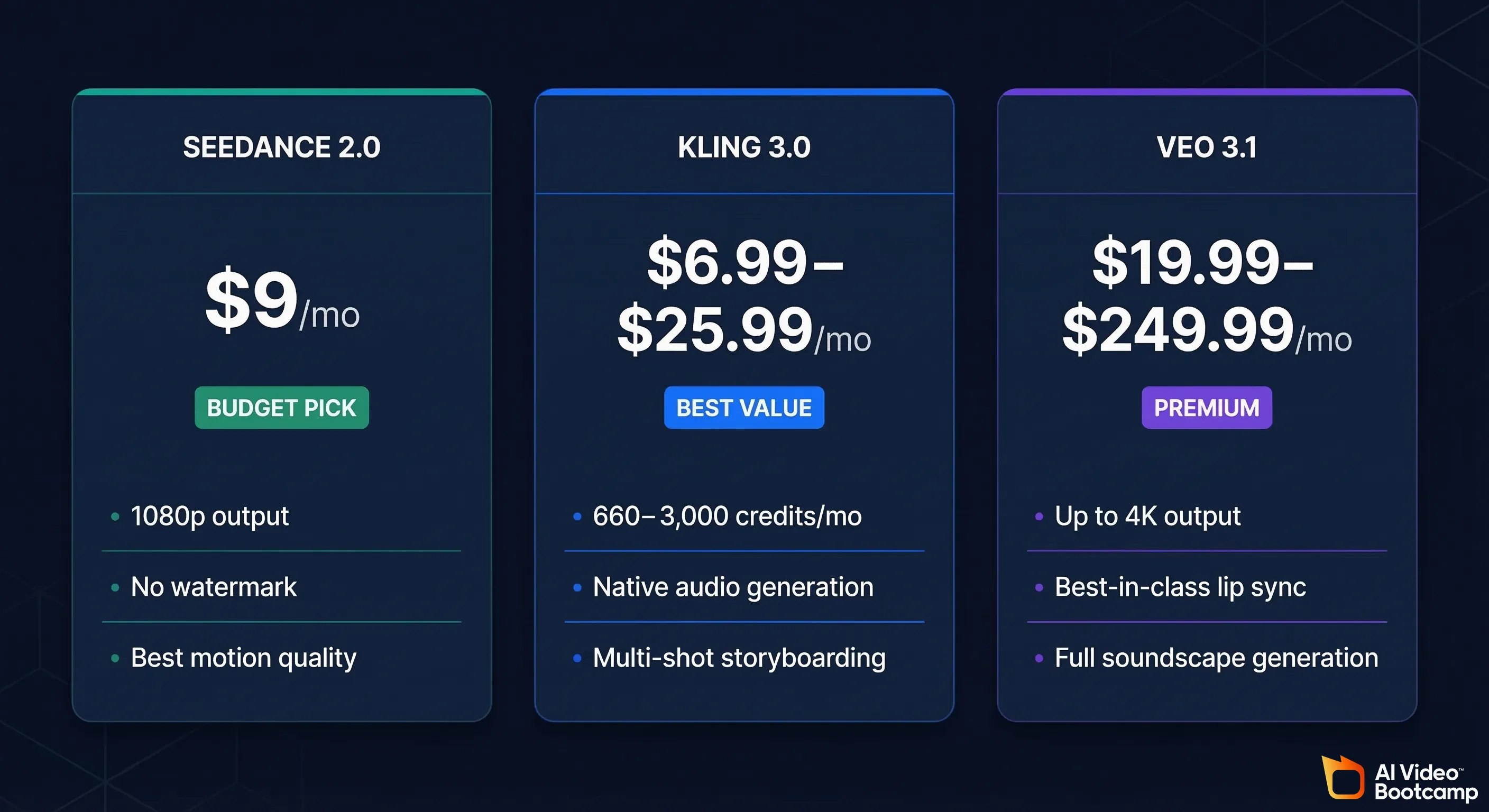
Seedance 2.0 is accessed through ByteDance’s Dreamina platform. The Chinese version (Jimeng) starts at approximately 69 RMB/month (~$9.60 USD). International pricing through third-party platforms that host the model varies, but generally falls in the $9–$15/month range for Pro-level access.
The bottom line: For under $10/month, you get 1080p watermark-free AI video generation. That’s genuinely remarkable value.
Kling 3.0 Pricing
| Plan | Monthly Cost | Annual (per month) | Credits | Key Features |
|---|---|---|---|---|
| Free | $0 | — | 66/day | 720p, watermarked, basic features |
| Standard | $6.99 | $6.60 | 660/month | 1080p, no watermark |
| Pro | $25.99 | $24.42 | 3,000/month | Priority generation, all features |
| Premier | ~$66 | $60.72 | 8,000/month | Higher priority, bulk credits |
| Ultra | ~$180 | $119.16 | 26,000/month | Highest priority, early access to new models |
How credits work: A standard 5-second video in Standard mode costs about 10 credits. Professional mode (higher quality) costs about 35 credits. Adding audio costs extra credits too. So on the Standard plan (660 credits/month), you’re looking at roughly 60–65 standard videos or about 18–19 professional-quality videos per month.
The bottom line: Kling’s Standard plan at $6.99/month is the cheapest paid tier of the three. But credits expire monthly, and professional mode eats through them fast. Most serious creators end up on the Pro plan at $26/month.
Veo 3.1 Pricing
Veo 3.1 is available through Google’s AI subscription plans:
| Plan | Monthly Cost | What You Get |
|---|---|---|
| Google AI Pro | $19.99/month | Access to Veo 3 (not 3.1), limited generations, 720p |
| Google AI Ultra | $249.99/month | Full Veo 3.1 access, 1080p, Quality model, ~625 eight-second clips/month, priority queue |
Important note: On the Pro plan ($19.99), you get access to Veo 3 — but not the latest 3.1 model, and not the highest quality settings. The truly impressive Veo 3.1 output that’s been blowing up on social media? That requires the Ultra plan at $249.99/month.
The bottom line: Veo 3.1 produces arguably the best AI video available right now — but it’s 25x more expensive than Seedance and 36x more expensive than Kling’s Standard plan. The Pro tier at $19.99 is more reasonable, but you’re not getting the full Veo 3.1 experience there.
Price-Per-Video Comparison
Let’s make this real. How much does one decent 8-second video actually cost you?
| Tool | Plan | Approximate Cost Per Video |
|---|---|---|
| Seedance 2.0 | Pro (~$10/mo) | ~$0.30–0.50 per clip (estimated based on daily limits) |
| Kling 3.0 | Standard ($6.99/mo) | ~$0.37 per standard clip / ~$1.30 per professional clip |
| Kling 3.0 | Pro ($25.99/mo) | ~$0.30 per standard clip / ~$1.05 per professional clip |
| Veo 3.1 | Ultra ($249.99/mo) | ~$0.40 per 8-second clip |
Surprisingly, the per-video costs are somewhat similar across tools at their respective sweet-spot tiers. The difference is the minimum buy-in: Seedance and Kling let you start under $10/month, while Veo 3.1’s best output requires that $250/month Ultra subscription.
Side-by-Side Quality Comparison
Okay, let’s talk about what these tools actually produce. Because specs and prices don’t tell the whole story.
Visual Quality
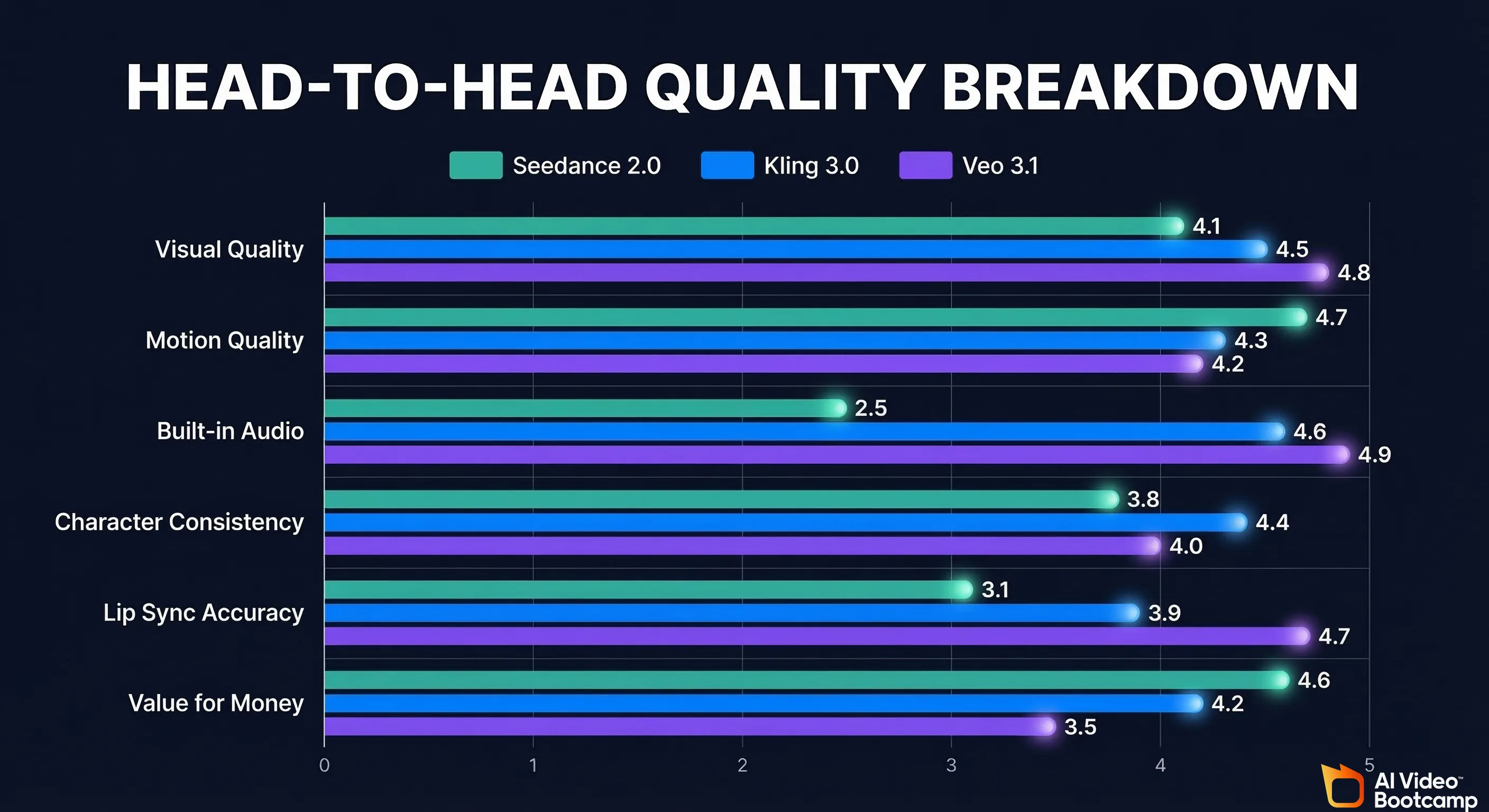
Veo 3.1 wins here, full stop. The footage has a cinematic warmth to it — natural depth of field, realistic lighting falloff, film grain that looks intentional rather than artificial. Skin tones are accurate. Fabric textures are detailed. It looks like footage from a professional camera with a good lens.
Kling 3.0 is a close second. The 3.0 update brought noticeably better lighting and textures compared to 2.5. Cinematic shots with specified camera language (crane shot, dolly zoom, etc.) look legitimately professional. Character faces are consistent and expressive. It doesn’t quite have Veo’s “premium feel” but honestly, 90% of viewers wouldn’t notice the difference.
Seedance 2.0 is impressive for its price point but sits slightly below the other two in raw visual polish. Colors can sometimes be slightly oversaturated, and fine details like hair or jewelry occasionally get a bit smudgy. That said, for social media content? It’s more than good enough. Most viewers will not notice the difference between Seedance and the other two on a phone screen.
Motion Quality
Seedance 2.0 actually takes the crown here. ByteDance’s motion synthesis engine produces the most natural-looking movement. Walking, running, dancing, fighting, subtle gestures — Seedance handles them all with fewer of the weird glitches and “AI wobble” that plague other tools. Characters move like real people rather than like video game NPCs.
Kling 3.0 is very good at motion, especially for cinematic slow movements. Camera movements are buttery smooth. But fast action scenes can still produce occasional artifacts — a hand that blurs oddly, a foot that doesn’t quite touch the ground right.
Veo 3.1 has good motion but it’s not the standout feature. It handles conversational scenes and moderate movement well, but intense action sequences aren’t its strongest suit. Where it shines is subtle movement — the way hair moves in wind, the way fabric drapes, the way light shifts as someone turns their head.
Audio Quality
Veo 3.1 dominates. The native audio generation is in a different league. Dialogue sounds natural, lip sync is under 120ms accuracy (you genuinely cannot tell it’s AI-generated in many cases), and ambient sounds are contextually appropriate. A scene in a coffee shop has background chatter and clinking cups. A forest scene has birds and rustling leaves.
Kling 3.0 now has native audio generation as of the 3.0 update, including dialogue in multiple languages, dialects, and accents. It’s good — a massive improvement over having to add audio separately. But the lip sync isn’t as tight as Veo’s, and dialogue can sometimes sound slightly robotic.
Seedance 2.0 does not currently have built-in audio generation. You’ll need to add audio separately using tools like ElevenLabs for voiceover, CapCut for sound effects, or other audio tools. This is its biggest weakness compared to the other two.
Character Consistency
Kling 3.0 wins. The Elements feature (upload up to 4 reference images) makes it possible to create a character and use them across multiple videos. Combined with the multi-shot storyboard feature, you can actually create short films with consistent characters. No other tool at this price point does this as well.
Veo 3.1 maintains good consistency within a single generation but doesn’t have an equivalent to Kling’s Elements feature for cross-video consistency.
Seedance 2.0 offers image-to-video which helps with consistency (upload a character photo, generate a video of them), but it doesn’t have the multi-reference system that Kling offers.
Summary Table
| Category | Seedance 2.0 | Kling 3.0 | Veo 3.1 |
|---|---|---|---|
| Visual Quality | ⭐⭐⭐⭐ | ⭐⭐⭐⭐½ | ⭐⭐⭐⭐⭐ |
| Motion Quality | ⭐⭐⭐⭐⭐ | ⭐⭐⭐⭐ | ⭐⭐⭐⭐ |
| Audio | ❌ (none built-in) | ⭐⭐⭐⭐ | ⭐⭐⭐⭐⭐ |
| Character Consistency | ⭐⭐⭐ | ⭐⭐⭐⭐⭐ | ⭐⭐⭐½ |
| Lip Sync | ❌ | ⭐⭐⭐½ | ⭐⭐⭐⭐⭐ |
| Value for Money | ⭐⭐⭐⭐⭐ | ⭐⭐⭐⭐½ | ⭐⭐⭐ |
Best For Beginners / Best For Quality / Best Value
🏆 Best for Beginners: Kling 3.0
If you’re just getting into AI video, start with Kling. Here’s why:
- The free tier is actually usable. You get 66 credits per day, which is enough to make a few test videos and learn how prompting works.
- The interface is clean and intuitive. No confusing settings, no technical jargon. Type a prompt, pick a style, hit generate.
- There are tons of tutorials. Because Kling has been around since 2024 and has over 6 million users, there’s a massive community. YouTube is full of Kling tutorials. Reddit has active communities. You won’t get stuck.
- The Standard plan is only $6.99/month. If you decide to go paid, the barrier is low.
- It does the most things. Text-to-video, image-to-video, multi-shot stories, audio generation, character consistency — Kling does it all in one place.
🏆 Best for Quality: Veo 3.1
If you have the budget and you want the absolute best output available in 2026, Veo 3.1 on the Ultra plan is the answer.
- The visual quality is unmatched
- The integrated audio (especially lip sync) eliminates an entire step in your workflow
- Google’s infrastructure means fast, reliable generation
- The output looks professional enough for client work, ads, and commercial projects
The catch: $249.99/month is a lot. This is for creators who are making money from their content and need premium quality. If you’re a hobbyist or just starting out, this is overkill.
Pro tip: Google AI Pro at $19.99/month gives you access to Veo 3 (not 3.1) which is still very good. If you want to try the Google ecosystem without the Ultra price tag, this is a reasonable entry point.
🏆 Best Value: Seedance 2.0
Dollar for dollar, Seedance 2.0 delivers the most impressive results for the least money.
- Pro access for ~$9–10/month
- 1080p output with no watermark
- The best motion quality of the three
- Good enough visual quality for social media, YouTube, and most content needs
The tradeoff is fewer features (no built-in audio, no multi-shot storyboarding, no character consistency system), but if you’re mainly making short clips for social media or creating eye-catching visuals, Seedance punches way above its weight.
Step-by-Step: How to Make Your First Video with Each Tool
How to Make Your First Video with Seedance 2.0
Step 1: Go to the platform Open your browser and head to Dreamina (dreamina.capcut.com) or one of the Seedance 2.0 platforms (like seedance2ai.app). Sign up with your email or Google account. No download needed.
Step 2: Choose your mode You’ll see two main options:
- Text-to-Video: Describe the video you want in words
- Image-to-Video: Upload a photo and Seedance will animate it
For your first video, try Text-to-Video.
Step 3: Write your prompt Here’s a good starter prompt to try:
“A young woman walking through a sunlit European street market, looking at colorful flower stalls, gentle breeze blowing her hair, cinematic, warm afternoon light”
Tips for better prompts:
- Describe the subject, action, setting, and lighting
- Include a mood or style (cinematic, documentary, dreamy, etc.)
- Be specific but not overly complicated
- Mention camera movement if you want one (slow pan, tracking shot, etc.)
Step 4: Set your options
- Choose your resolution (720p on free, 1080p on Pro)
- Choose clip length (typically 4–8 seconds)
Step 5: Hit Generate and wait Generation usually takes 1–3 minutes. Go grab a coffee.
Step 6: Review and download Watch your clip. If you like it, download it. If not, tweak your prompt and try again. The free tier lets you experiment with a few clips per day, so don’t stress about getting it perfect on the first try.
Step 7: Add audio (since Seedance doesn’t include it) Open CapCut or a similar editor, import your clip, and add:
- Background music (CapCut has a great free library)
- Sound effects
- Voiceover (use ElevenLabs if you want AI voice)
How to Make Your First Video with Kling 3.0
Step 1: Sign up at klingai.com/global/ Head to klingai.com/global/ and create an account. You’ll get free daily credits immediately.
Step 2: Choose your creation mode Kling gives you several options on the main dashboard:
- Text to Video — describe what you want
- Image to Video — upload a photo to animate
- Multi-Shot — plan multiple connected scenes (this is the advanced feature)
Start with Text to Video.
Step 3: Write your prompt Try something like:
“A chef in a professional kitchen, plating an elegant dessert, close-up shot of hands carefully placing a garnish, steam rising from the plate, warm kitchen lighting, cinematic”
Kling supports prompts up to 2,500 characters, so you can be very detailed.
Step 4: Configure your settings
- Mode: Choose Standard (10 credits, faster) or Professional (35 credits, higher quality). Start with Standard to learn.
- Duration: 5 seconds or 10 seconds
- Aspect Ratio: 16:9 (landscape), 9:16 (vertical/TikTok), or 1:1 (square)
Step 5: (Optional) Add camera movement Kling has preset camera controls: zoom in, zoom out, pan left/right, tilt up/down, and more. Pick one that fits your scene. For the chef example, a slow zoom-in works great.
Step 6: (Optional) Enable audio With Kling 3.0, you can toggle on audio generation. The AI will add appropriate sound effects, ambient noise, and even dialogue if your scene calls for it.
Step 7: Generate Click “Generate” and wait. Standard mode takes about 2–4 minutes, Professional mode takes 4–8 minutes.
Step 8: Review your video Watch it. Listen to the audio if you enabled it. Download what you like. Remember you can also extend clips using Kling’s video extension feature to create longer content (up to 3 minutes by chaining clips).
Bonus — Try the Elements Feature: Upload a photo of a face (your own, a stock photo, or an AI-generated character). Kling will remember that face and you can use it across multiple video generations. This is huge for creating consistent content series.
How to Make Your First Video with Veo 3.1
Step 1: Get a Google AI subscription Head to ai.google and sign up for Google AI Pro ($19.99/month) or Google AI Ultra ($249.99/month). Pro gives you Veo 3 access; Ultra unlocks the full Veo 3.1 experience.
Step 2: Open the video generation tool Once subscribed, navigate to the video generation feature within Google’s AI tools (it’s part of the Gemini ecosystem). The interface is clean and Google-typical.
Step 3: Write your prompt Veo responds exceptionally well to detailed, cinematic prompts. Try:
“Two friends having coffee at an outdoor café in autumn. One tells a joke and the other laughs naturally. Shallow depth of field, golden hour lighting, leaves falling in the background. Include natural conversation audio and ambient café sounds.”
Notice how we specifically asked for audio and conversation — Veo 3.1 will generate all of that together with the video.
Step 4: Choose your settings
- Resolution: 720p on Pro, up to 1080p on Ultra
- Duration: Up to 8 seconds per clip
- Model: Veo 3 (Pro) or Veo 3.1 (Ultra)
Step 5: Generate Hit generate and wait. Veo typically takes 2–5 minutes depending on complexity and queue position.
Step 6: Review — pay attention to the audio This is where Veo shines. Watch the clip with sound on. Notice how the dialogue matches the lip movements. Notice the ambient sounds. Notice how the laughter looks and sounds natural. This integrated audio-video generation is Veo’s superpower.
Step 7: Download and use Download your clip. Because the audio is already baked in, you may not need any additional editing for simple social content. For longer projects, import into CapCut or your editor of choice.
New Features in 2026 — What Just Changed
The AI video space is moving at breakneck speed. Here’s what each tool brought to the table in early 2026:
Seedance 2.0 (Released February 12, 2026)
- Brand new model: This is actually a new model, not an incremental update. Seedance 2.0 replaced the original Seedance with significantly improved quality across the board.
- Viral motion quality: The model’s ability to handle complex human motion (dancing, martial arts, sports) went viral within 72 hours of release.
- Global availability: Previously limited to China through Jimeng/Dreamina, the model is now accessible worldwide through various platforms.
- 1080p output: Up from 720p in the original model.
- Commercial licensing: Watermark-free output on Pro plans with commercial usage rights.
- What’s still missing: Native audio generation, multi-shot storyboarding, and a robust character consistency system. These are likely coming in future updates, but for now, Seedance is purely a video (no audio) generator.
Kling 3.0 (Released early February 2026)
- Native audio generation: The biggest addition. Kling 3.0 generates dialogue, sound effects, and ambient audio alongside video. Supports multiple languages, dialects, and accents.
- Multi-shot storyboarding: Plan and generate up to 6 connected shots with consistent characters and settings. This is a game-changer for storytelling.
- Extended duration: Up to 15 seconds per shot (up from 10 seconds in version 2.5). With the extension feature, you can still chain clips up to 3 minutes.
- Improved photorealism: Major upgrades to lighting, textures, and overall cinematic quality.
- Better character consistency: The Elements feature now works more reliably, especially for maintaining faces across multiple shots.
- Kling O3: A companion model focused on natural language video editing — describe what you want to change about an existing video and it modifies it. Still early, but exciting.
Veo 3.1 (Released early 2026)
- 4K support: Veo 3.1 can output at up to 4K resolution on the Ultra plan — the highest resolution of any mainstream AI video tool.
- Improved lip sync: Already the best in the industry, now refined to under 120ms accuracy. In practical terms: you cannot tell the dialogue is AI-generated in most cases.
- Multi-person dialogue: Veo 3.1 can handle scenes with multiple people talking, generating appropriate dialogue for each character with different voices.
- Enhanced ambient audio: The AI doesn’t just generate speech — it creates full soundscapes. A beach scene has waves, seagulls, and wind. A kitchen scene has sizzling, chopping, and background music.
- Faster generation: The “fast” model variant produces results in under 2 minutes for standard clips.
The Pros and Cons — Honest Assessment
Seedance 2.0
Pros:
- Best motion quality of any AI video tool right now
- Incredibly affordable (~$9/month for Pro)
- Free tier available without credit card
- 1080p quality that’s excellent for social media
- Simple, browser-based workflow
- ByteDance’s massive resources mean rapid improvement
Cons:
- No built-in audio (you need separate tools for voice/music/SFX)
- No multi-shot storyboarding
- Limited character consistency features
- Relatively new, so fewer community tutorials and resources
- The Dreamina platform can be confusing to navigate (it’s a Chinese platform with English support)
- Credits and pricing can be unclear across different third-party platforms
Kling 3.0
Pros:
- Most complete feature set of any AI video tool at this price
- Multi-shot storyboarding with character consistency is unique
- Native audio generation (new in 3.0)
- Generous free tier for learning
- Affordable entry point ($6.99/month)
- Massive community and tons of tutorials
- Camera controls are best-in-class
- Videos up to 3 minutes through extension
Cons:
- Credits expire monthly (use ‘em or lose ‘em)
- Professional mode burns through credits fast
- Customer support is essentially non-existent
- No refunds for failed generations (credits are gone)
- Audio quality lags behind Veo 3.1
- The best features (Kling 3.0 model) require Ultra subscription for early access
Veo 3.1
Pros:
- Highest visual quality available
- Best lip sync in the industry (under 120ms)
- Integrated audio generation is a massive time-saver
- 4K output option
- Google’s infrastructure means reliable, fast generation
- Multi-person dialogue scenes
- Full soundscape generation (not just dialogue)
Cons:
- Extremely expensive for full features ($249.99/month for Ultra)
- Pro plan ($19.99) only gets you Veo 3, not 3.1
- No character consistency system like Kling’s Elements
- No multi-shot storyboarding
- Shorter max clip length (8 seconds vs Kling’s 15)
- Locked into the Google ecosystem
- Overkill (and overpriced) for casual creators
Who Should Use What — The Honest Recommendation
You should use Seedance 2.0 if:
- You’re on a tight budget but want impressive results
- You mainly create short-form social media content (TikTok, Reels, Shorts)
- You’re already comfortable adding audio in CapCut or another editor
- Action scenes, dance videos, or dynamic motion is your thing
- You want the best value-per-dollar in AI video right now
- You don’t need multi-shot stories or built-in dialogue
Your workflow: Seedance for video → ElevenLabs for voiceover → CapCut for editing, audio, and final touches.
You should use Kling 3.0 if:
- You want one tool that does (almost) everything
- You’re creating content series with recurring characters
- You’re a beginner who wants to learn AI video with training wheels
- You’re making narrative content, short films, or story-based videos
- You need both video AND audio in one workflow
- You want good quality without a huge monthly bill
- You love having control over camera movements
Your workflow: Kling for video + audio → CapCut for final editing and polish.
You should use Veo 3.1 if:
- You’re a professional creator or business making money from video content
- Lip-synced dialogue is critical to your content (talking head videos, ads, presentations)
- You need the highest possible visual quality
- The $250/month price tag is a reasonable business expense for you
- You want audio and video generated together without any additional tools
- You’re creating ads, product demos, or client-facing content where quality can’t be compromised
Your workflow: Veo for complete video + audio → Light touch-up in your preferred editor if needed.
The Combo Approach (What Many Smart Creators Do)
Here’s what a lot of creators are actually doing in 2026: using more than one tool.
- Kling 3.0 ($6.99–$25.99/mo) as the daily driver for most content
- Seedance 2.0 (~$9/mo) for clips that need exceptional motion
- Veo 3.1 Pro ($19.99/mo) for when you need that premium look
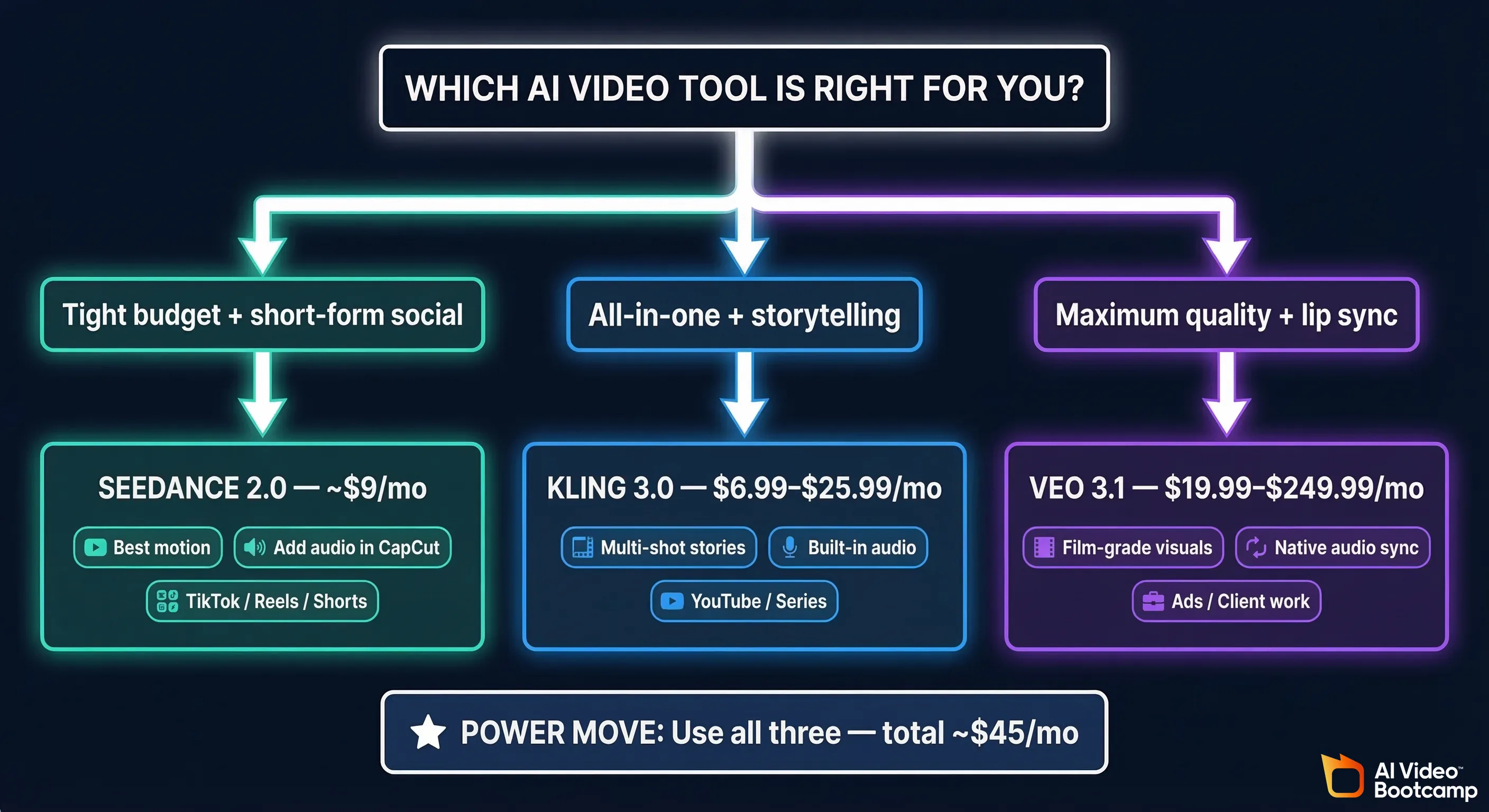
Total: $36–$55/month for access to three different AI video engines, each with different strengths. That’s less than one month of Veo Ultra, and you get more versatility.
Frequently Asked Questions
Q: Can I use these for commercial content? Yes, all three offer commercial usage rights on their paid plans. Seedance Pro, Kling Standard and above, and Google AI Pro/Ultra all allow commercial use. Always check the current terms of service, but as of February 2026, commercial use is permitted on paid tiers.
Q: Which one is best for YouTube videos? For YouTube specifically, Kling 3.0 is probably the best fit. The multi-shot storyboarding lets you create longer narrative content, the audio generation saves time, and the quality is easily good enough for YouTube. Pair it with CapCut for editing.
Q: Do I need a powerful computer? No! All three tools run in your web browser. The AI processing happens on their servers, not your computer. A basic laptop with internet access is all you need.
Q: How long are the generated videos?
- Seedance 2.0: Typically 4–8 seconds per clip
- Kling 3.0: Up to 15 seconds per shot, extendable to 3 minutes
- Veo 3.1: Up to 8 seconds per clip
For longer videos, you generate multiple clips and combine them in an editor like CapCut.
Q: What about Runway and Sora? Runway Gen-3 is still a solid tool and many creators love it, but it’s more expensive than Kling and Seedance for comparable quality. OpenAI’s Sora 2 is available but has been somewhat overshadowed by these three tools in early 2026. Both are worth checking out, but for this comparison, Seedance, Kling, and Veo are the three generating the most buzz (and results) right now.
Q: Can these replace a real video production? For certain types of content — absolutely. Social media clips, concept videos, storyboards, product mockups, educational content, ad concepts. For others — live events, interviews, documentary footage — you still need real cameras. Think of these tools as additions to your toolkit, not replacements for everything.
Final Recommendation
Here’s my honest take after weeks of testing all three:
If you can only pick one: Kling 3.0.
It’s the most well-rounded tool, the most accessible for beginners, and the most affordable for the feature set you get. The multi-shot storyboarding and character consistency features give it an edge that the other two don’t match. And with native audio in version 3.0, it covers nearly every use case.
If quality is everything and budget isn’t an issue: Veo 3.1 Ultra.
Nothing else produces this level of visual quality and audio integration. The lip sync alone is worth it if talking-head content is your bread and butter. But at $250/month, this is a professional tool for people who are earning from their content.
If you want the best deal in AI video: Seedance 2.0 Pro.
Under $10/month for motion quality that rivals or beats tools costing 5–25x more. Yes, you’ll need to add audio separately. Yes, it has fewer features. But the raw video output at this price point is incredible. If you’re scrappy, creative, and comfortable in CapCut, Seedance gives you the most bang for your buck.
My personal setup: I use Kling 3.0 Pro as my main tool, Seedance 2.0 for action/motion shots, and occasionally Veo 3.1 when I need that premium polish. Total monthly cost: about $45. And I’m producing content that would have cost thousands to film just two years ago.
The future of video creation isn’t about choosing one perfect tool. It’s about knowing which tool to reach for depending on what you’re making. And now you know.
Happy creating. 🎬
This article was last updated in February 2026. AI video tools change rapidly — pricing and features may have shifted since publication. Always check the official sites for current information.
Pricing sources: klingai.com/global/, Dreamina/Seedance platforms, Google AI subscription pages, and third-party pricing analyses from February 2026.