
Every “free AI video generator” article you’ve read is lying to you. Not maliciously — more like lying by omission. They list ten tools, each one described as “free,” and bury the truth three paragraphs deep: Runway gives you 125 credits one time (that’s roughly 25 seconds of video, total, forever). Hailuo used to be unlimited and now caps you at 3 clips per day. Luma’s free tier locks you into draft resolution with a fat watermark. Half the “free tools” in those articles are affiliate plays for $12–$30/month subscriptions.
We’re not doing that here.
This is the guide we wished existed when we started testing every AI video tool with a free tier. We’re going to be specific: exact credit limits, exact resolution caps, whether there’s a watermark, whether you can actually monetize the output. We’re going to separate the tools that are genuinely free from the ones running a free trial dressed up as a free plan. And we’re going to show you how to build a complete $0 video pipeline that actually works.
If you want the full paid-tool rankings, that’s over at our complete AI video generator rankings for 2026. This article is specifically about what you can do without spending a dollar.
Let’s get honest.
”Truly Free” vs. “Free Tier”: The Distinction Nobody Makes
This is the most important section of this article. Every other guide lumps these together. They shouldn’t.
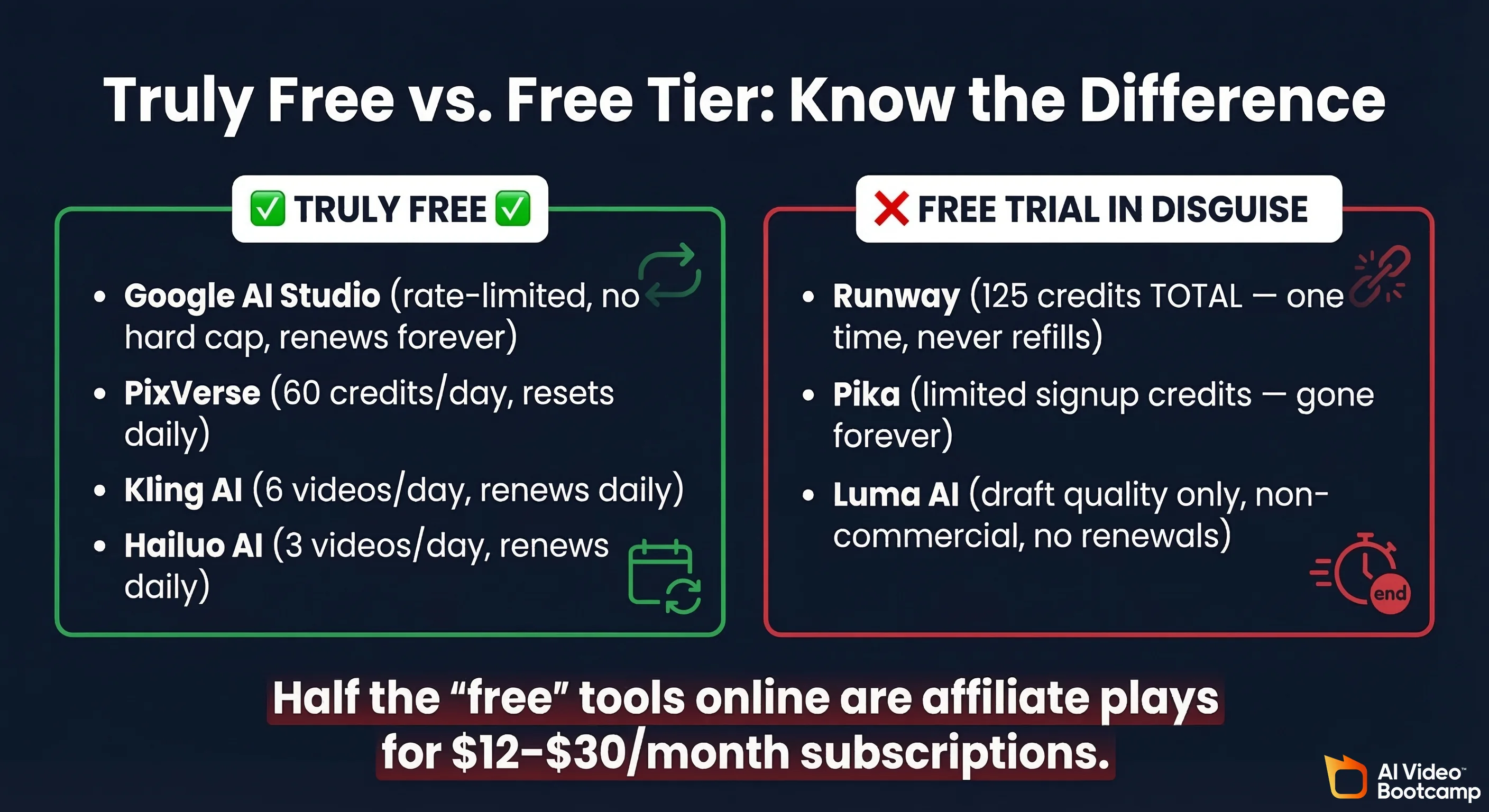
Truly free means you can use the tool indefinitely without paying. There may be rate limits or daily caps, but the tool doesn’t run out. You’re not burning through a one-time allotment that dries up after three test videos. For broader context on how free tools fit into the 2026 AI video market and competitive landscape, see our trends analysis.
Free tier means you get a small taste — often a one-time credit dump — designed to get you hooked so you subscribe. It’s a free trial with better marketing. The U.S. Federal Trade Commission’s updated Negative Option Rule (amended 2024) specifically requires that subscription conversion terms be disclosed “clearly and conspicuously” before any charge occurs — a standard most free-to-paid AI tool pipelines arguably don’t meet.
Here’s how the major tools actually break down:
The Truly Free Tools
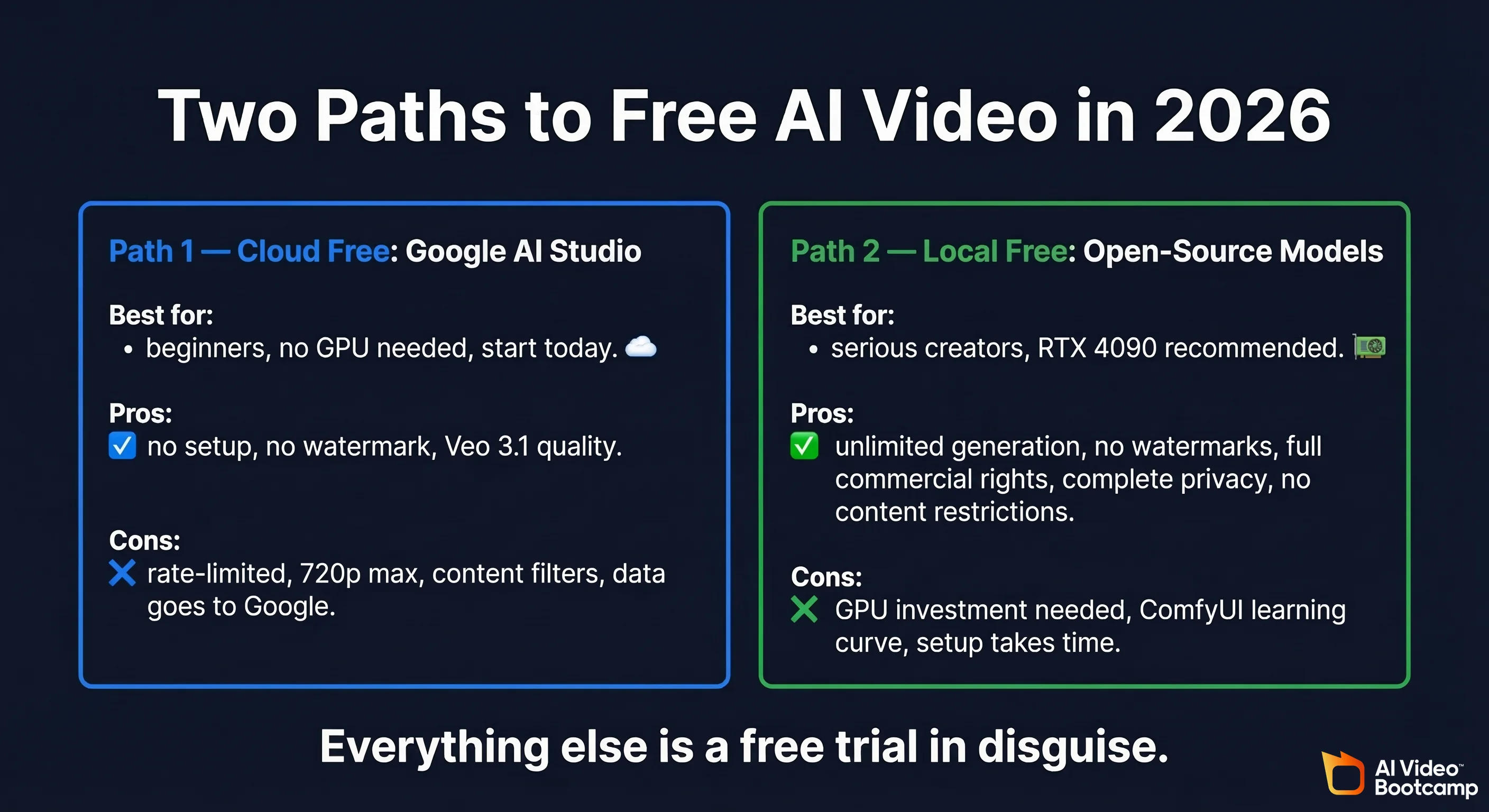
- Google AI Studio (Veo 3 / 3.1) — Free with a Google account. Rate-limited but no hard daily cap that depletes forever. No watermark. The best genuinely free option available right now.
- PixVerse — 60 free credits per day, resetting daily. That’s roughly 10 videos per day. Not unlimited, but it refills.
- Kling AI — Approximately 6 free videos per day. Watermarked. Basic models only. But it renews.
- Hailuo AI (MiniMax) — Around 3 videos per day now. Watermarked, 6-second clips, 720p. This used to be unlimited, which is how it built its reputation. Then they pulled the rug. Classic.
The “Free Tier” Bait
- Runway — 125 credits, one time. That’s not a monthly refresh. That’s your lifetime allotment. Gen-4 Turbo costs ~5 credits per second, so you’re looking at roughly 25 seconds of video total. You also can’t access Gen-4 Video on the free plan, you get a watermark, and you’re limited to 3 projects and 5GB of storage. The Standard plan is $12/month (annual billing) for 625 credits.
- Luma AI (Dream Machine) — “Free” but limited to draft resolution with watermarks, non-commercial license, low generation priority (meaning you wait longer), and 5-second max clip length. The Lite plan at $7.99/month still has watermarks. You need the Plus plan at $23.99/month to remove them and get commercial rights.
- Pika — Limited free credits on signup. That’s it. Once they’re gone, they’re gone.
- OpenAI Sora — Free tier exists but with very limited generations. More of a demo than a tool.
One Reddit user in r/StableDiffusion put it perfectly: they were looking for a “completely free and unrestricted text to video generator” and found nothing but fake free trials and credit limits that “aren’t enough for even one video.”
That frustration is universal. So let’s talk about what actually works.
Google AI Studio (Veo 3 / 3.1): The Best Free Option Nobody Covers Properly
If you search “free AI video generator,” Google AI Studio barely appears in the results. This is baffling, because it is — by a significant margin — the most generous truly-free video generation option available in 2026.
What You Get
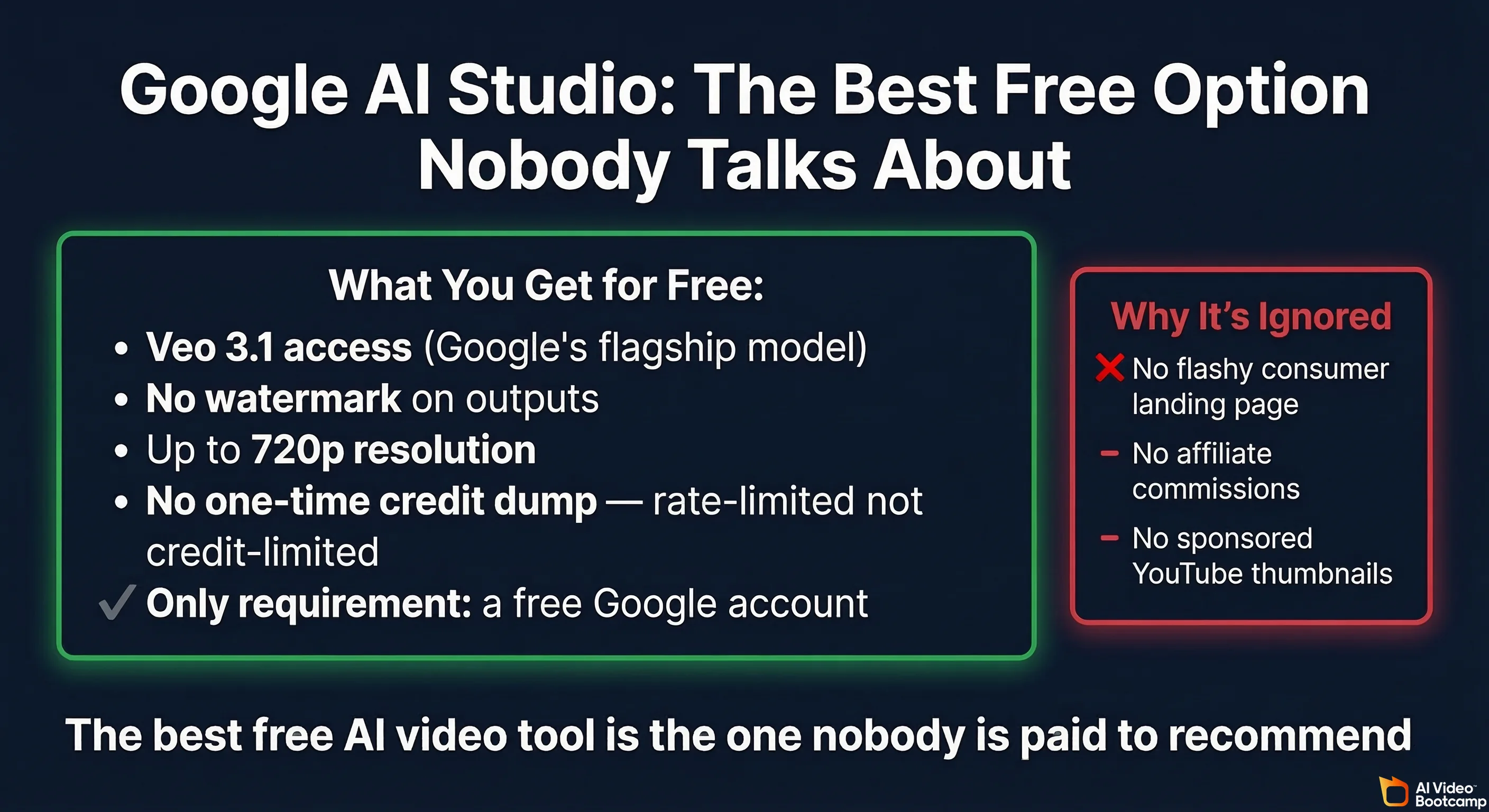
- Access to Veo 3 and Veo 3.1 — Google’s flagship video generation models
- No watermark on outputs
- Up to 720p resolution
- No one-time credit dump — it’s rate-limited, not credit-limited. You can keep generating.
- Only requirement: A Google account (free)
How It Works
Google AI Studio is primarily a developer playground for Google’s AI models, but video generation is built right in. You can do text-to-video directly. The interface isn’t as polished as Runway’s or Kling’s — it’s more of a developer tool than a consumer product — but the actual output quality from Veo 3.1 is competitive with tools charging $20+/month.
The Catches
There are limits, and we’ll be honest about them:
- Rate limiting: You can’t spam 100 generations in a row. Google throttles heavy usage, though the exact limits aren’t published and seem to adjust dynamically.
- 720p cap: You’re not getting 4K here. For YouTube Shorts and TikTok this is fine. For long-form 1080p content, you’ll need to upscale.
- No dedicated video editor: This is a generation tool, not a production suite. You generate clips and then edit them elsewhere.
- Google’s content policies apply: Aggressive content filtering. Forget NSFW. Some creative prompts get flagged.
Why It’s Underrated
Our theory: Google AI Studio is a developer tool first. It doesn’t have a flashy consumer landing page. It doesn’t sponsor YouTube thumbnails. It doesn’t run ads for “FREE AI VIDEO GENERATOR.” So the listicle writers — many of whom are running affiliate deals with Runway, Kling, and Pika — just… don’t mention it.
Meanwhile, a user on r/NewTubers posted about using Veo for YouTube Shorts and getting solid results, though they noted the 1,000-credit limit on the Flow platform (which is a separate product from Google AI Studio direct access).
If you’re making short-form content and want the best quality-to-cost ratio (where cost = $0), start here.
For a full beginner walkthrough on getting started with AI video, check our complete beginner guide.
Seedance 2.0: ByteDance’s New Free Contender
ByteDance (yes, the TikTok parent company) dropped Seedance 2.0 in February 2026, and the AI video community immediately took notice. One r/aivideo thread called it “the most advanced AI video generation model” and a YouTube video about it pulled 4,700 views in its first six days — strong numbers for a niche AI tool launch.
What We Know So Far
- Free tier is available at launch (standard playbook for new tools)
- Quality is reportedly very high — the early community comparisons are putting it against Kling 3.0 and Runway Gen-4
- ByteDance resources behind it — this isn’t some indie project. They have the compute and the data.
The Caveat
It’s brand new. Free tiers at launch are almost always more generous than they’ll be six months from now. Hailuo’s trajectory — unlimited at launch, then 3/day — is the template. Enjoy the free tier while it lasts, but don’t build a workflow around it being free forever.
We’ll update this section as we get more hands-on time. For detailed quality comparisons, check our full 2026 AI video generator rankings.
The Honest Free Tier Comparison Table
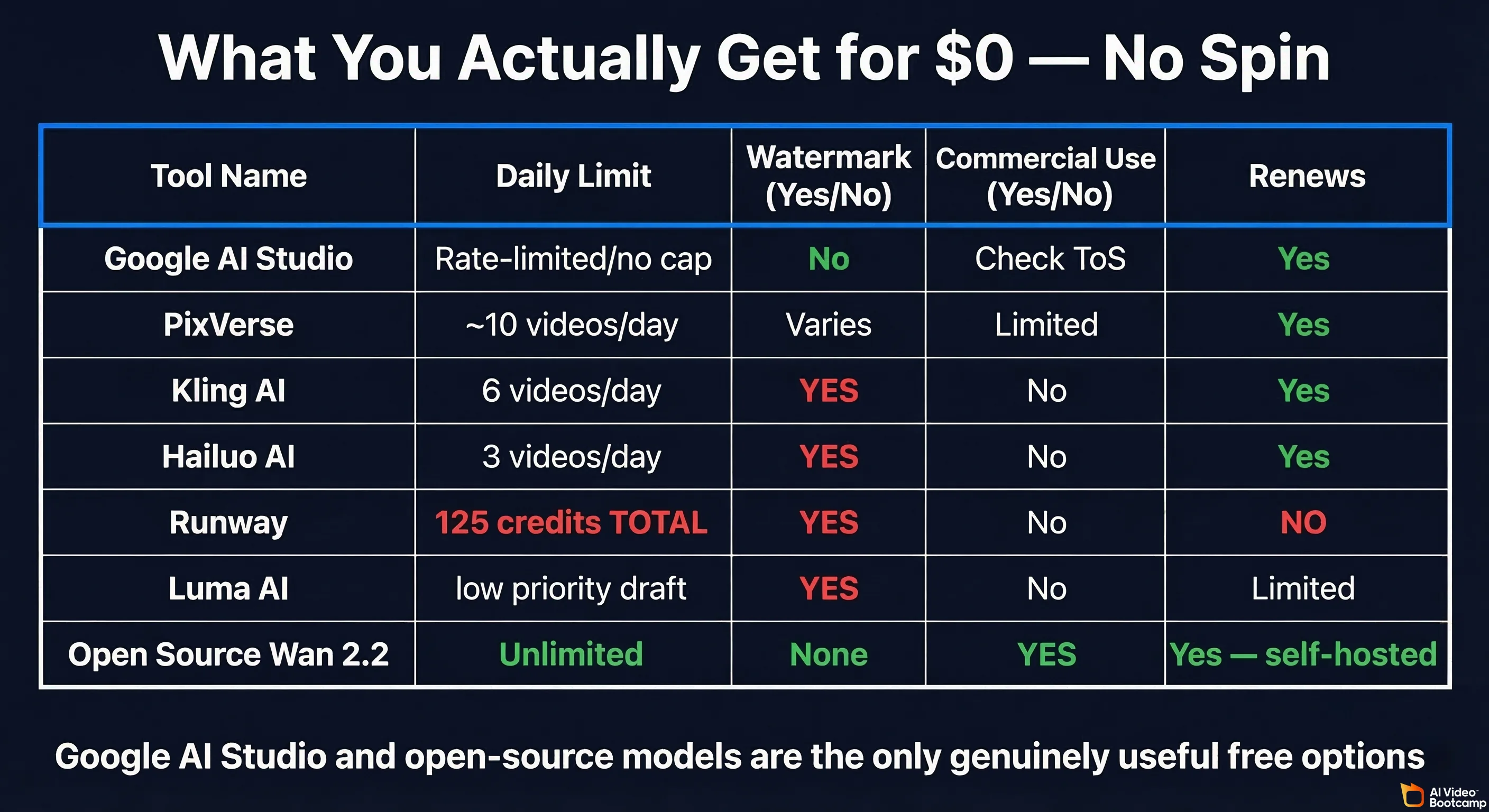
Here’s what you actually get for $0. No spin. No “generous free plan” language. Just numbers.
| Tool | Daily/Total Limit | Resolution | Watermark | Commercial Use | Max Clip Length | Renews? |
|---|---|---|---|---|---|---|
| Google AI Studio (Veo 3.1) | Rate-limited (no hard cap) | 720p | No | Check ToS | Varies | Yes (ongoing) |
| PixVerse | ~60 credits/day (~10 videos) | Up to 720p (free) | Varies | Limited | Standard | Yes (daily) |
| Kling AI | ~6 videos/day | 720p | Yes | No | Standard | Yes (daily) |
| Hailuo AI | ~3 videos/day | 720p | Yes | No | 6 seconds | Yes (daily) |
| Seedance 2.0 | Free tier (limits not yet confirmed) | Not yet confirmed | Not yet confirmed | Not yet confirmed | Not yet confirmed | Not yet confirmed |
| Runway | 125 credits TOTAL (≈25 sec) | 720p | Yes | No | ~5 sec | No |
| Luma AI | Limited (low priority) | Draft only | Yes | No | 5 seconds | Yes (limited) |
| Pika | Limited signup credits | 720p | Yes | No | Short | No |
| Sora | Very limited | Varies | Varies | No (free) | Varies | Limited |
| InVideo AI | Free plan available | 720p | Yes | No | Varies | Yes |
| Tencent Hunyuan | 6/day (2 HQ) | Good | No | Check ToS | Varies | Yes (daily) |
The takeaway: Google AI Studio and PixVerse are the most usable free options for ongoing work. Everything else either runs out permanently (Runway, Pika) or watermarks everything at low resolution (Kling, Hailuo, Luma).
Tencent Hunyuan Video deserves a mention — no watermark, solid quality, 6 videos per day — but it requires a Chinese phone number for web access. There are workarounds (guides exist), but it’s not friction-free for Western users.
Open-Source AI Video Models: The Actually Unlimited Option
If you have a decent GPU, open-source video generation models are the real “free and unlimited” answer. No watermarks. No daily caps. No credit systems. No terms of service restricting commercial use (check individual licenses, but most are permissive). No sending your prompts to someone else’s server.
The trade-off: you need hardware and some technical comfort. But in 2026, the setup is dramatically easier than it was even a year ago.
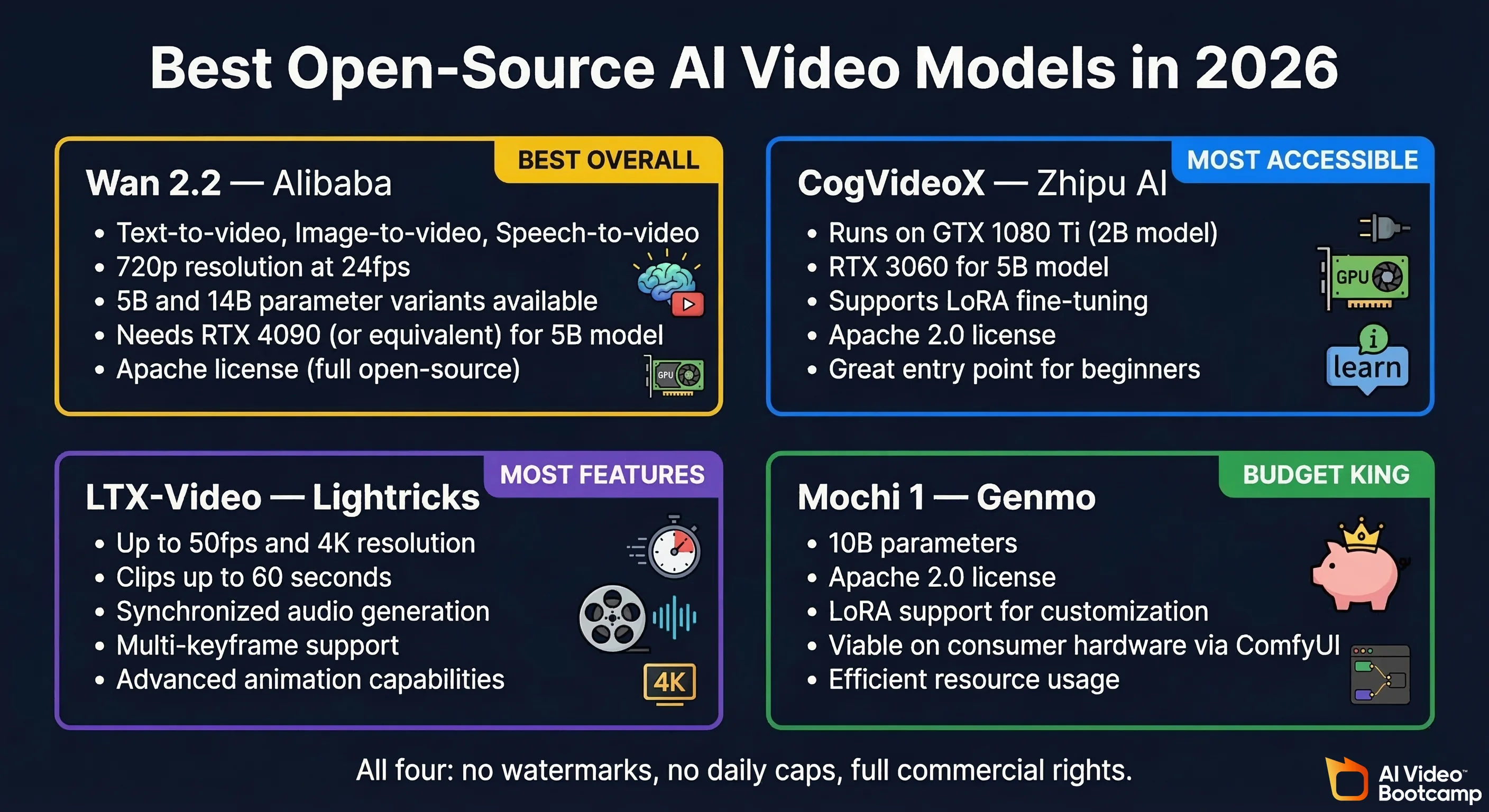
Wan 2.2 (Alibaba) — The Current King
When someone on r/StableDiffusion asked for a “free local model to generate videos”, the community’s answer was unanimous: Wan 2.2. The word “mind blowing” was used. Multiple times. NYU Shanghai’s AI research team independently documented it as a landmark advancement in democratizing cinematic-quality video generation.
What it offers:
- Text-to-video, image-to-video, speech-to-video, and character animation
- 5B parameter model (runs on consumer GPUs) and 14B model (needs pro hardware)
- 720p @ 24fps with cinematic aesthetics
- MoE (Mixture of Experts) architecture
- Full ComfyUI integration
- Diffusers (HuggingFace) integration
- Open source (permissive license)
VRAM requirements:
- Wan 2.2 5B: Runs on an RTX 4090 (24GB VRAM). With ComfyUI optimizations and offloading, some users report running it on 12GB cards, though generation is significantly slower.
- Wan 2.2 14B: Needs 48GB+ VRAM (A6000, dual GPUs, or cloud). Not a consumer GPU play.
The verdict: If you have an RTX 4090 or are willing to use cloud GPU services (which have their own free tiers), Wan 2.2 produces output that genuinely competes with $20/month commercial tools. The latest updates (July 2025 base, with Animate in September 2025 and speech-to-video in August 2025) have pushed it to a level that makes commercial tools nervous.
CogVideoX (Zhipu AI / THUDM) — The Accessible One
CogVideoX is the open-source model with the lowest hardware barrier to entry.
- CogVideoX-2B: Runs on a GTX 1080 Ti. Yes, a 1080 Ti. If you have any gaming GPU from the last 7 years, you might be able to run this.
- CogVideoX-5B: Needs an RTX 3060 or better (12GB+ VRAM)
- CogVideoX-1.5-5B: Higher resolution variant
- Supports text-to-video, image-to-video, and video continuation
- Apache 2.0 license (very permissive for commercial use)
- LoRA fine-tuning support for custom styles
- Diffusers integration
The quality isn’t Wan 2.2 level, but if you’re on older hardware, CogVideoX-2B is your best bet for local generation. The model architecture and benchmarks are described in the CogVideoX research paper (Yang et al., arXiv 2024).
LTX-Video (Lightricks) — The Feature-Rich One
LTX-Video is doing things the other open-source models aren’t:
- Up to 50 FPS and native 4K output
- Up to 60-second clips (most models max at 5-10 seconds)
- LTX-2 (October 2025) added synchronized audio generation — video and sound from the same model
- Multi-keyframe support, video-to-video, video extension
- Built-in ComfyUI support
- Open source
If you need longer clips or audio-synced output, LTX-Video is the open-source model to watch. Full technical specifications are in the LTX-Video research paper (arXiv:2501.00103); the LTX-2 audio-video model is described separately in arXiv:2601.03233.
Mochi 1 (Genmo)
- 10B parameter model, Apache 2.0 license
- 480x848 resolution, 31 frames
- LoRA fine-tuning support
- Requires serious VRAM (H100/A100 80GB natively, but ComfyUI offloading makes it viable on consumer hardware with patience)
- Good quality but Wan 2.2 has overtaken it in most benchmarks
Honorable Mentions
- Hunyuan Video (Tencent) — 13B parameters, open source, top-tier quality. Large model = large VRAM needs.
- VACE — Pairs with Wan 2.2 for enhanced generation capabilities
- Higgsfield AI — Local generation with GPU acceleration, avatars, and lip sync features
Local Setup Guide: Running AI Video on Your Own Machine
If you’ve never run an AI model locally, this section is your starting point. The ecosystem has matured enough that you don’t need a PhD in machine learning anymore — but you do need the right hardware.
What GPU Do You Need?
Let’s be specific:
| GPU | VRAM | What You Can Run |
|---|---|---|
| GTX 1080 Ti | 11GB | CogVideoX-2B (basic quality) |
| RTX 3060 | 12GB | CogVideoX-5B, Wan 2.2 5B (with heavy offloading, very slow) |
| RTX 3090 | 24GB | Wan 2.2 5B (comfortable), CogVideoX-5B, LTX-Video |
| RTX 4090 | 24GB | Wan 2.2 5B (fast), all smaller models easily |
| RTX 4090 x2 or A6000 | 48GB+ | Wan 2.2 14B, Mochi 1, Hunyuan Video |
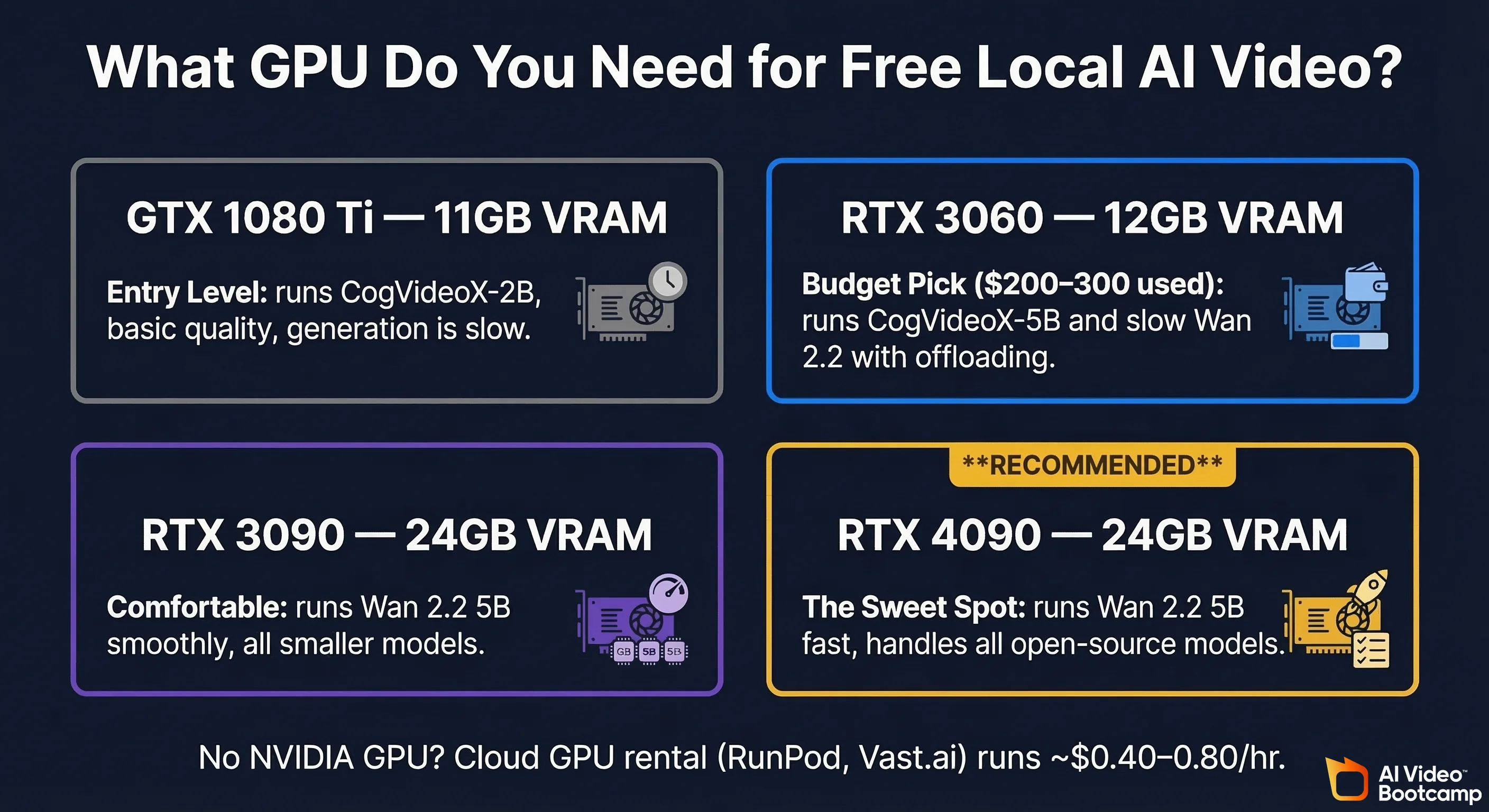
The sweet spot in 2026: An RTX 4090 (24GB). It runs the 5B variant of the best open-source model (Wan 2.2) at reasonable speeds, handles every other model comfortably, and can be found used for $1,200-$1,500.
Budget option: An RTX 3060 12GB ($200-300 used) will get you into local video generation via CogVideoX-5B and slow-but-functional Wan 2.2 with model offloading. Don’t expect fast generation, but it works.
ComfyUI: The Workflow Engine
ComfyUI is the standard tool for running local AI video generation. Think of it as a visual pipeline builder — you connect nodes to create generation workflows. Every major open-source video model has ComfyUI support.
Getting started:
- Install ComfyUI (Python-based, runs on Windows/Mac/Linux)
- Download the model weights for your chosen model (Wan 2.2, CogVideoX, LTX-Video, etc.)
- Install the corresponding ComfyUI custom nodes
- Load a community workflow (don’t build from scratch — the community shares excellent pre-built workflows)
- Generate
The learning curve is real but manageable. A weekend of tinkering will get you producing video. For detailed workflows, the r/StableDiffusion and r/comfyui communities are the best resources.
Pinokio: The 1-Click Option
If ComfyUI feels intimidating, Pinokio is a 1-click installer for local AI tools. Available on Mac, Windows, and Linux. It packages everything — the model, the interface, the dependencies — into a single install button.
The trade-off is less flexibility than ComfyUI, but for someone who just wants to generate video locally without debugging Python environments, it’s a legitimate option.
Cloud GPU Alternatives
Don’t have the hardware? Cloud GPU services let you rent a machine by the hour:
- Google Colab — Free tier includes GPU access (limited). Good for testing.
- RunPod, Vast.ai, Lambda — Rent an RTX 4090 for roughly $0.40-$0.80/hour. Not free, but a few dollars gets you hours of generation time.
- Hugging Face Spaces — Some community-hosted demos run for free (with queues)
The AMD GPU Problem
If you have an AMD GPU, you’ve probably already discovered the bad news: most AI video generation tooling assumes NVIDIA. CUDA is the default. ROCm (AMD’s equivalent) support exists but is spotty, poorly documented, and frequently broken.
Reddit threads from AMD users looking for local AI video solutions are some of the most frustrated posts in the space. One user on r/StableDiffusion posted specifically about wanting a “simple video generator free local” for their AMD GPU — wanting just basic 5-10 second realistic clips — and the honest answers were grim.
What Actually Works on AMD
- CogVideoX via PyTorch ROCm — the most compatible option, especially the 2B model
- ComfyUI has experimental ROCm support, but expect troubleshooting
- DirectML (Windows) provides some AMD compatibility for certain models
- CPU-only generation — technically possible but agonizingly slow (think hours per clip)
The Real Advice
If you’re serious about local AI video generation and you’re buying a GPU for it: get NVIDIA. We know that’s not the answer AMD users want to hear, but it’s the honest one. The entire ecosystem — ComfyUI, Diffusers, PyTorch’s best-optimized paths — is built on CUDA. A $300 used RTX 3060 will outperform a $500 AMD card for this specific workload.
If you’re stuck on AMD and can’t switch, cloud GPUs are your best workaround. Rent an NVIDIA card by the hour when you need to generate.
The $0 Budget Pipeline: Free Video Production End-to-End
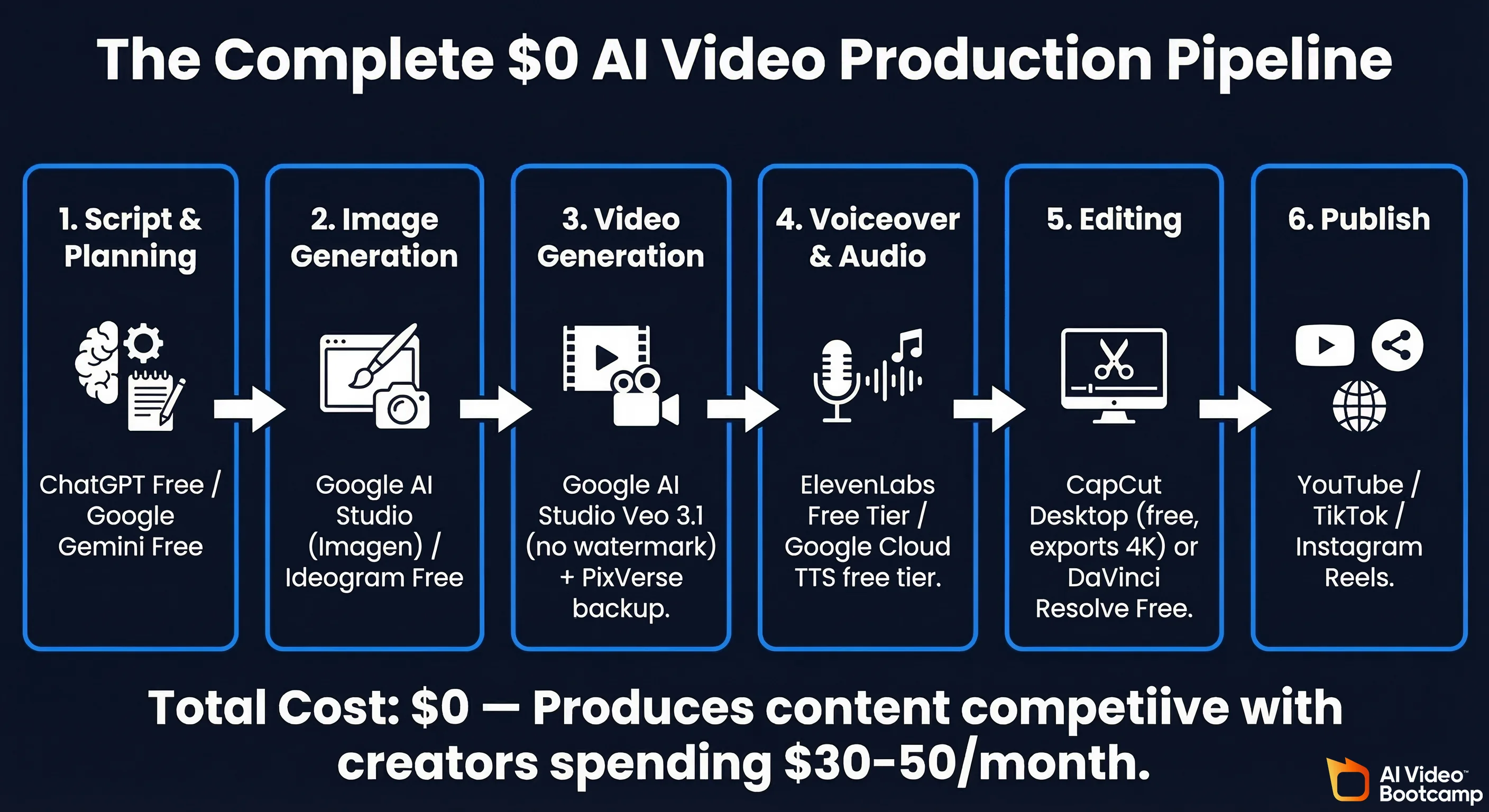
Alright, let’s build a complete video production workflow that costs nothing. This is a real pipeline that produces publishable content.
Step 1: Script & Planning
- ChatGPT Free / Google Gemini Free / Claude Free — Write your script, outline your scenes, generate prompts
- Cost: $0
Step 2: Image Generation (for thumbnails, reference images, image-to-video inputs)
- Google AI Studio (Imagen) — Free image generation
- Ideogram Free Tier — Good for text-in-image
- Leonardo.ai Free Tier — Daily free credits
- Cost: $0
Step 3: Video Generation
- Google AI Studio (Veo 3.1) — Primary video generation. No watermark, best free quality.
- PixVerse — Backup for additional clips (~10/day)
- Kling AI — Third option if you need more (watermarked)
- Cost: $0
Step 4: Voiceover & Audio
- ElevenLabs Free Tier — Limited free text-to-speech (high quality but small allocation)
- Google Cloud TTS Free Tier — 1M characters/month free
- Coqui TTS (open source) — Run locally for unlimited TTS
- Cost: $0
Step 5: Editing
- CapCut (desktop) — Fully free video editor with timeline editing, effects, transitions, text overlays. Exports up to 4K. This is the free editor that actually competes with paid tools.
- DaVinci Resolve Free — Professional-grade editor, free version handles everything most creators need
- Cost: $0
Step 6: Publish
- YouTube, TikTok, Instagram Reels — Free to upload and publish
- Cost: $0
Total cost: $0. This pipeline produces content that’s competitive with creators spending $30-50/month on tools. The main limitation is volume — free tiers limit how many clips you can generate per day — and resolution (720p from most free sources vs. 1080p+ from paid).
Can You Monetize Free AI Videos on YouTube?
This is one of the most-asked questions we see, especially from faceless channel creators on r/NewTubers. The short answer: it depends on the tool’s terms of service, and most free tiers explicitly prohibit commercial use.
Commercial Use Rights by Tool
| Tool | Free Tier Commercial Use? | Paid Tier Commercial Use? |
|---|---|---|
| Google AI Studio | Check current ToS (generally permissive) | N/A (it’s free) |
| Runway | No (free tier) | Yes (Standard+) |
| Kling AI | No (free tier) | Yes (paid plans) |
| Hailuo AI | No (free tier) | Yes (paid plans) |
| Luma AI | No (explicitly non-commercial) | Yes (Plus plan, $23.99/mo) |
| Pika | No (free tier) | Yes (paid plans) |
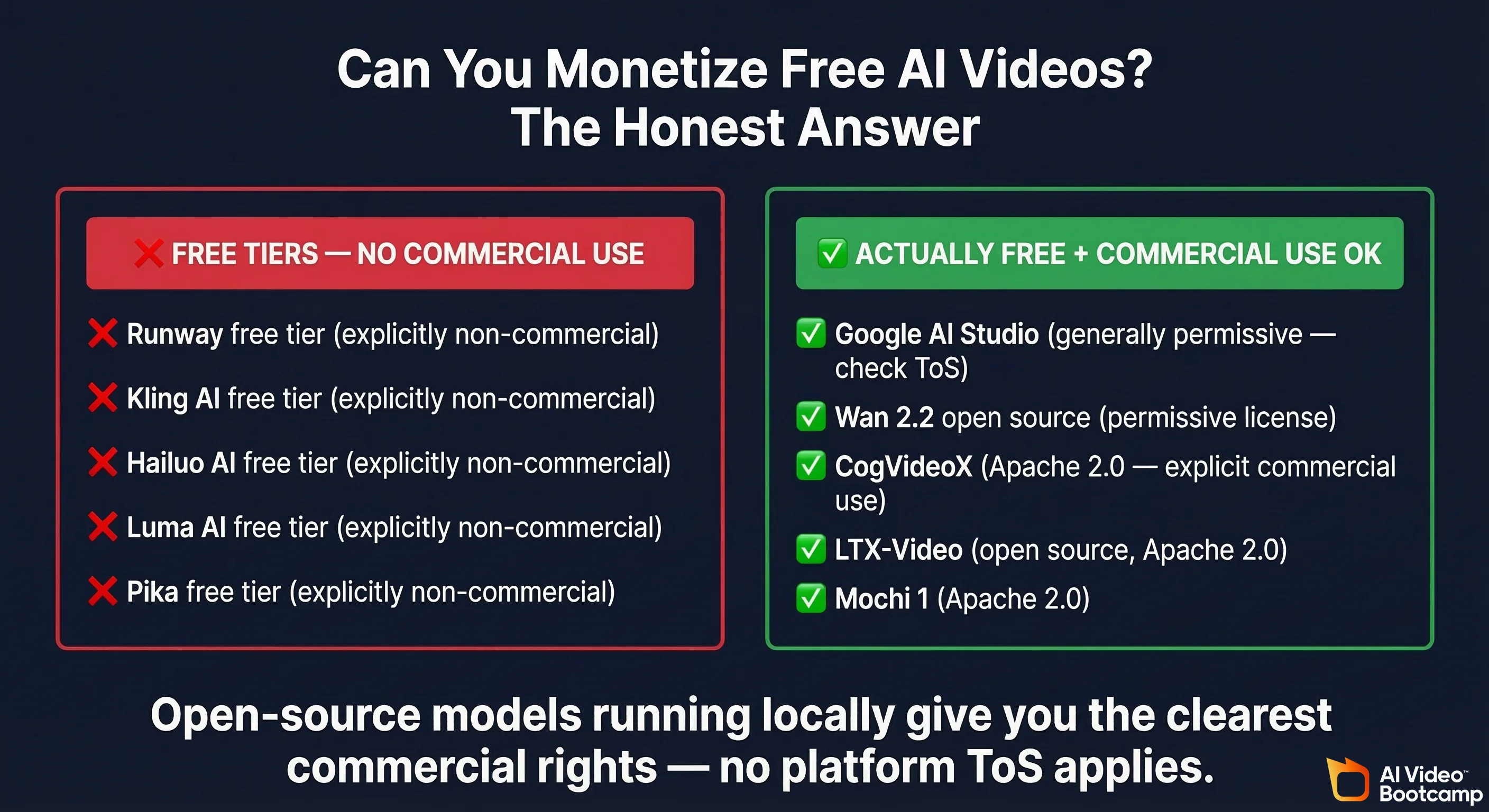
| Open Source (Wan 2.2, CogVideoX, LTX-Video) | Yes (check individual licenses — Apache 2.0, etc.) | N/A |
The big insight here: Open-source models running locally give you the clearest commercial use rights. Apache 2.0 (CogVideoX, Mochi, LTX-Video) explicitly allows commercial use. Wan 2.2’s license is permissive. You generated it on your hardware — no platform ToS applies.
Cloud-based free tiers almost universally restrict commercial use. If you’re building a monetized YouTube channel on free-tier AI video, you’re technically violating terms of service. Will they come after you? Probably not for small channels. But it’s a risk.
The Real Cost of “Free”
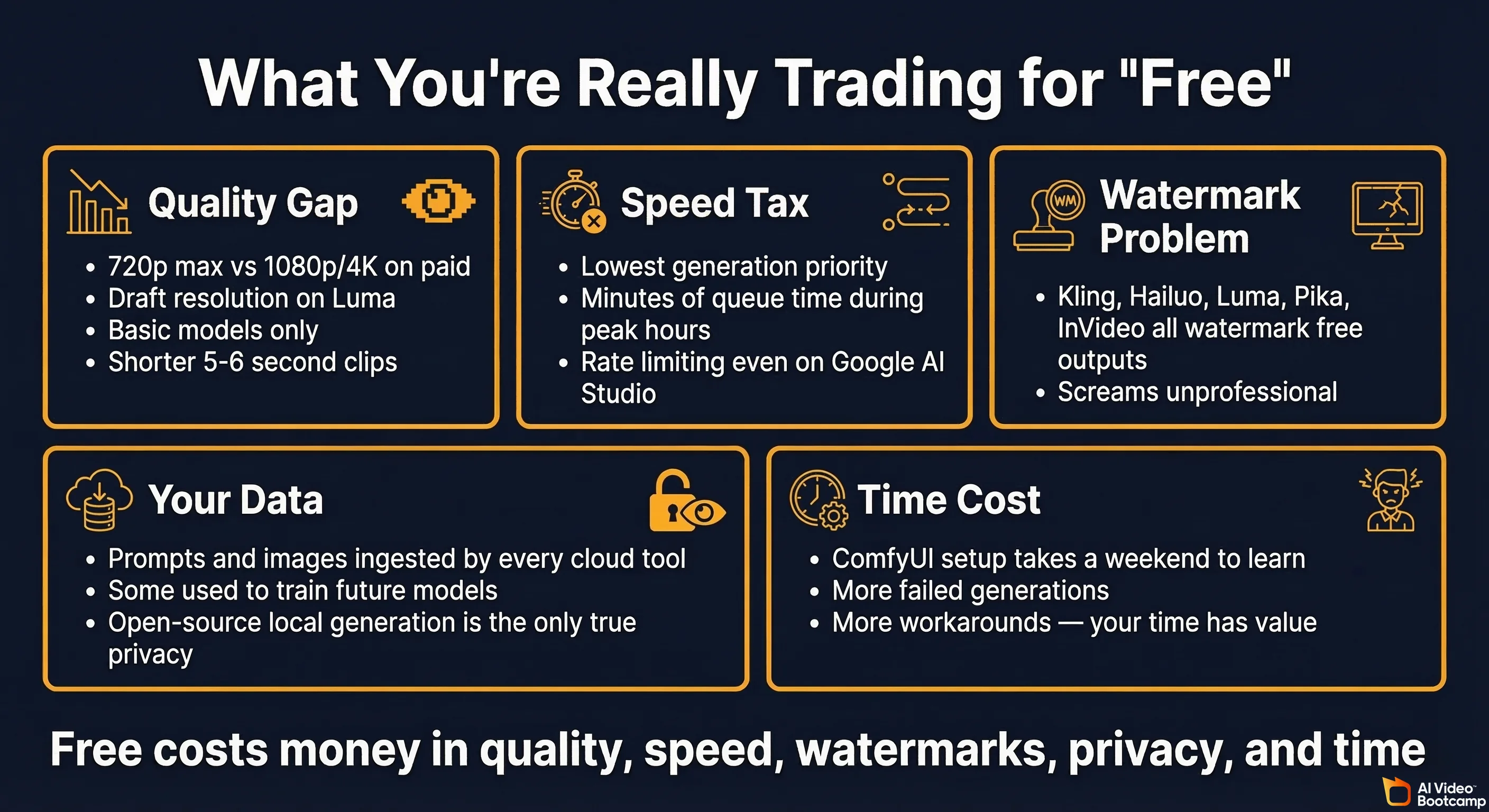
Nothing is truly free. Even the genuinely free tools extract value from you. Here’s what you’re trading:
Quality Gaps
- 720p max on most free tiers vs. 1080p or 4K on paid plans
- Draft resolution on Luma’s free tier (visibly lower quality)
- Basic models only — free tiers often lock you out of the latest, highest-quality models
- Shorter clips — 5-6 second maximums vs. 10-15+ seconds on paid
Speed & Priority
- Queue times — Free users get lowest generation priority. During peak hours, you might wait minutes or tens of minutes for a clip that paid users get in seconds.
- Rate limiting — Even Google AI Studio throttles heavy free usage
Watermarks
- Kling, Hailuo, Luma, InVideo, Pika — all watermark free-tier output. A watermark on your YouTube video screams “I didn’t pay for this tool,” which isn’t the vibe most creators want.
Data & Privacy
- Every cloud-based tool ingests your prompts and potentially your images. Some use your data to train future models (check each tool’s privacy policy).
- Open-source local generation is the only option with true data privacy — your prompts never leave your machine.
Content Restrictions
- Cloud tools enforce content policies. Some are aggressive — Google filters are notably strict. Others are more lenient. If you need full creative freedom (not just NSFW — think violence in a film project, medical content, controversial topics), local open-source models are your only path.
The Time Tax
- Setting up local generation takes hours (initial setup) to days (optimization, learning ComfyUI)
- Free cloud tiers mean more waiting, more failed generations, more workarounds
- Your time has value, even if you’re not paying money
Tool-by-Tool Quick Takes
Pollo.ai — The Aggregator Play
Pollo.ai gives you a single interface to access multiple models (Pika, Runway, Kling, Luma, Hailuo, and others) through one account. Their free tier lets you test different engines without creating accounts everywhere. Interesting for comparison shopping, less useful as a primary production tool.
InVideo AI
Free plan available with watermark and 720p max. More of a template-based video maker than a pure AI generation tool. Better suited for marketing videos and presentations than creative AI video generation.
Tencent Hunyuan Video
6 free videos per day (2 high-quality), no watermark, genuinely good output quality. The catch: requires a Chinese phone number for web access. The open-source version is available on GitHub (13B parameters) if you have the hardware to run it locally.
CapCut’s AI Features
CapCut is primarily a video editor (and an excellent free one), but it’s been adding AI generation features. The AI capabilities are limited compared to dedicated generators, but if you’re already editing in CapCut, having basic AI features built in saves workflow steps.
Frequently Asked Questions
Is there a completely free AI video generator?
Yes. Google AI Studio (Veo 3.1) is genuinely free with a Google account — no credit card, no one-time credit dump, no watermark. It’s rate-limited but doesn’t run out. For truly unlimited generation, open-source models (Wan 2.2, CogVideoX, LTX-Video) running locally on your own hardware are the real answer — though you need a decent GPU.
What is the best free AI video generator without a watermark?
Google AI Studio doesn’t watermark free outputs. For local generation, no open-source model adds watermarks — you’re generating on your own machine. Among cloud tools with daily renewal, Tencent Hunyuan doesn’t watermark but requires a Chinese phone number.
How many free videos can I make with Runway?
125 credits, one time, total. At roughly 5 credits per second for Gen-4 Turbo, that’s approximately 25 seconds of video for your entire account lifetime. It’s a free trial, not a free tool.
Is Sora free?
OpenAI offers a limited free tier for Sora, but the generations are very restricted. It’s more of a demo than a usable free tool. For what Sora charges on its paid plans, Google AI Studio gives you comparable quality for free.
What GPU do I need to run AI video generation locally?
Minimum viable: GTX 1080 Ti (11GB VRAM) for CogVideoX-2B. Recommended: RTX 4090 (24GB VRAM) for Wan 2.2 5B and comfortable generation of all smaller models. Budget option: RTX 3060 12GB ($200-300 used) runs CogVideoX-5B and slow Wan 2.2 with offloading.
Can I use AI-generated videos for YouTube monetization?
YouTube currently allows AI-generated content for monetization, but requires disclosure under their synthetic content policy — failure to disclose can result in content removal or suspension from the YouTube Partner Program. The bigger issue is tool terms of service — most free tiers explicitly prohibit commercial use. Open-source models with permissive licenses (Apache 2.0) are the safest bet for commercial use.
What’s the best free AI video generator for beginners?
Google AI Studio for the simplest cloud-based experience with good quality. PixVerse for daily-renewing credits with an easy interface. If you want to learn local generation, Pinokio offers 1-click installation of open-source models. For a full walkthrough, see our complete beginner guide to making AI videos.
Can I make unlimited AI videos for free?
Only with local open-source models on your own hardware. No cloud service offers truly unlimited free generation. The closest is Google AI Studio, which doesn’t have a hard cap but does rate-limit heavy usage.
Do free AI video generators add watermarks?
Most do. Runway, Kling, Hailuo, Luma, Pika, and InVideo all watermark free-tier outputs. Google AI Studio and local open-source models do not.
Is there a free AI video generator with no sign up?
Some Hugging Face Spaces demos let you generate without an account, but the quality and reliability are inconsistent. Practically speaking, a Google account (for AI Studio) is the lowest-friction option — and you probably already have one.
The Bottom Line
The free AI video landscape in 2026 has exactly two genuinely good options:
-
Google AI Studio (Veo 3.1) — The best cloud-based free option. No watermark, decent quality, ongoing access. Start here if you just want to generate video without spending money or installing anything.
-
Open-source models (especially Wan 2.2) running locally — The best option period if you have the hardware. Unlimited generation, no watermarks, full commercial rights, complete privacy, no content restrictions. The RTX 4090 + ComfyUI + Wan 2.2 5B stack is producing output that embarrasses $20/month subscriptions.
Everything else is either a free trial in disguise (Runway, Pika), an increasingly stingy daily allowance (Hailuo, Kling), or a draft-quality watermark machine (Luma).
The tools that were generous are getting less generous. The open-source models are getting better. The trajectory is clear: if you want truly free, learn to run models locally — or use Google AI Studio while it’s still this generous.
Because if there’s one thing we’ve learned watching this space: free tiers only shrink.
Want the full picture including paid tools? Read our complete 2026 AI video generator rankings. Building your first AI video? Start with our beginner guide.
Sources & References
- Veo — Google DeepMind — Official Veo model page, Google DeepMind
- Introducing Veo 3.1 and new creative capabilities in the Gemini API — Google Developers Blog
- Negative Option Rule — Federal Trade Commission — FTC.gov
- Click to Cancel: FTC’s amended Negative Option Rule (2024) — FTC.gov
- Disclosing use of altered or synthetic content — YouTube Help — support.google.com
- YouTube Partner Program overview & eligibility — support.google.com
- Apache License, Version 2.0 — Apache Software Foundation
- Wan 2.2 — Official GitHub Repository — Wan-Video (Alibaba)
- Wan 2.2: Alibaba’s Open-Source Breakthrough in AI Video Generation — NYU Shanghai Research IT
- CogVideoX: Text-to-Video Diffusion Models with An Expert Transformer — Yang et al., arXiv:2408.06072 (2024)
- LTX-Video: Realtime Video Latent Diffusion — arXiv:2501.00103 (2025)
- LTX-2: Efficient Joint Audio-Visual Foundation Model — arXiv:2601.03233 (2025)