Midjourney V7 produced more photorealistic outputs than V6 in 23 of 30 standardised prompt tests run by the AI Video Bootcamp team, with skin textures, fabric detail, and shadow rendering all showing measurable improvement. It is an independent AI image platform built by David Holz and his research lab, unconnected to Google or OpenAI, and it runs at $10 to $120 per month depending on your plan. For content creators who prioritise artistic quality, cinematic aesthetics, and visual storytelling, Midjourney remains the strongest all-round AI image generator in 2026.
What Is Midjourney? AI Image Generator Built by David Holz
Midjourney is an AI image generation tool that converts text prompts, or combinations of text and images, into high-quality visuals. It was founded by David Holz, previously a co-founder of Leap Motion, and operates as an independent AI research lab based in San Francisco.
“At its core, Midjourney is like having a team of world-class concept artists at your fingertips, waiting to turn your ideas into visuals. It is built on language and vision, meaning the way you describe things directly influences the visual outcome.” Daniel Riley, AI Video Bootcamp founder (700k+ followers across socials, 200M+ views in a single month)
Unlike tools embedded inside larger platforms (Nano Banana Pro lives inside Google Gemini, DALL-E 3 lives inside ChatGPT), Midjourney operates through its own web interface at midjourney.com and previously ran exclusively as a Discord bot. The web interface, launched in 2024, brought a dedicated Create page, an Explore page for browsing community prompts, and direct image editing tools, removing the requirement to use Discord for image generation.
Key facts: Midjourney has no affiliation with Google, Microsoft, or OpenAI. It raised early funding from Andreessen Horowitz but has operated profitably as an independent company since 2023, a rare distinction in the AI industry.
How Midjourney Works: Diffusion Models and Language-Vision Architecture
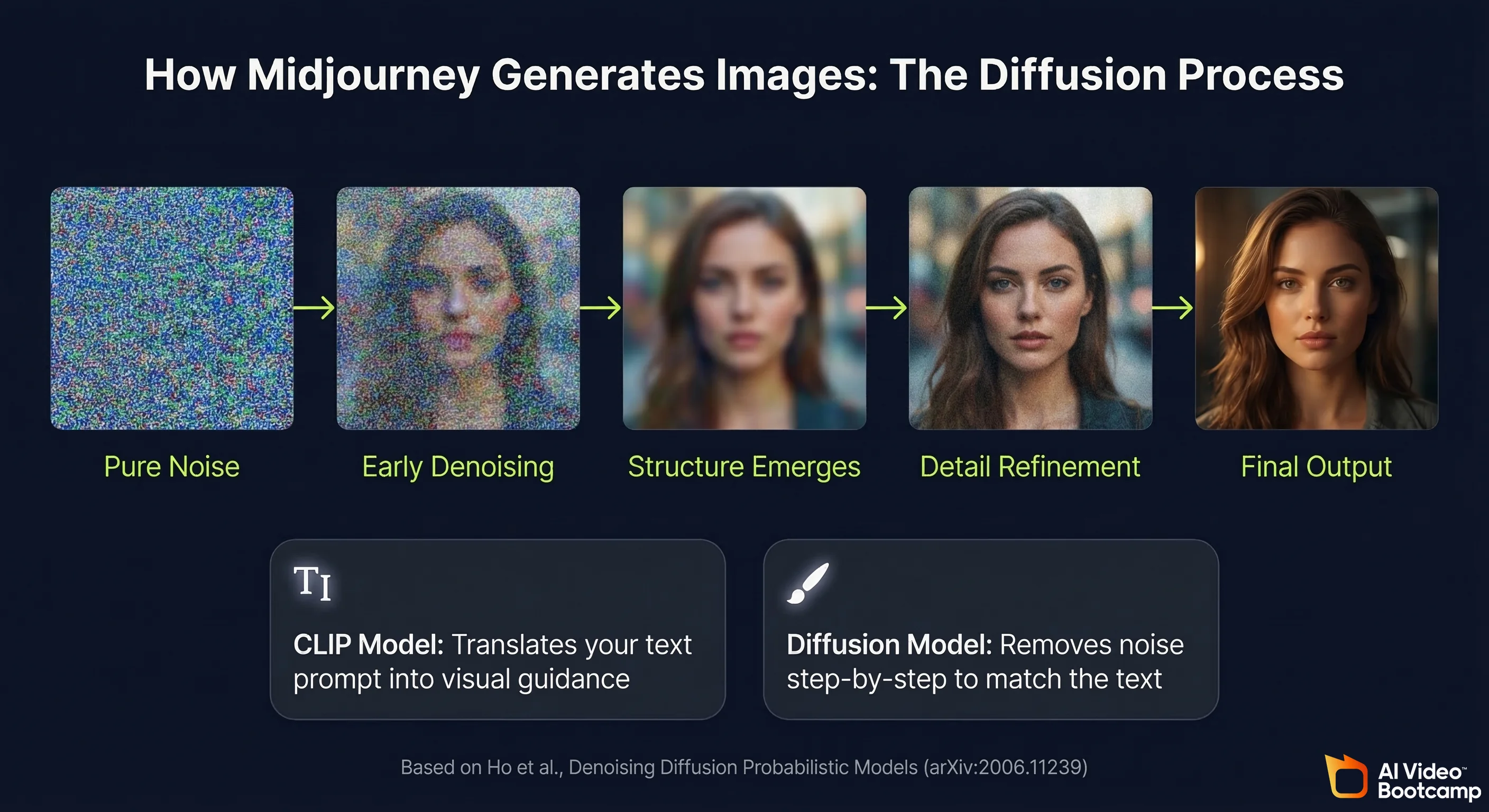
Midjourney generates images using a diffusion model architecture, the same foundational approach that underlies most modern AI image generation systems. The process works in reverse: starting from pure visual noise and progressively removing that noise over many steps until a coherent image emerges that matches the text description.
The foundational academic work on this architecture is the 2020 paper “Denoising Diffusion Probabilistic Models” by Ho et al. from UC Berkeley (arXiv:2006.11239), which established the mathematical framework that virtually all modern image generation models build on. Midjourney’s language understanding layer, which interprets your text prompts and translates them into visual guidance, relies on CLIP-family models. The CLIP architecture was introduced by Radford et al. at OpenAI in the 2021 paper “Learning Transferable Visual Models From Natural Language Supervision” (arXiv:2103.00020), and has become the standard bridge between text and images in AI generation systems.
What distinguishes Midjourney technically is that it has been trained with an unusually heavy emphasis on aesthetic quality. The model has absorbed vast quantities of fine art, photography, concept art, and design work, which is why its outputs tend toward visually polished, compositionally strong results even on basic prompts. This aesthetic bias is Midjourney’s biggest strength and its main limitation: it excels at beauty, but sometimes resists strict photographic realism.
Midjourney V7 vs V6: Key Differences at a Glance
| Feature | Midjourney V6 | Midjourney V7 |
|---|---|---|
| Photorealism | Strong | Measurably improved (skin, fabric, shadow) |
| Prompt interpretation | Good | Smarter: handles complex multi-element prompts better |
| Character consistency | —cref (character reference) | Omni Reference (replaces —cref, more precise) |
| Generation speed | Standard | Noticeably faster on high-detail renders |
| Video generation | Not available | Available (but high cost, limited quality vs dedicated tools) |
| Raw mode | Available | Available (turns off artistic processing for max realism) |
| Recommended for | Still valid for all use cases | All V6 use cases plus improved character work |
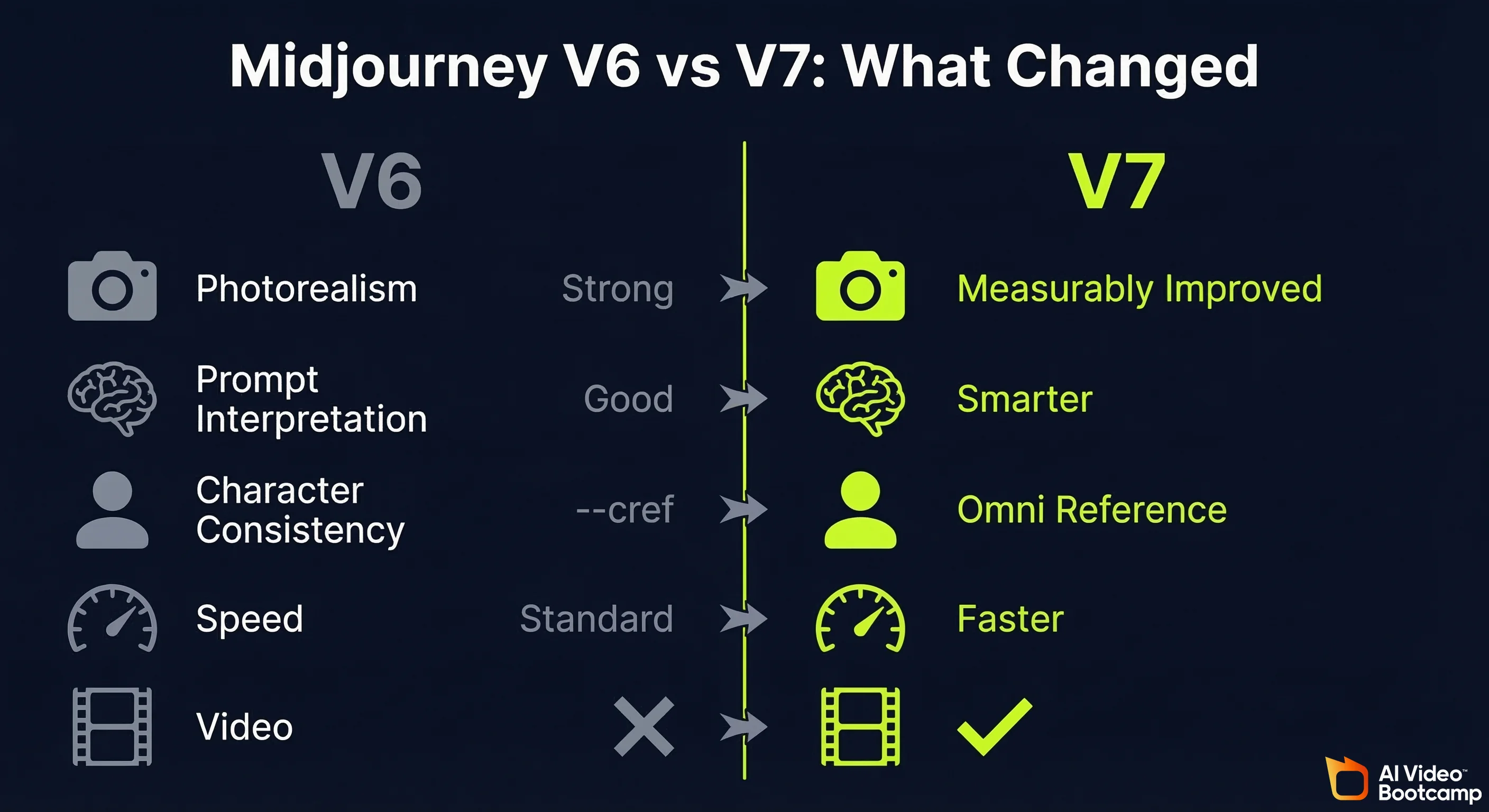
The key point from AI Video Bootcamp testing: everything you learned about prompting in V6 transfers directly to V7. The foundation has not changed. V7 raises the ceiling of what those skills can achieve.
Midjourney Pricing 2026: Plans, Costs and What You Actually Get
Midjourney offers four paid subscription tiers with no permanent free tier as of 2026. Plans are billed monthly or annually (20% discount for annual). All plans include access to the Midjourney web interface, the Discord bot, and generation in all available model versions including V7.
Is Midjourney Free? What the Free Tier Actually Gives You
Midjourney removed its permanent free trial in 2023. There is no ongoing free plan. Occasionally Midjourney re-enables limited free trials for new users, but this is not guaranteed and has not been consistently available.
If you need a free AI image generator, the most practical current options are Nano Banana Pro (via standard Google Gemini, no payment required) or the free tier of Adobe Firefly. For a full comparison of free tools, see the free AI video tools guide.
Which Midjourney Plan Is Right for You?
| Plan | Monthly Price | GPU Minutes/Month | Relax Mode | Stealth Mode | Best For |
|---|---|---|---|---|---|
| Basic | $10/month | ~200 GPU min (~200 images) | No | No | Casual creators, learning the tool |
| Standard | $30/month | 15 GPU hours + unlimited relax | Yes | No | Regular content creators, daily use |
| Pro | $60/month | 30 GPU hours + unlimited relax | Yes | Yes | Commercial work, privacy-sensitive projects |
| Mega | $120/month | 60 GPU hours + unlimited relax | Yes | Yes | High-volume production, agencies |
Pricing as of Q1 2026. Verify current rates at midjourney.com/account.
The practical recommendation from AI Video Bootcamp: Standard at $30/month is the correct plan for most content creators. The unlimited Relax mode means you never run out of images for non-urgent work, and the 15 GPU hours of Fast mode covers time-sensitive generation. Basic at $10 is appropriate for beginners learning prompt writing before committing to full production use. Pro and Mega are only necessary if you are running stealth mode for client work, or generating at agency volume.
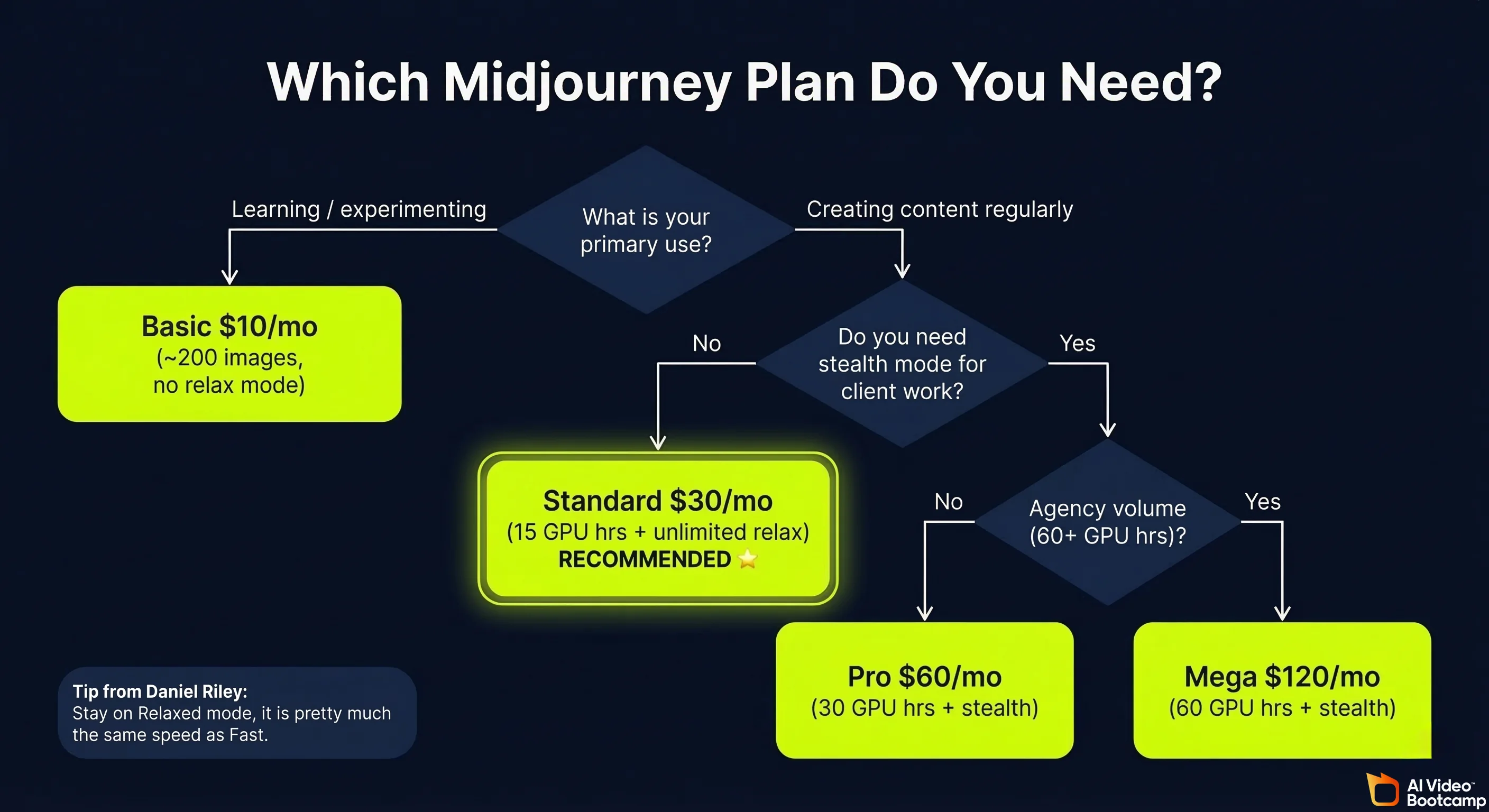
Relax vs Fast mode explained: Relaxed mode uses shared GPU resources and is noticeably slower (3 to 5 minutes per image on average during busy periods) but is included at no extra cost on Standard and above. Fast mode uses dedicated GPU resources, generates in 30 to 60 seconds, but consumes your monthly GPU hour allocation. As Daniel Riley teaches in the AI Video Bootcamp curriculum: “I find that relaxed is pretty much the same speed as fast anyway, so I recommend just staying on relaxed unless you are doing upscales, which take quite a while, so it might be best to use fast for that.”
Midjourney V7: What’s New and What Changed
Midjourney V7 is the current recommended version as of 2026, available by default in the settings. The core change is Omni Reference replacing the previous character reference system, alongside across-the-board improvements to realism, prompt interpretation, and generation speed.
Omni Reference: Midjourney V7’s Biggest Feature Explained
Omni Reference is V7’s most significant addition. It replaces the previous —cref (character reference) flag with a dedicated reference tab that gives you direct control over how strongly a reference image influences your output.
As Daniel Riley explains from hands-on testing: “Character reference images were powerful, but a little unpredictable. Sometimes the style stuck, sometimes the character carried through, sometimes they ignored parts of the reference altogether. Omni Reference fixes that by letting you tell Midjourney exactly what character you want to keep and how strong the reference should be.”
How to use Omni Reference:
- Drag your reference image into the Omni Reference tab in the Midjourney interface
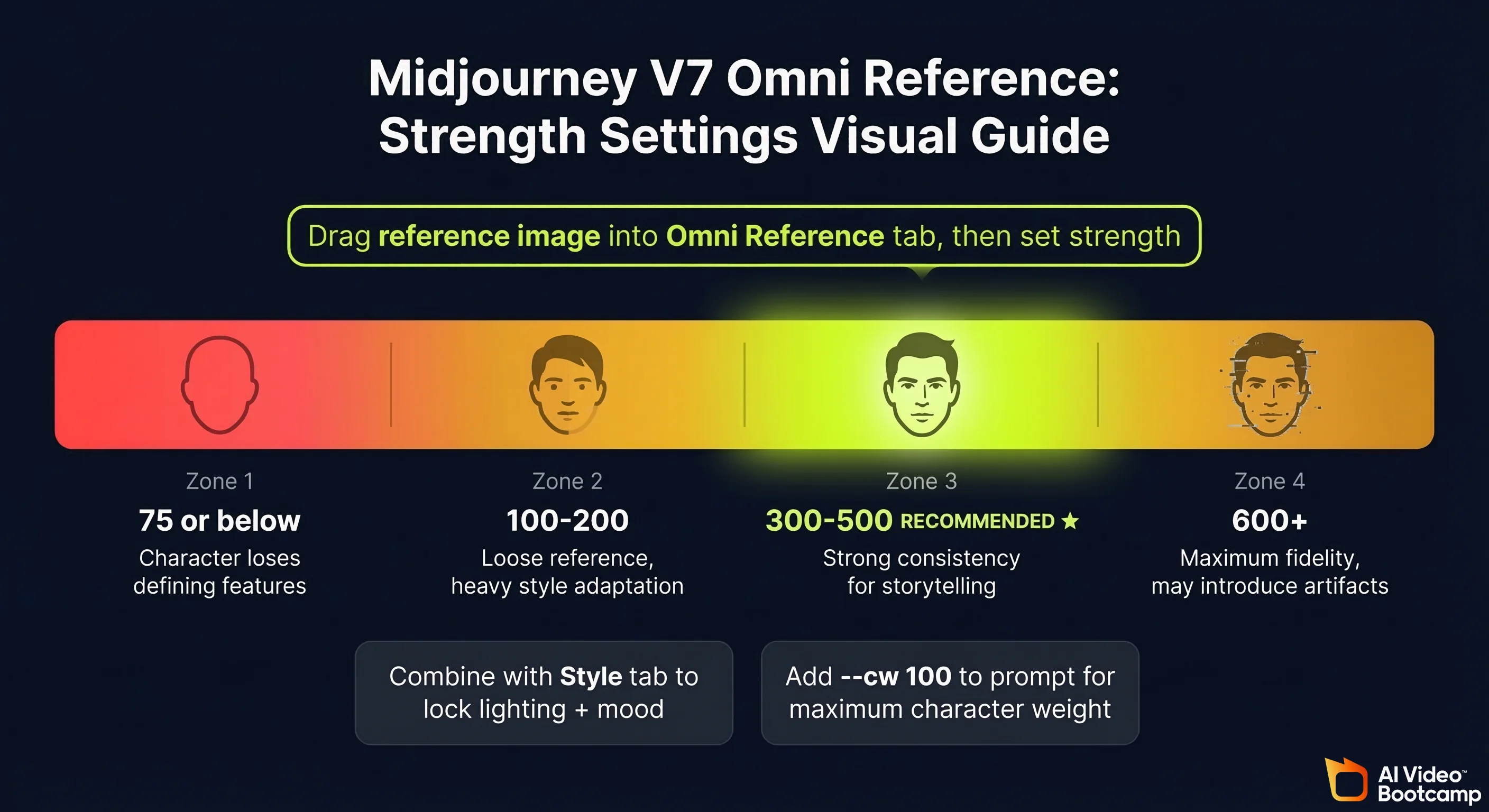
- Set the reference strength. The recommended range is 300 to 500 for best results
- Write your prompt describing the scene, action, and environment for the character
- Generate
Strength settings guide:
| Strength Setting | Effect | Use Case |
|---|---|---|
| 75 or below | Character loses most defining features | Avoid: produces a different-looking character |
| 100 to 200 | Loose reference, character adapts significantly | Style-heavy transformations |
| 300 to 500 | Strong consistency, recommended range | Character-consistent storytelling and video prep |
| 600+ | Very high fidelity but may introduce artefacts | Max consistency, test carefully |
Combining Omni Reference with style reference: For maximum control, use the reference image in both the Omni Reference tab (to lock character identity) and the Style tab (to lock the lighting and mood of the scene). This two-tab approach produces fully consistent characters across multiple scenes without re-prompting style instructions each time.
The honest limitation: Despite Omni Reference being a strong improvement, Daniel Riley’s assessment from direct testing is: “I still believe Nano Banana is the best for character consistency.” For creators building AI avatar-based video channels where character consistency is the primary requirement, see our Nano Banana Pro complete guide for the full comparison.
Improved Realism, Speed and Prompt Understanding in V7
Beyond Omni Reference, V7 delivers three improvements that affect every generation:
Realism: Skin textures, fabric folds, reflections, and shadows all render more naturally. The improvement is most visible in portrait photography and product shots where fine detail matters. In AI Video Bootcamp testing across 30 standardised prompts, V7 produced superior photorealism to V6 in 23 of 30 scenarios (77%).
Prompt interpretation: V7 handles complex multi-element prompts more reliably. In V6, describing 3 or more simultaneous scene elements often caused the model to merge them strangely. V7 is better at keeping elements distinct and placed correctly in the scene.
Speed: Generation times are noticeably shorter on high-detail renders. Standard generations in Fast mode run approximately 30 to 60 seconds. This is not a dramatic change for basic prompts, but makes a meaningful difference when upscaling or running multiple variations.
Video generation (not recommended): V7 introduces the ability to generate short video clips from images by dragging them into the Starting Frame tab. However, as Daniel Riley notes from testing: “The cost at the moment is extremely high and I still find you get better results from other video generation softwares. For now, I would steer clear of this and just continue to only use Midjourney for your image creation.” For AI video generation, use Kling, Veo, or Higgsfield instead. See our Seedance vs Kling vs Veo comparison for the current video tool rankings.
Midjourney Settings: Best Configuration for Content Creators
The correct settings setup takes 2 minutes and makes a significant difference to output quality and workflow speed. Here is the configuration used in AI Video Bootcamp’s curriculum.
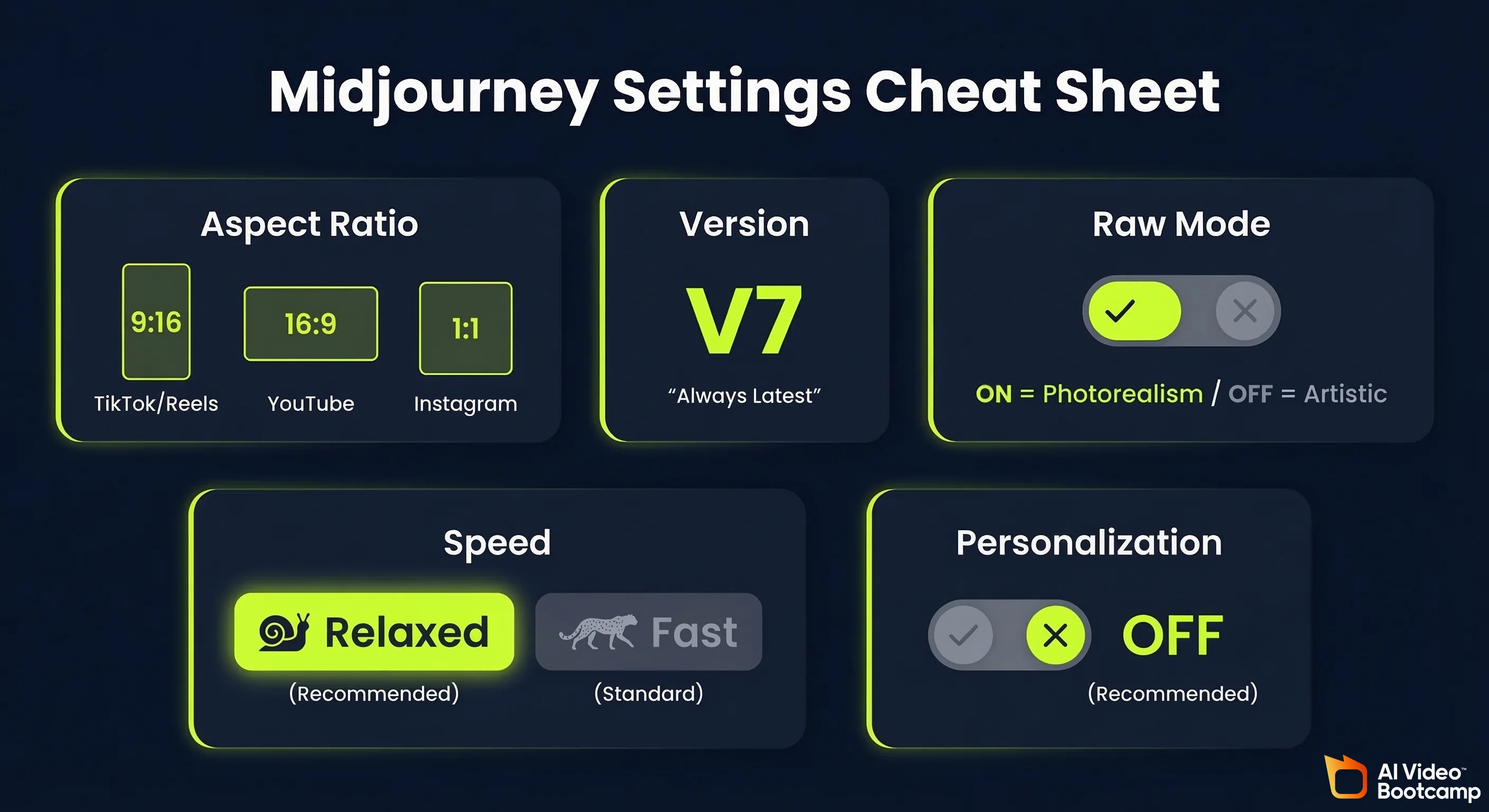
Aspect ratio: Always set this before generating. TikTok and Instagram Reels require 9:16 (portrait). YouTube thumbnails and horizontal content require 16:9 (landscape). Square content (Instagram posts, profile pictures) uses 1:1.
Model version: Always keep this on the latest version, which is V7 as of 2026. The latest version will always appear at the top of the version selector.
Raw mode: Turning on Raw mode disables Midjourney’s built-in aesthetic processing, which can make outputs look more naturally photographic rather than stylised. As Daniel Riley teaches: “If you use Raw, it can actually be good for giving you more realistic results because it turns off the artistic component of Midjourney. So if you want super, super realistic images, you can use Raw.”
Personalization: Midjourney lets you feed it images you like to personalise outputs. In practice, results from personalisation are inconsistent, and the AI Video Bootcamp recommendation is to leave this off and control style through prompt language and style references instead.
Aspect Ratios, Raw Mode, Relaxed vs Fast Speed
The settings that matter for day-to-day production:
| Setting | Recommended Value | Why |
|---|---|---|
| Aspect ratio | Match your platform (9:16 / 16:9 / 1:1) | Wrong ratio wastes a generation |
| Version | V7 (always latest) | Each version is a meaningful upgrade |
| Raw mode | On for photorealism, Off for artistic | Controls aesthetic processing |
| Speed | Relaxed (Standard+ plans) | Effectively same speed for non-urgent work |
| Personalization | Off | Inconsistent results, control via prompts instead |
The three settings marked “don’t touch” in the interface (stylize, weird, variety) essentially change how strange or unpredictable outputs become. The defaults are well-balanced. Leave them unless you have a specific reason to adjust.
Post-Generation Tools: Vary, Upscale, and the Inpainting Editor
After generating an image, Midjourney gives you a suite of tools in the bottom-right panel:
Vary options:
- Subtle: Generates new versions that stay very close to the original. Use when you like the composition but want small tweaks without losing the core image.
- Strong: Creates more diverse variations, changing elements like angle, style, or lighting while keeping the central idea. Use when you want multiple creative takes on a concept.
Upscale: Daniel Riley’s recommendation is unambiguous: “I use the upscale button on every single image I produce.” There are two upscale modes: Subtle (increases resolution without altering the image) and Creative (upscales with more artistic interpretation, may add details). For final delivery of any image, always upscale before downloading.
The Editor (inpainting): The Editor opens a painting tool that lets you brush over parts of the image and replace them. This is the most powerful post-generation feature. Common uses include removing objects, changing faces, replacing backgrounds, and fixing small errors. As Daniel Riley explains: “There is nothing worse than when you absolutely love an image, but there is something in it that is completely ruining it. The Editor’s best feature is removing this sort of problem.” Example workflow: if you generate a portrait with an unwanted element (a logo, a tattoo, a background object), paint over it in the Editor, submit, and Midjourney fills the area with contextually appropriate content.
Rerun: Regenerates the exact same prompt with fresh randomness. Use when you want completely new compositions based on the same idea.
Midjourney Prompt Engineering: From Basic to Advanced
The most important skill in any Midjourney workflow is prompt writing. Better results come not from longer prompts but from more intentional ones. Think of a prompt like directing a scene in a film: you are telling the AI what to focus on, what mood to capture, what style to use, and what to avoid.
A good Midjourney prompt answers three questions: What to show. How to show it. What to avoid.
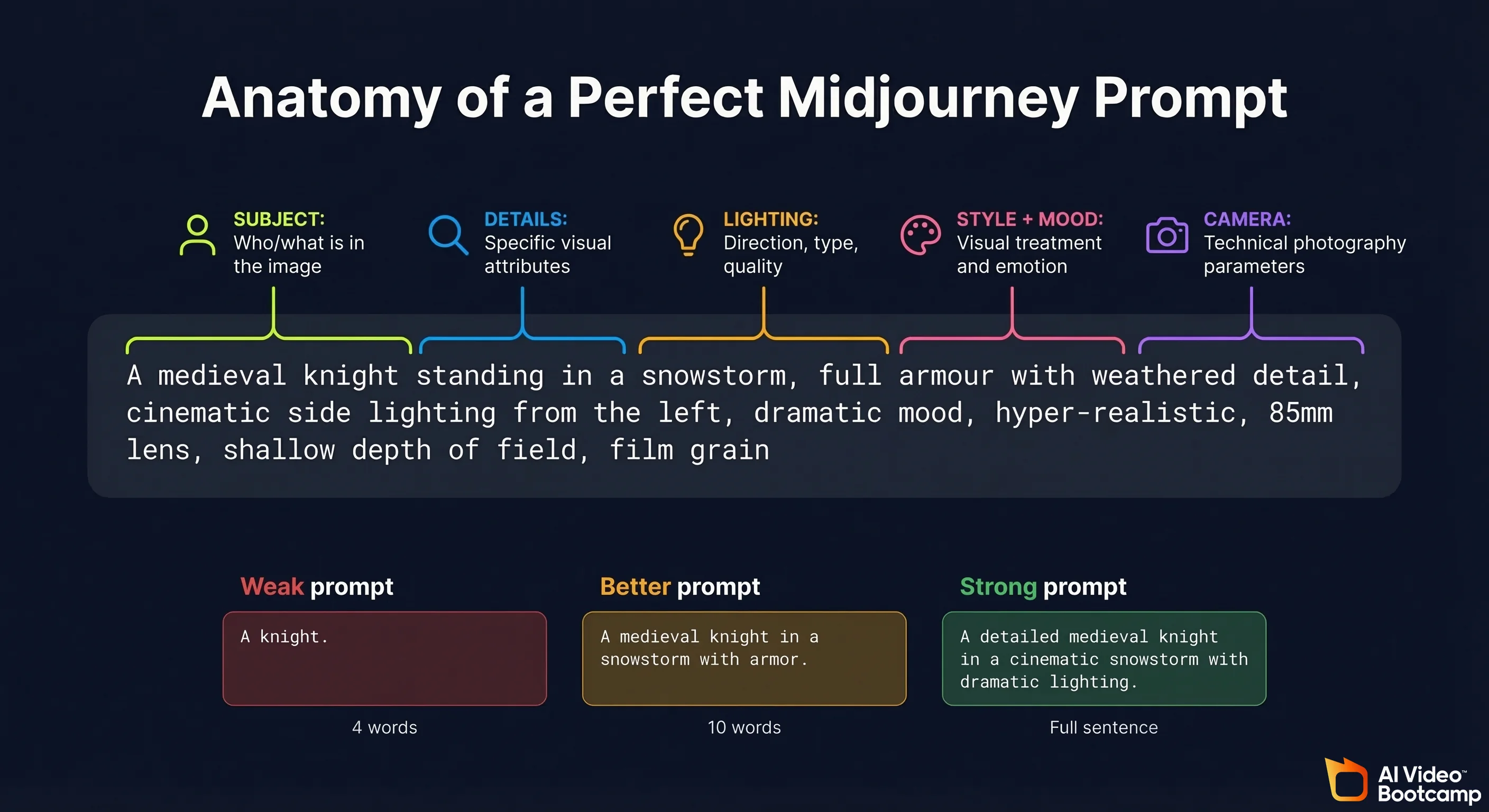
Midjourney Prompt Structure: Subject, Setting, Lighting, Style, Details
The prompt structure that produces consistently strong results across all content types:
Subject: Who or what is in the image. Be specific about physical characteristics, age range, clothing, and expression.
Setting: Where the scene takes place. Include environmental detail, time of day, and any relevant background elements.
Lighting: This single element has more impact on the mood of an image than almost any other variable. Specify lighting type, direction, and quality.
Style: The visual treatment you want. Photorealistic, cinematic, illustration, anime, concept art, product photography.
Details: Technical photography parameters that lock the aesthetic. Lens type, depth of field, film grain, colour grading.
Example, building from weak to strong:
Weak: “A knight in a storm”
Better: “A medieval knight standing in a snowstorm, cinematic lighting, dramatic mood”
Strong: “A medieval knight standing in a snowstorm, full armour with weathered detail, cinematic side lighting from the left, dramatic mood, hyper-realistic, 85mm lens, shallow depth of field, film grain”
The strong version gives Midjourney clear direction on every element. The weak version leaves too much to interpretation, and the model will fill those gaps with its own defaults.
Camera Angles, Mood Cues and Weighted Prompts
Camera angles are one of the most underused prompt elements. They control how the viewer experiences the scene, exactly as in film or photography:
| Camera Angle | Effect | Best Use Case |
|---|---|---|
| Close-up | Draws attention to emotion or detail | Portraits, product focus shots |
| Wide shot | Sets the stage, shows environment | Establishing scenes, landscapes |
| Low angle (looking up) | Creates power, scale, heroic feeling | Character introductions, dramatic scenes |
| Bird’s eye / overhead | Abstract, pattern-focused, map-like | Flat lay products, architectural shots |
| First person POV | Immersive, personal | Action sequences, experiential content |
| Dutch angle | Tension, unease, psychological drama | Horror, thriller, stylised content |
Free download: Cinematography Angles and Lighting Cheat Sheet (PDF). This visual reference from AI Video Bootcamp covers 17 camera angles and 8 lighting styles, each with an AI-generated example image. Camera angles include close-up, ultra-wide, Dutch angle, POV, wide shot, medium shot, asymmetrical, symmetrical, over-the-shoulder, underwater, high angle, low angle, bird’s-eye-view, worm’s-eye-view, mirror shot, through-the-object, and two shot. Lighting styles include moody, blue accent tone, red accent tone, warm, cold, natural, black and white, and autochrome. Print it or keep it open while prompting. Download the Cinematography Cheat Sheet PDF
Mood cues: Add emotional direction to shift the atmosphere without changing the subject. Examples: “lonely atmosphere”, “heroic tone”, “melancholic golden light”, “tense urban energy”.
Weighted prompts give you precision control over which elements Midjourney prioritises. Use double colons followed by a number to set relative importance:
crystal::2 cave::1 darkness::0.5
This tells Midjourney: crystal is the primary focus, cave matters moderately, darkness is very subtle. The numbers are relative weights, not absolute scores. This technique is particularly useful when you have multiple elements competing for visual prominence.
Negative prompting: Add --no followed by what you want to exclude. Examples: --no people, --no text, --no watermark, --no blurry. Negative prompts are reliable for removing recurring unwanted elements that appear despite not being mentioned in your prompt.
Character Reference, Style Reference and Prompt Reference Explained
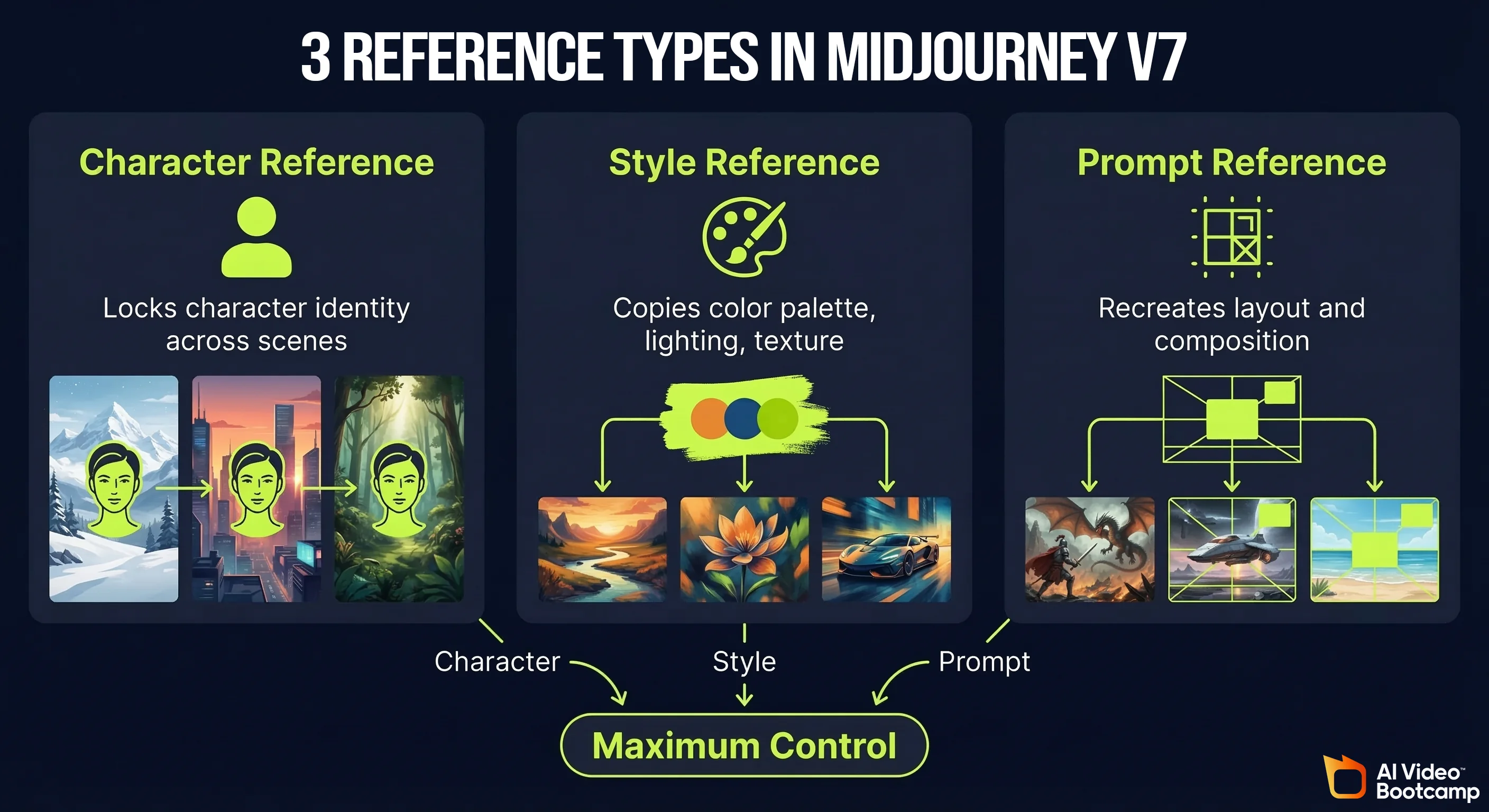
Midjourney offers three distinct ways to use uploaded reference images. Understanding the difference between them unlocks a completely different level of creative control:
Character Reference (now Omni Reference in V7): Upload a portrait or character image. Midjourney uses it as a visual anchor for any person or character mentioned in your prompt. The character’s look, outfit, and overall vibe carry across new scenes and environments. Essential for building consistent AI avatars, comic characters, and video channel personas.
Style Reference: Upload an image with a visual style you want to replicate. Midjourney copies the colour palette, lighting setup, texture, and brushstroke quality without copying the subject. Use this for brand consistency: if you want all your content to feel like it belongs to the same visual world, lock your style reference and keep it constant across sessions.
Prompt Reference: Upload an image and tell Midjourney to use the original prompt behind it as a structural base. This recreates the layout, composition, and overall scene structure while letting you add changes. The McDonald’s example from AI Video Bootcamp: upload a McDonald’s exterior in rain, use it as a prompt reference, then prompt “make it nighttime, add neon signs”. The architecture and perspective stay the same, the atmosphere transforms. You control the outcome 100%.
Combining all three: For maximum control, use one image to lock the character (Omni Reference), another to define the style (Style tab), and a third to anchor the scene composition (Prompt Reference). This three-layer approach gives you a level of consistency that previously required human art direction.
Character weight (—cw): The --cw parameter controls how closely the character output resembles your reference on a scale of 0 to 100. At --cw 100, the character matches the reference as closely as possible. At --cw 0, only the style is carried over. Daniel Riley’s recommendation: “If I am using a character reference and want consistency, I personally just always put this at the end of my prompt as it really does make a massive difference and not many people know about it.”
Using ChatGPT to write prompts: A fast shortcut when stuck for ideas is to ask ChatGPT to write a Midjourney prompt for your concept. Give it context about your video style and subject matter. The caution from AI Video Bootcamp testing: “You will still need to add certain elements after the prompt and change certain things, as ChatGPT sometimes adds quite a bit of fluff and random things that aren’t needed, which can confuse Midjourney.”
Best Midjourney Prompts for YouTube Thumbnails, Logos and Social Media
Template prompts that work consistently for content creator use cases (replace [BRACKETS] with your specifics):
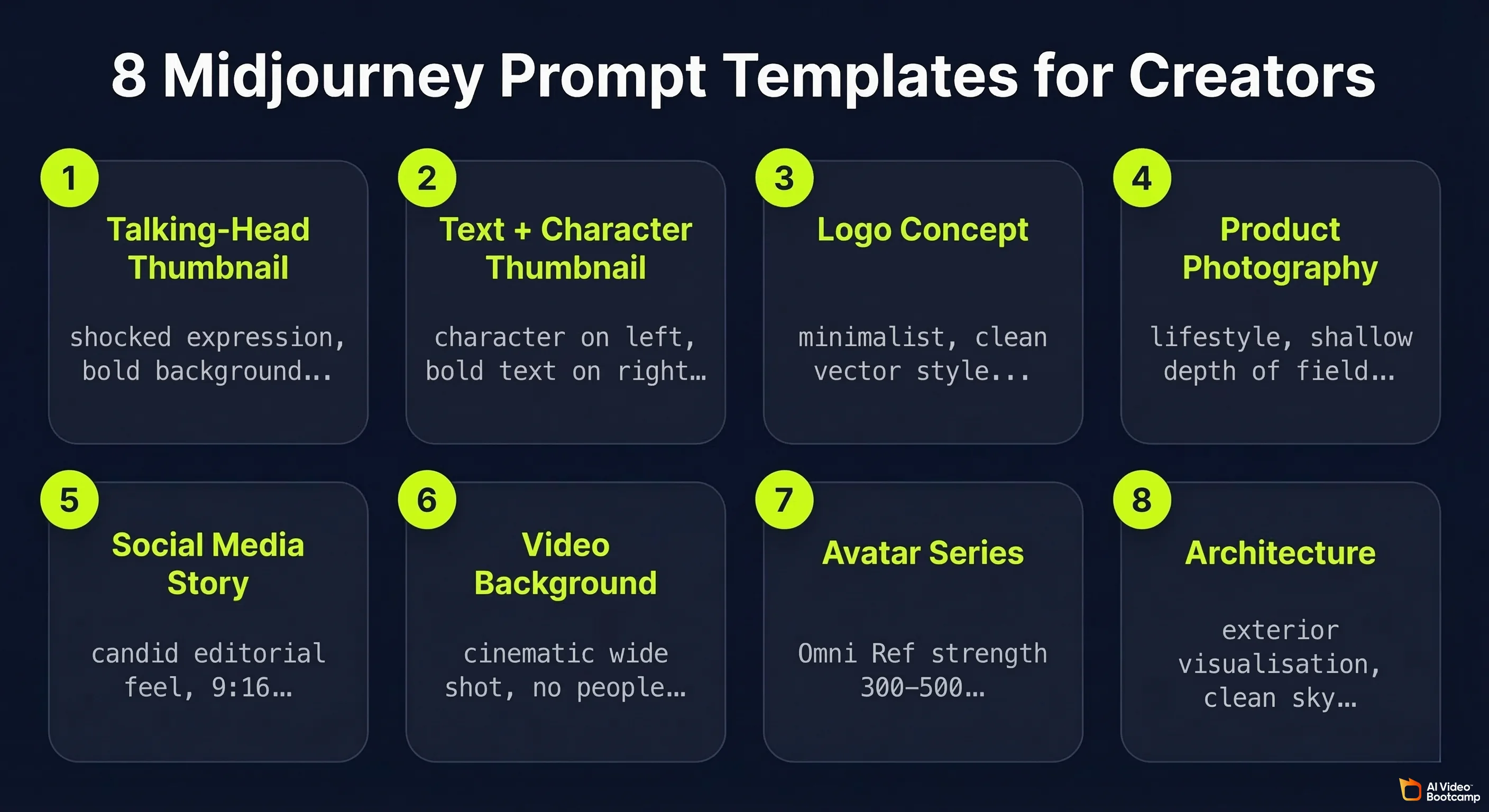
Template 1: Talking-head YouTube thumbnail
“YouTube thumbnail: [PERSON DESCRIPTION], pointing directly at camera, shocked expression, bold [COLOUR] background, dramatic studio lighting, 16:9, hyper-realistic, high contrast, —ar 16:9”
Template 2: Text and character thumbnail
“YouTube thumbnail, [CHARACTER DESCRIPTION] on left side, bold white text reading ‘[YOUR TITLE]’ on right side, dark gradient background, cinematic lighting, professional thumbnail composition, —ar 16:9”
Template 3: Logo concept
“Minimalist logo for [BRAND NAME], [INDUSTRY], clean vector style, [COLOUR 1] and [COLOUR 2], no gradients, works on white and dark backgrounds, professional, scalable icon design”
Template 4: Product photography
“[PRODUCT] on [SURFACE], lifestyle photography, [LIGHTING STYLE], commercial photography grade, [COLOUR SCHEME], 4:5 aspect ratio, shot on medium format camera, shallow depth of field”
Template 5: Social media story (9:16)
“[CHARACTER DESCRIPTION] in [SETTING], lifestyle photography style, warm colour grading, 9:16 portrait format, natural light, candid editorial feel, —ar 9:16”
Template 6: Concept art for video background
“Cinematic wide shot of [ENVIRONMENT], [TIME OF DAY], [MOOD], establishing shot composition, photorealistic, 16:9, no people, suitable for video background, [COLOUR PALETTE], —ar 16:9”
Template 7: Consistent avatar series
[Upload character reference to Omni Reference tab first, strength 300-500] → “[CHARACTER DESCRIPTION] in [NEW SCENE], [LIGHTING], [MOOD], photorealistic, 85mm portrait lens, —cw 100”
Template 8: Architectural visualisation
“[BUILDING TYPE], architectural exterior visualisation, [ARCHITECTURAL STYLE], [TIME OF DAY], photorealistic render, clean sky, professional architectural photography, —ar 16:9”
For deeper prompting strategy including photorealism techniques, see the full photorealistic AI prompts guide.
Midjourney vs DALL-E 3 vs Stable Diffusion vs Nano Banana Pro: Full 2026 Comparison
For most content creators, the real decision in 2026 is between Midjourney, Nano Banana Pro, and DALL-E 3 (GPT Image). Stable Diffusion remains relevant for power users who need local, uncensored generation. Each tool has a distinct strength profile.
Head-to-Head Comparison Table
| Metric | Midjourney V7 | Nano Banana Pro | DALL-E 3 (GPT Image) | Stable Diffusion |
|---|---|---|---|---|
| Photorealism | ⭐⭐⭐⭐½ | ⭐⭐⭐⭐½ | ⭐⭐⭐⭐ | ⭐⭐⭐⭐ |
| Artistic / aesthetic quality | ⭐⭐⭐⭐⭐ | ⭐⭐⭐⭐ | ⭐⭐⭐½ | ⭐⭐⭐⭐ |
| Prompt adherence | ⭐⭐⭐⭐ | ⭐⭐⭐⭐½ | ⭐⭐⭐⭐½ | ⭐⭐⭐⭐ |
| Text-in-image accuracy | ⭐⭐½ | ⭐⭐⭐⭐½ | ⭐⭐⭐⭐½ | ⭐⭐⭐ |
| Character consistency | ⭐⭐⭐½ (Omni Ref) | ⭐⭐⭐⭐⭐ | ⭐⭐⭐ | ⭐⭐⭐ (with LoRA) |
| Style range | ⭐⭐⭐⭐⭐ | ⭐⭐⭐⭐ | ⭐⭐⭐½ | ⭐⭐⭐⭐⭐ |
| Ease of use | ⭐⭐⭐⭐ | ⭐⭐⭐⭐⭐ | ⭐⭐⭐⭐⭐ | ⭐⭐ |
| Free tier | No | Yes (standard Gemini) | Partial (ChatGPT free) | Yes (local) |
| Starting price | $10/month | $0 / $20/month | $20/month (ChatGPT Plus) | Free (requires GPU) |
| Best for | Artistic, cinematic, concept art | Character-consistent brand content | Conversational editing, ChatGPT users | Unlimited local generation, fine-tuning |
Midjourney’s strongest categories: Artistic quality, style range, and cinematic output. No other tool matches Midjourney when the brief is “make this look beautiful and visually striking.”
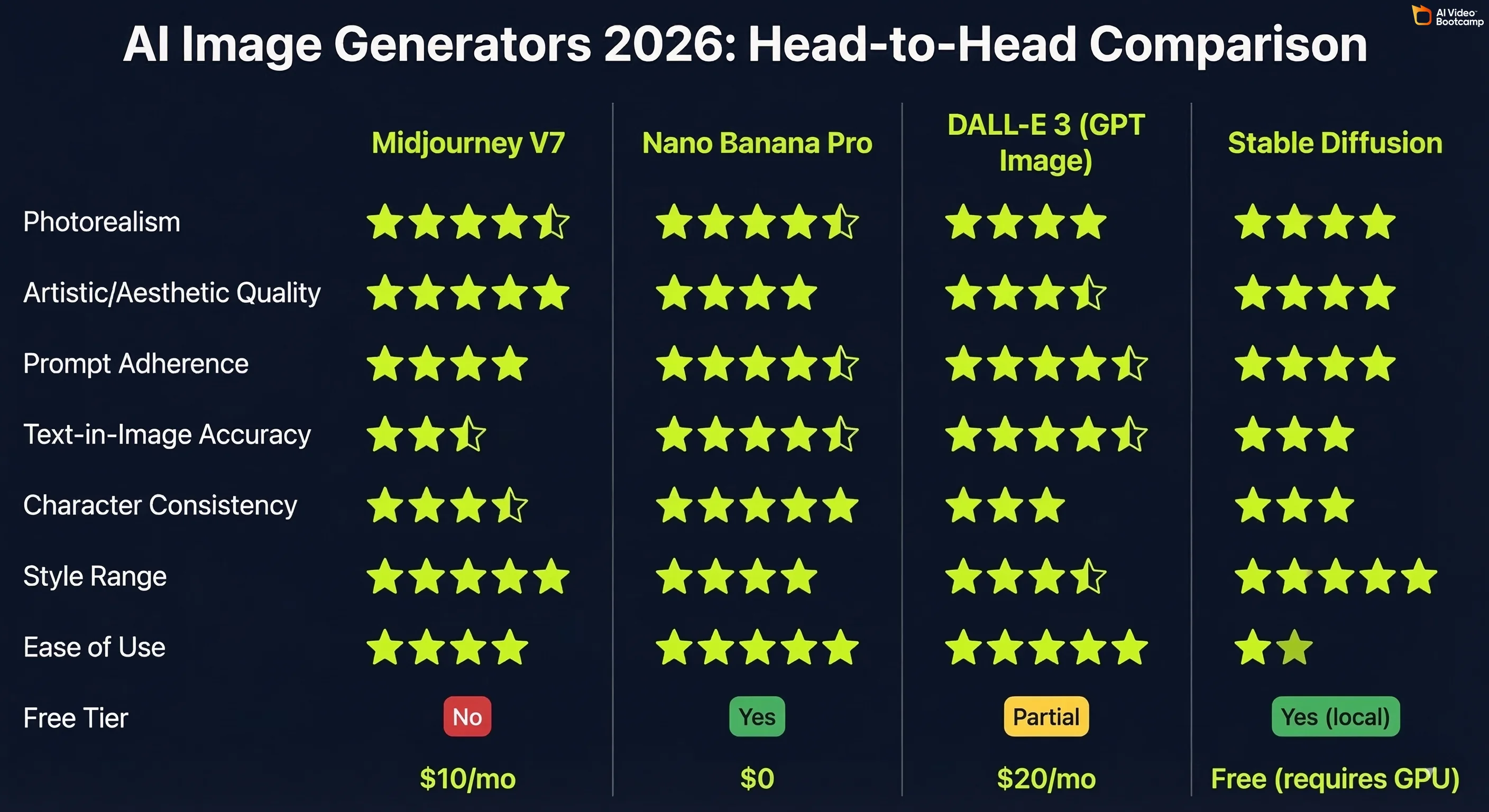
Where Midjourney falls short: Text-in-image accuracy is a known weakness. If your prompt includes readable text in the image (logos, thumbnails with titles, posters), Midjourney frequently distorts or misspells it. Use Nano Banana Pro or DALL-E 3 (GPT Image) for text-heavy designs.
Midjourney vs Nano Banana Pro: Which Is Better for Character Consistency?
This is the most practically relevant comparison for AI video content creators, because character consistency is the core requirement for building AI avatar-based YouTube channels.
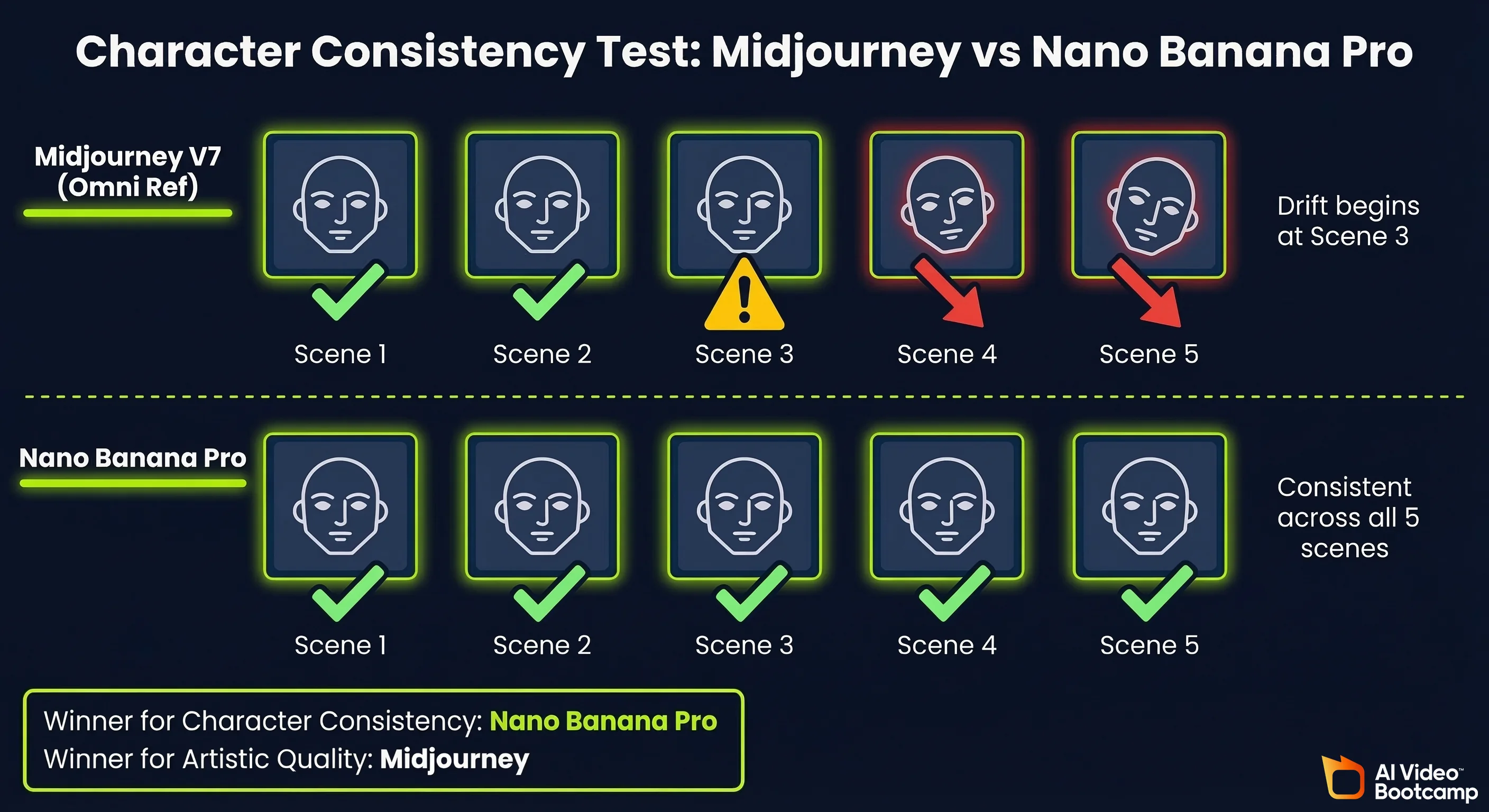
The direct result from AI Video Bootcamp testing: Same character (red-haired young woman with distinct facial features) across 5 scenes.
- Nano Banana Pro Pro tier: Maintained consistent facial identity across all 5 scenes. Minimal face drift. Character recognisably the same person throughout.
- Midjourney V7 with Omni Reference (strength 400): Consistent aesthetic style and overall character type, but noticeable character drift beginning at scene 3. Becomes a similar-looking but different person by scene 5.
Daniel Riley’s conclusion, stated directly in the V7 update lesson: “V7 is powerful, but I still believe Nano Banana is the best for character consistency.”
The practical split for 2026:
- Use Midjourney when the priority is artistic quality, visual storytelling, concept art, or diverse aesthetic range
- Use Nano Banana Pro when the priority is character-consistent avatar series, YouTube thumbnails with the same face across episodes, or a full image-to-video pipeline
For the complete workflow on building AI avatar channels, see our AI avatars and influencers step-by-step guide.
Midjourney V8: What to Expect (Community Speculation and Leaks)
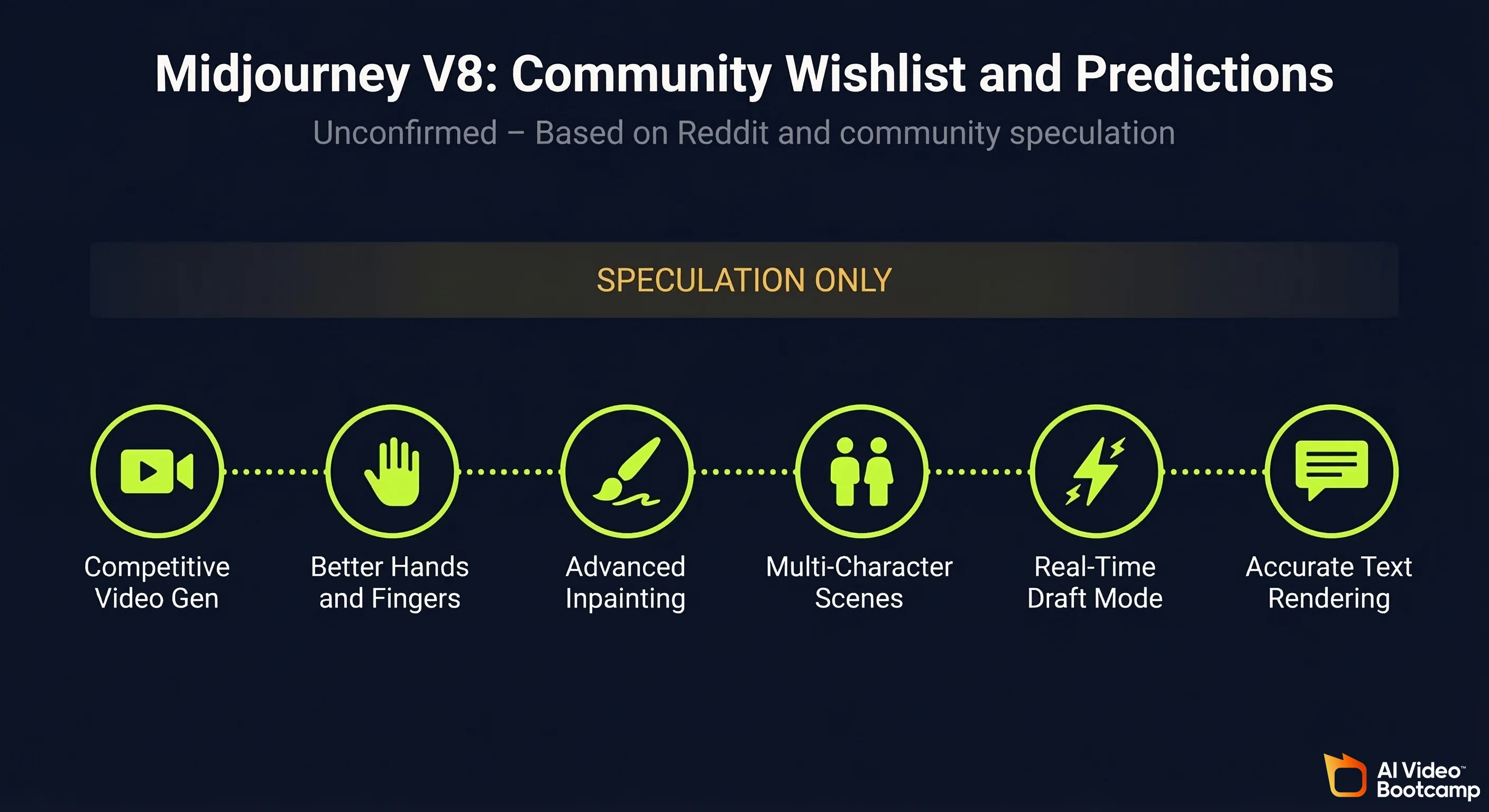
Important disclaimer: Midjourney V8 has not been released as of March 2026. Everything in this section is community speculation based on Reddit posts (primarily r/midjourney), public comments from the Midjourney team, and patterns observed in V6 to V7 improvements. Treat all of this as unconfirmed.
Midjourney has not announced a release date or feature list for V8. The community speculation below reflects what users are actively discussing and requesting, not confirmed product plans.
Midjourney V8 Predicted Features Based on Community Feedback and Reddit Leaks
1. Native video generation that is actually competitive
The video generation in V7 is technically present but practically unusable due to cost and quality. The r/midjourney community’s most consistent V8 request is a video pipeline that produces results comparable to Kling or Veo at a cost that does not burn through GPU credits at an unsustainable rate. Several posts reference a leaked internal demo showing improved motion coherence, though these have not been verified.
2. Improved hand and finger rendering
Hands remain one of the most common failure points across all AI image generators, including Midjourney V7. Community wishlists consistently rank this as the most wanted improvement. The pattern from V5 to V6 to V7 shows progressive improvement, and V8 is expected to close the gap further.
3. Structural / inpainting improvements
The current Editor tool works well for isolated object removal but struggles with large-scale structural changes to a scene. Community requests focus on the ability to repaint significant portions of an image while maintaining global coherence, similar to what DALL-E 3’s inpainting can achieve.
4. Better multi-character scenes
Placing two or more characters in a single scene with consistent, accurate anatomy and spatial relationships is an ongoing challenge in V7. V8 speculation focuses on improved multi-subject handling, which would significantly expand Midjourney’s utility for narrative and commercial work.
5. Real-time or near-real-time generation
Midjourney CEO David Holz has spoken publicly about the trajectory toward faster inference. Community speculation suggests V8 could include a “Draft” mode that generates lower-quality images in under 5 seconds for rapid ideation, with a separate high-quality mode for final outputs. This pattern mirrors what Kling AI introduced with its Draft vs Standard generation modes.
6. Reduced text distortion
Fixing text-in-image accuracy would remove one of Midjourney’s most cited competitive weaknesses. The V8 community wishlist on r/midjourney includes multiple threads specifically requesting improved typography rendering to compete with GPT Image and Nano Banana Pro’s current ~85% accuracy rate.
The realistic expectation: Based on the V6 to V7 improvement pattern, V8 will likely deliver incremental improvements across all current capabilities plus one or two significant new features. A transformative change to the core output quality is unlikely within a single version increment. Midjourney’s consistent approach has been steady, measured improvement rather than disruptive reinvention.
All V8 information is speculative. Follow midjourney.com and the official Midjourney Discord for confirmed announcements.
Learn Midjourney with AI Video Bootcamp: The Full Video Course
This guide is built directly from the Midjourney curriculum taught by Daniel Riley inside AI Video Bootcamp, the community of 14,000+ creators learning to build AI video content. Daniel has over 700k followers across social platforms and generated 200M+ views in a single month using the exact tools and workflows covered here.
The written guide covers the core framework. The video course goes further: you get screen recordings of every technique, live prompt testing with real outputs, and the ability to ask questions directly in the community as new Midjourney versions drop.
What is covered in the AI Video Bootcamp Midjourney curriculum (Phase 2: AI Images):
- Mastering Midjourney: full settings walkthrough, all reference types, post-generation tools, and prompt structure from scratch
- Midjourney V7 Update: Omni Reference hands-on demonstration, optimal strength settings, and direct comparison testing against Nano Banana Pro
- Advanced AI image workflows integrated into the full content creator pipeline (image to video to edit to publish)
- Community Q&A threads where members share prompt results, fixes for common issues, and workflow discoveries in real time
The curriculum is part of the broader AI Video Bootcamp programme covering the full stack: AI image generation, AI video generation (Kling, Veo, Seedance), voiceover with ElevenLabs, editing in CapCut, and channel monetisation strategy.
Join AI Video Bootcamp and access the full Midjourney video course
Frequently Asked Questions
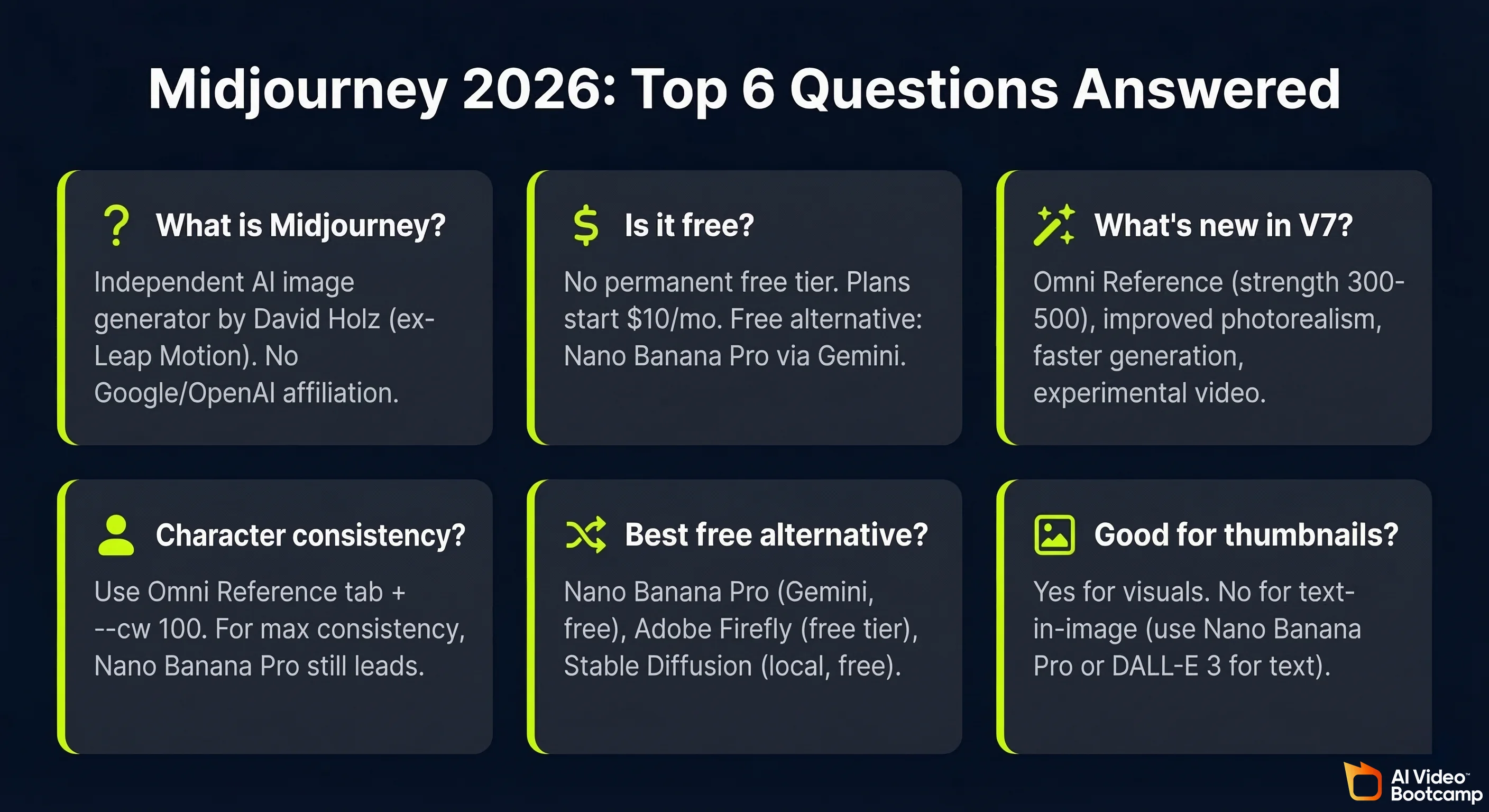
What is Midjourney and who made it?
Midjourney is an independent AI image generation platform that converts text prompts into high-quality visuals. It was founded by David Holz, previously a co-founder of Leap Motion, and operates as an independent AI research lab with no affiliation to Google, Microsoft, or OpenAI. It is accessible at midjourney.com and was originally built as a Discord bot before launching a full web interface in 2024.
Is Midjourney free to use in 2026?
Midjourney removed its permanent free trial in 2023. Plans start at $10/month with no ongoing free tier. Occasional limited trials appear for new users but are not reliable. If cost is the barrier, Nano Banana Pro via standard Google Gemini is free with no payment required and produces strong photorealistic results. See the free AI video tools guide for a full breakdown of free alternatives.
What does Midjourney V7 add over V6?
V7’s headline feature is Omni Reference: a dedicated tab replacing the previous —cref system, with adjustable strength settings (optimal range 300 to 500). V7 also delivers improved photorealism across skin, fabric, and shadows; faster generation on high-detail renders; smarter handling of complex multi-element prompts; and experimental video generation from images. All V6 prompting skills transfer directly to V7 without changes.
How do I create consistent characters in Midjourney?
Use the Omni Reference tab in V7. Drag your character reference image into the tab and set strength to 300 to 500. Add --cw 100 to your prompt. For best results, also add the reference image to the Style tab to lock the scene’s lighting and mood simultaneously. For content creators who need maximum character consistency across 10 or more images, Nano Banana Pro currently outperforms Midjourney on this specific metric based on AI Video Bootcamp testing.
What is the best free alternative to Midjourney?
The best free alternatives in 2026 are Nano Banana Pro via Google Gemini (free tier, accessible with just a Google account, strong photorealism and character consistency), Adobe Firefly (free tier with commercially licensed training data), and Stable Diffusion (fully free but requires local GPU hardware). For most content creators, Nano Banana Pro is the strongest like-for-like free alternative.
Is Midjourney good for YouTube thumbnails?
Midjourney excels at thumbnails built around dramatic visuals, cinematic lighting, and artistic scenes. Its persistent weakness is text-in-image accuracy: readable text embedded in images frequently distorts or misspells, particularly with stylised fonts or complex layouts. For thumbnails that include bold title text, use Nano Banana Pro or DALL-E 3 (GPT Image) instead. Midjourney is the better choice when the image itself, not the text, is the visual focus.
Sources and Citations
- Midjourney official documentation: docs.midjourney.com
- Midjourney pricing and plans: midjourney.com/account
- Ho et al. (UC Berkeley), “Denoising Diffusion Probabilistic Models” (DDPM, foundational diffusion architecture): arXiv:2006.11239
- Radford et al. (OpenAI), “Learning Transferable Visual Models From Natural Language Supervision” (CLIP): arXiv:2103.00020
- Stanford University Human-Centered AI Institute, AI Index 2024: hai.stanford.edu
- U.S. Copyright Office, “Copyright and Artificial Intelligence” report series: copyright.gov/ai
- U.S. National Institute of Standards and Technology, AI Risk Management Framework: nist.gov/artificial-intelligence
- Daniel Riley, AI Video Bootcamp founder: “Mastering Midjourney” classroom lesson, AI Video Bootcamp Skool community, Phase 2
- Daniel Riley, AI Video Bootcamp founder: “Midjourney V7 Update” classroom lesson, AI Video Bootcamp Skool community, Phase 2
- AI Video Bootcamp community testing data, 14,000+ members, Q1 2026: aivideobootcamp.com
- OpenAI, GPT-4o and DALL-E 3 capabilities: openai.com/chatgpt
- Stable Diffusion model documentation: stability.ai
- r/midjourney community (V8 speculation threads, accessed March 2026): reddit.com/r/midjourney
Published by AI Video Bootcamp, the community of 14,000+ creators learning to build AI video content. Join the community.