
Pricing verified April 30, 2026.
What “AI Video Editing” Actually Means in 2026
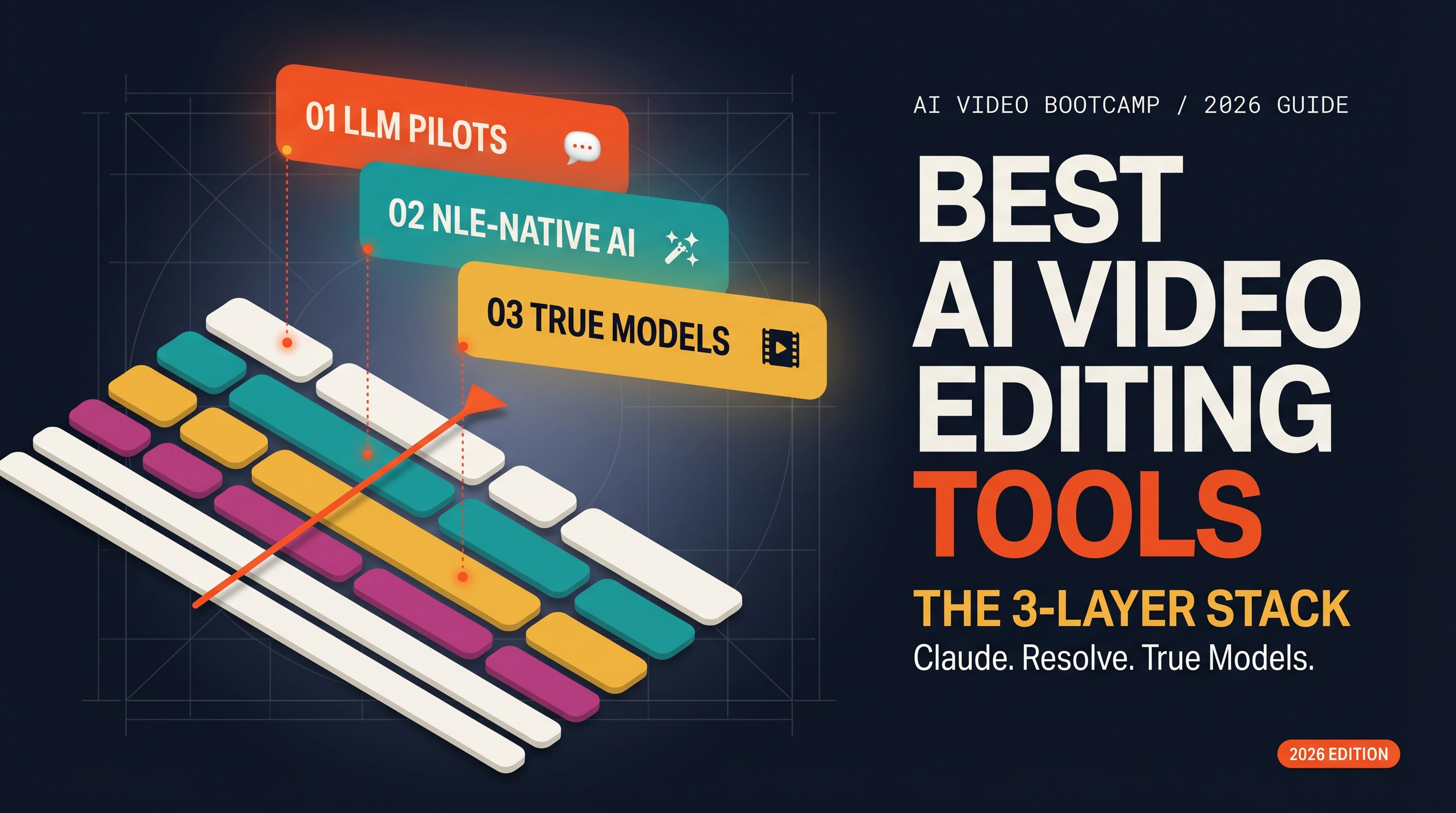
The best AI video editing tools in 2026 split into three layers: LLM pilots that script your timeline (Claude plus DaVinci Resolve MCP, ButterCut), NLE-native AI (DaVinci 20 and 21 IntelliScript and Magic Mask, Premiere Generative Extend, After Effects Object Matte), and True Model plug-ins for B-roll, voice, and upscale (Kling, Veo 3.1, ElevenLabs, Topaz). Every other listicle on the internet treats “AI video editor” as a single app. That framing was true in 2023. It stopped being true the moment Claude could control DaVinci Resolve through the Model Context Protocol.
What changed in 2026 is that editing became a composable stack. A creator building a 60 second YouTube cut now routinely touches all three layers: they ask Claude to sort and roughcut 40 minutes of raw footage with a community-built DaVinci Resolve MCP server exposing up to 342 granular tools (or 27 compound tools in default mode), they run IntelliCut inside Resolve 20 to remove silences and checkerboard speakers, they generate 4 seconds of B-roll in Kling 3.0 at $0.14 per unit, they extend the final shot by up to 2 seconds of video or 10 seconds of audio with Premiere Generative Extend, and they voice the narration through ElevenLabs Creator at $22 per month for 100,000 credits. At AI Video Bootcamp we teach this three-layer stack across our 19,300 member community because it is how professional AI editors actually work in 2026.
If you want a rapid overview of the whole ecosystem before going deep, the AI video skill stack 2026 breakdown shows how editing connects to the other six skills creators need. This article focuses on the editing layer end to end, including the specific prices per second, per image, and per credit that every other guide leaves out.
The 3-Layer Stack (The Frame No Other Article Uses)
Every competing “best AI video editing tools” post on the first page of Google conflates three fundamentally different product categories. It lists Runway, Pika, and Sora (which are video generators, not editors) alongside DaVinci Resolve and Premiere Pro (which are editors) alongside CapCut and Descript (which are hybrids). That category salad is how you end up with a 15 tool listicle that does not help anyone pick a workflow.
The real structure of AI video editing in 2026 is three distinct layers, each with its own job and its own winners.
Layer 1 is LLM pilots. Claude, ChatGPT, or Perplexity drives your NLE by scripting its API. The LLM does not replace the editor. It automates bulk operations (sort 300 clips by scene, flag every take under 50 frames, cut a first pass from the shooting script). This layer barely existed before March 2025 and exploded in 2026 after Anthropic published the Model Context Protocol.
Layer 2 is NLE-native AI. Whatever ships baked into DaVinci Resolve, Premiere Pro, After Effects, CapCut, or Descript. This is where you live for 80 percent of an edit: color, masks, captions, silence trim, audio mix, extend, sharpen.
Layer 3 is True Model plug-ins. Kling 3.0, Veo 3.1, Seedance 2.0, Hailuo, LTX-2, Wan 2.6, Grok Imagine for B-roll video. Midjourney, Nano Banana Pro, Flux.2, Seedream, Recraft, Ideogram for still frames. ElevenLabs for voice. Topaz Video AI for upscale. These are not editors. They are production assets you generate and drop onto your timeline, frequently upscaled and graded afterward.
A generic 15 tool listicle cannot survive next to an article that teaches the stack because the stack is what creators actually compose. If you only remember one thing from this guide, remember that “AI video editing” in 2026 is a composition problem across three layers, not a single app choice.
Layer 1: LLM Pilots (How to Use AI for Video Editing Without Replacing Your Editor)
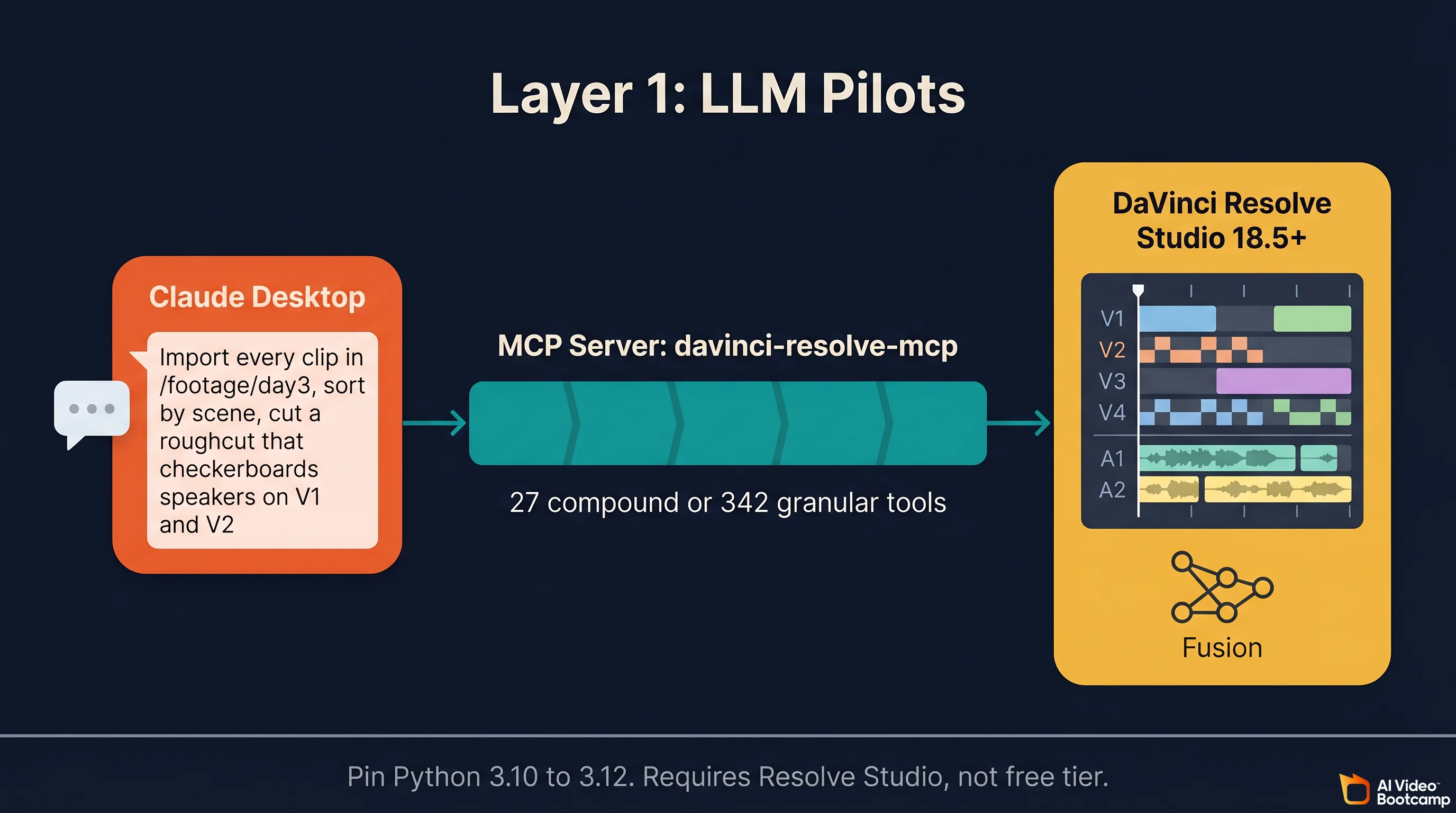
The LLM pilot layer is the real 2026 story. It is the only place where “AI for video editing” moved from marketing copy to something editors actually run every day.
Claude Plus DaVinci Resolve Through the MCP Server
The most cited LLM plus NLE pattern in 2026 is the open source samuelgursky/davinci-resolve-mcp server. It wraps the DaVinci Resolve Scripting API in MCP tools and hands them to Claude, so you can type things like “import every clip in /footage/day3, sort by scene, cut a roughcut that checkerboards the two speakers on V1 and V2” and Claude executes inside Resolve while you watch. Power users can expose all 342 granular tools; most people stick with the 27 compound tools that ship by default.
Specs worth citing, from the samuelgursky repo and the first hand write-up “I Gave Claude Direct Access to DaVinci Resolve” on wildlion.media:
- The installer is universal across 10 MCP clients, including Claude Desktop, Claude Code, Cursor, and Windsurf.
- A separate
fusion_comptool exposes the Fusion node graph so Claude can add or delete nodes, wire connections, set keyframes, and trigger renders. - It requires DaVinci Resolve Studio 18.5 or higher. The free tier does not expose the external scripting API.
- Pin Python to 3.10 through 3.12. Python 3.13 and newer break the Resolve scripting library with ABI incompatibilities. This alone saves most new users 2 hours of debugging.
The honest community framing, mirrored by both the wildlion.media case study and the Skywork deep-dive, is that the real value is not creative editing. It is bulk operations, metadata-poor tasks, and repetitive logic. “Flag every clip shorter than 50 frames.” “Pull every clip where the transcript matches this line and drop them on V4.” “Generate 400 character subtitles in the style of shot 32 for shots 33 through 120.” Claude is a timeline intern, not a director.
ButterCut: Claude Code as a Roughcut Engine
barefootford/buttercut is the second “Claude plus editor” project worth naming. Claude Code uses a small Ruby library plus WhisperX and FFmpeg to:
- Ingest raw footage into a Library with audio and visual transcripts.
- Generate a roughcut with editorial decisions.
- Export FCPXML that round-trips into Final Cut Pro, Premiere Pro, or DaVinci Resolve.
Install stack is Homebrew, Ruby, Python, FFmpeg, WhisperX. It is MacOS-first but the FCPXML output is universal, so Windows creators can use a Mac rendering box and bring the cut back. See buttercut.io for the CLI docs.
color-grade-ai (Claude Code Skill for LUTs)
isaacrowntree/color-grade-ai is a Claude Code skill that generates .cube LUT files from reference stills. You drop a reference frame in, ask Claude to match it, and get a LUT that loads directly into Resolve Color or Premiere Lumetri. Worth a paragraph in any serious AI editing workflow because it turns “find a reference, eyeball a match” into a 30 second operation.
Perplexity and ChatGPT in Pre-Production
Perplexity is not an editor. It generates 8 second clips with audio and cannot iterate on them, per the Perplexity help center. The creator honest framing is that Perplexity is a research and storyboarding co-pilot for pre-production. You ask it to research camera angles for a product demo, pull references for a color palette, or draft three B-roll alternatives for a beat in your script. ChatGPT sits in the same slot: a script and shot list partner that hands off to Claude or a native NLE before a timeline exists.
Key takeaway: “LLM for editing” means the LLM drives the NLE. It does not mean the LLM is the NLE. Anyone marketing “edit your video by chatting with an AI” in 2026 is selling a wrapper around Claude or GPT that pushes FCPXML into your NLE under the hood, and usually charges 10 times more than the underlying API.
Layer 2: NLE-Native AI (The Baseline Every Editor Needs)
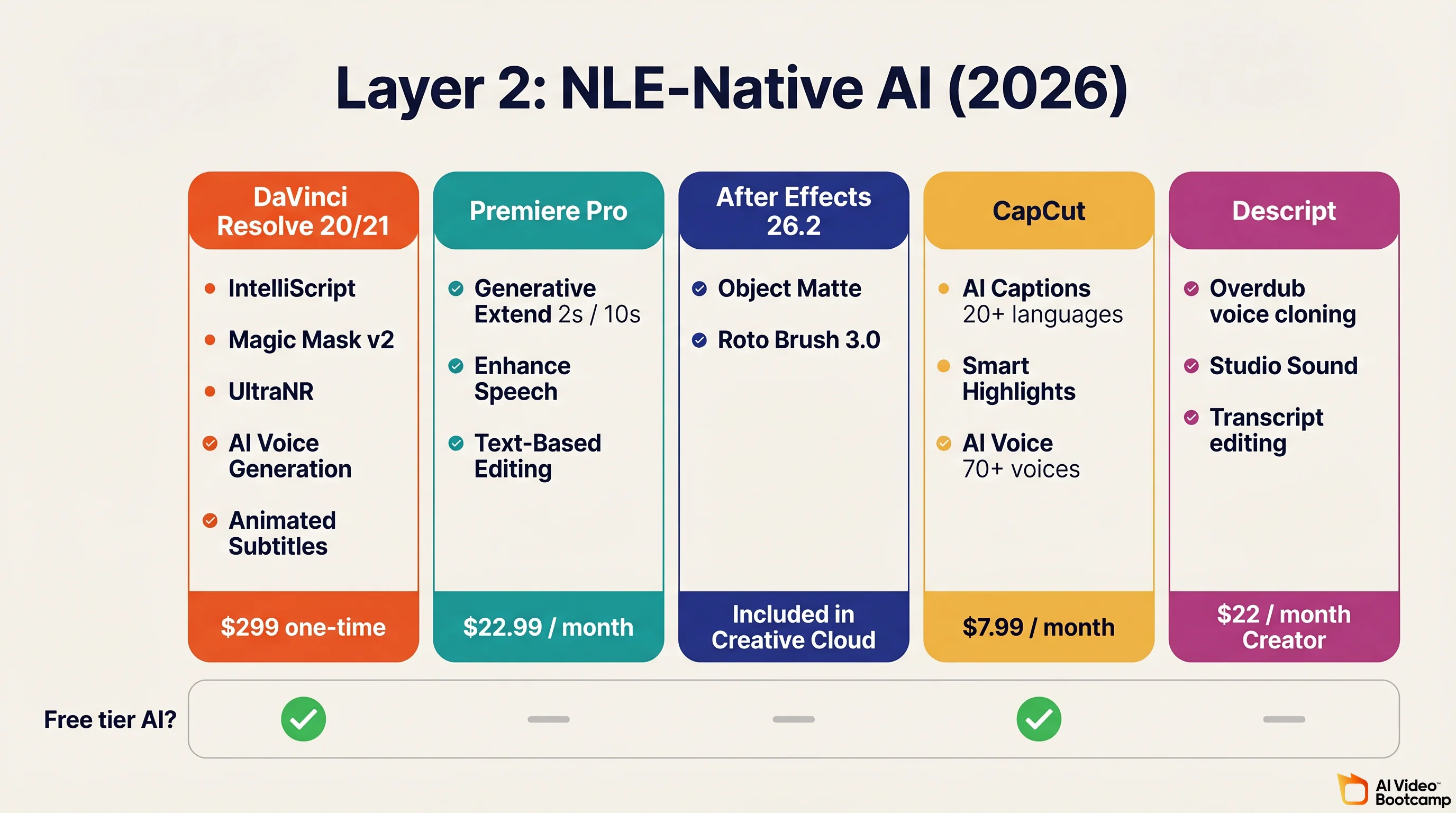
This is where 80 percent of every AI enabled edit happens. Layer 2 is not glamorous, it is not viral, and it is unavoidable.
DaVinci Resolve 20 and 21 (the Free Plus Studio Story)
DaVinci Resolve 20 shipped in 2025 and Resolve 21 was announced at NAB 2026. Together they are the AI editing story of 2026 for creators who refuse to pay a monthly subscription. Studio is a $299 one-time license with no renewal.
Studio 20 and 21 AI features, from Blackmagic What’s New, Larry Jordan, RedShark News, and MacRumors:
- IntelliScript auto-generates a timeline from the shooting script by matching transcribed audio to script lines.
- Multicam SmartSwitch auto-selects the best angle in real time by recognising the main speaker.
- Animated Subtitles generates and animates captions in sync with speech rhythm.
- AI Audio Assistant auto-builds a professional dialogue, music, and effects mix.
- IntelliCut Audio Processing removes silences and checkerboards speakers to separate tracks.
- AI Voice Generation creates custom voices from a 10 second sample with adjustable speed and inflection.
- Magic Mask v2 isolates subjects with motion tracking for targeted grades or effects.
- UltraNR is a Neural Engine driven denoiser, combinable with temporal denoise.
- AI Set Extender fills missing frame regions from a text prompt.
- AI Resolve FX Depth Map 2 gives one-click mattes for foreground isolation or lens blur.
- IntelliTrack AI is the new point tracker used in Color, Fusion, and Fairlight (including audio panning to on-screen motion).
- AI Dialogue Matcher matches tone, level, and room across takes.
- Resolve 21 additions: IntelliSearch for content search, CineFocus for focal point adjustment, AI Motion Deblur, UltraSharpen, facial refinement, and the new Photo page.
Free tier versus Studio, per Oreate AI’s breakdown: Animated Subtitles, SmartSwitch, and AI Dialogue Matcher live on the free tier. IntelliScript, Magic Mask v2, Set Extender, UltraNR, and AI Voice Generation are Studio-only. If you are serious about using Claude to control your timeline, the $299 Studio license is non-negotiable because the MCP server requires the external scripting API.
Adobe Premiere Pro (Creative Cloud)
Generative Extend is Adobe’s flagship 2026 feature, powered by the Firefly Video Model. Per Adobe helpx and the April 15, 2026 Adobe announcement:
- Extends a clip by up to 2 seconds of video or up to 10 seconds of audio.
- Supports 4K UHD (3840 by 2160) and 4K Cinema (4096 by 2160).
- Cloud-rendered via Firefly, so it requires an internet connection.
- Cannot extend spoken dialogue (muted during extension) or music (copyright reasons).
- Generally available since April 2025 and still evolving, with a color reinvention announced April 15, 2026.
Community reception, per PetaPixel’s review, is that Generative Extend is “surprisingly good and actually useful” for pacing fixes and smoothing transitions when a shot was a beat too short. It is not a magic reshoot button. It is a safety net.
Other Premiere Pro AI features: Text-Based Editing, Enhance Speech (voice isolation and room tone removal), and transcription across 27 languages. Subscription is $22.99 per month for a single app.
After Effects 26.2 (the Object Matte Moment)
Object Matte landed in After Effects 26.2 in early 2026 and is the standout AE feature of the year. Per CG Channel and Adobe’s Object Matte docs:
- One-click subject isolation. Click or marquee-select the subject and AE generates the matte and tracks it through the shot.
- Brings AE in line with Resolve’s Magic Mask v2 and Fusion Studio’s node-based matting.
- Roto Brush 3.0 still exists for frame by frame control. Object Matte is the fast path for everyday shots.
CapCut (Free Plus Pro)
CapCut wins the short form and mobile first layer. Per the CapCut desktop AI page:
- Script to Video converts a text prompt into a rendered clip with stock media, captions, and voiceover.
- AI Captions covers 20+ languages at roughly 99 percent accuracy on clear speech.
- AI Effects includes oil painting, anime, sketch, and 3D avatar stylizations.
- Smart Highlights extracts interesting moments from long footage.
- AI Voice covers 70+ voices across 70+ languages.
- Background Removal requires no green screen.
Pro is $7.99 per month. For TikTok, Reels, and Shorts creators this is usually the only editor you need at Layer 2.
Descript
Descript’s Overdub voice cloning is included on Creator at $22 per month with a 1,000 word vocab. Pro unlocks unlimited vocab, higher quality, and professional features. Descript has evolved far beyond “word doc for audio” in 2026 with full video editing, a collaborative recording studio, and design tools. It remains the fastest way to re-record a botched line without re-shooting a talking head.
Layer 2 Summary Table
| NLE / App | Free tier AI | Paid AI highlight | Price | Best for |
|---|---|---|---|---|
| DaVinci Resolve 20/21 | Animated Subtitles, SmartSwitch, Dialogue Matcher | IntelliScript, Magic Mask v2, Set Extender, UltraNR, AI Voice Generation | $299 one-time (Studio) | Color, long-form, free-tier creators, Claude MCP users |
| Premiere Pro | None | Generative Extend (2s video / 10s audio), Enhance Speech, Text-Based Editing | $22.99 per month | Adobe users, 4K extension, podcast video |
| After Effects 26.2 | None | Object Matte, Roto Brush 3.0 | Included in Creative Cloud | VFX, motion graphics, compositing |
| CapCut | Captions, voiceover, AI Effects, Smart Highlights | Pro cloud rendering | $9.99/month | Short form, TikTok, Reels, Shorts |
| Descript | Transcript editing | Overdub voice cloning, Studio Sound | $22 per month Creator | Podcasters, dialogue-heavy video |
If you are starting from zero, Resolve free is the right answer for 90 percent of creators in 2026 because the AI features on the free tier already beat most paid apps from two years ago. The daVinci MagiHuman free AI video generator guide covers the free tier stack in more depth.
Layer 3: True Model Plug-Ins (Generating B-Roll, Voice, Stills, and Upscale)
Pricing last verified April 30, 2026. API rates are sourced from fal.ai; consumer subscription plans are from each product’s official site. Screenshots and UI references elsewhere in this article may reflect earlier versions. Prices change frequently - double-check with fal.ai or the vendor’s site before making spending decisions.
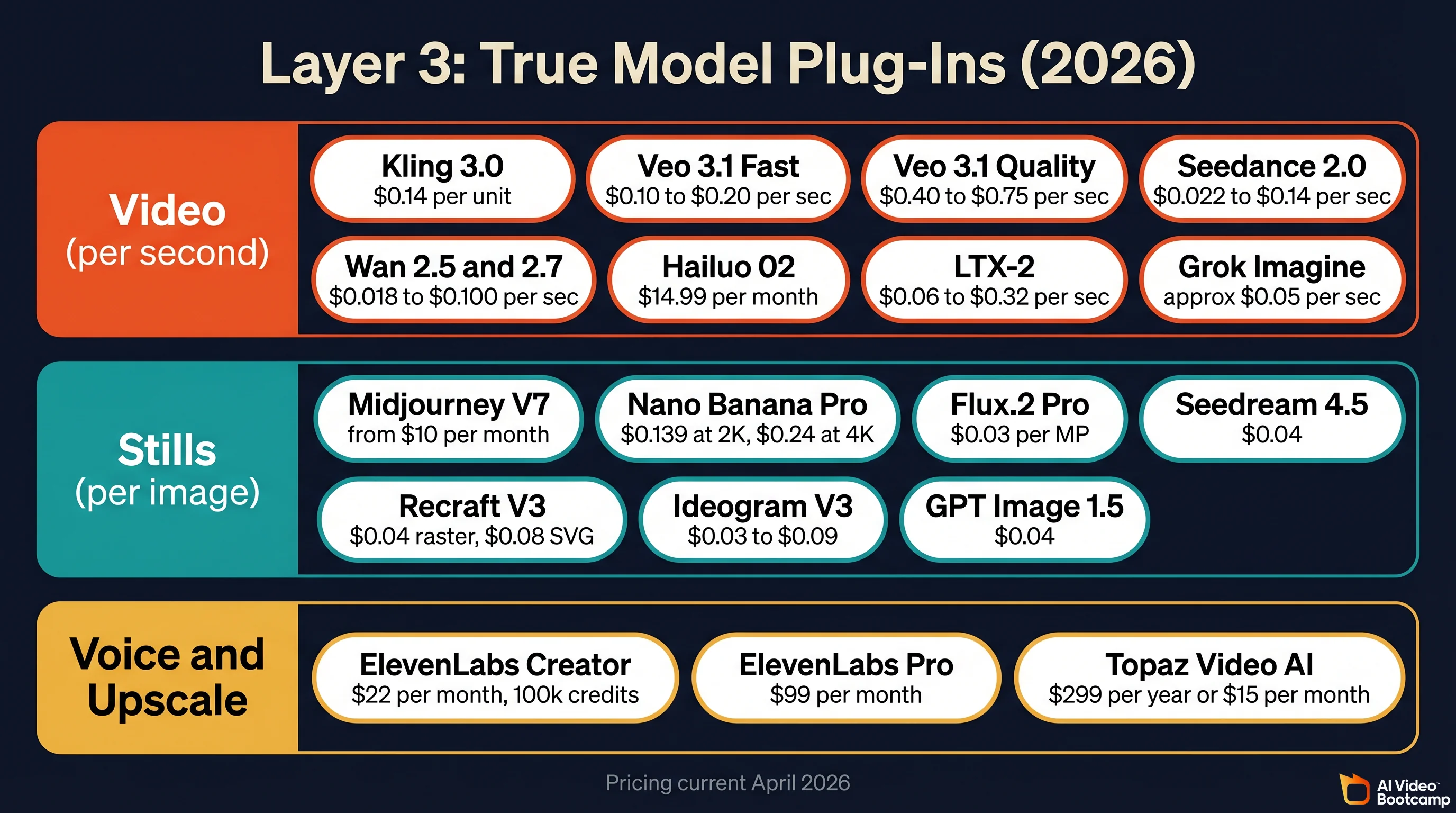
This is where AI Video Bootcamp members spend most of their day. Assume you already generate clips. The useful framing in 2026 is “which layer of the edit does this True Model belong in,” not “which True Model is objectively best.”
AVB covers every one of these tools in Phases 2 through 9 of the curriculum. If you want the deep, model specific guides, start with the Kling AI complete guide, the Seedance vs Kling vs Veo comparison, the Nano Banana Pro complete guide, and the AI video generators ranked 2026 deep dive.
Video Generation True Models (B-Roll and Scene Coverage)
| Model | Pricing via fal.ai / Official API | Notes | Source |
|---|---|---|---|
| Kling 3.0 API | $0.084/sec (std no audio), $0.126/sec (std with audio), $0.112-$0.168/sec (pro) | Best prompt adherence in most 2026 creator side-by-sides. Negative prompts available via API. | fal.ai Kling docs |
| Veo 3.1 Fast | $0.08/sec (720p no audio), $0.10/sec (1080p no audio), $0.30/sec (4K) via fal.ai | Google DeepMind model. Native audio and industry best lip sync. | fal.ai Veo docs |
| Veo 3.1 Standard | $0.20/sec (720p no audio), $0.40/sec (4K) via fal.ai | Premium tier. Use for hero shots where visual quality wins over cost. | fal.ai Veo docs |
| Veo 3.1 Lite | $0.03/sec (720p no audio), $0.05/sec (1080p no audio) via fal.ai | Budget tier for social media. | fal.ai Veo docs |
| Seedance 2.0 Standard | $0.3034/sec at 720p via fal.ai | ByteDance model. VQ-VAE compression plus DiT. | fal.ai Seedance docs |
| Seedance 2.0 Fast | $0.2419/sec at 720p via fal.ai | Lower cost variant. | fal.ai Seedance docs |
| Hailuo 02 (MiniMax) | Token-based via fal.ai; exact rates on dashboard | Ranked #2 globally in user evals. Auto-refunds units if render fails. | fal.ai Hailuo docs |
| LTX-2 (Lightricks) | Token-based; verify current rates on fal.ai dashboard | Only major model with fully open weights and native 4K audio-video. | fal.ai LTX docs |
| Grok Imagine (xAI) | API pricing via xai.com; not on fal.ai | Accessible via X Premium+ and SuperGrok; check xai.com for current rates. | xai.com |
A thing most guides miss: these models reward prompts in their native training language where known. Seedance responds measurably better to Chinese prompts and to prompts that tag references with @Video1 or @Image1. Kling responds strongly to explicit negative prompts (use them to ban watermarks, text, glitches). Veo 3.1 rewards long, cinematically specific prompts (camera, lens, light, pace, mood). See the how to write AI video prompts article for the full prompt system.
Still Frame True Models (Reference Plates, B-Roll Frames, Thumbnails)
| Model | Pricing | Notes | Source |
|---|---|---|---|
| Midjourney V7 + V1 Video | Basic $10/mo, Standard $30/mo, Pro $60/mo, Mega $120/mo. 20% annual discount. | Top tier stills with the best “painterly to cinematic” range. | Midjourney docs, Midjourney complete guide |
| Nano Banana Pro (Google) | $0.134 per 2K image. $0.24 per 4K via Vertex AI. | Best in class text rendering. Strong for thumbnails and reference plates. | Vertex AI pricing |
| Flux.2 Pro (Black Forest Labs) | $0.03 per megapixel (first MP $0.03, each extra $0.015) on Fal.ai. Roughly $0.055 to $0.073 per 1024 by 1024 image across Replicate and Fal | Strongest “non-AI looking” photorealism in 2026 blind tests. | Price Per Token, BFL pricing |
| Seedream 4.5 (ByteDance) | $0.04 per image on OpenRouter. 18 to 24 credits per image inside Dreamina. | Cheapest tier at broadcast quality. | OpenRouter |
| Recraft V3 | $0.04 per raster image, $0.08 per vector image. | Only True Model with native SVG output. | Recraft API |
| Ideogram V3 | Turbo $0.03 per image. Balanced $0.06. Quality $0.09. | Best-in-class text rendering, especially logos and poster style layouts. | Ideogram API |
| GPT Image 1.5 (OpenAI) | ChatGPT Plus $20 per month = 200 images per day. API $0.04 per image at Medium. GPT Image 2 expected mid-to-late 2026. | Good default for ChatGPT workflows. | aifreeapi, ChatGPT Plus image generation guide |
Audio, Voice, and Upscale
| Tool | Pricing | Use case |
|---|---|---|
| ElevenLabs Creator | $22/month, 100,000 credits, ~100 min TTS at V2 Multilingual | Voiceover, character voices, dubbing |
| ElevenLabs Pro | $99/month | Higher quality tier for full podcast or YouTube narration |
| ElevenLabs credit math | 1 credit per character on V2 Multilingual. 0.5 to 1 credit per character on Flash and Turbo. Rule of thumb: 800 to 1,000 characters per minute of natural reading pace. | Precise budgeting for long-form narration |
| ElevenLabs Voice Designer V3 | 24,000 credits one-time to generate a custom voice | Create on-brand character voices for ads and films |
| Topaz Video AI | $299/year or $15/month. 19+ models (Astra for AI, Proteus for camera) | Upscale to 4K/8K/16K, stabilise, deblur, frame interpolation |
Full workflow for adding voice, sound, and music is covered in add voice and sound to AI videos. Full upscale pipeline is covered in the AI video upscaler guide.
AI Editing Plug-Ins That Sit on Top of Any NLE
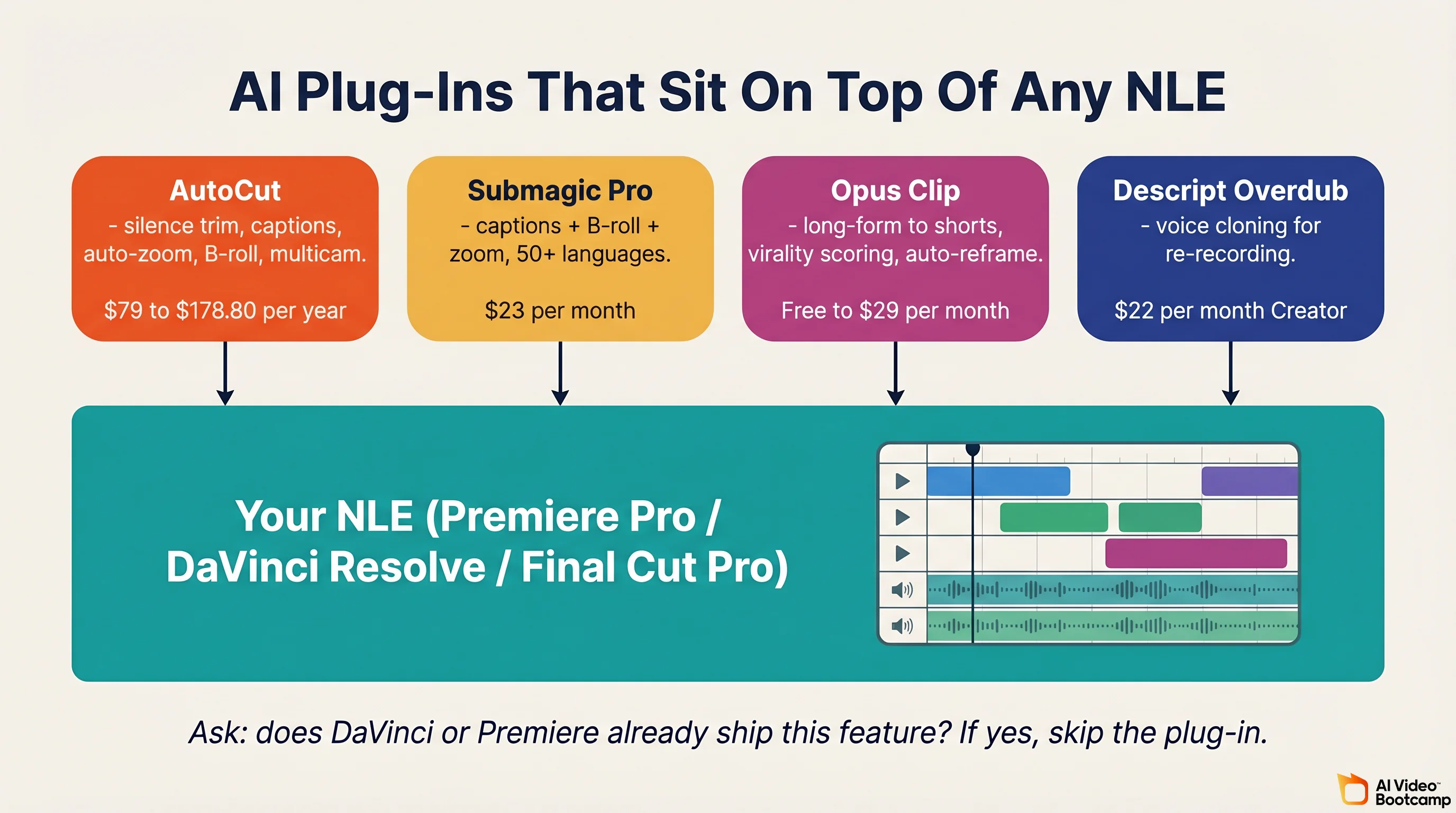
Between Layer 2 (native AI) and Layer 3 (True Models) sits a fourth, smaller category: third-party plug-ins that extend your NLE with AI features the vendor does not ship.
| Tool | Pricing | What it does | Host NLE |
|---|---|---|---|
| AutoCut | Basic $79 per year for silence removal only. AI Plan $178.80 per year for full feature set | Silence removal, animated captions, auto-zoom, B-roll, multicam | Premiere Pro 2023+ and DaVinci Resolve 18.6+ (free and Studio) |
| Submagic Pro | $23 per month for 40 videos up to 5 minutes each. Business $41 per month | Auto-captions plus B-roll plus trim plus zoom. 50+ languages. Now publishes directly to TikTok, Instagram, Shorts, LinkedIn, and X | Browser-based |
| Opus Clip | Free 60 credits. Starter $15 per month. Pro $29 per month | Long form to shorts, virality scoring, auto-reframe | Browser-based |
| Descript Overdub | Included in Descript Creator at $22 per month | Voice cloning for re-recording dialogue without re-shooting | Descript |
The question to ask yourself about any plug-in: does DaVinci Resolve or Premiere already ship this feature? If yes, skip the plug-in. If no, and the plug-in saves you 30 minutes a week, it pays for itself in month one.
How to Use AI for Video Editing (the Practical Workflow)
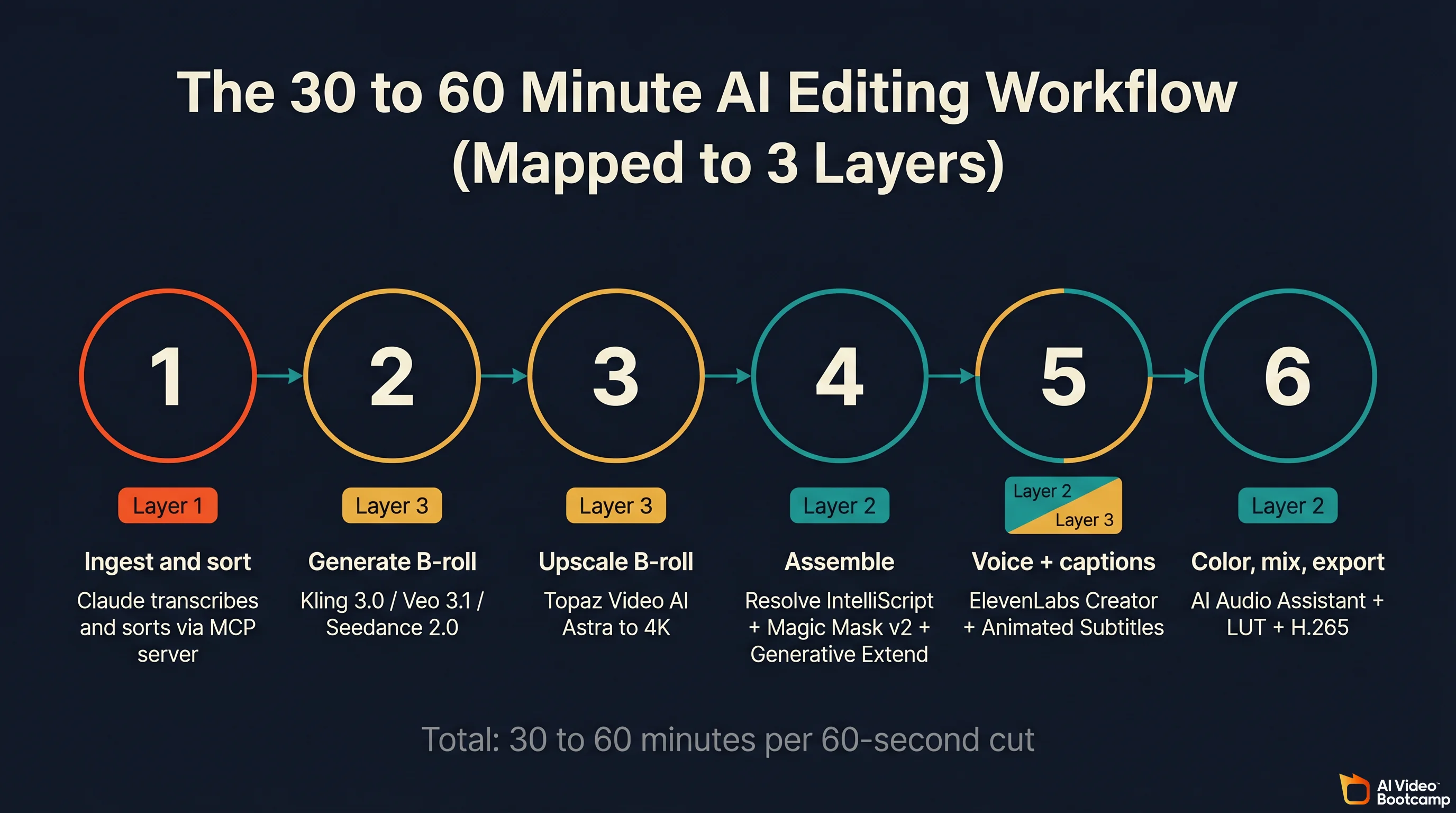
Here is the workflow AVB students ship videos with. The whole thing runs in 30 to 60 minutes for a 60 second YouTube cut once you own the tools. Each step maps to one of the three layers.
Step 1. Ingest and sort (Layer 1). Point Claude Desktop, with the davinci-resolve-mcp server connected, at your raw footage folder. Ask it to transcribe everything with Whisper, sort by scene, and flag any clip shorter than 50 frames or with bad audio. Claude does 10 minutes of metadata work in 30 seconds and hands you a clean bin structure.
Step 2. Generate B-roll (Layer 3). Open Kling 3.0, Veo 3.1, or Seedance 2.0 (or just the cheapest Grok Imagine if budget matters). Write an 80 to 200 word prompt with camera, lens, light, pacing, and an explicit negative prompt (“no watermark, no text overlay, no cartoon”). Render 8 variations. Select the sharpest.
Step 3. Upscale and polish B-roll. Run every AI clip through Topaz Video AI with the Astra model. Target 4K. Save as H.265 at high bitrate. This step is the difference between “AI looking” and “professional looking.” Detailed workflow in the AI video upscaler guide.
Step 4. Assemble (Layer 2). Import everything into DaVinci Resolve Studio or Premiere Pro. Use IntelliScript (Resolve) or Text-Based Editing (Premiere) to lay out dialogue from your script. Use Magic Mask v2 (Resolve) or Object Matte (After Effects) to isolate subjects. Use Generative Extend to heal any shot that came in a beat short.
Step 5. Voice and captions. Generate narration with ElevenLabs Creator (~1 credit per character). Drop on V3. Turn on Animated Subtitles in Resolve or AI captions in CapCut. If you need to re-record a line without re-shooting a talking head, Descript Overdub does it in 30 seconds.
Step 6. Color, mix, export. Use AI Audio Assistant in Resolve to build a full dialogue, music, and effects mix. Color grade with a LUT generated by color-grade-ai or a manual Resolve Color pass. Export H.265 at the highest bitrate your target platform accepts. Never re-encode more than once.
If you are new to this and want a ground up walkthrough, start with the how to make AI videos beginner guide before layering in the LLM pilot step. Once you own the stack, a 60 second cut takes 30 to 60 minutes, not 4 hours.
What Is the Best AI Video Editor? (Direct Answer)
There is no single best AI video editor in 2026 because the category stopped being a single app. Pick by the layer of work you do most.
- Technical creators and power users who already know DaVinci: DaVinci Resolve Studio $299 one-time plus Claude Desktop via the MCP server. This is the most powerful stack in 2026, full stop.
- Adobe users who already pay Creative Cloud: Premiere Pro plus After Effects 26.2 plus AutoCut AI. Generative Extend plus Object Matte plus AutoCut’s B-roll engine covers 90 percent of what you need.
- Short form creators (TikTok, Reels, Shorts): CapCut Pro at $7.99 per month. Nothing else ships mobile plus desktop plus browser at that price with AI captions in 20+ languages.
- Podcasters and dialogue-heavy creators: Descript Creator at $22 per month. Overdub plus Studio Sound plus collaborative recording is a category leader.
- Generative creators doing hero shots: Layer 3 first. Kling 3.0 for prompt adherence, Veo 3.1 for quality, Seedance 2.0 for motion realism, ElevenLabs for voice. Assemble in Resolve free.
The minimum viable AI editing stack in 2026 is roughly $6.99 (Kling 3.0 Standard) plus $22 (ElevenLabs Creator) plus free (DaVinci Resolve) plus free (Claude Desktop plus MCP) = about $29 per month, with an optional $299 one-time for DaVinci Studio when you need IntelliScript, Magic Mask v2, and full MCP access.
Community Pulse and Pitfalls
Evidence-based patterns from 2026 creator forums, Reddit threads, PetaPixel, LTX Studio’s workflow guides, and first-hand write-ups:
- “Resolve was slow on AI, is catching up fast,” per Digital Camera World. Resolve 20 and 21 together closed most of the gap with Premiere.
- Generative Extend is a genuine creator win. PetaPixel calls it “surprisingly good and actually useful.” Creators routinely use it to avoid reshoots when a shot is a beat short.
- AI auto-edit saves 60 to 80 percent of time on repetitive tasks, per Vozo and AIToolsGuide. Some reports cite up to 90 percent on silence-removal and caption tasks specifically.
- Tool sprawl is a real cost. Creators went from averaging 1.2 AI tools to 3.4 AI tools in their workflow per the LTX Studio workflow guide. The best workflows keep stages unified where possible, which is why the three-layer stack matters.
- Claude plus Resolve is still early adopter territory. The wildlion.media case study and the Skywork deep-dive both frame it as promising for bulk operations, not a replacement for creative editing.
Hidden parameters that save hours of debugging:
- DaVinci free tier has no external scripting API, so any MCP or automation server requires Studio.
- Generative Extend silently mutes dialogue during any extension you apply.
- Python 3.13 breaks the davinci-resolve-mcp server. Pin 3.10 to 3.12.
- Hailuo automatically refunds your units if a generation fails, so failed renders do not burn credits.
- LTX Studio’s UI encourages fast credit burn because every hover preview renders a new frame. Disable auto-preview when you are not actively composing.
- Midjourney’s default
--stylize 100biases output toward painterly aesthetics. Override with--stylize 0for photorealistic reference plates.
Frequently Asked Questions
How to use AI for video editing?
Stack three layers. Use an LLM (Claude Code with the DaVinci Resolve MCP server, or ButterCut) to script roughcuts and run bulk operations. Rely on NLE-native AI (DaVinci IntelliScript, Premiere Generative Extend, After Effects Object Matte) for in-timeline fixes. Generate B-roll, voice, and upscale with True Models like Kling 3.0, Veo 3.1, ElevenLabs, and Topaz. Compose across the three layers instead of buying one all-in-one app.
What is the best AI video editor in 2026?
There is no single best AI video editor in 2026. DaVinci Resolve Studio paired with Claude through the MCP server is the most powerful choice for technical creators and costs $299 one-time. Premiere Pro with Generative Extend and AutoCut leads for Adobe users. CapCut wins short form. Descript wins talking-head and podcast. Pick by workflow layer, then stack AI plug-ins on top.
Is DaVinci Resolve good for AI video editing?
Yes. Resolve 20 and 21 ship IntelliScript, Multicam SmartSwitch, Animated Subtitles, IntelliCut, Magic Mask v2, UltraNR, AI Voice Generation, IntelliTrack, and a Photo page with facial refinement. Animated Subtitles and SmartSwitch are on the free tier. IntelliScript and Magic Mask v2 are Studio-only. Studio is $299 one-time, which makes Resolve the cheapest pro AI NLE in 2026.
Can Claude or ChatGPT actually edit my video?
Not directly inside a timeline, but they can pilot an NLE through MCP servers or custom code. Claude plus the samuelgursky davinci-resolve-mcp server can import footage, sort clips, cut roughcuts, and run Fusion nodes. ButterCut uses Claude Code to generate FCPXML. ChatGPT and Perplexity work best in pre-production for scripts, storyboards, and references, not timeline edits.
What is the cheapest AI video editing stack in 2026?
DaVinci Resolve free plus Claude Desktop (free) plus a Kling 3.0 Standard subscription at $6.99 per month plus ElevenLabs Creator at $22 per month lands around $29 per month with zero upfront cost. Add Topaz Video AI at $15 per month for upscale or DaVinci Studio at $299 one-time for IntelliScript and Magic Mask v2 when you need professional features.
Is AI going to replace video editors?
No, and it is not close. Every 2026 case study (wildlion.media, Skywork, PetaPixel, LTX Studio workflow guide) reaches the same conclusion: AI is a timeline intern, not a director. It excels at bulk operations, metadata, silence trim, caption generation, and short B-roll. It struggles with creative pacing, emotional beats, and story. Editors who compose across the three layers are the fastest and highest paid creators in 2026. Editors who ignore the stack are already being undercut.
Start With AI Video Bootcamp
AI Video Bootcamp is the world’s largest paid AI video and image community, with 19,300+ members and 20,000+ daily interactions. Our structured 9-phase curriculum teaches the three-layer stack from first prompt to professional client delivery, covering every tool in this guide (Kling, Veo, Seedance, Nano Banana Pro, ElevenLabs, DaVinci, Premiere, AutoCut, Topaz) plus the LLM pilot patterns that only early adopters are using today. Members get daily feedback, live classes, an opportunity hub, and a 100 percent money-back guarantee.
Join at aivideobootcamp.com for $9 per month or $55 per year (about $4.60 per month). If you are still deciding where AI video fits into your career, the AI video skill stack breaks down the six core skills professional creators need in 2026, and the how to make AI videos beginner guide is the fastest on-ramp.