

AI garden design turns a single photo of a real yard into a photorealistic redesign in seconds. You upload a picture of the actual space, describe the change you want, and an image-to-image model repaints the patio, planting beds, lawn, or full landscape while keeping the house, fence line, and lot shape intact. The two models that do this best in 2026 are GPT Image 2.0 and Nano Banana Pro, and a complete redesign of one yard costs under a dollar.
This guide serves two people who keep landing on the same search. The first is a homeowner who wants to see a new yard before paying anyone to build it. The second is a landscaper or contractor who wants to hand a client a before-and-after mockup on the first site visit and win the job faster. The workflow is identical. The difference is what you do with the picture afterward.
We cover what AI garden design is, how it actually works, the best tools compared, why the free apps frustrate people, the two models worth your time, a step-by-step photo-to-redesign workflow, copy-and-paste prompts, real costs against hiring a designer, where the renders still fail, the landscaper sales workflow, and the disclosure rules you cannot skip. AI Video Bootcamp runs the same image-to-image approach for real estate virtual staging, and garden design uses the identical muscle.
What Is AI Garden Design?
AI garden design is the use of image generation models to redesign an outdoor space from a photograph, producing a realistic picture of the same yard with new landscaping, hardscape, or planting. It works through image-to-image generation, where the model treats your photo as the starting canvas instead of inventing a scene from scratch.
The distinction matters. A text-to-image prompt like “a beautiful backyard garden” returns a generic stock yard that looks nothing like yours. Image-to-image starts from your real photo, so the redesign sits on your actual patio, respects your real fence, and keeps your house in the frame. That is the entire value. A homeowner sees their own yard transformed, not a catalog photo. A landscaper shows a client their own property, which is far more persuasive than a portfolio shot from a different job.
Three capabilities make this reliable in 2026. The models hold the structure of an input image while changing its contents, so the redesign does not warp the house or move the property line. They follow detailed instructions about materials, plants, and layout rather than guessing. And they render at a resolution high enough to print on a proposal or post on a listing. Five years ago none of this was dependable. Today it is a fifteen-minute task.
For a wider view of how these image models compare, the AI Video Bootcamp model rankings break down the current image and video leaders.
How AI Garden Design Actually Works
AI garden design works by feeding your photo to a model’s image-to-image (or “edit”) endpoint with a prompt that says what to change and what to keep, after which the model regenerates only the parts you described. There is one common misconception worth clearing up before you start, because it saves hours of confusion.
GPT Image 2.0 and Nano Banana Pro are prompt-driven semantic editors, not classic diffusion tools. They do not expose a “denoising strength” or “transformation strength” slider. If you have read older tutorials that tell you to set strength to 0.3, that advice applies to a different class of models (such as Stable Diffusion or Flux) and has no equivalent control here. With these two, you steer the result entirely through wording. You tell the model what to change and, just as importantly, you give it an explicit list of what to preserve. GPT Image 2.0 adds one extra lever: an optional mask image, where you paint white over the area the model may edit and leave black over everything it must not touch, which is the most reliable way to lock a house and fence in place.
This is good news for non-technical users. There is no parameter tuning. A clear photo plus a specific prompt with a preservation instruction is the whole skill, and the rest of this guide is about getting those two things right.
Best AI Garden Design Tools in 2026, Compared
The best AI garden design results come from using a general-purpose image model directly, specifically GPT Image 2.0 or Nano Banana Pro, rather than a dedicated landscaping app. The apps are easier to start with but paywall the parts you need, while the direct models cost cents per image and give full control. Here is how the field compares.
| Tool | What it is | Free tier | Real cost | From a photo | Best for |
|---|---|---|---|---|---|
| GPT Image 2.0 | General image model (OpenAI), via fal.ai | None (pay per use) | $0.158 to $0.211 per HD image (fal.ai) | Yes, with optional mask | Highest fidelity, signage, crisp materials |
| Nano Banana Pro | General image model (Google), via fal.ai | None (pay per use) | $0.15 per image (fal.ai) | Yes | Complex multi-zone layouts, fast iterations |
| DreamzAR | Dedicated landscaping app | Starter credits, then locked | $19.99/mo or $199/yr | Yes | A guided mobile experience with AR |
| Neighborbrite | Dedicated landscaping web app | Free basic renders | About $15/mo Pro (unverified) | Yes | Casual homeowner browsing |
| Ideal House | AI home-design platform | 10 daily preview credits, watermarked | Paid tiers (price unverified) | Yes | One-off look with zero setup |
| HomeDesigns.ai | AI home-design platform | A few starter credits | About $27 to $29/mo (unverified) | Yes | DIY interior plus exterior |
| Others (Gardenly, Hadaa, Remodel AI, iScape) | Niche landscaping apps | Varies | Varies (unverified) | Yes | Specific single-purpose looks |
A note on the prices above. Only DreamzAR ($19.99/mo or $199/yr) and the App Store app “AI Garden Design: Landscape AI” ($7.99/week or $59.99/year) publish prices on their own pages, so those are confirmed. Neighborbrite Pro, Ideal House, and HomeDesigns.ai hide their plan prices behind a buy modal or a login, so the figures circulating online come from third-party sites and are marked unverified here. Do not treat any consumer-app price as gospel until you see it in the app’s own checkout.
The dedicated apps all follow the same monetization pattern: a free, low-resolution or watermarked preview, with the clean download locked behind a subscription. Of the five main apps reviewed, four paywall the watermark-free download. That model is fine for a homeowner who needs exactly one picture. It falls apart for a landscaper who needs ten mockups a week, because the fees stack and the output quality is whatever the app decides. The direct-model path inverts that: pay cents per image, own the full-resolution unwatermarked file, control everything.
Free vs Paid: What “Free AI Garden Design” Actually Gets You
Free AI garden design tools exist, but free almost always means a watermarked, low-resolution preview, with the download, the higher resolution, and the extra redesigns locked behind a subscription. Knowing this upfront saves the frustration that fills the community threads on these apps.
There are three honest free routes. The first is the free preview inside a dedicated app, which is free to look at but not to use, because the downloadable file is paywalled or watermarked (Ideal House, for example, gives 10 daily preview credits with a watermark and personal-use-only terms). The second is a general assistant with image generation built in, which can produce a redesign at no cash cost but caps your daily generations and gives little control over keeping the original structure. The third, and the one that is free in spirit, is a direct model’s cheapest tier, where GPT Image 2.0 produces a draft for around half a cent and base Nano Banana produces one for under four cents.
The practical takeaway is that truly free and actually useful rarely overlap. If you need one picture to daydream about your yard, a free app preview is fine. If you need a clean, high-resolution image you can print, post, or hand to a client, you will either pay an app subscription or pay a few cents per image to a direct model. The direct model is cheaper the moment you need more than two or three pictures, and it is the only route that gives you a watermark-free file at full resolution. For client work, that is not optional.
The Two Models Doing the Real Work: GPT Image 2.0 vs Nano Banana Pro
For yard redesigns, GPT Image 2.0 is the best all-around choice and produces the highest-fidelity result, while Nano Banana Pro is faster, slightly cheaper, and better at understanding a long, complex instruction. Most operators keep both and route each shot to whichever fits.
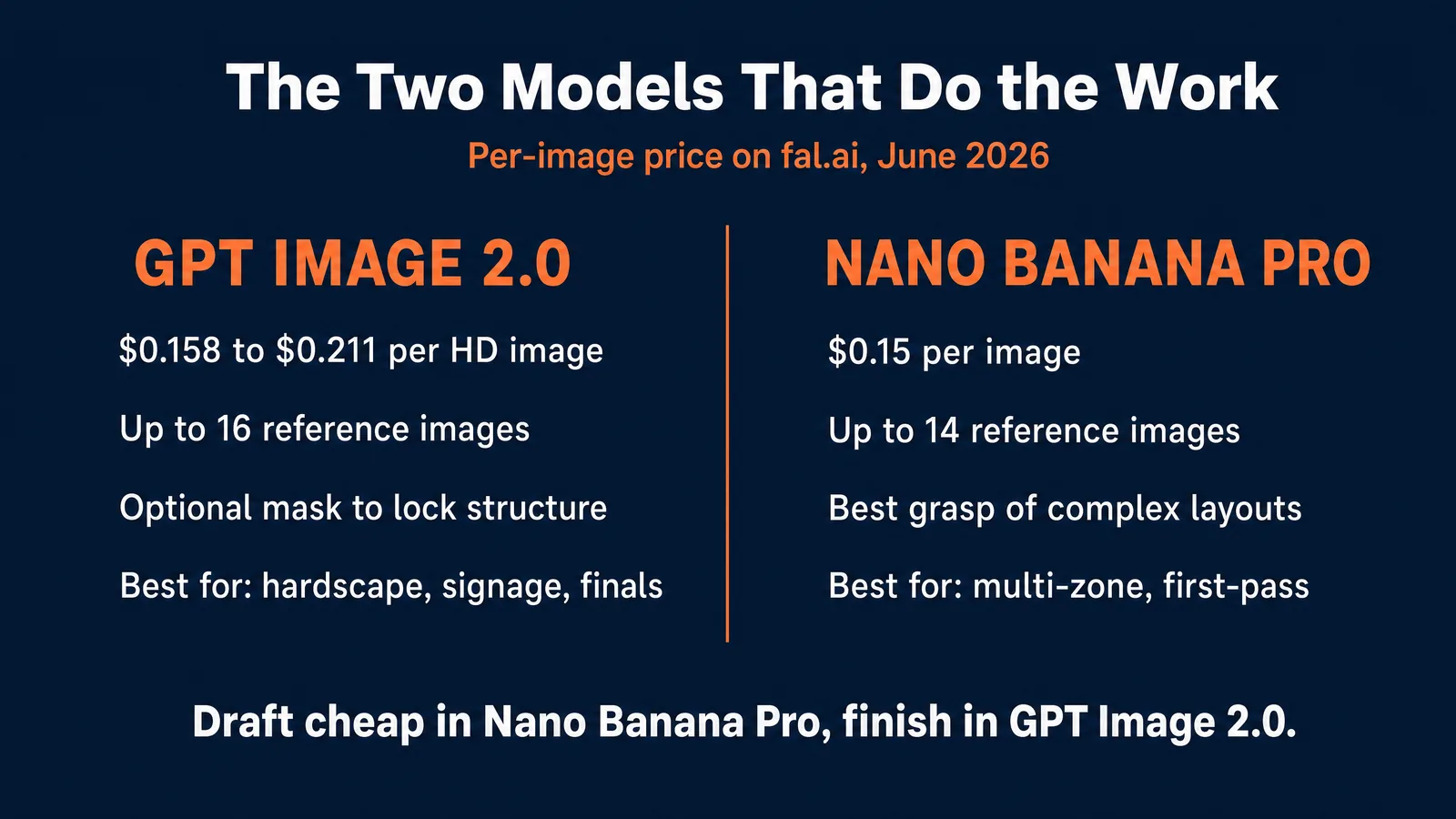
GPT Image 2.0, from OpenAI, is the strongest image model for almost everything in 2026. For garden design it shines where detail and text matter, such as a readable house number on a new mailbox post or crisp material textures on a stone patio. It holds the input structure tightly, supports an optional mask for pixel-perfect locking, and accepts up to 16 reference images so you can supply the base photo plus swatches of the exact pavers and plants you want. On fal.ai it costs $0.158 per image at a 1920 by 1080 landscape crop and $0.211 at 1024 by 1024, both at high quality, verified June 18, 2026. A medium-quality draft drops to roughly four cents, and a 4K final runs about $0.40.
Nano Banana Pro, from Google, has the better grasp of a complicated request. Describe a xeriscape with three planting zones, a gravel path, and a seating area, and Nano Banana Pro is more likely to place all of it correctly on the first try. It accepts up to 14 reference images and lets you assign each a role. Its weaker spot is fine drawing technique, where small details and text can come out softer than GPT Image 2.0. It costs a flat $0.15 per image on fal.ai, about seven generations per dollar, double at 4K, plus $0.015 if web search is enabled, verified June 18, 2026. For a closer look, see the Nano Banana Pro complete guide.
| Factor | GPT Image 2.0 | Nano Banana Pro |
|---|---|---|
| Cost per HD image (fal.ai, June 18 2026) | $0.158 to $0.211 | $0.15 |
| 4K cost | About $0.40 | About $0.30 |
| Cheap draft tier | About $0.04 medium, $0.006 low | $0.039 (base Nano Banana) |
| Max reference images | 16 | 14 |
| Structure lock | Prompt plus optional mask | Prompt (“keep everything else the same”) |
| Complex instruction following | Strong | Strongest |
| Fine detail and text | Strongest | Good, occasionally soft |
| Best yard use | Hardscape, signage, final proposals | Multi-zone layouts, first-pass redesigns |
The honest summary: start a redesign in Nano Banana Pro to nail the layout cheaply, then regenerate the keeper in GPT Image 2.0 at high quality for the version you print or send. Two models, under forty cents, one finished mockup.
Already Paying for ChatGPT or Gemini? Generate It Right There
If you already subscribe to ChatGPT or a Google AI plan, you do not need a developer account or any API to do this, because the same two models are built into those chat apps. For a homeowner or a landscaper making a handful of mockups, this is the easiest route of all.
GPT Image 2.0 is the image generator inside ChatGPT. On ChatGPT Go (about 8 euros per month) or ChatGPT Plus (about 20 US dollars, roughly 23 euros in the EU after VAT), you upload a photo of your yard in the chat, describe the redesign, and tell it to keep the house and fence, all in one window with no per-image billing to track. Plan prices are current consumer pricing and vary by region.
Nano Banana Pro is the image generator inside Google’s Gemini. Google’s AI Plus plan (4.99 US dollars per month) already includes Nano Banana Pro image generation, and AI Pro (19.99 US dollars per month) includes it too. You upload your yard photo in the Gemini app or in Google Flow and run the same image-to-image redesign there.
So the choice is simple. If you make a few redesigns and already pay for one of these assistants, use the app you already have. If you run high volume or want to wire generation into your own proposal software, go direct through fal.ai for cents per image. Either way you are driving the same two models.
How to Redesign a Backyard From a Photo, Step by Step
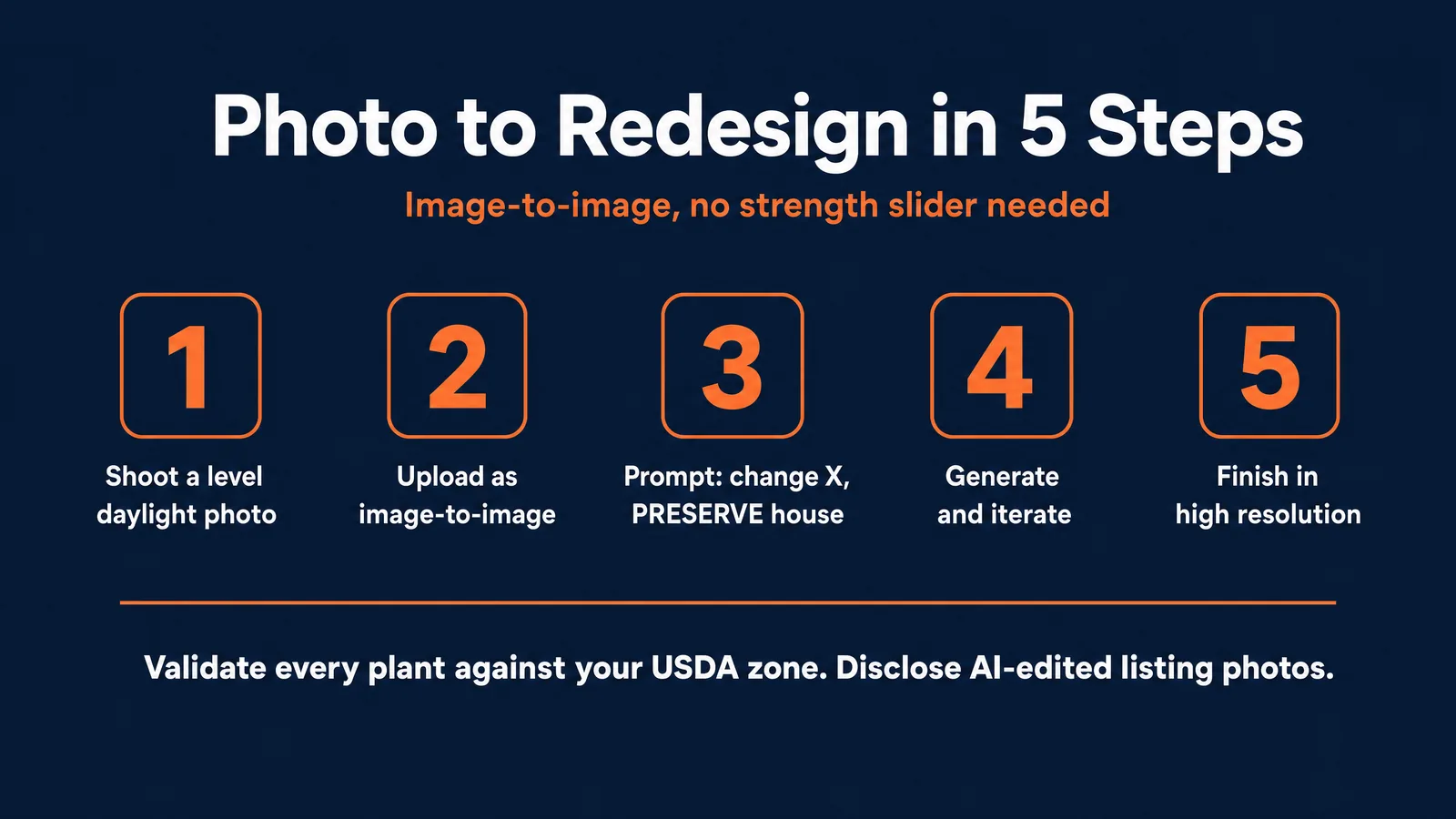
To redesign a backyard from a photo, take a clear daylight picture, upload it to GPT Image 2.0 or Nano Banana Pro as an image-to-image input, write a specific prompt that describes the changes and instructs the model to keep the house and layout, generate several options, then upscale the best one. The whole process takes about fifteen minutes.
Step one is the photo. Shoot in flat daylight, ideally an overcast morning, so harsh shadows do not confuse the model. Stand back far enough to capture the whole area, including the back of the house or the fence as an anchor. Hold the camera level. A crooked or backlit photo produces a crooked or muddy redesign, so this single step decides half your result quality.
Step two is the upload. Open your model of choice, choose the image-to-image or edit mode, and add your photo as the reference. This is the step the free apps hide, because it is what keeps the redesign on your actual property.
Step three is the prompt. Describe the end state, not the process. Name the materials, the plants, the layout, and the mood, then add a clear instruction to preserve the existing house, fence line, and perspective. The prompt library below gives you ready templates.
Step four is iteration. Generate three to five options. The first rarely lands. Change one variable at a time, such as swapping a lawn for gravel or moving a seating area, so you can see what each change does. At four cents per draft, exploring ten variations costs under fifty cents.
Step five is the finish. Pick the keeper and regenerate it at high quality or 4K for a clean, printable file. If the image is going in front of a client or onto a listing, read the disclosure section first, because an AI render needs an honest label.
Free Copy-Paste Prompts for AI Garden Design
The fastest route to a good redesign is a structured prompt that names materials, plants, and layout, then ends with a preservation instruction. Copy any of these, paste your photo as the image-to-image input, and replace the bracketed parts. None of these need a strength slider; the wording does the work.
Full backyard redesign: “Using the uploaded photo as the base, redesign this backyard into a [modern minimalist] garden. Replace the [patchy lawn] with [a clean rectangular lawn bordered by low boxwood hedges], add [a paved bluestone patio with a dining set] in the foreground, and plant [ornamental grasses and a small Japanese maple] along the back fence. PRESERVE the existing house facade, windows, deck, and boundary fence from the reference image exactly. Do not alter the structural architecture. Warm late-afternoon light, professional architectural photography, sharp textures.”
Patio, deck, and hardscape: “From the uploaded photo, add [a two-level cedar deck with built-in bench seating] where the [bare concrete slab] currently sits. Include [a pergola with string lights] and [potted plants on the steps]. Preserve the house wall, door positions, grade, and original lighting. Photorealistic, golden hour, realistic wood grain and crisp mortar joints.”
Front-yard curb appeal: “Redesign the front yard in the uploaded photo for maximum curb appeal. Replace [the overgrown shrubs] with [a tidy layered bed of lavender, ornamental grass, and a single flowering tree], add [a clean stone path to the front door], and refresh [the lawn edge]. Keep the house facade, windows, house numbers, driveway, and roofline identical. Photorealistic, bright morning light.”
Low-water xeriscape: “Convert the yard in the uploaded photo into a low-water xeriscape. Replace the lawn with [decomposed granite and drought-tolerant zones of agave, yucca, and ornamental grasses], add [a dry creek bed of river rock] and [two terracotta planters]. Keep the house, fence, and perspective unchanged. Photorealistic, desert daylight.”
Planting-only refresh: “Keep the hardscape and house in the uploaded photo exactly as they are. Only change the planting: fill the empty beds with [a cottage-garden mix of roses, salvia, and catmint in pinks and purples], and add [climbing jasmine on the fence]. Photorealistic, natural light, summer bloom.”
Two rules make these work. Always end with a preservation instruction so the model does not rebuild your house, and always name specific plants and materials rather than “nice plants,” because specificity is the difference between a believable redesign and an obvious fake. If a structure still drifts in GPT Image 2.0, add a mask so the house and fence cannot change.
Worked Examples: Four Real Backyards, Redesigned
The fastest way to learn the pattern is to see it applied to real yards. Below are four common backyard types, each shown as a real before photo next to the AI redesign it produced, with copy-and-paste prompts. Match the closest type to your own photo, paste your image as the input, and adjust the bracketed details. Every prompt keeps the existing house, fences, and outbuildings, and names specific materials and plants. The redesigns below are AI-generated visualizations.
A big, empty, sunny lawn
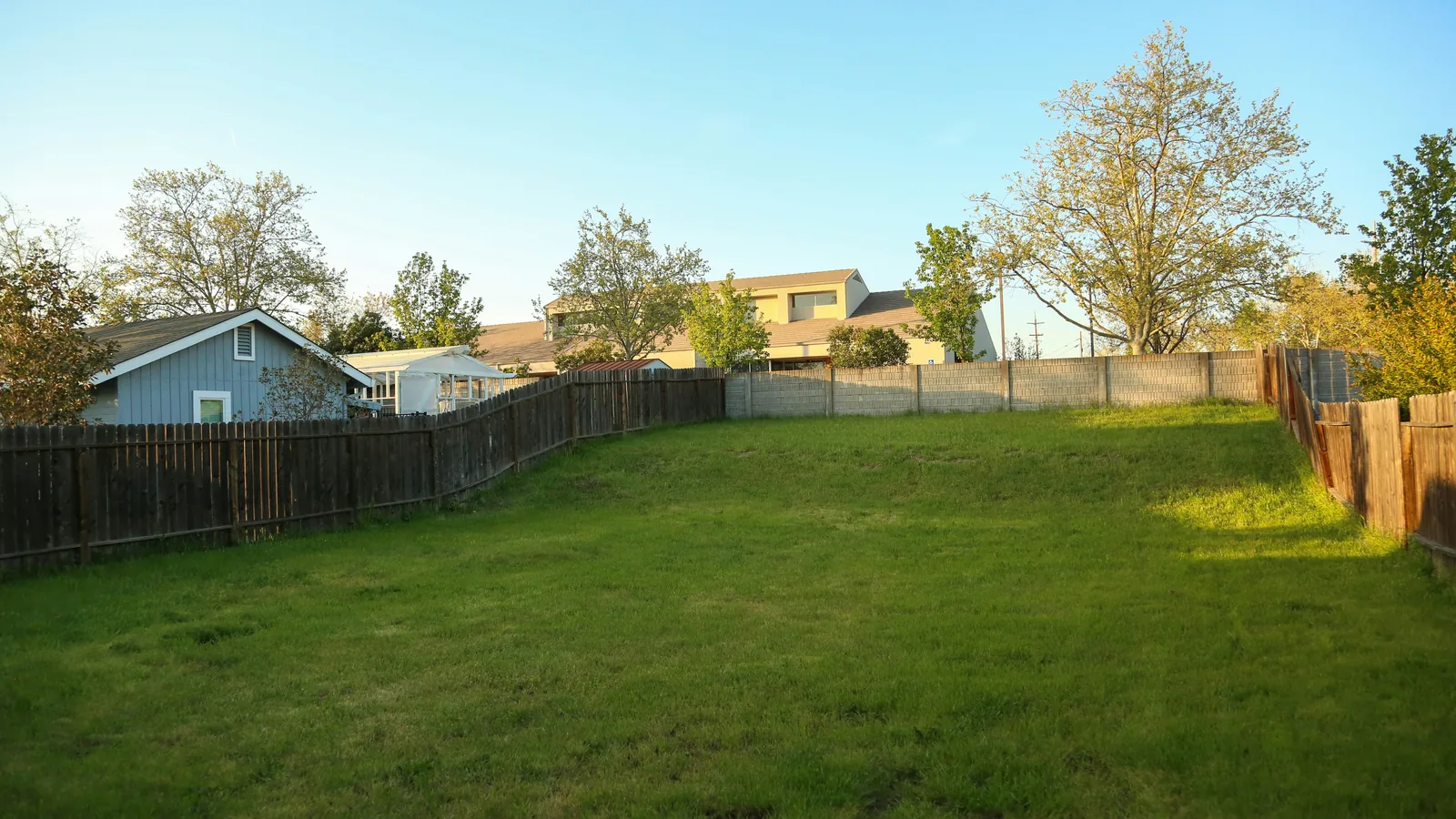
A wide flat lawn bordered by wood fences, with a shed and mature trees behind, is the easiest yard to redesign because there is room to add anything.
Before
The prompt (run on the photo above):
“Using the uploaded photo, keep the wood fences, the shed, the trees, and the sky exactly as they are. In the open lawn add a large rectangular flagstone patio with a dining set in the near foreground, a fire-pit seating circle to one side, and curved planting beds of ornamental grasses and lavender along both fence lines, leaving a central lawn. Photorealistic, warm late-afternoon light, sharp textures.”
After
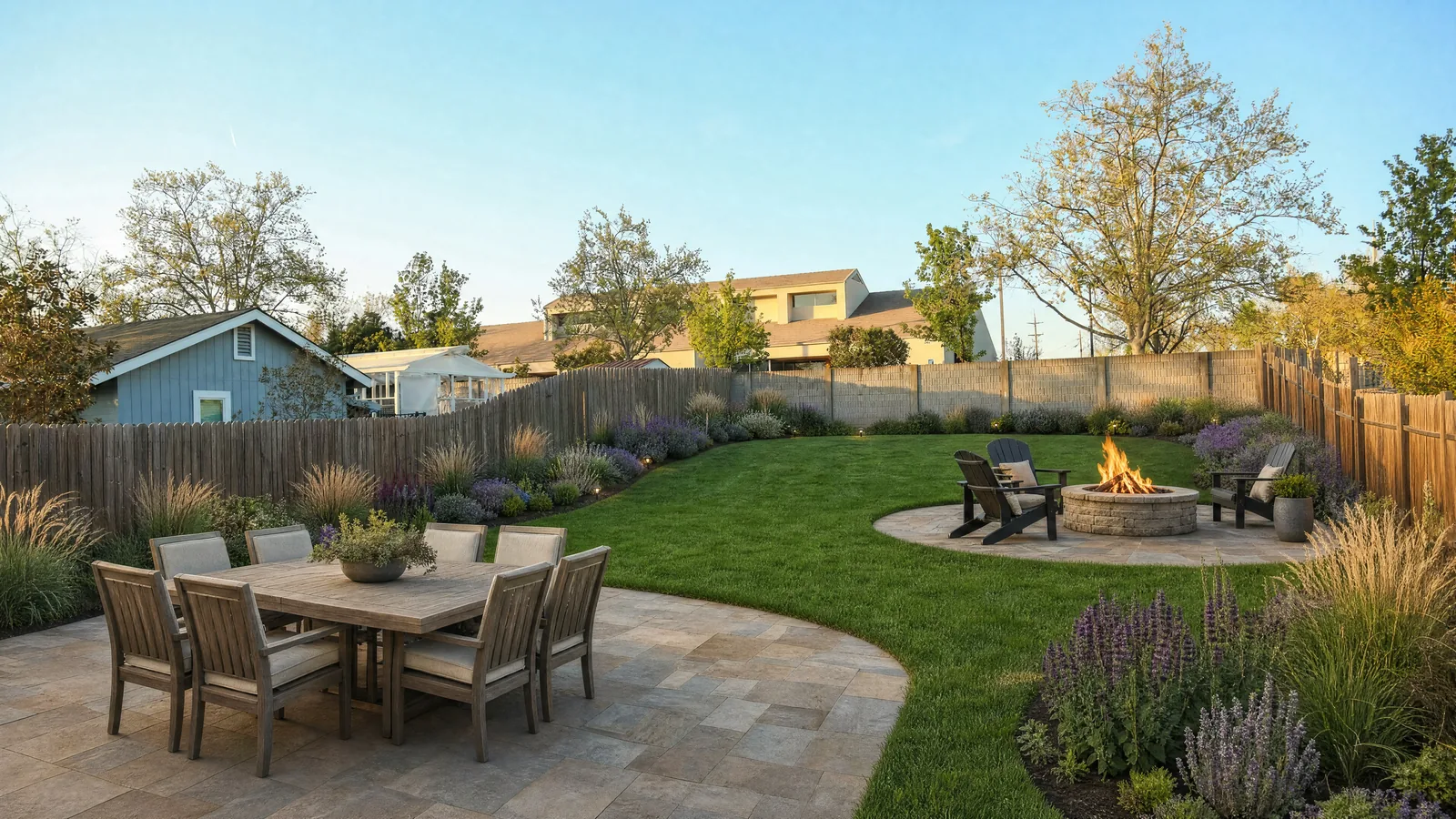
The AI result. This is an AI-generated visualization.
More directions to try on the same photo:
- “Keep the fences, shed, trees, and perspective from the uploaded photo. Redesign the lawn into a modern minimalist garden: a clean rectangular lawn framed by wide gravel borders, raised corten-steel planters with architectural grasses, and a slatted timber pergola with a lounge set on a concrete-paver pad. Photorealistic, bright daylight.”
- “Keep the house, fences, and trees from the uploaded photo. Turn the lawn into a lush cottage garden: curved beds of roses, salvia, and catmint, a winding stepping-stone path to the shed, and a small flowering tree as a focal point. Photorealistic, soft morning light.”
A small yard with a detached garage and a path
A compact yard with a porch, a paved path, and a separate garage or outbuilding rewards a layout that connects the buildings.
Before
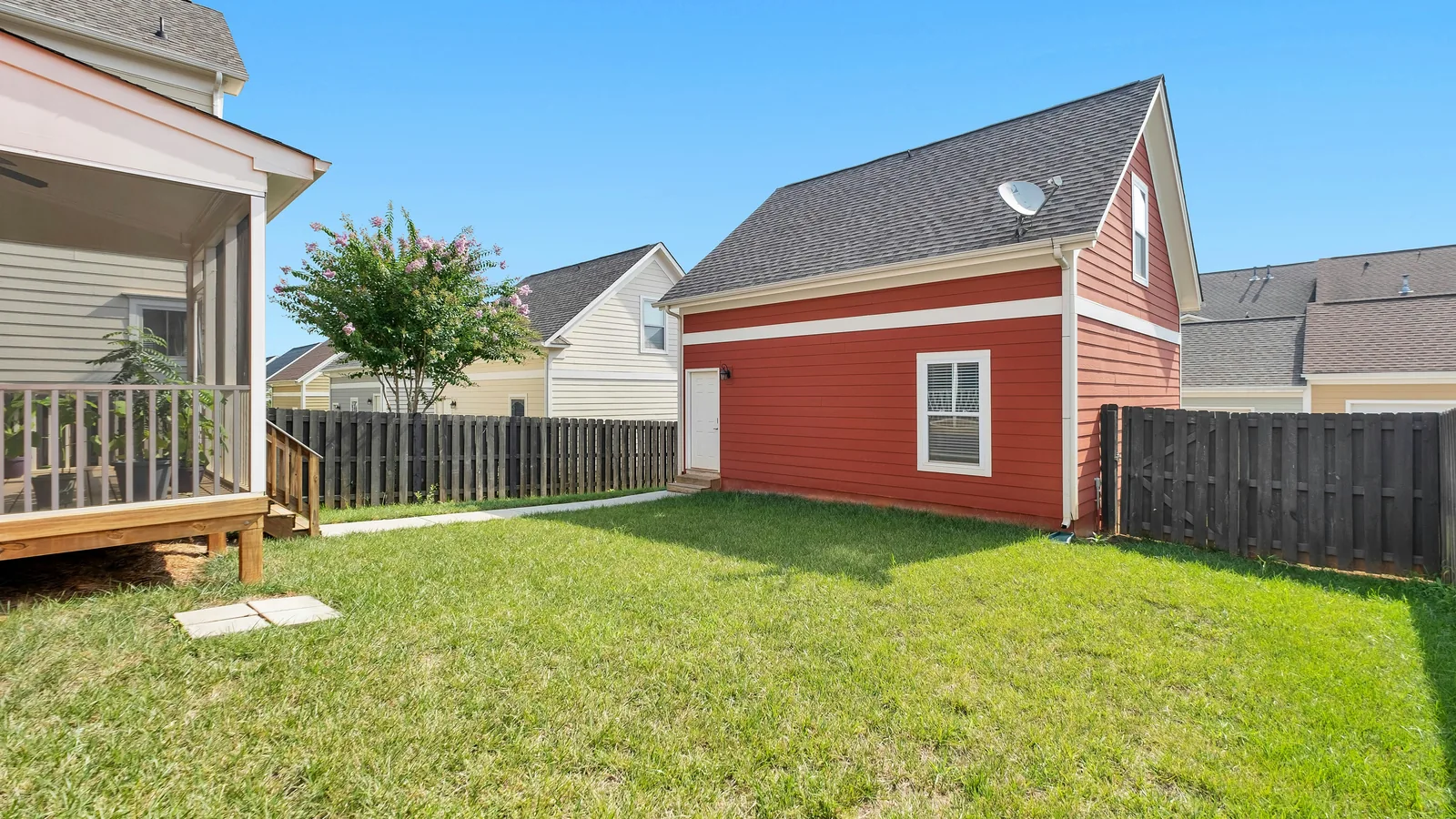
The prompt (run on the photo above):
“Keep the screened porch, the red outbuilding, the wood fence, and the flowering tree in the uploaded photo exactly. Add a paver patio with a fire pit between the porch and the outbuilding, line the path with low boxwood and container plants, and add a planting border of hydrangeas along the fence. Photorealistic, golden-hour light.”
After
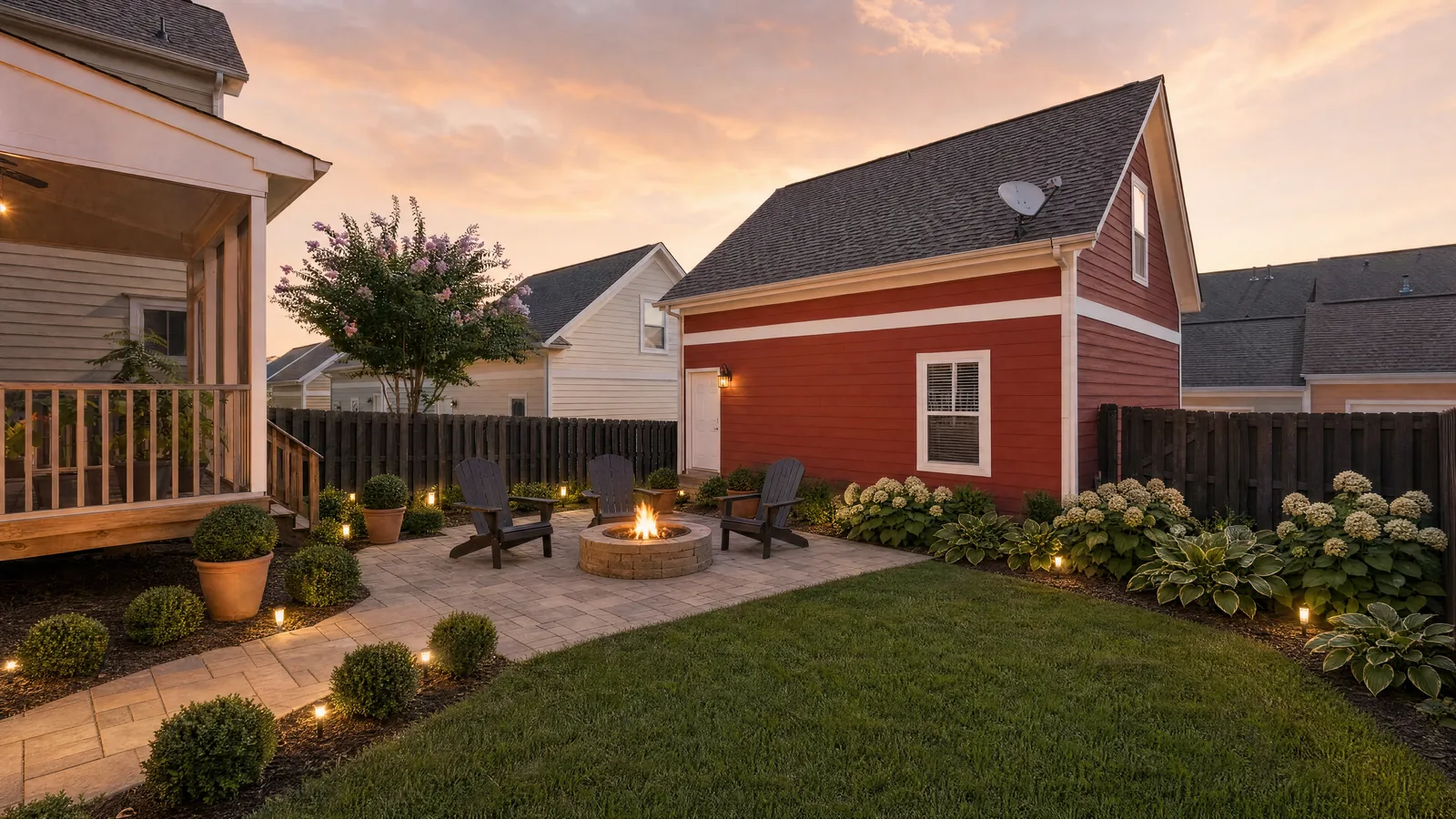
The AI result. This is an AI-generated visualization.
More directions to try on the same photo:
- “Preserve the porch, outbuilding, fence, and path from the uploaded photo. Create a low-maintenance garden: replace open lawn with mulch beds of ornamental grasses and dwarf shrubs, add a small gravel seating nook beside the outbuilding, and train a climbing vine up the base of the red wall. Photorealistic, midday light.”
- “Keep all structures and the perspective from the uploaded photo. Design a compact family yard: a small artificial-turf lawn for kids, a timber deck off the porch, and raised vegetable beds along the sunny fence. Photorealistic, bright daylight.”
A shady, tree-lined yard
A yard backed by tall evergreens in soft light needs shade-tolerant planting, which is the single most important constraint here.
Before
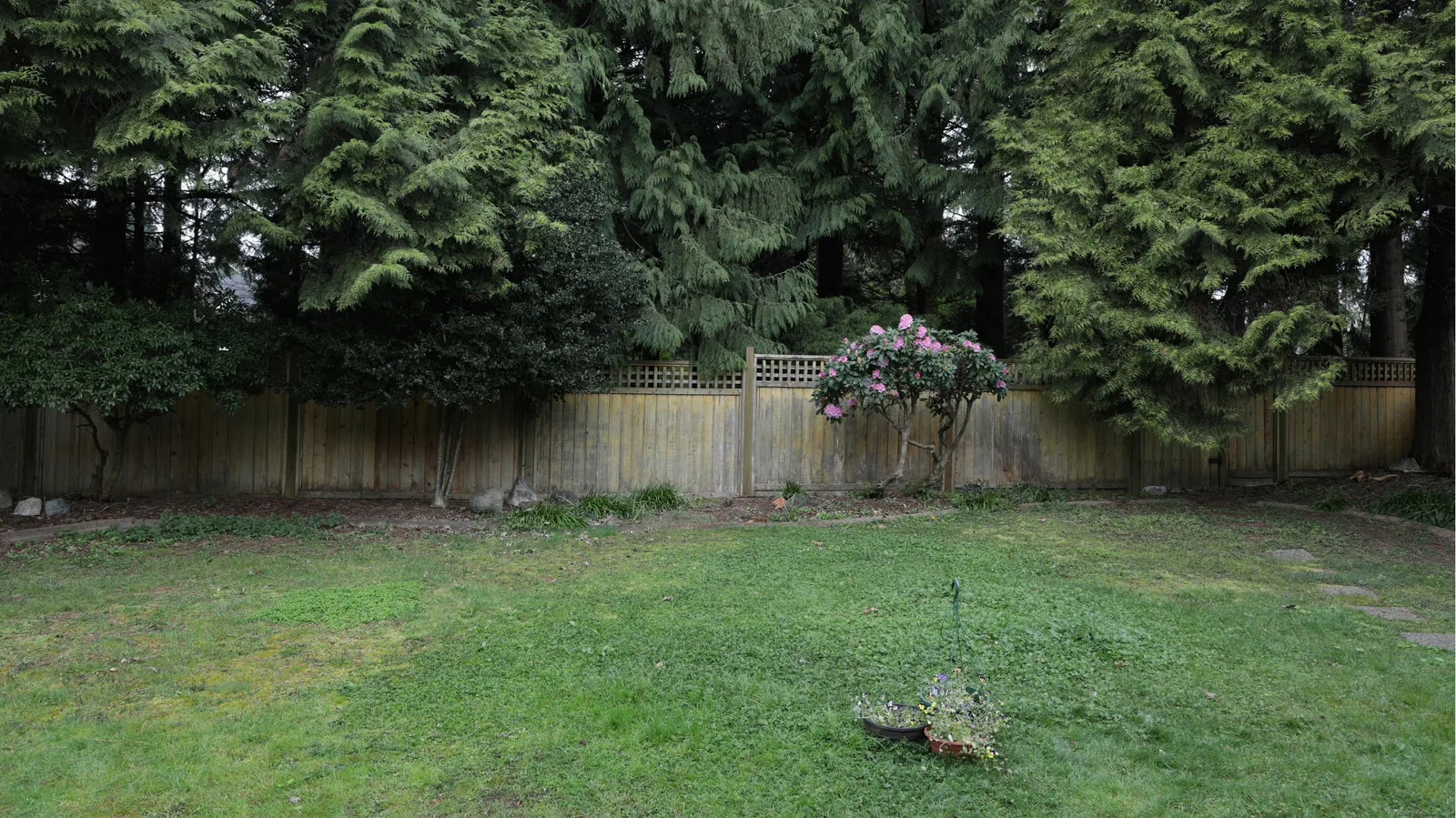
The prompt (run on the photo above):
“Preserve the conifers, fence, and perspective from the uploaded photo. Create a mossy retreat: a moss-and-shade-grass lawn, a meandering gravel path, low ground-cover beds, and a small water-bowl feature. Shade-tolerant planting only. Photorealistic, diffused light.”
After
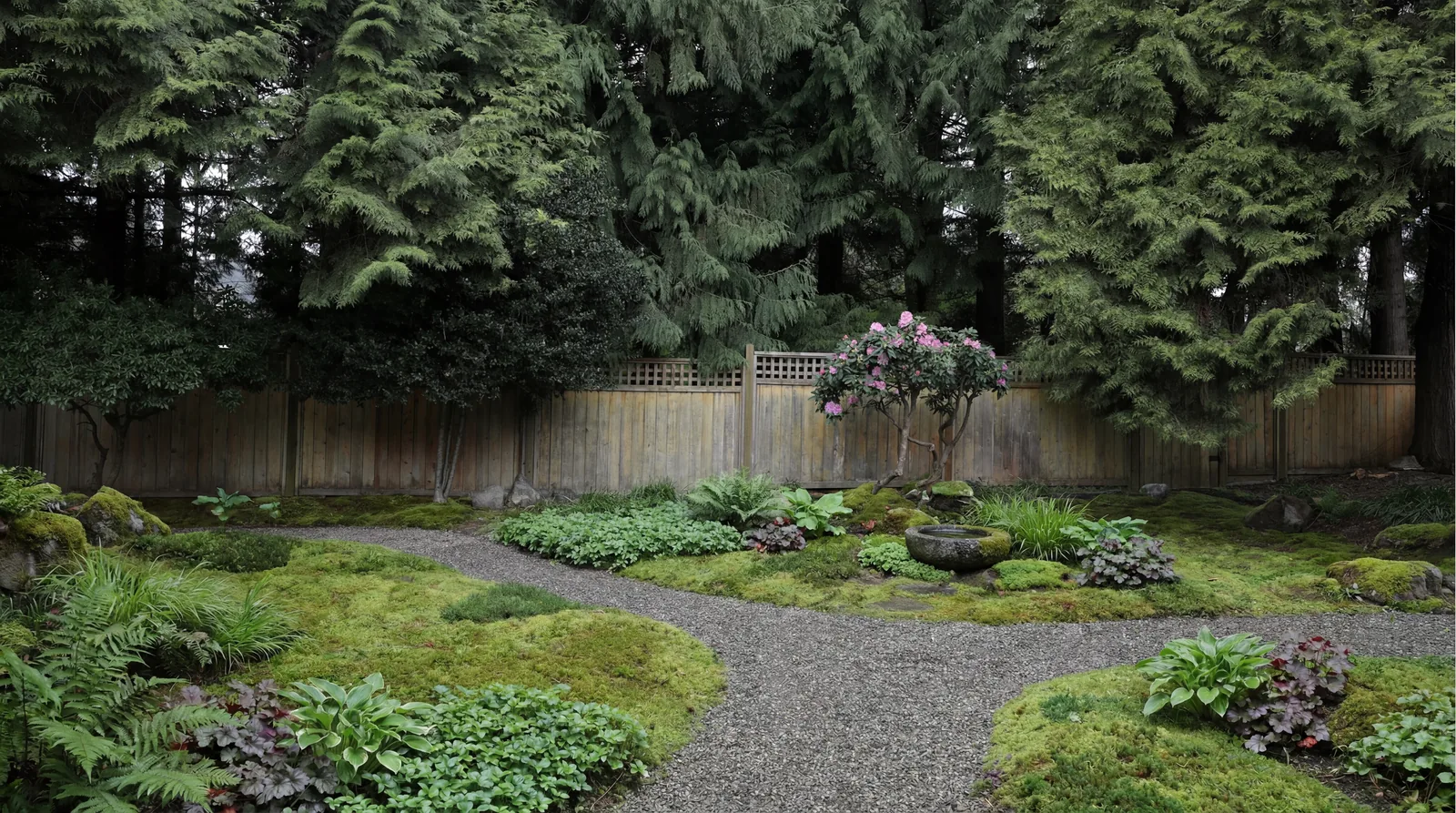
The AI result. This is an AI-generated visualization.
More directions to try on the same photo:
- “Keep the tall evergreen trees, the wood fence, and the existing flowering shrub in the uploaded photo. Design a woodland shade garden: layered beds of ferns, hostas, and astilbe, a bark-mulch path with stone stepping stones, and a simple wooden bench. Use shade-loving plants only. Photorealistic, soft overcast light.”
- “Keep the trees, fence, and the flowering rhododendron in the uploaded photo. Add a pollinator-friendly shade border of hydrangea, foxglove, and bleeding heart with a small flagstone seating area. Use shade-appropriate species only. Photorealistic, soft natural light.”
An overgrown yard that needs a reset
A neglected yard with long grass and a big feature tree is mostly about showing the cleaned-up potential.
Before
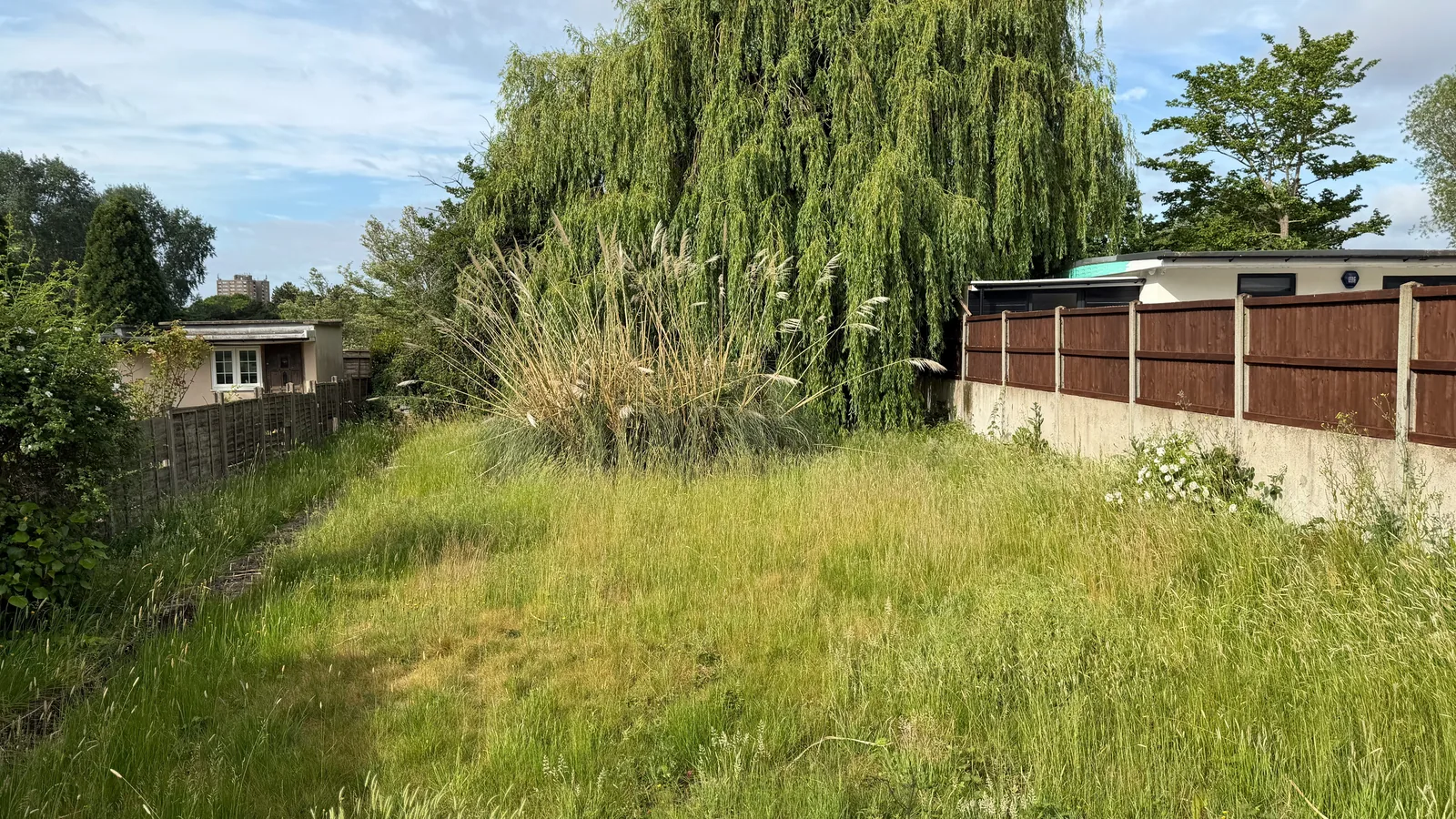
The prompt (run on the photo above):
“Preserve the willow, fences, and buildings in the uploaded photo. Create a family garden: a level lawn, a timber deck near the house, and raised vegetable beds along the sunny fence line. Photorealistic, bright daylight.”
After
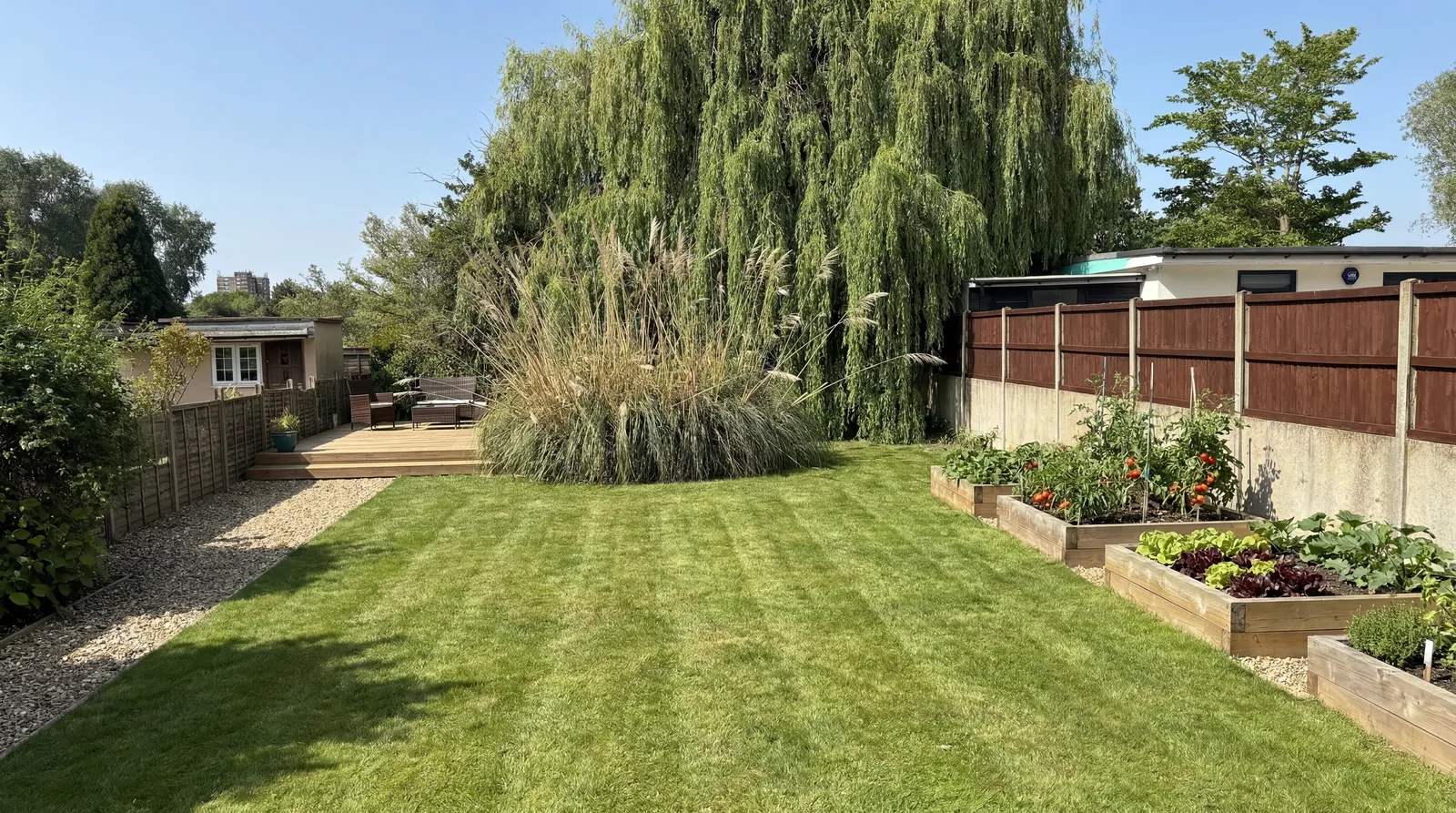
The AI result. This is an AI-generated visualization.
More directions to try on the same photo:
- “Using the uploaded photo, keep the large weeping willow, the perimeter fences, and the outbuildings exactly. Clear the overgrowth and show a tidy mown lawn with crisp edges, a simple stone patio under the willow, and neat planting borders along the fence. Photorealistic, bright daylight.”
- “Keep the willow, the tall ornamental grasses, the fences, and the outbuildings from the uploaded photo. Redesign as a wildlife cottage garden: a wildflower-meadow zone with a winding mown path through it, mixed perennial borders, and a small wildlife pond. Photorealistic, soft afternoon light.”
Notice the shady example names shade-tolerant plants in every prompt on purpose. Match the plant choices to your light and your USDA zone before you build, because the render will not check for you.
Before and After Mockups for Client Proposals
A before-and-after mockup is a landscaper’s strongest closing tool, and AI garden design makes one in minutes from a phone photo taken on the first site visit. Instead of describing what you would build, you show the client their own yard rebuilt, which removes the imagination gap that stalls bids.
The on-site workflow is simple. Photograph the yard while you walk it with the client. Back in the truck or that evening, run the photo through GPT Image 2.0 or Nano Banana Pro with a prompt that matches the plan you discussed, generating two or three directions such as a low-maintenance version and a lush version, then send them with the quote. The historic alternative was outsourcing a 3D rendering to a freelancer for roughly $500 to $1,500 and waiting 48 to 72 hours; the AI path costs cents and takes under a minute, which is what makes a “live design” moment on the first visit possible.
Build the before-and-after as a single side-by-side image so the contrast is obvious, with the original photo on the left and the redesign on the right at the same crop and lighting. This is the same proposal technique AVB documents in the home services marketing playbook, applied to the design stage of the sale.
A word of restraint, and an honest one. It is widely repeated in the industry that visual proposals close more bids, and that is plausible, but there is no rigorous public data putting a number on how much an AI mockup lifts a landscaper’s win rate. Treat it as a faster, more concrete way to sell the vision, not a guaranteed percentage. And remember the mockup is not a construction document. Use it to win agreement on direction and budget, then move to real plans and plant lists for the build.
AI Patio, Deck, and Hardscape Visualizer
For hardscape, AI garden design is strongest when you change one structural element at a time and let the model render realistic materials, because patios, decks, and walls have hard edges and textures that reward a focused prompt. A vague “add a patio” produces a floating slab, while a specific material and placement produces something a client believes.
Hardscape redesigns live or die on material description. Name the surface, the pattern, and the tone: “a patio of large-format charcoal porcelain pavers in a stack-bond pattern” reads as real, while “a patio” does not. GPT Image 2.0 is the better choice here, because it renders crisp geometric lines on masonry and keeps mortar joints sharp where other models blur them. Tell the model to keep the house wall, the door, and the existing grade so the new structure connects to the real building instead of hovering, and mention the slope direction for retaining walls and steps, because the model cannot see your topography and will otherwise guess wrong.
AI Front-Yard Curb-Appeal Redesign
Front-yard redesigns are the highest-value use of AI garden design for sellers and agents, because curb appeal drives first impressions and the render shows what the property could look like. The approach mirrors the backyard workflow with one added priority: keep the house facade perfectly intact, since the front of the house is the recognizable anchor. GPT Image 2.0 is the right model here for its pixel-accurate handling of house numbers, signage, and architectural trim.
The most persuasive front-yard redesigns change three things and leave everything else alone: refresh the planting beds with a tidy layered arrangement, clean up or replace the lawn, and add a clear path or refreshed entry. Resist changing the house color, windows, or roof in the same image, because every extra change is a chance for the model to drift from the real property. If a client wants exterior changes too, that overlaps with the real estate virtual staging workflow, which is built for the structure of the home itself. For agents, a front-yard render carries the heaviest disclosure responsibility, covered below.
Low-Water Xeriscape and Planting-Only Refreshes
Two of the most popular and lowest-risk redesigns are a low-water xeriscape conversion and a planting-only refresh, and both play to the models’ strengths. Xeriscaping requires scattering aggregate (gravel, decomposed granite) among structurally distinct succulents and cacti, and Nano Banana Pro’s reasoning keeps gravel beds granular instead of turning them into a flat gray slab, so it is the better pick. A planting-only refresh, where you swap tired shrubs for seasonal perennials in existing beds, is the cheapest job of all: lock the hardscape and house, change only the planting, and run it on base Nano Banana at under four cents a draft.
These two jobs are also where horticultural accuracy matters most, because a xeriscape full of the wrong species or a perennial bed picked for looks rather than climate will fail in the ground. The accuracy section explains how to validate the plant list.
Per-Use-Case Routing: Which Model for Which Job
No single model wins every yard job, so route each task to the model built for it. The logic below was consistent across both research passes; the costs use the verified fal.ai per-image prices, and a typical job is a few cheap drafts plus one or two high-quality finals, well under a dollar.
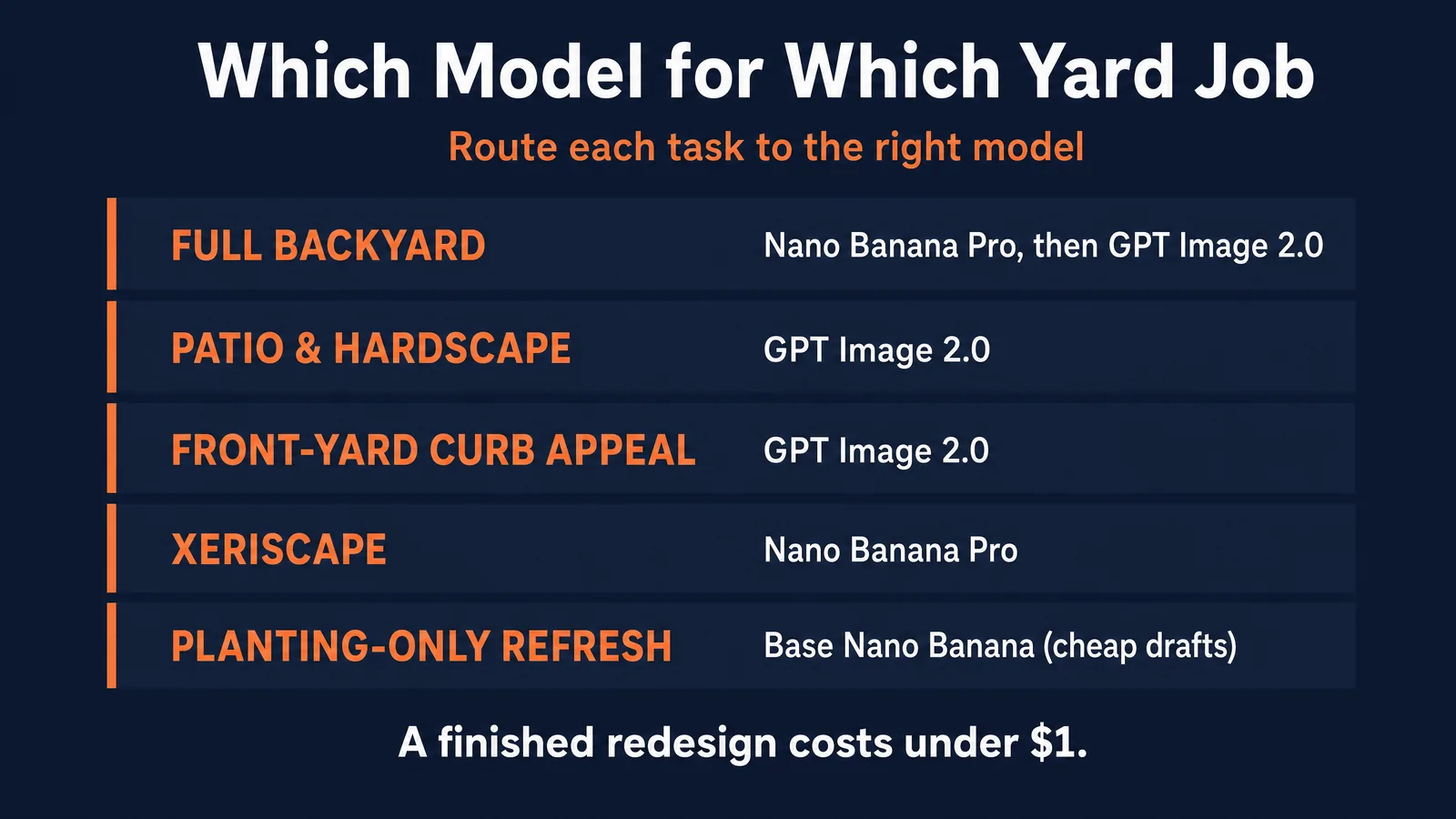
| Use case | Best model | Backup | Cost per finished image | Why |
|---|---|---|---|---|
| Full backyard redesign | Nano Banana Pro (layout) then GPT Image 2.0 (final) | Either alone | $0.15 to $0.21 | Nano Pro reasons over multi-zone layouts; GPT finishes detail |
| Patio / deck / hardscape | GPT Image 2.0 | Nano Banana Pro | $0.16 to $0.21 | Cleaner edges and material texture |
| Front-yard curb appeal | GPT Image 2.0 | Nano Banana Pro | $0.16 | Pixel-accurate facade, house numbers, signage |
| Low-water xeriscape | Nano Banana Pro | GPT Image 2.0 | $0.15 | Keeps aggregate granular, places zones correctly |
| Planting-only refresh | Base Nano Banana (draft), Nano Banana Pro (final) | GPT Image 2.0 | $0.039 to $0.15 | Cheapest for simple biological swaps |
| Before/after proposal | GPT Image 2.0 with mask | Nano Banana Pro | $0.16 to $0.21 | Mask locks the existing structure exactly |
What It Costs: AI vs Hiring a Designer
A complete AI garden design redesign costs under one dollar, while a professional design plan averages several thousand, which is the gap that makes this worth learning. The point is not that AI replaces a designer; it is that AI removes the cost of the exploration phase.
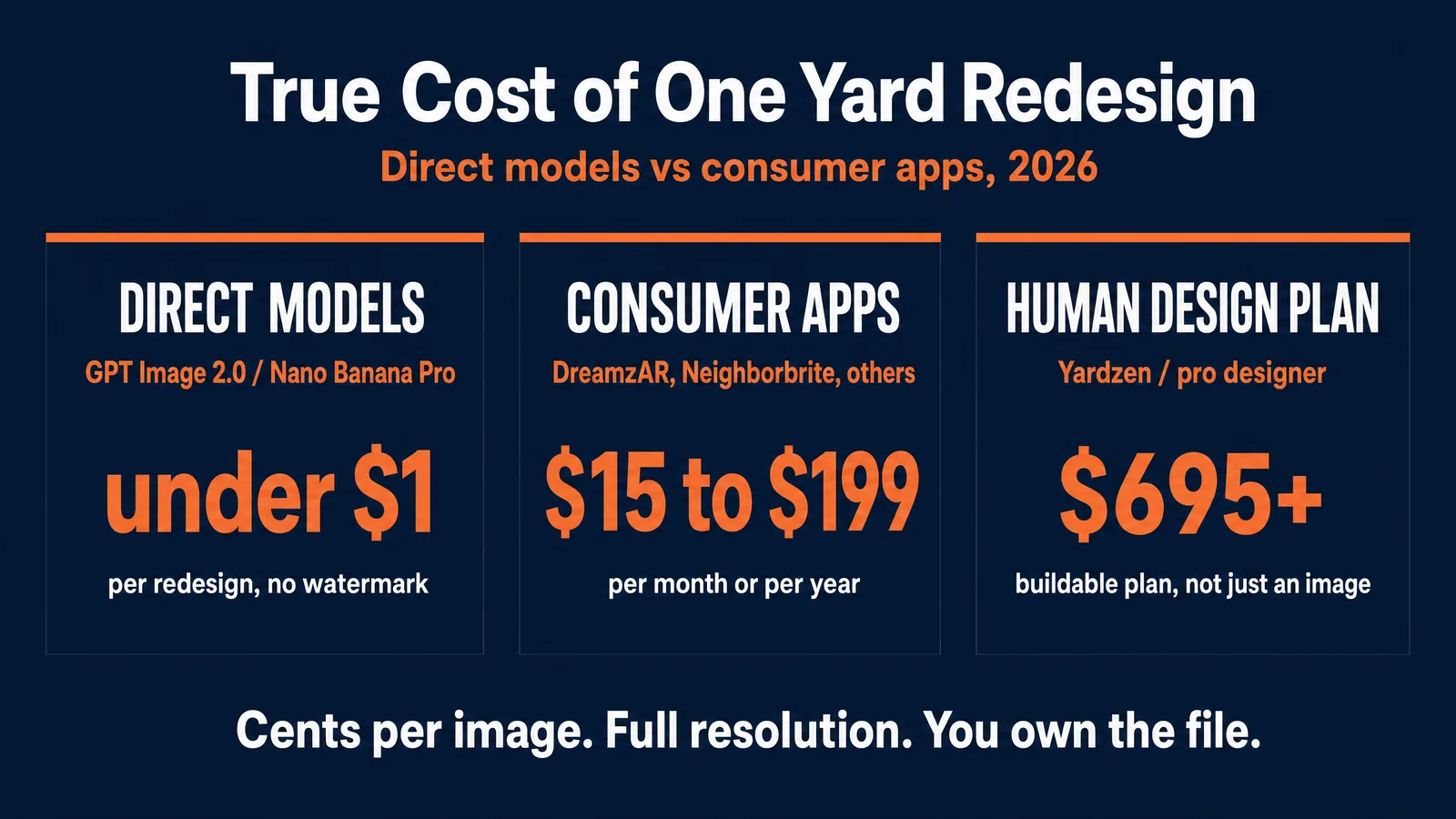
On the AI side, all figures verified on fal.ai June 18, 2026: Nano Banana Pro is $0.15 per image, GPT Image 2.0 is $0.158 to $0.211 at high quality with a medium draft near four cents, and base Nano Banana is $0.039. A realistic project of six drafts plus two finals totals about $0.54 to $1.06 per yard, and a homeowner can generate 50 conceptual layouts for under $3.
On the human side, the numbers are an order of magnitude higher, and rightly so, because a designer delivers a buildable plan and a plant list, not just a picture. A professional landscape design plan averages around $4,580, with most homeowners paying between roughly $1,934 and $7,257; a basic concept plan starts at $300 to $1,000 (HomeAdvisor, 2025). Tech-enabled human services price similarly: a Yardzen plan runs from about $695 for a small space up to about $3,495 for a premium full-yard layout. Landscape designers bill roughly $50 to $150 per hour, and the median wage for landscape architects was $79,660 in May 2024 (U.S. Bureau of Labor Statistics).
| Path | What you get | Cost |
|---|---|---|
| Direct models (GPT Image 2.0 / Nano Banana Pro) | Unwatermarked, full-resolution concept you own | About $0.54 to $1.06 per redesign |
| DreamzAR (app) | In-app designs, app export | $199/yr or $19.99/mo |
| App Store “AI Garden Design” | Capped designs, paywalled | $7.99/wk or $59.99/yr |
| Yardzen (human-assisted) | Build-ready 2D and 3D plan | About $695 to $3,495 |
| Professional design plan | Human plan, plant list, buildable | $300 (concept) to about $4,580 average |
The honest framing: use AI for the cents-per-image ideation phase, lock the direction you love, then pay a professional only for the buildable plan and the install. You skip the expensive exploratory stage without skipping the expertise that keeps the yard alive.
Getting Plants and Hardscape Right: The Honest Limits
AI garden design is convincing at a glance but not horticulturally accurate, so it will place plants that cannot survive your climate, render hardscape that ignores your slope, and invent species that do not exist. Knowing the failure modes keeps you from promising something the ground cannot deliver.
The biggest limit is that the model has no idea where you live. It matches the look of your words, not the reality of your site, so it will put shade-loving hydrangeas and hostas into full-sun arid yards and frost-tender tropicals into cold-winter zones. The fix is to treat the plant choices in a render as a mood, not a planting list, and validate every species against your USDA Plant Hardiness Zone before you build. The 2023 USDA map (based on 1991 to 2020 winter lows) tells you what survives winter cold, but it covers cold only, so you still filter by sun, soil, and water using the “right plant, right place” principle that university extensions teach. Penn State Extension, testing these tools directly, found that AI redesigns produce attractive images that are “hard to implement because they did not include a plant list,” and that AI assistants made unverified assumptions about sun and soil. You can check what the model suggests against the Penn State Extension and USDA hardiness zone resources.
The second limit is physical plausibility. Models cannot see topography, so a retaining wall might sit at an impossible angle, and they regularly draw mature 30-foot trees growing out of a 24-inch sidewalk strip, ignoring the soil volume a real tree needs. The third limit is scrutiny: fences gain or lose posts, steps miscount, and a render of full-grown plants hides the fact that real installs go in small and take a season or two to fill in. Community discussion captures both reactions. People love the speed (“you can see your space in different styles,” r/landscaping/comments/15ohomj) and distrust the accuracy (“the plants included can only tolerate shade and would be burnt” in full sun, same thread; “incorrect scale, removal or modification of existing structures,” r/landscaping/comments/1toaeht). Both are correct: excellent for direction, unreliable for dimensions.
For Landscapers: Win the Bid With an Instant Mockup
For landscapers, the business case is speed to a yes, because a client who sees their redesigned yard attached to a quote decides faster than one staring at a number alone. The mockup shifts the conversation from “is this worth it” to “I want that.”
The operator workflow is a routine, not a project. Photograph every yard you bid while you are standing in it, then spend fifteen minutes and under a dollar that evening turning each photo into two redesign directions and attaching them to the proposal. The cost per bid is trivial against a single won job. Several professionals describe exactly this use: AI is “invaluable” for handing a customer a concept (r/LandscapeArchitecture/comments/14jmtwj), and offices “use AI for videos and client presentations” (r/LandscapeArchitecture/comments/1mk787e). The recurring caution from the same professionals is just as important: the render can “convince a lot of people that their wrong design is correct” (r/landscaping/comments/1plojfm), so set expectations as you present it.
There is a real arbitrage here, the same one AVB teaches across its content. The subscription apps homeowners use charge a recurring fee for limited, watermarked output, while the direct models cost cents and produce unlimited full-resolution images you own. A landscaper who learns the fifteen-minute direct workflow has a faster, cheaper, higher-quality closing tool than a competitor paying monthly for an app. The skill is the moat, not the software.
Disclosure: Label Every AI-Edited Yard Image
Any AI garden design image shown to a buyer or used in a listing must be clearly disclosed as a digitally altered or AI-generated visualization, because presenting a render as the current or guaranteed condition is misleading and, in real estate, is now regulated. Honesty here is both ethics and risk management.
For a homeowner planning their own yard, disclosure does not matter, since the only audience is you. The moment another party relies on the image, it does. A landscaper should label a mockup as a design concept so the client does not expect the exact rendered plant palette. An agent or seller faces the strictest rules.
In the United States, the National Association of Realtors Code of Ethics Article 12 requires a “true picture” in advertising and, per NAR guidance, the disclosure of digitally altered or virtually staged images. California Assembly Bill 723, effective January 1, 2026, goes further for listings: any image altered by AI to add, remove, or change elements, explicitly including landscape and hardscape, must carry a conspicuous label such as “Digitally Altered” or “AI Altered” and provide access to the original, unaltered image. Treat any listing-facing yard render as a virtual enhancement that must be marked, and never use one to hide a defect.
For operators serving European audiences, the EU AI Act Article 50 transparency obligations begin enforcement on August 2, 2026, and require that AI-generated or manipulated realistic media be disclosed as artificially generated; penalties for transparency breaches run to the regulation’s upper tiers, so confirm the current figure for your situation before relying on it. The same provenance and labeling practices AVB documents in the AI disclosure compliance guide apply directly to garden renders. The short version: show the render proudly, label it honestly, and let the real plans carry the promise.
Common Mistakes and Fixes
Most failed AI garden designs come from a small set of avoidable mistakes, and each has a one-line fix. Working through these turns a frustrating afternoon into a reliable fifteen-minute routine.
The most common mistake is a bad input photo; the fix is a level, flat-daylight shot with the house or fence in frame as an anchor. The second is a vague prompt; name materials, plants, layout, and a preservation instruction. The third is forgetting the preservation instruction, which lets the model rebuild your house; always tell it to keep the structure and perspective, and add a mask in GPT Image 2.0 if it still drifts. The fourth is chasing an old “strength slider” that these models do not have; steer with words instead. The fifth is changing too many things at once, which causes drift; change one variable per generation. The sixth is trusting the plant choices literally; treat plants as mood and verify species against your USDA zone. The seventh is using a free watermarked preview for client work; for anyth