
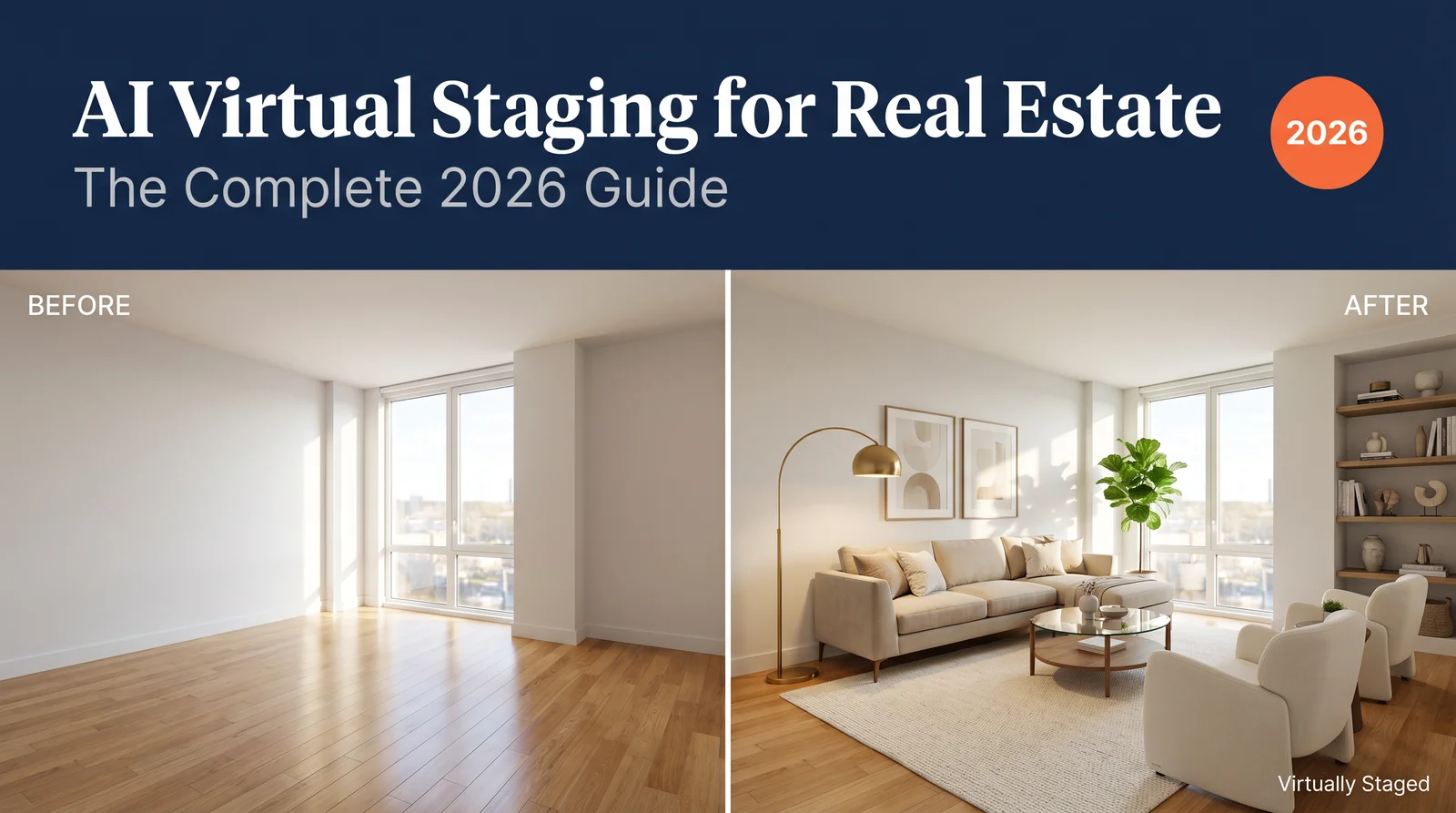
Pricing verified April 30, 2026.
AI virtual staging is now standard practice for real estate listing marketing in 2026. The category has split into two paths: a DIY path using general purpose AI image models like GPT Image 2.0 and Nano Banana Pro, where agents who learn prompting get unmatched flexibility at near zero marginal cost, and a dedicated tools path of thin wrappers like Collov AI and Interior AI, which trade control for plug and play workflow. This guide covers both, with verified April 2026 pricing, room by room DIY prompts you can copy and paste, and the full legal compliance stack including California AB 723, NAR Code of Ethics, and MLS rules.
What AI Virtual Staging Actually Is
AI virtual staging is software that takes a photo of an empty or poorly staged room and produces a photorealistic version of the same room with furniture, decor, lighting adjustments, and styling. The original architecture of the room stays identical: walls, windows, floors, ceilings, doors, and built in fixtures remain exactly as photographed. What changes is the contents.
The technology sits on top of the same diffusion and autoregressive image models that power Midjourney, GPT Image 2.0, Nano Banana Pro, and Stable Diffusion, but with two specific constraints baked in. First, the models are conditioned on the input photo so they preserve spatial geometry rather than hallucinating new architecture. Second, they are prompted or templated toward furniture and interior design styles rather than open ended artistic output. The underlying diffusion model architecture has been studied formally in academic literature including the original Denoising Diffusion Probabilistic Models paper on arXiv (Ho et al., 2020) and its successors.
The result for an agent is a workflow that used to take a three to five day physical staging setup and compresses it into a one to sixty second generation, for roughly 1 percent of the cost.
Why Agents Are Adopting It Now
Three forces pushed AI virtual staging into mainstream adoption.
Model quality crossed the realism threshold. Diffusion and autoregressive models have advanced rapidly in the last 24 months, with output now indistinguishable from physical staging in standard listing photos when prompted correctly. Independent comparisons of leading models are documented in our GPT Image 2.0 vs Nano Banana Pro head to head.
Cost compression makes it commercially obvious. Physical staging costs $2,000 to $6,000 per home according to the National Association of Realtors Profile of Home Staging. AI virtual staging ranges from approximately $0.24 per image at volume on dedicated tools, down to fractional cents per image when using general purpose models. The DIY path is especially compelling: an agent with a $20 per month ChatGPT Plus subscription can use GPT Image 2.0 (gpt-image-2) directly, and a Google AI Pro subscription at €22.99 per month gives access to Nano Banana Pro through Google Flow. Both produce production grade staging output with the right prompting.
Buyer behavior data confirms the demand. The 2025 NAR Profile of Home Staging found that 83 percent of buyer agents say staged photos help buyers visualize the property, 82 percent of buyers say staged photos make it easier to imagine themselves living there, and homes are now expected to be staged in the listing photos as a baseline. Underlying market data on housing inventory and listing photo standards is published by the U.S. Census Bureau and the U.S. Department of Housing and Urban Development.
The honest read on the ROI claims in the category: most precise percentages come from vendor case studies, but the directional pattern (staged sells faster and often at premium) is consistent across the independent NAR data, RESA industry surveys, and aggregated MLS data. Use the directional confidence, discount the precise percentages.
The Two Paths: DIY vs. Dedicated Tools
Most agents do not realize this is a choice. The dedicated tools market (Collov AI, Interior AI, REimagineHome, Virtual Staging AI, Apply Design, and ten others) is built almost entirely as user friendly wrappers on top of the same general purpose models any agent can access directly. The trade off is real, and worth understanding before you commit to a workflow.
The DIY path uses GPT Image 2.0, Nano Banana Pro, or comparable general purpose models with deliberate prompting. The advantages: full creative control over style, materials, mood, and composition; no per image limits beyond your subscription; the ability to generate any room type, style, or aesthetic; the same skill transfers to other listing marketing tasks (twilight conversions, decluttering, marketing flyers). The trade off: requires learning to prompt well, and you handle watermarking and disclosure manually. Once learned, the marginal cost per staged image approaches zero.
The dedicated tools path uses a focused staging app with a few clicks. The advantages: zero learning curve, automatic style presets, batch processing, sometimes automated watermarking, MLS direct integration on a few platforms. The trade off: per image fees stack up, style is constrained to what the wrapper exposes, and you are paying for a UI on top of the same model the DIY user is accessing directly.
This guide treats the DIY path as the default for any agent willing to invest two hours learning to prompt, and the dedicated tools path as a legitimate alternative for agents who want maximum simplicity and are happy paying for it. We cover both in detail.
The DIY Path: GPT Image 2.0 and Nano Banana Pro
Why DIY Wins for Agents Willing to Learn
A typical agent staging five rooms across two listings per month pays a dedicated tool $19 to $49 per month for that volume. The same agent paying $20 per month for ChatGPT Plus or €22.99 per month for Google AI Pro can stage the same five rooms plus generate listing flyers, social media graphics, twilight exterior conversions, and unlimited prompting practice. The math compresses further at higher volumes.
More importantly, the underlying skill (prompt engineering for photorealistic image editing) transfers to every other AI image task an agent encounters. Learning to prompt GPT Image 2.0 well in 2026 is a foundational marketing skill, the way learning Photoshop was in 2010.
The Two Tools Worth Using
GPT Image 2.0 (gpt-image-2). Available through ChatGPT Plus at $20 per month, ChatGPT Pro at $200 per month (which unlocks Thinking mode for more deliberate generations), or directly through the OpenAI API. Strongest at typography rendering, structured output, and photorealistic interior generation. Full review in our ChatGPT Images 2.0 deep dive.
Nano Banana Pro (gemini-3-pro-image). Available through Google AI Pro at €22.99 per month (also priced in USD on the U.S. site) accessed via Google Flow, or directly through the Gemini API. Strongest at photorealism, skin and surface texture, natural light, and cinematic quality output. The first agent friendly tool that produces output indistinguishable from real listing photography in our blind tests.
The honest recommendation: if you can only have one, Nano Banana Pro produces marginally more photorealistic interiors. If you can have both ($20 ChatGPT Plus plus €22.99 Google AI Pro), use Nano Banana Pro for photorealism and GPT Image 2.0 for any image with on image typography (flyers, branded social tiles, listing thumbnails). The two together are the single best AI image stack for a real estate agent in 2026 at any price.
Prompting Principles for Virtual Staging
Five principles before the room by room prompts.
-
Lead with the spatial subject. Start every prompt with what the room is and what is in the input photo. “Empty living room with hardwood floors, white walls, large window with daylight” before any styling instructions. The model uses early prompt words with more weight.
-
Preserve geometry explicitly. Add the phrase “preserve the room geometry, walls, windows, floors, and ceiling exactly as in the source image” to every prompt. This single phrase prevents the model from hallucinating different architecture.
-
Specify the style precisely. “Modern minimalist,” “Scandinavian,” “mid century modern,” “transitional contemporary,” “warm farmhouse” all produce different results. Pick one that matches the buyer demographic for the listing, not your taste.
-
Direct the lighting. “Warm natural daylight from the window, soft shadows, no harsh contrast” beats leaving lighting unspecified. AI models default to flat showroom lighting if you do not direct otherwise.
-
Constrain explicitly. “No people, no pets, no clutter, no text, no watermarks, photorealistic real estate photography style” goes in every prompt. Watermarks added during your post processing step, not by the model.
Room by Room DIY Prompts
Each prompt below assumes you upload an empty or poorly staged photo of the room as input, then paste the prompt as your instruction. Works in GPT Image 2.0 and Nano Banana Pro identically. After generation, add the “Virtually Staged” watermark in Canva or Photoshop before MLS upload (covered in the Workflow section).
Living Room
Stage this empty living room photo. Preserve the room geometry, walls, windows, floors, and ceiling exactly as in the source image. Add a modern beige sectional sofa, two ivory armchairs, a wood and glass coffee table, a soft cream area rug, a brass arc floor lamp, framed minimalist wall art, a large potted fiddle leaf fig in the corner, and a styled bookshelf. Style: modern transitional, neutral palette with warm wood accents. Lighting: warm natural daylight from the existing window, soft shadows, no harsh contrast. Photorealistic real estate listing photography, wide angle 16mm lens look, sharp focus throughout. No people, no pets, no clutter, no text, no watermarks.
Important:
- Preserve walls, floor, doors, and proportions exactly
- Keep mirror reflections realistic and consistent with furniture placement
- Do not distort geometry
- Keep it realistic, like a real estate staged photo
Master Bedroom
Stage this empty master bedroom photo. Preserve the room geometry, walls, windows, floors, and ceiling exactly as in the source image. Add a queen size upholstered bed with white linen bedding and grey throw, two matching wood nightstands with small lamps, a soft area rug under the bed, a large framed botanical print above the headboard, sheer curtains on the windows, and a small reading chair in the corner if space allows. Style: warm minimalist, neutral palette, calm and restful. Lighting: soft natural morning light from the window, warm tones, no harsh shadows. Photorealistic real estate listing photography. No people, no clutter, no text, no watermarks.
Important:
- Preserve walls, floor, doors, and proportions exactly
- Keep mirror reflections realistic and consistent with furniture placement
- Do not distort geometry
- Keep it realistic, like a real estate staged photo
Bedroom case study (same Park Providencia listing). The same DIY workflow on the bedroom of the Park Providencia listing, this time with explicit layout rules to handle the mirrored sliding closet (a common spatial challenge in apartments where careless staging will block the closet doors or place furniture that breaks the mirror reflection logic).
The actual prompt we used (notice the “Layout rules” block, which is what stops the AI from blocking the closet):
Modern interior design, realistic furniture placement in an empty bedroom, keep original architecture unchanged.
Add a cozy contemporary bedroom setup:
- Queen-sized bed with a soft upholstered beige headboard positioned against the solid right wall (not the mirrored closet)
- Two minimal bedside tables with small lamps on each side of the bed
- Soft neutral bedding (white, beige, light gray), layered pillows and a throw blanket
- Low bench or ottoman at the foot of the bed
- Area rug partially under the bed to define the sleeping area
- Small decorative elements (plant, books, simple wall art above bed), keep space uncluttered
Layout rules:
- Do not block closet (mirrored sliding doors must remain fully accessible)
- Keep clear walking path from door to closet
- Do not place furniture in a way that conflicts with mirror reflections
Style: Scandinavian modern, neutral tones (beige, light wood, soft gray)
Lighting: natural daylight from window (visible in mirror), soft shadows, photorealistic
Camera: same perspective, same lens, do not change room structure
Important:
- Preserve walls, floor, mirror closet, doors, and proportions exactly
- Keep mirror reflections realistic and consistent with furniture placement
- Do not distort geometry
- Keep it realistic, like a real estate staged photo
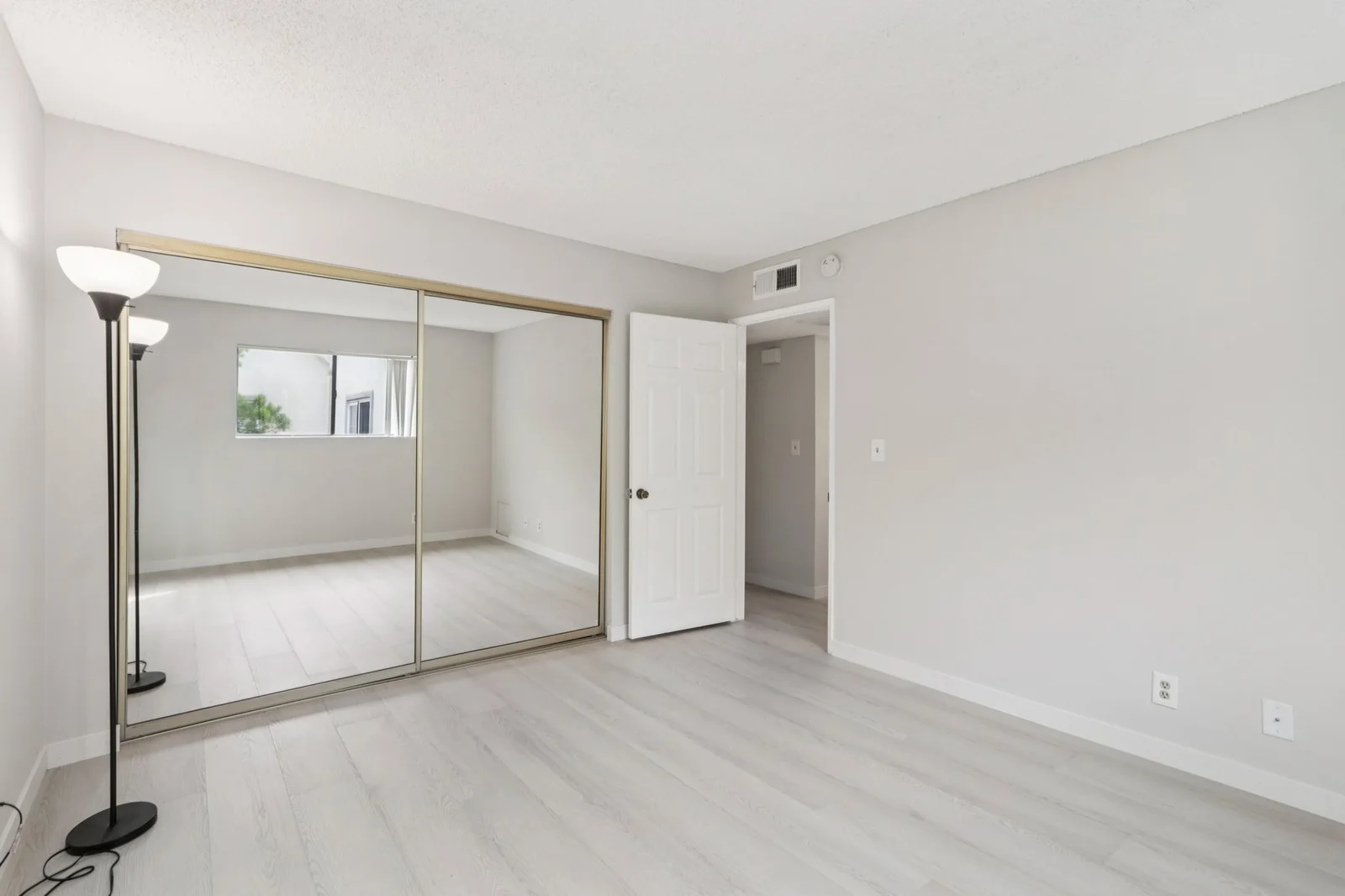
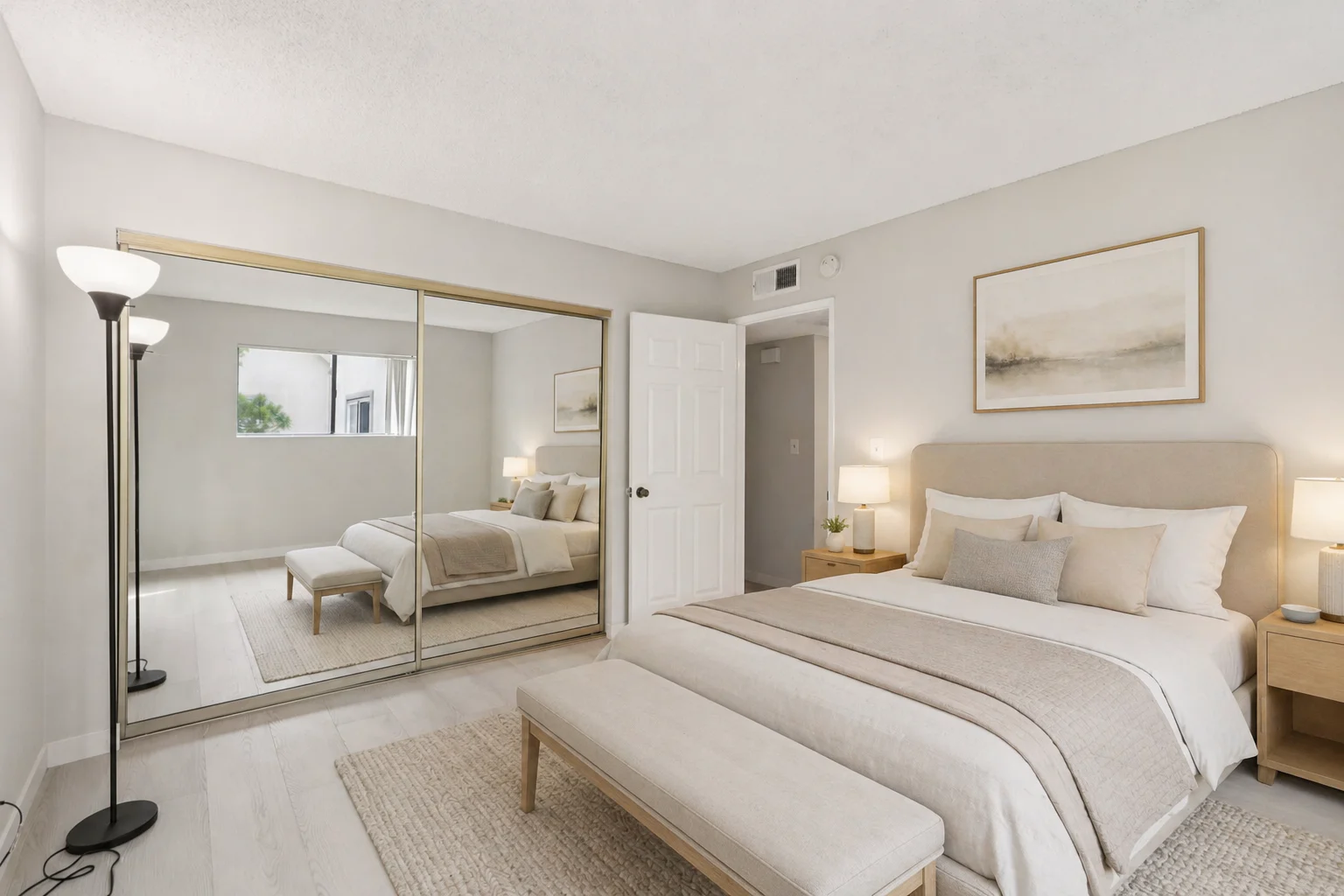
Why the layout rules matter. Without an explicit “do not block closet” instruction, AI staging models will routinely place a chest of drawers, a bench, or a chair in front of a sliding closet because the model sees a flat wall and treats it as available space. The same principle applies to door swings, HVAC vents, and electrical outlets: if a room has a constraint that the photo alone does not communicate, name it explicitly in the prompt. This is the single biggest tell of an amateur AI staged photo, and the single easiest thing to fix.
Pro Move: Personalized Staging for Specific Buyers
The technique above is the baseline. The high leverage version is to use AI staging as a buyer personalization tool, not a one shot listing photo. Process:
- During a showing or first conversation with a serious buyer, ask them what design style they actually live in (modern minimalist, mid century, transitional, farmhouse, Mediterranean) and which specific pieces they would want in the space (a sectional from West Elm, a particular Article sofa, a specific Crate & Barrel dining table). Most buyers love this question because no agent has ever asked them.
- Pull product photos of the specific items the buyer named directly from the retailer’s website (West Elm, Article, Crate & Barrel, IKEA, Pottery Barn, RH all publish high quality product images that work as AI references).
- Feed the original empty listing photo plus the buyer’s reference product images into GPT Image 2.0 or Nano Banana Pro as multi image inputs. Both models accept multiple reference images in a single prompt.
- Prompt the model to stage the room with the specific pieces from the references, in the buyer’s preferred style. The output is a personalized rendering of how this exact buyer’s furniture would actually look in this exact room.
- Send the personalized staged image to the buyer within 24 hours, with the watermark and disclosure.
This is psychologically powerful in a way traditional staging cannot match. A generic staged photo says, “here is a house that someone could live in.” A personalized rendering with the buyer’s actual sofa says, “here is your home.” The conversion delta on serious buyers is meaningful, and the marginal cost is one extra GPT Image 2.0 generation, which is fractions of a cent.
The same technique works for sellers who are torn between staging styles: produce three variants (modern, transitional, traditional) of the same room with the same prompt, change only the style line, and let them pick which version goes on the listing. Twenty minutes of agent time, three subscription generations, and a faster decision than a traditional design consultation.
Kitchen
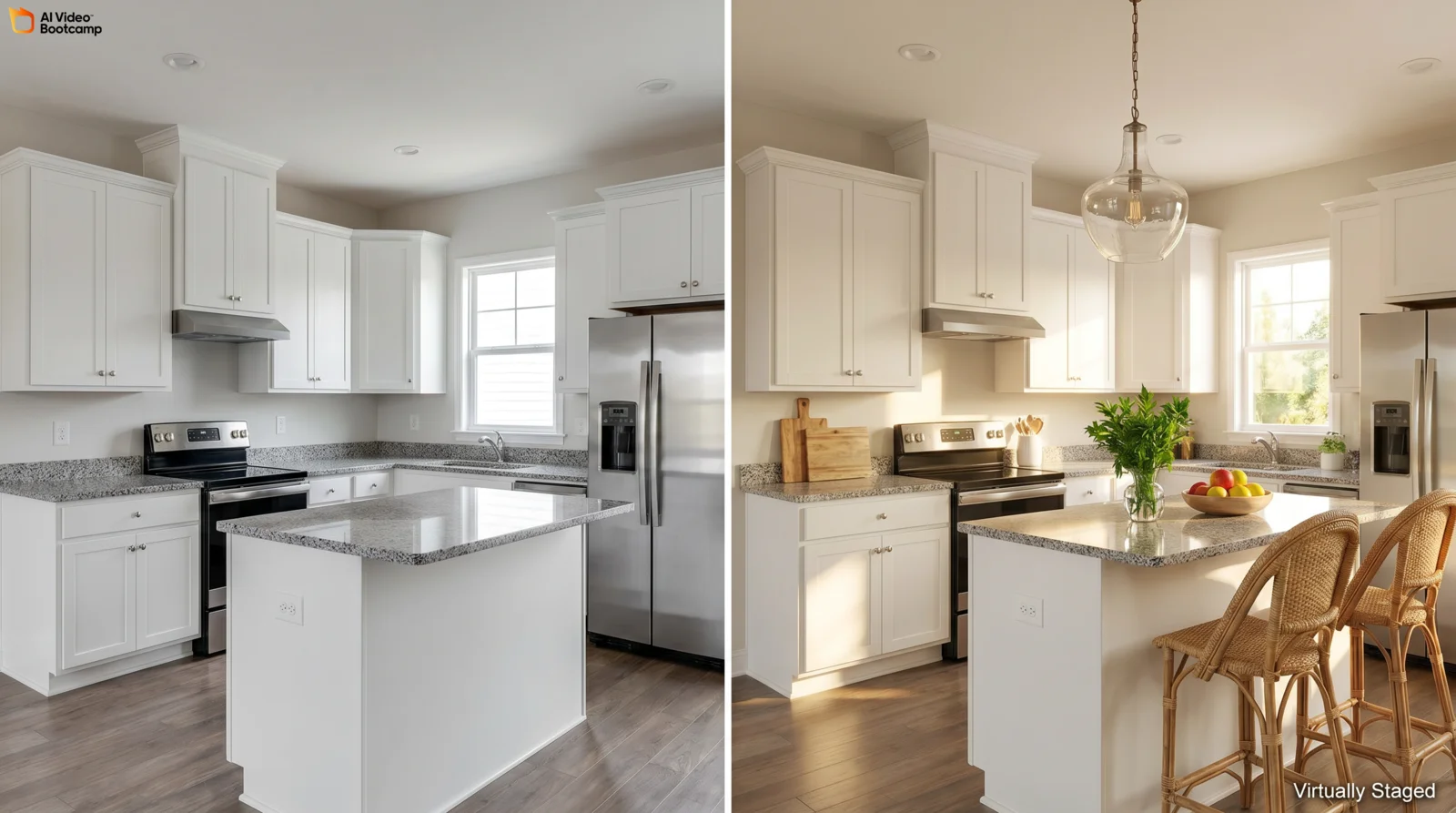
Stage this empty kitchen photo. Preserve the cabinetry, countertops, appliances, floors, and architecture exactly as in the source image. Add subtle styling: a wood cutting board with a small glass vase of fresh herbs on the counter, a styled fruit bowl with citrus, two woven bar stools at the island if applicable. Do not change cabinets, countertops, or appliances. Style: clean and aspirational, magazine kitchen feel. Lighting: bright natural daylight, white balanced, no warm cast. Photorealistic real estate listing photography. No people, no clutter, no text, no watermarks.
Important:
- Preserve walls, floor, doors, and proportions exactly
- Keep mirror reflections realistic and consistent with furniture placement
- Do not distort geometry
- Keep it realistic, like a real estate staged photo
Bathroom
Stage this empty bathroom photo. Preserve the tile, vanity, shower, tub, and architecture exactly as in the source image. Add hospitality style touches: two rolled white plush towels on a shelf or vanity, a small green plant, a modern soap dispenser, a single framed minimalist print on the wall if blank wall space exists, a bath tray with toiletries on the tub if a tub is present. Style: spa hotel aesthetic, white and natural materials. Lighting: bright clean daylight, white balanced. Photorealistic real estate listing photography. No people, no clutter, no text, no watermarks.
Important:
- Preserve walls, floor, doors, and proportions exactly
- Keep mirror reflections realistic and consistent with furniture placement
- Do not distort geometry
- Keep it realistic, like a real estate staged photo
Dining Room
Stage this empty dining room photo. Preserve the room geometry, walls, windows, floors, and ceiling exactly as in the source image. Add a wood dining table that fits the room scale, six upholstered dining chairs in a complementary neutral fabric, a centerpiece of a low ceramic vase with eucalyptus stems, a pendant light above the table if no light fixture exists, an area rug under the table, and a sideboard or buffet against one wall with a styled vignette. Style: warm contemporary, dinner party ready. Lighting: warm afternoon natural daylight from windows, inviting mood. Photorealistic real estate listing photography. No people, no clutter, no text, no watermarks.
Important:
- Preserve walls, floor, doors, and proportions exactly
- Keep mirror reflections realistic and consistent with furniture placement
- Do not distort geometry
- Keep it realistic, like a real estate staged photo
Home Office
Stage this empty room as a modern home office. Preserve the room geometry, walls, windows, floors, and ceiling exactly as in the source image. Add a clean wood desk facing the window, an ergonomic mid century desk chair, a closed laptop and a small task lamp on the desk, a low bookshelf along one wall with curated books and decor objects, a single large framed abstract print, and a soft area rug. Style: focused and aspirational, high productivity feel. Lighting: bright natural daylight from the window, no harsh contrast. Photorealistic real estate listing photography. No people, no clutter, no text, no watermarks.
Important:
- Preserve walls, floor, doors, and proportions exactly
- Keep mirror reflections realistic and consistent with furniture placement
- Do not distort geometry
- Keep it realistic, like a real estate staged photo
Outdoor Patio
Stage this empty outdoor patio or deck photo. Preserve the architecture, decking, railings, and views exactly as in the source image. Add a modern outdoor lounge set with two armchairs and a sofa around a low table, soft outdoor cushions in neutral fabric, a potted olive tree or large planter, a discreet outdoor rug, two pendant string lights overhead if architecturally possible, and a styled tray with two glasses on the table. Style: warm modern outdoor living, lifestyle focused. Lighting: golden hour late afternoon natural daylight, warm shadows. Photorealistic real estate listing photography. No people, no clutter, no text, no watermarks.
Important:
- Preserve walls, floor, doors, and proportions exactly
- Keep mirror reflections realistic and consistent with furniture placement
- Do not distort geometry
- Keep it realistic, like a real estate staged photo
Real Listing Case Study: Park Providencia, Burbank, CA
An important note about the inputs. Both photos in this case study (and the bedroom case study below) are real camera photographs of an actual Burbank apartment listed publicly on Zillow, not AI generated empty rooms followed by AI generated staging. We started with the original listing photographer’s empty room shot, fed that real photo into GPT Image 2.0 as the conditioning image, and asked the model to add furniture and styling on top. Every wall, window, fixture, floor, doorway, and proportion you see in the After image came from the actual photo on Zillow; only the contents (sofa, table, lamp, decor) are AI generated. This is the actual production workflow an agent uses on a live listing, not a sanitized synthetic demo.
Source listing: Park Providencia, 725 E Providencia Ave, Burbank, CA 91501 (Zillow)
Tool used: GPT Image 2.0 (gpt-image-2) inside ChatGPT Plus.
The actual prompt we used (copy and adapt for your own listing):
Modern interior design, realistic furniture placement in an empty living room, keep original architecture unchanged.
Add a cozy contemporary living room setup:
- Large L-shaped beige fabric sofa positioned facing the fireplace
- Low wooden coffee table centered on a soft textured rug
- Minimalist TV console or built-in shelving on the right wall
- Warm ambient lighting with a floor lamp near the sofa
- Small decorative elements (books, plant, vase) but keep space uncluttered
Style: Scandinavian modern, neutral tones (beige, light wood, soft gray)
Lighting: natural daylight, soft shadows, photorealistic
Camera: same perspective, same lens, do not change room structure
Important:
- Preserve walls, floor, fireplace, doors, and proportions exactly
- Do not distort geometry
- Keep it realistic, like a real estate staged photo
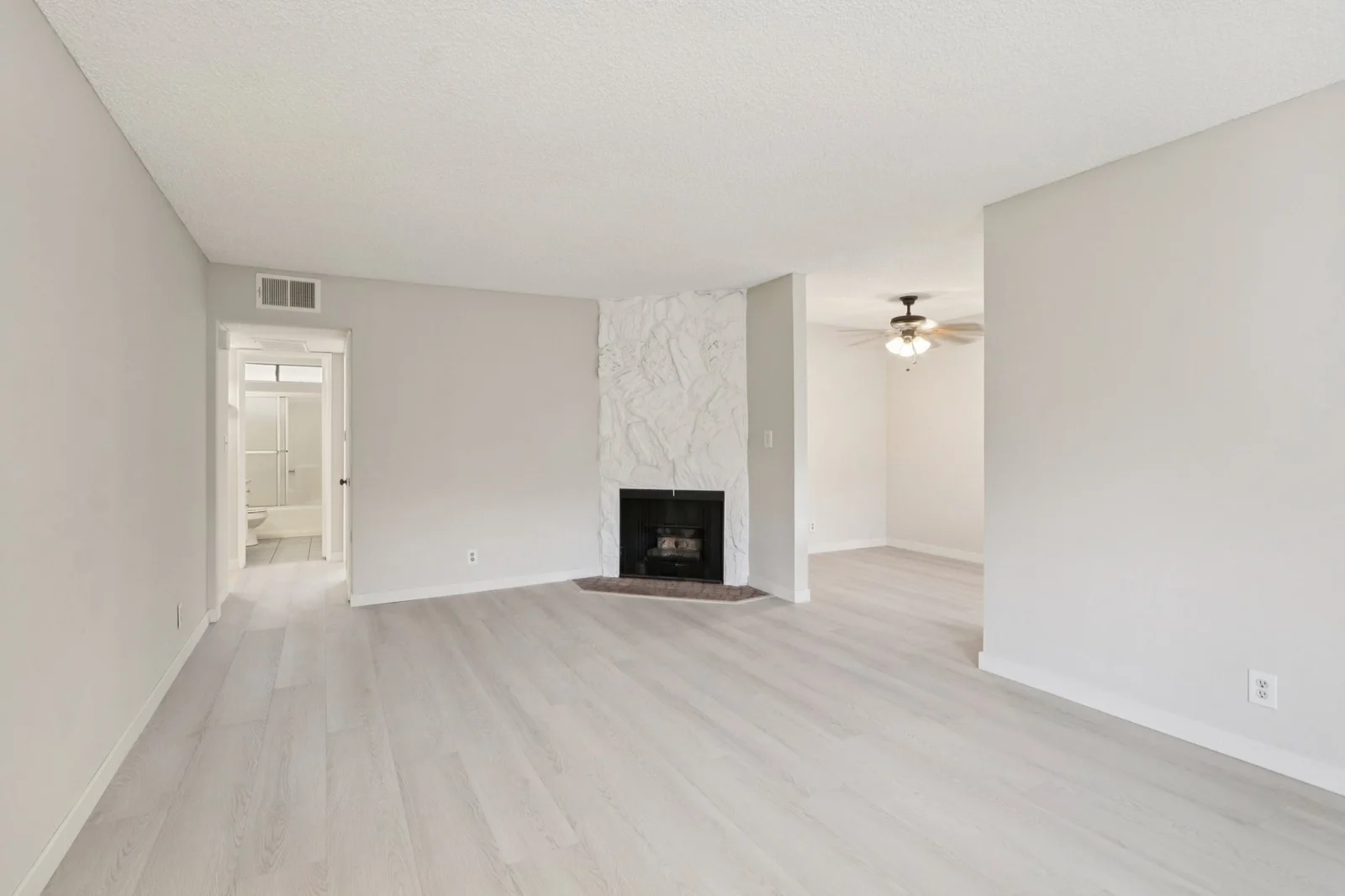
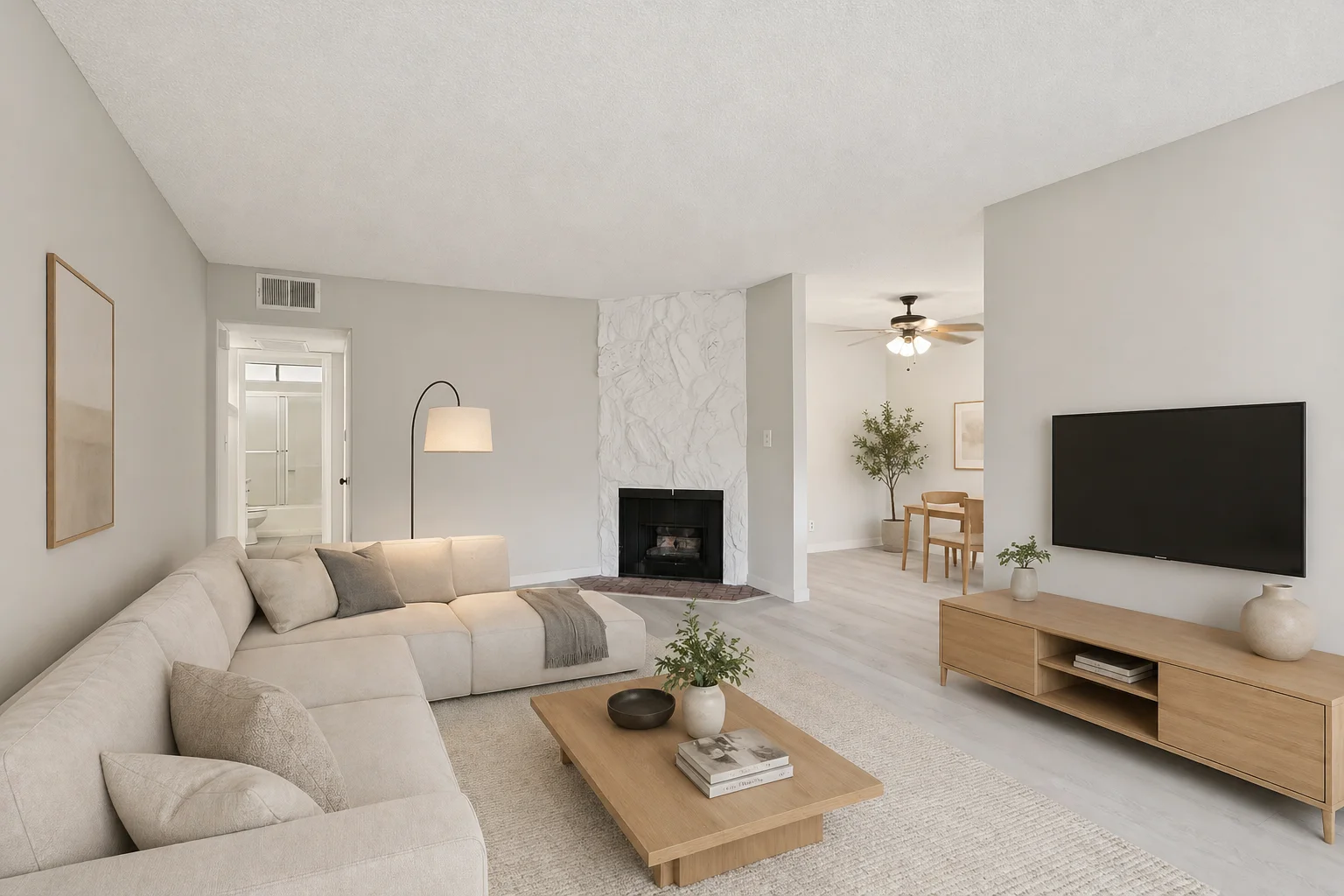
Why this case study matters. The starting input was a real publicly listed Zillow photo, not a curated test image. GPT Image 2.0 preserved the white stone fireplace, the light wood flooring, the exact wall geometry, the ceiling fan, the doorways, and the room proportions. What changed: the contents only. The total cost of this generation was within the $20 per month ChatGPT Plus subscription. A dedicated tool would have charged $0.50 to $7 per image for comparable output. Multiply that across multiple rooms and listings, and the DIY path’s economics compound fast.
We also tested the same image through Nano Banana Pro using a slightly adapted prompt; results from that comparison are in our GPT Image 2.0 vs Nano Banana Pro head to head.
After Generation: Watermark and Disclose
The model will not add the legally required “Virtually Staged” watermark. You add it after generation, before MLS upload. Two minute workflow:
- Open the generated image in Canva (free), Photoshop, or any image editor.
- Add a text layer in the lower right corner reading “Virtually Staged” in 14 to 16 point sans serif white text with a thin black outline for legibility.
- Export as JPG or PNG at the resolution your MLS requires.
- Archive the original unstaged photo and the AI staged photo in a clearly named folder per listing.
- Upload to MLS with the staged photo, and add the disclosure language to the listing remarks (covered in the Compliance section below).
This is the same legal step a dedicated tool user takes; the only difference is you are doing it manually instead of having the wrapper do it for you. Twenty seconds per image once you have a saved Canva template.
The Dedicated Tools Path
For agents who want zero learning curve and a few clicks to staged output, dedicated staging tools are the right call. Treat this section as honest plug and play coverage.
Comparison Table (Verified April 2026)
| Tool | Entry Pricing | Per Image | Turnaround | Best For |
|---|---|---|---|---|
| Collov AI | $19/mo (annual $228) | $0.24 at volume | 10 seconds | High volume, lowest cost dedicated option |
| Interior AI | $29/mo or $349/yr | ~$0.39 at volume | 30 to 60 sec | Solo agents, 50+ design styles |
| REimagineHome | $14 to $99/mo | $0.50 to $7 | Instant | Brokerages with priority support |
| Virtual Staging AI | $16 to $35/mo | $0.53 to $2.67 | 10 seconds | Caution: Trustpilot billing complaints |
| Apply Design | Pay per image | $7 to $15 | 10 minutes | High end properties, detail control |
| Spacely AI | Tiered plans | $1 to $15 | 60 seconds | Brokerages with API needs |
| Stager AI | $25 to $99/mo | $0.21 to $4 | 30 seconds | Subscription preference, unlimited revisions |
| Styldod | $29 to $99/mo | $16 to $23 | 24 to 48 hours | Human assisted, design heavy |
| Box Brownie | Pay per image | $24 to $30 | 48 hours | Human assisted, traditional editing |
| Virtual Staging Solutions | Per image bulk | $75 to $99 | 24 to 48 hours | Architecture, custom consultation |
| GPT Image 2.0 (DIY) | $20/mo ChatGPT Plus | Effectively unlimited | Instant | DIY high control, OpenAI ecosystem |
| Nano Banana Pro (DIY) | €22.99/mo Google AI Pro | Effectively unlimited | Instant | DIY high control, best photorealism |
Pricing verified directly from official provider sites in April 2026 where possible; verify current rates on each provider’s pricing page before subscribing because tiers shift as new models release.
Brief Profiles of the Top 5 Dedicated Tools
Collov AI at $19 per month is the lowest cost dedicated entry point with 10 second generation. Best for high volume agents managing 20+ listings per month. Style customization is preset constrained.
Interior AI by Pieter Levels at $29 per month or $349 per year (with 6+ months free on the annual plan) offers 50+ style presets and is the best dedicated value for solo agents.
REimagineHome at $14 to $99 per month is the polished brokerage tier with priority support and the strongest free trial in the category. The default recommendation for agents who want hand holding on the workflow.
Stager AI at $25 to $99 per month with unlimited revisions is the middle ground between Interior AI’s indie feel and REimagineHome’s enterprise polish.
Styldod at $29 to $99 per month is the human assisted option with 24 to 48 hour turnaround. Best when design judgment matters more than instant turnaround, typically luxury or architecturally complex listings.
A specific caution on Virtual Staging AI (virtualstagingai.app): their output quality is competitive but their Trustpilot page documents persistent billing and auto renewal complaints across 167+ reviews. If you choose this tool, set a calendar reminder before each renewal date. Alternatives at similar price points (Stager AI, Interior AI, Collov AI) do not have these complaints.
Pricing Benchmark by Volume
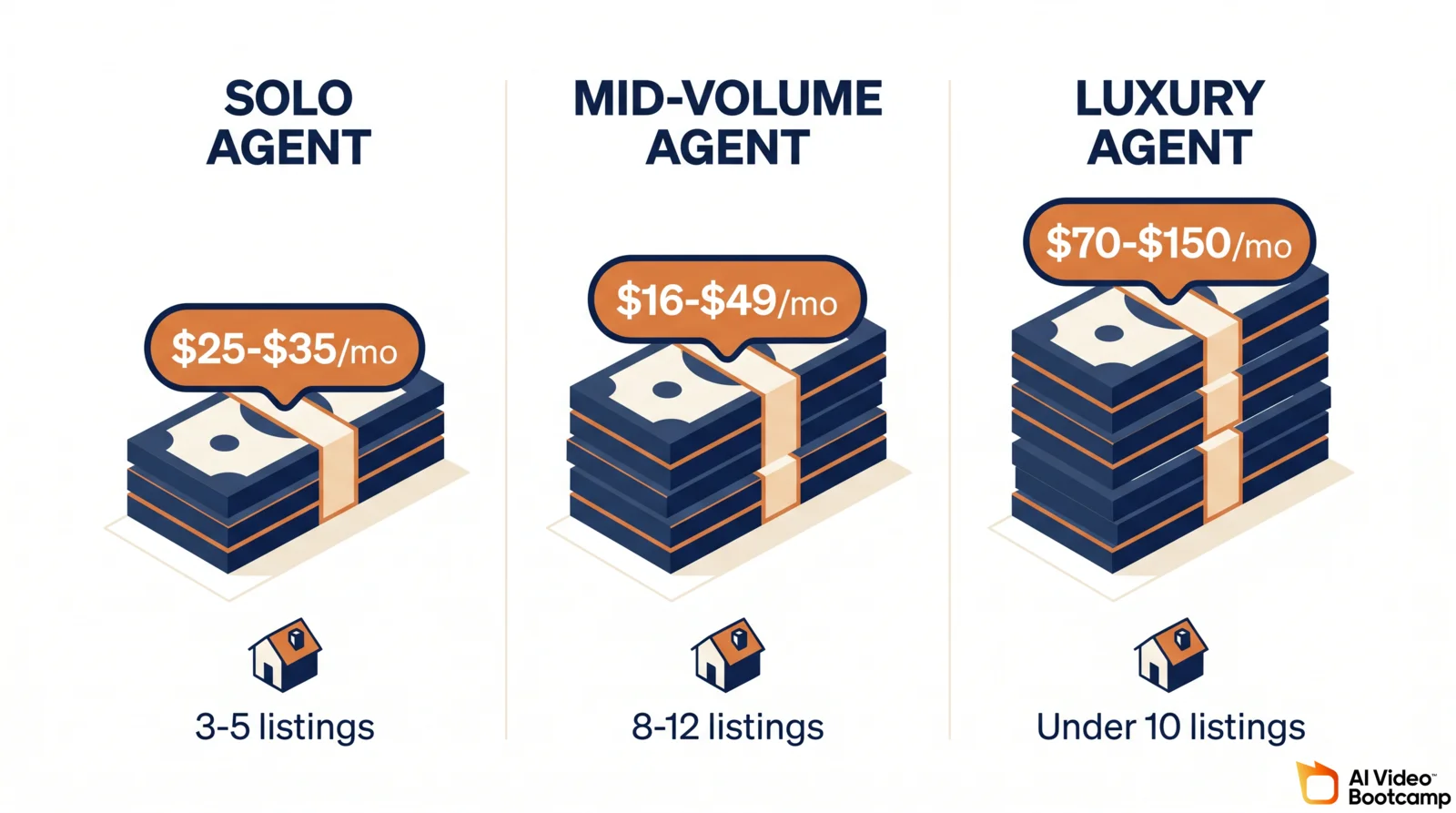
Three realistic budget scenarios.
Solo agent, 3 to 5 listings per month, 4 to 6 rooms each. 12 to 30 staged images per month. DIY: $20 (ChatGPT Plus) or €22.99 (Google AI Pro). Dedicated: Interior AI at $29 per month, Collov at $19, Stager AI at $25. Best per dollar: DIY at ~$20 to €23 covers unlimited volume.
Mid volume listing agent, 8 to 12 listings per month, 5 rooms average. 40 to 60 staged images per month. DIY: same $20 to €23 covers everything. Dedicated: Collov mid tier at $49, REimagineHome mid tier ~$49. Best per dollar: DIY again, by a wide margin.
Luxury or design heavy listings, under 10 images per month, high quality required. DIY: $20 to €23, with optional ChatGPT Pro at $200 per month if you want Thinking mode for higher fidelity output. Dedicated: Apply Design at $7 to $15 per image, or Styldod at $29 to $99 per month for human review. Best per dollar: DIY for unlimited iteration; Styldod if you want a human in the loop.
At any of these tiers, the cost is a small fraction of the commission on a single staged listing.
The Legal and Compliance Stack
This is the highest stakes section of the guide. Compliance changed substantially in 2025 and 2026. Agents who use AI virtual staging without disclosure discipline are exposed to MLS fines, NAR ethics complaints, civil liability, state regulatory discipline, and as of January 2026 in California, criminal misdemeanor charges. Citations below all link to primary sources.
California AB 723 (Criminal Statute, Effective Jan 1, 2026)
Assembly Bill 723 is the first U.S. state level criminal statute on AI generated real estate photos. The bill text is publicly available on the California Legislative Information site.
What triggers disclosure: Any change, addition, or removal of elements including fixtures, furniture, appliances, flooring, walls, paint color, hardscape, landscape, facade, or floor plan. Virtual staging clearly falls under this definition.
What does not trigger disclosure: Lighting adjustments, sharpening, white balance, color correction, cropping, exposure adjustment, and other routine photo editing that preserves accurate property representation.
How disclosure must be made:
- Clear, conspicuous notice on or directly adjacent to the altered image. Fine print elsewhere does not satisfy the requirement.
- The original unaltered image must be accessible to buyers (link or embed alongside the staged version).
Penalties: Willful violations are a criminal misdemeanor under California law, with civil liability exposure and regulatory discipline by the California Department of Real Estate.
NAR Code of Ethics (Binding Nationwide)
Every REALTOR is bound by the NAR Code of Ethics regardless of state.
- Article 12 requires REALTORS to “present a true picture in their advertising, marketing, and other representations.”
- Standard of Practice 12-10 mandates that altered photos be clearly identified.
- NAR’s 2025 magazine guidance, Using AI to Enhance Listing Photos Can Be Legally Risky, confirms that AI staged images must meet the same disclosure standards.
Code of Ethics violations are adjudicated by local REALTOR associations and can result in fines, education requirements, suspension, or expulsion. Expulsion costs the agent REALTOR status and MLS access in most markets.
MLS Rules (Where Most Violations Actually Happen)
Major MLSs each layer rules on top of state and NAR requirements. The consistent pattern across CRMLS (California), Stellar MLS (Florida), REcolorado (Colorado), Bright MLS (Mid Atlantic), OneKey MLS (New York), and Northwest MLS (Pacific Northwest):
- Watermark required. “Virtually Staged” text must appear directly on the image, typically 12 to 16 point font in the bottom corner. Caption only disclosure is not sufficient.
- Photo labeling. Some MLSs require the virtually staged photo to be flagged separately from authentic photos.
- Original photo availability. Several MLSs require the unstaged original be uploaded alongside or available on request.
- Penalty: $500 to $5,000 per violation, with repeat violations escalating to listing suspension and agent MLS access revocation.
FTC and Federal Considerations
The FTC’s Endorsement Guides and the broader FTC truth in advertising authority cover AI generated marketing imagery. The FTC’s 2025 guidance on AI generated content emphasizes that advertising disclosures apply regardless of whether content is human or AI produced. While the FTC does not commonly target individual agents, the authority exists, and class action buyer litigation over undisclosed staging has begun emerging.
Permitted vs. Prohibited Edits
Safe (with disclosure): Furniture and decor; staged lighting (lamps on); color correction, white balance, exposure; minor decluttering; virtual window cleaning.
Always prohibited regardless of disclosure: Covering structural damage; replacing fixtures (depicting an old kitchen as modern); altering landscape to add features that do not exist; changing perceived room size, layout, or orientation; removing code violations.
Disclosure Wording That Is Legally Sufficient
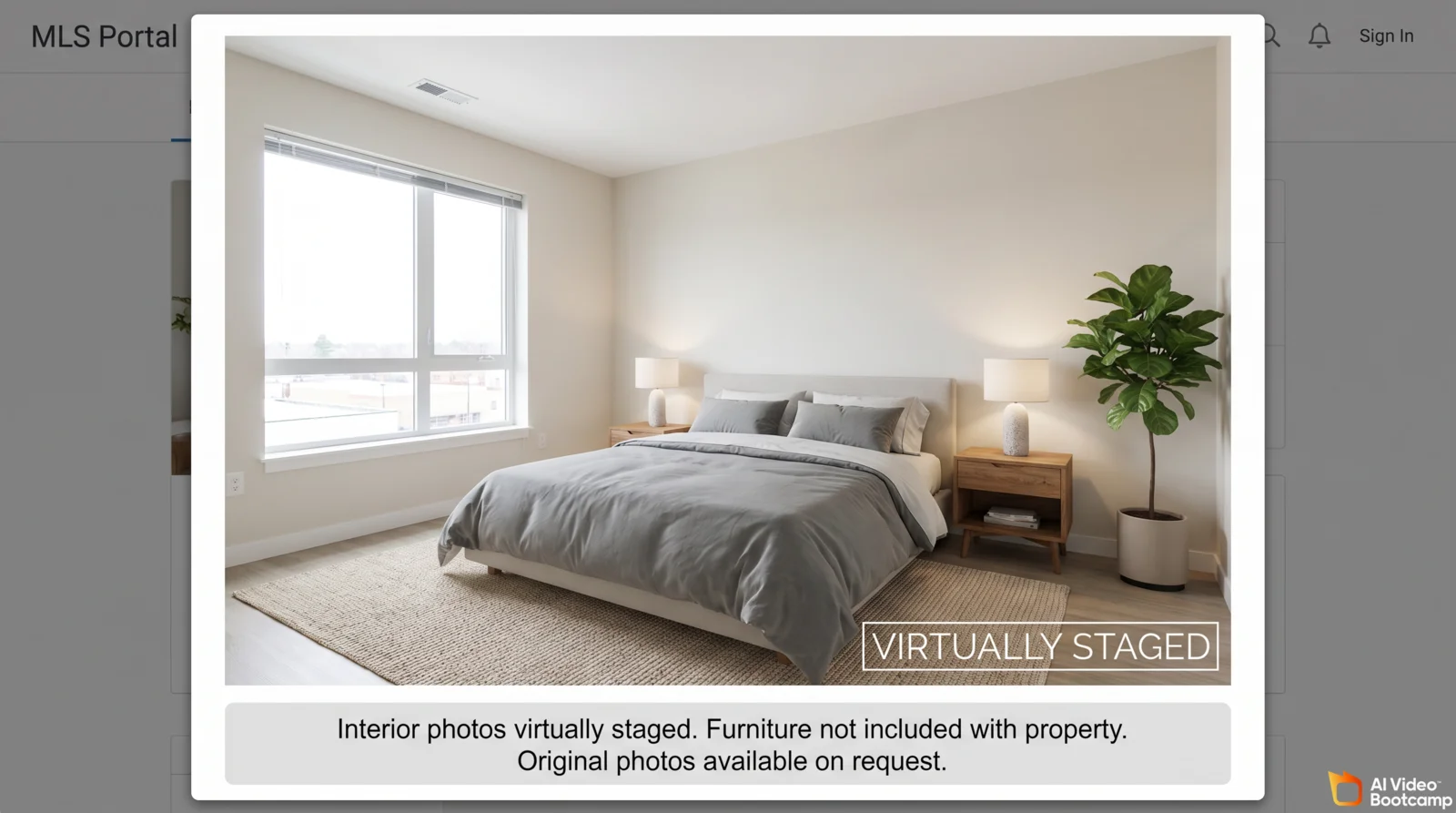
“Virtually Staged” watermark on the image (bottom corner, visible, 12 pt minimum)
Listing remarks: “Interior photos have been virtually staged. Furniture shown is not included with the property. Original unaltered photos are available upon request.”
Wording that is generally NOT sufficient: “Digitally enhanced,” “AI rendered,” caption only disclosure with no on image watermark, disclosure buried in fine print at the bottom of a long description.
When in doubt, over disclose. The cost of over disclosing is zero; the cost of under disclosing is a misdemeanor in California and MLS fines elsewhere.
Step by Step Workflow
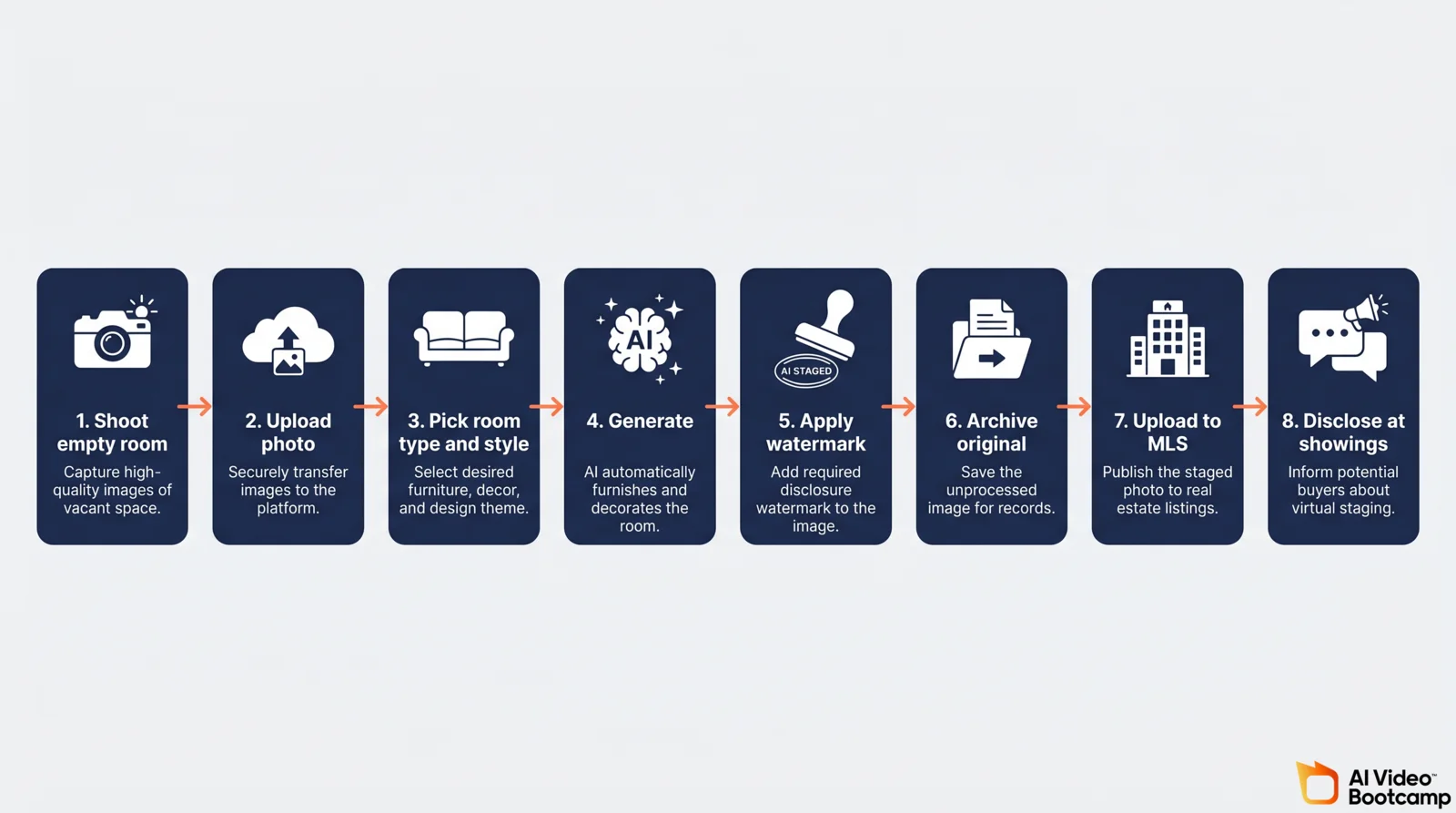
The complete process from empty room photo to MLS ready compliant listing.
- Shoot the empty room. Wide angle, level horizon, good natural light, tripod. AI output inherits everything from the input photo quality.
- Stage with your chosen tool. DIY path: paste the appropriate room prompt above into GPT Image 2.0 or Nano Banana Pro. Dedicated path: upload to Collov, Interior AI, or your tool of choice and select style.
- Iterate. Generate three to five variants per room and pick the best.
- Apply watermark. Add “Virtually Staged” in the lower right corner in Canva, Photoshop, or directly in the dedicated tool if it offers automated watermarking.
- Archive original. Save both the original unstaged and final staged photo in a clearly named folder per listing.
- Upload to MLS with the watermarked staged photo and disclosure language in remarks.
- Mention at showings. Train your team or assistant to flag virtual staging when scheduling showings: “The interior photos are virtually staged; the property is currently vacant.”
Total time for a five room listing on the DIY path: roughly 60 minutes including watermarking. Total cost: $0 to $1 in incremental compute on top of your ChatGPT Plus or Google AI Pro subscription. Compare to physical staging at $2,000 to $6,000 and several days.
ROI and Case Studies
The strongest aggregate data comes from independent industry sources. Vendor case studies skew optimistic; we cite both with appropriate framing.
- Time on market. Virtually staged listings sell in a median 29 to 31 days versus 52+ for unstaged listings (2025 NAR Profile of Home Staging; aggregated MLS data).
- Price premium. 68 percent of virtually staged listings sell at or above comparable unstaged homes, with a typical 5 to 15 percent premium. NAR reports an average uplift of approximately $70,000 on single family homes above the U.S. median.
- Buyer visualization. 83 percent of buyer agents and 82 percent of buyers reported staged photos helped them imagine living in the property (2025 NAR Consumer Survey).
- Click through rate. Listings with staged photos report roughly 90 percent higher click through rate on portal sites including Zillow, Realtor.com, and similar.
- Showing requests. Vendor case studies (MeltFlex’s 2025 seven agent test) document a 74 percent increase in showing requests in the first 14 days. Treat as directional.
The honest read: effect size is real and consistent across sources; precise percentage claims should be interpreted directionally rather than as a guaranteed forecast for any single listing.
Common Mistakes to Avoid
- Assuming MLS handles disclosure. It does not. The disclosure must be visible on the image itself.
- Using staging to hide damage. Ethics violation in every state, criminal in California.
- Forgetting the original. Without the unaltered photo archived, you cannot defend an AB 723 challenge.
- Over staging. Restraint reads as professional; maximalism reads as inexperienced.
- Using a tool with documented billing issues. Read Trustpilot before subscribing.
- Staging the exterior facade. Almost always prohibited under state and MLS rules.
- Skipping showing prep. Always inform buyers before a tour that the photos were virtually staged.
Recommended Starter Stack
The DIY first agent (recommended for any agent willing to spend two hours learning to prompt):
- ChatGPT Plus ($20 per month) for GPT Image 2.0 access.
- Google AI Pro (€22.99 per month) for Nano Banana Pro access via Google Flow.
- Canva (free tier) for adding the “Virtually Staged” watermark.
- Cloud archive system (Google Drive, Dropbox) with consistent listing folder naming.
- Saved disclosure template for listing remarks, reusable across every listing.
Total: $20 to €23 per month. Unlimited image generations. Maximum flexibility.
The dedicated tool agent (for agents who want plug and play):
- Collov AI ($19 per month starter) or Interior AI ($29 per month) for one click staging.
- Canva (free tier) for watermarking if your tool does not auto watermark.
- Same Canva watermark, archive, and disclosure template setup as above.
Total: $19 to $50 per month for the dedicated path. Easier on day one, less powerful long term.
Frequently Asked Questions
Is AI virtual staging legal for real estate listings in 2026? Yes, with disclosure. Virtual staging itself is legal in every U.S. state, but as of April 2026 it requires clear, image level disclosure in nearly every jurisdiction. California AB 723, effective January 1, 2026, makes willful non disclosure a criminal misdemeanor. NAR Code of Ethics Article 12 and Standard of Practice 12-10 require all REALTORS to clearly identify altered photos. Every major MLS requires a visible “Virtually Staged” watermark directly on the image, not just in the caption.
How much does AI virtual staging cost compared to physical staging? Physical staging costs $2,000 to $6,000 per home according to the NAR Profile of Home Staging. AI virtual staging on the DIY path costs $20 per month for ChatGPT Plus or €22.99 per month for Google AI Pro, with effectively unlimited image generation. Dedicated tools cost $19 to $99 per month with per image pricing from $0.24 to $99 depending on tool and tier. The DIY path is roughly 100 to 1,000 times cheaper per room than physical staging.
Should I use a dedicated tool or DIY with GPT Image 2.0 and Nano Banana Pro? DIY with GPT Image 2.0 and Nano Banana Pro is more powerful, more flexible, and cheaper for any agent willing to spend two hours learning to prompt. The room by room prompts in this guide are designed to make that learning curve explicit. Use a dedicated tool (Collov AI, Interior AI, REimagineHome) if you want maximum simplicity and are happy paying for a UI on top of the same models DIY users access directly.
What disclosure wording is legally sufficient on virtually staged photos? At the MLS level, use “Virtually Staged” in a visible watermark directly on the image (bottom corner, 12 to 16 point font minimum). In the listing remarks, use language like “Interior photos have been virtually staged. Furniture shown is not included with the property. Original unaltered photos are available upon request.” For California listings under AB 723, the disclosure must appear on or directly adjacent to the image, and unaltered originals must be accessible to buyers.
Will buyers be disappointed if they arrive at a staged listing and the furniture is not there? Managed correctly, no. The 2025 NAR Profile of Home Staging found that 83 percent of buyer agents say virtual staging helps buyers visualize the property, and 82 percent of buyers say staged photos make it easier to imagine themselves living there. The disappointment effect is almost entirely caused by undisclosed staging, which is exactly what disclosure laws are designed to prevent. When buyers know the photos are virtually staged before they schedule a tour, the expectation gap is zero.
Sources
- California Assembly Bill 723 (AB 723), full bill text — California Legislative Information
- NAR Code of Ethics (Article 12 and Standard of Practice 12-10) — National Association of Realtors
- NAR Profile of Home Staging — National Association of Realtors Research
- Using AI to Enhance Listing Photos Can Be Legally Risky — NAR Magazine
- California Department of Real Estate (DRE)
- FTC Endorsement Guides: What People Are Asking — Federal Trade Commission
- FTC Truth in Advertising authority — Federal Trade Commission
- Spotting Deepfakes — FTC Consumer Advice.
- GPT Image 2 model documentation — OpenAI Platform
- ChatGPT Plus pricing — OpenAI
- Google Gemini (Nano Banana Pro) — Google
- Denoising Diffusion Probabilistic Models (Ho et al., 2020) — arXiv
- Park Providencia listing — Zillow
- U.S. Census Bureau — Housing Topics
- HUD User — Comprehensive Housing Affordability Strategy (CHAS) Data
- Trustpilot reviews — Virtual Staging AI
- GPT Image 2.0 vs Nano Banana Pro — 10 Prompts Tested (AI Video Bootcamp)
- ChatGPT Images 2.0 Review 2026 (AI Video Bootcamp)