
Pricing verified April 30, 2026.
The $100,000 Problem That Now Costs Under $300
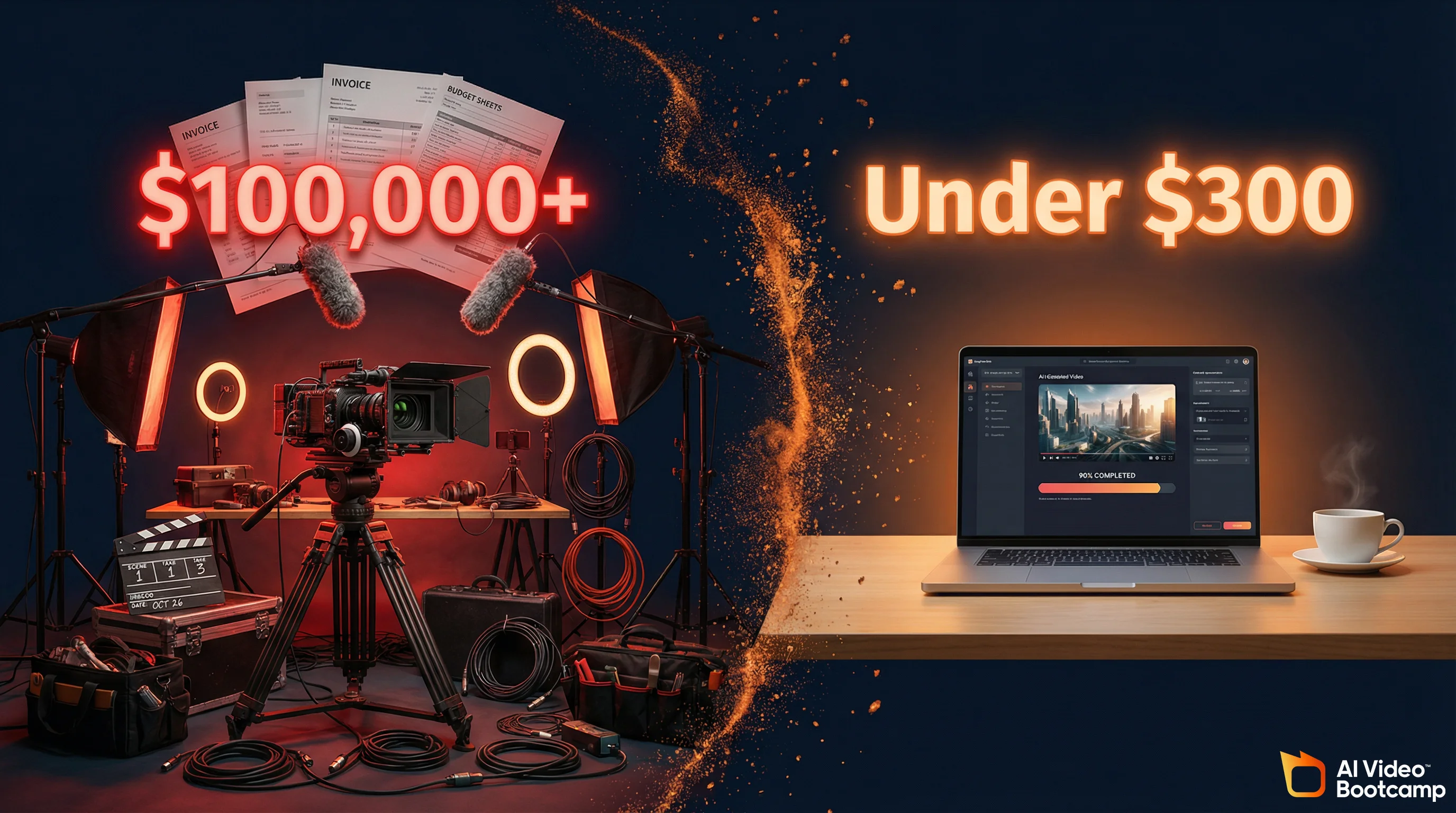
A traditional 10-video production campaign costs $100K+ through agencies. Using AI tools like Veo (Gemini Advanced $19.99), Kling ($6.99 Standard from kling.ai), CapCut, and ElevenLabs free tier (costing ~$27/month total), the same campaign costs under $300. The global AI content market grew from $2.56B in 2025 to a projected $10.59B by 2033 at 19.4% CAGR. This is not cost-cutting, it’s accessing enterprise capabilities that were unavailable to small businesses two years ago.
Ten years ago, your small business video production budget looked like this: hire a videographer ($1,200-3,000 per day), rent equipment ($200-500 per day), pay for editing (two weeks, $3,000-8,000 for a freelancer). A modest 10-video campaign for product launches, testimonials, and social media clips? You were looking at $100,000 to $150,000.
Today, that same 10-video campaign costs under $300 with AI tools. A Gemini Advanced subscription (~$20/month) gives you access to Veo 3.1 and NanoBanana PRO. Add Kling Standard ($6.99/month from kling.ai) and free editing tools like CapCut, and your entire production stack costs less than a single stock photo shoot used to. The global AI content market reached $2.56B in 2025 and is projected at $10.59B by 2033 (19.4% CAGR). The complete breakdown of AI video tools proves this shift is real. You’re not choosing between cheap and expensive anymore. You’re choosing between leverage and irrelevance.
Why 89% of Small Businesses Are Already Using AI
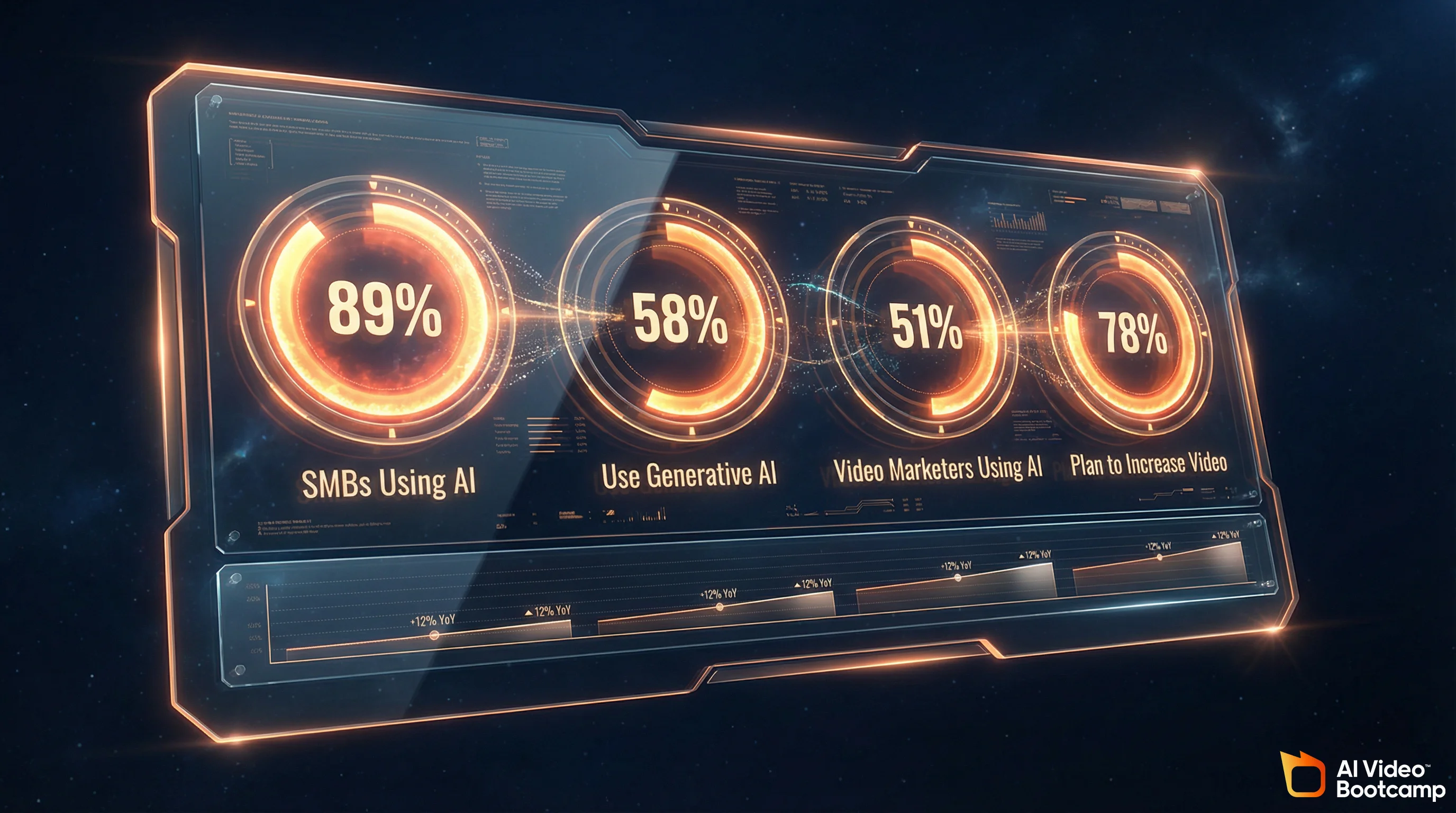
Adoption of AI tools among small businesses reached 89% in 2026. 58% actively use generative AI (up 45% year-over-year from 40% in 2024), 51% of video marketers use AI tools, and 78% plan to increase video content. This is no longer a competitive advantage, it’s table stakes. Competitors already using these tools are outpacing those who are not.
Here is what adoption looks like across small business in 2026:
- 58% of small businesses report using generative AI, up from 40% in 2024 (45% year-over-year increase)
- 89% of small businesses are leveraging AI in some capacity, whether video, customer service, content, or operations
- 71% of organizations applied generative AI in 2024, up 33% from the prior year
- 51% of video marketers are now using AI tools for content creation
- 78% of small businesses plan to increase video content in 2026
This is table stakes. Your competitors are already using these tools. Adoption is no longer the question. Competence is. Learning how to use these tools well is the moat that lasts. The latest generative AI statistics confirm this trajectory across every industry.
What Generative AI Actually Does for a Small Business
Generative AI handles five core tasks for small businesses: image generation (photorealistic or stylized images in 30-60 seconds), text-to-video and image-to-video creation (30-90 second clips), digital avatars (months of talking head content without a camera), AI voiceovers (seven+ languages, no audio engineer needed), and editing automation (video editing like a word processor in Descript). These capabilities remove friction between idea and execution without replacing human creativity.
Before you can use AI for video and images, you need to understand what it actually does. Here are the five core capabilities that matter for a small business:
Image generation. Describe what you want, get photorealistic or stylized images in 30-60 seconds. No photographer, no studio setup. Product photos in minutes instead of weeks.
Video creation. Text-to-video (describe it, get a 30-90 second clip) or image-to-video (upload an image, AI adds motion). Write and press “generate.”
Digital avatars. Record yourself for five minutes, the AI creates a virtual you that reads scripts, changes outfits, or appears in different environments. Months of talking head content without a camera.
Voiceovers. AI voices in seven+ languages, adjustable speed and tone. Perfect voiceovers in minutes for under $50.
Editing automation. Tools like Descript treat video like a word processor. Edit the transcript, the video edits itself. A 3-4 hour task takes 20 minutes.
This is not replacing human creativity. This is removing the repetitive friction between idea and execution.
The Fragmented Tool Landscape: What Actually Works
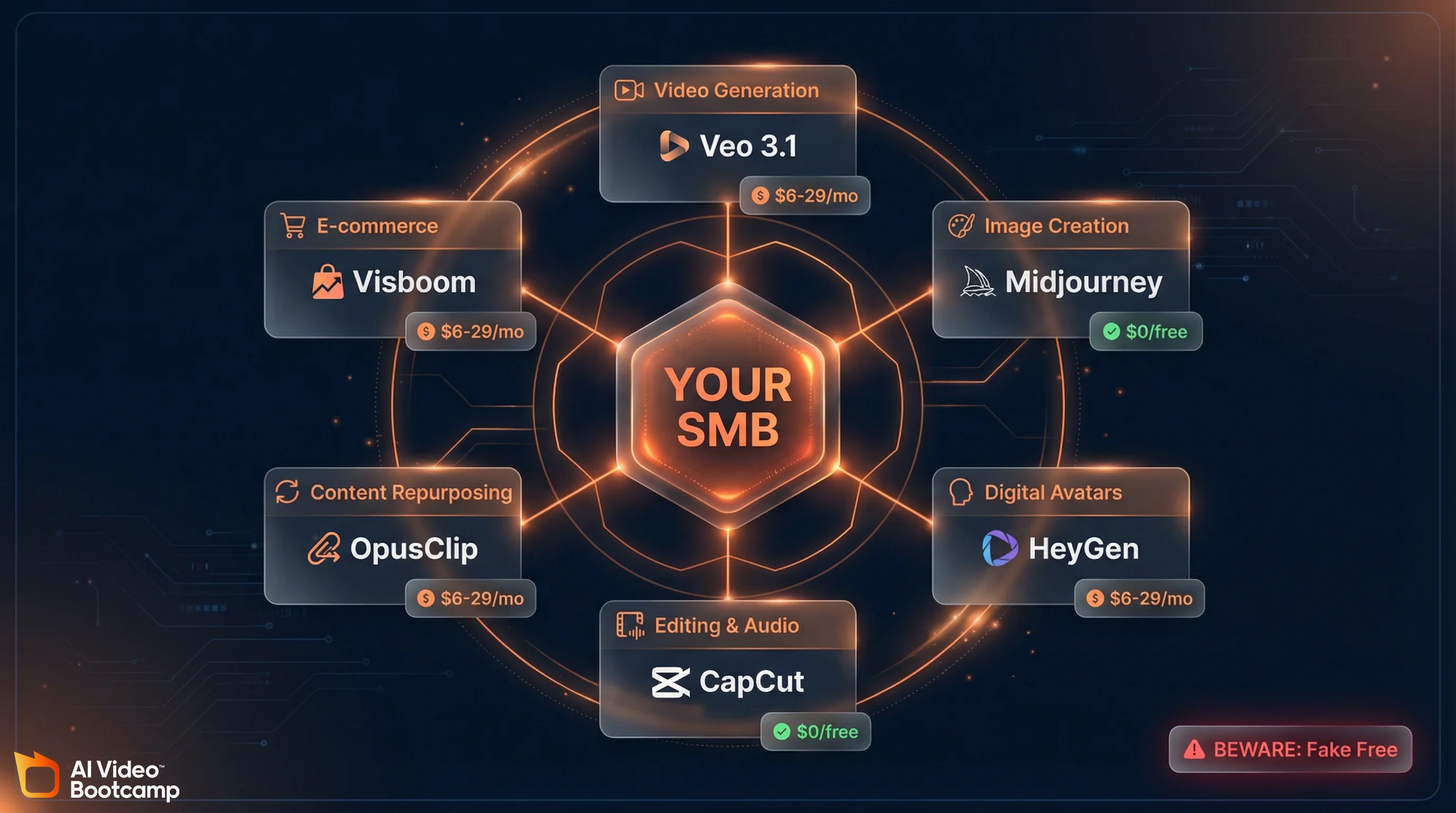
Pricing last verified April 30, 2026. Consumer subscription plans are from each product’s official site (kling.ai, midjourney.com, heygen.com, elevenlabs.io, etc.). Screenshots and tool pricing elsewhere in this article may reflect earlier versions. Prices change frequently — double-check with the vendor’s site before making spending decisions.
The AI tool market is crowded with hype. Focus on battle-tested tools: Veo 3.1 and Kling 3.0 for video, Midjourney V7 for images, HeyGen ($29/month) for avatars, CapCut and Descript for editing, ElevenLabs for voiceovers, and OpusClip for repurposing. You need 3-5 core tools and discipline to use them well, not fourteen platforms. The table below maps tools to use cases and costs.
The problem with AI tools is that there are too many and most of them are marketing hype. You will encounter tools that promise everything and deliver nothing. You need to know which ones actually work for a small business with real deadlines and real deliverables.
Here is the landscape broken down by category:
Foundational models: Kling 3.0 (fastest image-to-video), Veo 3.1 (text-to-video), Midjourney V7 (image generation).
Avatars: HeyGen Starter ($29/month) for affordable quality.
Editing: CapCut Desktop (free, covers most needs) or Descript ($16/month, transcript-based editing that saves 2-3 hours per video).
Repurposing: OpusClip (auto-clips) or Pictory (auto-captions).
E-commerce: Visboom and Fibbl with anchor frames for product videos.
The mistake most SMBs make is collecting tools instead of mastering workflows. You do not need fourteen tools. You need three to five tools and the discipline to use them well.
| Platform | Primary Business Application | Key Strengths | Estimated Cost |
|---|---|---|---|
| Veo 3.1 | Text-to-video content | Long-form generation, temporal coherence, storytelling | Gemini Advanced (~$20/month) |
| Kling 3.0 | Image-to-video motion | Speed, smooth motion, realism | $6.99/month Standard (via kling.ai) |
| Midjourney V7 | Product and brand images | Photorealism, style control, consistency | $20+/month |
| HeyGen | Digital avatars, talking head videos | Speed to market, avatar customization, multilingual | $29/month Starter |
| CapCut Desktop | Video editing, effects, transitions | Free, intuitive, mobile and desktop sync | Free |
| Descript | Audio/video editing, transcription | Podcast-to-video, captions, editing by transcript | $16/month Standard |
| ElevenLabs | Voiceover generation, audio cloning | Voice quality, language support, voice cloning | Free / Starter $5 (via elevenlabs.io) |
| OpusClip | Content repurposing, social clips | Auto-clips, captions, platform optimization | Freemium |
This table represents the core stack that 80% of small business use cases require. You do not need to evaluate fifty tools. These eight are proven and sufficient.
The 7 Highest-ROI Use Cases (With Real Examples)
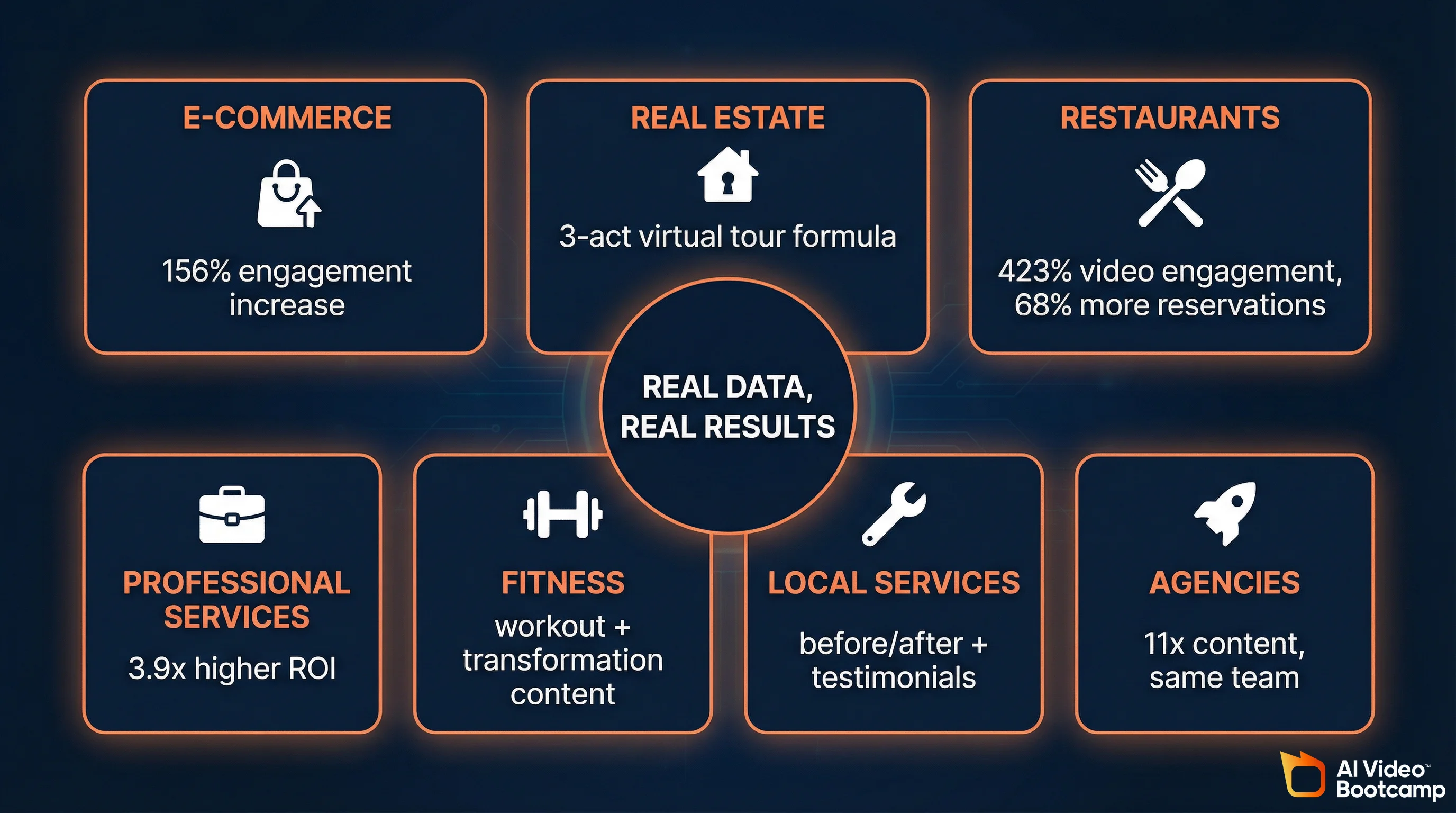
E-commerce saw 156% engagement increase with AI product videos. Real estate reduced production time from hours to under one hour per property. Restaurants achieved 423% engagement and 68% higher reservations. Professional services generate 12+ clips per 30-minute recording. AI video ROI is highest in industries where speed-to-market and content volume matter. Each use case has a specific workflow and proven multiplier effect.
AI video is not one solution for all businesses. The ROI changes based on your industry and content strategy. Here are the use cases where small businesses see the fastest payback:
1. E-Commerce: Product Videos That Drive Conversion
Thomas Niko, an apparel creator, started using AI-generated product videos in his e-commerce listings. Using Visboom’s anchor frame technology (placing real product photos and animating around them) combined with Kling 3.0, he produced videos that showed how his garments moved and fit.
Result: 20% reduction in bounce rate, 156% increase in engagement on video-enabled listings, and higher average order value. The traditional path would have been: hire a model ($300-500), book a shoot day ($1,500), get footage, edit for one week ($1,500-2,000). AI path: 30 minutes, $0-6. The velocity matters as much as the quality. He could test variations (different backgrounds, speeds, music) on day one instead of week two.
The workflow: Real product photo (smartphone) → Visboom or Kling → 5-15 second video → CapCut for music and captions → Shopify upload. Time investment: 30-45 minutes per product.
2. Real Estate: Virtual Walkthroughs at Scale
A real estate agent was spending 4-6 hours per property on video production. Multiple angles, stabilization, color grading, subtitles, music selection. Using AI editing suites (CapCut + Descript + auto-captioning), that same workflow dropped to 45-60 minutes. Multiply that across 20 properties per month: that’s 60+ hours of production time recovered.
The workflow: Shoot raw video on smartphone (iPhone or Android) → CapCut for stabilization and color correction → Descript for transcription and captions → OpusClip to create micro-clips for social media → Upload to MLS and YouTube.
3. Restaurants and Food: Engagement Multiplied
A restaurant chain implemented a “Chef’s Table” video series using AI-assisted editing and avatar hosts. Recording 30-minute informal chef discussions, they used Descript to auto-transcribe, auto-caption, and edit. OpusClip broke each 30-minute session into eight 60-90 second clips for social media.
Result: 423% increase in video engagement, 68% increase in reservations in 120 days. Cost: $0 (using free tiers of Descript and OpusClip during their free trials, then upgrading to $16/month). For more on creating AI video ads for restaurants and retail, see our dedicated guide. Traditional cost: $3,000-5,000 per video with a production team.
The workflow: Record conversation on smartphone → Descript auto-transcription and caption → OpusClip auto-clips → post to Instagram Reels, TikTok, YouTube Shorts simultaneously.
4. Professional Services: Content Multiplier
A law firm recorded 30-minute discussions, generated 12-16 clips per recording with OpusClip and Descript. Result: 3.9x higher ROI, 20+ content pieces monthly without hiring. Lead quality improved because prospects saw expertise before consulting.
The workflow: Record call → Descript transcription → OpusClip clips → LinkedIn/YouTube upload.
5. Small Agencies and Fitness: Scaling Content Without Scaling Staff
Agencies producing 4-5 videos monthly now produce 50+ pieces with AI-assisted workflows (Kling image-to-video, Veo text-to-video, HeyGen avatars, Descript captions). Our AI video for business guide covers the enterprise version of this scaling playbook. Result: 11 times more content without 11 times more staff. Fitness coaches and local service providers use AI for transformation videos, class promotions, and before-after testimonials at scale.
The pattern is consistent across all use cases: AI removes friction, not creativity. You still define the story and understand your audience. What changes is speed between decision and delivery.
Your Tool Stack: Three Budget Tiers
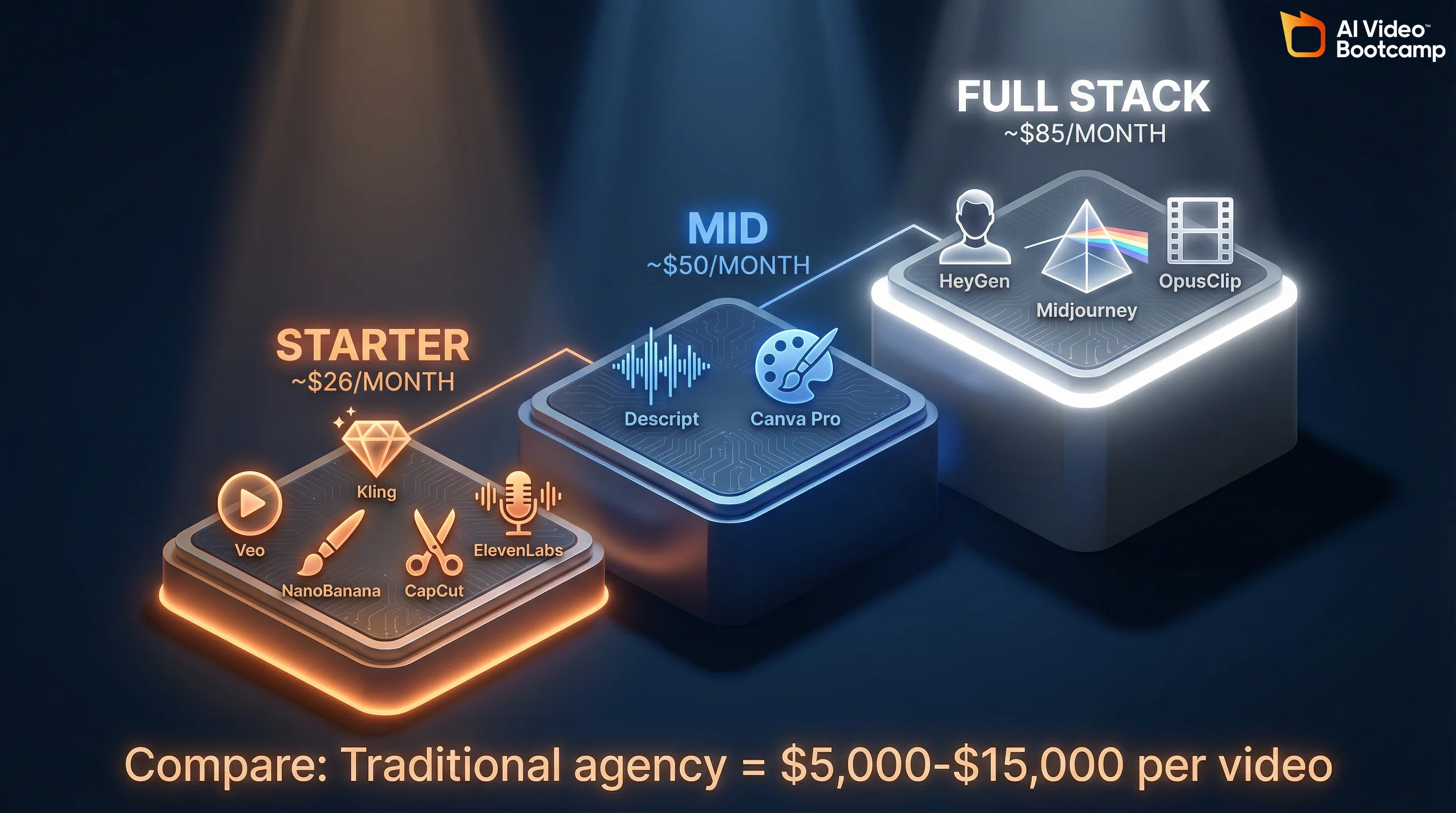
The starter tier (~$30/month for Gemini Advanced ~$20 + Kling Standard $6.99 from kling.ai) covers 80% of small business needs with Veo 3.1, NanoBanana PRO, Kling 3.0, and free editing in CapCut. The mid tier (under $50/month) adds Descript for transcription-based editing. The full stack (under $100/month) adds HeyGen avatars and dedicated repurposing tools. Start at the starter tier and expand based on volume and quality requirements, not assumptions about what you need.
You do not need to spend thousands to get started. Here is a breakdown of tools by budget:
| Monthly Budget | Video Generation | Image Generation | Voiceover | Editing | Avatars | Content Repurposing |
|---|---|---|---|---|---|---|
| Starter (~$30) | Veo 3.1 (Gemini Advanced, ~$20) + Kling Standard ($6.99 via kling.ai) | NanoBanana PRO (included with Gemini Advanced) | ElevenLabs free tier (10k credits) | CapCut Desktop (free) | None | OpusClip free tier |
| Mid (~$50) | Veo 3.1 + Kling Standard | NanoBanana PRO + Canva Pro ($10) | ElevenLabs free tier | CapCut Desktop + Descript Standard ($16) | None | OpusClip free tier |
| Full Stack (~$85) | Veo 3.1 + Kling Standard | NanoBanana PRO or Midjourney ($20 via midjourney.com) | ElevenLabs Starter $5 (via elevenlabs.io) | Descript Standard ($16) | HeyGen Starter ($29) | OpusClip Starter ($29) or Pictory ($20) |
The starter tier covers 80% of small business use cases. With Gemini Advanced and Kling Standard (from kling.ai), you can generate images, create text-to-video and image-to-video content, add voiceovers, and edit in CapCut. That is a complete production pipeline for ~$30/month.
Move to the mid or full stack tier when you hit one of these thresholds: (1) you are generating more than six videos per day and hitting generation limits, (2) you need avatar-based talking head content, (3) you want transcript-based editing in Descript, or (4) you need dedicated content repurposing at scale.
Start at the starter tier. You will know when you need to upgrade because the volume or format demands will outgrow your current stack.
Your First 30 Days: A Practical Roadmap
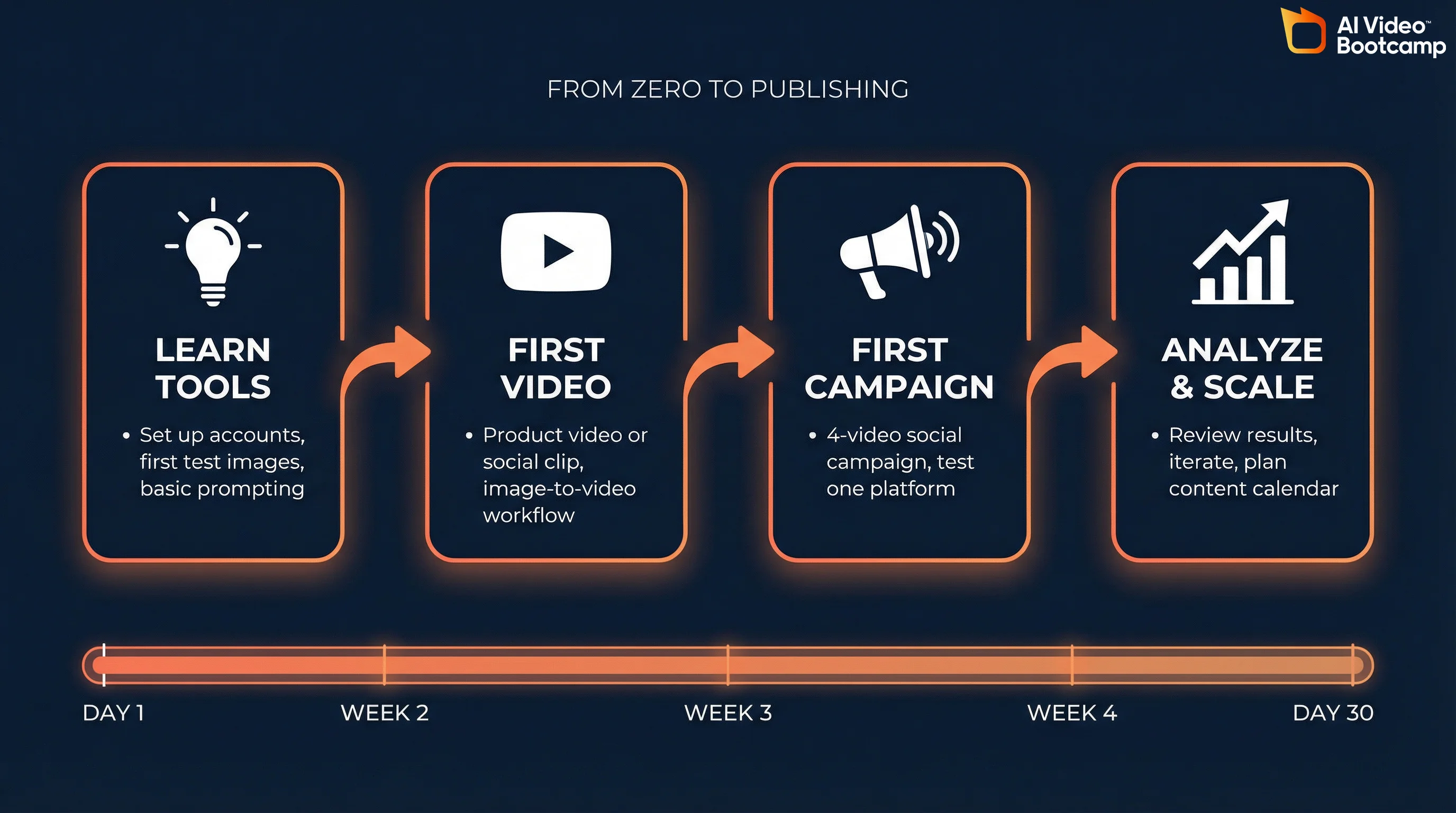
Week 1 covers setup and first test images. Week 2 produces your first complete video. Week 3 launches a 4-5 video social campaign on one platform. Week 4 analyzes results and builds your content calendar for next month. This roadmap assumes 1-2 hours daily and gets you from zero to publishable content within 14 days. By the end of Week 4, you have data on what works for your audience.
Most small business owners freeze because they do not know where to start. Here is a week-by-week plan that takes you from zero to launching your first AI-powered campaign.
| Week | Focus | Concrete Actions | Expected Output |
|---|---|---|---|
| Week 1 | Setup and orientation | Subscribe to Gemini Advanced (~$20/month) for Veo 3.1 and NanoBanana PRO access. Create accounts for Kling 3.0, CapCut, and ElevenLabs. Generate 3-5 test images with basic prompts. Read one prompting guide (COSTAR framework). | Five test images, no video yet. |
| Week 2 | Your first video | Using one test image from Week 1, generate an image-to-video with Kling 3.0. Edit with CapCut (add music, lower third title). Generate a voiceover (ElevenLabs) and add to video. Re-edit. | 1 complete video (45-90 seconds), ready to post. |
| Week 3 | Campaign launch | Identify your core offer or product (pick one category: product, service, testimonial, educational content). Generate 8-12 variations of video or images for that category. Select the top 3. Edit each with different music, captions, or voiceover. Post to one social platform (Instagram, TikTok, YouTube, or LinkedIn). Monitor engagement. | 4-5 final videos posted to one platform. Engagement data collected. |
| Week 4 | Iterate and plan | Analyze which video performed best. Identify what worked (length, music, message, format). Sketch out your next four weeks of content (16-20 videos). Create a simple template or workflow for Week 1 of next month. | Content calendar for next month, performance data, refined workflow. |
This roadmap assumes you spend 1-2 hours per day on the task. You are learning while doing, not taking a course first. By the end of Week 2, you will have your first complete, publishable video. By the end of Week 4, you will have data on what works for your audience.
The Brand Consistency Problem (And How to Solve It)
Brand drift kills most AI projects. When five videos look like they were made by five different people, audience trust erodes. Solve this with a one-page character bible (specific clothing, lighting, colors, pacing), anchor frames (real product photos that AI animates around), and prompt chaining (small changes per video, not dramatic reinvention). Advanced teams use LoRA training for custom micro-models. Consistency is a habit, not magic.
Here is a problem that trips up most small businesses: you generate five product videos and they look like they were made by five different people. One has warm lighting, one has cool lighting. One has a fast pace, one is slow. Your avatar has brown hair in one video and red hair in the next.
This is called “the $2,400 problem” by most small business teams. Our deep dive on character consistency in AI video covers the technical solutions in detail. It is the unspoken cost of brand drift: lost trust from inconsistent visual identity, confused messaging, and diluted impact.
The solution is character DNA. Create a detailed character bible for your brand or avatar that includes unmistakable identifiers: specific clothing, lighting preferences, background style, color palette, speaking pace, camera angles, and even the types of transitions you use. When your team generates new content, they reference the bible, not intuition.
For image and video consistency specifically:
Anchor frames (in Visboom or similar tools) use a real photo of your product as the centerpiece and AI motion around it. This forces visual consistency because the real product is your anchor.
Prompt chaining means making small, controlled changes across generations instead of dramatic reinvention. If your logo is blue in one video, keep it blue in the next. If your avatar wore a blazer in one video, use similar styling in the next. One or two elements change per video, not everything.
LoRA training is advanced: collect 15-30 consistent images of your brand, product, or style, and train a micro-model that learns your specific aesthetic. This is most valuable when you have a strong visual language and want to scale it. Cost is usually $50-200 per custom model, but it saves dozens of hours of iteration.
For most small businesses, the answer is simpler: write a one-page character bible. Distribute it to anyone generating content. Reference it before posting. Consistency is a habit, not magic. The NanoBanana PRO guide covers how to maintain style consistency across image generations.
Prompt Engineering That Actually Works for Business
Prompt engineering is a communication skill, not dark magic. Use the COSTAR framework (Context, Objective, Style, Tone, Audience, Response) to give AI tools specific direction on every decision. Few-shot prompting (referencing existing content you love) calibrates style quickly. Generate 8-12 variations instead of perfecting one, then select the best 2-3 and refine. Volume over perfectionism improves output quality 5-10 times.
You have heard about prompt engineering. Most guides make it sound like dark magic. It is not. It is a communication skill.
The best framework for business use is COSTAR: Context, Objective, Style, Tone, Audience, Response. (For more depth, read how to write AI video prompts that actually work.)
A weak prompt: “Make a product video.”
A strong COSTAR prompt:
- Context: “This is an apparel product, a unisex linen button-up shirt.”
- Objective: “Show the shirt being worn in different settings (office, casual, weekend), emphasizing fit and fabric movement.”
- Style: “Cinematic, natural lighting, close-up on textures, warm color grading.”
- Tone: “Aspirational but approachable, not high-fashion.”
- Audience: “People aged 25-45 who value quality, sustainability, and versatile basics.”
- Response: “30-second video, no dialogue, minimal music, emphasis on fabric movement.”
Specificity lets the AI decide on lighting, pacing, framing, and tone. Our photorealistic AI prompts guide walks through this technique step by step. Use few-shot prompting (reference existing content you love), and prioritize iterative volume over perfectionism. Generate 8-12 variations, pick the best 2-3, refine. Quality jumps 5-10x from one output to twelve. You move from tool user to content director.
Building SOPs: From Experimenting to Operating
Systematize your workflow once you have three successful videos. Five core SOPs: (1) topic research, (2) content brief creation, (3) prompt execution with 8-12 variations, (4) human-in-the-loop review, (5) multichannel optimization. Total time per video: 90-120 minutes. Automate hand-offs with n8n or Zapier. Document workflows with screen recordings so new team members can replicate them. Process beats intuition.
Once you have made three videos successfully, you need to systematize the workflow so you do not reinvent it every time.
The five core AI SOPs for small business are:
1. Topic Research and Data Aggregation. What are you making video about? Sales data, customer feedback, team ideas, trending keywords in your industry? Spend 30 minutes once per week collecting this. Assign it to one person. It becomes the source material for everything else.
2. Content Brief Creation. Take the topic and write a one-paragraph brief: objective, audience, key message, call-to-action, and any brand guidelines. A brief should take 5-10 minutes to write and should fit on one page. This is not busywork. It prevents rework.
3. Prompt Framework Execution. Using COSTAR, translate the brief into prompts for your tools. Generate 8-12 variations. This is the fun part and usually takes 30-45 minutes. Assign it to whoever is best at prompting (often the team member with most AI experience).
4. Editorial Review. Select best 2-3 outputs. Verify they match the brief. 15-20 minutes.
5. Multichannel Optimization. Optimize for Instagram (square), TikTok (9:16), YouTube (16:9), LinkedIn. One video becomes three platform-specific versions. 20-30 minutes.
Total time: 90-120 minutes per video. Use n8n or Zapier automation to remove manual hand-offs. Document workflows with screen recordings for team onboarding.
The Mistakes That Kill Small Business AI Projects
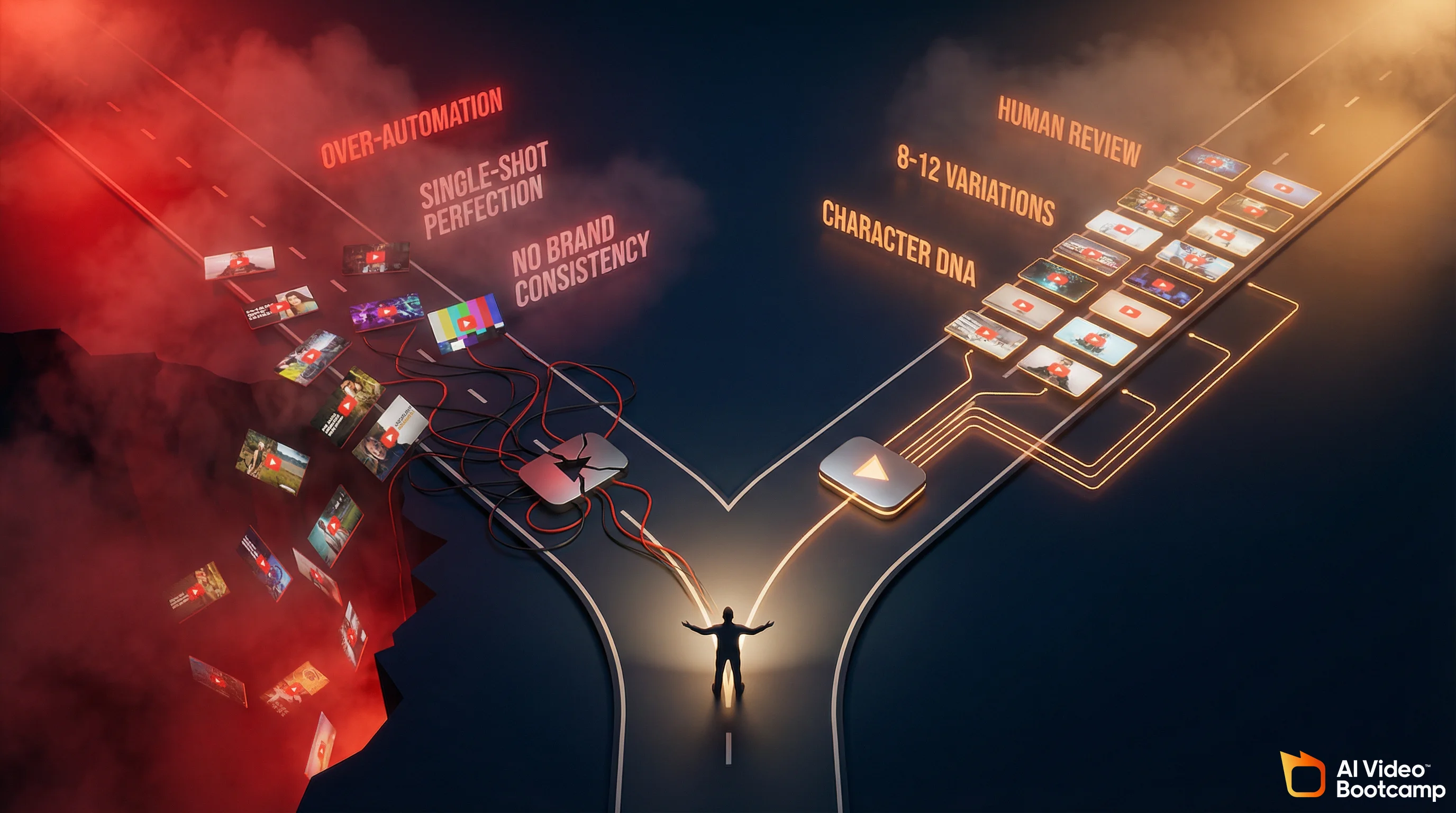
Six mistakes kill most AI projects: over-automation without human review, single-shot perfectionism instead of iteration, fighting the uncanny valley instead of leaning into style, ignoring brand consistency (the patchwork quilt problem), weak hooks in first three seconds, and platform-specific formatting ignored. Each has a fix. Post-mortems after every batch catch these patterns early and prevent repeat failures.
Most AI projects fail not because the tools are bad, but because the team makes repeatable mistakes. Here are the big ones:
| Operational Mistake | Impact on Business | How to Fix |
|---|---|---|
| Over-automation: removing the human entirely | Generated content misses brand voice, loses audience trust, gets deleted after a few posts | Implement human-in-the-loop review (four-eye principle) before any content ships |
| Single-shot perfectionism | Team waits for perfect output instead of iterating, wastes time on marginal improvements | Generate 8-12 variations always, pick best 2-3, iterate on those |
| Fighting the uncanny valley | Trying to make AI output photorealistic when it should be stylized; burning time on watermarks, artifacts | Lean into art direction: stylized, animated, or character-driven content where AI excels |
| Ignoring character and brand consistency | Videos look disjointed, audience sees patches instead of coherence, no visual moat | Create a one-page character bible and reference it before generating any content |
| Weak hooks in first three seconds | Video gets scrolled past, engagement tanks regardless of how good the rest is | Reverse engineer successful content in your category, start with the hook, then build the body |
| Ignoring platform-specific formatting | Posting Instagram content on TikTok vertically, losing 30% of engagement | Optimize every video for the platform before posting (square for Instagram, 9:16 for TikTok, captions for mobile) |
The fix for most of these is process, not talent. Run a brief post-mortems after every batch of videos. What worked? What did not? Why? Update your SOP accordingly.
How to Learn This Without Hiring an Agency
60% of small businesses cite skills gap as the main barrier to AI adoption. Three learning paths: YouTube tutorials (fast, free, analysis paralysis risk), structured courses like AI Video Bootcamp (9-phase curriculum, 20,000+ community members), or immediate real-world projects. The 7-Day Image Challenge trains 20,000+ creators in one week by generating one image per day. Completion and speed to competence matters more than program choice.
The skills gap is real. 60% of small businesses cite skills gap as the top barrier to AI adoption. You do not have a “video team.” You have yourself and maybe one other person.
Three paths to learning (our how to learn AI video guide breaks these down in detail):
The best predictor of success is committed time, not IQ or technical background. Plan 30-40 hours over three months to move from novice to competent. The AI Video Bootcamp 7-Day Image Challenge (generating one AI image daily) has 20,000+ completers who reach portfolio quality by day five. Free, one hour per day, immediate results. Choose courses based on completion likelihood, not program features.
The Economics: When Free Tools Hit Their Limit
A ~$30/month starter stack (Gemini Advanced + Kling Standard from kling.ai) covers 80% of small business needs if you generate two videos per week. Upgrade only when hitting generation limits (6+ videos daily), needing avatar content, wanting transcript-based editing, or requiring custom models. The AI video market is $716.8M (2025) growing 18.8% CAGR to $3.35B by 2034, driven by SMB adoption. Even the full stack at $85/month pays for itself in two-three videos.
The question every SMB asks: when do I need to spend more?
The starter stack (~$30/month) covers 80% of small business needs. The remaining 20% matters only when you hit specific thresholds:
- You are generating more than six videos per day and hitting generation limits
- You need avatar-based talking head content (add HeyGen at $29/month)
- You want transcript-based editing that saves 2-3 hours per video (add Descript at $16/month)
- You need dedicated content repurposing at scale (add OpusClip Starter at $29/month)
- You are training custom models or running complex workflows
The global AI video market was $716.8 million in 2025 and is growing at 18.8% CAGR to reach $3.35 billion by 2034. The AI video generators ranked guide shows which tools lead this market. This growth is driven almost entirely by small business adoption. The tools are racing downward in price and upward in quality.
For most small businesses, here is the economic reality:
- Starter stack: ~$30/month (Gemini Advanced + Kling Standard from kling.ai), produces 1-3 publishable videos per day
- Mid stack: ~$50/month (adds Descript and Canva Pro), produces 5-10 publishable videos per day with faster editing
- Full stack: ~$85-100/month (adds HeyGen, OpusClip, or Midjourney), unlimited formats including avatars and automated repurposing
If you are generating two videos per week (profitable for most SMBs), the starter stack handles everything. If you are generating two videos per day, the mid stack is an investment that pays for itself immediately. A single product video that drives three extra sales covers the entire month’s tool cost.
The key metric is not tool cost, it is content velocity and ROI. Measure both.
What This Looks Like in 12 Months
In 12 months you will have 50+ pieces of finished content, repeatable SOPs, audience data on what works, and likely 2-3x engagement or conversion increases. The tools will improve dramatically (Veo faster, Kling longer clips, new capabilities emerging). The competitive moat is not the tool you use, it’s your skill using tools well. SMBs have velocity advantage over enterprises (no procurement, no legal review). Start now to build defensible skill.
You are probably wondering: where does this go?
In 12 months, the small business that started with a ~$30/month tool stack and a 30-day roadmap will have:
- 50+ pieces of finished content (videos, images, repurposed clips)
- A repeatable SOP that one or two people can execute without thinking
- Data on what works for your audience and what does not
- Likely a 2-3 times increase in engagement or conversion (this varies by industry, but the data is strong)
- A defensible competitive advantage: you are moving faster than your competitors because you learned earlier
Here is the harder part: the tools you are using in 12 months will be dramatically better than they are today. Veo will be faster and higher quality. Kling will generate 10-second clips instead of 5-second clips. New tools will emerge that do things that do not even exist yet (volumetric video, real-time avatar generation, full-length video synthesis).
The competitive moat is not which tool you use. It is your skill using tools well.
Learn core skills: storytelling, audience psychology, brand consistency, iterative refinement. The AI video skill stack outlines exactly which skills compound over time. The tools will change. The skills will not. SMBs have velocity advantage: no procurement, no legal review, no change requests. You see a tool and use it the same day. Enterprises are still debating it. Decision velocity is your competitive advantage.
*Sources: Grand View Research AI Content Market, U.S. Chamber of Commerce AI Adoption, [Adobe Small Business Superpower S