
Pricing verified April 30, 2026.
faq:
- question: “How long does it take to learn AI video creation?” answer: “Most beginners produce their first publishable AI image within 1-3 days and their first complete edited AI video within 3-4 weeks. With consistent practice (5-10 hours per week) and structured learning, you can reach portfolio-ready quality in 10-12 weeks and land your first paid project within 3-4 months. Creative professionals who already understand composition and lighting learn roughly 2x faster.”
- question: “What tools do I need to start making AI videos?” answer: “A complete beginner stack costs $30-50 per month: Midjourney ($10/mo) for image generation, Kling AI (credit-based) for video generation, ElevenLabs (starter plan) for voice and audio, and CapCut (free) for editing. You can start for free using Google AI Studio with NanoBanana PRO for images and free tiers on Kling AI and ElevenLabs.”
- question: “Can you make money with AI video creation?” answer: “Yes. AI video freelancers on Fiverr and Upwork report gig demand up 340% year-over-year. Entry points include AI video ads and UGC content ($150-500 per video), freelancing on platforms ($25-1,000+ per project), and faceless YouTube channels ($5,000-50,000 per month when established). The fastest path to income is AI video ads, where brands are actively hiring creators.”
- question: “Do I need an expensive computer to create AI videos?” answer: “No. Most AI video generation happens in the cloud through web-based tools like Kling AI, Google Veo, and Midjourney. You need a reliable internet connection and a computer that can run CapCut for editing. If you want to run open-source models locally (Stable Diffusion, FLUX, ComfyUI workflows), you will need an NVIDIA GPU with at least 10GB VRAM (RTX 5070 or higher), but this is optional and only relevant for advanced users.”
- question: “Should I learn AI image creation or AI video creation first?” answer: “Start with images. Image generation is faster to learn, cheaper to practice, and the prompting skills transfer directly to video. Most professional AI video workflows start with a high-quality AI image that gets animated into video. Produce at least 50 images before generating your first video.”
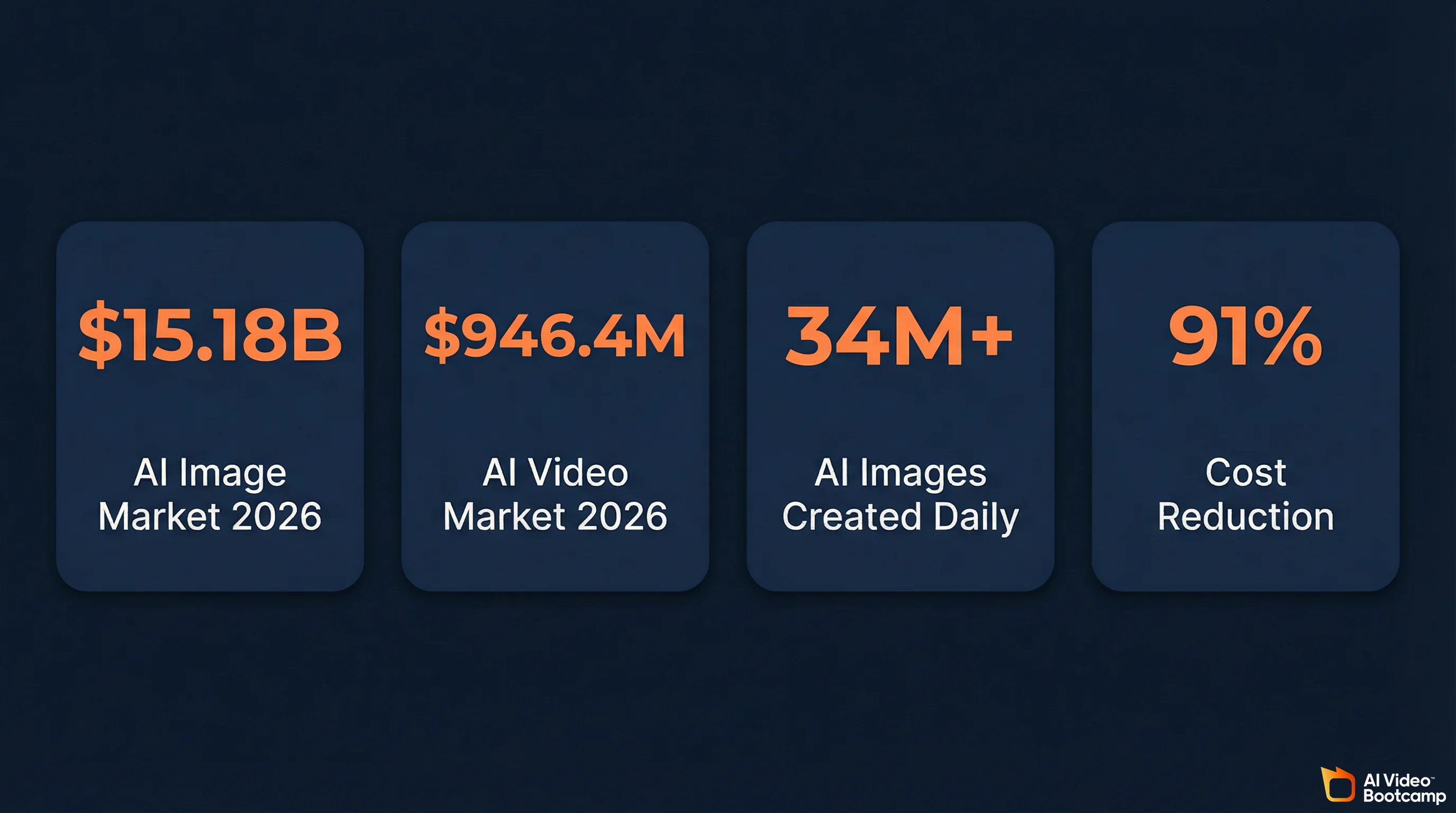
Learning AI video and image creation in 2026 comes down to six skills, a handful of tools, and a structured path that matches your experience level. The AI image market hit $15.18 billion this year (up 30.3% from 2025), the AI video market reached $946.4 million, and production costs have dropped 91% compared to traditional methods. There is real money here, real demand from brands, and a clear path from zero experience to paid work. This guide covers every step.
This is not a list of 50 tools with no context. This is the complete framework: what to learn, in what order, which tools actually matter, how to avoid the most common mistakes, and how to start earning from AI-created content.
The 2026 AI Landscape: What Changed and Why It Matters
The generative AI market for visual content has crossed from experimental to professional infrastructure. The industry is now evaluated on production reliability, not novelty.
The numbers tell the story. Over 34 million AI images are created every day, with more than 15 billion generated since 2022. The average production time for a 60-second marketing video has dropped from 13 days to 27 minutes. Marketing and advertising accounts for 33.88% of the AI video market, followed by media and entertainment at 23.87%, according to Grand View Research.
Three structural shifts define this moment:
The single-tool era is over. No one model does everything well. Professional creators in 2026 route different tasks to different tools. A cinematic establishing shot goes to Google Veo 3.1. A character dialogue scene goes to Kling 3.0. Budget b-roll goes to Wan 2.6. This multi-tool orchestration is the baseline professional workflow, not an advanced technique.
Text prompting alone is not enough. The industry has moved from “prompt roulette” (typing descriptions and hoping for the best) to deterministic, structural control. That means image-to-video workflows, reference images, ControlNet conditioning, and IP-Adapters. The people producing the best work are not writing better prompts. They are building structured visual pipelines.
Audio-video joint generation has arrived. Models like Google Veo 3.1 and Seedance 2.0 now generate synchronized audio, environmental sound effects, and phoneme-level lip-sync alongside video. This is not a gimmick. It eliminates an entire post-production step and changes how you plan content from the start.
If you are entering this space in 2026, these are the conditions you are walking into. The bar is higher than it was 12 months ago, but the tools are dramatically better and the path to professional output is shorter than ever.
The Six Skills You Actually Need (In Learning Order)
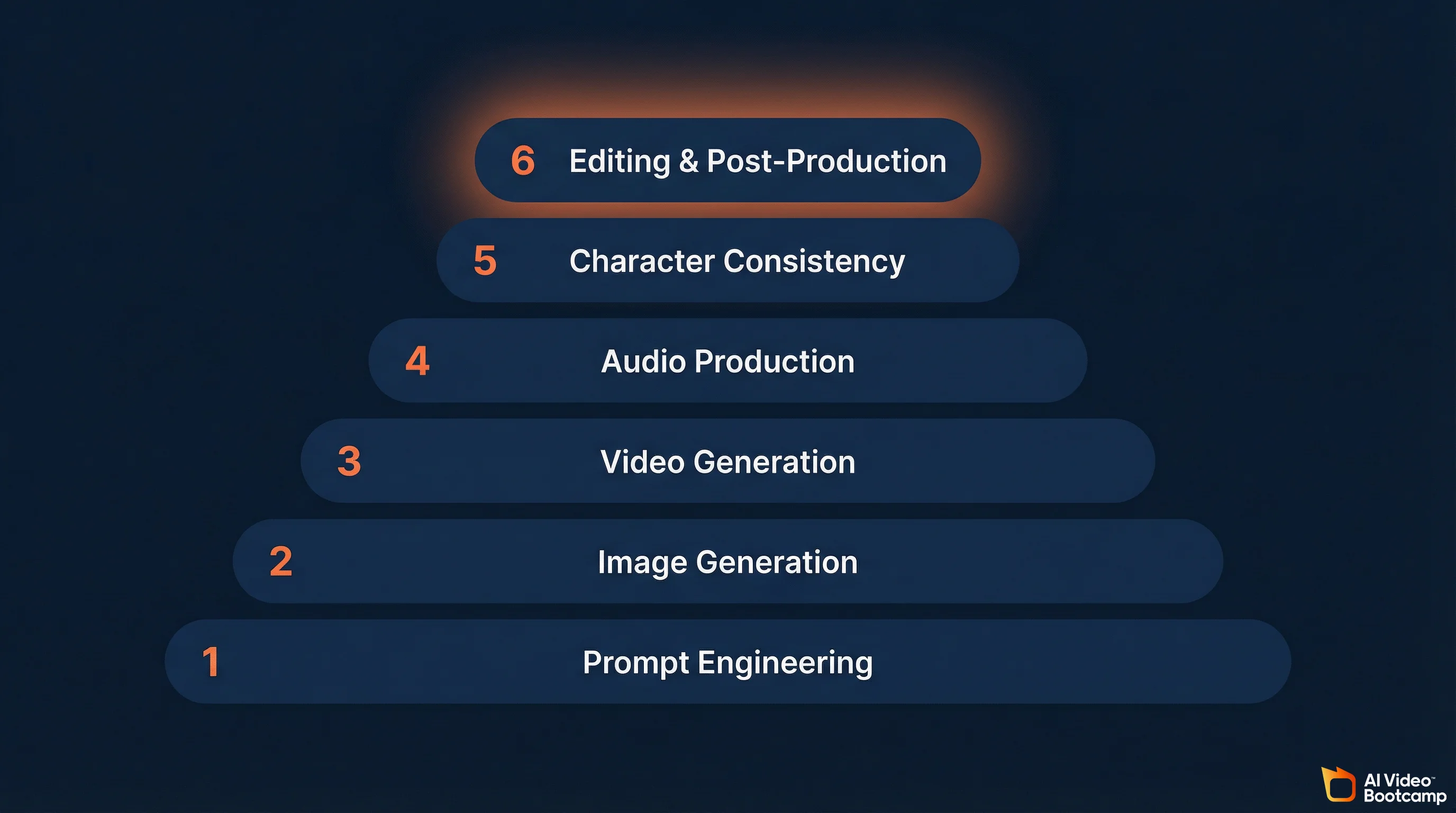
Every AI video creator needs the same six skills. The order matters because each one builds on the previous. Skip ahead and you will hit walls.
1. Prompt Engineering
This is the single highest-leverage skill. Every image, every video, every piece of AI-generated content depends on the quality of the instruction you give the model.
In 2026, effective prompting has moved beyond keyword lists. Terms like “highly detailed,” “8k,” and “masterpiece” are now considered junk tokens by advanced models. They get ignored. What works is natural language with specific technical detail.
For images, that means invoking real camera terminology: the lens (“shot on 85mm lens”), the aperture (“f/1.8”), the film stock, and specific lighting (“cinematic rim lighting,” “volumetric god rays”). Describe the actual details you want, not generic quality adjectives. “Pores visible on skin, intricate gold embroidery on velvet jacket” produces dramatically better results than “highly detailed portrait.”
For video, the additional dimension is time. You need to specify exact camera movements (“slow ascending crane shot” produces completely different results than “fast lateral tracking shot”), subject actions, and environmental changes. The most common mistake beginners make is being vague about movement.
The best framework for video prompts: describe the environment and lighting first, then the subject and their action, then camera behavior and mood. Layer the information so the model has clear instructions for every aspect of the output.
2. Image Generation
Before you create video, you create images. Most professional AI video workflows start with a high-quality still image that gets animated. This is the image-to-video pipeline, and it is the dominant production method in 2026.
The key competencies: style control, photorealistic output, composition, and working across multiple tools. You need to understand that Midjourney v7 produces the highest artistic quality, ChatGPT’s GPT Image 1.5 understands complex natural language instructions best, and FLUX 2 handles photorealism and multi-element prompts with the highest fidelity.
Image generation is the fastest skill to learn. You can produce portfolio-ready images within days. Aim for 50+ images across different styles before moving to video.
3. Video Generation
Converting static images to motion. Core competencies include image-to-video workflows, text-to-video prompting, camera movement control, motion pacing, and lip sync.
The critical technique: keep individual clips short (3-5 seconds) and combine them in editing. Longer single-take AI generations degrade in quality. Short clips give you more control and higher quality. This is how every professional AI video is assembled in 2026.
For tool selection, Kling AI offers the best balance of quality, cost, and ease of use for someone learning. Google Veo 3.1 produces the highest quality output with native audio. Seedance 2.0 is the strongest for directed motion control using reference video input. See our full AI video generators ranked comparison for detailed breakdowns.
4. Audio Production
Voice generation, voice cloning, sound effects, and music. The 2026 industry standard is an audio-first production approach: you create and finalize the voiceover before generating any video. The pacing, emotional peaks, and pauses in your narration dictate the cuts and motion. If the audio is off, the video feels disconnected.
ElevenLabs remains the dominant platform. You record a clean audio sample (minimum one minute, no background noise), and the AI replicates your vocal characteristics. Your cloned voice can be reused across all content for consistent narration.
This is the most underrated skill in the stack. Mediocre audio will ruin excellent visuals every time.
5. Character Consistency
Maintaining a consistent character identity (face, outfit, style) across multiple scenes and shots. This is the skill that separates professional output from amateur experiments. Without it, you cannot produce serialized content, recurring characters, AI avatars and influencers, or multi-scene narratives.
The 2026 industry standard is FaceID Plus v2: upload one reference photo and the AI clones that facial structure into any new scenario without training. For higher fidelity, LoRA fine-tuning through ComfyUI captures not just facial features but style, proportions, and characteristic poses.
A breakthrough in 2026: Kling 3.0’s multi-shot sequences generate 3-15 second clips with subject consistency across different camera angles from a single prompt. This eliminates much of the manual work that character consistency previously required.
For the complete deep-dive, see our character consistency guide.
6. Editing and Post-Production
Assembling AI-generated clips into polished final content. This is where raw AI output becomes publishable.
CapCut Desktop is the recommended editing tool for AI creators. Its 2026 release includes AI Auto-Edit and an AI Effect Engine that cut post-production time by roughly 70% compared to traditional stock footage editing. Descript is a strong alternative for text-based editing where you edit video by editing the transcript.
The pro workflow for lip sync: generate facial movement in Kling using a “speaking” prompt, then refine the sync in CapCut using the Audio Match feature to align lips with the specific phonemes of your ElevenLabs voice.
For a step-by-step breakdown of the full pipeline, see our guide on how to make AI videos from scratch.
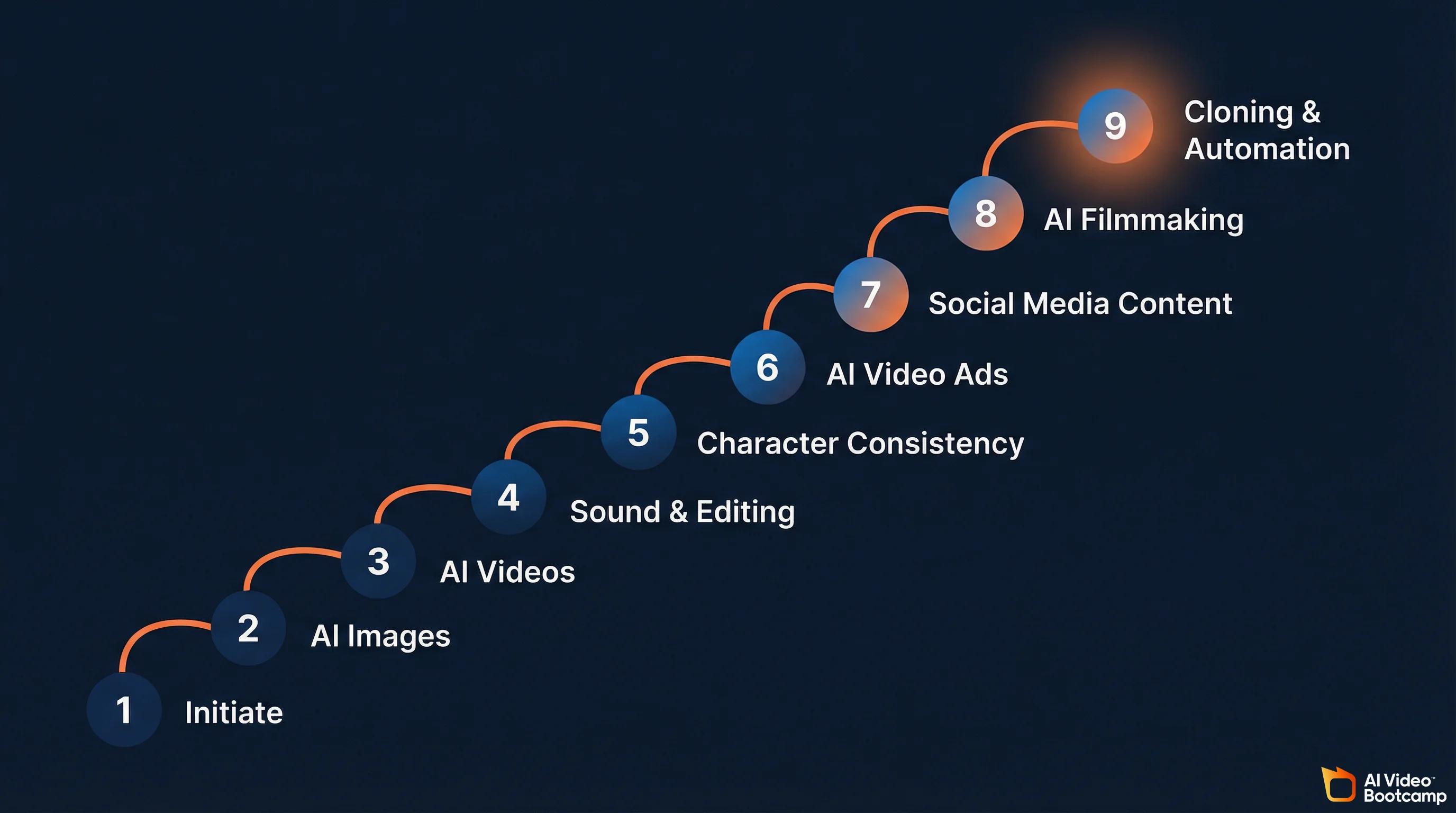
If these six skills look like a lot to figure out on your own, that is because they are. This is exactly why structured programs exist. AI Video Bootcamp maps its entire 9-phase curriculum to this progression: Phase 1 (Initiate) covers foundation and tool navigation, Phase 2 (AI Images) teaches high-level prompting and professional visuals, Phase 3 (AI Videos) handles converting images to cinematic video, Phase 4 (Sound Effects and Editing) covers audio design, Phase 5 (Character Consistency) locks in faces and styles across scenes, Phase 6 (AI Video Ads) teaches UGC-style ads and product campaigns, Phase 7 (Social Media AI Content) covers platform-specific viral content, Phase 8 (AI Filmmaking) gets into cinematic storytelling, and Phase 9 (Cloning and Automation) covers face/voice cloning and scaled production. Each phase builds on the last, which is the part that is nearly impossible to replicate by piecing together random YouTube tutorials.
The AI Tool Stack: What to Use and When
Pricing last verified April 30, 2026. Prices are from official product sites and fal.ai. Check vendor sites as pricing changes frequently.
No single tool does everything well. Here is what actually matters for each category.
AI Image Generators
| Tool | Best For | Key Strength | Price |
|---|---|---|---|
| Midjourney v7 | Artistic and aesthetic imagery | Unmatched painterly quality; distinctive styled output | $10-120/mo |
| GPT Image 1.5 (ChatGPT) | Complex instructions, iteration | Best natural language understanding; 4x faster than DALL-E 3 | $20/mo (Plus) |
| FLUX 2 (Black Forest Labs) | Photorealism, product shots | Exceptional skin textures; handles multi-element prompts reliably | Open-source + API |
| Google Imagen 3 | Speed and batch production | Fastest generation; strong for volume workflows | Included in AI Studio |
| Stable Diffusion (SDXL/SD3.5) | Full control, customization | Open-source; local hosting; LoRA fine-tuning; ComfyUI pipelines | Free (open-source) |
| NanoBanana PRO | Free photorealism | Accessible through Google AI Studio; strong realism | Free tier available |
The practical recommendation: start with Midjourney if you care about visual quality, or ChatGPT if you want the easiest learning curve. Add FLUX when you need precise photorealistic control. Smart studios use all four: Imagen for speed, Midjourney for hero imagery, FLUX for product photography, and ChatGPT for client-facing iteration.
For deeper comparisons, see our Midjourney complete guide and ChatGPT Plus image generation guide.
AI Video Generators
| Tool | Best For | Key Strength | Cost Per Second |
|---|---|---|---|
| Google Veo 3.1 | Overall quality, native audio | Best native audio generation; 4K output; lip sync; full sound design | ~$0.40/sec |
| Kling 3.0 | Motion control, human performance | Multi-shot sequences (3-15s) with subject consistency across camera angles | $0.05-0.15/sec |
| Seedance 2.0 (ByteDance) | Directed motion, multi-shot | Unified audio-video joint generation; reference video input; 8+ language lip-sync | ~$0.10/sec |
| Runway Gen-4.5 | Professional editing, cinematic control | Timeline and keyframe-like controls; strongest for professional editors | $0.15-0.25/sec |
| Sora 2 Pro (OpenAI) | Enterprise API, long-form | Strong text understanding; enterprise infrastructure focus | ~$0.20/sec |
| Wan 2.6 / LTX 2.0 | Budget production | Lowest cost per second; open weights for local execution | $0.04-0.05/sec |
Most production teams do not pick one model. They route by scene type. A cinematic establishing shot goes to Veo 3.1, a character dialogue scene to Kling 3.0, and b-roll to Wan 2.6 to keep costs down. This multi-tool routing is the 2026 standard, not an advanced technique.
For a full breakdown, see our AI video generators ranked comparison and Seedance vs Kling vs Veo comparison.
The Supporting Stack
| Category | Tool | What It Does |
|---|---|---|
| Voice and Audio | ElevenLabs | Voice generation, voice cloning, text-to-speech |
| Editing | CapCut Desktop | AI-assisted video editing, Auto-Edit, effects |
| Editing (Alt) | Descript | Text-based video editing via transcript |
| Node Workflows | ComfyUI | Visual pipeline builder for advanced image/video generation |
| Professional NLE | DaVinci Resolve | Color grading, AI-powered color matching, broadcast finishing |
| Professional NLE | Adobe Premiere Pro | Object masking, AI tracking, Frame.io integration |
| Avatars | HeyGen | AI avatar presentations, multilingual video |
| Repurposing | Opus Clip | Automated short-form extraction from long-form video |
Three Learning Paths (Pick One)
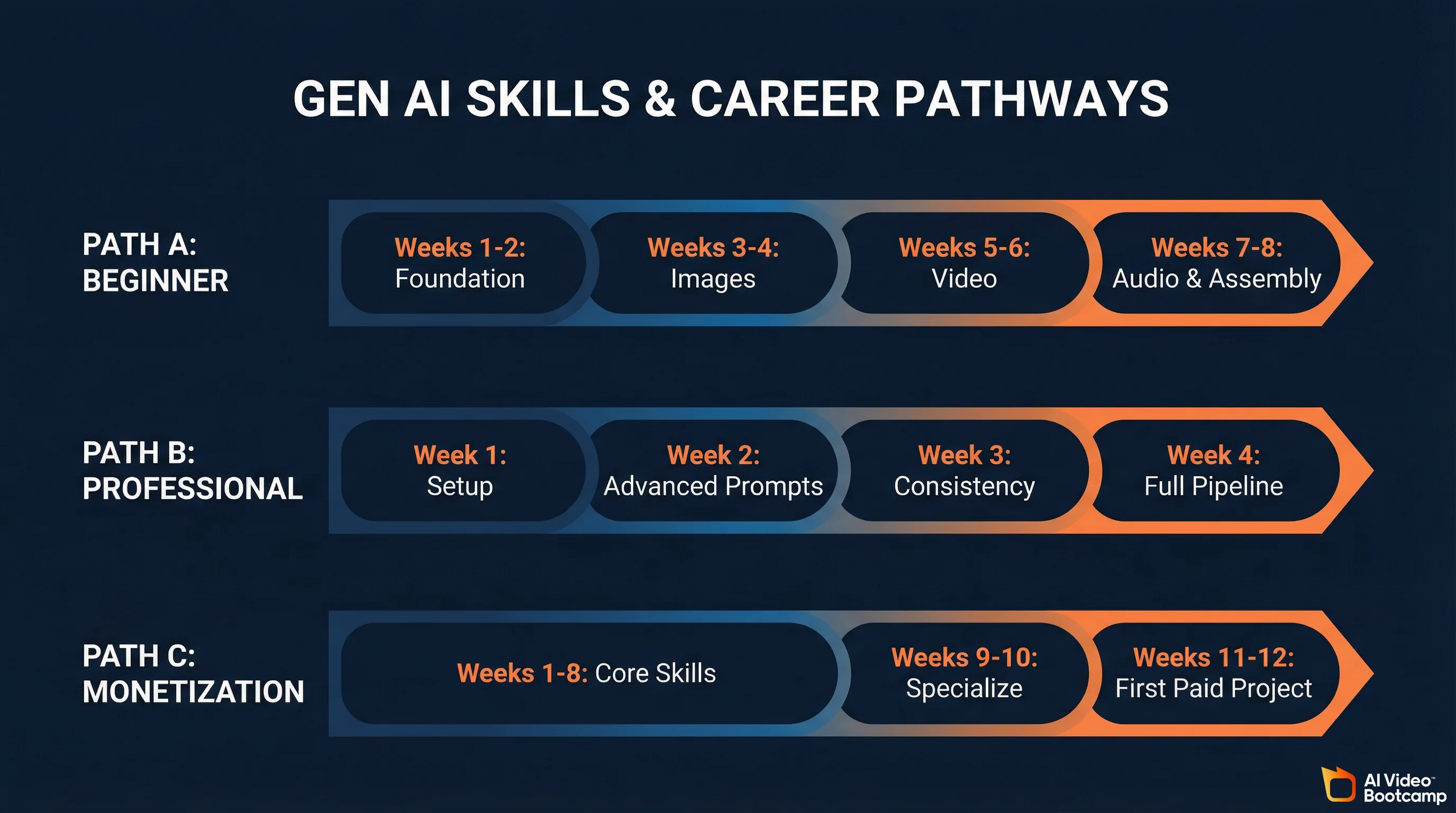
The learning curve for AI visual content creation is measured in weeks, not years. But the path varies depending on where you are starting and what you want to achieve.
Path A: Complete Beginner (8 Weeks)
This is for someone with zero AI experience who wants to build real skills from the ground up.
Weeks 1-2: Foundation. Learn the landscape. Set up accounts on Midjourney, Kling AI, ElevenLabs, and CapCut. Understand the core pipeline: prompt to image, image to video, video to edited final. Produce your first 10 AI images and 3 AI video clips. Do not worry about quality yet. Get familiar with the interface and feedback loops of each tool.
Weeks 3-4: Image mastery. Focus exclusively on prompt engineering for images. Learn style control, photorealistic output, and composition. Produce 50+ images across different styles and experiment with at least two different tools to understand how they differ. This is where you build the foundation that every other skill depends on.
Weeks 5-6: Video fundamentals. Convert your best images to video. Learn motion prompting, camera controls, and clip length management. Start combining clips in CapCut. Produce 10 edited short videos. Learn the audio-first workflow: script and voice before video.
Weeks 7-8: Audio and assembly. Add voiceover (ElevenLabs), sound effects, and music. Produce 5 complete, polished pieces ready for social media or a portfolio.
Path B: Working Creative Professional (4 Weeks)
For photographers, videographers, designers, or marketers who already understand composition, lighting, and storytelling. The learning curve is faster because your existing skills transfer directly into better prompts. Camera terminology, lighting physics, and composition rules are exactly what these models respond to.
Week 1: Tool setup and first outputs using existing creative knowledge. Week 2: Advanced prompting using your domain expertise. Week 3: Character consistency and multi-scene production. Week 4: Full production pipeline: audio-first workflow, editing, client-ready output.
Path C: Monetization Focus (12 Weeks)
For anyone whose primary goal is earning income from AI content.
Weeks 1-8: Complete Path A. Weeks 9-10: Specialize. Choose AI video ads (highest immediate income), social media content (fastest audience growth), or AI filmmaking (highest creative ceiling). Weeks 11-12: Build portfolio, create profiles on Fiverr and Upwork, learn client communication and pricing. First paid project by week 12.
These three paths map closely to how AI Video Bootcamp structures its curriculum. Phases 1 through 5 cover the core creative skills (Path A and B territory), Phases 6 and 7 focus on commercial applications like AI video ads and social media content (Path C specialization), and Phases 8 and 9 push into filmmaking and production automation for creators who want to scale. The difference between doing this alone and doing it inside a community of 20,000 people is that you get daily feedback at every stage, plus access to the Opportunity Hub when you are ready to monetize.
Realistic Timelines
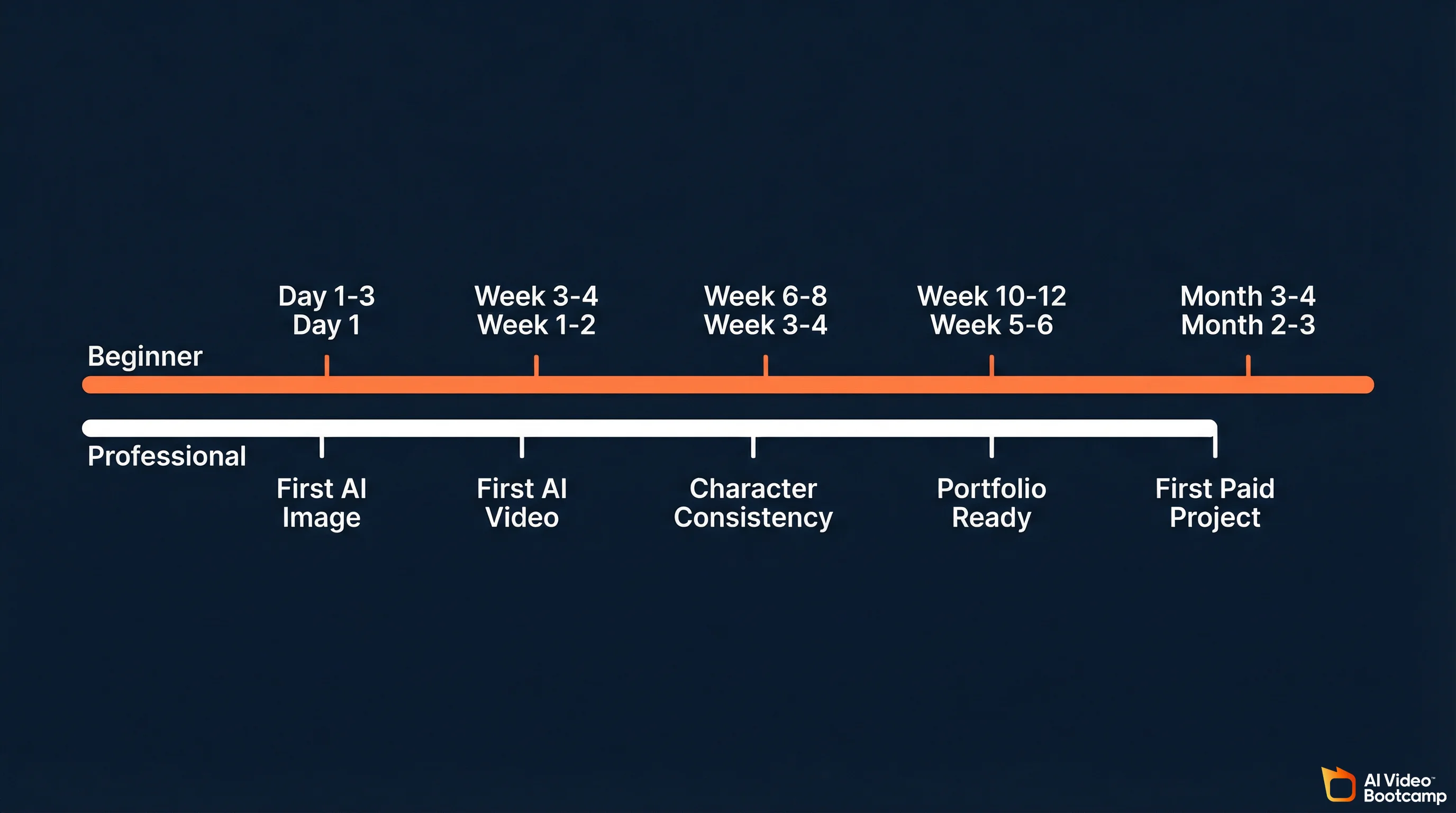
| Milestone | Complete Beginner | Creative Professional |
|---|---|---|
| First publishable AI image | Day 1-3 | Day 1 |
| Consistent high-quality images | Week 2-3 | Week 1 |
| First complete AI video (edited) | Week 3-4 | Week 1-2 |
| Character consistency across scenes | Week 6-8 | Week 3-4 |
| Full audio-video production pipeline | Week 8-10 | Week 4-5 |
| Portfolio-ready for freelancing | Week 10-12 | Week 5-6 |
| First paid project | Month 3-4 | Month 2-3 |
| Consistent monthly income | Month 6-8 | Month 4-5 |
These timelines assume 5-10 hours per week of practice for beginners, 3-5 hours for professionals. They also assume structured learning with feedback. Self-taught timelines are typically 2-3x longer due to the trial-and-error overhead.
The Audio-First Production Workflow
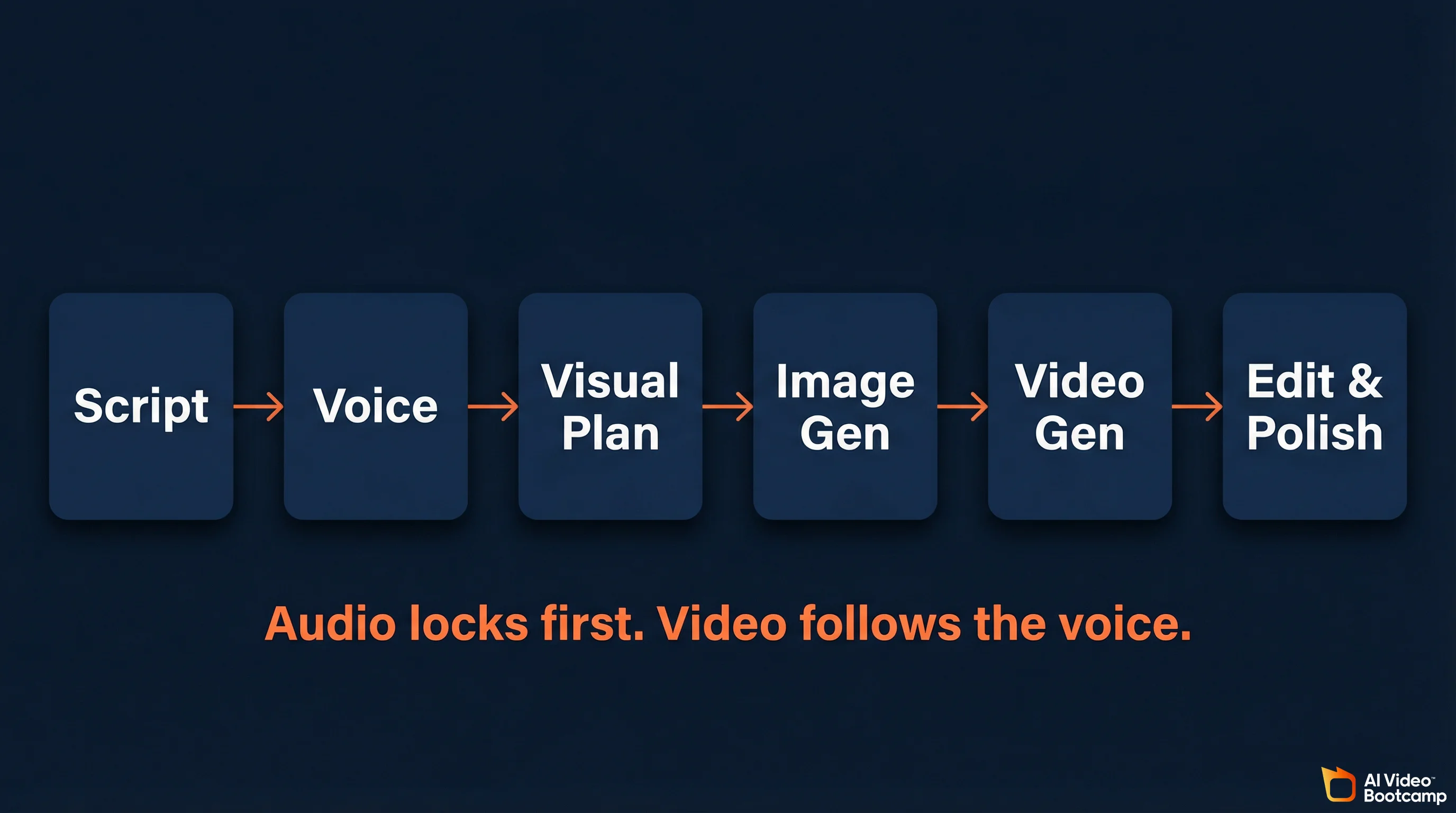
This is the standard production method for AI video in 2026. It matters enough to break out separately because most beginners get the order wrong.
The mistake: generating video first and trying to add audio later. The result is video that feels disconnected from the narration because the pacing, cuts, and emotional beats do not align.
The correct pipeline:
Step 1: Script. Write or generate the script. Structure it for your target platform’s optimal length and format.
Step 2: Voice. Generate the voiceover in ElevenLabs using your cloned voice or a selected AI voice. Lock the audio timing. This is the backbone of your entire video.
Step 3: Visual planning. Based on the audio timing, plan which AI images and video clips you need for each segment. Note where the emotional peaks are, where pauses happen, and where transitions belong.
Step 4: Image generation. Generate reference images for each shot. These become the visual anchors for your video clips.
Step 5: Video generation. Generate video clips to match the audio segments. Use image-to-video for character scenes, text-to-video for environments and b-roll. Keep clips to 3-5 seconds each.
Step 6: Assembly and polish. Import audio and video to CapCut. Align clips with voiceover. Add transitions, sound effects, music, and color grading. Export optimized for your platform.
This workflow reduces post-production time by roughly 70% compared to traditional stock footage editing.
For the exact tool settings and export specs, see our tutorial on adding voice and sound to AI videos.
Community Learning vs. Self-Taught: The Data
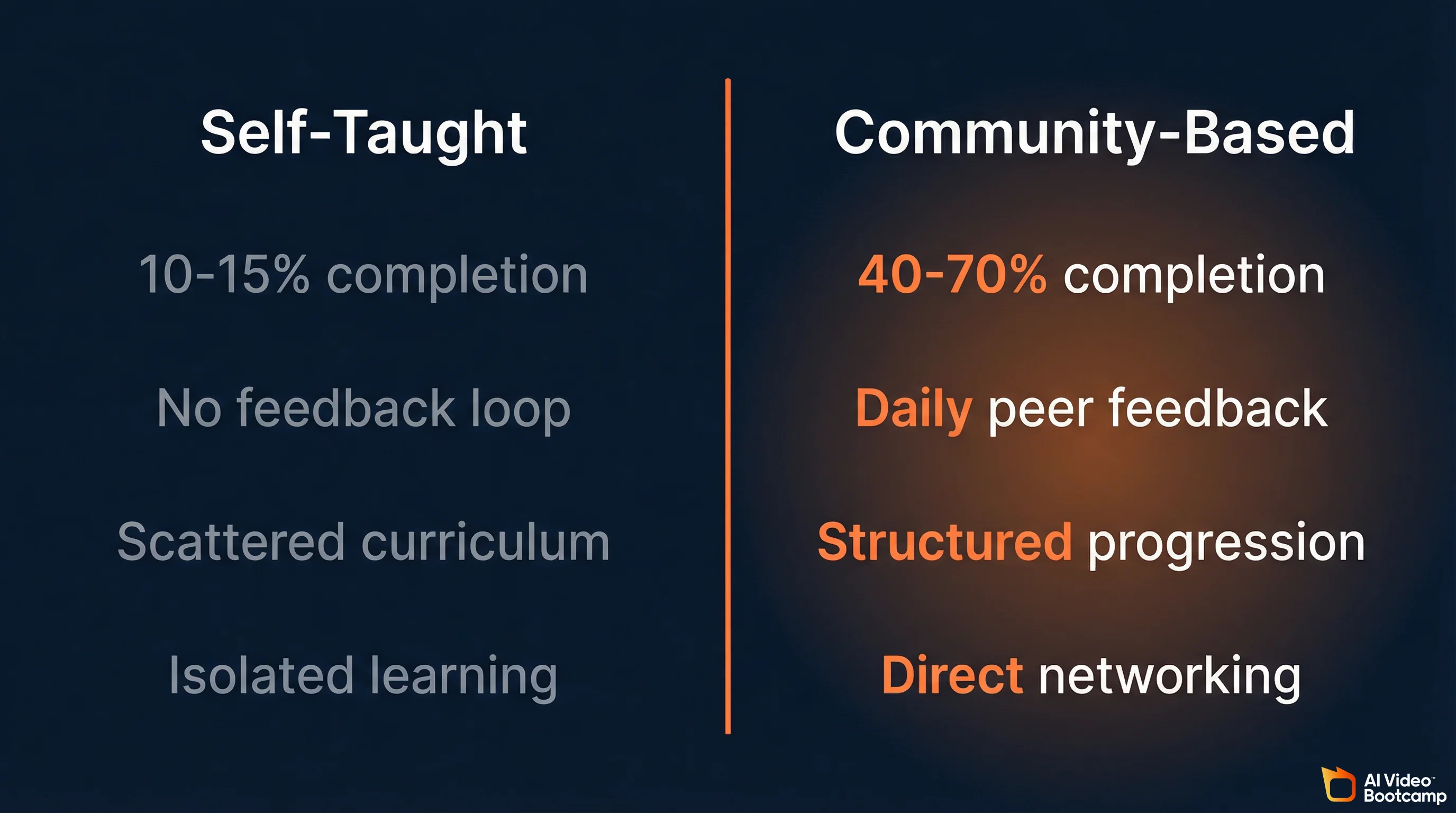
This is one of the most important decisions you will make, and the data is not ambiguous.
| Factor | Self-Taught (YouTube, Blogs) | Community-Based (Structured) |
|---|---|---|
| Completion rate | 10-15% of started courses/playlists | 40-70% with peer accountability |
| Cost | Free (but time-intensive) | $5-100/month depending on platform |
| Feedback loop | None; you judge your own work | Daily peer and expert feedback |
| Curriculum structure | Scattered; you build your own path | Structured progression; clear next steps |
| Tool updates | Must find new content after each release | Updated within days of new model launches |
| Networking | Isolated learning | Direct access to other creators and opportunities |
| Monetization support | Limited; mostly theory | Opportunity boards, brand deal connections |
Self-paced courses average 10-15% completion rates due to lack of accountability and peer momentum. Community-integrated learning consistently shows 40-70% completion. The difference is not content quality. It is the feedback loop. When you post your AI creation and get immediate feedback from people working on the same problems, learning accelerates dramatically.
Labor market data reinforces this: intensive AI bootcamps report 70% job placement within six months, compared to 56% for traditional associate degree programs. The industry values applied, hands-on skill development over theoretical knowledge.
The most effective 2026 approach combines both: free YouTube content for initial exposure and specific technique lookups, with a structured community for the sustained learning path. The community serves as the backbone. Free content supplements it.
AI Video Bootcamp is the largest paid AI video and image community in the world, with over 20,000 members generating 20,000+ daily interactions. It is ranked #1 for AI Video/Image on Skool and #24 globally out of 250,000+ communities.
What makes it work is the combination of structured curriculum and live community. The 9-phase curriculum takes you from zero (Phase 1: tool setup and navigation) through image generation, video creation, audio and editing, character consistency, AI video ads, social media content, AI filmmaking, and all the way to face/voice cloning and automated production pipelines in Phase 9. But the curriculum alone is not the point. The point is that 20,000 other people are going through the same phases, posting their work, sharing what prompts worked, flagging which tool updates broke their workflow, and giving direct feedback on your output. That daily feedback loop across 20,000+ interactions is what compresses a 6-month self-taught learning curve into weeks. The classes and resources are also updated within days when new AI models release (Kling 3.0, Veo 3.1, Seedance 2.0), so you are never learning outdated workflows.
At $9/month with no contracts, it removes the financial barrier that stops most people from joining structured learning. And for members who are ready to earn, the built-in Opportunity Hub connects trained creators directly with brand deals and freelance work, which is the part most courses completely skip.
How to Actually Start Earning
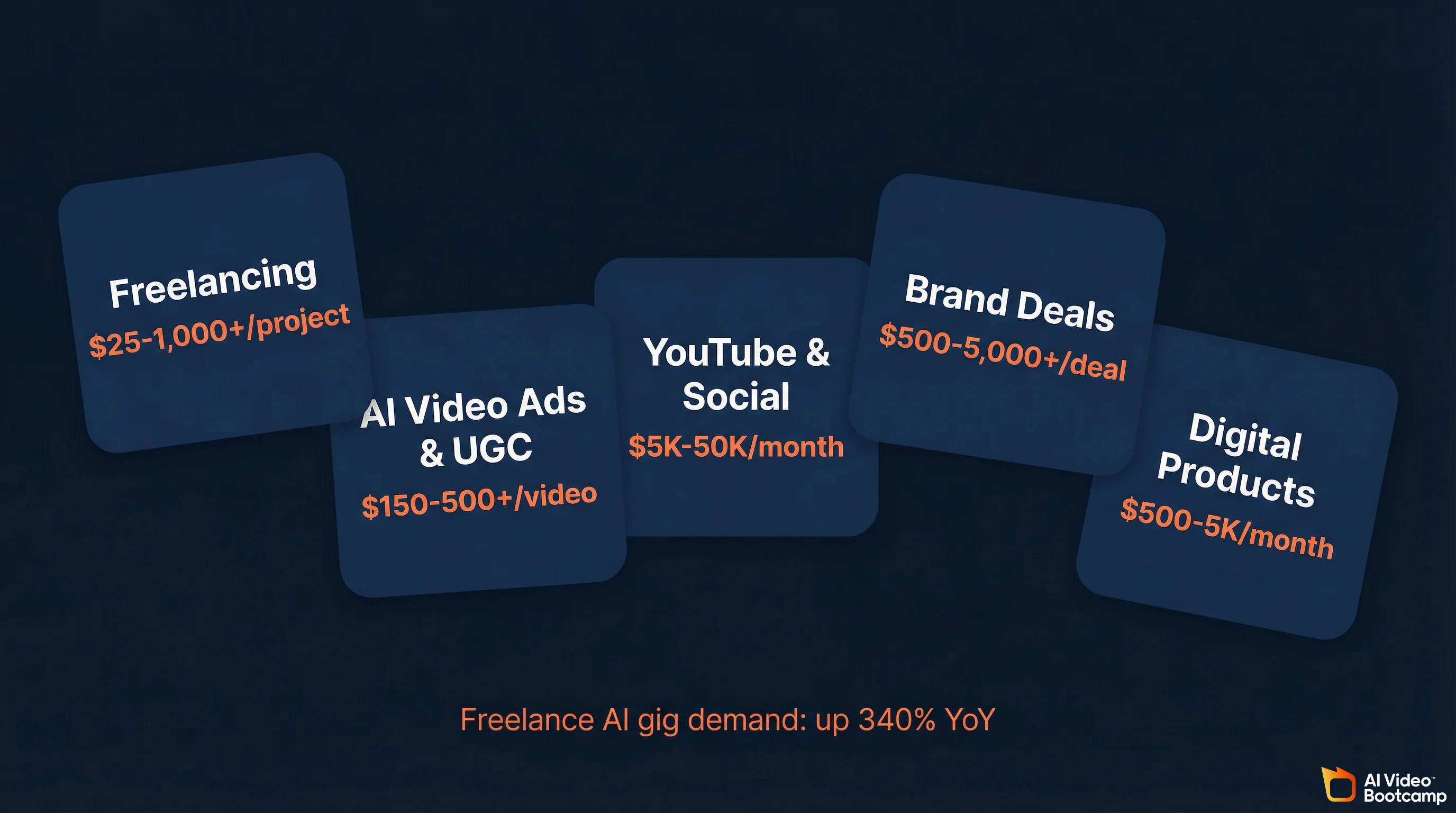
The path from learning to income is shorter in AI content creation than in any previous creative field. Here are the real numbers.
Income Channels and Ranges
| Channel | Income Range | Time to First Dollar | Key Requirements |
|---|---|---|---|
| Freelancing (Fiverr, Upwork) | $25-1,000+/project | 1-4 weeks | Portfolio; platform profiles; client communication |
| AI Video Ads / UGC | $150-500+/video | 2-4 weeks | Understanding of direct response marketing; Meta/TikTok ad formats |
| YouTube / Social (faceless channels) | $5,000-50,000/mo (established) | 3-6 months to monetization | Consistency; SEO; niche selection; YouTube Partner Program compliance |
| Brand Deals | $500-5,000+/deal | 2-3 months with audience | Social following; portfolio; outreach skills |
| Digital Products (templates, presets) | $500-5,000/mo (passive) | 1-2 months to build | Specialized knowledge; template creation; marketing |
The fastest path to income is AI video ads and UGC content. Brands are actively hiring creators at $150-500 per video on platforms like Upwork and Fiverr. Some specialists produce 40-50 creatives per month. AI freelancer gig demand is up 340% year-over-year. The skills you need beyond AI creation: understanding direct response marketing, knowing Meta and TikTok ad formats, and UGC-style storytelling. See our detailed guide on AI video ads.
Faceless YouTube channels are one of the fastest-growing income streams, with 38% of new monetized creators using AI-assisted content. Compliance requirement: you must use YouTube’s “Altered or Synthetic Content” label for any realistic AI-generated content. Failure to disclose violates the YouTube Partner Program policies. YouTube’s 2026 policy focuses on “Originality and Added Value,” so unique scripts with high-quality AI voice and transformative visuals meet the requirements.
Combining multiple income streams is where the real money is. Creators who stack YouTube + freelancing + digital products earn significantly more than those relying on a single channel. See 5 People Making $10K+/Month With AI Video for detailed breakdowns.
One advantage of learning inside a community like AI Video Bootcamp is that the monetization path is built into the curriculum itself. Phases 6 and 7 teach AI video ads and social media content creation specifically as income skills, and the Opportunity Hub connects members directly with brand deals and freelance gigs. That shortcut from “I just learned this skill” to “someone is paying me for it” is hard to replicate on your own.
The Prompt Engineering Deep Dive
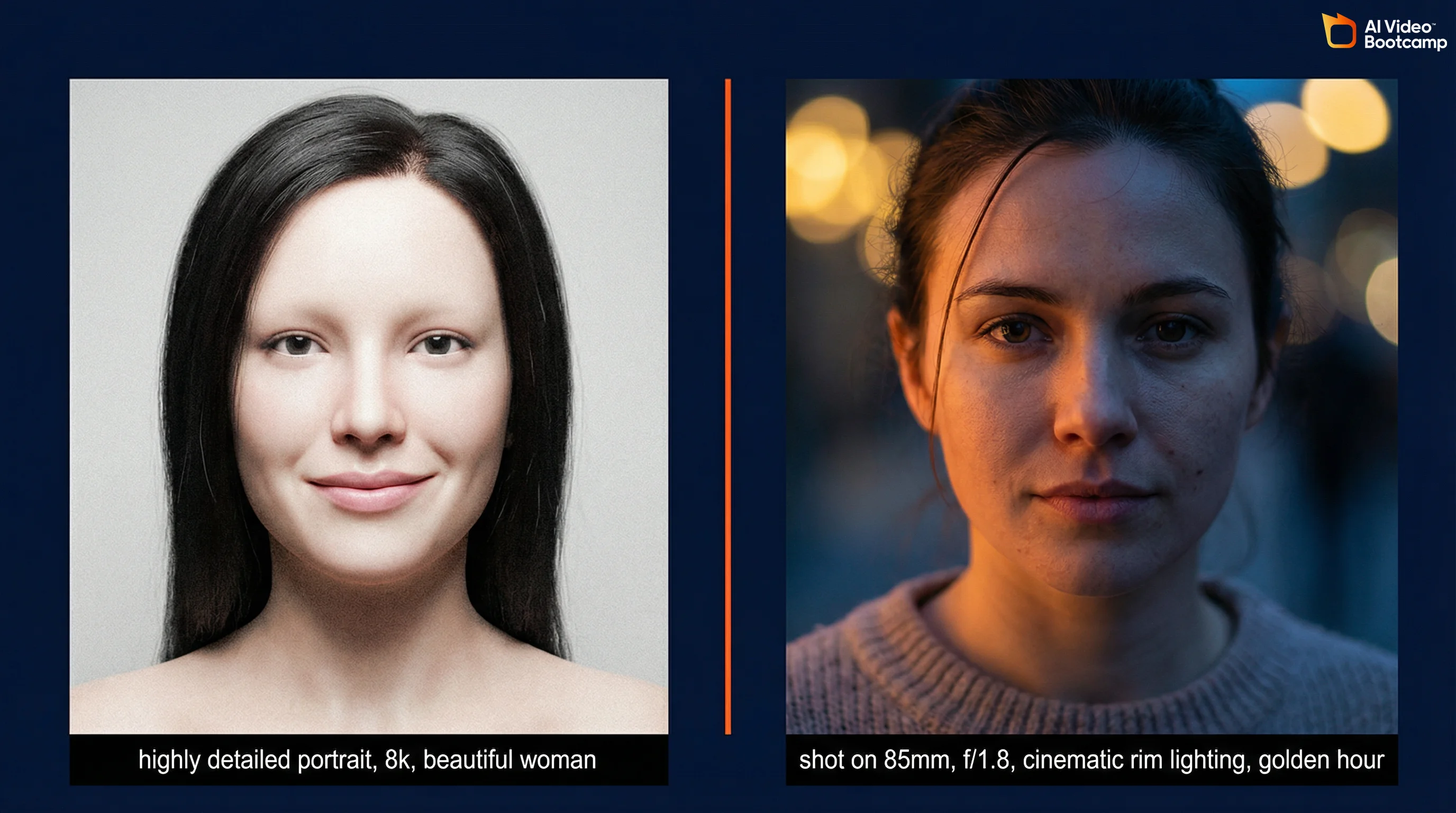
Prompt engineering deserves its own section because it is the skill that multiplies every other skill in the stack. Better prompts make your images better, your videos better, and your production faster.
Image Prompting in 2026
Use structured descriptions, not keyword lists. Effective prompts include a clear subject, context/setting, and style/aesthetic. Natural language outperforms comma-separated keywords, especially on FLUX and GPT Image 1.5. Write it like you are describing a photograph to a skilled photographer.
Invoke real camera terminology. For photorealistic results, specify the lens, aperture, film stock, and lighting physics. “Shot on 85mm lens, f/1.8, cinematic rim lighting, golden hour” carries far more weight than “beautiful, 4k, detailed.” These terms map directly to the model’s training data from real photographs.
Drop the junk tokens. “Highly detailed,” “8k,” “masterpiece,” and “best quality” are increasingly ignored by 2026 models. Instead, describe specific textures, materials, and surface qualities: “weathered leather with visible grain,” “brushed aluminum with fingerprint smudges.”
Multimodal prompting is now standard. Prompts that combine text with reference images produce dramatically better results than text alone. Upload a reference for style, composition, or character guidance alongside your text prompt.
For a complete tutorial with examples, see our guide to AI video prompts that actually work and our photorealistic AI prompts guide.
Video Prompting in 2026
Specify exact camera movements. “Camera moves through scene” produces inconsistent results. “Slow ascending crane shot revealing a coastal cityscape at golden hour” gives the model precise direction for movement type, speed, direction, and target.
Layer your visual information. Describe multiple layers simultaneously: environment and lighting first, then subject and action, then camera behavior and mood. This gives the model clear instructions for every aspect of the output.
Keep clips short and combine them. Generate 3-5 second clips rather than attempting long single takes. This gives you more control and avoids quality degradation.
Advanced Topics: Hardware, ComfyUI, and Agentic Workflows
This section is for intermediate to advanced creators who want to push beyond the web-based tools.
When Local Hardware Matters
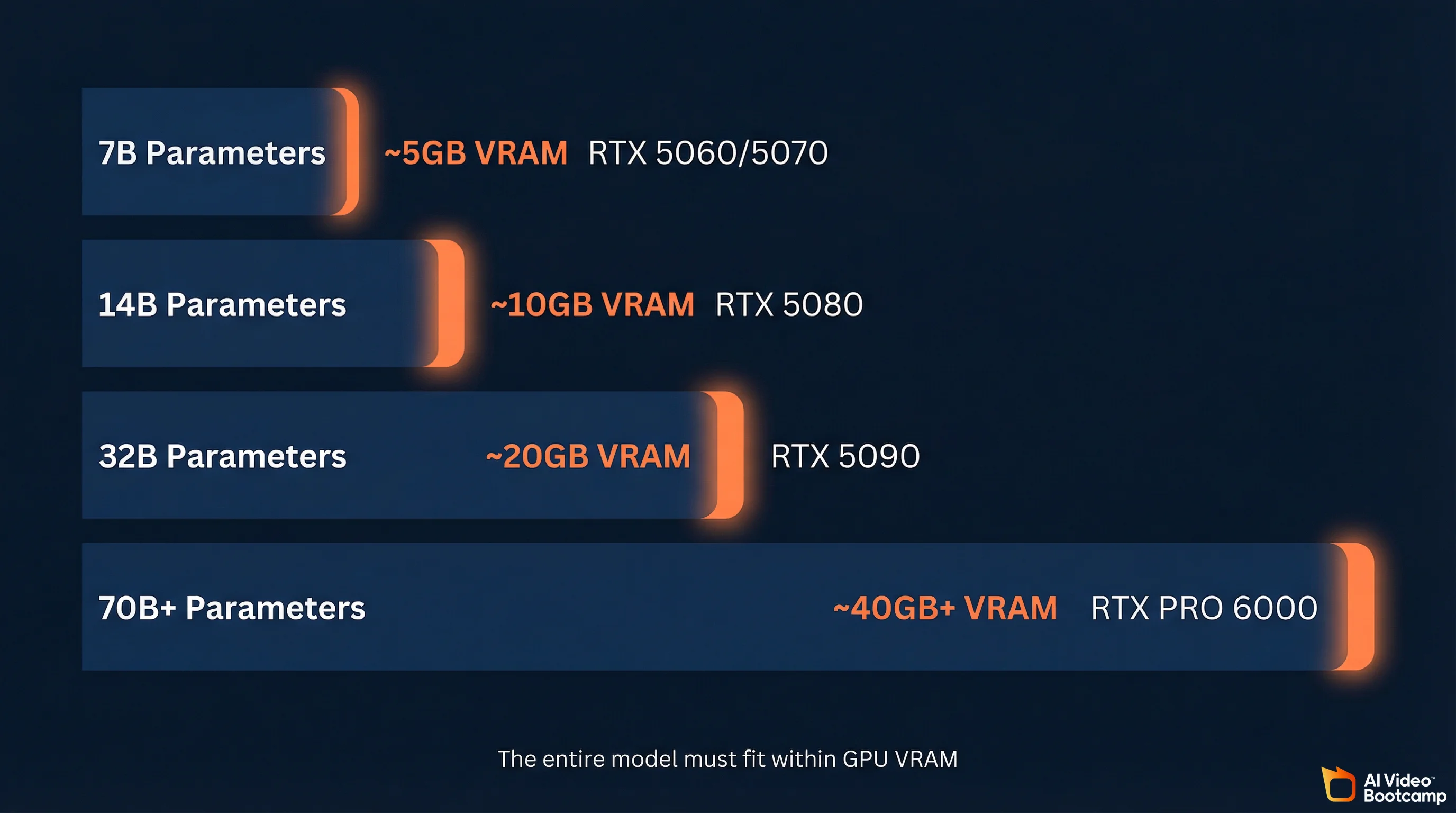
Most AI video generation happens in the cloud. You do not need expensive hardware to start. But if you want to run open-source models locally (Stable Diffusion, FLUX, LTX-2.3, Wan 2.5), you gain privacy, eliminate recurring API costs, and get full control over your workflow through environments like ComfyUI.
The defining metric for an AI workstation is Video RAM (VRAM), not CPU speed or system RAM. The entire model must fit within the GPU’s VRAM. If it spills over into system memory, generation speeds collapse from 40 tokens per second to unusable.
| Model Size | VRAM Needed (4-bit Quantization) | What It Runs | Recommended GPU |
|---|---|---|---|
| 7B parameters | ~5GB VRAM | Entry-level workflows, basic LLM inference | Consumer (RTX 5060/5070) |
| 14B parameters | ~10GB VRAM | Standard image generation | Prosumer (RTX 5080) |
| 32B parameters | ~20GB VRAM | Advanced video generation, multi-agent tasks | High-end prosumer (RTX 5090) |
| 70B+ parameters | ~40GB+ VRAM | Deep learning training, large-scale fine-tuning | Enterprise (RTX PRO 6000 or multi-GPU) |
If you are a beginner, skip local hardware entirely and use cloud-based tools. Revisit this once you need ComfyUI workflows or want to run open-weight models without per-generation costs.
ComfyUI and Structural Control
For professionals, mastering ComfyUI and the conditioning models that run within it is where the real control lives. ComfyUI is a node-based interface that lets you build complex generation pipelines visually, chaining image generation, video generation, face swapping, upscaling, and post-processing into automated workflows.
Key technologies within this ecosystem:
IP-Adapters inject image prompt conditioning into diffusion models. Upload a reference image and the model inherits style, composition, or character identity without fine-tuning. This is how you get consistent characters across different scenes without training a LoRA for each one.
ControlNet Union Pro 2.0 applies physical constraints like depth maps, human skeletal poses, and edge detection to control generation output. Combined with IP-Adapters, you can maintain both visual identity (IP-Adapter) and physical structure (ControlNet) simultaneously, giving you deterministic control over what the AI generates.
This is advanced territory, but it is where the industry is heading. The creators producing the most commercially valuable work are building these pipelines.
Agentic Orchestration
The most advanced evolution in 2026 is the move from manual multi-tool operation to autonomous AI agent orchestration. Instead of manually prompting each model step by step, professionals are building teams of specialized AI agents that execute complex production pipelines in parallel.
A production pipeline might include: a research agent that scrapes trends and identifies content opportunities, a scripting agent that writes platform-optimized narratives, a generative API agent that interfaces directly with Kling or Veo APIs to generate the visual assets, and an editing agent that compiles the final video. Each agent is narrow and specialized, which produces better results than a single general-purpose AI trying to do everything.
This is not beginner territory. But it is the direction the industry is moving, and understanding it early gives you an advantage.
Overcoming the “Vanilla Void”: Making AI Content Feel Human
As AI content saturates every platform, audiences are getting better at detecting it. Studies from early 2026 show that viewers can correctly identify AI-generated video with 60-70% accuracy under active viewing conditions. In written content, over-reliance on AI drafting produces what the industry calls the “Vanilla Void”: text that is grammatically flawless but devoid of perspective, nuance, and emotional resonance.
The professional humanization workflow:
1. Outline with explicit intent. Before invoking any AI tool, define your unique angle, proprietary data, and the exact objective of the piece.
2. AI-assisted drafting. Use AI to generate the structural baseline and sequence the arguments. This is where AI saves the most time.
3. Light structural editing. Deliberately modify cadence, break predictable paragraph lengths, and introduce controlled natural imperfections. AI detectors analyze syntax variance and token distribution, not meaning. Perfect grammar is a detection signal.
4. E-E-A-T injection. This is where AI-assisted content fails most often. Manually insert personal anecdotes, proprietary data, verifiable real-world statistics, and authoritative quotes. Google’s Experience, Expertise, Authoritativeness, Trustworthiness framework requires signals that an AI cannot synthesize from training data alone.
5. Entity optimization. Ensure the final content is optimized for semantic depth, bridging engaging human narrative with the entity relationships that search engines and AI models use for retrieval.
In video production, the same principle applies: UGC-style, slightly imperfect human storytelling consistently outperforms polished AI-looking content. Relatable beats perfect. Deploy AI for speed and b-roll generation, but retain human judgment for narrative pacing and emotional connection.
Ethical, Legal, and Disclosure Requirements
You cannot learn AI content creation in 2026 without understanding the rules you are operating under.
Platform disclosure is mandatory. YouTube, TikTok, and Instagram all require disclosure of AI-generated content. On YouTube, you must use the “Altered or Synthetic Content” label for realistic AI content. Failure to disclose is a direct violation of monetization policies. Build this habit from day one.
Copyright ambiguity remains. AI models are trained on datasets that include copyrighted material. For commercial production, understand which tools offer “commercially safe” outputs backed by corporate indemnification (like Adobe Firefly) versus which operate in legal gray areas. This is an active area of litigation with no clear resolution yet.
Watermarking and provenance. Professional creators are integrating cryptographic provenance markers and watermarking into their deployment pipelines. This protects your brand and builds trust with audiences who are increasingly skeptical of synthetic media.
Environmental consideration. The computational resources powering generative AI carry real environmental costs. Global AI data center power capacity has reached 29.6 Gigawatts, equivalent to the peak power demand of the entire state of New York. Using efficient, quantized local models and being intentional about generation volume is not just cost management. It is responsible practice.
10 Key Recommendations
-
Start with images, not video. Image generation is faster to learn, cheaper to practice, and the prompting skills transfer directly. Produce 50+ images before your first video.
-
Learn prompt engineering as a dedicated skill. It is the single highest-leverage investment. Master structured descriptions, camera terminology, and lighting physics for images. Master temporal descriptions and layered visual information for video.
-
Use multiple tools, not just one. Learn at least one image generator (Midjourney or ChatGPT) and one video generator (Kling AI or Veo). Expand as you identify specific workflow needs.
-
Join a community. The data is unambiguous: community-based learning produces 3-5x higher completion rates. The feedback loop from sharing work with peers who understand the tools is irreplaceable.
-
Adopt the audio-first workflow from day one. Script and voice come first. Video follows the audio pacing. Getting this wrong creates content that feels disjointed.
-
Prioritize character consistency early. Start learning multi-reference techniques and FaceID approaches by week 6-8. This is what unlocks professional serialized content.
-
Target AI video ads for fastest income. UGC-style AI video ads are the highest-demand, fastest-paying segment. Brands are hiring at $150-500 per video.
-
Disclose AI content properly. YouTube, TikTok, and Instagram all have requirements. Build compliant habits from the start to avoid monetization disruptions.
-
Budget for tools, but not much. A complete beginner stack costs $30-50/month (Midjourney $10, Kling credits, ElevenLabs starter, CapCut free tier). This is a fraction of traditional video production.
-
Set a 12-week milestone. Give yourself a concrete target: first paid project by week 12. This creates accountabi