
Pricing verified April 30, 2026.
What Is Hailuo AI? (And Who Is Behind It)
Hailuo AI is a video generation platform built by MiniMax Group, a Beijing-based AI company that raised $619 million in its Hong Kong IPO in January 2026 at a $4 billion valuation. The platform generates 1080p video clips up to 10 seconds long from text or image inputs, with generation speeds of 30-90 seconds that make it the fastest comparable model in 2026. Hailuo 2.3 ranks #1 for physics simulation on WorldModelBench and #2 globally on Artificial Analysis benchmarks. Plans run $9.99 to $199.99 per month, but the credit system has a steep learning curve that this guide breaks down completely.
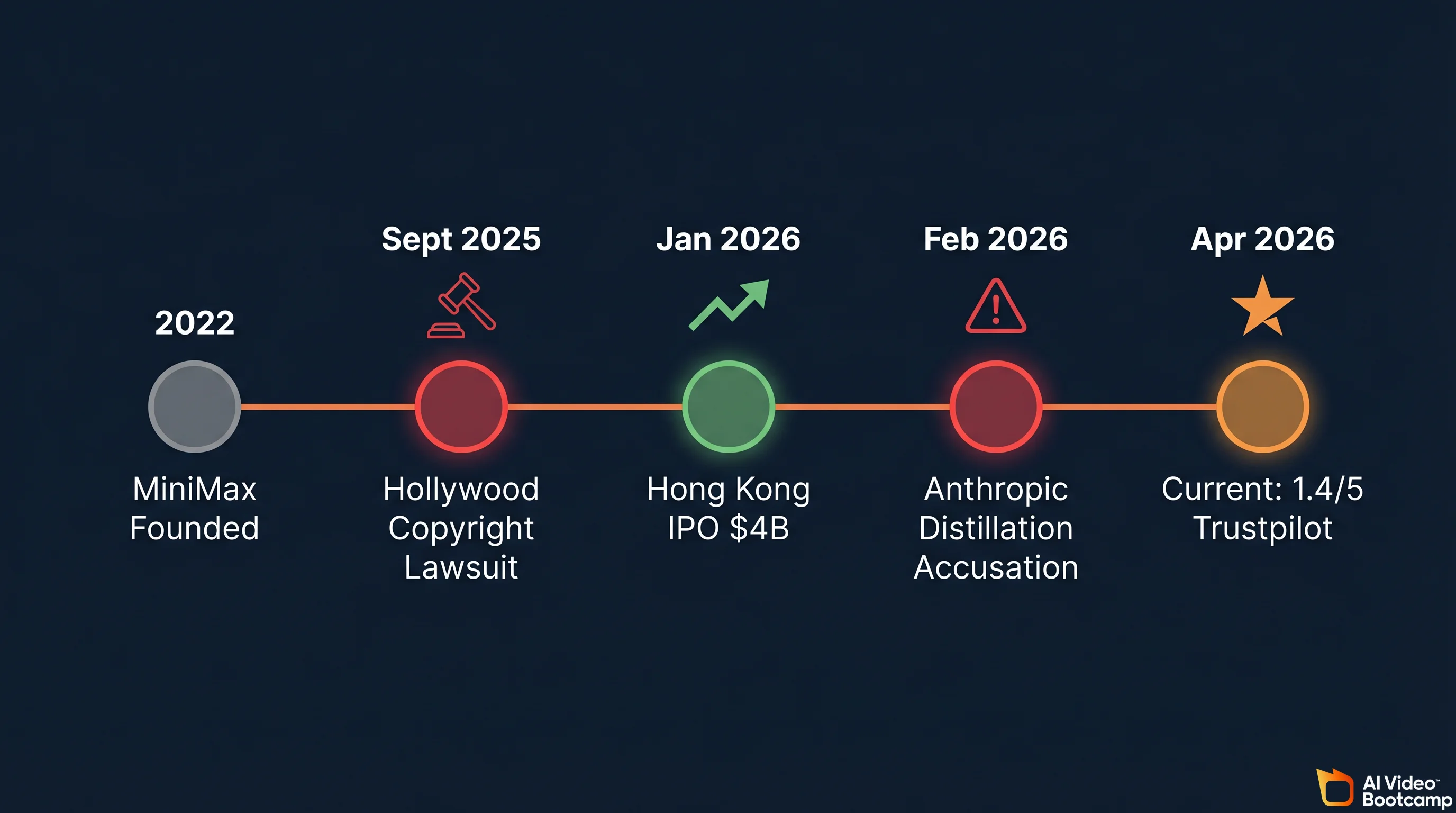
MiniMax was founded in 2022 by Yan Junjie, Yang Bin, and Zhou Yucong. The company has raised approximately $1.15 billion in total funding from investors including Alibaba, Tencent, and the Abu Dhabi Investment Authority. Its IPO was oversubscribed 1,800 times by retail investors. Beyond Hailuo AI for video and image generation, MiniMax operates MiniMax Agent (a chatbot) and MiniMax Audio (text-to-speech and voice cloning). The company employs roughly 700 people and runs its entire stack on proprietary infrastructure built around a 456-billion parameter Mixture of Experts architecture.
| Fact | Detail |
|---|---|
| Parent Company | MiniMax Group (Beijing, China) |
| Founded | 2022 |
| IPO | Hong Kong, January 9, 2026 ($619M raised) |
| Valuation | ~$4 billion at IPO |
| Total Funding | ~$1.15 billion |
| Key Investors | Alibaba, Tencent, MiHoYo, Abu Dhabi Investment Authority |
| Products | Hailuo AI (video/image), MiniMax Agent (chatbot), MiniMax Audio (TTS) |
| Employees | ~700 (estimated) |
Two active controversies hang over the company. In September 2025, Disney, Universal, and Warner Bros. Discovery filed a U.S. copyright lawsuit alleging Hailuo AI was trained on unauthorized copies of copyrighted works and generates content featuring characters from Star Wars, Marvel, and DC Comics. MiniMax moved to dismiss in early 2026; the case remains ongoing. Then in February 2026, Anthropic publicly accused MiniMax and two other Chinese AI companies of using thousands of fraudulent accounts to generate 16+ million interactions with Claude to improve their own language models via “distillation.” As a Chinese AI company, MiniMax also faces ongoing data privacy scrutiny: their privacy policy states that data may be stored and processed in China, which means different data protection regulations than the US or EU. These are facts you should weigh before uploading proprietary or sensitive content to the platform.
Every Hailuo AI Model Explained
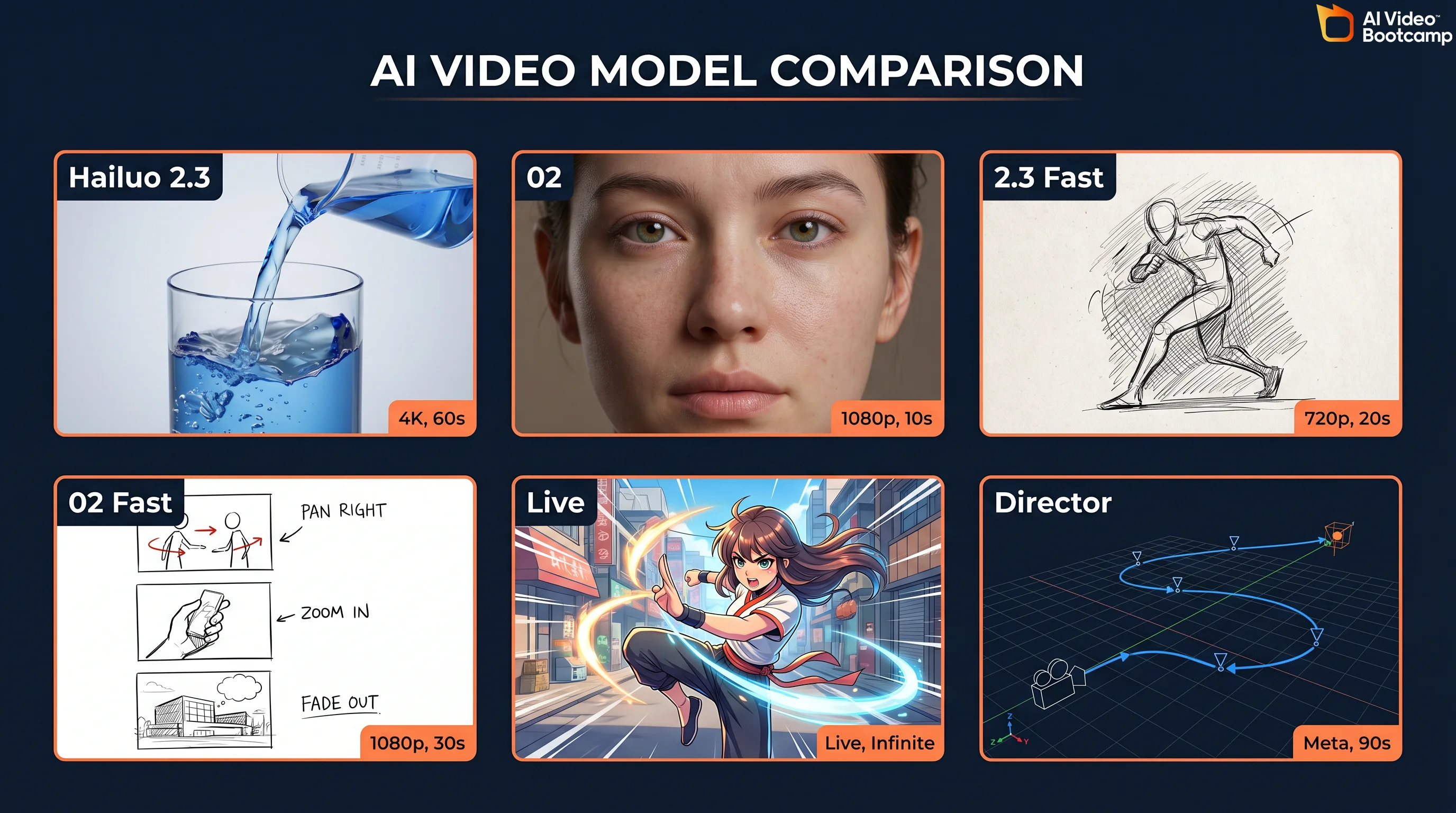
Hailuo AI currently offers six models, each optimized for different use cases and budgets. Understanding which model to use for which job is the single biggest factor in getting good results without burning through credits. Here is the complete lineup as of April 2026.
| Model | Type | Resolution | Duration | Credits (6s) | Key Strength |
|---|---|---|---|---|---|
| Hailuo 2.3 | T2V + I2V | 1080p | Up to 10s | 80 (1080p) | Physics simulation, anime, micro-expressions |
| Hailuo 2.3 Fast | T2V + I2V | 768p | Up to 6s | 25 | 50% cheaper, rapid prompt iteration |
| Hailuo 02 | T2V + I2V | 1080p | Up to 10s | 80 (1080p) | Cinematic photorealism, NCR architecture |
| Hailuo 02 Fast | T2V + I2V | 768p | Up to 6s | 25 | Quick drafts and storyboarding |
| I2V-01-Live | I2V only | 768p | Up to 6s | 25 | 2D art animation, Live2D style |
| T2V-01-Director | T2V only | 768p | Up to 6s | 25 | Camera control, director-style prompts |
Hailuo 2.3 is the flagship physics model. It earned the “Physics Champion” title on WorldModelBench for accurately simulating mass conservation, fluid dynamics, and spatial-temporal consistency. This is the model behind the viral “eating noodles” demo that showcased realistic fluid physics and object interaction. Use it for food content, product demos with liquid or fabric, and any scene where physical accuracy matters more than photorealism.
Hailuo 02 is the cinematic model, built on MiniMax’s proprietary NCR (Neural Composition Rendering) architecture. According to MiniMax’s technical documentation, it delivers 2.5x faster training and inference versus the previous generation, with 3x larger parameters and 4x more training data. Use it when you need the most photorealistic output for ads, brand content, or live-action style footage.
The Fast variants (2.3 Fast and 02 Fast) output at 768p in 6-second clips for 25 credits each instead of 80. These are your iteration models. Use them to test prompts before committing to a full 1080p render. This single workflow change can save you 50-70% of your monthly credits.
I2V-01-Live specializes in animating 2D artwork, illustrations, and anime stills. If you work with static character art from Midjourney or Flux.2 Pro, this model brings those images to life with a distinctive Live2D animation style.
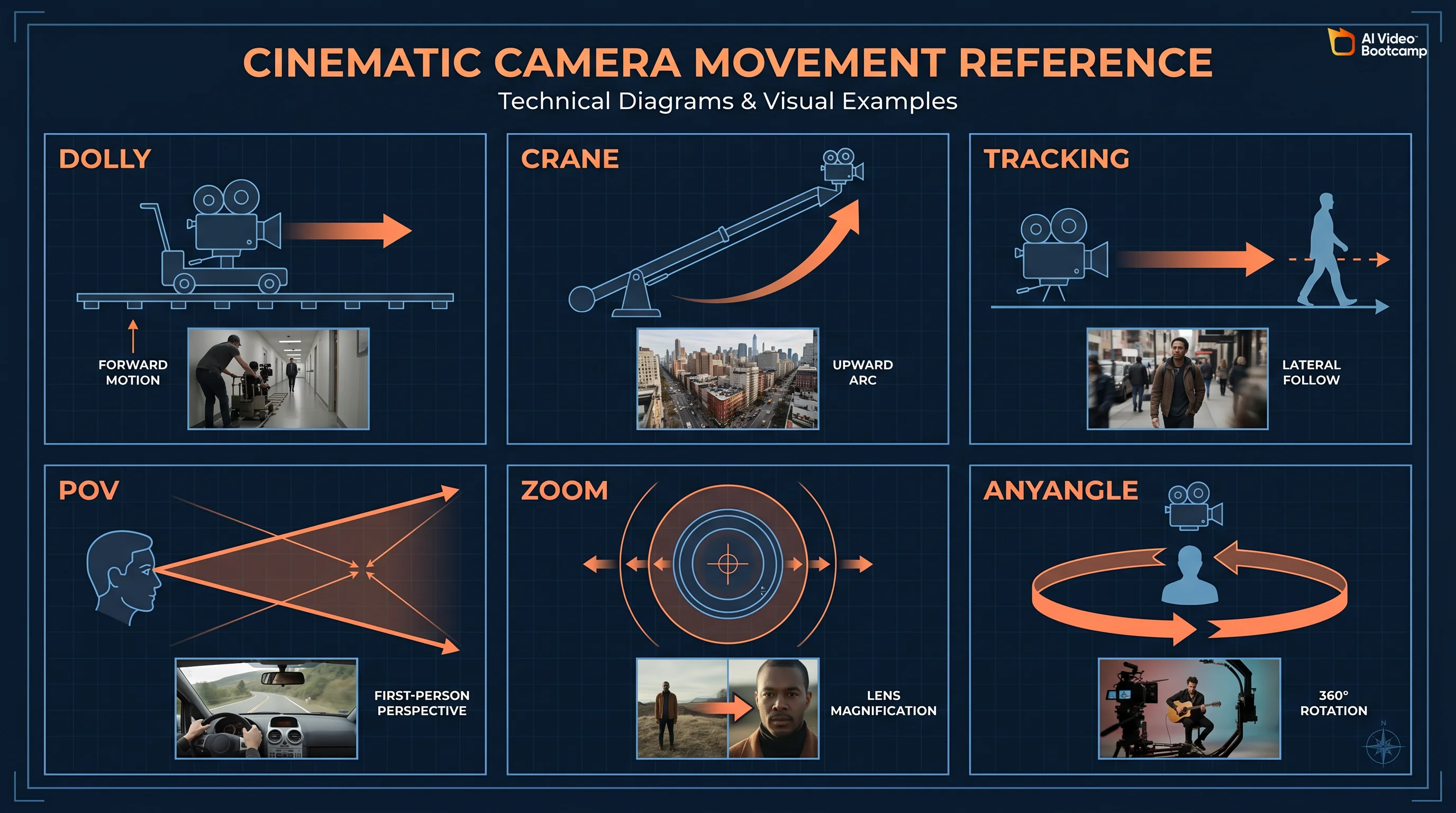
T2V-01-Director gives you structured camera control through natural language. Instead of hoping the model interprets your camera intent, you can specify dolly, zoom, tilt, crane, tracking, and POV movements directly. This is particularly useful for storyboarding and pre-visualization workflows.
The Architecture Behind the Models
What makes Hailuo models technically different from competitors is the underlying MiniMax-01 architecture. The system uses a 456-billion total parameter Mixture of Experts (MoE) framework, but only 45.9 billion parameters activate per token through sparse activation with 32 distinct experts using top-2 routing. This means the model can differentiate between rendering fluid dynamics and computing micro-expressions by routing each task to specialized neural pathways.
The attention mechanism is equally distinctive. MiniMax uses what they call “Lightning Attention,” an I/O-aware linear attention variant that achieves near-linear computational complexity instead of the quadratic scaling that limits traditional transformers. The architecture spans 80 layers, with one traditional softmax attention block following every seven transnormer blocks using Lightning Attention. This hybrid approach enables a context window of 1 million tokens during training and up to 4 million tokens at inference through extrapolation. In practical terms, this means your detailed, paragraph-length prompts are fully retained without degradation from the first frame to the last.
The vision-language component (MiniMax-VL-01) was trained on 512 billion vision-language tokens, giving the system deep understanding of 3D spatial relationships. And the LeMiCa framework (Lexicographic Minimax Path Caching) accelerates the diffusion process by treating cache scheduling as a global path planning problem rather than relying on greedy strategies, which reduces visual artifacts while maintaining generation speed.
Hailuo AI Pricing: The Complete Breakdown
Pricing last verified April 30, 2026. API rates are sourced from fal.ai; consumer subscription plans are from each product’s official site. Screenshots and UI references elsewhere in this article may reflect earlier versions. Prices change frequently - double-check with fal.ai or the vendor’s site before making spending decisions.
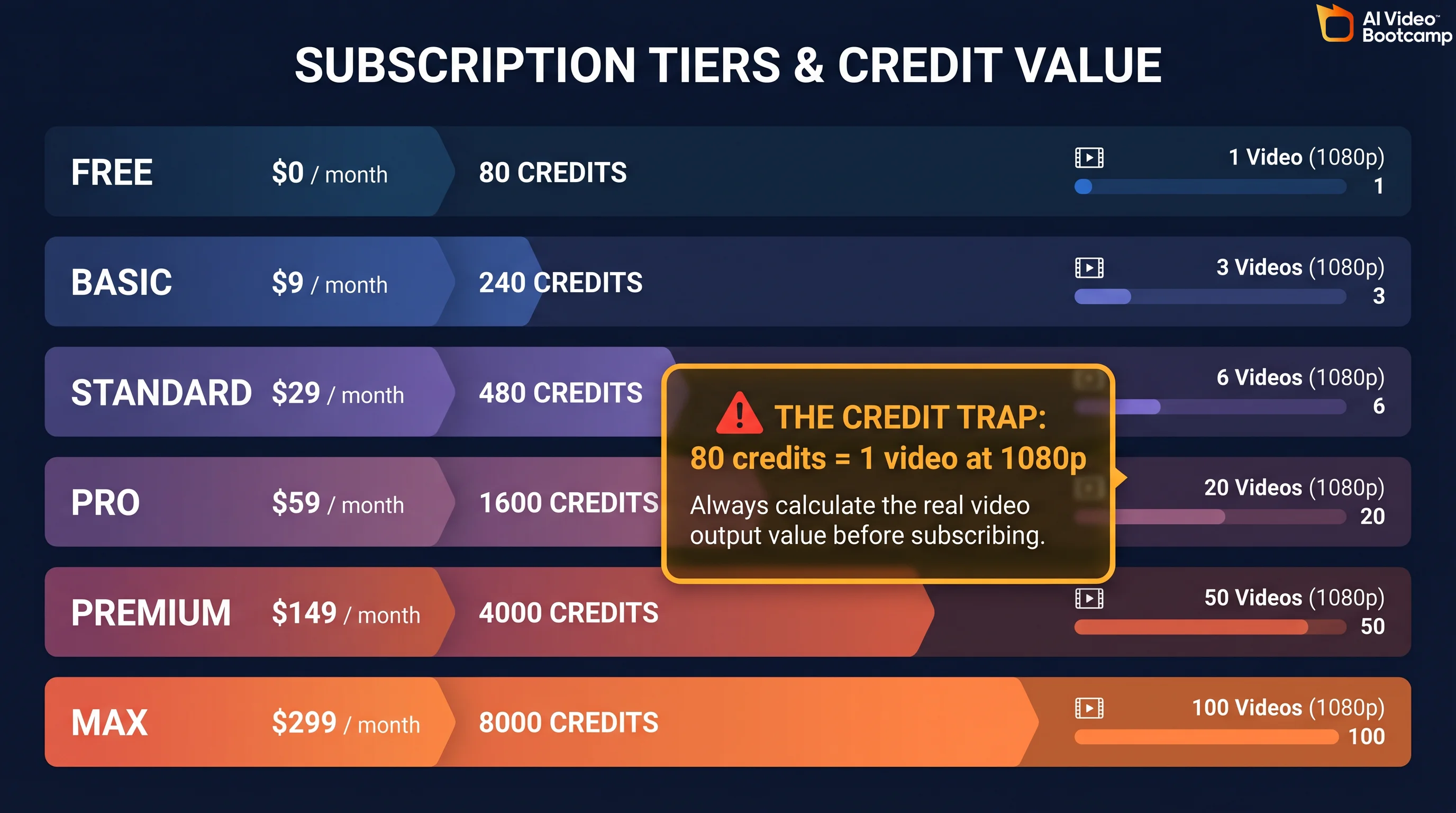
Hailuo AI uses a credit-based subscription model with six tiers. Every paid plan removes the watermark and grants commercial usage rights. The pricing has been restructured multiple times since launch, and the current structure (as of April 2026) is where most user frustration originates. Here is what you actually pay.
| Plan | Price/Month | Credits/Month | 1080p 6s Videos | 768p 6s Videos | Key Feature |
|---|---|---|---|---|---|
| Free | $0 | Limited trial | ~4 | ~8 | Watermarked, 768p max, lowest queue priority |
| Standard | $9.99 | 1,000 | 12.5 | 40 | Watermark-free, HD exports |
| Pro | $34.99 | 4,500 | 56.25 | 180 | 2 parallel tasks, 10s 1080p |
| Master | $79.99 | 10,000 | 125 | 400 | High volume, 2 parallel tasks |
| Ultra | $124.99 | 12,000 | 150 | 480 | Unlimited Hailuo 01 legacy models |
| Max | $199.99 | 20,000 | 250 (+ unlimited Relax) | 800+ | Unlimited Relax Mode for 01 and 02 |
Source: Hailuo AI official pricing page and community-verified credit costs.
The Credit Trap: What Nobody Tells You
The credit math is where Hailuo AI’s pricing gets deceptive. Here is the real cost breakdown per video:
| Resolution | Duration | Credits | Cost (Standard $9.99) | Cost (Pro $34.99) | Cost per Second |
|---|---|---|---|---|---|
| 768p | 6 seconds | 25 | $0.25 | $0.19 | $0.041 |
| 768p | 10 seconds | 50 | $0.50 | $0.39 | $0.050 |
| 1080p | 6 seconds | 80 | $0.80 | $0.62 | $0.133 |
| 1080p | 10 seconds | 160 | $1.60 | $1.24 | $0.160 |
The Standard plan at $9.99/month for 1,000 credits sounds generous until you realize a single 1080p 6-second clip costs 80 credits. That gives you only 12.5 videos per month at full quality. The 1080p “inflation shock” caught many users off guard: while 768p stayed at 25 credits, 1080p jumped to 80 credits per clip, a 3.2x multiplier that was not clearly communicated.
Worse, failed generations still consume credits. Community reports on r/HailuoAiOfficial indicate 30-50% of generations produce unusable output due to morphing artifacts, prompt ignorance, or content filter rejections. If you factor in iteration costs, your real-world output on the Standard plan drops to roughly 6-8 usable 1080p videos per month.
The free tier has been gutted since launch. Historically, new users received 1,000 initial credits plus a daily login bonus of 100 credits. MiniMax removed the daily bonus without advance notice, which community members calculated as a loss of roughly 3,000 credits per month for subscribers who relied on it.
API Pricing: The Developer Alternative
For developers and agencies producing at scale, third-party API platforms offer Hailuo 02 (token-based via fal.ai) without monthly subscriptions. Hailuo 02 uses token-based pricing on fal.ai. For exact token-to-dollar conversion, verify current rates on your fal.ai dashboard, as token costs vary by resolution and features.
The API route can be cheaper than subscription plans if you produce fewer than about 36 videos per month at 1080p. It also unlocks hidden parameters (seed, CFG scale, negative prompts) that the web interface does not expose.
Is Hailuo AI Free? What You Actually Get for $0
The short answer: barely. Hailuo AI technically offers a free tier, but it is designed as a trial, not a production tool. In April 2026, free accounts receive a small pool of trial credits (enough for roughly 4-8 test videos), outputs are capped at 768p with a 6-second maximum, a watermark is applied to every clip, and you sit at the lowest queue priority, meaning generation can take several minutes instead of the typical 30-90 seconds.
If you need a genuinely free AI video generator, you have better options. Wan 2.2 is fully open-source and runs locally on your own hardware with zero cost and complete privacy. Google’s Veo 3.1 is included with Gemini Advanced ($20/month) and offers unlimited generation with native audio sync. CapCut’s built-in generator provides basic free AI video creation. And if you want to explore other no-cost options, the complete list of free AI video tools covers every viable option in 2026.
The honest assessment: Hailuo’s free tier is useful for testing whether the platform’s aesthetic matches your needs before committing money. It is not useful for producing anything you would publish.
How to Use Hailuo AI Video Generator (Step-by-Step)
Getting your first video from Hailuo AI takes under 5 minutes. The quality of that video depends entirely on how you structure your prompt and which model you select. This section walks you through the complete workflow from account creation to export, including the credit-saving strategies that separate casual users from efficient creators.
You can access Hailuo AI models in two ways. The first is through MiniMax’s official platform at hailuoai.video, where you get the full interface with all six models, Subject Reference, Director Mode, and AnyAngle controls. The second is through third-party all-in-one platforms like invideo.io, pollo.ai, and others that embed Hailuo models (particularly 2.3 and 02) alongside other generators in a single workspace. The official platform gives you the most control and the complete feature set. Third-party platforms may offer simpler interfaces or bundle Hailuo with other tools, but they typically limit which models, resolutions, and advanced features are available. This guide covers the official platform workflow.
Step 1: Create your account. Go to hailuoai.video and sign up with email or Google. No credit card required for the free tier.
Step 2: Choose your generation mode. Click “Create” on the dashboard. Select Text-to-Video to generate from a written prompt, or Image-to-Video to animate a still image. For more consistent results, especially for brand content, use Image-to-Video with a high-quality source image generated in Midjourney V6 or Flux.2 Pro.
Step 3: Write your prompt. Use the 5-part prompt formula covered in the next section. Keep it between 40-60 words. Shorter prompts give the model too much creative freedom (and waste credits on unwanted interpretations). Longer prompts degrade output quality as the model tries to pack too many elements into a short clip.
Step 4: Select your model and resolution. Pick Hailuo 2.3 for anime, physics-heavy, or stylized content. Pick Hailuo 02 for photorealism. Start with 768p Fast (25 credits) for iteration, then switch to 1080p (80 credits) only for your final render.
Step 5: Generate and review. Click Generate and wait 30-90 seconds. If the output needs changes, adjust your prompt and regenerate at 768p. Do not iterate at 1080p unless you have credits to burn.
Step 6: Export and post-process. Download your completed video. For professional output, run it through an AI video upscaler like Topaz Video AI to reach 4K, and add audio through ElevenLabs since Hailuo has no native audio integration.
If you are new to AI video generation in general, start with the complete beginner guide to making AI videos before diving into Hailuo-specific workflows.
Hailuo AI Prompt Guide: The 5-Part Formula
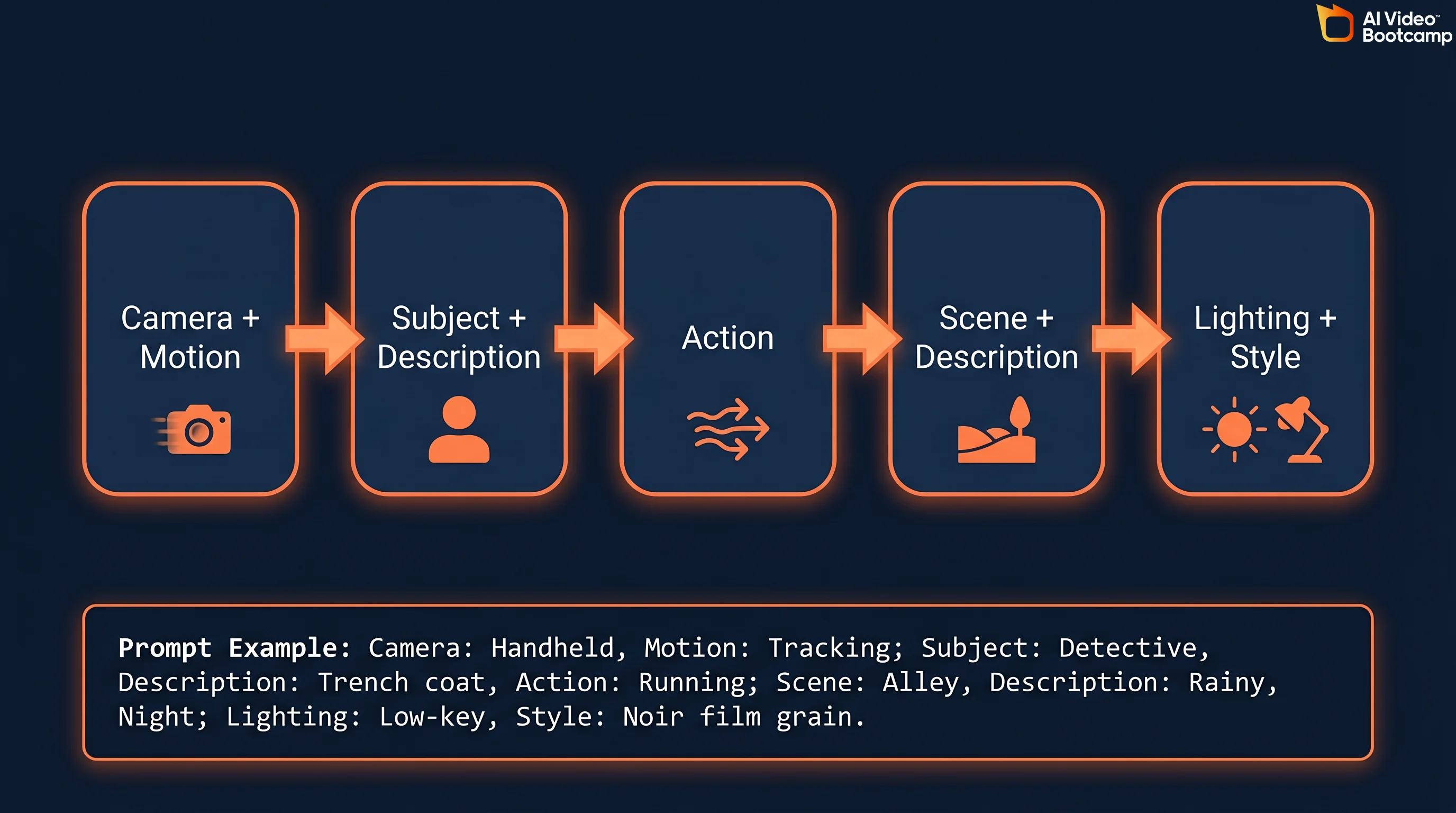
Achieving cinematic quality with Hailuo AI depends on structured prompt engineering. Vague prompts produce vague results and waste credits. The platform’s massive 4-million-token context window means it can process detailed instructions without losing coherence, so specificity is your friend. Here is the prompt formula that professional AI filmmakers use.
Part 1: Camera Shot + Motion. Define the virtual camera’s perspective and trajectory. Be explicit: “Extreme close-up, macro lens, slow tracking shot moving left” works far better than “close shot.” Hailuo’s Director Mode maps these keywords directly to trained camera behaviors.
Part 2: Subject + Description. Detail the core entity. If human, specify demographics, clothing textures, hair color, and facial features to prevent mutation between frames. “A woman in her 30s with dark brown shoulder-length hair, wearing a navy wool coat” beats “a woman.”
Part 3: Action. Restrict to ONE explicit action per prompt. Multiple actions cause temporal blending where the model tries to compress everything into 6-10 seconds and produces artifacts. “Slicing a cucumber with steady hands, the blade tapping rhythmically” is better than “cooking dinner.”
Part 4: Scene + Description. Set the environmental context with spatial depth. “Traditional Japanese kitchen with wooden counters, copper pots on open shelves, steam rising from a pot on the stove” gives the model concrete 3D spatial data to work with.
Part 5: Lighting + Style + Atmosphere. This is where most users under-specify. Treat “cinematic” as a combination of specific lighting terms: “volumetric lighting, golden hour, high-contrast chiaroscuro” produces dramatically better results than appending “cinematic” to the end of your prompt.
Complete Prompt Example
Here is a full prompt using the formula: “Slow dolly shot tracking forward. A ceramic bowl of steaming ramen sits on a weathered oak counter, chopsticks lifting thick noodles with visible steam wisps. Traditional Japanese kitchen, copper pots hanging overhead, morning light streaming through a rice-paper window. Warm volumetric lighting, subtle film grain, documentary style.”
That prompt is 48 words, right in the optimal 40-60 word range. It specifies camera motion, subject, single action, environment, and lighting style. This level of detail takes full advantage of Hailuo’s 4-million-token context window and its MoE routing, which assigns specialized neural pathways to each visual element.
Sora-Style Long-Form Prompting
A growing trend in 2026 is the use of paragraph-length “screenplay” prompts that combine visual direction with technical camera metadata. Both Hailuo AI and Veo 3.1 excel at parsing these verbose instructions without dropping secondary details, thanks to their massive context windows. For prompt engineering best practices that work across all AI video generators, including specific templates and examples, see the dedicated prompt guide.
Photorealism Trigger Words
For live-action results, include these modifiers in your prompt: “shot on Arri Alexa, photorealistic, natural lighting, subtle film grain, cinematic documentary style.” These terms map to specific training data distributions in Hailuo’s neural network. For more photorealistic AI prompt techniques, check the complete guide.
Subject Reference and Character Consistency
One of Hailuo AI’s strongest features for professional production is Subject Reference. You upload a photo and the AI locks that subject’s visual features across multiple video generations, maintaining consistency in face, hair, clothing, and body type.
The workflow is straightforward. Generate or source a high-quality character reference image using Midjourney V6, Flux.2 Pro, or Recraft V3. Upload it as a Subject Reference in Hailuo’s interface. Write your prompt describing only the action and scene (the model already has the character details from the reference). Generate multiple clips, and the character should remain visually consistent across all of them.
For best results, use extremely detailed character descriptions alongside the reference image: specific age range, facial features, clothing details, and accessories. The more constraints you give the model, the less it will drift between generations. If you work on multi-shot narrative projects, combine this technique with the seed parameter (covered in the Hidden Parameters section below) for maximum consistency. For more advanced techniques, the character consistency guide covers workflows across all major generators.
Unlocking Hidden Parameters: Seed, CFG, and Negative Prompts
The standard Hailuo web interface gives you a text box and basic settings. But the model supports powerful hidden parameters that are only accessible through API wrappers like Fal.ai, BasedLabs, or direct API calls. Mastering these parameters is the difference between amateur experimentation and professional-grade output.
The Seed Parameter (—seed)
Every Hailuo generation starts from a random noise pattern. The seed parameter (an integer between 0 and 4,294,967,295) locks that starting noise. When you find a generation you love, note its seed value. Reuse that exact seed with the same prompt to get a nearly identical result. Modify the prompt slightly (change time of day, adjust camera angle) while keeping the seed to create consistent multi-shot sequences. This is essential for narrative projects where visual continuity across clips matters.
Classifier-Free Guidance (—cfg)
The CFG scale controls how strictly the model follows your text prompt versus allowing creative interpretation. The optimal range for Hailuo models is 5.0 to 7.0. A low CFG value (under 4.0) produces highly varied, fluid results but causes composition drift where framing shifts unpredictably and hands become physically unstable. A high CFG value (above 8.0) forces strict text adherence but produces what the community calls a “deep-fried” look: over-baked, overly contrasted visuals with harsh artifacts. Start at 6.0 and adjust in 0.5 increments.
Negative Prompting (—no)
Negative prompts explicitly tell the model what to exclude from the output. Common negative prompts for Hailuo include: “morphing, extra limbs, low resolution, watermark, text, fast motion, distorted geometry, blurry, overexposed.” This parameter significantly reduces the failure rate on generations, which directly saves credits.
Hailuo AI vs Kling vs Veo vs Seedance vs Wan: Honest Comparison
No single AI video generator wins across every use case. The model you choose depends on what you are creating, your budget, and your technical requirements. Here is the data-driven comparison across the five True Models that matter in 2026. For the full three-way comparison between Seedance, Kling, and Veo, see the detailed breakdown.
| Feature | Hailuo 2.3/02 | Kling 2.6 | Veo 3.1 | Seedance 2.0 | Wan 2.5 |
|---|---|---|---|---|---|
| Max Resolution | 1080p | 4K (native) | 1080p+ | 1080p | 720p-1080p |
| Max Duration | 10s | Up to 3 min | 15-25s | 10s | ~10s |
| FPS | 24-30 | 24-60 | 24 | 24-30 | 24 |
| Native Audio | No | No | Yes (Veo 3) | No | Yes (dialogue + SFX) |
| Camera Control | Director Mode + AnyAngle | Motion Control trajectories | Basic | Basic | Limited |
| Physics Rank | #1 (WorldModelBench) | #3 (Acceptable) | #2 (Tie) | Not ranked | #2 (Strong) |
| Speed | 30-90s (fastest) | 2-5 min | 1-3 min | 1-3 min | Variable (local) |
| Open Source | No | No | No | No | Yes (fully open) |
| Free Tier | Limited trial | Yes (limited) | Via Gemini Advanced ($20/mo) | Limited | Fully free (self-hosted) |
| Cost (1080p 6s) | $0.80 (Standard) | ~$0.84 (API) | Included in $20/mo | ~$0.50 (API) | Free |
| Best For | Anime, physics, speed | Long-form narrative, human subjects | Photorealism, audio sync | Dance, choreography | Privacy, self-hosting |
When to Use Each Model
Choose Hailuo when you need the fastest generation speed for rapid iteration, physics-accurate content (food, liquid, fabric, product demos), anime or stylized aesthetic, or innovative camera control through Director Mode and AnyAngle.
Choose Kling 2.6 when you need clips longer than 10 seconds (Kling supports up to 3 minutes continuous), human subjects with natural motion quality, the Motion Control trajectory feature for precise character movement, or the Elements multi-reference system for complex scenes.
Choose Veo 3.1 when you need the highest cinematic photorealism, native audio sync (Veo 3 generates dialogue and sound effects in-video), clips up to 15-25 seconds, or when you already pay for Gemini Advanced and want unlimited generation included in your subscription.
Choose Seedance 2.0 when your primary content involves dance, choreography, or rhythmic motion.
Choose Wan 2.5 when data privacy is non-negotiable (fully local, open-source), you want zero ongoing costs (self-hosted), or you need native audio generation. Wan requires significant VRAM hardware to run effectively.
The Controversies: Hollywood Lawsuit, Data Privacy, and Anthropic
Most Hailuo AI guides ignore the corporate context entirely. AI Video Bootcamp does not. If you are evaluating this tool for professional use, you need the full picture.
The Hollywood Copyright Lawsuit (September 2025)
Disney, Universal, and Warner Bros. Discovery filed a U.S. copyright lawsuit against MiniMax alleging that Hailuo AI was built using unauthorized copies of copyrighted works. The lawsuit claims the model generates content featuring recognizable characters from Star Wars, Marvel, DC Comics, The Simpsons, and Despicable Me. MiniMax filed a motion to dismiss in early 2026, but the case remains active. This is the same legal pattern affecting multiple AI companies. For context on how copyright lawsuits are reshaping the AI video industry, see the Seedance 2.0 Hollywood lawsuits analysis.
The Anthropic “Distillation” Accusation (February 2026)
Anthropic publicly accused MiniMax and two other Chinese AI companies of operating thousands of fraudulent accounts to generate over 16 million interactions with Claude. The alleged purpose: extracting training signal to improve their own language models through a technique called “distillation,” essentially using a competitor’s AI as a free training data source. MiniMax has not issued a detailed public response.
Data Privacy Considerations
MiniMax’s privacy policy states that user data may be stored and processed in China. This means your uploaded images, text prompts, and generated content are potentially subject to Chinese data protection regulations rather than GDPR or US privacy frameworks. For enterprise users or anyone working with sensitive brand assets, this is a material consideration. If data sovereignty matters to your workflow, Wan 2.5 (fully local, open-source) or Veo 3.1 (Google infrastructure) are safer alternatives.
Common Problems and How to Fix Them
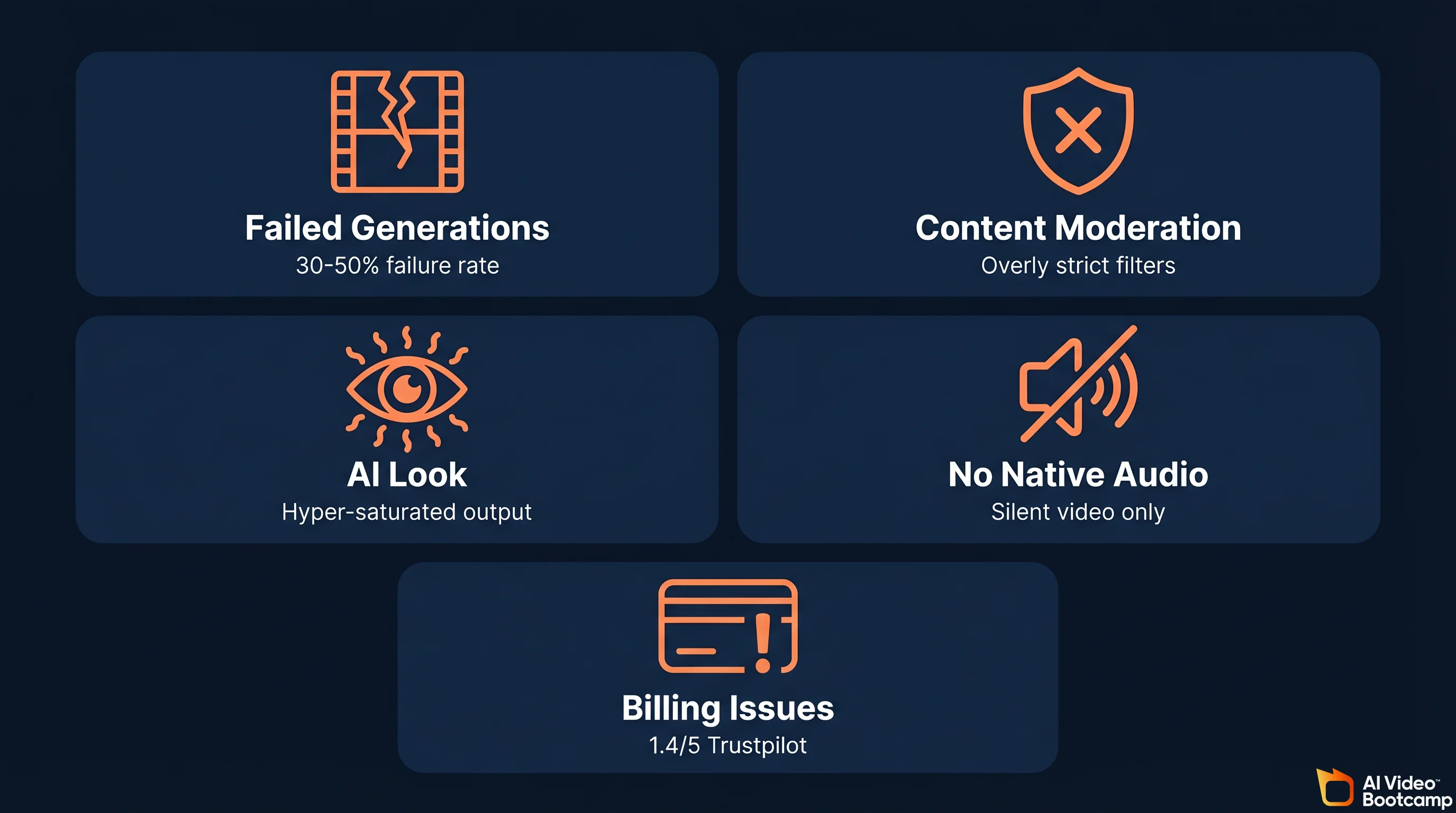
Hailuo AI’s Trustpilot rating sits at 1.4 out of 5 stars across 89+ reviews. That is extremely poor, and most complaints cluster around specific, fixable problems. Here are the top issues and practical workarounds.
Problem 1: Failed Generations Burning Credits
The most frustrating issue. You pay credits, the model generates garbage (morphing artifacts, incorrect motion, prompt ignorance), and those credits are gone. Community reports suggest 30-50% failure rates on complex prompts.
Fix: Always iterate at 768p Fast (25 credits) before committing to 1080p (80 credits). Use negative prompts via API wrappers to exclude common failure modes: “morphing, extra limbs, distorted geometry, blurry.” Break complex multi-subject scenes into single-subject clips and composite in post.
Problem 2: Overly Aggressive Content Moderation
Hailuo’s content filter is notoriously strict and inconsistent. Users report that prompts mentioning “Santa Claus” get flagged as celebrity content, and “wooden puppets” trigger content guidelines violations.
Fix: Avoid proper nouns entirely. Instead of character names, describe physical attributes. Rephrase filtered prompts using more generic descriptive language. If a prompt is repeatedly blocked, try the same concept through Image-to-Video with a pre-generated source image instead of text-to-video.
Problem 3: The “AI Look” (Hyper-Saturation and Harsh Contrast)
Professional VFX artists on r/vfx note that Hailuo output tends toward overly contrasted, hyper-saturated colors with harsh shadowing that is instantly recognizable as AI-generated. This is a byproduct of the diffusion model overcompensating during denoising.
Fix: Include “natural lighting, subtle color palette, muted tones, soft shadows” in your prompt. In post-production, reduce saturation by 15-20% and lower contrast in CapCut or DaVinci Resolve. Use the AI video upscaler pipeline for additional quality improvements after color correction.
Problem 4: No Native Audio
Unlike Wan 2.5 (native dialogue + SFX) and Veo 3 (native audio sync), Hailuo generates silent video only. MiniMax Audio exists in beta but users report frequent errors and synchronization problems.
Fix: Route all audio through ElevenLabs for voiceovers and dialogue, and use dedicated sound design tools for Foley and effects. Build this into your production pipeline from the start rather than treating it as an afterthought.
Problem 5: Unauthorized Charges and Cancellation Difficulty
Multiple Trustpilot reviewers report continued billing after cancellation attempts and refund processes taking 30+ days.
Fix: Use a virtual credit card or payment method with easy dispute capabilities. Screenshot your cancellation confirmation. If billing continues, dispute directly with your card provider rather than waiting for Hailuo’s customer support.
Hailuo AI API: Developer Pricing and Access
For developers building video generation into products or workflows, Hailuo’s models are accessible through multiple third-party API platforms without requiring a direct MiniMax subscription. The API route also unlocks hidden parameters (seed, CFG, negative prompts) that the web interface does not expose.
Fal.ai offers the most straightforward integration at $0.28 per Hailuo 02 video (approximately $0.046 per second). Together AI prices range from $0.25 to $0.52 per video depending on resolution and duration. Segmind offers similar per-second pricing around $0.04.
The API route makes economic sense if you produce fewer than 36 1080p videos per month (below that threshold, pay-as-you-go beats the $34.99 Pro subscription) or need programmatic access for batch processing, A/B testing, or integration into content pipelines. For agencies scaling AI video ad production, the API eliminates the subscription ceiling entirely.
MiniMax also maintains a GitHub organization and HuggingFace repos with model documentation, though the video models themselves are not open-source (unlike Wan 2.5, which is fully open-weights).
Image-to-Video Workflow: The Professional Approach
If Text-to-Video output proves too unpredictable or wastes too many credits, the professional workaround is an Image-to-Video (I2V) pipeline. This method gives you far more control over the final output because you are starting from a known visual reference rather than asking the model to interpret text from scratch.
The workflow has three steps. First, generate a pixel-perfect first frame using a dedicated image generator: Midjourney V6, Flux.2 Pro, Recraft V3, or Ideogram V3. Second, upload that image to Hailuo’s I2V interface with a prompt describing only the desired motion (the model already has all visual details from the image). Third, generate and iterate.
This approach drastically reduces character mutation, ensures brand consistency across multiple clips, and typically produces usable output in fewer attempts than T2V, which directly saves credits. For detailed image-to-video techniques across all generators including free options, see the dedicated guide.
For character consistency across multi-shot projects, combine Midjourney character sheets with Subject Reference in Hailuo’s I2V mode. Generate the same character from multiple angles as reference images, then use those as I2V inputs with different action prompts for each shot.
Hailuo AI for Business: Use Cases and ROI
Hailuo AI makes the most economic sense for specific business applications where its strengths (speed, physics, anime aesthetics) align with the content need. Here is where the return on investment works and where it does not.
Strong ROI use cases: Product demos with liquid, fabric, or physical interaction (Hailuo’s #1 physics ranking shines here). Anime and stylized brand content for social media. Rapid concept iteration and storyboarding using Fast models at 25 credits. Food and beverage content where realistic physics matters. Short-form social content under 10 seconds.
Weak ROI use cases: Long-form narrative content (Kling 2.6 supports up to 3 minutes; Hailuo caps at 10 seconds). Content requiring native audio (use Veo 3.1 or Wan 2.5 instead). Enterprise content where data sovereignty matters (Chinese data processing). High-volume production where credit costs compound.
For a broader perspective on building a business around AI video, the AI video monetization guide covers revenue strategies, and the AI video skill stack maps the complete skillset you need. If you are evaluating Hailuo alongside other tools for business use, the AI video for business guide provides a comprehensive framework.
The Honest Verdict: When to Use Hailuo (And When to Use Something Else)
Hailuo AI is a technically exceptional model wrapped in a frustrating platform. The physics simulation is genuinely best-in-class. The generation speed is unmatched. The MoE architecture and Lightning Attention represent real engineering innovation. But the credit system punishes the experimentation that creative work requires, the content moderation is unpredictable, and the 1.4/5 Trustpilot rating reflects real problems with billing and customer support.
Use Hailuo when: You need the fastest iteration speed available. Your content relies on accurate physics (food, liquid, fabric, product demos). You work in anime or stylized aesthetics. You need advanced camera control via Director Mode. You are building an I2V pipeline where you control the source image quality.
Use something else when: You need clips longer than 10 seconds (Kling 2.6). You need native audio (Veo 3.1 or Wan 2.5). Data privacy is critical (Wan 2.5, self-hosted). You need reliable customer support. Your budget is tight and you cannot absorb credit waste from failed generations.
The AI video generator rankings provide a complete leaderboard across all True Models. The generative AI media statistics page tracks the market data cited throughout this article. And if you are just getting started, the complete beginner guide covers the fundamentals before you commit to any specific platform.
The AI video generator market is projected to grow from $1.4 billion in 2024 to $10.5 billion by 2033 at a 24.9% CAGR, and [51% of video marketers](https://www.grandviewresearch.com/industry-analysis/ai-