
Pricing verified April 30, 2026.
Overworld’s Waypoint-1.5 is a 1.2 billion parameter AI world model that generates interactive 3D environments at 720p and 60 frames per second on consumer GPUs. Released April 9, 2026, it runs locally on hardware ranging from the RTX 3090 to the RTX 5090, is fully open-source under Apache 2.0, and represents a fundamentally different category of AI from the video generators most creators currently use. While tools like Kling and Veo produce pre-rendered clips you watch, Waypoint-1.5 creates worlds you walk through. This guide covers the architecture, hardware requirements, competitive landscape, and what world models mean for AI video creators in 2026.
If you have been working with AI video tools for any length of time, you already understand the pipeline: write a prompt, generate a 5-second clip, iterate, assemble in editing. World models break that entire paradigm. Instead of generating video, they generate reality. Persistent, interactive, responsive reality that runs on the same GPU sitting under your desk.
What Is a World Model (and Why Should Video Creators Care)?
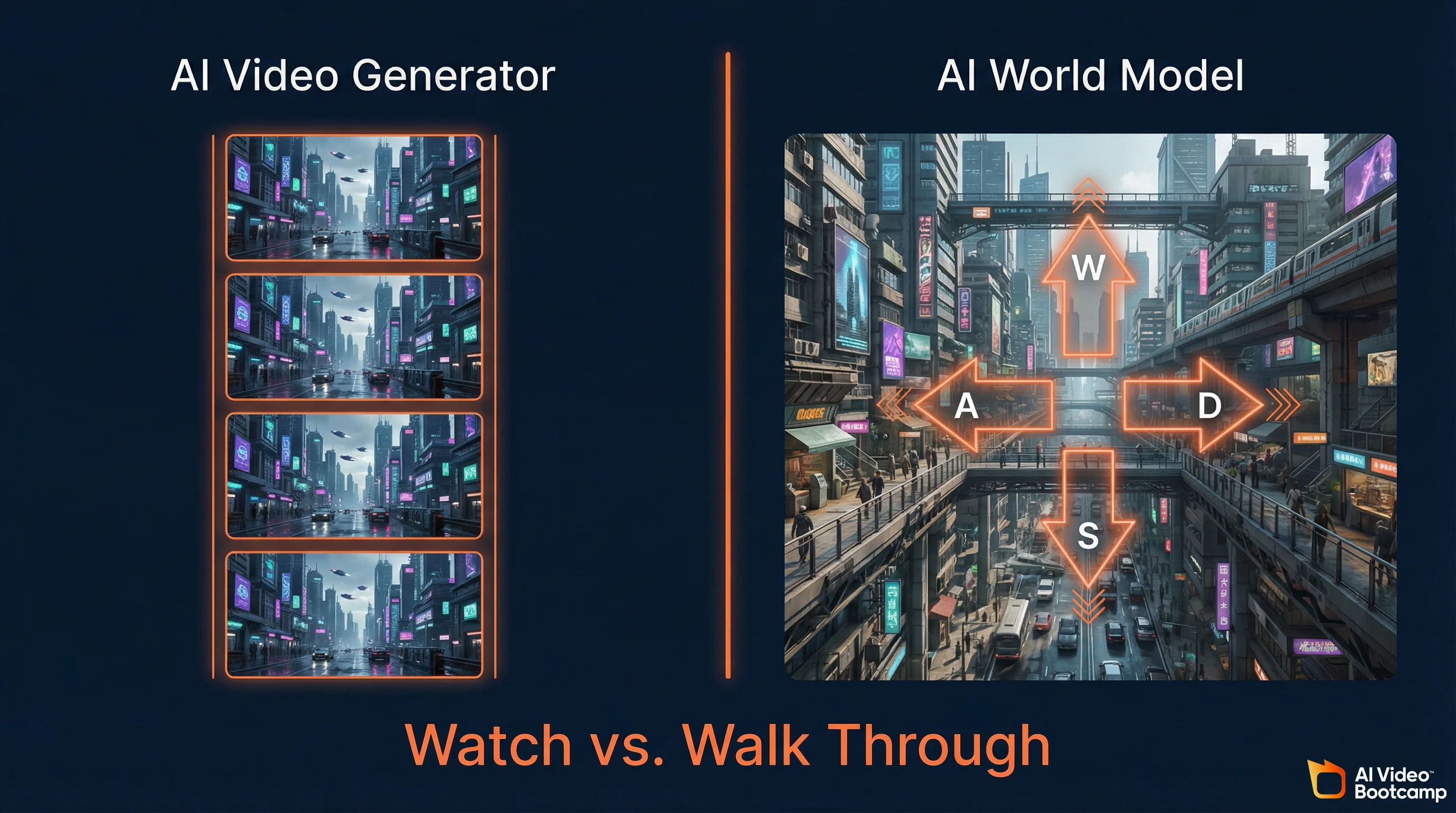
A world model is an AI system that generates interactive 3D environments in real-time, responding to user input frame by frame. Unlike AI video generators that produce pre-rendered clips you watch passively, world models create persistent environments you navigate with keyboard and mouse. The AI predicts the next visual frame based on your actions, effectively simulating a 3D world entirely through neural network inference.
The distinction matters because it defines the boundary between watching and doing. AI video generators like Kling 3.0, Google Veo 3.1, and Runway Gen-4.5 use bidirectional diffusion transformers. They analyze entire video sequences simultaneously, looking at both past and future frames to resolve physical inconsistencies. The result is stunning visual fidelity but zero interactivity. You cannot control the camera mid-generation. You cannot walk left instead of right. The output is a fixed clip.
World models use causal generation. They predict strictly the next frame based on the past 512 frames (approximately 10 seconds of context) and the exact controller inputs provided in the current millisecond. This architectural choice sacrifices some photorealism for something video generators fundamentally cannot offer: real-time human agency inside a generated environment.
For the AI creators in our AI Video Bootcamp community of 20,000+ members, the practical implication is significant. Today you generate a cyberpunk city as a static image, then animate it with Kling for a 5-second camera pan. With a world model, you generate the city and walk through it. You find the exact camera angle you want. You adjust the lighting. Then you record. The world model becomes your virtual production stage.
Overworld: The Company Behind Waypoint-1.5
Overworld is an AI research studio founded by two former Stability AI researchers, Louis Castricato and Shahbuland Matiana, who previously led RLHF and diffusion model alignment work. The company raised $4.5 million in pre-seed funding led by Kindred Ventures with angels from Snowflake and Roblox. Their thesis: world simulation should run locally on consumer hardware, not in cloud data centers.
Louis Castricato (Co-founder, CEO) served as LLM Lead and Research Director at Stability AI, heading reinforcement learning from human feedback (RLHF) efforts across large-scale generative models. He studied mathematics at the University of Waterloo and conducted RLHF research at Brown University.
Shahbuland Matiana (Co-founder, Chief Science Officer) worked as Research Scientist at Stability AI, focusing on diffusion model improvements with human feedback. He co-founded CarperAI with Castricato and built open-source reinforcement learning libraries including tRLX and DRLX.
The company raised a $4.5 million pre-seed round led by Kindred Ventures, with participation from Amplify.LA, Garage Capital, Logan Kilpatrick, and angel investors from Snowflake and Roblox. Overworld is headquartered in the United States.
The Stability AI pedigree is relevant context. The team that built Waypoint-1.5 comes from the same organization that created Stable Diffusion, the model that powers the majority of open-source image and video generation workflows that advanced AI creators already use through ComfyUI.
How Waypoint-1.5 Works: Causal Diffusion and Rectified Flow
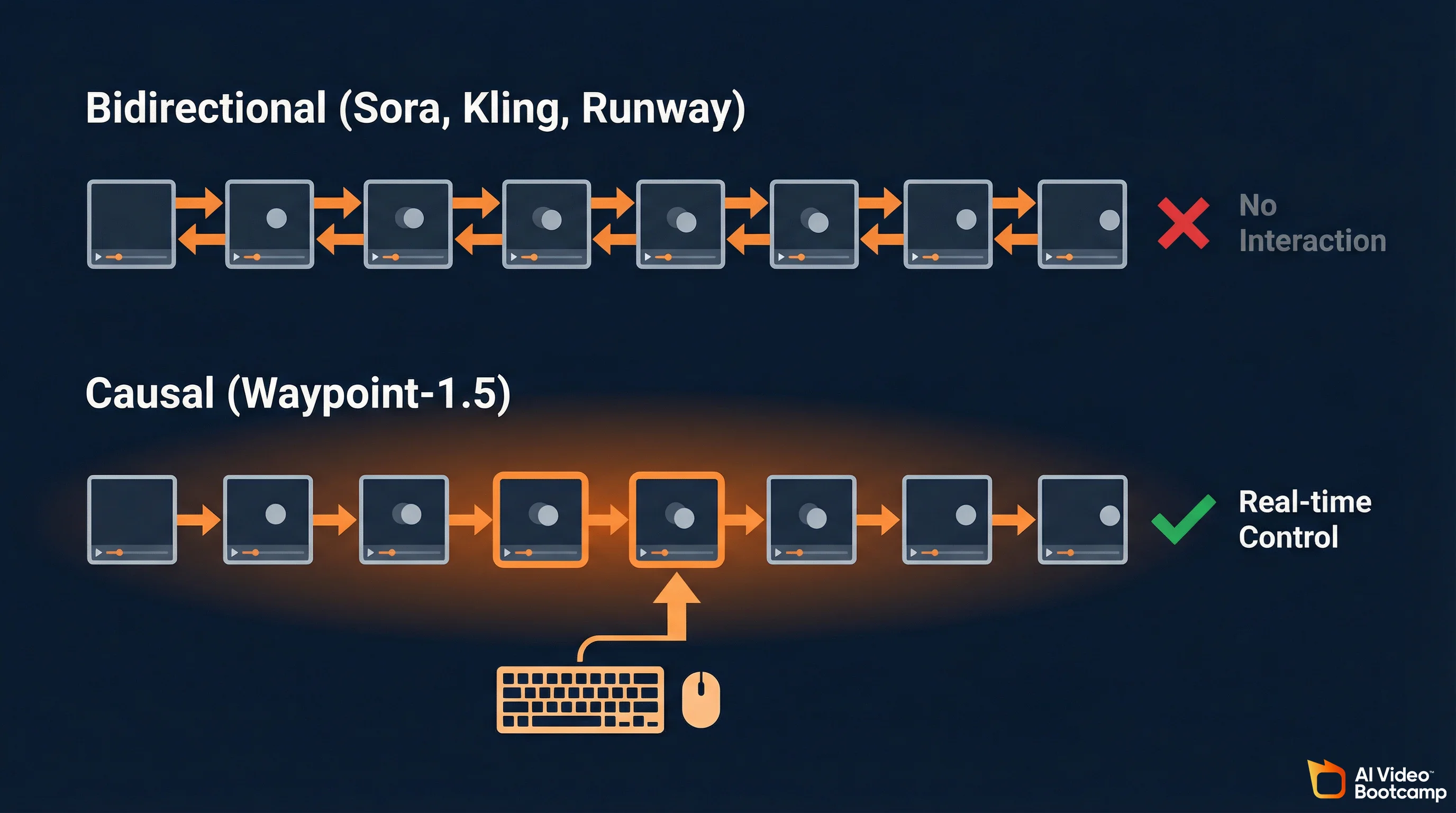
Waypoint-1.5 uses a causal autoregressive diffusion transformer with rectified flow that predicts frames strictly forward in time, conditioning only on the past 512 frames and current controller input. This is the opposite of bidirectional models like Sora that analyze entire sequences simultaneously. The causal design sacrifices some visual fidelity for real-time interactivity that bidirectional architectures cannot achieve.
The architecture of Waypoint-1.5 is where it gets interesting for anyone who wants to understand where generative AI is heading, not just where it is today.
Traditional video diffusion models (Sora, Runway, Kling) are bidirectional. They process information forward and backward across time simultaneously, which means the model can “see the future” of a video sequence while generating the present frame. This produces visually perfect results but makes the model fundamentally incompatible with real-time interaction, because you cannot predict a human’s next input.
Waypoint-1.5 is strictly causal. It can only condition its generation on the past 512 frames and the exact controller inputs provided right now. This introduces what Overworld calls “immense architectural pressure to prevent cascading hallucinations,” because the model cannot look ahead to correct errors. The solution is a combination of massive training data (100x more than Waypoint-1) and advanced distillation techniques.
The core technical architecture:
Autoregressive Diffusion Transformer. The backbone uses rectified flow, a mechanism that maps noise to data via straight-line trajectories. This allows faster sampling with fewer inference steps compared to traditional diffusion, which is critical for hitting real-time frame rates.
Diffusion Model Distillation (DMD). The architecture is distilled via self-forcing, a technique that drastically reduces the computational overhead required to denoise the latent representations. Without this, a 1.2 billion parameter model could not generate frames fast enough for 60fps gameplay.
Tiny Hunyuan Autoencoder. The model uses a compact autoencoder (taehv1_5) with 4x temporal compression, 8x spatial compression, and 32 latent channels. During active inference, Waypoint-1.5 generates sequences of four continuous video frames for every single controller input state processed. This batching mechanism allows the engine to maintain a fluid output frame rate while only requiring a full attention pass every four frames.
512-Frame Context Window. The context window acts as the world’s short-term memory: approximately 10 seconds of continuous interaction. It maintains spatial consistency so objects, layouts, and geometry remain coherent even as the user navigates away from and returns to previously viewed areas.
The output tensor is structured mathematically as sequences of H x W x 3 matrices (height, width, and RGB color channels), buffered and spaced evenly across the render pipeline to mask the underlying batch generation process.
Waypoint-1.5 Pricing and Distribution
Overworld Waypoint-1.5 is released under Apache 2.0 license at zero cost. The open-source model weights are available on Hugging Face. For in-browser execution without local GPU, Overworld.stream offers cloud access.
Pricing last verified April 30, 2026. Overworld Waypoint-1.5 has no licensing cost (Apache 2.0 open source). Cloud-based access via Overworld.stream pricing should be verified at over.world. Hardware costs below reflect GPU acquisition only, not recurring fees.
Hardware Requirements and Performance Benchmarks
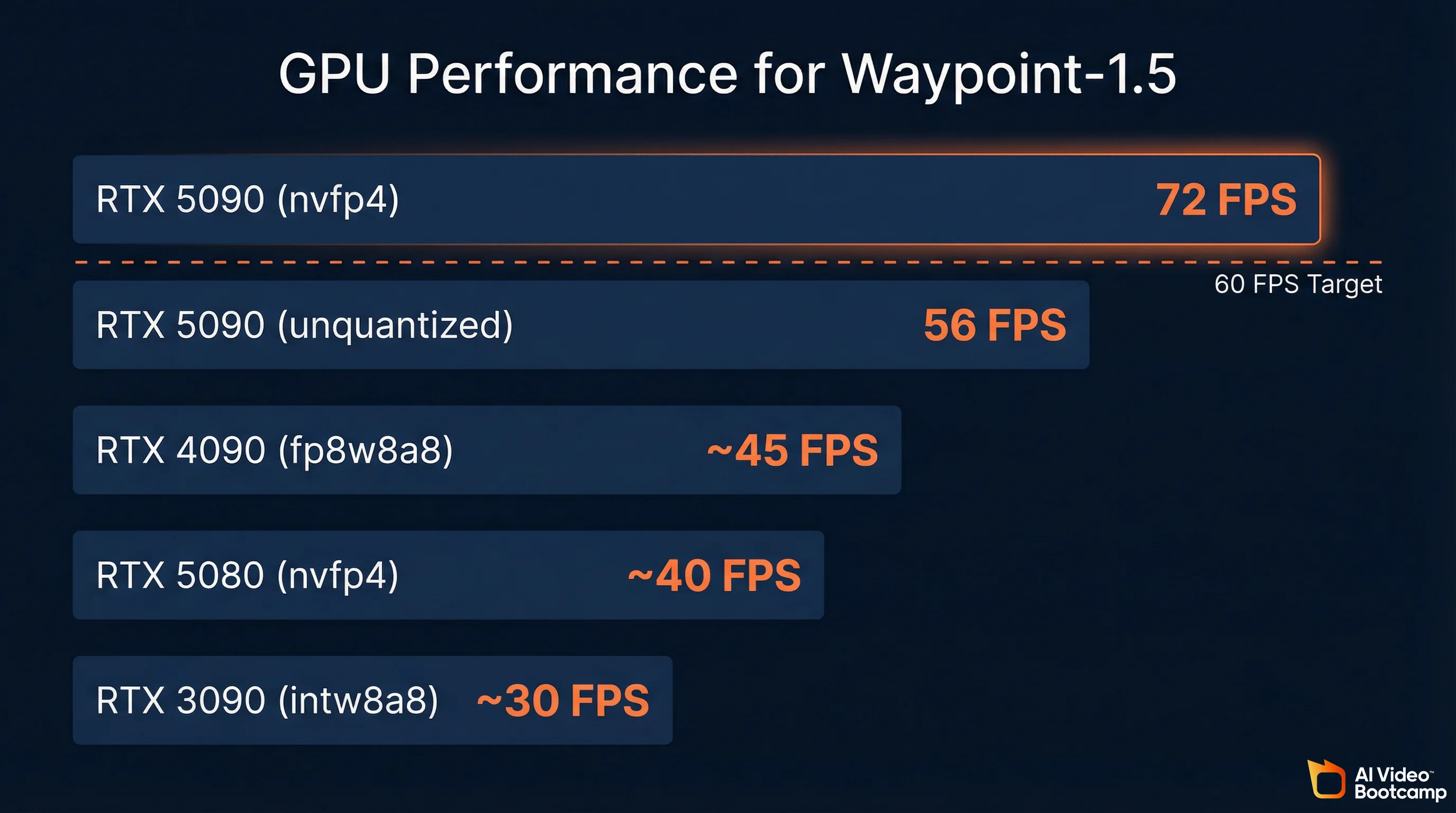
Waypoint-1.5 runs on consumer NVIDIA GPUs from the RTX 3090 through the RTX 5090, achieving 72 FPS with quantization on the top-end card and 30 FPS on the RTX 3090. The 360p model extends compatibility to gaming laptops and Apple Silicon Macs. System memory requirement is approximately 8 gigabytes. No cloud connection is required for local execution. The entire model fits within consumer GPU VRAM with approximately 8 gigabytes of system memory required.
Performance by GPU (720p Model)
| GPU | Quantization | Expected FPS | Notes |
|---|---|---|---|
| RTX 5090 (Blackwell) | nvfp4 | 56 FPS (unquantized), 72 FPS (quantized) | Reference hardware; full quality |
| RTX 5090 | fp8w8a8 | ~60 FPS | Near-target performance |
| RTX 4090 (Ada Lovelace) | fp8w8a8 | ~45 FPS | Strong prosumer option |
| RTX 3090 (Ampere) | intw8a8 | ~30 FPS | Playable on older hardware |
| RTX 5080 | nvfp4 | ~40-50 FPS | Mid-range Blackwell |
Source: Hugging Face model card and Overworld blog. FPS estimates for non-reference hardware are interpolated from published benchmarks.
Quantization Configurations
Waypoint-1.5 supports three quantization schemes, each optimized for different GPU generations:
| Configuration | Description | Supported GPUs |
|---|---|---|
| intw8a8 | 8-bit integer weights with 8-bit integer per-token dynamic activations | NVIDIA Ampere and Ada Lovelace (RTX 30-series, RTX 40-series) |
| fp8w8a8 | 8-bit floating-point (e4m3) weights with per-tensor activations via torch._scaled_mm | NVIDIA Ada Lovelace and Hopper (RTX 40-series, H100) |
| nvfp4 | 4-bit floating-point weights and activations via FlashInfer and CUTLASS backends | NVIDIA Blackwell (B100, B200, RTX 5090) |
The nvfp4 configuration on Blackwell is the most efficient option available. By reducing weights to just four bits and processing activations via FlashInfer operations, the model operates with extraordinary memory efficiency while achieving the highest frame rates.
The 360p Tier
For creators without high-end desktop GPUs, the Waypoint-1.5-1B-360P model runs on gaming laptops and Apple Silicon Macs. The trade-off is resolution (360p vs. 720p), but interactivity and frame rates remain smooth.
How This Compares to Your Current AI Video Hardware
If you have been following the hardware guidance in our guide to learning AI video, you already know the VRAM hierarchy: 5GB for 7B parameter models, 10GB for 14B, 20GB for 32B, and 40GB+ for 70B+. Waypoint-1.5 at 1.2B parameters sits at the very bottom of that range, which is exactly why it runs on consumer hardware. The engineering challenge was not raw model size but inference speed: generating frames fast enough for 60fps interactive use from a model that small.
The Biome Runtime and Scene Editing
Biome is Overworld’s open-source desktop client that handles local execution of Waypoint-1.5, abstracting away PyTorch dependencies and tensor management behind a simple installer. Beyond running the model, Biome includes real-time latent scene editing: users can manipulate objects, adjust material properties like metalness and roughness, and modify lighting within the generated environment using professional Blender-style gizmos.
Running Waypoint-1.5 locally is handled through Overworld Biome, a desktop client that acts as the translation layer between your hardware and the neural network. It abstracts away tensor management, PyTorch dependencies, and asynchronous batch processing behind a straightforward executable installer.
For users without the required GPU, Overworld.stream runs the identical model in the cloud and streams the output to a standard web browser via ultra-low latency protocols. No setup required.
Latent Scene Editing
This is the feature that elevates Waypoint-1.5 from a technical demo to a creative tool. Within the Biome runtime, users can enable scene editing to dynamically modify the generated environment in real-time by manipulating the latent space representation directly.
The interface uses professional-style gizmos (similar to Blender’s visual axis indicators) for precise translational, rotational, and scaling adjustments of localized elements within the generated scene. Because the environment is entirely generated by a neural network, “selecting an object” mathematically translates to isolating a specific semantic feature map within the model’s attention layers.
The scene editing tools extend to dynamic material controls. Users can adjust parameter sliders that simulate metalness, roughness, and transparency, and the model recalculates the physics of light transport and surface reflection across the continuously evolving 512-frame context window in real-time. This is not applying a post-processing filter. The model is regenerating the scene with the new material properties baked in.
For AI filmmakers working through Phase 8 of the AI Video Bootcamp curriculum, this represents a potential shift in how establishing shots and environmental work gets done. Instead of generating a static image and animating it into a 5-second video clip, you could generate an entire environment, adjust it until it matches your vision, and then record from within it.
LoRA Fine-Tuning for Custom Worlds
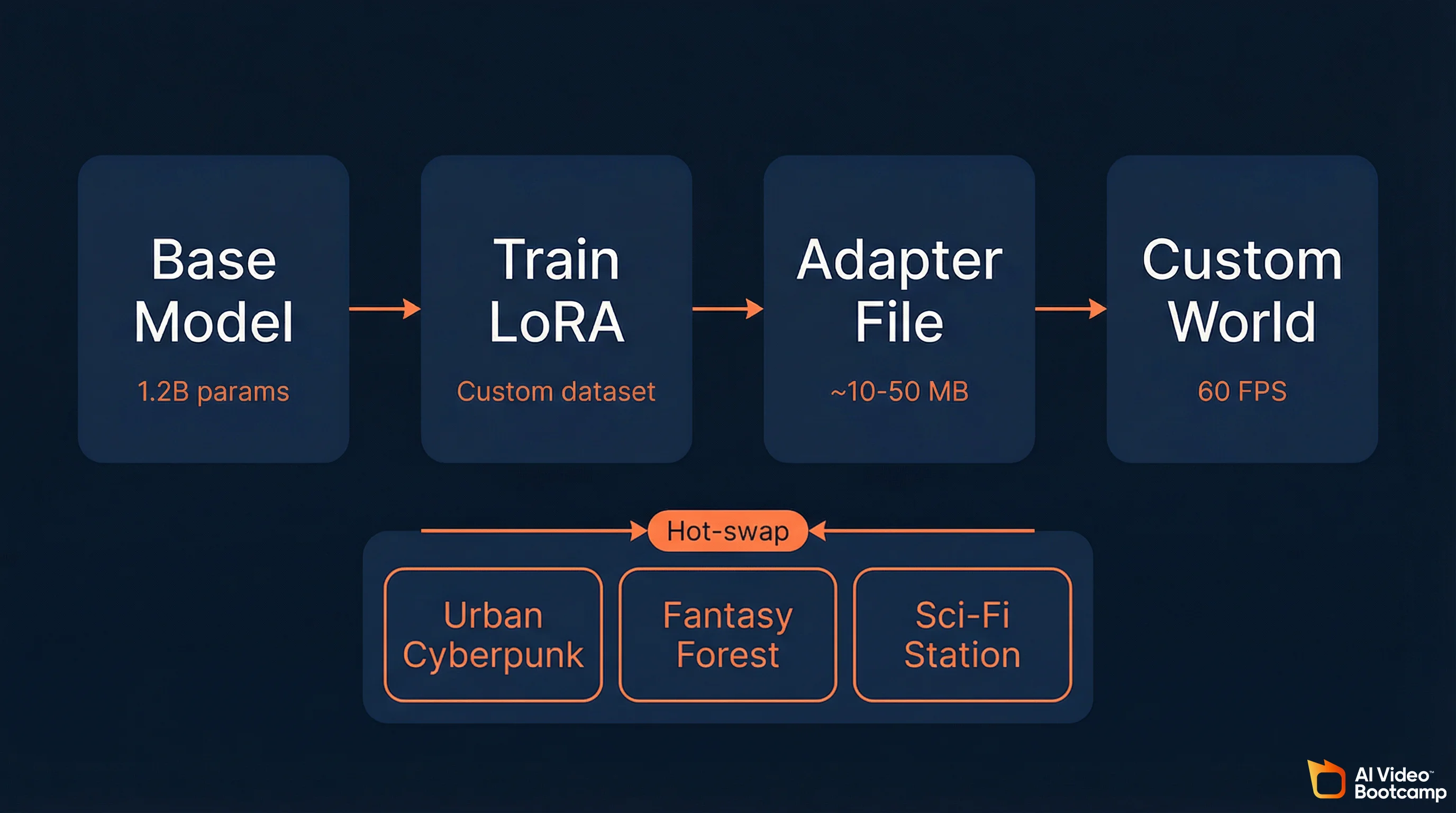
Waypoint-1.5 supports Low-Rank Adaptation (LoRA) fine-tuning, allowing creators to train lightweight adapters (often just tens of megabytes) that override the visual style of generated worlds without compromising the model’s spatial reasoning or physics. Adapters can be hot-swapped instantly between different environment styles, and community-trained adapters maintain 60fps performance even with quantization enabled.
The Waypoint-1.5 architecture deeply integrates support for Low-Rank Adaptation (LoRA), the same parameter-efficient fine-tuning technique that AI image creators already use for character consistency and custom styles in Stable Diffusion.
Within the world_engine library, LoRA adapters work the same way conceptually. You supply targeted datasets, train a lightweight adapter (often only tens of megabytes), and the adapter overrides the visual style of the world engine without compromising the underlying spatial reasoning, physics, and temporal consistency learned during the model’s primary training. The core logic of “how to move through space” remains intact. The aesthetic wrapper of that space is entirely overridden by the fine-tuned weights.
Key LoRA capabilities in Waypoint-1.5:
Hot-swapping. The architecture supports simultaneous deployment of multiple adapters and allows users to hot-swap between different environments instantaneously by dynamically swapping the active adapter paths within active memory, bypassing the need to unload and reload the multi-gigabyte base model.
Quantization compatibility. Community-trained adapters using intw8a8 and nvfp4 quantization still achieve the targeted 60fps benchmark on consumer hardware.
Creator ecosystem potential. The same LoRA sharing infrastructure that exists for Stable Diffusion on Civitai and Hugging Face could emerge for world models. Imagine downloading a “photorealistic urban” adapter, a “fantasy forest” adapter, or a “sci-fi space station” adapter, each only tens of megabytes, and swapping between them instantly.
For communities like AI Video Bootcamp where 20,000+ members actively share prompts, workflows, and LoRA techniques, this opens a new creative dimension. Training a world model adapter to match your visual brand or content niche is the logical extension of the character consistency techniques members already learn in Phase 5 of the curriculum.
Competitive Landscape: World Models in 2026
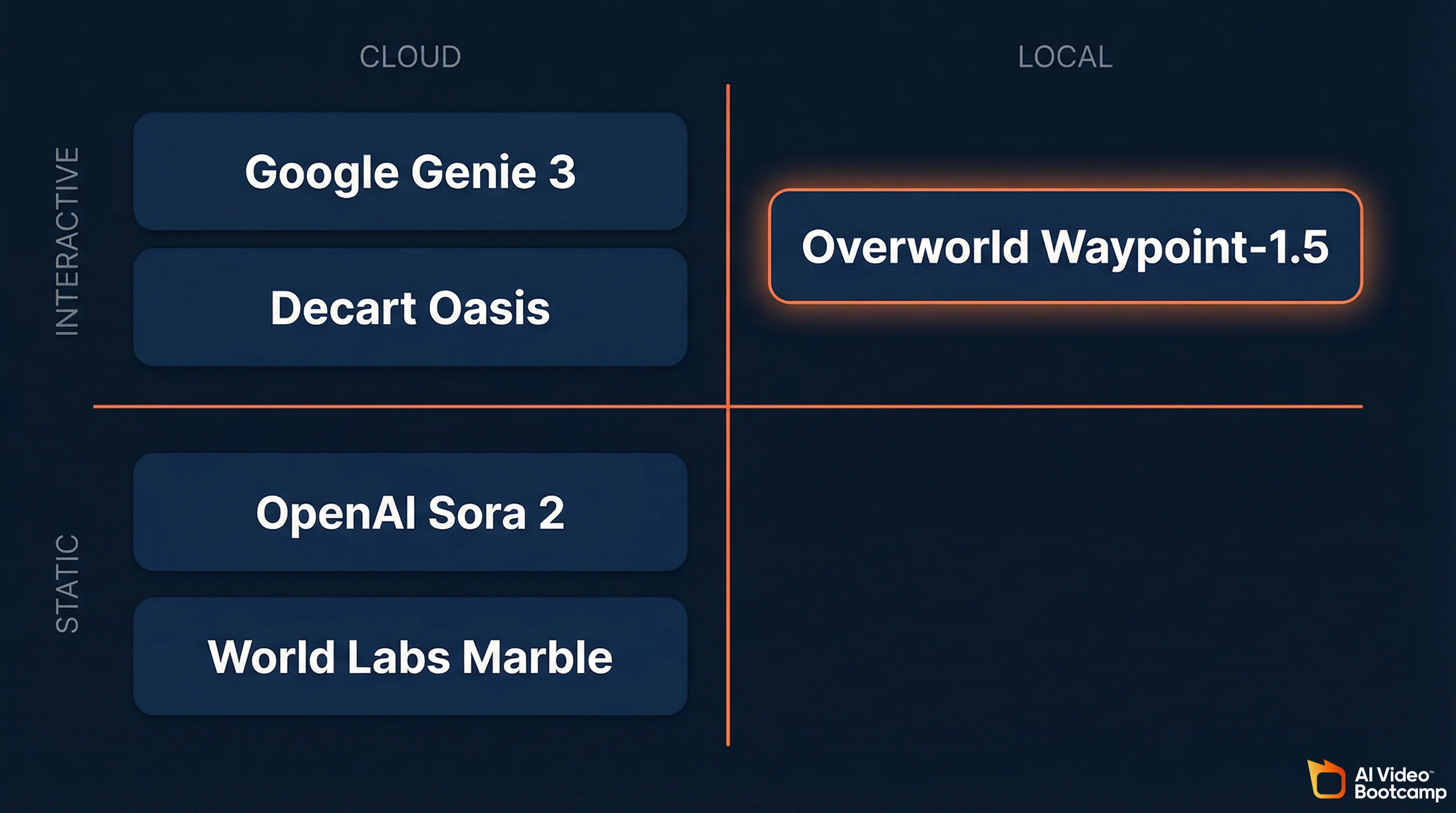
Waypoint-1.5 competes in a sector that has attracted billions in funding. Google’s Genie 3 is cloud-only with a 60-second exploration limit. World Labs (Fei-Fei Li) is raising at a $5 billion valuation for persistent but non-interactive environments. Decart’s Oasis reached millions of users but requires custom ASICs for high resolution. Overworld is the only major player betting entirely on local-first, open-source, consumer-hardware execution. The world models sector has attracted billions in funding from some of the most prominent names in AI research.
World Model Comparison Table
| System | Architecture | Hardware Target | Resolution | Interactivity | Key Limitation | License |
|---|---|---|---|---|---|---|
| Overworld Waypoint-1.5 | Autoregressive causal diffusion | Consumer GPUs (RTX 30-50 series) | 720p / 360p | Real-time, keyboard + mouse | Occasional structural hallucinations on long sessions; 720p max | Apache 2.0 (open) |
| Google Genie 3 | 3D spatial foundation model | Enterprise cloud | Up to 1080p | Real-time, browser-based | 60-second exploration limit; cloud-only | Proprietary |
| Decart Oasis | Spatial autoencoder / Latent DiT | Cloud + custom ASICs (Sohu Transformer) | Up to 4K (with ASICs) | Real-time, Minecraft-style | Requires dedicated ASICs for high resolution; block-based only | Partially open (500M model) |
| World Labs Marble | Persistent 3D generation | Enterprise cloud | High (downloadable assets) | Non-interactive (static scenes) | No real-time interaction; generates environments, not experiences | Proprietary |
| OpenAI Sora 2 | Bidirectional diffusion transformer | Enterprise cloud | Up to 4K | None (pre-rendered video) | Zero interactivity; highest photorealism | Proprietary |
| Dynamic Labs Magica | Text-driven UGC engine | Browser / cloud streaming | Variable | Text prompts during gameplay | Environment changes via prompts, not direct control | Proprietary |
Sources: Hugging Face Waypoint-1.5 blog, Google Genie 3 announcement, World Simulator AI leaderboard, Overworld GlobeNewsWire release.
Funding Context
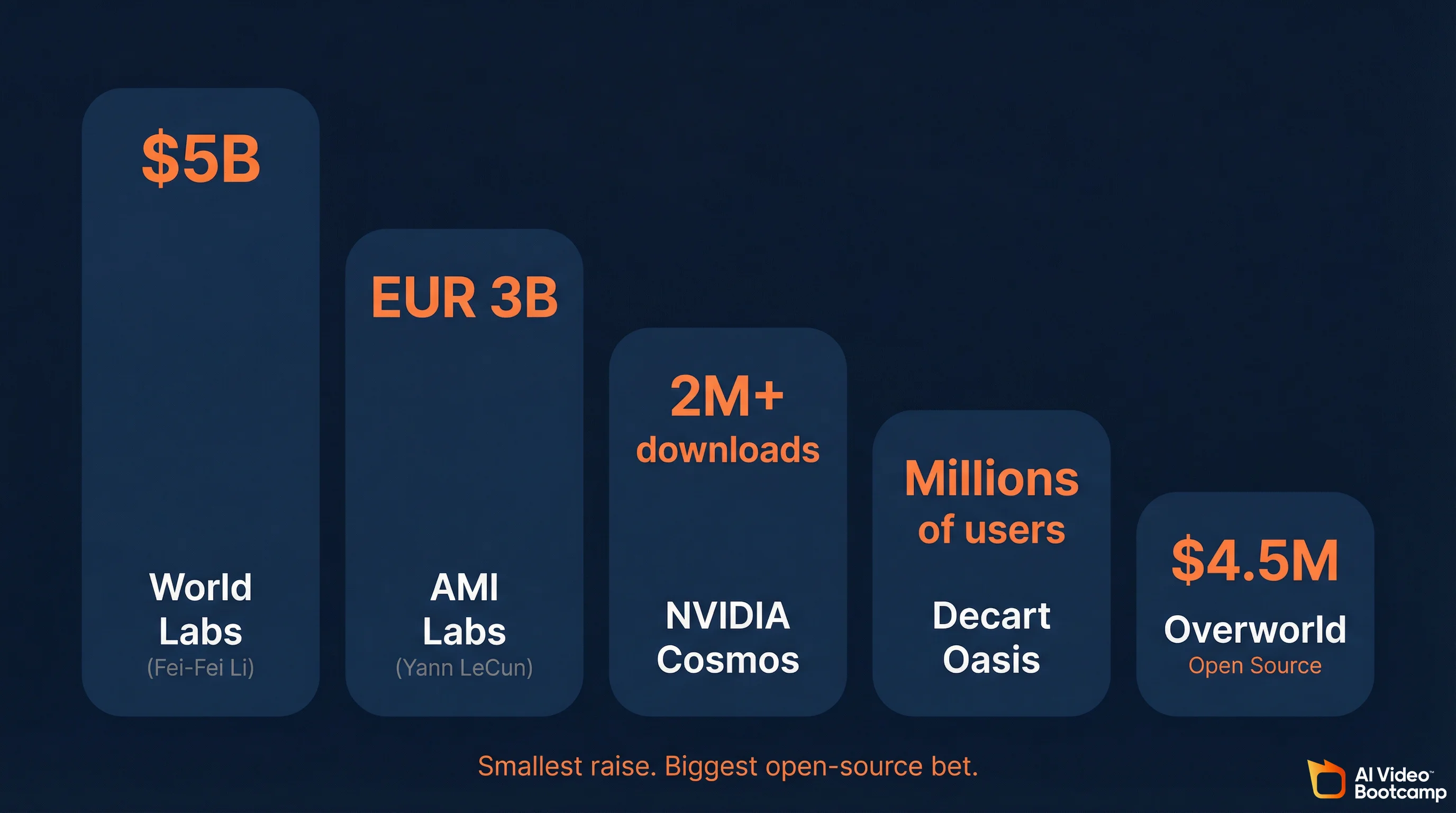
The scale of investment in world models signals where the industry believes the next breakthrough will happen:
- World Labs (Fei-Fei Li): In talks to raise $500 million at a $5 billion valuation
- AMI Labs (Yann LeCun): Seeking EUR 500 million at a EUR 3 billion valuation
- NVIDIA Cosmos: Trained on 20 million hours of real-world data; surpassed 2 million downloads
- Decart (Oasis): Reached millions of users within days of launch
- Overworld: $4.5 million pre-seed (smallest raise, biggest open-source bet)
Why Overworld’s Approach Stands Out
The strategic divergence is clear. Google, World Labs, and AMI Labs are building cloud-dependent systems that require enterprise GPU clusters. Overworld is the only major player betting entirely on local-first, consumer-hardware execution. This mirrors the same philosophical split the AI image community already experienced: Midjourney (cloud, proprietary) vs. Stable Diffusion (local, open-source). For creators who value privacy, zero recurring API costs, and full ownership of their outputs, the local-first approach has proven advantages.
Training: 100x More Data and the Sim-to-Real Gap
Waypoint-1.5 was trained on roughly 100 times more data than its predecessor, primarily action-conditioned gameplay footage from open-world video games paired with controller telemetry. The training pipeline uses densely annotated state-action-event triads and a blend of real-world and synthetic data to teach the model causality, object permanence, and lighting physics rather than just pixel generation.
The nature of that 100x data expansion explains both the model’s strengths and its current limitations.
The training corpus consists primarily of action-conditioned gameplay video data from open-world video games including Minecraft, Grand Theft Auto, and various first-person action titles. Each training example pairs video footage directly with the corresponding control telemetry: the exact keyboard and mouse inputs that produced each frame. By processing millions of hours of this paired data, the model learns the statistical probability of how an environment should visually transform in response to a specific input command.
A critical challenge is the domain gap between different visual styles. To mitigate this, Overworld’s training pipelines employ densely annotated state-action-event triads, categorizing the training data into structural components distinguishing the agent (Self), other dynamic entities (Other Agents), and the static world topology (World). This forces the neural network to simulate distinct physical entities interacting within a shared space, not just generate plausible-looking pixels.
The training strategy also blends real-world datasets with procedurally generated synthetic data. Synthetic data offers perfect ground truth labeling, unlimited scale, and the ability to systematically control variations in lighting and viewpoint. When hybridized with real gameplay footage, the resulting model exhibits robust generalization across environments.
The sim-to-real gap remains the primary limitation. The model was trained on game footage, so it generates game-like environments. Photorealistic outdoor scenes, human faces, and complex organic materials are outside its current training distribution. This will change as training data expands, but for now, expect stylized 3D environments rather than photorealistic scenes.
Limitations and Honest Assessment
Waypoint-1.5 is impressive for a 1.2B parameter model on consumer hardware, but real limitations exist: 720p maximum resolution (below broadcast quality), temporal drift on long sessions, game-trained aesthetics rather than photorealism, no physics simulation (learned approximations only), and no audio generation. Creators should understand these constraints before investing significant time in world model workflows.
World models are early. Waypoint-1.5 is impressive for what it achieves, but creators should understand the real limitations before investing time.
Visual fidelity ceiling. 720p maximum resolution. Compare this to Veo 3.1 at 4K or Runway Gen-4.5 at 1080p. For broadcast or high-resolution social media content, world model output currently needs upscaling.
Temporal drift. Long sessions (significantly beyond the 10-second context window) can produce structural hallucinations: geometry that warps, objects that appear or disappear, or environmental layouts that shift. The model is generating each frame from a 512-frame memory, not from a persistent 3D scene graph.
Game-trained aesthetic. The training data is primarily video game footage. The output looks like a high-quality video game, not like a photograph or a cinematic film. This is a training data limitation, not an architectural one, and will improve as the corpus expands.
No physics simulation. Waypoint-1.5 approximates physical behavior through learned statistical patterns. It is not calculating gravity, collision, or fluid dynamics. Objects generally behave realistically because the training data showed realistic physics, but edge cases can produce physically impossible results.
Hardware floor. While it runs on consumer GPUs, “consumer” still means an RTX 3090 for the 720p model. That is a $500-1,000+ graphics card. The 360p model or Overworld.stream are the options for creators on more modest hardware.
No audio generation. Unlike Veo 3.1 or Seedance 2.0 which generate synchronized audio alongside video, Waypoint-1.5 is visual-only. Any audio would need to be added in post-production using tools like ElevenLabs.
What This Means for AI Video Creators
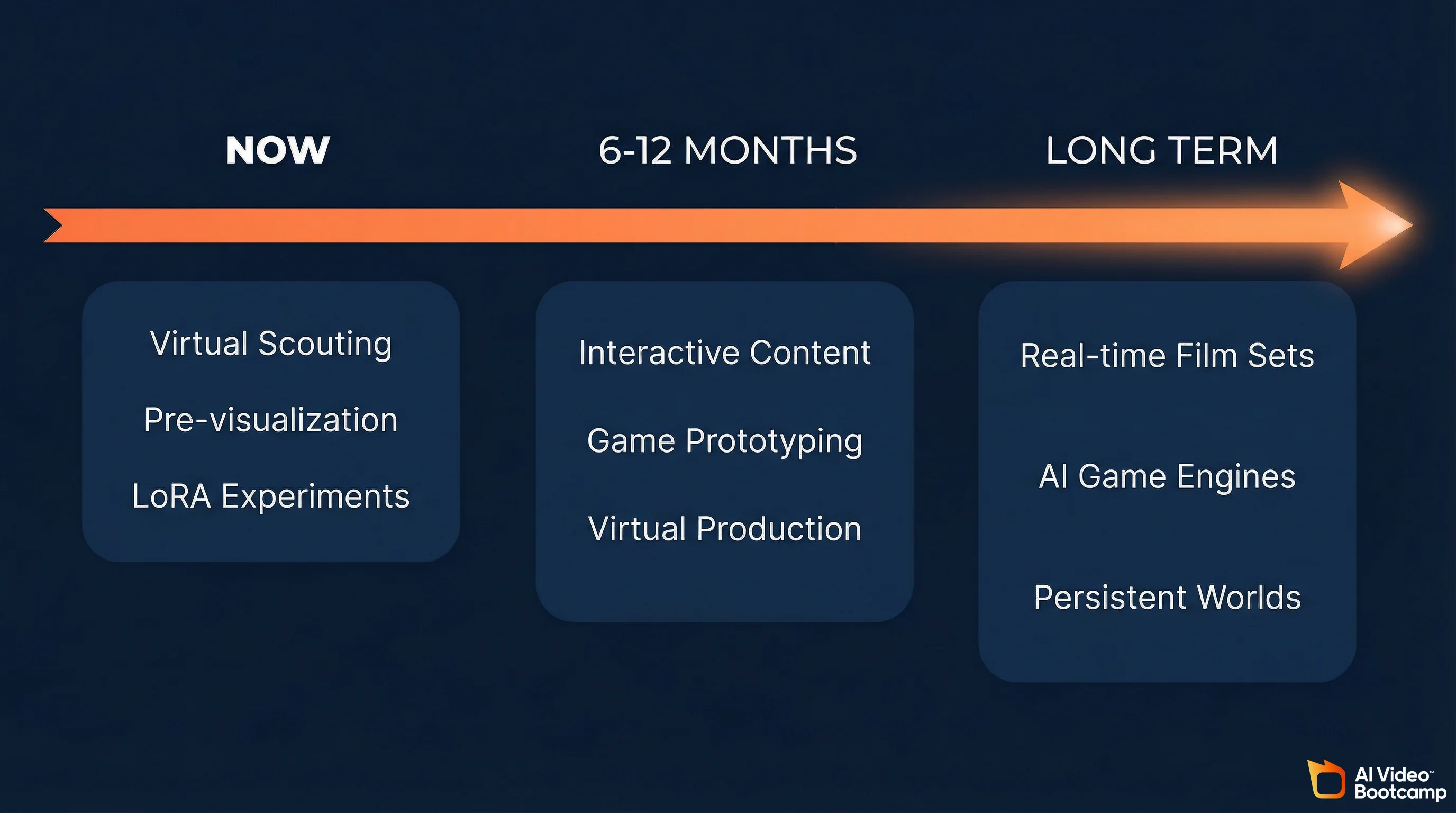
World models represent the next technology layer above AI video generation. For creators who already understand prompt engineering, image generation, video generation, audio, character consistency, and editing, world models add interactive environment generation as a seventh skill. Near-term applications include virtual location scouting, pre-visualization for AI films, and LoRA experimentation using existing Stable Diffusion fine-tuning knowledge.
For creators learning AI video through structured programs like AI Video Bootcamp, world models represent the technology layer that sits above everything you are building right now. The six core skills in the AI video skill stack (prompt engineering, image generation, video generation, audio production, character consistency, and editing) all remain essential. World models add a seventh dimension: interactive environment generation.
Near-Term Applications (Now)
Virtual location scouting. Generate multiple environment variations, walk through each one, and identify the exact compositions and angles you want before committing to expensive video generation credits on Kling or Veo.
Pre-visualization for AI films. For creators in advanced AI filmmaking workflows, Waypoint-1.5 can serve as a real-time previsualization tool. Block out scenes, test camera movements, and iterate on environmental design before generating final-quality video.
LoRA experimentation. If you already train LoRA adapters for Stable Diffusion, the same conceptual skills transfer to world model fine-tuning. The tooling is early but the workflow is familiar.
Medium-Term Applications (6-12 Months)
Interactive AI content. As resolution improves and browser streaming becomes smoother, creators will be able to publish interactive experiences alongside traditional video content. Imagine a YouTube video about a sci-fi world paired with a link where viewers can explore that world themselves.
AI game prototyping. Solo creators can prototype game concepts without writing code or building 3D assets. Generate the world, define the interactions, and ship a playable prototype.
Real-time virtual production. The convergence of world models with tools like Unreal Engine or Blender could enable real-time virtual production stages powered entirely by AI, where the environment responds to the director’s voice commands and generates new set pieces on demand.
Long-Term Trajectory
The endgame for world models is clear from the funding patterns. When Fei-Fei Li raises at a $5 billion valuation and Yann LeCun seeks EUR 500 million, they are betting that world models will become the fundamental interface between humans and digital environments. The trajectory points toward a future where interactive media is not programmed polygon by polygon but simulated, navigated, and shaped in real-time by the intersection of human agency and parameter-efficient AI.
For creators building AI skills today, the strategic advice is simple: master the fundamentals now (images, video, audio, editing, consistency) because they are the foundation. Then keep a close eye on world models as the technology matures over the next 12-24 months. The creators who understand both traditional AI video generation and interactive world models will have the strongest position as these technologies converge.
How to Try Waypoint-1.5 Today
You can try Waypoint-1.5 three ways: instantly in your browser via Overworld.stream (no GPU required), locally through the Biome desktop client (Windows/Mac, simple installer), or programmatically through the open-source world_engine Python library. Model weights for both the 720p and 360p tiers are freely available on Hugging Face under the Apache 2.0 license.
Option 1: Browser (No Setup)
Visit Overworld.stream and start exploring generated environments immediately. No GPU required. This runs the model in the cloud and streams the output to your browser.
Option 2: Local Installation (Biome)
- Download the Biome desktop client for Windows or Mac
- Run the installer (the runtime handles all PyTorch and CUDA dependencies)
- Select the 720p or 360p model based on your GPU
- Launch and start exploring
Option 3: Developer Setup (world_engine)
For programmatic access:
- Install Python 3.11 and create a virtual environment (
uv venv -p 3.11) - Install dependencies:
diffusers>=0.36.0,torch>=2.9.0,einops - Clone the world_engine repository
- Use
append_frame()to pass a conditioning image andgen_frame(ctrl=controller_input)to generate frames dynamically as the user explores
Model weights are available directly from Hugging Face:
10 Key Takeaways
Waypoint-1.5 is the first open-source world model that runs interactively at 60fps on consumer GPUs. It is early-stage technology with real limitations, but the $5+ billion flowing into world model companies from researchers like Fei-Fei Li and Yann LeCun signals that interactive AI environments are the next major frontier after video generation. Here are the essential points.
-
Waypoint-1.5 is a world model, not a video generator. It creates interactive environments you navigate in real-time, not pre-rendered clips you watch.
-
1.2 billion parameters, Apache 2.0. Fully open-source with weights on Hugging Face. The smallest model in the competitive landscape, but the only one built for consumer hardware.
-
60fps on an RTX 5090, 30fps on an RTX 3090. Real-time performance on GPUs that many AI creators already own.
-
Causal, not bidirectional. The architectural trade-off: less photorealistic than Sora or Veo, but interactive where they are not.
-
100x training data over Waypoint-1. Trained primarily on open-world game footage paired with controller telemetry.
-
LoRA support built in. Train custom environment styles using the same techniques you use for Stable Diffusion character consistency.
-
**Scene editing in real-