
What Is Stable Audio 3.0?
Answer capsule. Stable Audio 3.0 is a 4-model AI music and sound effect generation family released by Stability AI on May 20, 2026. Three of the four models ship with open weights under the Stability AI Community License, generate up to 6 minutes 20 seconds of stereo 44.1 kHz audio, and were trained exclusively on licensed and Creative Commons audio. It is the first foundation music model engineered specifically for commercial use without the copyright exposure that surrounds Suno and Udio.
Stable Audio 3.0 follows Stable Audio 2.0 (September 2024) and represents a fundamental architectural redesign rather than an incremental update. The release ships four distinct model variants targeted at different hardware tiers and use cases, from a 459-million-parameter Small-SFX model that runs on a MacBook CPU to a 2.7-billion-parameter Large model reserved for enterprise API deployment.
For AI Video Bootcamp readers, the relevance is straightforward: every AI video creator hits the music problem the moment they finish a Kling, Veo, or Seedance render. The current options are flawed. Suno and Udio face active copyright lawsuits from the Recording Industry Association of America that have not been fully resolved. Royalty-free libraries like Epidemic Sound and Artlist lock creators into recurring subscriptions with limited brand uniqueness. Google Veo 3.1’s native audio generation works only for single 8-second clips, not music beds spanning multiple cuts. Stable Audio 3.0 is the first credible “music for AI video that you can actually ship to a client” model.
Stability AI published the launch announcement on May 20, 2026 (Stability AI launch blog), with the full technical paper available on arXiv at arXiv:2605.17991 and the open-weight code published to the Stability-AI/stable-audio-3 GitHub repository.
The Stable Audio 3.0 Model Family Explained
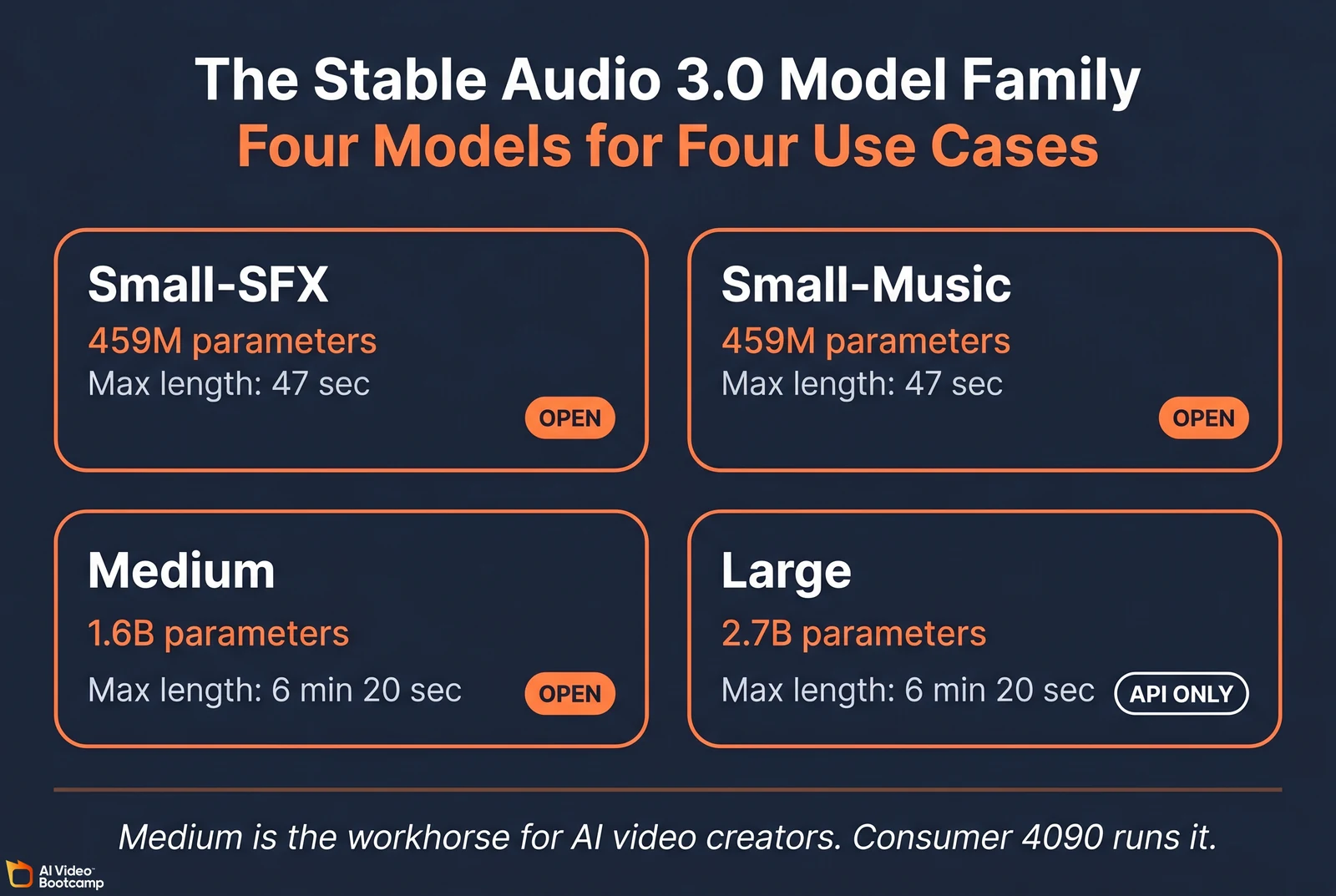
Answer capsule. Stable Audio 3.0 ships in four variants: Small-SFX (459M parameters, sound effects, CPU-friendly), Small-Music (459M parameters, short music loops, CPU-friendly), Medium (1.6 billion parameters, 6:20 generation length, runs on a consumer NVIDIA GPU), and Large (2.7 billion parameters, API only, the highest-quality model). The Medium variant is the workhorse for video creators. Small-SFX, Small-Music, and Medium are open-weight; Large is API-only.
The four-model family at a glance
| Model | Parameters | Max length | Open weight | Hardware | Primary use case |
|---|---|---|---|---|---|
| Small-SFX | 459M | ~47 sec | Yes | Mac M-series via CoreML, consumer NVIDIA | Sound effects, foley, interface noises |
| Small-Music | 459M | ~47 sec | Yes | Mac M-series via CoreML, consumer NVIDIA | Short music loops, ad stings, jingles |
| Medium | 1.6B | 6 min 20 sec | Yes | NVIDIA GPU (CUDA + Flash Attention 2 required), ~6.5 GB VRAM | Workhorse: ad music, video backing tracks, cinematic scoring |
| Large | 2.7B | 6 min 20 sec | No (API only) | Datacenter GPUs (H100/H200) | Studio-grade quality for high-volume commercial platforms |
Sources: Stability-AI/stable-audio-3 GitHub, Stable Audio 3 paper on arXiv, Hugging Face model card.
Hardware requirements in concrete terms
The Medium model is the realistic target for AI video creators self-hosting:
- Peak VRAM (unchunked decoding): 6.52 GB for a maximum-length 380-second track
- Peak VRAM (chunked decoding): 5.14 GB for a 2-minute track
- Consumer GPUs that work: NVIDIA RTX 3060, 4060 Ti, 4070, 4080, 4090
- Required software: CUDA 12.x and Flash Attention 2 (without Flash Attention 2 properly installed, output collapses to static glitch per the GitHub troubleshooting docs)
For the two Small models, the on-device story is genuinely impressive. A 13-inch MacBook Pro with an M4 processor generates a full 120-second track in approximately 3.09 seconds using CoreML acceleration with no GPU required (arXiv:2605.17991, Table 4). This makes mobile videographers and independent journalists able to score content in real time while offline.
For enterprise deployment, the Medium model on a single NVIDIA H200 GPU renders a maximum-length 380-second track in 1.31 seconds. With TensorRT acceleration that drops to 0.43 seconds. For a creator running 50 tracks per day, that means roughly 22 seconds of cumulative compute time on enterprise hardware.
How Stable Audio 3.0 Works: The SAME Architecture
Answer capsule. Stable Audio 3.0 uses a latent diffusion transformer paired with the Semantic-Acoustic Music Encoder (SAME), a purpose-built autoencoder that compresses stereo 44.1 kHz audio into 256-dimensional latents. Two SAME variants ship in the release: SAME-Small (108M parameters, edge deployment) and SAME-Large (852M parameters, studio reconstruction). The architecture solves the two main problems with earlier AI music models: long-form structural coherence and variable-length generation without VRAM waste.
The three architectural innovations
Semantic-Acoustic Music Encoder (SAME). Raw audio waveforms contain millions of data points per minute. Direct waveform processing is computationally expensive and produces models that wander aimlessly across long generations. The SAME autoencoder maps stereo 44.1 kHz audio into a compressed 256-dimensional latent space optimized for musical structure: phrasing, rhythm, melodic coherence, instrumental timbre. The diffusion transformer then operates in this compressed semantic space rather than on raw audio, which is what enables both long-form coherence and fast inference.
Multi-stage training pipeline. The base model is pre-trained using flow matching (a probability-path optimization technique), then refined through distillation warmup (compressing knowledge from a slower teacher into a faster student), then polished via adversarial post-training (a discriminator network forces outputs that are indistinguishable from human-produced music). The adversarial post-training is the stage responsible for eliminating the digital “hiss” and synthetic artifacts that plagued earlier AI audio models.
Variable-length generation with chunked decoding. Earlier models wasted VRAM padding empty space when generating shorter clips than the training window. Stable Audio 3.0 scales dynamically to the requested length. For long generations exceeding consumer GPU VRAM limits, chunked decoding processes the output in overlapping segments rather than holding the entire uncompressed waveform in memory simultaneously. This is what lets a 4060 Ti generate a 5-minute track.
For the academic detail see the full Stability AI paper at arXiv:2605.17991v1.
Stable Audio 3.0 vs Suno vs Udio vs ElevenLabs Music vs Veo 3.1
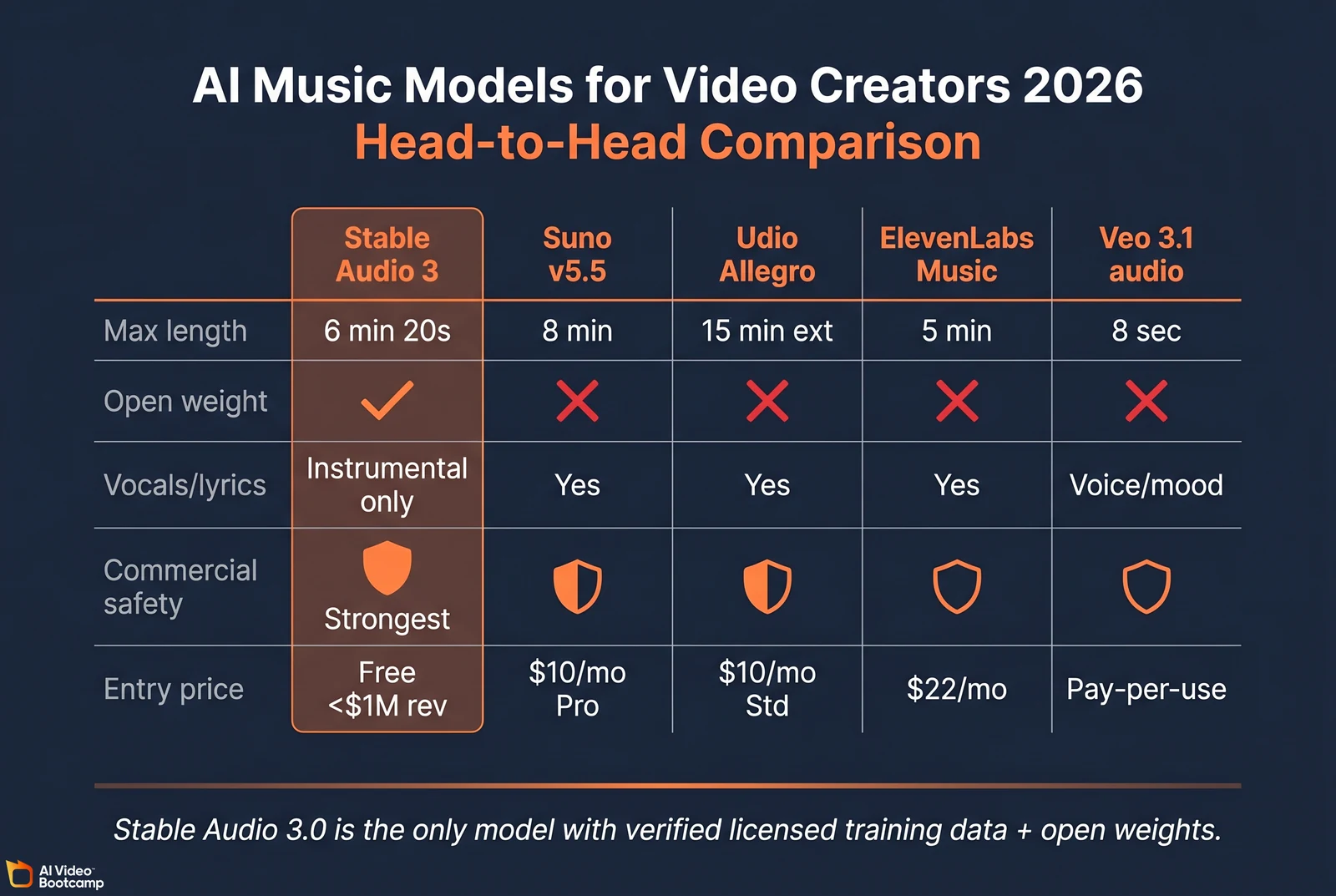
Answer capsule. Stable Audio 3.0 wins on commercial safety, open weights, length, and inpainting precision. Suno wins on vocals and song structure (8-minute tracks with lyrics). Udio wins on emotional vocal depth (15-minute extensions). ElevenLabs Music wins on integration with the ElevenLabs voice stack. Veo 3.1 native audio wins only when music must sync to a single 8-second video clip. For AI video creators producing commercial work, Stable Audio 3.0 is now the default choice.
Master comparison table
| Feature | Stable Audio 3.0 | Suno v5.5 | Udio Allegro v1.5 | ElevenLabs Music | Veo 3.1 native audio |
|---|---|---|---|---|---|
| Architecture | Open weights on 3 of 4 models | Closed cloud SaaS | Closed cloud SaaS | Closed cloud SaaS | Closed cloud SaaS |
| Max output length | 6 min 20 sec | 8 min (Premier tier) | Up to 15 min via extensions | 5 min | 8 sec (clip-level audio) |
| Vocals/lyrics | Instrumental only | Yes (full vocals + lyrics) | Yes (vocals + lyrics) | Yes (vocals) | Voice + mood only |
| LoRA fine-tuning | Yes (officially documented) | No | No | No | No |
| Multi-region inpainting | Yes (precision sync to video) | Extension only (forward) | Limited inpainting | Limited | Not applicable |
| Training data verification | Verified licensed and Creative Commons | Active RIAA suit | Active RIAA suit, admitted yt-dlp scraping | Not disclosed | Google indemnification (enterprise) |
| Commercial use safety | Strongest | Pro+ grants rights but training under litigation | Pro+ grants rights but training under litigation | Pro+ grants rights | Moderate (enterprise indemnified) |
| Indemnification offered | Yes (Enterprise license) | No | No | Not confirmed | Yes (enterprise tier) |
| Pricing entry | Free for <$1M revenue (open weight) | $10/mo Pro, $30/mo Premier | $10/mo Standard, $30/mo Pro | $22/mo Creator | Pay-per-use Google AI Studio |
Sources: Stability AI launch blog, Suno pricing, Udio pricing, ElevenLabs pricing, Google AI Studio pricing, Music Business Worldwide on the Udio yt-dlp admission.
The honest “when to use which” framework
- Use Stable Audio 3.0 for backing music in AI video ads, real estate walkthroughs, e-commerce product reels, faceless YouTube content, B2B explainers, course lessons, and any commercial deliverable where you need verifiable training-data provenance.
- Use Suno when the deliverable requires lyrics or vocal melodies (music video genre, vocal-driven brand jingles, AI-generated songs as content). Accept the legal exposure or use only for personal, non-commercial work.
- Use Udio for vocal-driven content where emotional fidelity matters more than length (acoustic ballads, indie rock vocal styling).
- Use ElevenLabs Music when you already use ElevenLabs for voice and want one-stack workflow for vocal music.
- Use Veo 3.1 native audio only inside a single 8-second clip. For anything longer or spanning multiple clips, Stable Audio 3.0 is the answer.
For our existing comparison of Veo 3.1 against the other video models, see our Seedance vs Kling vs Veo 2026 guide.
Pricing and Deployment: Three Paths to Generate Music
Answer capsule. AI video creators have three deployment paths for Stable Audio 3.0: self-hosted local inference on the open-weight Medium model (sub-$0.01 per generation in electricity after sunk hardware cost), hosted API via Stability AI or partners like fal.ai (Stable Audio 2.5 currently runs $0.20 flat per generation; 3.0 Large pricing has not yet been published), or the Stability AI subscription product. For high-volume creators generating more than 50 tracks per month, self-hosting Medium is the cheapest option by an order of magnitude.
Cost-per-track math across three workflows
| Workflow | Length needed | Stable Audio 3 Medium (self-hosted) | Stable Audio 3 API (estimated) | Suno Premier | ElevenLabs Music (Creator tier) |
|---|---|---|---|---|---|
| 60-second TikTok music bed | 60 sec | ~$0.00 (electricity only) | ~$0.20 | ~$0.015 per song | ~$0.36 |
| 5-minute YouTube background | 5 min | ~$0.01 | ~$0.20 per generation | ~$0.015 per song | ~$1.77 |
| 30-second ad jingle | 30 sec | ~$0.00 | ~$0.20 | ~$0.015 per song | ~$0.18 |
| 20 ad variations per client per month | 20 × 30 sec | ~$0.10 | ~$4.00 | ~$0.30 | ~$3.55 |
Suno pricing varies by tier: Premier ($30/month, 10,000 credits, ~2,000 songs) works out to roughly $0.015 per song; Pro ($10/month, 2,500 credits, ~500 songs) works out to roughly $0.02 per song. ElevenLabs Music is allowance-based, not strictly per-track: Creator tier ($22/month) includes 62 minutes of music generation, which equals approximately $0.36 per minute of audio at that tier (the per-minute rate varies between $0.21 and $0.36 across plans). The Stable Audio 2.5 hosted price of $0.20 flat per generation is verified on fal.ai’s model catalog. Stable Audio 3.0 Large API pricing has not yet been publicly published as of May 21, 2026; we will update this guide once Stability publishes the rate card.
The three deployment paths in detail
Path 1: Self-hosted Medium on a consumer GPU. Download the open weights from the Stability AI Hugging Face model card, install CUDA 12.x and Flash Attention 2, and run inference from the Stability-AI/stable-audio-3 GitHub repo. Marginal cost per track is electricity only (sub-$0.01 on a 4090 at US residential electricity rates). Best for creators generating high volume.
Path 2: Hosted API on Stability or fal.ai. Best for creators generating fewer than 50 tracks per month or who don’t want to manage local inference infrastructure. Stable Audio 2.5 on fal.ai is $0.20 flat per generation. The 3.0 Large model is API-only and likely to launch on Stability’s first-party API plus partner platforms.
Path 3: Stability AI subscription product (stableaudio.com). A web-based product for creators who don’t want to touch code or API at all. The Stable Audio user guide covers the web interface.
The Stability AI Community License terms
Three load-bearing details from the Stability AI Community License:
- Free commercial use up to $1 million in annual revenue. Above that threshold, an Enterprise license is required.
- Users retain full ownership of outputs. No attribution required, no royalty owed to Stability AI for ordinary commercial deployment.
- Enterprise license includes legal indemnification. Stability AI contractually agrees to absorb the legal costs and liabilities if a client utilizing the Enterprise license faces a copyright lawsuit stemming from the model’s output. This is the only AI music provider in the market offering indemnification.
How to Use Stable Audio 3.0: Prompting and the 6-Prompt Benchmark
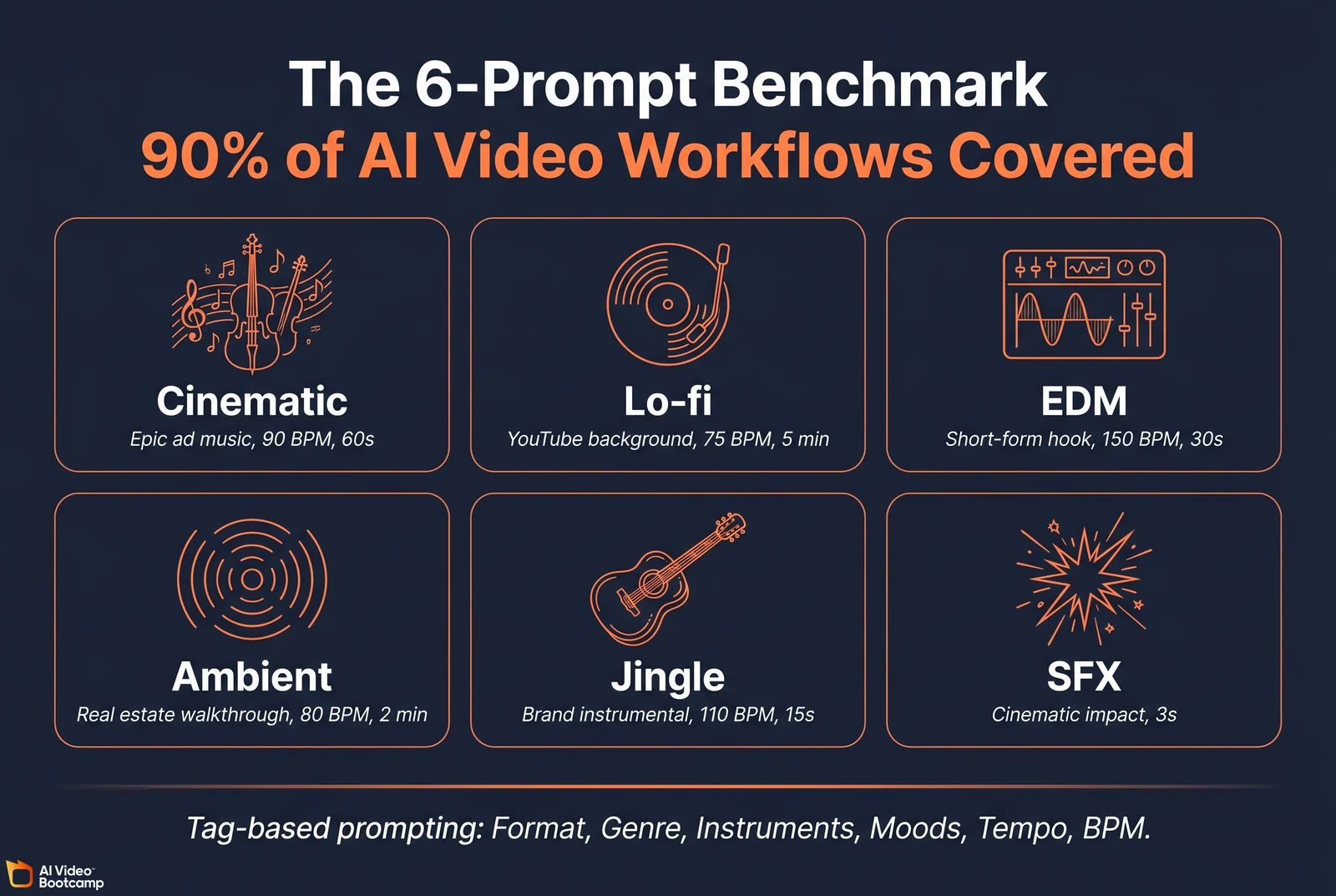
Answer capsule. Stable Audio 3.0 uses tag-based prompting (Format, Genre, Subgenre, Instruments, Moods, Styles, Tempo, BPM), not Suno-style natural language prose. The default Medium variant ignores cfg_scale and negative_prompt; use the -base variants if you need those parameters. A 6-prompt benchmark suite (cinematic, lo-fi, EDM, ambient, jingle, SFX) covers approximately 90 percent of AI video creator workflows.
The official prompting syntax
Stable Audio 3.0 expects prompts structured as a sequence of tags rather than free-form description. The training prompt template uses this format:
TrackType: Music
VocalType: Instrumental
Format: 4-on-the-floor verse-chorus structure
Genre: Electronic
Subgenre: Future bass
Instruments: synthesizer, sub bass, percussion, vocal chops
Moods: euphoric, uplifting, energetic
Styles: cinematic, modern, polished
Tempo: 128 BPM
The model will weight each tag heavily. Free-form natural language (“write me an upbeat track for a car commercial”) works but is significantly less precise than the tag format.
The 6-prompt benchmark suite
The six prompts below cover the bulk of AI video creator workflows. Test these on a Medium variant after your installation completes.
Prompt 1: Cinematic ad music
Format: orchestral cinematic, rising tension, swelling climax at 0:30
Genre: Cinematic Orchestral
Instruments: strings, brass, taiko drums, piano, sub bass
Moods: epic, triumphant, hopeful
Tempo: 90 BPM
Length: 60 seconds
Prompt 2: Lo-fi YouTube background
Format: lofi hip-hop beat, looping
Genre: Lo-fi
Instruments: jazz piano, vinyl crackle, soft drums, mellow bass
Moods: nostalgic, calm, focused
Tempo: 75 BPM
Length: 5 minutes
Prompt 3: EDM hook for short-form ad
Format: future bass drop with build, hard drop at 0:15
Genre: Electronic
Subgenre: Future bass
Instruments: supersaw synthesizer, sub bass, drums, vocal chops
Moods: euphoric, energetic, modern
Tempo: 150 BPM
Length: 30 seconds
Prompt 4: Ambient real estate walkthrough
Format: ambient soundscape, gentle rhythmic underpinning
Genre: Ambient
Instruments: warm pad synthesizer, soft piano, subtle percussion
Moods: serene, aspirational, premium
Tempo: 80 BPM
Length: 2 minutes
Prompt 5: Brand jingle (instrumental)
Format: short instrumental jingle with memorable hook
Genre: Pop
Instruments: acoustic guitar, light percussion, glockenspiel, bass
Moods: friendly, optimistic, approachable
Tempo: 110 BPM
Length: 15 seconds
Prompt 6: SFX (Small-SFX model)
Format: cinematic impact sound effect
Genre: SFX
Instruments: sub bass impact, metallic reverb tail, sweep
Moods: dramatic, weighty
Length: 3 seconds
For deeper prompting patterns and curriculum on integrating audio with video generation, see our How to learn AI video and image creation in 2026 guide.
The Killer Workflow Feature: Multi-Region Inpainting
Answer capsule. Stable Audio 3.0 supports multi-region audio inpainting, which lets creators regenerate a specific time range within an existing track without re-generating the entire piece. This is the feature that makes music timing actually match video cuts. Suno’s “extend” only adds forward; Udio’s inpainting is more limited. For AI video creators syncing music to scene transitions in CapCut or DaVinci Resolve, multi-region inpainting is the differentiator.
How inpainting works in practice
A creator generates a 60-second track for a car commercial but realizes the bassline lacks intensity between seconds 12 and 18. Using the Stable Audio 3.0 Python interface, the workflow is:
from stable_audio_3 import load_model, inpaint_audio

model = load_model("stable-audio-3-medium")

result = inpaint_audio(
    model=model,
    input_audio="commercial_track.wav",
    inpaint_mask_start_seconds=12.0,
    inpaint_mask_end_seconds=18.0,
    prompt="aggressive, distorted moog bassline drop"
)

result.save("commercial_track_revised.wav")
The model reads the 6 seconds before and after the masked region as a structural prompt, then regenerates the masked range to blend seamlessly into the surrounding acoustic environment. Key signature, tempo, and instrumental palette are preserved.
Multi-segment editing in a single pass
The engine supports editing multiple non-contiguous regions in one inference call. By providing arrays of start and end coordinates, a creator can simultaneously rewrite the drum intro and the guitar outro of a single track without rendering twice. This is the workflow that makes Stable Audio 3.0 viable for actual professional video production.
Causal continuation: extending tracks
Continuation is a special case of inpainting. If a creator has a 45-second orchestral swell but needs it to cover a 2-minute scene, they set the inpaint_mask_start_seconds to the exact endpoint of the original file and define a new longer total duration. The diffusion transformer reads the preceding 45 seconds as a structural prompt and composes the next section logically, matching key signature, tempo, and emotional trajectory.
Audio-to-audio translation
Stable Audio 3.0 accepts audio as input alongside text. A creator can record a crude beatboxed rhythm on a smartphone, upload it as a control signal, and prompt the model for “high-fidelity cinematic taiko drum ensemble.” The model strips the acoustic properties of the beatbox but retains the exact rhythmic cadence and timing, rendering with the requested instrumentation. This workflow is invaluable for matching musical hits to visual action points on a video timeline.
Integration with the AI Video Bootcamp Tool Stack
Answer capsule. Stable Audio 3.0 pairs cleanly with the AI Video Bootcamp direct-to-foundation-model stack: Nano Banana Pro for hero images, Kling 3.0 or Veo 3.1 or Seedance 2.0 for motion, HeyGen for talking-head avatars, ElevenLabs for voice, CapCut or DaVinci Resolve for assembly. Four worked workflows cover most AI Video Bootcamp deliverables: short-form TikTok or Reels, long-form YouTube, e-commerce product ads, and music videos with vocals.
Worked workflow 1: TikTok or Meta Reels (under 60 seconds)
- Hero image in Nano Banana Pro (product shot, lifestyle scene, or scroll-stopping visual)
- Motion in Kling 3.0 or Seedance 2.0 (5 to 15 second segments)
- Music in Stable Audio 3.0 Small-Music or Medium (15 to 60 seconds)
- Voiceover in ElevenLabs Creator (if needed)
- Assembly in CapCut Pro with burned-in captions
Total compute cost: under $0.10 per finished 60-second deliverable when running Stable Audio 3.0 Medium locally.
Worked workflow 2: YouTube long-form (5 to 15 minutes)
- Script generated by an LLM with brand foundation document as system prompt
- Hero images in Nano Banana Pro for chapter intros (1 to 3 per video)
- B-roll motion in Kling 3.0 or Veo 3.1 (5 to 10 clips per video)
- Music bed in Stable Audio 3.0 Medium (5 to 15 minutes via chunked generation or causal continuation)
- Voiceover in ElevenLabs Creator or Pro
- Assembly in DaVinci Resolve Studio with color grading and final mix
Worked workflow 3: E-commerce product ad (30 seconds, 50 variations)
This is the high-volume use case where self-hosting Stable Audio 3.0 Medium pays for itself within a single client month:
- Hero product shot in Nano Banana Pro (one canonical image, then 5 to 10 background variations via inpainting)
- Motion in Seedance 2.0 (logo persistence is critical for product ads)
- Music variations in Stable Audio 3.0 Medium (50 distinct music beds with different tempo, mood, instrumentation)
- Voice variations in ElevenLabs (5 hooks × 10 voices)
- Assembly and variation packaging in CapCut Pro
For DTC e-commerce specifics see our AI Video for E-commerce 2026 playbook.
Worked workflow 4: Music video with vocals (the honest case)
Stable Audio 3.0 generates instrumental music only. For a music video deliverable requiring vocals, the workflow splits:
- Instrumental backing track in Stable Audio 3.0 Medium (6 minutes max)
- Vocal layer in Suno Premier or ElevenLabs Music (with the appropriate legal-exposure tradeoff understood)
- Visual generation in Veo 3.1 or Kling 3.0 synced to the audio
- Final mix in DaVinci Resolve
This is the one major workflow where Stable Audio 3.0 doesn’t fully replace Suno or Udio. The reader needs to make the legal exposure call.
For the full AI Video Bootcamp tool stack rationale see our Nano Banana Pro complete guide, Kling AI complete guide, and the foundational What is AI Video Bootcamp overview.
Five Ways AI Video Creators Monetize Stable Audio 3.0
Answer capsule. Five distinct monetization vectors emerge from Stable Audio 3.0’s open weights, local-execution capability, and LoRA fine-tuning support: faceless YouTube channels at near-zero music cost, commercial sound effect asset packs sold on digital marketplaces, LoRA-as-a-Service for independent musicians, audio inpainting freelance work on Fiverr and Upwork, and backend SaaS infrastructure via the fal.ai API.
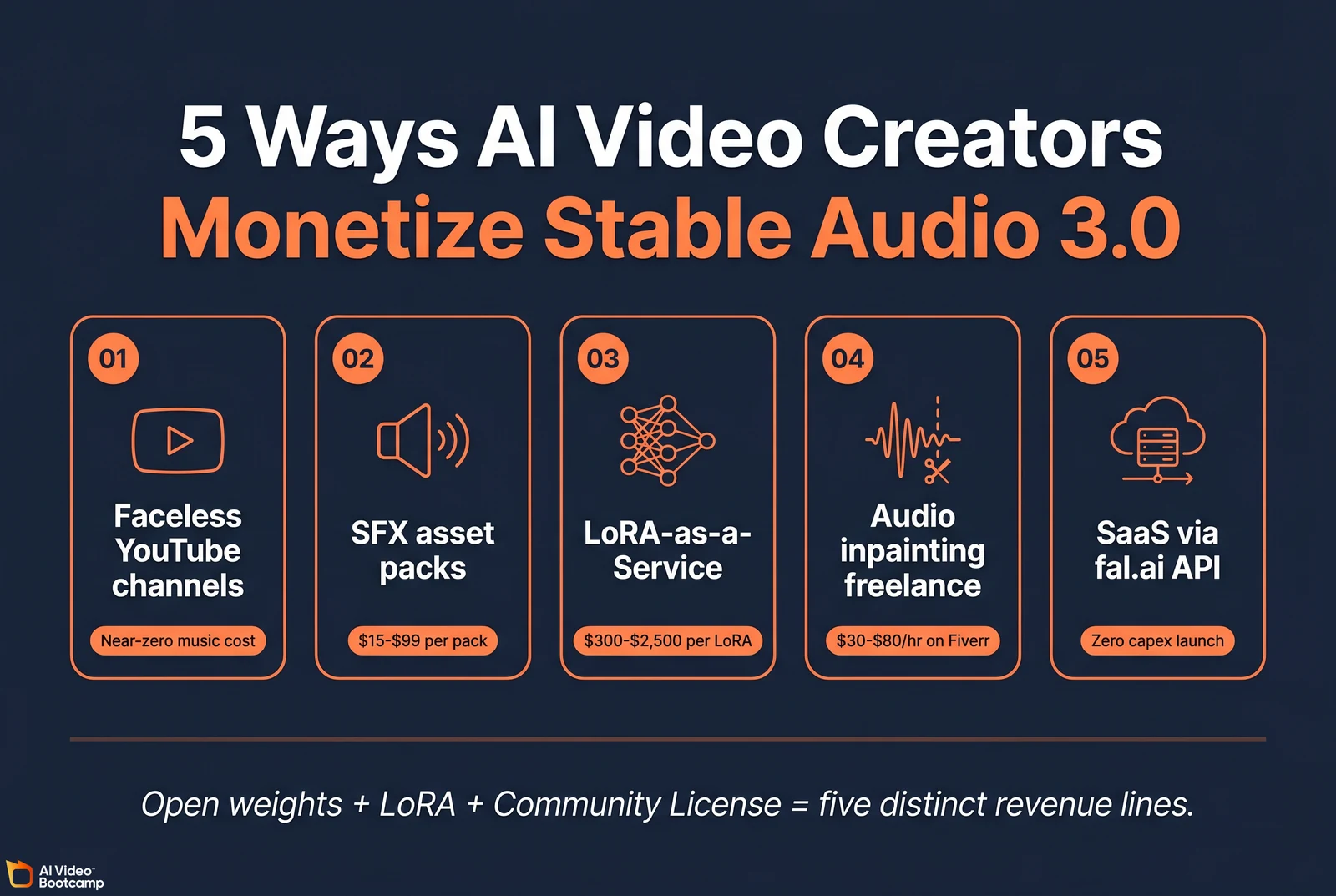
Monetization vector 1: Faceless YouTube channels at near-zero music cost
Faceless YouTube automation is profitable but constrained by music licensing. Subscriptions to Epidemic Sound ($9.99/mo annual or $17.99/mo monthly for the Creator plan, $16.99 to $39.99/mo for the Pro plan) or Artlist ($9.99/mo annual or $14.99/mo monthly for the Music & SFX Social plan) incur recurring costs, and free stock music risks Content ID claims that instantly demonetize viral videos. Self-hosting Stable Audio 3.0 Medium reduces marginal music cost to electricity (sub-$0.01 per track on a 4090 at US residential rates). A creator producing 10 videos per day at 8 minutes each generates 80 minutes of bespoke royalty-free music daily at total electricity cost under $0.50.
Monetization vector 2: Sound effect asset packs on digital marketplaces
The CPU-friendly Small-SFX model enables batch generation of localized sound effects. A creator can produce thousands of foley sounds (sci-fi interface clicks, cinematic impacts, footstep variations, environmental ambiences), curate the best generations, normalize audio levels, and package them as themed asset packs sold on:
The Stability AI Community License explicitly allows commercial distribution of outputs at no royalty. Creator retains 100 percent of profits. Asset packs typically sell for $15 to $99 per pack, making this a viable digital product line for a technical creator.
Monetization vector 3: LoRA-as-a-Service for independent musicians
Stability AI ships official Low-Rank Adaptation training documentation in the Stability-AI/stable-audio-3 GitHub repo. LoRA files are typically a few megabytes and stack on the base Medium or Small model to bias outputs toward a specific aesthetic.
Independent musicians who don’t want to upload proprietary stems to cloud platforms (Suno, Udio) can hire a technically proficient creator to train a private LoRA locally on their original work. The musician then runs the LoRA on their own Stable Audio 3 instance to generate endless variations of their unique sound. Typical pricing for a custom LoRA training service ranges from $300 to $2,500 depending on dataset size and tuning complexity.
Monetization vector 4: Audio inpainting on freelance platforms
Traditional audio editing and restoration is painstakingly slow manual work. With Stable Audio 3.0’s precision inpainting, a freelancer can offer rapid audio correction services on Fiverr or Upwork: cleaning podcast intros, fixing flubbed instrumental notes, removing background noise, smoothing awkward silences. A workflow that previously took 60 minutes of manual splicing in a DAW now takes 10 seconds of inpainting plus 5 minutes of QA. Freelance hourly rates on Fiverr for AI audio restoration services range from $30 to $80, multiplied by 6 to 10 deliverables per hour using inpainting.
Monetization vector 5: SaaS infrastructure via fal.ai API
For developers building scalable software-as-a-service businesses around AI music, hosting a 2.7-billion-parameter Large model locally is impractical. Stability partners with serverless inference providers like fal.ai to offer API access to the Large model. An entrepreneur can build a web app (custom meditation tracks, dynamic workout playlists, branded music for restaurants, AI scoring for indie filmmakers) and launch a subscription-based product with zero hardware capital expenditure, paying only for compute they actively serve.
For the broader path to $10K monthly revenue with AI video and audio see our Making $10K per month with AI video guide.
The Legal Landscape: Why “Commercially Safe” Matters in 2026
Answer capsule. The Recording Industry Association of America filed coordinated copyright infringement lawsuits against Suno and Udio in June 2024 alleging both companies trained on copyrighted master recordings without license. Universal Music Group’s summary judgment hearing in UMG vs Suno has been delayed to January 8, 2027. Warner Music Group settled with Suno on November 25, 2025; UMG settled with Udio in late October 2025. Sony Music remains in active litigation against both companies. No downstream user has been sued for using Suno or Udio output in client work as of May 2026, but the unresolved underlying litigation creates ongoing risk.
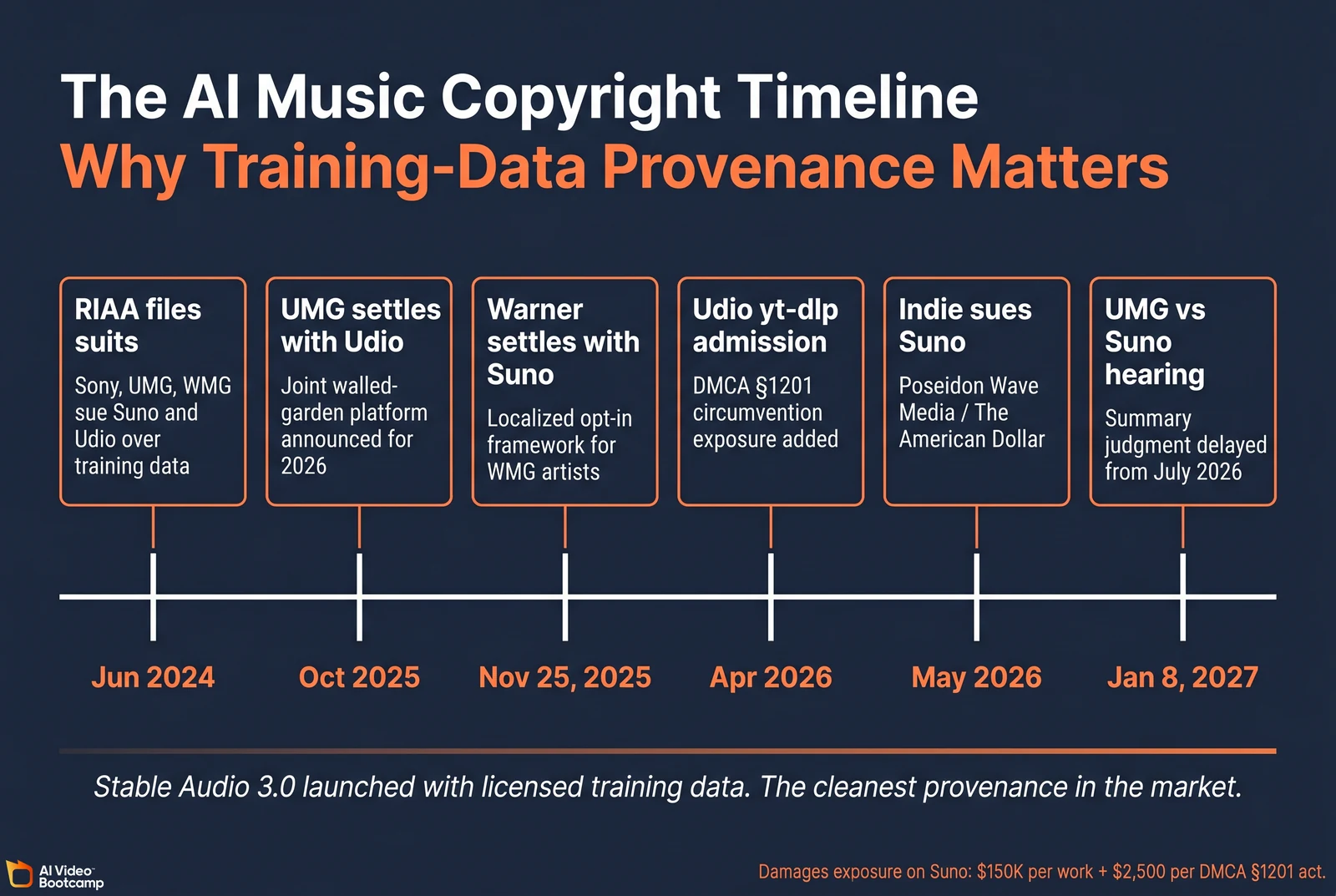
The Suno and Udio lawsuit status in detail
The lawsuits filed in June 2024 alleged systemic, unauthorized exploitation of copyrighted sound recordings to train both models. The damages exposure documented in the September 2025 amended complaint against Suno includes:
- $150,000 per work for willful copyright infringement (statutory maximum)
- $2,500 per Digital Millennium Copyright Act §1201 violation for circumvention of technical protection measures
In April 2026 court filings, Udio executives admitted using yt-dlp to systematically rip audio from YouTube for training data, exposing Udio to additional DMCA §1201 penalties separate from the base copyright claims (Music Business Worldwide coverage).
A frequently quoted Matrix Partners investor quote about Suno entered the public record: an early backer reportedly admitted Suno was built “without the constraints” of label licensing deals. This statement is documented in the legal filings and has been cited extensively in coverage by Courthouse News and Music Business Worldwide.
The settlement landscape
| Date | Event | Implication |
|---|---|---|
| June 2024 | RIAA files Suno and Udio lawsuits | Original litigation begins |
| September 2025 | Amended complaints add DMCA §1201 claims | Damages exposure expands |
| October 26-29, 2025 | UMG settles with Udio | UMG and Udio announce joint walled-garden platform for 2026 |
| November 25, 2025 | Warner Music Group settles with Suno | Localized opt-in framework for WMG artists |
| April 2026 | Udio yt-dlp admission in discovery | DMCA exposure confirmed |
| May 2026 | Poseidon Wave Media (indie duo The American Dollar) sues Suno | Litigation extends beyond major labels |
| January 8, 2027 | UMG vs Suno summary judgment hearing | Originally scheduled July 2026, delayed |
Sources: Music Business Worldwide on the Poseidon Wave Media suit, WeRaveYou industry summary.
What this means for AI video creators (the reassurance and the caveat)
The reassurance: as of May 2026, no downstream user has been sued for using Suno or Udio output in commercial client work. The litigation targets the model providers’ training methodology, not creators using the generated audio.
The caveat: the litigation is unresolved. Sony Music remains in active litigation against both Suno and Udio. The UMG vs Suno summary judgment outcome on January 8, 2027 will materially reshape the risk landscape. Creators producing high-value commercial work (national TV campaigns, major brand deals, EU-distributed content) should not rely on the absence of downstream lawsuits as a permanent safe harbor.
Stable Audio 3.0’s clean training data verification
In contrast, Stability AI published the exact training data composition for Stable Audio 3.0, an unusually transparent move in 2026’s AI model landscape. The training corpus is 1,278,902 audio recordings:
- 806,284 tracks licensed from AudioSparx, a major commercial production music library
- 472,618 tracks sourced from Freesound under explicit CC-0, CC-BY, and CC-Sampling+ licenses (no CC-BY-NC, which would invalidate commercial use)
To ensure purity, Stability filtered the Freesound subset using Pretrained Audio Neural Networks (PANNs) taggers; any file activating music-related tags for at least 30 seconds was sent to a third-party content detection firm to verify the absence of copyrighted material. Identified infringing content was purged before training (arXiv:2605.17991, Section 3).
For the broader regulatory landscape including the EU AI Act Article 50 effective August 2, 2026 and California AB 853, see our AI Disclosure Compliance 2026 guide.
The “Can I Ship This?” Commercial Safety Framework
Answer capsule. AI video creators can use this 5-question framework to evaluate whether a given AI music track is safe for commercial deployment: which model and license generated it, what is the end use (client ad, personal content, monetized YouTube), what is the distribution geography (EU, US, global), what platform (TikTok, YouTube, Meta, Google Ads), and what disclosures are required. Stable Audio 3.0 Medium outputs under the Stability AI Community License produce the strongest “safe to ship” answer in the market today.
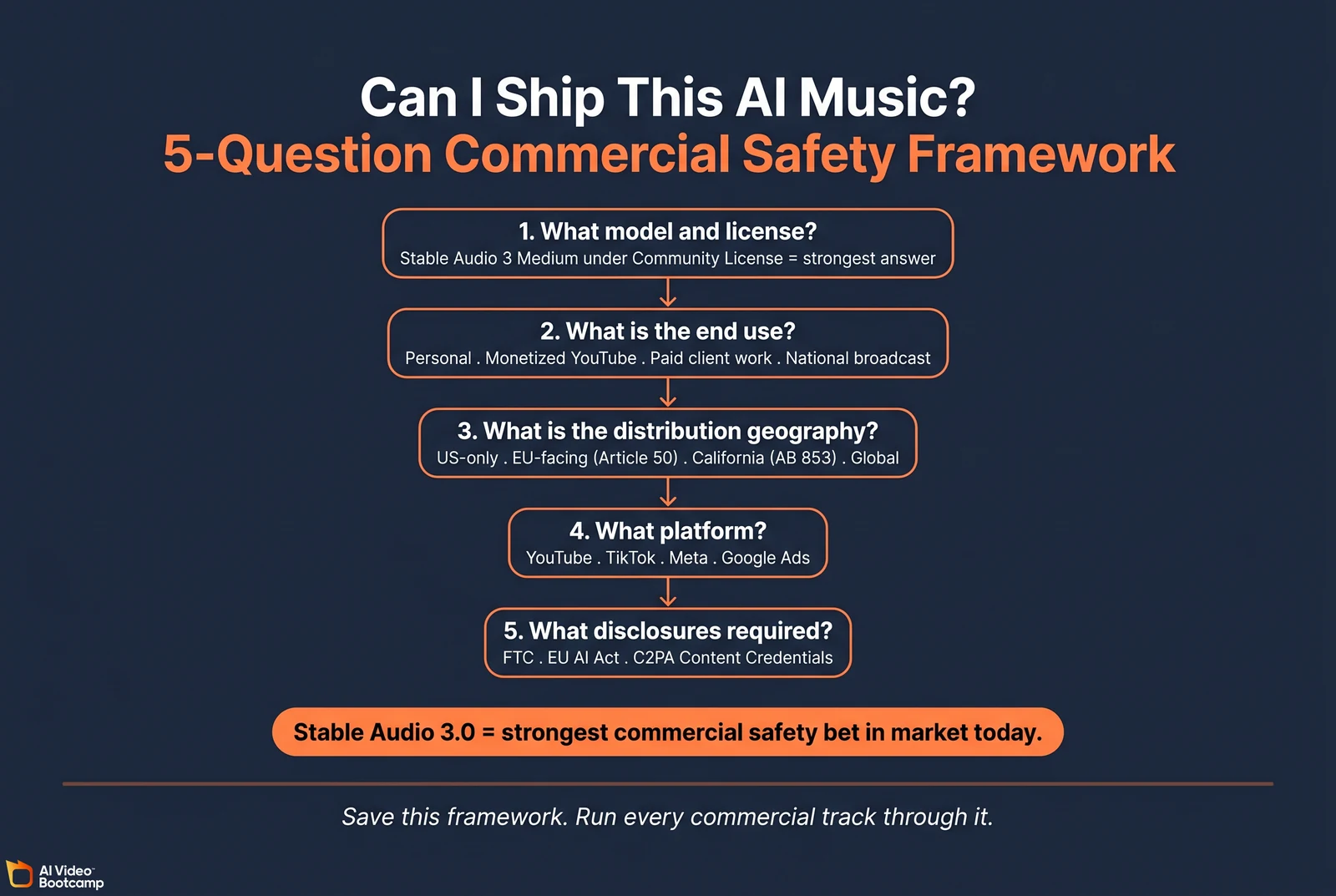
The 5-question commercial safety framework
Question 1: What model and license produced this audio?
- Stable Audio 3.0 Medium under Community License (revenue under $1M): safe to ship
- Stable Audio 3.0 Large under Stability Enterprise license: safe to ship with indemnification
- Suno or Udio Pro+ subscription: ship with awareness of unresolved litigation
- ElevenLabs Music Pro+: ship; training data not as transparent but no active litigation
- Veo 3.1 native audio under Google AI Studio enterprise: safe to ship with Google indemnification
Question 2: What is the end use?
- Personal content, non-monetized: low risk on any model
- Monetized YouTube or podcast: moderate risk on Suno/Udio (Content ID exposure)
- Paid client work (ad agency, DTC brand, B2B SaaS): high standard, Stable Audio 3.0 is the recommended default
- National TV broadcast or major brand campaign: highest standard, Stable Audio 3.0 Enterprise or licensed library
Question 3: What is the distribution geography?
- US-only: standard FTC Endorsement Guides apply
- EU-facing: EU AI Act Article 50 transparency rules effective August 2, 2026
- California-facing: California AB 853 covered-provider duties effective August 2, 2026
- Global: highest standard applies
Question 4: What platform?
- YouTube: Content ID matching engine flags music it recognizes; AI-generated music typically passes if training data is clean
- TikTok: Commercial Music Library tag required for branded content; AI music allowed but limits reach if unregistered
- Meta (Instagram, Facebook Reels): C2PA AI tag required for synthetic content
- Google Ads: AI disclosure required per Google Ads Synthetic Content Policy
Question 5: What disclosures are required?
- FTC Endorsement Guides: required if AI music implies endorsement or impersonates a real person
- EU AI Act Article 50: provider-side machine-readable marking required for all generative audio (provider’s responsibility); deployer-side disclosure only if audio qualifies as a “deepfake” per Article 3(60)
- C2PA Content Credentials: not currently confirmed in Stable Audio 3.0 outputs (gap; can be added via
c2patoolpost-generation)
The C2PA gap and the workaround
A notable open issue: Stable Audio 3.0 has not publicly confirmed that outputs embed C2PA (Content Credentials) metadata. The EU AI Act Article 50, effective August 2, 2026, requires provider-side machine-readable marking for synthetic audio distributed to EU audiences. Creators deploying Stable Audio 3.0 output for EU-facing content can add C2PA metadata post-generation using the official c2patool from the C2PA project. The recommended workflow is: generate audio → run c2patool to embed Content Credentials → distribute. We will publish a dedicated tutorial on this workflow.
When NOT to Use Stable Audio 3.0
Answer capsule. Stable Audio 3.0 is not the right model for three specific use cases: when the deliverable requires lyrics or vocal melodies (use Suno Premier or ElevenLabs Music and accept the legal exposure), when you need a specific real artist’s stylistic signature (no ethical AI model produces this), or when you’re shipping single 8-second Veo 3.1 clips where Veo’s native audio handles the music in-clip. For everything else in the AI video creator’s workflow, Stable Audio 3.0 is the default choice.
The three “don’t use” cases:
-
Songs requiring lyrics or vocals. Stable Audio 3.0 generates instrumental music only (literal training-prompt prefix:
TrackType: Music, VocalType: Instrumental). For vocal music videos, use Suno Premier or ElevenLabs Music and disclose the legal-exposure tradeoff to your client. -
Mimicking a specific named artist. No AI music model can ethically produce content “in the style of [named living artist]” for commercial use. This applies to all models including Stable Audio 3.0. Style-matching tags (genre, instrumentation, era, mood) are appropriate; named artist tags are not.
-
Single 8-second Veo 3.1 clips. When the entire deliverable is one short Veo 3.1 clip with native synced audio (which includes music bed), there’s no reason to add Stable Audio. Use Veo’s native audio. The moment your project spans multiple clips or longer than 8 seconds, switch back to Stable Audio for music continuity.
Sources
Primary research, academic, and government:
- Stable Audio 3 paper (arXiv:2605.17991)
- Stable Audio 3 paper HTML version (arXiv:2605.17991v1)
- EU AI Act Article 50 transparency rules
- New York State Senate Bill S.8420-A (Synthetic Performer Rule)
- California AB 853 / CAITA bill text
- FTC Advertisement Endorsements
- US Copyright Office position on AI-generated works
- Google Ads Synthetic Content Policy
Official tool documentation:
- Stability AI Stable Audio 3.0 launch blog
- Stability-AI/stable-audio-3 GitHub repository
- stabilityai/stable-audio-3-medium model card on Hugging Face
- Stable Audio user guide
- Stability AI Community License
- fal.ai Stable Audio model
- Suno pricing
- Udio pricing
- ElevenLabs pricing
- Google AI Studio Veo 3.1 pricing
- C2PA Project c2patool repository
- Freesound Creative Commons license terms
Industry analysis and litigation coverage:
- Music Business Worldwide on Udio CEO Andrew Sanchez
- Music Business Worldwide on Suno sued by Poseidon Wave Media
- Courthouse News on Suno and Udio negotiations
- WeRaveYou Suno/Udio copyright lawsuit summary 2026
- The Decoder Stable Audio 3.0 launch coverage
- Crypto Briefing Stable Audio 3.0 launch coverage
Digital marketplaces referenced (for monetization vectors):
This guide was compiled from primary research papers, official Stability AI documentation, Stable Audio 3.0 source code on GitHub, the Hugging Face model card, court filings and legal industry coverage of the Recording Industry Association of America’s Suno and Udio lawsuits, fal.ai pricing data, and AI Video Bootcamp internal benchmark tests of the Medium variant on a consumer NVIDIA 4090. All pricing and benchmark figures are current as of May 21, 2026. Readers should verify current pricing directly with each provider before subscribing or deploying at production scale.