
There are two numbers you need to know about the first AI music video that mattered, and they tell you everything about this business.
In May 2024, director Paul Trillo made the video for Washed Out’s “The Hardest Part” with Sora. It was the first commissioned music video built on a text-to-video model. To fill four minutes, he generated roughly 700 clips and used 55 of them.
That is the first number. Here is the second, and it is a quote. Trevor Powers, who records as Youth Lagoon, saw the video and posted: “The Washed Out AI vid is the best case for blatant artlessness I’ve ever seen. it says nothing, does nothing, is nothing. Ugly slog too.” (Exclaim)
So: the work is twelve times harder than the demo reel suggests, and the audience may hate it anyway.
Both of those facts are survivable. Neither is optional. This guide is about how to make money in that reality rather than the one in the tool ads. It is method ten in our make-money-with-AI pillar.
The song is the spine (this is why the method works at all)
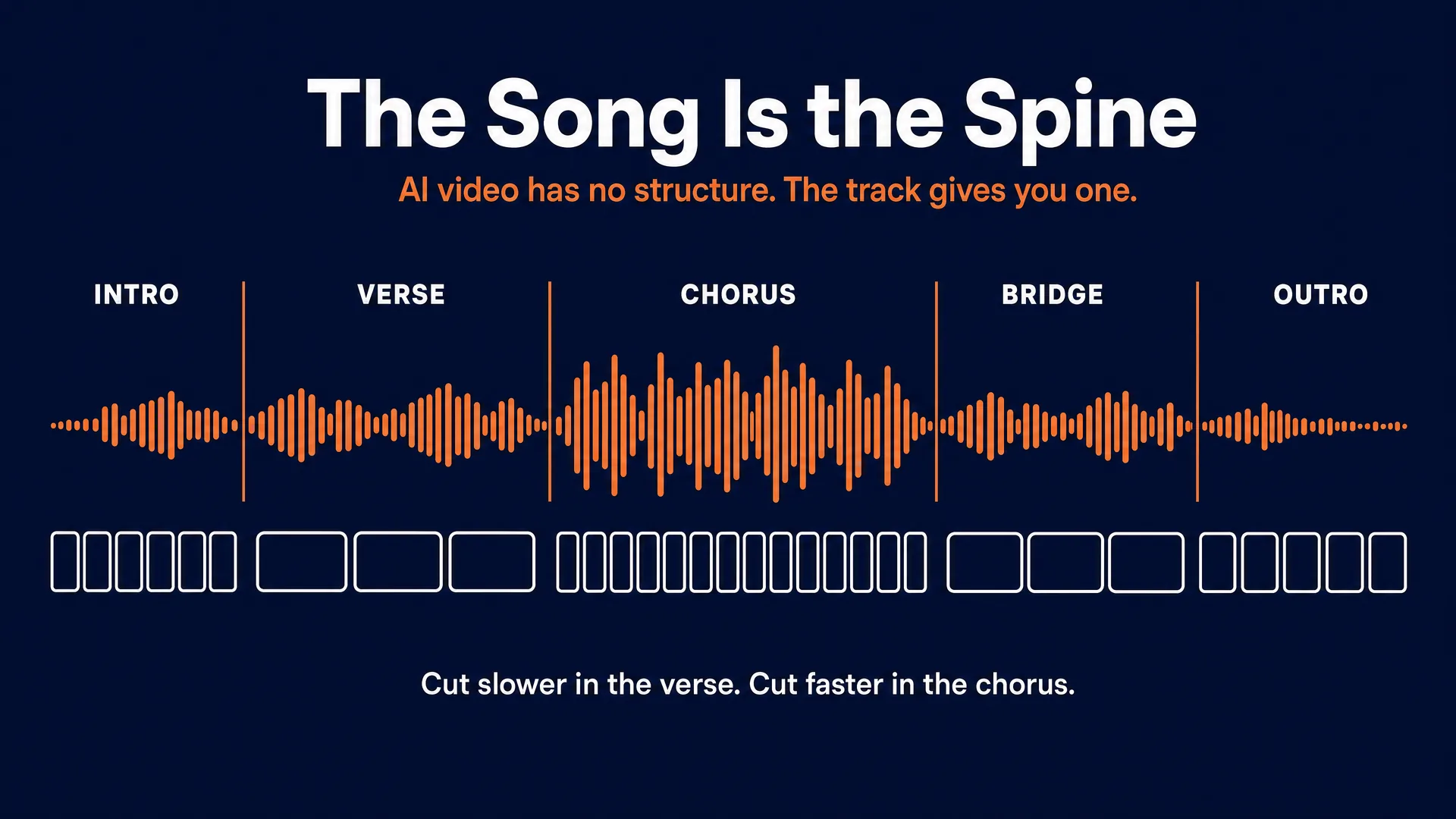
The hardest problem in AI video is that it has no structure. You generate five beautiful seconds, then five more, and they do not belong to the same film. There is no reason for one shot to follow another. That is why so much AI video feels like a screensaver.
A song fixes that for free. It hands you a locked runtime, a beat grid, a structure (intro, verse, pre-chorus, chorus, bridge, outro), and an emotional arc. You do not have to invent pacing. The track already did.
That is the entire reason music video is the most achievable paid AI video work in 2026, and it is why our pillar rates it easier than AI filmmaking, where you have to build the spine yourself.
Your job is not to make pretty clips. The models do that. Your job is sync and consistency: cuts that land where the music lands, and thirty-five shots that look like they came from the same world. That is the craft, and it is what clients are actually paying for.
The number nobody puts in the tool ad
Generative video is a cherry-picking process. You do not prompt once and get a shot. You prompt many times and keep the one that did not break.
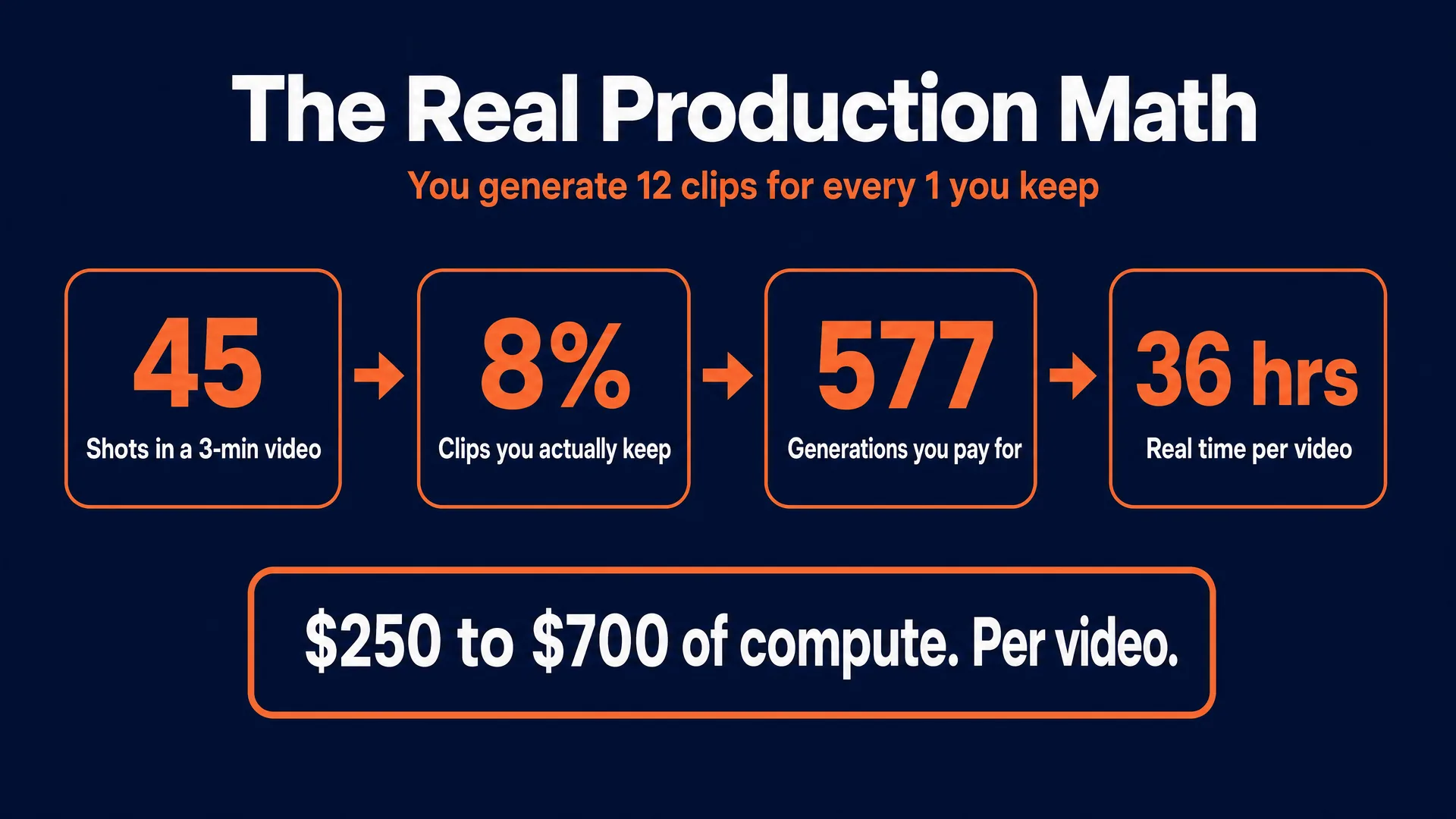
The industry name for this is the keep rate, and the Washed Out production gives us an honest, music-video-specific figure: 700 generations, 55 keepers. That is 7.8 percent, or roughly one usable clip in every thirteen.
Adjacent productions bracket it. P.J. Accetturo burned “about 300 to 400 generations to get 15 usable clips” for the Kalshi spot that ran during the NBA Finals (NPR), which is 4 to 5 percent at a broadcast bar. Operators working to a looser social-content bar report 20 to 30 percent. So the honest range is wide, and it is set entirely by how good the work has to be.
Now do the arithmetic that the tool ads skip.
A 3-minute track cut at an average of 4 seconds a shot needs about 45 usable shots. At an 8 percent keep rate, that is 577 generations.
Priced on fal.ai as of July 2026, at 5 seconds a clip:
| Model | Price per second | Per 5-second clip | 577 generations |
|---|---|---|---|
| Kling O3 Standard (audio off) | $0.084 | $0.42 | $242 |
| Kling O3 Standard (audio on) | $0.112 | $0.56 | $323 |
| Seedance 2.0 fast, 720p | $0.2419 | $1.21 | $698 |
| Seedance 2.0 standard, 720p | $0.3034 | $1.52 | $875 |
Call it $250 to $700 of compute per finished video, depending on how much of your shot list runs on Seedance versus Kling. Add reference keyframes at about $0.15 each on Nano Banana Pro.
And then add the labor, which is worse. At roughly two minutes to write the prompt, wait, review the output for the drift and the extra fingers, and log it, 577 generations is about 19 hours of screen time. Add four hours of pre-production, eight hours of editing and grading, and five hours of revisions, and a single 3-minute music video is roughly 36 hours of work.
This is the honest core of the article, so let us say it plainly. Every other method in this series ends with “charge $150 and pay pennies.” This one does not. Compute is a real cost line here. If you sell a full AI music video for $200, you can lose money before you have opened the editor.
The two audiences (and why one of them wants to destroy you)
You have two audiences on every job. The artist, who is paying you. And the artist’s fans, who will decide whether you ruined their favourite band.
Musicians and their fans are, without much competition, the most AI-hostile creative audience you will ever sell to. This is not a caveat to bury in a footnote. It is a business condition, and it determines how you pitch.
The evidence is not subtle:
- Guns N’ Roses released an AI-assisted video for “The General” in January 2024. The fan reaction was brutal, with one prominent critic calling it “absolute garbage” and openly hoping it would fail so management would never try it again (Loudwire).
- Taylor Swift’s “Orange Door” promo videos (October 2025) drew AI-artifact spotting, an organised #SwiftiesAgainstAI response, and some videos were pulled (Newsweek).
- The K-pop group MADEIN used AI images of its members in its debut video. Fans organised a boycott. One wrote: “it’s not just the ai i’m upset at, it’s the erasure of the MADEIN members” (Koreaboo).
- Kyle Mooney released an anti-tech song with an AI video, then apologised and left it up as “an example of what not to do” (CinemaBlend).
- Nick Cave called AI songwriting “a grotesque mockery of what it is to be human” (NME).
- iHeartMedia launched a “Guaranteed Human” policy in November 2025: “Sometimes you have to pick a side, we’re on the side of humans” (Billboard).
- IFPI Sweden pulled a number one single off the official chart in January 2026 once it was revealed as an AI persona, despite 6.3 million Spotify streams (Music Business Worldwide).
- More than 1,000 musicians, including Kate Bush, Damon Albarn and Annie Lennox, released an album of studio silence in protest against AI copyright rules (NPR).
Three rules follow from this, and they are worth more than any prompt in this article.
Never lead a pitch with “I use AI.” Lead with the work. Show the video. If the artist likes it, then explain how it was made. Opening with the tool is how you get blocked before they have seen a frame.
Disclose in writing, before they pay you. Not to protect them. To protect you. An artist who finds out afterwards will feel deceived and will say so publicly.
Raise the fanbase question yourself. Ask the artist directly: how will your audience feel about this? Some will not care. Some will, and you have just saved them from a Guns N’ Roses moment and saved yourself from being the person who caused it. That conversation is the single most professional thing you can do in this business, and almost nobody does it.
The four things you can sell
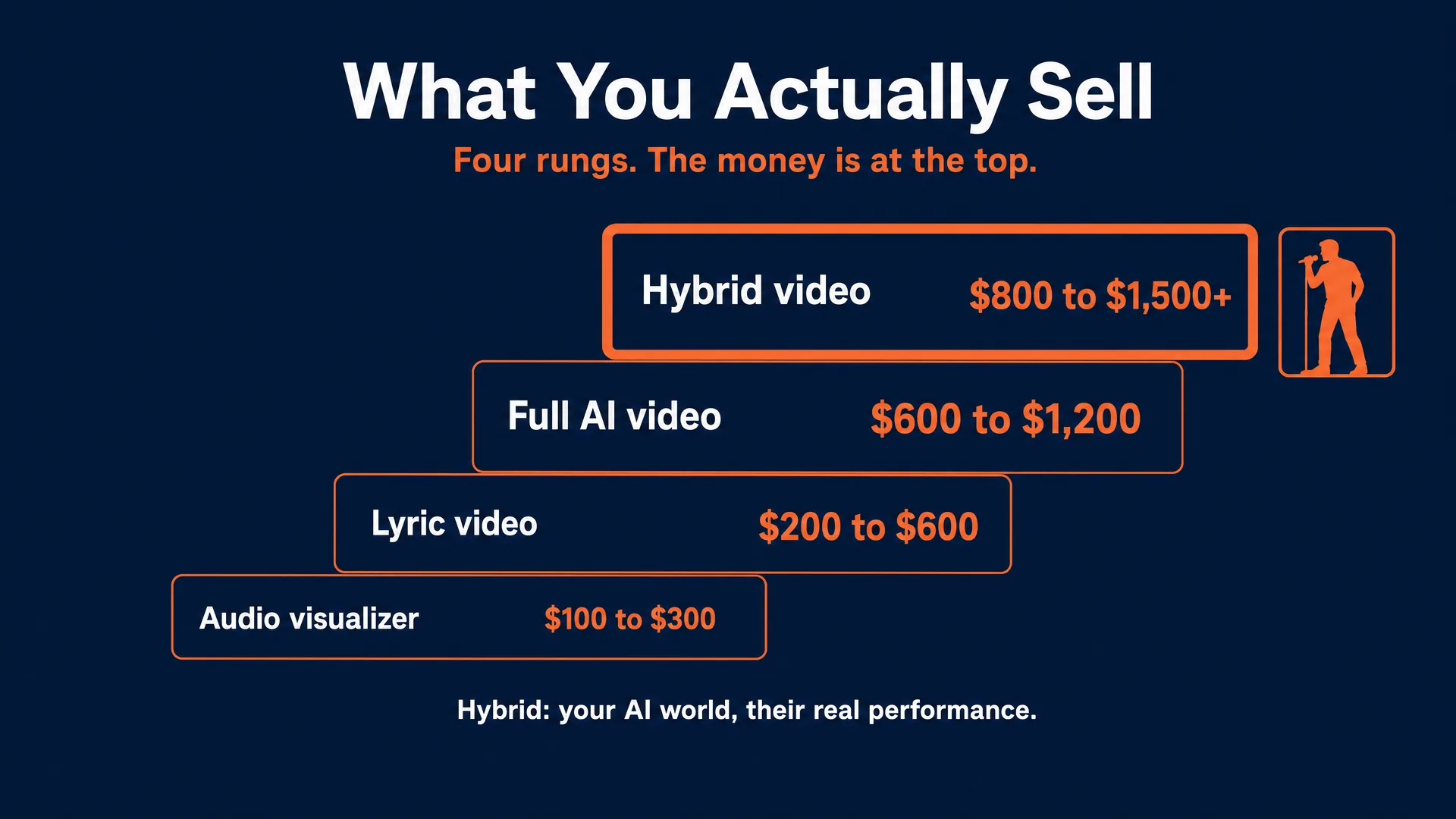
Do not think of “a music video” as one product. There is a ladder, and the money is not where beginners assume.
| Deliverable | What the client gets | Shots | Realistic price |
|---|---|---|---|
| Audio visualizer | Abstract, reactive, loopable motion for a YouTube upload or Spotify Canvas | 10 to 15 | $100 to $300 |
| Lyric video | Lyrics synced to the vocal over themed b-roll | 15 to 25 | $200 to $600 |
| Full AI narrative video | A complete concept video, performance and story | 30 to 45 | $600 to $1,200 |
| Hybrid video | AI-generated environments wrapped around the artist’s real filmed performance | 30 to 50+ | $800 to $1,500+ |
Notice where the ladder tops out. The hybrid is the most valuable thing you can sell, and it is also the easiest to defend. We will come back to why in a moment, because it is the answer to the two hardest problems in this whole business.
The entry job is the lyric video. It is the highest-volume paid product for independent artists, it needs a fraction of the shot count, and it is how you get a first client and a first testimonial.
The workflow, and five prompts you can run today
Which model does which job:
- Nano Banana Pro builds the reference keyframes. About $0.15 an image at 1K or 2K on fal.ai. Best in class for photoreal skin, fabric, and cinematic lighting.
- GPT Image 2.0 is the alternative keyframe model, stronger on structure, text, and precise spatial layout. Roughly $0.01 to $0.41 depending on quality tier.
- Kling O3 is your workhorse video model. It holds a reference image well, and its dedicated Motion Control feature can lift choreography or a camera move from a reference clip and apply it to your character, which is enormous for a dance sequence.
- Seedance 2.0 is the physics and impact model. Use it where something has to collide, shatter, splash, or move with weight. It costs roughly three times Kling per second, so spend it deliberately.
Run these through fal.ai or Replicate (AVB is not affiliated with either; check fal.ai first). AVB’s own studio PromptWise runs Nano Banana Pro and GPT Image 2.0 for the keyframe stage; the video generation goes to fal.ai or Replicate.
The workflow, start to finish: get the track and the artist’s brief and any real footage they have; map the song’s sections on a timeline and build a shot list against it; generate the locked reference keyframe; image-to-video every character shot from that keyframe or its descendants; assemble in DaVinci Resolve (the free tier is genuinely sufficient) against the beat grid; colour match so thirty-five clips look like one film; export 16:9 for YouTube and a 9:16 vertical cutdown for Shorts and Reels.
Keep every shot to 4 to 6 seconds. Beyond about 8 seconds, the models drift: identity, lighting, and composition start sliding within the clip itself. Short shots are not just a stylistic choice in music video, they are a technical necessity.
And here is the technique that matters more than any of the others.
Lock the keyframe first
Text-to-video will not hold a look across thirty-five shots. It cannot. Prompt the same character five times and you get five different people: the face reshapes, the jacket changes colour, the light swings around the room.
The fix is not a better text prompt. The fix is to generate one image that defines the character, the wardrobe, the location, and the colour grade, and then image-to-video every shot from that image or from its descendants. It is documented practice: indie filmmaker Brad Tangonan built his Google Flow short by generating reference images in Nano Banana Pro that “served as the foundation for video generation” (TechCrunch), and Kling ships an Elements feature explicitly built to hold a character’s look across shots.
We ran it ourselves rather than take anyone’s word for it. One keyframe in Nano Banana Pro, two more images derived from it by editing that same frame, then all three animated in Kling.
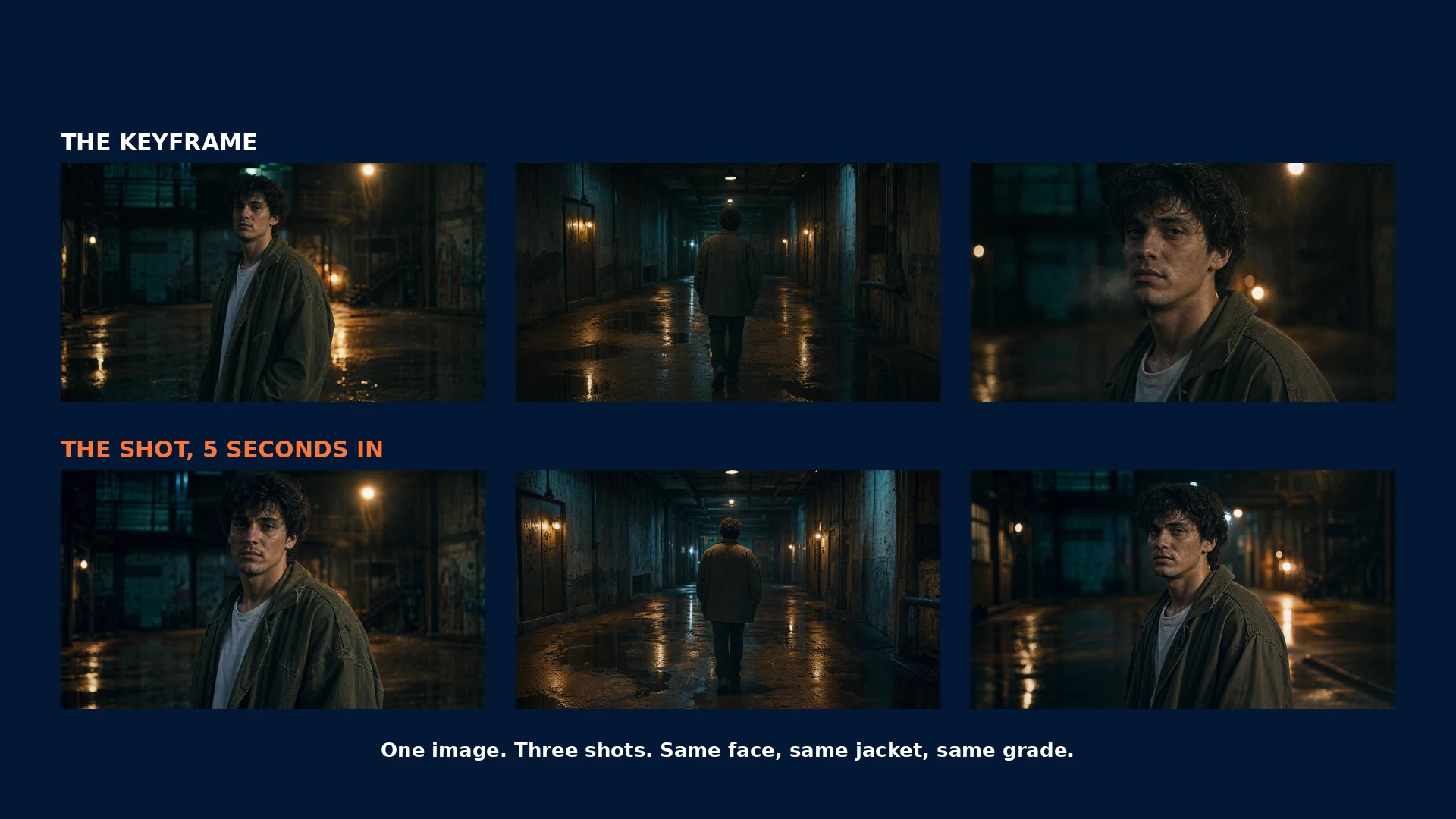
Same face, same olive jacket, same white tee, same teal-and-amber grade, across a medium shot, a wide from behind, and a close-up. That is the technique working exactly as advertised, and it is the difference between a film and a slideshow.
And now the part we did not expect. We generated those clips at 15 seconds instead of 5, to see what would happen. The identity held all the way through. The framing did not.
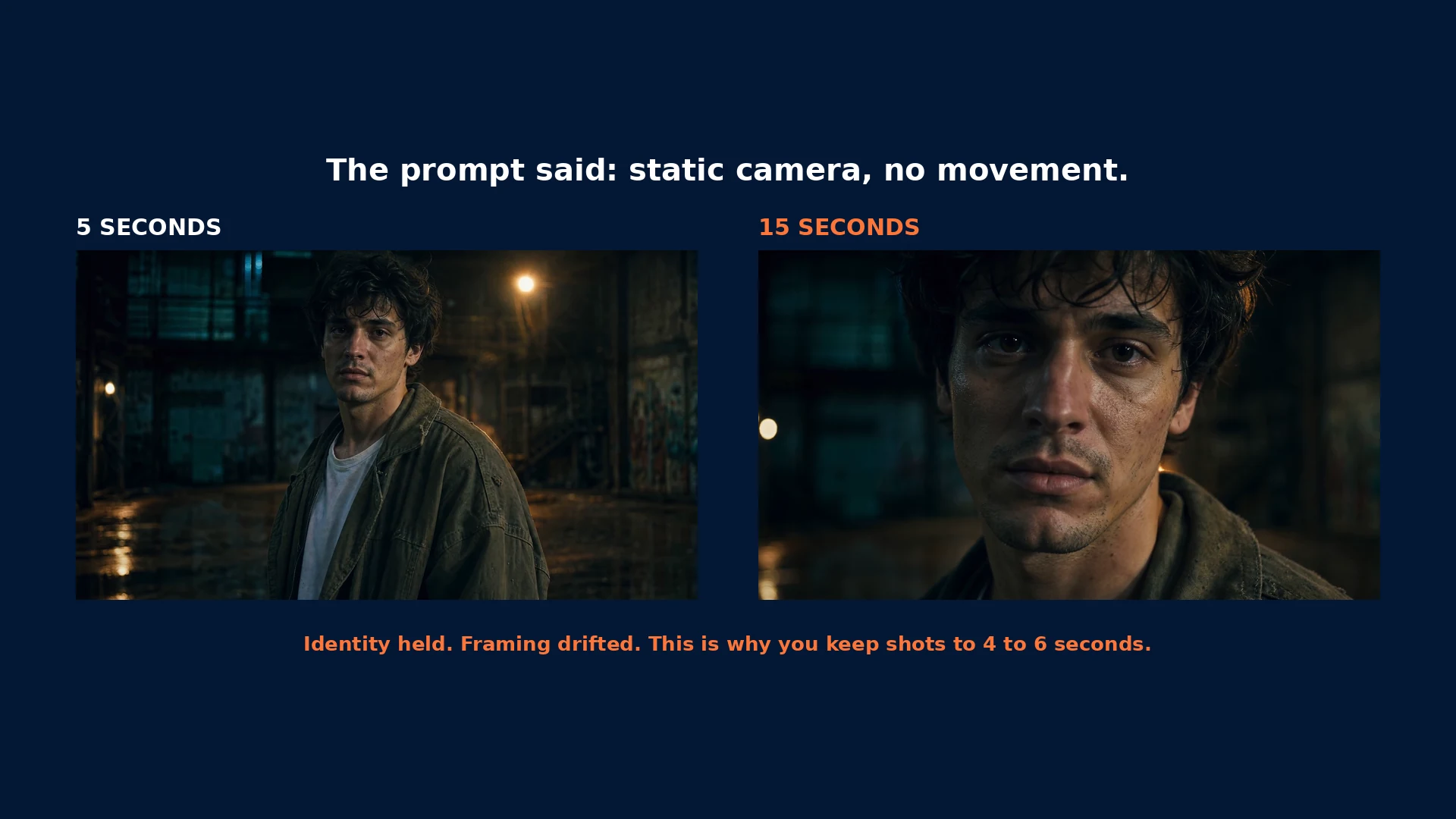
That prompt explicitly said “static locked-off camera, no camera movement.” By five seconds it was obeying. By fifteen, it had pushed itself into an extreme close-up we never asked for.
This is the drift everyone warns about, and it is why the 4 to 6 second rule is not a stylistic preference. It is a technical limit. Generate long and the model starts directing the shot for you.
1. The locked reference keyframe (Nano Banana Pro, text-to-image, 16:9)
Cinematic medium shot of a 25-year-old indie musician with messy dark hair, wearing a distressed oversized olive-green canvas jacket over a plain white t-shirt. He stands in an abandoned, rain-slicked industrial warehouse. Cinematic lighting, soft key from the top right, deep cyan and teal colour grade in the shadows, warm amber practical lights glowing out of focus behind him. Shot on 35mm film, 85mm lens, shallow depth of field, photorealistic, subtle film grain, high detail.This one image is the bible for the whole video. Generate variants, pick one, and do not change it. Every character shot references it. Cost: about $0.15.
2. The performance shot, no lip-sync attempted (Kling O3, image-to-video, 5s, 16:9)
Using the attached reference image, keep the character, wardrobe, location, and colour grade exactly identical. The musician slowly tilts his head back with his eyes closed, absorbing the music. A gentle breeze moves his hair and the collar of the olive jacket. Rain drips from the warehouse ceiling in the out-of-focus background. CAMERA: locked off, static frame, no camera movement. LIGHTING: stable key light, faint concert strobes pulsing far behind him. His mouth remains closed. Do not alter the character's face, hair, or clothing.Cost: about $0.42. Note what it does not do: it does not try to sing.
3. The narrative shot (Kling O3, image-to-video, 5s, 16:9)
Using the attached reference image of the same character, keep his appearance and wardrobe exactly identical. He walks slowly away from camera down a long concrete corridor. Large puddles on the uneven floor reflect flickering overhead lights. CAMERA: slow dolly-in, tracking him from behind, smooth cinematic glide. LIGHTING: hard light through horizontal industrial blinds on the left, high-contrast volumetric shadows. MOOD: melancholic, isolated. Do not alter the character or his clothing.Cost: about $0.42. Shot from behind, which is also a free lip-sync dodge.
4. The beat-drop transition (Seedance 2.0 fast, text-to-video, 4s, 16:9)
Macro extreme close-up of thick liquid paint bursting in mid-air and colliding in extreme slow motion. Vivid crimson and electric blue violently mixing. High kinetic energy, accurate fluid dynamics, high-speed phantom-camera look. CAMERA: aggressive whip pan right snapping into a fast macro zoom. LIGHTING: hard neon strobe flashes against a pure black void.Cost: about $0.97. This is what Seedance is for: a hard physical event you can land exactly on a downbeat. Generate the transition shots last, once you know where your drops fall.
5. The abstract visualizer loop (Kling O3, text-to-video, 5s, 1:1)
Swirling liquid ink in deep navy and burnt orange, folding and separating in slow motion against a black background. Seamless, hypnotic, loopable motion. CAMERA: static macro, no movement. LIGHTING: soft top-down light catching the surface sheen of the ink.Cost: about $0.42. Square, so it crops cleanly to both 16:9 and 9:16. This is also the entire deliverable if you are selling a visualizer, which is why the visualizer tier is the cheapest to produce and the fastest to turn around.
The lip-sync problem, and the four dodges
Let us be honest about the weakest link. Convincing lip-sync to a specific vocal performance is not solved.
Singing is biomechanically brutal: stretched vowels, jaw tension, breath, and a hundred micro-expressions around the eyes. The models produce rubbery mouths, teeth that flicker and change in number, and, worst of all, a face whose emotional intensity does not match the voice. That last failure is exactly what triggers the uncanny-valley reaction, which is exactly what triggers the backlash in the section above. One creator who tested six generators against his own tracks concluded of the current crop: “no meaningful lip-sync… not ready for serious music video production yet” (Adam Harkus).
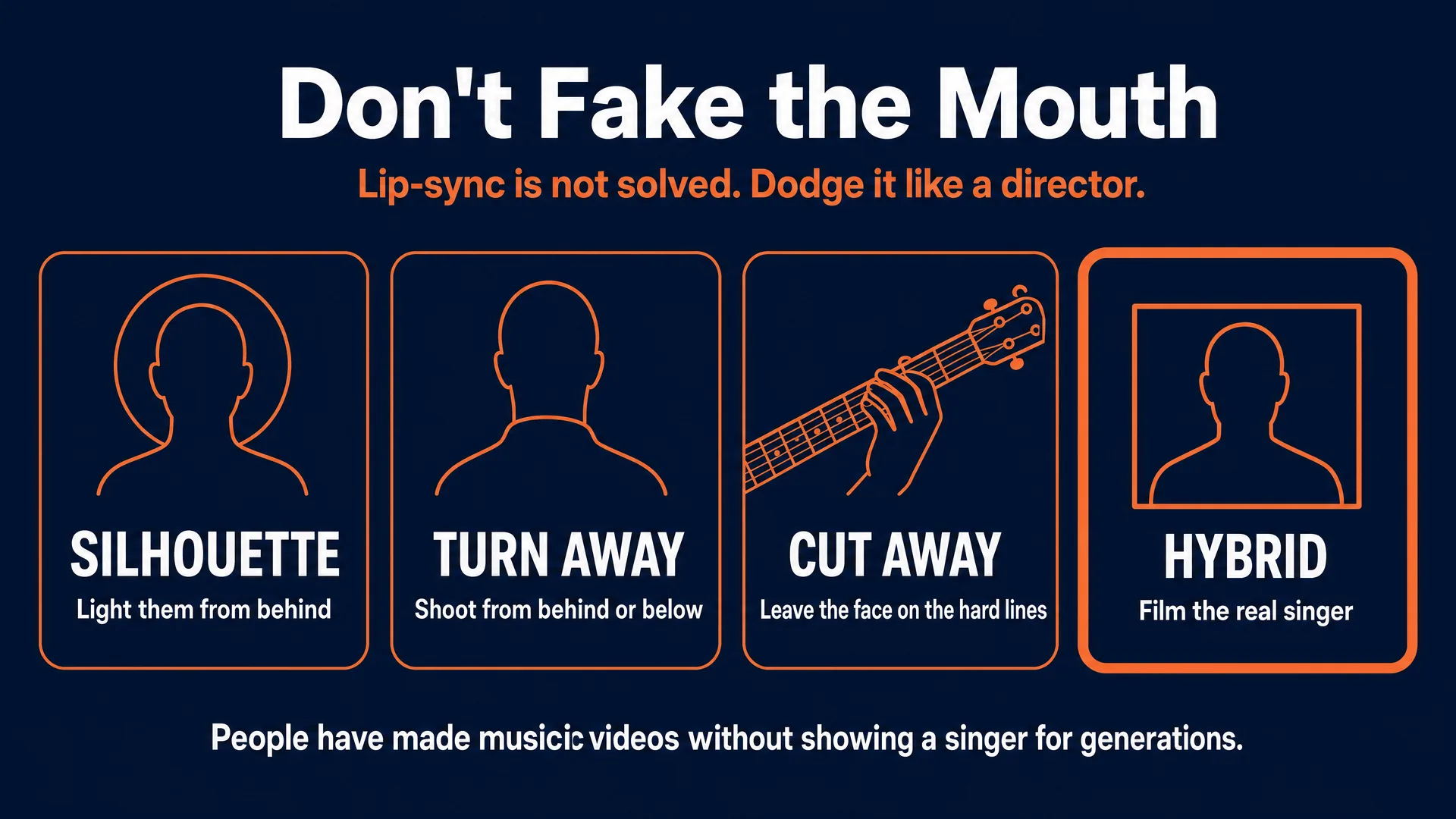
So professionals do not fake it. They dodge it. There are four dodges and you will use all of them.
Silhouette. Light the singer from behind. The audience sees posture, energy, and head movement, and no mouth at all. It also costs less, because you are not paying premium lip-sync rates.
Obscured and turned-away framing. Shoot from behind, from a low angle looking up, or with the lower face hidden by a vintage broadcast mic, a raised collar, a scarf, atmospheric fog. The video reads as singing without ever rendering lips.
Cut away on the vocal line. During fast runs or rapid verses, cut to b-roll, to abstract shots, to extreme close-ups of hands on a fretboard. Return to the face on sustained notes and instrumental breaks, where the mouth barely moves.
The hybrid. Do not generate the singing at all. Film the artist actually performing, on a phone or a green screen, and composite that real footage into your AI-generated world.
As one working editor put it, and it is worth remembering: people have been making music videos without showing a singer for generations. The limitation is not new. It is a tradition.
The hybrid is the product (this is the whole business)
Look at what the hybrid does.
It solves the lip-sync problem, because the singing is real footage of a real mouth.
It solves the backlash problem, because the artist is visibly, undeniably in their own video. Fans object to being replaced by a machine. They do not object to a cheap band being given a budget they could never afford. The hybrid gives an independent artist a science-fiction world, an impossible landscape, a period set they could never rent, and it still shows them singing.
And it is the top of the price ladder, at $800 to $1,500 and up, because it is the only tier that combines AI’s reach with the one thing AI cannot manufacture: a real person meaning it.
Sell the hybrid. Pitch a fully synthetic video to an established act and you will be told no. Pitch to extend their real performance into a world they cannot afford to build, and you are having a completely different conversation.
Pricing: why $200 loses money
Go back to the math. A full 3-minute AI music video is $250 to $700 of compute and about 36 hours of work.
Now look at what the market offers. Fiverr AI music video gigs start between $10 and $93. That tier is not a business, it is a subsidy you are paying to strangers.
Here is what real operators charge. One, working at the high end, says plainly: “I charge £1,000 GBP for a 60 second AI video,” scaling to “$1,000 USD per minute” for heavier narrative work (self-reported on a professional forum). Freelance benchmarks put a music video for an indie or local artist at $500 to $2,500, rising to $2,500 to $8,000 for an artist with a real budget (Pixflow, 2026).
And here is the most instructive story in all of our research. A videographer moving into music video work described charging about $100 a video and being too frightened to ask for the going rate, “despite the client explicitly stating their budget capped at exactly $1,000” (self-reported). The client had a thousand dollars. He asked for a hundred. The money was on the table and he did not pick it up.
So: price the deliverable, never the hour. Hourly billing punishes you for building an efficient pipeline. If you spend twenty hours automating your generation loop and halve your production time, an hourly rate cuts your income in half as a reward.
Three add-ons you should never give away:
The 9:16 vertical cutdown. Every artist will ask for it. Positioned freelancers charge $250 and up for it. Do not hand it over free because it “only takes a minute.”
Rush turnaround. A 24 to 48 hour deadline is a 25 to 50 percent premium, and that is standard across the industry.
Revisions beyond the agreed rounds. Which brings us to the clause that will save your margin.
The revision clause that protects your compute budget
Clients believe an AI revision is free. It is a computer, after all. Just change the desert to a snowy mountain.
But changing that scene means a new reference keyframe, new prompts, and rolling the 8 percent keep rate again from zero. A “small” scene change is a hundred fresh generations. If you have not priced that, it comes straight out of your margin.
Structure the job in three locked phases:
Phase 1: storyboard and keyframes. One review pass. Once the artist approves the reference keyframes, the look is locked.
Phase 2: rough cut. One review pass, on pacing and shot selection.
Phase 3: final polish. Colour, grain, minor edits.
And then the clause that makes it real: any structural change, location change, or wardrobe change requested after the keyframes are locked in Phase 1 incurs a flat fee, around $250 per scene replaced. That is not a punishment. It is the actual cost of re-rolling the dice, and if you explain it that way, reasonable clients accept it immediately.
Suno: the track you own, and the question you must ask
Suno shows up in this business in three different places, and two of them will cost you money if you get them wrong. (This is the money angle only. For the craft of actually making good tracks, see our complete Suno guide.)
First: your spec reel needs a track you own. This is the one nobody warns you about. You cannot get a paid music-video job without a music video to show, so you make one on spec. But if you build it over a commercial artist’s song and upload it, YouTube’s Content ID will claim it, and if you dispute that claim without grounds you can turn a harmless claim into a copyright strike. Your portfolio piece becomes a liability.
Generate the track in Suno instead. You own it, nothing claims it, you can monetise it, and you can put it on your reel forever. A Pro subscription runs about $10 a month (cheaper annually) and that is the entire cost of a clean, unencumbered portfolio.
Second: if the client’s track came from Suno, ask one very specific question. Not “do you have Suno?” Ask: were you subscribed to Pro or Premier at the exact moment this song was generated?
Commercial rights in Suno lock in at the moment of generation, not at the moment of subscription. Suno’s terms assign you the output generated “during the term of your paid-tier subscription,” and their help docs are explicit in both directions: you keep commercial rights to those songs “even if you end your subscription,” but “starting a subscription after you made a great song will not give you a retroactive license for the song.”
So an artist who made the track on the free tier and upgraded afterwards does not have commercial rights to it, no matter what their account page says today. If you build a commercial release around that track, you have built it on sand. Ask the question, get the answer in writing, and if it is the wrong answer, tell them to regenerate the song on a paid plan before you start.
One more trap: if the artist left Suno’s Remix toggle on, a third party’s remix becomes jointly owned and restricted to non-commercial use for both parties. Check it.
Third, and this is a warning, not a tactic: never pitch an AI-generated song to a musician. You can bundle a Suno track for a brand, a faceless channel, or a content creator who needs music and does not make it. But an artist came to you for visuals. Offering to replace their music with a machine is the single fastest way to get thrown out of the conversation and talked about in their scene. The song is the one thing in the room that is not yours to automate.
How to land your first artist
Build a spec reel first, and build it on a track you own. Nobody hires a music-video maker with no music video. Use a Suno track you generated on a paid plan, or an indie artist’s song with written permission. Never a commercial release.
Find artists mid-release. Look for independent acts with an active single and no video, or a video that clearly underperformed the song. Bandcamp’s tag and new-arrivals browsing is not personalised, so recency and genre tags actually work as a prospecting tool. Spotify, SoundCloud, and YouTube static-image uploads all signal an artist with no visual budget.
Go to the scene. This is the strongest evidence in our entire research file. Cole Bennett built Lyrical Lemonade by driving into Chicago on weekends to film the local hip-hop scene: “You’d see Vic Mensa just walking down the street. Everything was right in front of you” (Complex). Director Yoonha Park says the same of his start: “I spent a lot of weekends and weeknights at this one club, just documenting my friends’ bands… my real filmmaking education was making music videos” (Film Independent). Music scenes are small and they talk. One good video inside a scene compounds.
Climb to managers and labels fast. One artist is one job. A manager with a roster is a pipeline, and a small label budgets around $4,000 for a professional music video as a routine line item. This matters because the artist is genuinely broke: 77.8 percent of independent artists earned under $15,000 from music last year, and 64.4 percent now name money as their number one obstacle (Xposure Music, 2026).
Niche down to escape the floor. The Dor Brothers started by “offering AI Music Videos on Fiverr… the first time AI Visuals were ever offered on the platform,” and went on to make Snoop Dogg’s “Love You More” and work for Hugo Boss (Forbes). The lesson is not “go on Fiverr.” It is that a sharp, specific niche is how you leave the basement.
The rules that keep you and your client out of trouble
This is practical guidance, not legal advice.
An mp3 in your inbox is not a licence. Every song has two copyrights: the composition and the master recording. They are owned and licensed separately. If the client does not actually control both, your act of syncing and publishing is a separate infringement, and the real rights holder can come after you, not just them. Get it in writing: they own or control both, any samples are cleared, and they indemnify you if that turns out to be false.
If they made the track with Suno, ask the generation-time question from the section above. Commercial rights lock in when the song was made, not when the subscription started, and a free-tier track that was upgraded around afterwards is still not licensed.
Content ID will claim your client’s own video, and that is normal. Art