
For a long time, “AI filmmaking” meant a ten second clip of something melting into something else. Fun to watch once, impossible to care about. That era is over. In 2026 you can sit down with the tools already open in your browser, write a short film shot by shot, generate it, score it, cut it, and finish something a stranger will actually watch to the end. And there are now real places for that film to go. If you are brand new to this, start with our beginner guide to making AI videos and the AI image and video glossary, then come back here for the bigger picture.
This is not a news piece about a deal. It is a map. By the time you reach the bottom you should be thinking about the film you could start this weekend, because the path in front of you is real.
The signal: why 2026 is the year this got serious
On June 22, 2026, Google DeepMind and the independent studio A24 announced a multi-year research partnership, backed by a reported investment of around 75 million dollars (a figure first reported by the Wall Street Journal and repeated across the trade press). It is Google’s first direct stake in a film studio. The terms are the interesting part: the partnership is non-exclusive, A24 keeps full creative control, and Google does not get access to A24’s film and television library to train models. The early focus is not finished films at all. It is AI-assisted storyboards and pre-visualization, built by a small internal A24 Labs team alongside DeepMind researchers. You can read the announcement in Google DeepMind’s own post and the deal coverage in Variety, The Hollywood Reporter, and IndieWire.
Scott Belsky, the A24 partner overseeing the work, was blunt about the intent: the tools “won’t look anything like the prompted generation type of AI that people feel uncomfortable with.” In other words, this is assistive software for directors, not a button that makes a movie.
A24 is not alone. Around the same time, Martin Scorsese was reported to be prototyping AI storyboard tooling of his own with Black Forest Labs, calling the approach creatively freeing. Funded AI film festivals are handing out five and six figure prizes (more on that below). AI shorts have entered the official lineups of major festivals.
You do not need to care about studio politics to read the signal correctly: the institutions that decide what counts as real filmmaking are now in the water. That is exactly why this is worth treating as a craft to build, not a trend to watch.
A fair note before we go further: this shift is genuinely contested. When the A24 deal landed, plenty of filmmakers were furious, and the backlash was loud. “Backrooms” director Kane Parsons had already called generative AI “cultural rot.” Guillermo del Toro said “f--- AI” on stage at an awards show. That tension is part of the landscape, and we will come back to how an honest creator works inside it rather than pretending it away.
What “AI filmmaking” actually means now
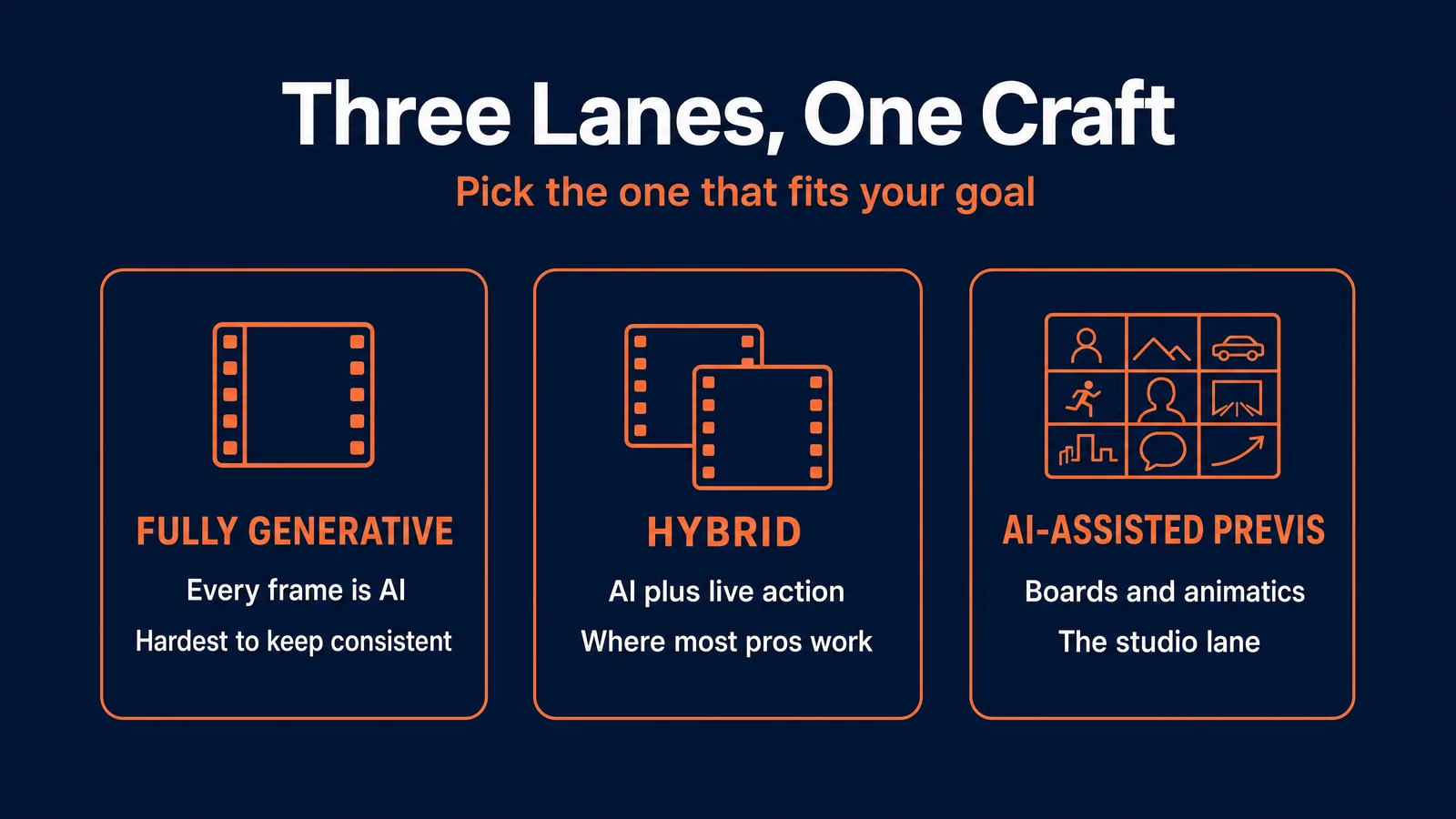
Before the workflow, you need the map of the territory, because “AI filmmaking” is really three different crafts.
Fully generative. Every frame and most of the sound is made by models. This is the hardest mode, because the thing models do worst is stay consistent over time. It is also where solo creators are winning festival slots right now. Think 60 to 180 second shorts.
Hybrid. You shoot real footage and use AI to extend environments, add impossible shots, stylize sequences, or generate b-roll. This is where most working professionals actually live, because it lets AI strengthen a real production instead of replacing it.
AI-assisted previs. AI never touches the final film. It builds storyboards, animatics, and look tests in pre-production. This is the A24 lane, and as you will see, it may be the most durable way to get paid.
Across all three, there is one line that matters more than which tools you used: the line between craft and slop.
Slop is the slot machine. Type a vague prompt, accept whatever falls out, post it. It reads as slop because of what it lacks: a story, characters who stay the same person from shot to shot, real sound design, an actual edit, and the restraint to cut the 185 generations that did not work. Craft is the opposite of all of that. Audiences can tell the difference instantly, and the research backs it up: surveys consistently show most viewers want AI use disclosed, and a majority will happily watch AI work when it is disclosed and it is good.
The good news for anyone learning: every skill that separates craft from slop is teachable. Story and shot literacy, prompting a camera instead of a vibe, consistency discipline, sound, editing. None of it is magic, and our how to learn AI video and how to learn AI image generation pillars walk through each one.
The end-to-end workflow, on tools you can open today
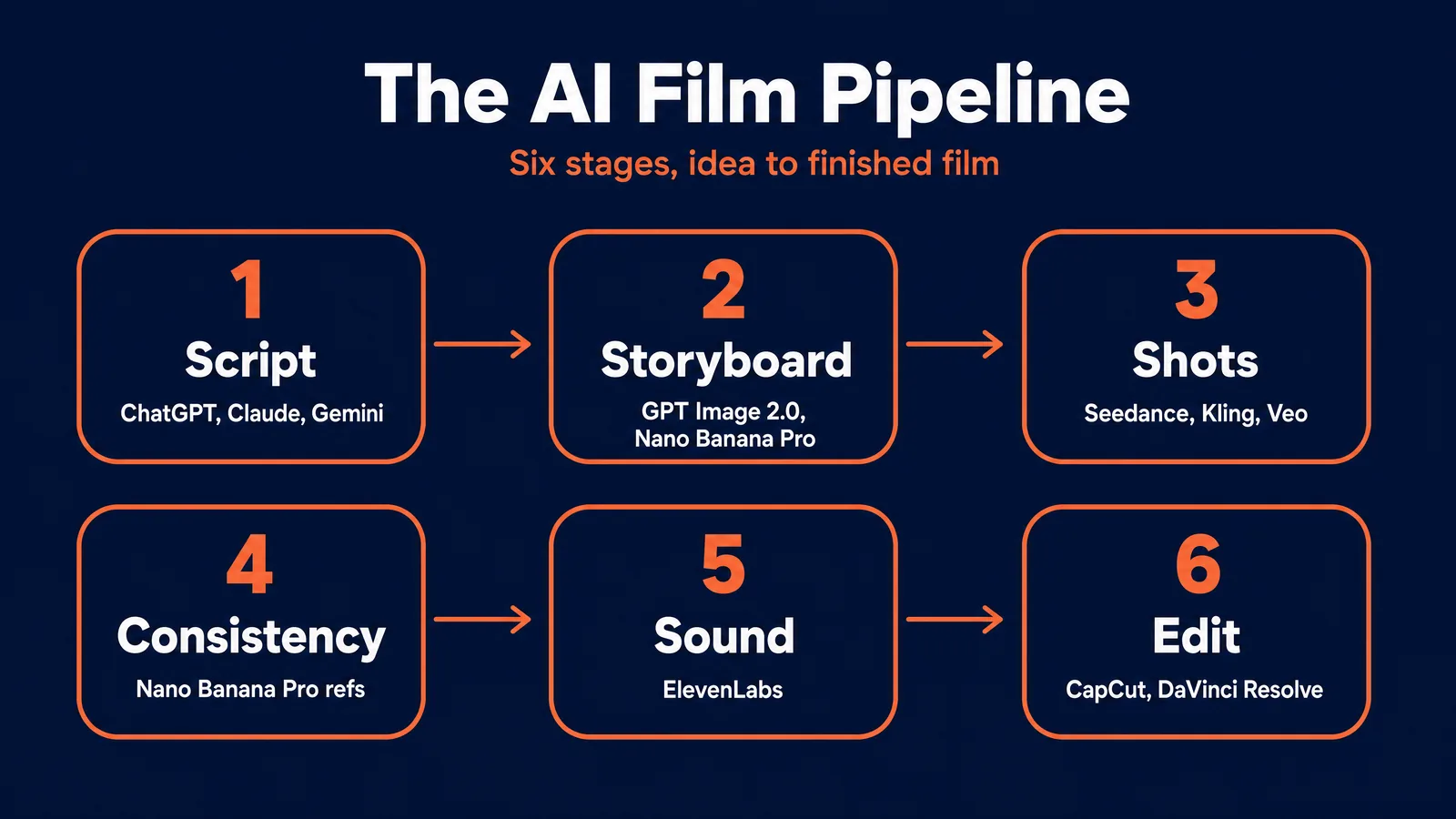
Here is the actual pipeline, stage by stage, on the models worth using. Every price below was checked on the canonical host (fal.ai first) on June 25, 2026, and is quoted in the smallest billable unit. Prices move; treat them as the current shape, not gospel.
Stage 1: idea, script, and shot list
Start in a language model: ChatGPT, Claude, or Gemini (around 20 dollars a month each). You are not asking it to write the movie. You are asking it to break your idea into a numbered shot list, where every row already carries the information the image and video models need.
The frame we teach for this is a simple six-part recipe for each shot: Subject, Environment, Camera, Lighting, Mood, Style. So instead of “a cool detective scene,” you write: “a tired detective in a wet trench coat (subject), a neon-lit alley with rain on the pavement (environment), 50mm lens, shallow focus, slow push-in (camera), hard light from a single street lamp, fog (lighting), tense and isolated (mood), photoreal, 35mm grain (style).” That six-part recipe is the on-ramp to the same 5-Element Grammar we use everywhere else at AVB; once it is second nature, you are writing prompts that read like camera direction. For the deeper version, see how to write AI video prompts that actually work and our cinematic AI video prompts guide.
Failure mode: letting the AI default to generic three-act structure with a generic hero. Break it on purpose with a hard constraint (“no dialogue, only diegetic sound”) or a specific stylistic reference.
Stage 2: storyboard and previs
Lock the look before you spend a cent on video. Three image models carry this stage:
- GPT Image 2.0 is the overall best image model: photoreal, strong world knowledge, clean composition. Roughly 0.05 dollars per image at medium quality and 0.21 at high (1024x1024) on fal.ai. Draft at medium; reserve high for the three to five hero frames that become your video inputs. (We put it through its paces in our GPT Image 2.0 review.)
- Nano Banana Pro has stronger prompt understanding and excellent multi-image blending, which makes it the consistency workhorse. About 0.15 dollars per image at 1K on fal.ai. Its drawing technique is a touch behind GPT Image 2.0, which is why you pair them; see the Nano Banana Pro guide and our head to head comparison.
- Ideogram 4.0 is the one to use for any frame with readable text: title cards, location slates, signage. Around 0.10 dollars per megapixel in Quality mode on fal.ai, and the Ideogram 4.0 guide covers its text tricks.
Failure mode: leaving GPT Image 2.0 on “high” for rough drafts and burning money on frames you will throw away.
Stage 3: shot generation
This is the expensive stage, and the one where you choose your weapon per shot. Our Seedance vs Kling vs Veo comparison goes deeper on the tradeoffs.
- Seedance 2.0 is the realism workhorse: about 0.30 dollars per second (Standard, 720p) or 0.24 (Fast) on fal.ai, clips of 4 to 15 seconds, with native audio included at no extra charge. Its reference-to-video mode (around 0.18 per second) is your friend for consistency. Full walkthrough in the Seedance 2.0 guide.
- Kling is the better pick for animation and stylized motion, and it is cheap: its O3 Standard tier runs about 0.084 dollars per second with audio off on fal.ai, and it can place multiple shots in a single generation. See the Kling guide.
- Veo 3.1 is the hero-shot tool: cinematic quality and genuinely synchronized native audio at about 0.40 dollars per second (1080p with audio) on fal.ai. Use it for the three to five signature shots, not the whole film, and iterate on its Fast tier (about 0.15 per second) before committing to a final take. If budget is tight, the Veo 3.1 Lite tier generates video-only clips from around 0.03 dollars per second, which makes even hero shots cheap to rough out. One quirk worth knowing: Veo does not infer audio, so describe it explicitly. (Google’s omni-modal Gemini Omni is handy for writing the prompt itself.)
Failure mode: generating long single clips and watching them drift. Pros work in 3 to 6 second shots and assemble them in the edit.
Stage 4: keeping characters and worlds consistent
This is the stage everyone underestimates, and inconsistent characters are the number one reason an AI short reads as amateur. We have a whole guide on character consistency in AI video; the short version:
- Build a character reference sheet in Stage 2 with Nano Banana Pro: full body, face, three-quarter view, all in the film’s lighting.
- Feed those reference images into every new frame, and hold yourself to roughly five characters before quality slips.
- Reuse the same seed for identical-prompt shots.
- For video, use Seedance’s reference-to-video mode or Kling’s start-and-end-frame inputs to lock appearance.
The pro move is to chain generations: use your last good frame as the input for the next shot, so the character cannot drift far. Budgeting four to six reference generations per main character (well under a dollar) is the cheapest insurance in the whole pipeline.
Stage 5: sound
Silent AI video has no emotional weight, and sound is the cheapest upgrade that most separates craft from slop. Our guide to adding voice and sound to AI videos covers the full stack. ElevenLabs owns voice and dialogue: about 0.05 dollars per 1,000 characters on the fast tier for iteration, 0.10 on the high-quality multilingual tier for final takes (official pricing). ElevenLabs Music runs about 0.30 dollars a minute; ElevenLabs Sound Effects about 0.12 per generation; Stable Audio is a strong option for textural score. A typical 90 second short uses only a few hundred characters of dialogue, so voice cost is effectively pennies.
Stage 6: edit and finish
Your generated clips are raw footage, nothing more. CapCut Pro (about 20 dollars a month) is the fast path for social formats and has solid auto-captioning. DaVinci Resolve Studio (a one-time 295 dollar license, with a genuinely capable free tier) is the right tool for anything headed to a festival, with real color, audio, and AI-assisted cleanup for smoothing artifacts. Our best AI video editing tools roundup compares the options. Finishing is what turns a pile of clips into continuity, rhythm, and color.
What it actually costs
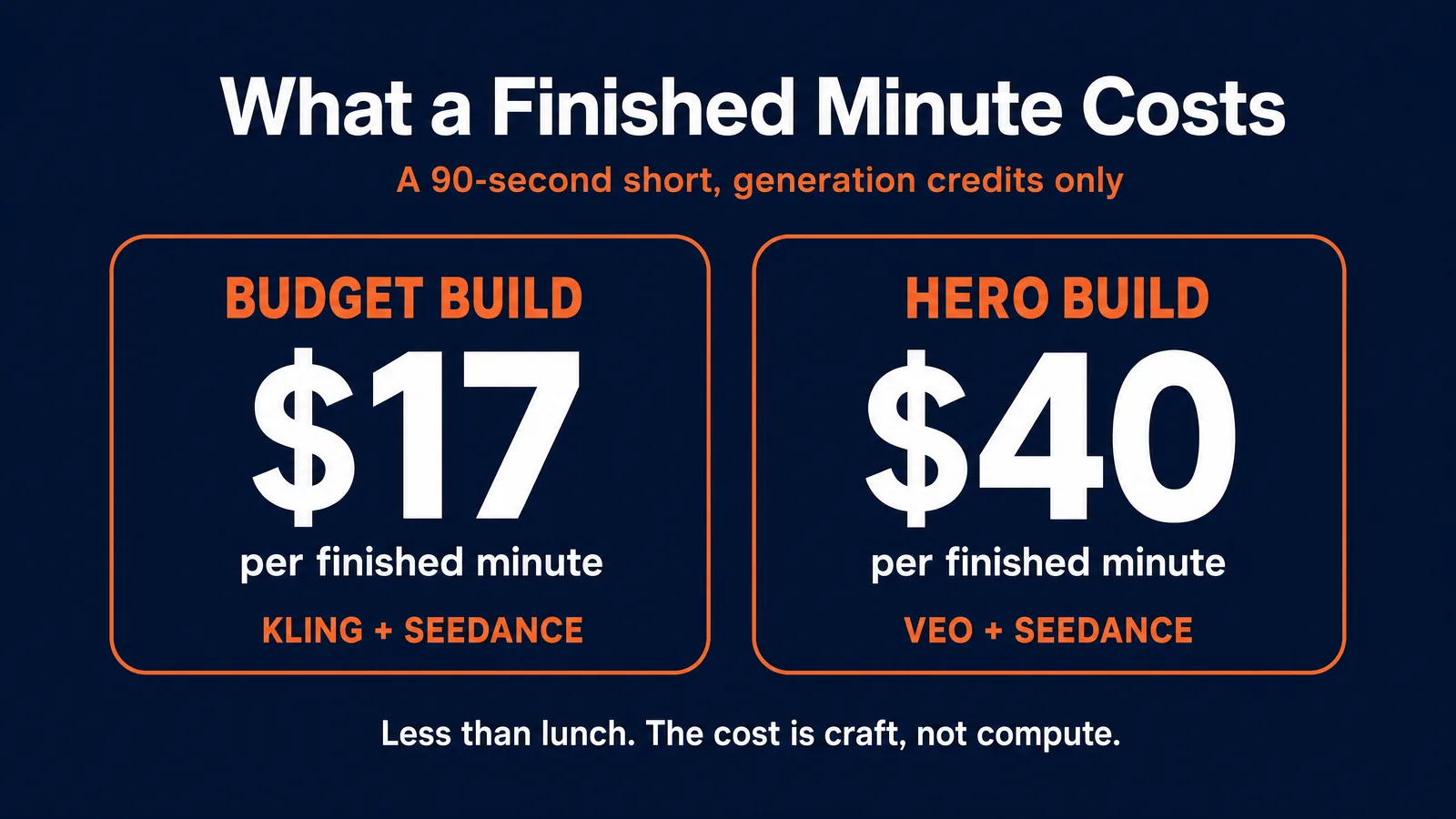
Almost nobody publishes the number that matters: cost per finished minute. Here it is, worked through for a 90 second short of fifteen shots at six seconds each, including a realistic buffer for regenerations.
A budget build (Kling O3 for stylized shots, Seedance Fast for realism, GPT Image 2.0 medium previs, edited in CapCut) lands around 26 dollars total, or roughly 17 dollars per finished minute.
A hero build (five Veo 3.1 shots with native audio plus ten Seedance Standard shots, GPT Image 2.0 high previs, finished in DaVinci) lands around 59 dollars total, or roughly 40 dollars per finished minute.
The single biggest swing is not the model, it is waste. The regeneration buffer is the largest cost driver after raw price, so creators who nail composition at the storyboard stage routinely cut 30 to 40 percent off the total. Spend your care in Stage 2, where pixels are cheap, and you protect Stage 3, where they are not.
One important caveat on those figures: that is the cost when you are making a film on your own, for your own purposes. The moment the work becomes commercial, an ad or a client deliverable, the math changes. Now you are also paying for a professional editor, often a voiceover artist, a music license, an evaluation reviewer, legal sign-off, and a handful of other line items that solo projects skip. Add it all up and shipping that first commercial piece realistically runs anywhere from 1,200 to 2,000 dollars. Mateo breaks the real economics down in AI video does not cost a fortune, but it does not cost 50 either.
Where the opportunity actually is
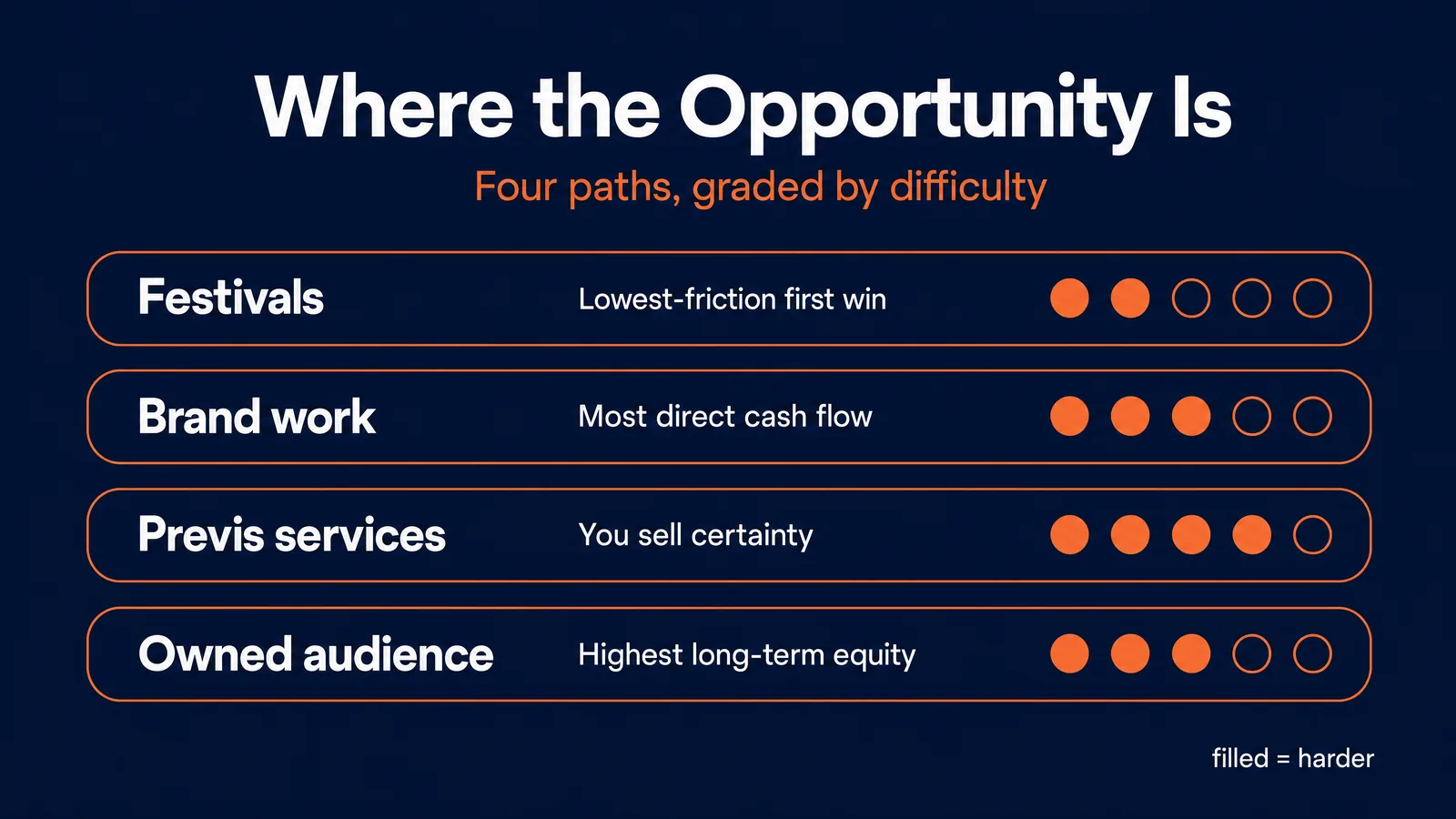
Tools do not pay you, and the biggest mistake new creators make is trying to win at all of these at once. Pick your lane early, because each one rewards a different skill: festivals reward concept and restraint, client work rewards speed and predictable delivery, an owned audience rewards format and cadence. Here are the four real paths, graded honestly, with the upside and the catch. If income is the goal, pair this with our AI video career guide and the honest breakdown in making 10k a month with AI video.
Festivals and competitions (difficulty 2 to 3 of 5). The lowest-friction first win, often free to enter. The prize money is real, as the table below shows. Treat festivals as proof, not payroll: they are excellent for credibility, discovery, and the track record that opens paid doors, but unreliable as income on their own. The catch: judges are increasingly tired of slop, so a thoughtful 60 to 90 second short beats a flashy reel.
Paid creative work (difficulty 3 of 5). Brand spots, music videos, social narrative content. Demand is real (one marketplace reported AI video work up over 300 percent year on year), and the most credible rate signal we found is a UK studio publishing brand films from roughly 2,500 pounds and full “brand world” packages from 10,000 pounds and up. The catch: supply is surging too, and the differentiated offer is not “I can make clips,” it is “I can deliver a complete branded story with a consistent character and voice.” Our AI video ads guide and UGC ads freelancer playbook cover the client side.
Previs and storyboard services (difficulty 4 of 5). This is the exact lane the A24 deal just validated at the studio level: turning scripts into animatics and shot plans fast and cheap. The durable insight here is that you are not selling spectacle, you are selling certainty. Storyboards, animatics, and hero-shot tests all do the same job for a buyer: they reduce the risk of an expensive production before the money is spent, which is exactly what production companies and agencies will pay for. It rewards people who understand professional pre-production. The catch: an independent freelance market for this barely exists yet in documented form. It is the strongest “watch this space,” not a proven paycheck.
Owned audience and teaching (difficulty 3 of 5). Narrative or faceless channels monetize through ad revenue, sponsorships, and products; teaching and prompt packs scale once you have proof of work. The honest caveat: most eye-popping “X dollars a month” creator figures come from tool-company blogs, and the reliable aggregate is that nearly half of all creators earn under 10,000 dollars a year. The play that actually compounds is a recognizable format with a consistent character and world. For the audience-building lane, see our AI avatars and influencers walkthrough.
The 2026 festival circuit (verified June 25, 2026)
| Festival | Top prize | AI requirement | Deadline | Status |
|---|---|---|---|---|
| Astana AI Film Festival | 450,000 dollars (1,000,000 pool) | Generative AI integral | Aug 15, 2026 | Open |
| Reply AI Film Festival | 8,000 euros (30,000+ pool) | AI in the process; disclose it | Jun 2, 2026 | Closed (finalists) |
| Inspiring Asia, Best AI Film | 10,000 dollars | AI-generated or assisted | Jul 6, 2026 (regional) | Open |
| LTX Shortest AI Film | 3,000 dollars | Made with the host’s tools | Jul 5, 2026 | Open |
| Hollywood AI Short Film Awards | 750 dollars | Meaningful creative AI use | Jan 2027 | Open |
| 1 Billion Followers AI Film Award | 1,000,000 dollars | 70% Google Gemini tools | Concluded | 2025 edition |
| Bitcoin FilmFest AI Contest | ~1,500,000 sats | AI meaningful role | Concluded | 2026 edition |
Two honest flags. The Astana million-dollar pool is real and government-backed, but it is a debut festival with no jury named yet, so treat the upside as genuine and the track record as unproven. The Reply festival’s celebrated Venice premiere is an independent event at the Venice Lido, not part of the Venice Film Festival proper. Several of these prizes are platform-locked to specific tools; you can enter them while still building your everyday workflow on the models above.
And people really are winning. In January 2026, a Tunisian designer named Zoubeir Jlassi won a one-million-dollar AI film award in Dubai for a short called “Lily,” made in roughly a month largely on Google’s Veo and Gemini tools (Google, Gulf News). AI shorts have entered official festival lineups, including a feature-length AI film at Tribeca in 2026 whose sharply hostile reception is its own lesson: festival access is no longer the barrier, taste is. Look closely at the creators who place and the pattern is boringly consistent, and it is the same as traditional film: a real idea, disciplined consistency, careful sound, and a real edit. None of that is locked behind a budget. It is locked behind craft.
The honest limits, so you do not get burned
AI filmmaking in 2026 is real, not finished. Know where it still breaks:
- Clips are short. Native ceilings sit around 8 seconds (Veo 3.1) to 15 seconds (Kling, Seedance 2.0), with Seedance 2.5 reaching about 30. Long continuous takes are off the table; you build with cuts.
- Consistency drifts, hands and physics still fail, and lip-sync is imperfect. Plan to generate several takes per usable shot.
- Iteration costs add up, which is exactly why you draft on cheap Fast tiers and lock composition early.
And the part that protects your work and your wallet. Our full AI disclosure and compliance guide goes deep, but the essentials:
- Disclose. YouTube, TikTok, and Meta all require disclosure of realistic AI content, and most festivals require you to list your tools. Build disclosure in from the start.
- Mind the law. The EU AI Act’s transparency rules (Article 50) apply from August 2, 2026, with machine-readable labeling duties and real penalties. If you publish into the EU, this is you.
- Do not borrow faces or franchises. The single clearest legal line is recognizable people and recognizable intellectual property. This is not theoretical: in early 2026, after viral clips recreating real actors and studio characters, major studios sent cease-and-desist letters and one leading video model had its global launch paused until it added filters to block realistic faces and protected characters (we covered the fallout in Seedance 2.0 and the Hollywood lawsuits). The lesson is permanent: never recreate a real person’s face or voice without explicit written consent, and never generate a “close enough” version of a character you do not own. Keep your prompts clean and your work is safe; this is exactly where lawsuits live.
- Mind commercial terms and provenance. Most major models permit commercial use on paid plans, but read the terms before you bill a client (some video tools are notably more restrictive about commercial output than others), and know that essentially none of these tools indemnify you. Many outputs now carry invisible provenance marks (such as Google’s SynthID); treat that as an asset, not a liability, because clean provenance is increasingly what festivals and corporate clients want. Own your inputs, keep your project files, and disclose.
One more thing worth knowing, because it reframes the whole craft: the major awards bodies have landed on a human-authorship standard rather than an AI ban. The Academy’s current rules state that using AI tools neither helps nor harms a film’s chances, and that what gets judged is the degree of human creative authorship (with AI-generated performances and fully AI-written screenplays held ineligible in the relevant categories). Read that as permission and as direction: the work that wins is the work where a human is visibly at the center of the concept, the performances, the edit, and the taste. That is the version of this craft worth building a name on, and it is also the honest answer to the backlash.
Start your first film this weekend
Here is the whole thing, compressed into a path you can begin today. Pick one small idea, 60 to 90 seconds, one or two characters. Write the shot list in a language model using the six-part recipe. Build a character reference sheet and your key frames in Nano Banana Pro and GPT Image 2.0. Generate your shots in Seedance and Kling, saving Veo for one or two hero moments. Lay in voice and music from ElevenLabs. Cut it in CapCut or DaVinci, paying real attention to sound and pacing. Disclose that it is AI. Then enter it somewhere on the list above.
That is a film. The barrier is no longer the tools or the money; a finished minute costs less than lunch. The barrier is the craft, and craft is learnable.
That is the part we obsess over inside the AI Video Bootcamp community, where filmmaking is its own phase of the curriculum and the Opportunity Hub keeps a running list of the contests, briefs, and paid work where this craft turns into a track record. Membership is 9 dollars a month. But the tools are in your browser right now. The most important thing is that you start.
Sources and further reading
The deal and the industry
- Google DeepMind, DeepMind and A24 announce a first-of-its-kind research partnership
- Variety, Google invests in A24 to develop AI-powered filmmaking tools
- The Hollywood Reporter, A24 and Google DeepMind’s AI venture (Belsky quote)
- IndieWire, A24 opens its workflow to Google DeepMind
- Salon, A24 and Google deal sparks backlash
- Variety, Kane Parsons calls generative AI “cultural rot”
Tools and pricing (canonical hosts)
- fal.ai, Seedance 2.0 | Kling O3 | Veo 3.1 | GPT Image 2 | Nano Banana Pro | Ideogram 4.0
- ElevenLabs, API pricing
- Blackmagic Design, DaVinci Resolve Studio
Festivals
- Astana AI Film Festival | Reply AI Film Festival | LTX Shortest AI Film | 1 Billion Followers AI Film Award | Hollywood AI Short Film Awards | Bitcoin FilmFest | Inspiring Asia
Films and proof
- Google, “Lily” wins the Global AI Film Award, and Gulf News coverage
- Deadline, the AI feature at Tribeca 2026
Law, rights, and provenance
- EU AI Act, Article 50 transparency obligations
- Caixin, ByteDance halts the global rollout of Seedance 2.0 amid a copyright dispute
- The Academy, 98th Oscars rules on AI and human authorship, and TechCrunch on the eligibility changes
- Google DeepMind, SynthID content provenance
- Mateo Starcevic Filipovic, AI video does not cost a fortune, but it does not cost 50 either
Keep learning at AI Video Bootcamp
- How to learn AI video and how to learn AI image generation
- Seedance vs Kling vs Veo, GPT Image 2.0 vs Nano Banana Pro, and the AI image and video glossary
- Tool guides: Seedance 2.0, Kling, Veo 3.1 Lite, Nano Banana Pro, Ideogram 4.0, Stable Audio 3
- Craft: character consistency, adding voice and sound, writing prompts that work, best AI video editing tools
- Business: AI video career guide, making 10k a month, AI disclosure and compliance
Written by Daniel for AI Video Bootcamp. Deal facts and prices verified June 2026 and will date over time.