
This is the canonical AI Video Bootcamp reference on Seedance 2.0, the ByteDance Seed lab flagship multimodal AI video generation model that defines the 2026 photoreal realism frontier. The article covers product identity, technical specifications, every verified access path with current pricing, complete step-by-step tutorials, the JSON-inside-prompt convention that unlocks precision camera control, the CRAFT prompt framework, head-to-head benchmarks against the True Model competitors, real-world commercial use cases, the EU AI Act and California AB 853 compliance picture for client work, and the AI Video Bootcamp honest verdict on whether Seedance 2.0 is the right tool for the deliverable you have in mind.
What Is Seedance 2.0?
Answer capsule. Seedance 2.0 is ByteDance Seed lab’s flagship multimodal AI video generation model, released February 12, 2026. It uses a unified multimodal architecture (technical details published in arXiv:2604.14148) to process text, image, video, and audio inputs in a single forward pass, generating synchronized audio-visual output at 480p or 720p native resolution, with 1080p delivered via upscale. It is the True Model 2026 video stack’s photoreal realism leader for dynamic action, multi-subject physics, and complex fluid dynamics.
Seedance 2.0 is the successor to Seedance 1.5 Pro (December 16, 2025, the first ByteDance Seed model with native audio-video joint generation) and the original Seedance 1.0 (June 2025, text-to-video only). The 2.0 release introduced the unified multimodal reference system that allows operators to inject up to 12 simultaneous input files into a single generation: 9 reference images plus 3 video clips (combined 15-second total) plus 3 audio files (combined 15-second total). This omni-reference capability is the single biggest architectural change versus the 1.x lineage and the technical foundation for the model’s character consistency and camera path replication strengths.
Three specific data points operators should internalize. First, Seedance 2.0 is officially proprietary and closed-weight; no self-hostable variant exists, every access path routes through ByteDance servers or authorized partner platforms. Second, the model uses a dual-branch architecture that processes audio and video modalities through parallel transformer branches sharing cross-attention layers, which is why generated sound effects and visual impacts are temporally locked without post-production synchronization. Third, ByteDance has not published a parameter count, the arXiv paper describes the architecture as “unified, highly efficient, large scale” with sparse routing, but exact model size remains undisclosed.
Seedance 2.0 sits in the True Model 2026 video stack alongside Kling 3.0, Veo 3.1, Hailuo 02, and LTX-2. For the broader market context and decision rules across the five core video tools, see the AI Video Bootcamp Tech Stack pillar and the Cinematic AI Video Prompts pillar.
When Was Seedance 2.0 Released?
Answer capsule. Seedance 2.0 was officially launched February 12, 2026, with the China-first rollout on CapCut Dreamina. Global API access opened on fal.ai April 9, 2026. The academic model card was published as arXiv preprint 2604.14148 on April 15, 2026. ByteDance temporarily halted the global rollout in response to Hollywood cease-and-desist letters in mid-February 2026, then relaunched with copyright filters and C2PA watermarking guardrails.
The Seedance model family progression:
| Version | Release Date | Headline Capability |
|---|---|---|
| Seedance 1.0 | June 2025 | First public ByteDance Seed text-to-video model |
| Seedance 1.5 Pro | December 16, 2025 | First native audio-video joint generation |
| Seedance 2.0 | February 12, 2026 | Unified multimodal architecture, omni-reference up to 12 files |
| Seedance 2.0 Fast | February 2026 | Low-latency variant for real-time inference |
The global rollout context matters for operator access. According to The Decoder, ByteDance initially excluded the United States from the April 2026 wave following the Hollywood litigation. fal.ai and CapCut Dreamina remain the cleanest US-accessible paths as of June 2, 2026. For US-based operators, the recommended path is fal.ai with prepaid credits.
How to Access Seedance 2.0
Answer capsule. Six access paths exist for Seedance 2.0 in 2026. The four AI Video Bootcamp recommended paths are fal.ai (developer API), Replicate (serverless Python SDK), ByteDance Volcano Engine (official enterprise), and CapCut Dreamina (consumer creative editor). The two paths to avoid are unverified wrapper sites (seedance2.ai, jxp.com, seedance2.app, seedance2.so, youart.ai) and any platform that bundles Seedance with forbidden tools. The cleanest free trial entry point is CapCut Dreamina at dreamina.capcut.com.
Path 1: fal.ai (recommended primary developer path)
fal.ai at https://fal.ai/models/bytedance/seedance-2.0/text-to-video is the recommended primary API path for AI Video Bootcamp operators. The platform uses a prepaid credit system with per-second billing. Global access. Audio generation is included free at every tier. Signup gives a small free credit pool for initial testing.
Path 2: Replicate (serverless developer path)
Replicate at https://replicate.com/bytedance/seedance-2.0 is the alternative serverless environment, popular with Python developers and operators testing complex multimodal reference combining. The model variant non_video_in at 720p target resolution is priced at 0.18 USD per second of output video, which equals roughly 55 seconds of generation per 10 USD spent. A lower 480p variant is available at a reduced rate for rapid prototyping.
Path 3: ByteDance Volcano Engine (official enterprise direct)
Volcano Engine at https://www.volcengine.com/ is the official ByteDance enterprise cloud platform. Access is geared toward large-scale media agencies and corporate customers requiring service-level agreements. The platform uses token-based billing. Volcano Engine requires corporate identity verification and historically blocked US-based IP addresses in the April 2026 global rollout. The English-language entry point for international customers is BytePlus at https://www.byteplus.com, which mirrors Volcano Engine pricing and offers 2 million free tokens at signup (approximately 100 seconds of 720p generation).
Path 4: CapCut Dreamina (consumer creative editor)
CapCut Dreamina at https://dreamina.capcut.com/tools/seedance-2-0 is the consumer creative editor path operated by ByteDance. Available in the US plus 7 other markets at launch. The interface is a visual drag-and-drop editor designed for non-technical creators. This is the cleanest free-trial entry point for evaluating Seedance 2.0 before any API commitment.
Path 5: Wavespeed (API aggregator)
Wavespeed at https://wavespeed.ai/ operates as a model aggregator. Useful for developers consolidating multiple model APIs under a single billing account. Splits Seedance 2.0 endpoints into Standard and Fast tiers similar to fal.ai.
Path 6: ComfyUI bridge nodes (community workflow)
A community-built ComfyUI node by developer Cameraptor at https://github.com/Cameraptor/seedance_2_Comfy_UI_Node-sjinn_Api- lets operators route Seedance 2.0 directly into ComfyUI workspaces. Important operator-facing fact: this is NOT local self-hosting. All “ComfyUI Seedance nodes” are API bridges that route through ByteDance servers via authorized resellers. The node accepts API credentials and pipes local reference images into remote generation. Treat it as a workflow convenience, not a local-compute alternative.
Paths to avoid
The SERP for seedance 2.0 is heavily saturated with third-party wrapper sites (seedance2.ai, jxp.com, seedance2.app, seedance2.so, youart.ai). Youart.ai for example charges 29.99 USD per month for 3,300 credits, a substantial markup over direct fal.ai access. These wrappers apply pricing premiums, occasionally experience rate-limit failures when upstream ByteDance blocks occur, and provide no editorial added value. AI Video Bootcamp recommends bypassing all wrappers in favor of the four sanctioned paths above.
For the broader picture on how Seedance 2.0 fits in the AI Video Bootcamp recommended 5-tool stack, see the Tech Stack pillar and the head-to-head Seedance vs Kling vs Veo comparison.
Seedance 2.0 Pricing and Tiers
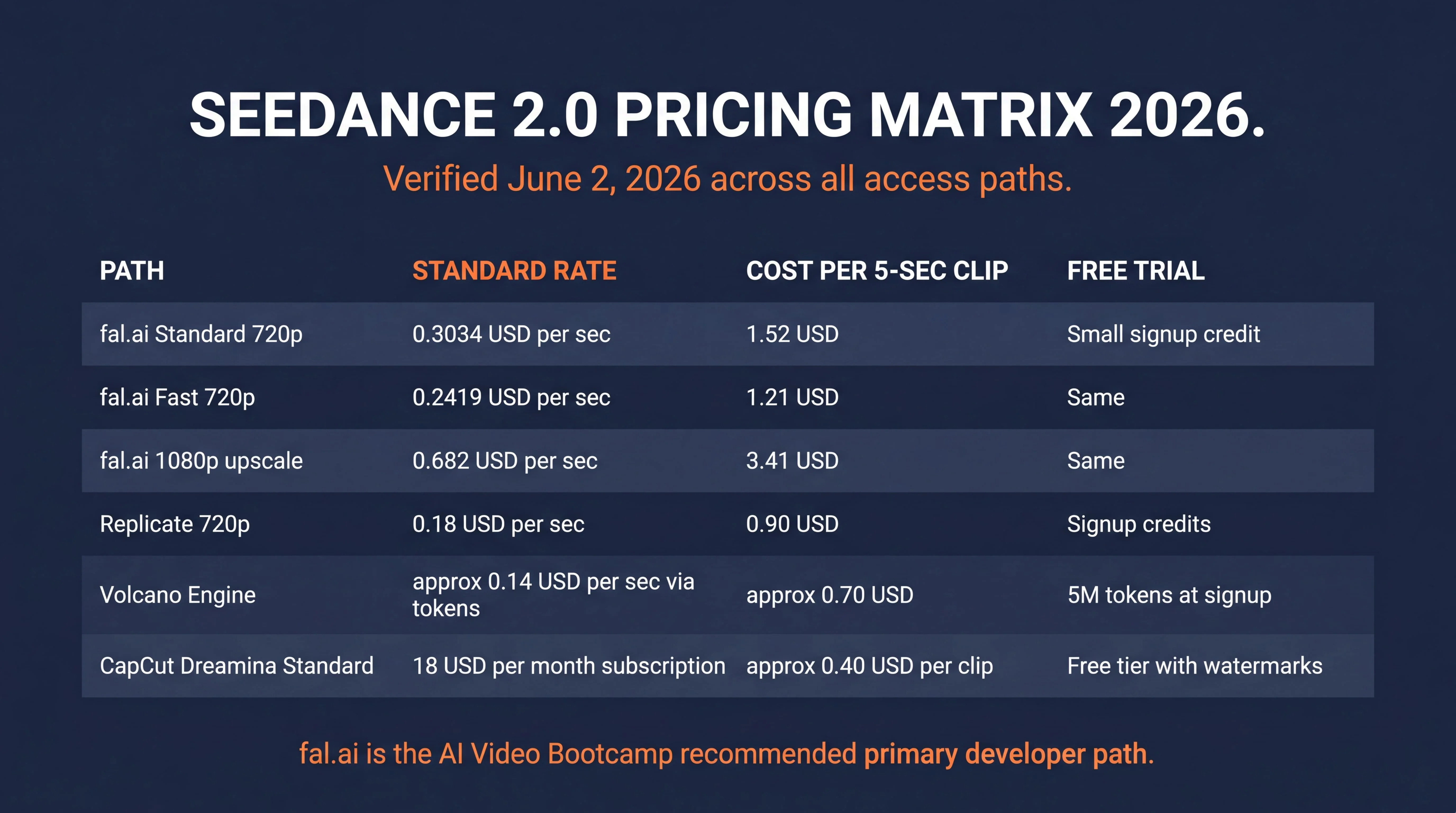
Answer capsule. Seedance 2.0 pricing varies across access paths. fal.ai charges 0.3034 USD per second at Standard 720p (audio included), 0.2419 USD per second at Fast 720p, and 0.682 USD per second at upscaled 1080p. Replicate charges 0.18 USD per second at 720p, or approximately 55 seconds of generation per 10 USD. ByteDance Volcano Engine uses token-based billing at approximately 0.14 USD per second. CapCut Dreamina bundles pricing into 18 USD per month Standard, 48 USD per month Pro, 84 USD per month Ultra. There is no genuinely unlimited free tier.
Master pricing matrix (verified June 2, 2026)
| Access Path | Pricing Model | Standard Rate | Effective Cost per 5-sec Clip | Free Trial |
|---|---|---|---|---|
| fal.ai Standard 720p | Per-second + prepaid credits | 0.3034 USD per sec | 1.52 USD | Small signup credit |
| fal.ai Fast 720p | Per-second + prepaid credits | 0.2419 USD per sec | 1.21 USD | Same |
| fal.ai 1080p upscale | Per-second + prepaid credits | 0.682 USD per sec | 3.41 USD | Same |
| Replicate 720p | Per-second serverless | 0.18 USD per sec | 0.90 USD | Signup credits |
| Volcano Engine (token) | Token-based, ~$0.14/sec effective | 28 CNY per 1M tokens (pure gen), 46 CNY per 1M tokens (video edit) | ~0.70 USD | 5M tokens at signup |
| BytePlus (international) | Same as Volcano | Same | Same | 2M tokens at signup |
| CapCut Dreamina Free | Token-bundled subscription | 225 daily shared tokens | Watermarked output | Truly free |
| CapCut Dreamina Standard | 18 USD per month | Priority queue, watermark-free | ~0.40 USD per clip | NA |
| CapCut Dreamina Pro | 48 USD per month | Higher token allocation | NA | NA |
| CapCut Dreamina Ultra | 84 USD per month | Maximum allocation + bulk | NA | NA |
Operator decision rules by use case
For API operators producing client deliverables at volume: fal.ai Standard tier at 0.3034 USD per second is the recommended primary path. The audio-included pricing is meaningfully better than competitor Veo 3.1 Quality at 0.40 USD per second, and the global access path avoids the US geo-restriction friction of Volcano Engine.
For Python developers prototyping rapidly: Replicate at 0.18 USD per second is cheaper than fal.ai and the Python SDK integration is the simplest path to programmatic generation. The 55-seconds-per-10-USD math makes Replicate the budget API path for testing.
For enterprise agencies producing at scale: ByteDance Volcano Engine direct via BytePlus international entry point. The token-based math works out to approximately 0.14 USD per second of 720p generation, the cheapest large-volume rate, but requires the BytePlus signup and is China-server-routed (see compliance section below for EU implications).
For non-technical creators evaluating Seedance: CapCut Dreamina at 18 USD per month Standard tier. Removes watermarks, grants priority queue, and the bundled subscription is significantly cheaper than per-clip API pricing if generation volume exceeds 45 clips per month.
For the cost comparison context against the broader 2026 True Model video stack, see the AI Video Bootcamp Tech Stack pillar which documents pricing across all five core tools (Seedance, Kling, Veo, Hailuo, LTX).
How to Use Seedance 2.0
Answer capsule. Five access paths each have distinct tutorial workflows. The recommended fastest path from signup to first generated clip is fal.ai, which takes about 5 minutes. Replicate and CapCut Dreamina take 5 to 10 minutes. ByteDance Volcano Engine requires 15 to 30 minutes including corporate signup. The ComfyUI bridge node integration takes 10 to 15 minutes and requires existing ComfyUI familiarity. All paths accept the same prompt structure and reference image conventions.
The 5-minute quickstart (fal.ai)
- Navigate to fal.ai/dashboard and create a developer account using standard email verification.
- Deposit a prepaid balance (5 USD minimum recommended for first session) using a credit card on the billing dashboard.
- Open the Seedance 2.0 model page at fal.ai/models/bytedance/seedance-2.0/text-to-video.
- Upload a clear high-resolution starting frame image (ideally generated via Seedream 4.5 for optimal latent compatibility, alternatively Nano Banana Pro or GPT Image 2.0).
- Enter a descriptive action prompt (example: “The camera pushes in slowly as the subject looks directly into the lens, soft ambient lighting, anamorphic 35mm lens, golden hour”).
- Click Run. The 5-second 720p output appears in the viewer within approximately 30 to 45 seconds.
- Download the MP4 file from the output panel.
Cost: approximately 1.52 USD for the first clip at Standard tier. Total time from account creation to first download: under 5 minutes.
Tutorial 1: Programmatic generation via fal.ai
For automation and CI/CD integration into AI Video Bootcamp member workflows:
- Obtain a fal.ai API key from the developer dashboard and store it securely in environment variables.
- Construct the JSON request body containing prompt, image_url, video_url (optional), duration, aspect_ratio, generate_audio boolean.
- Standard payload format:
{
  "prompt": "Cinematic tracking shot of a sports car drifting through a sun-flared corridor. Camera follows the subject at eye level. 35mm anamorphic lens. Golden hour.",
  "image_url": "https://example.com/start-frame.jpg",
  "duration": 5,
  "aspect_ratio": "16:9",
  "generate_audio": true
}- POST the payload to the fal.ai endpoint, then poll the returned status URL until generation completes.
- Download the resulting MP4 array from the provided cloud storage link.
Common error: asset URL timeout. Resolve by ensuring all provided image and video URLs are publicly accessible without authentication headers.
Tutorial 2: Programmatic generation via Replicate
For Python developers in the serverless ecosystem:
- Install the Replicate Python client library and authenticate using your API token.
- Define the model version string for
bytedance/seedance-2.0. - Construct the input dictionary, specifying prompt, image references, and duration. Set duration to “-1” to enable intelligent duration control (the model chooses naturally based on the prompt’s narrative arc).
- Execute the
replicate.run()function. - Retrieve the output URL from the completed prediction object.
Common error: overloading the reference limit. The combined duration of uploaded reference videos must not exceed 15 seconds.
Tutorial 3: ByteDance Volcano Engine (enterprise direct)
For enterprise agencies and large-scale media production:
- Navigate to volcengine.com and complete corporate account registration with identity verification. US-based operators should use BytePlus.com instead due to the April 2026 US geo-restriction.
- Attach a corporate payment method to the billing console.
- Navigate to the “ModelArk” AI product dashboard and select the Seedance 2.0 Video Generation model.
- Input the core text prompt into the primary directive field.
- Upload reference assets via the Vision Features uploader, max 9 images plus 3 video clips.
- Assign duration (4 to 15 seconds) and resolution (480p or 720p).
- Execute the generation call. Output delivers to the secure Volcano Engine object storage bucket as MP4.
Common error: token limit exceeded. Resolve by reducing duration or using lower-resolution input images to reduce the total token footprint.
Tutorial 4: CapCut Dreamina (consumer visual interface)
For non-technical creators focused on narrative construction:
- Navigate to dreamina.capcut.com and authenticate via ByteDance SSO or Google sign-in.
- Purchase the 18 USD per month Standard subscription if you need watermark-free output.
- Select Seedance 2.0 from the main generation dashboard.
- Use the visual drag-and-drop interface to upload character reference images and style guides.
- Type your natural language prompt into the dialogue box. To invoke a specific uploaded image, type the
@symbol and select the file from the dynamic dropdown menu (example:@Image1 walks forward through the corridor). - Select aspect ratio (16:9 for cinematic, 9:16 for vertical mobile).
- Click Generate. The video appears in the user library for immediate playback and MP4 download.
Common error: queue stagnation. Free-tier accounts are deprioritized during peak server load, upgrade to Standard or higher for priority queue access.
Tutorial 5: Local orchestration via ComfyUI bridge node
For operators blending local image generation with cloud video rendering:
- Open ComfyUI and launch the ComfyUI Manager.
- Install the
seedance_2_Comfy_UI_Node-sjinn_Api-package via Git URL. - Restart the ComfyUI server to initialize custom nodes.
- Drag the Seedance 2.0 node into the workspace from the Cameraptor_Nodes menu.
- Connect local Load Image nodes to the image_1 through image_6 input sockets.
- Input your fal.ai or Sjinn API credentials into the node settings.
- Write your prompt using
@Image1syntax to map connected nodes to text instructions. - Click Queue Prompt. The node packages local images, sends to the remote server, and returns the video to a Save Video node.
Common error: authentication failure. Ensure the API key is correctly formatted in the configuration text file.
For the broader prompt engineering reference across all True Models, see the Cinematic AI Video Prompts pillar.
Worked Example: NYC Subway Pursuit (Omni-Reference Demo)
Answer capsule. This 15-second NYC subway pursuit is a single Seedance 2.0 generation using the 12-file omni-reference capability. Two character anchors (@image1 and @image2) lock identity across seven shots: slow reveal, recognition, pursuit, slam, plea, methodical strikes, and the calm walk-away. Total cost on fal.ai Standard 720p was 4.83 USD including two Nano Banana Pro character reference images. This is the proof-of-concept demonstration for Seedance 2.0’s character consistency, multi-subject physics, and dynamic action handling in a single shot list.
The two omni-reference character anchors
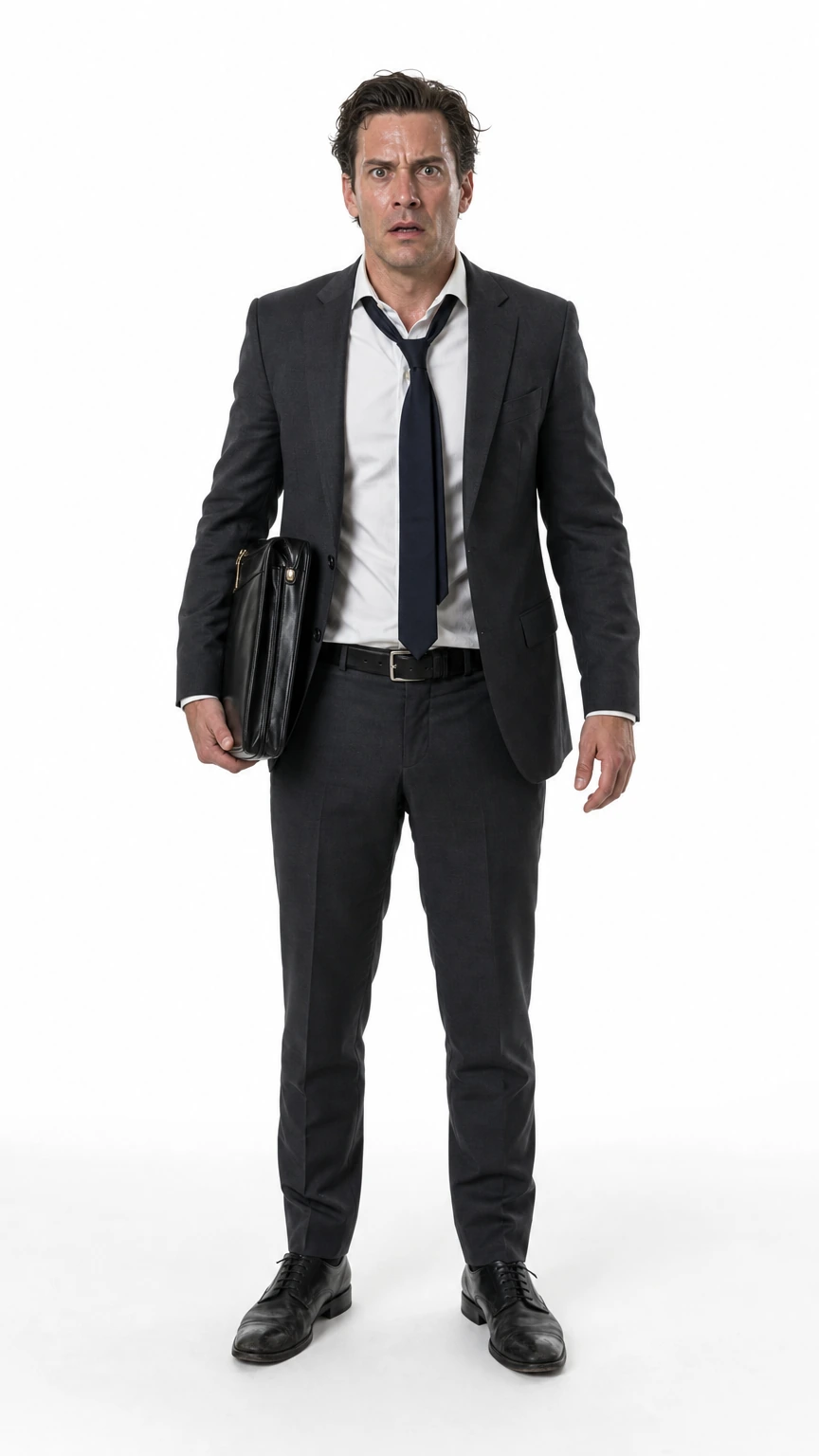
Character A (uploaded as @image1) locks the calm dominant pursuer. Character B (uploaded as @image2) locks the panicked desperate runner. Both reference images were generated in Nano Banana Pro on pure white backgrounds to give Seedance maximum face fidelity without environmental noise bleeding into the latent representation.

The output video (single Seedance 2.0 generation, 15 seconds)
Honest caveat: in-scene text is not legible in this demo
Sharp-eyed readers will notice that the MTA station signs, ad posters, and platform numerals in the video render as garbled glyphs rather than readable English text. This is a deliberate tradeoff disclosure, not a hidden bug.
The cause is the 1,536-character Seedance prompt budget combined with a 15-second, 7-shot timeline. The character ceiling was almost entirely consumed by shot blocking, character anchors, dialog, and SFX timing. There was no character budget left to spend on specific typography instructions like “MTA sign reads CANAL STREET in white Helvetica on black” or “platform numeral 6 in standard NYC subway typography.” Seedance allocates its rendering attention to whatever is named most concretely in the prompt, and since station signage was never specified, the model filled the visual space with plausible-looking but illegible signage placeholders.
Two operator workarounds exist for AI Video Bootcamp members who need legible in-scene text:
- Shorter scene, more character budget for typography. A 5-second 2-shot version of the same scene leaves roughly 800 characters of prompt headroom that can be spent on explicit sign content, font specification, and placement. The tradeoff is narrative compression.
- Composite text in post. Generate the scene with placeholder signage, then matte-replace the signs in Adobe After Effects or DaVinci Resolve Fusion using corner-pin tracking. This is the standard professional pipeline for any AI video deliverable where in-scene text matters (location signage, brand logos, screen content, document inserts), and it is faster than burning 20-plus regenerations chasing legible text inside the model.
AVB ships this demo as-is because the point being demonstrated is character consistency across seven shots and multi-subject physics, not typography rendering. The honest caveat is part of the operator-facing transparency this site is built on.
The verbatim prompt (1,536 characters, paste-ready into fal.ai)
OMNI REF. 15s NYC subway pursuit. No music, full SFX. Empty late-night platform: green steel pillars, white-green tile walls, yellow strip, flickering fluorescents.

@image1 = calm dominant hobo. @image2 = panicked businessman with briefcase.

SHOT 1 (0-2s): WIDE SLOW PUSH-IN. @image1 walks slowly down empty platform toward camera, hands in coat pockets, head down. SFX: heavy boots, fluorescent hum.

SHOT 2 (2-4s): MEDIUM REVERSE. @image2 turns onto platform, freezes seeing @image1. Briefcase slips. SFX: sharp inhale, leather skid.

SHOT 3 (4-6s): WIDE TWO-SHOT. Long platform between them. @image2 backs away. @image1 keeps walking. DIALOG (@image1, low quiet): You should have stayed home tonight. SFX: footsteps, distant train horn.

SHOT 4 (6-8s): MEDIUM TRACKING. @image2 bolts. @image1 breaks into fast walk then run. Handheld shake builds. SFX: dress shoes pounding, boots gaining, garbled MTA announcement.

SHOT 5 (8-10s): LOW-ANGLE HANDHELD. @image1 catches @image2 from behind, grabs collar, spins him against green pillar. DIALOG (@image2, choked): Please. I have money. SFX: fabric pulled, slam on steel, coins falling.

SHOT 6 (10-12s): MEDIUM TIGHT. @image1 silently delivers three measured body shots, methodical, no anger. @image2 doubles over. SFX: dull thuds, exhales, express train roars on far track, fluorescents stutter.

SHOT 7 (12-15s): WIDE STATIC. @image2 collapsed at pillar, briefcase open, papers scattered. @image1 walks away into dim tunnel. SFX: receding boots, fading train, single coin spinning.
What this demo proves
Four specific Seedance 2.0 capabilities are simultaneously verified in this single generation:
- Character consistency across seven distinct shots without face drift, costume drift, or identity collapse. Both
@image1and@image2are recognizably the same person from Shot 1 through Shot 7 despite framing changes (wide push-in, medium reverse, low-angle handheld, close-up tight, wide static). - Multi-subject physics during the Shot 5 collar grab and the Shot 6 body shots. Two characters in physical contact under load is the failure mode where most competitor models warp, slide, or duplicate limbs. Seedance 2.0 handles it.
- Native audio plus dialogue lip-sync generated in a single pass via
generate_audio: true. Both spoken lines arrive synchronized to the character’s mouth movements without post-production correction. - Atmospheric environmental physics including the express train passing on the far track in Shot 6 that triggers fluorescent flicker through implied vibration, the briefcase clatter and coin fall in Shot 5, and the single coin spinning to rest in Shot 7. Seedance 2.0’s “king of action” reputation per the r/aivideo community is anchored on this kind of environmental causal chain.
This single 4.83 USD generation does work that would take a traditional film crew several days plus thousands of dollars in location permits, talent fees, and audio post-production.
Seedance 2.0 Prompt Guide
Answer capsule. Seedance 2.0 responds best to the CRAFT framework (Context, Reference, Action, Framing, Timing) for natural language prompts, and to the JSON-inside-prompt convention for precision camera control. The model has no formal camera_motion enum at the API layer; operators inject structured JSON directly into the prompt string to lock variables. A counter-intuitive finding: vague genre-level action prompts (example: “subject performs traditional kung-fu moves”) produce cleaner motion than micro-managed joint instructions because the model accesses intact latent representations of entire choreography sequences.
The CRAFT Framework (Seedance-specific)
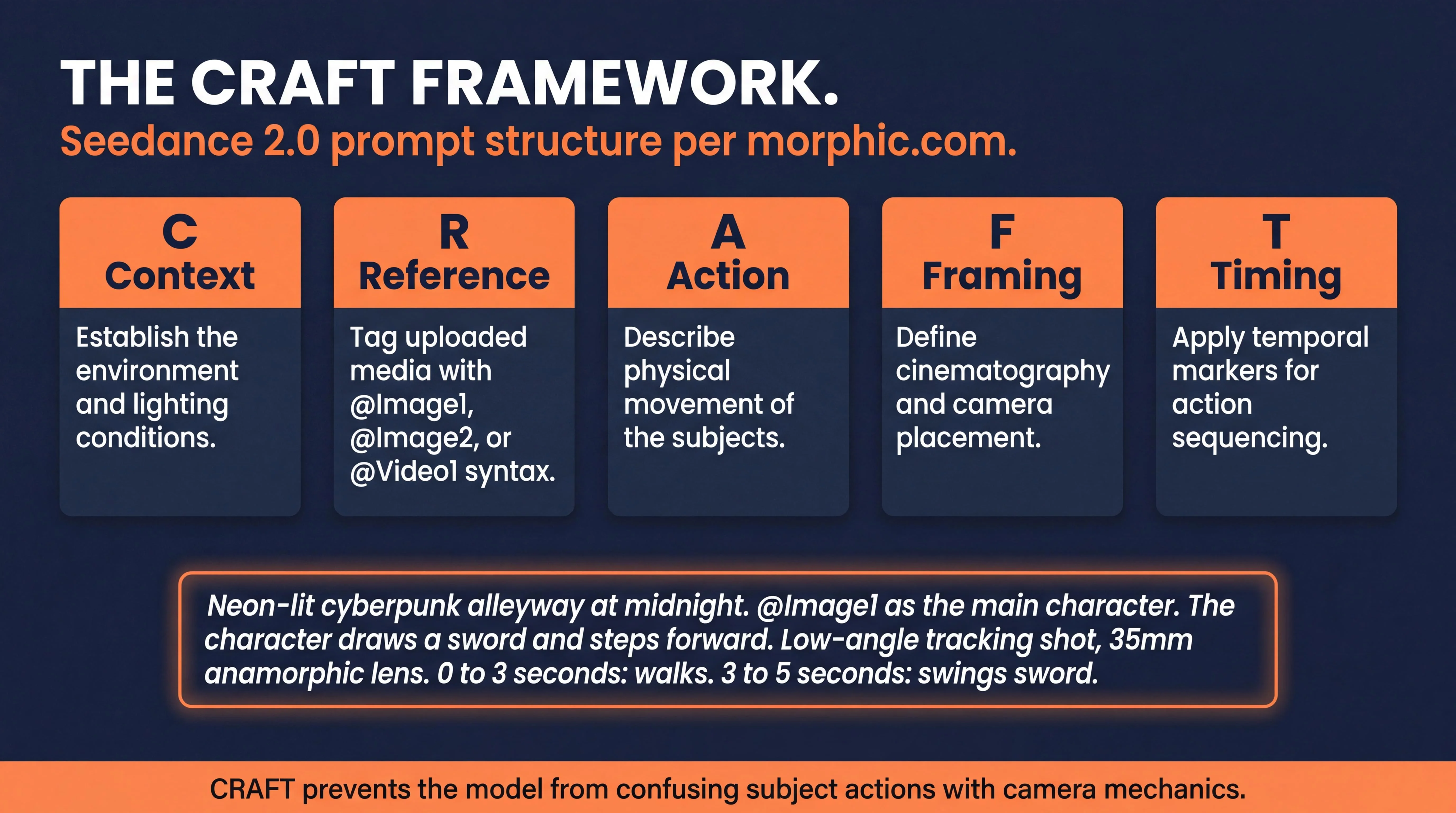
The AI Video Bootcamp recommended prompt structure for Seedance 2.0 is the CRAFT framework, documented by morphic.com in their Seedance 2 prompt guide. CRAFT expands to:
- Context, establish the primary environment and lighting conditions
- Reference, explicitly tag uploaded media using
@Image1,@Image2, or@Video1syntax - Action, describe the physical movement of the subjects
- Framing, define the cinematography and camera placement
- Timing, apply temporal markers to dictate when actions occur
Example CRAFT prompt:
Neon-lit cyberpunk alleyway at midnight, rain reflections on wet asphalt. @Image1 as the main character. The character draws a sword and steps forward. Low-angle tracking shot moving backward, 35mm anamorphic lens. 0 to 3 seconds: character walks. 3 to 5 seconds: character swings sword.
This structure prevents the model from confusing subject actions with camera mechanics, which is the most common Seedance prompting error.
The JSON-Inside-Prompt Convention
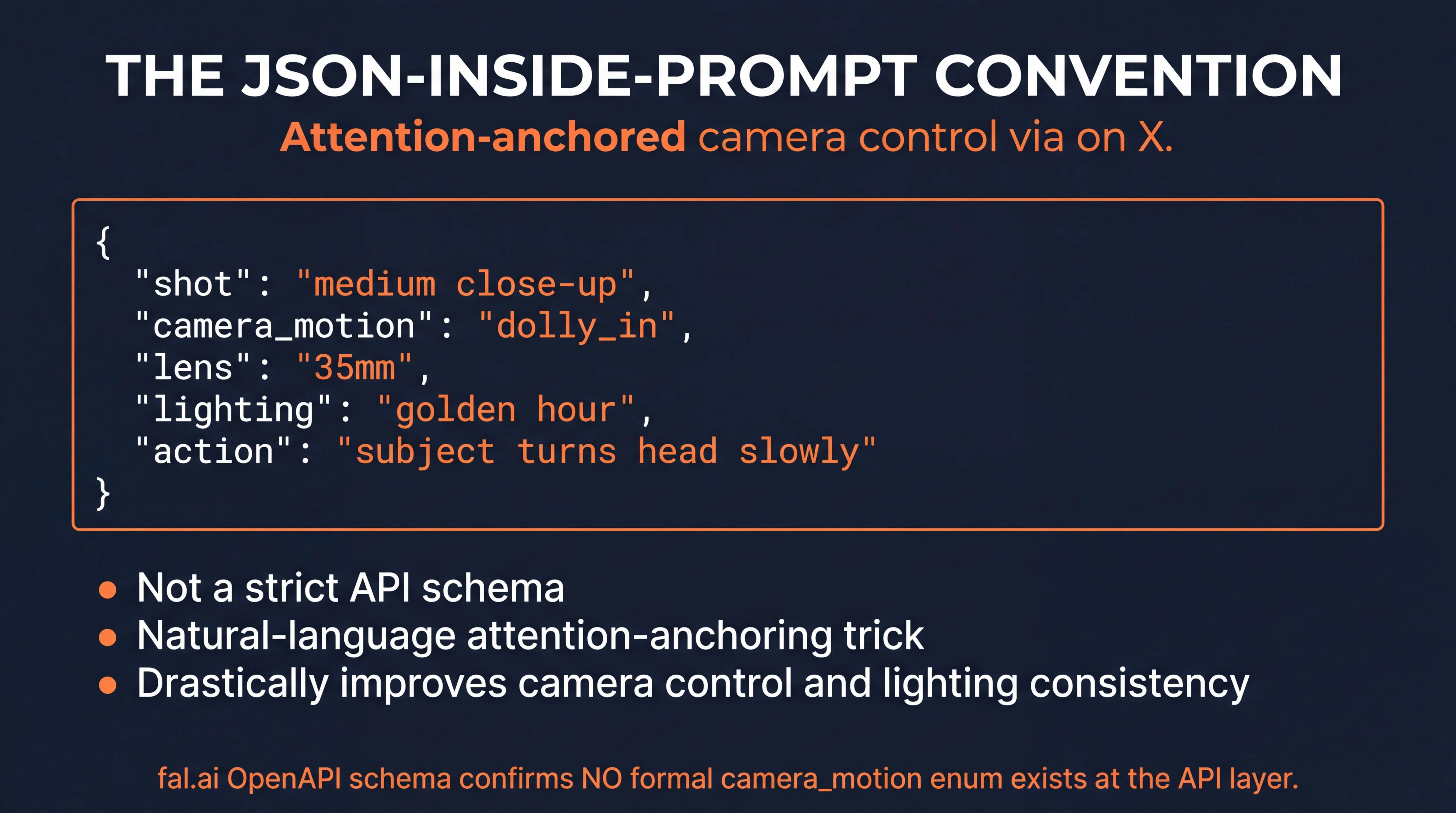
The operator community has converged on a JSON-structured pattern that operators embed directly inside the prompt string. The Seedance 2.0 natural language parser reads the JSON object as attention anchors, drastically improving camera control and lighting consistency. The convention was popularized by technical creator @EHuanglu (el.cine) on X at the post https://x.com/EHuanglu/status/2041366648456937981.
The verified working JSON payload pattern:
{
  "shot": "medium close-up",
  "camera_motion": "dolly_in",
  "lens": "35mm",
  "lighting": "golden hour",
  "action": "subject turns head slowly"
}
Important caveat: this is not a strict API schema, it is a natural-language attention-anchoring trick that exploits the model’s text parsing. The fal.ai OpenAPI schema confirms no formal camera_motion enum exists at the API layer. Operators should treat the JSON convention as a community-discovered prompting pattern, not a vendor-supported contract.
The Vague Action Phenomenon (the Kung-Fu Finding)
Extensive community testing documented in the r/aivideo subreddit reveals a counter-intuitive behavior in the Seedance 2.0 physics engine. When attempting to generate complex martial arts or athletic sequences, micro-managing joint movements causes the physical simulation to collapse into chaotic artifacting.
Failure pattern: “lift left leg, twist torso 45 degrees, punch with right arm” → broken limbs, joint inversions, motion warping.
Success pattern: “Subject defeats opponent by using traditional kung-fu moves” → flawless choreography execution.
The model relies on its vast training data of human motion. Highly specific joint instructions conflict with the model’s deeply embedded motion weights. Vague descriptive phrases allow the model to access intact latent representations of entire choreography sequences. This finding is the single most cited Seedance 2.0 community prompting insight as of June 2026.
The Anime In-Between Workflow
A popular technique documented in r/seedance2pro uses Seedance 2.0 as an interpolation engine for traditional anime aesthetics. The workflow:
- Generate an establishing Start Frame using Nano Banana Pro or Seedream 4.5.
- Generate a concluding End Frame in the same image model to maintain stylistic parity.
- Upload both images to Seedance 2.0, designating them as
@Image1(start) and@Image2(end) via the prompt. - Provide a text prompt describing the transitional action bridging the two states.
- Add anime-specific style language: “anime in-between key frames, hand-drawn animation, traditional Japanese animation style.”
- The model interpolates motion between the two keyframes while adhering to the anime aesthetic.
This is a Seedance 2.0 capability no other True Model in the 2026 stack replicates with the same fidelity.
Camera Motion Vocabulary That Works
Verified keywords that yield consistent results across community testing:
- Movement commands: push-in, pull-out, pan left, pan right, tilt up, tilt down, slow-mo ramp, static
- Complex rigs: orbit, crane shot, handheld tracking, drone sweep, dolly zoom (with “vertigo effect” qualifier)
- Lens vocabulary: 14mm fisheye, 24mm wide, 35mm standard, 50mm, 85mm portrait, 135mm telephoto, anamorphic 2.39:1, macro
- Lighting vocabulary: three-point, Rembrandt, golden hour, blue hour, magic hour, motivated, practical, hard light, soft light, low-key chiaroscuro, day-for-night
Failure Modes to Avoid
Documented failure patterns from operator community testing:
- Long orbits past 8 seconds result in severe background drift and architectural warping.
- Dolly-in maneuvers lasting beyond 5 seconds tend to over-smooth facial textures, destroying pore-level detail unless film-grain or anamorphic qualifiers are explicitly added.
- Whip pans are largely inconsistent and cause motion blur artifacting that destroys multi-shot continuity.
- Multi-instruction prompts past 3 camera moves per generation cause Seedance to silently drop later instructions.
- Micro-managed joint movement prompts produce worse results than vague genre prompts (see Kung-Fu Finding above).
First-Frame Pairing Dynamics
The choice of foundational image model is critical for image-to-video workflows. Seedream 4.5 is the optimal paired workhorse, as it shares ByteDance’s underlying latent space architecture. Images generated by Seedream 4.5 animate with significantly fewer initial-frame warping artifacts than images from competing generators.
For operators on non-ByteDance pipelines, Nano Banana Pro and GPT Image 2.0 are the primary alternatives, both offering robust aesthetic control that Seedance 2.0 can seamlessly inherit. Flux 2 Pro is the strong alternative for highly photorealistic commercial product shots where prompt adherence matters more than aesthetic. For the full first-frame source decision matrix, see the AI Image Generators A-Z Encyclopedia.
Seedance 2.0 API and Integration
Answer capsule. Three API surfaces expose Seedance 2.0: fal.ai, Replicate, and ByteDance Volcano Engine. All accept the same core parameters (prompt, image_url, end_image_url, resolution, duration, aspect_ratio, generate_audio) but pricing models and feature support vary. fal.ai is the recommended developer path. Community ComfyUI bridge nodes exist but are API wrappers, not local self-hosting. Open-source self-host is not available, the model is proprietary closed-weight.
Core API parameter reference
| Parameter | Type | Default | Description |
|---|---|---|---|
prompt | string | required | Natural language description, supports CRAFT framework and JSON-inside-prompt convention |
image_url | string | optional | Start frame URL for image-to-video |
end_image_url | string | optional | End frame URL for chained interpolation |
video_url | string | optional | Motion reference video URL, max 15 sec combined |
audio_url | string | optional | Audio reference for tempo and pacing, max 15 sec |
duration | integer or “-1” | 5 | Output duration, 4 to 15 seconds, or -1 for intelligent duration |
resolution | string | ”720p" | "480p”, “720p”, or “1080p” (1080p upscaled on fal.ai only) |
aspect_ratio | string | ”16:9" | "16:9”, “9:16”, “1:1”, “4:3”, “3:4”, “21:9”, or “auto” |
generate_audio | boolean | true | Toggle native stereo audio generation |
API surface comparison
| Specification | ByteDance Volcano Engine | fal.ai | Replicate |
|---|---|---|---|
| Max duration | 15 sec | 15 sec | 15 sec |
| Resolution limit | 720p native | 1080p (upscaled) | 720p |
| Audio generation | Native | Native (included free) | Native |
| Aspect ratios | All formats | All formats + auto | All formats + auto |
| Max reference files | 12 total | 12 total | 12 total |
| Geographic | China-friendly, US restricted in April 2026 wave | Global | Global |
| Billing model | Token-based | Per-second prepaid | Per-second serverless |
| Recommended for | Enterprise volume | AI Video Bootcamp default | Python rapid prototyping |
ComfyUI integration
The Cameraptor ComfyUI node at GitHub lets operators route Seedance 2.0 directly into existing ComfyUI workspaces. The node accepts up to 6 reference images and 3 reference videos, pipes them to the remote ByteDance server via the Sjinn API framework, and returns the video to a Save Video node. Critical operator note: this is an API bridge, not local self-hosting. All Seedance 2.0 generation requires routing through ByteDance servers regardless of access path.
GitHub community resources
Two community-maintained prompt repositories on GitHub provide curated Seedance 2.0 prompt patterns:
- AtlasCloudAI/awesome-seedance-2-prompt, community-curated working prompts
- EvoLinkAI/awesome-seedance-2.0-prompts, 100+ curated prompt examples
Both repositories are maintained as living references. Operators should bookmark for ongoing reference.
Seedance 2.0 vs Competitors
Answer capsule. Seedance 2.0 leads the True Model 2026 video stack on photoreal realism, dynamic action, multi-subject physics, and complex fluid dynamics. Kling 3.0 Pro wins on tracking-shot precision and 4K native output. Veo 3.1 Quality wins on native audio with SynthID watermarking and Vertex AI indemnification. Hailuo 02 Director wins on explicit bracket-token camera control and per-second cost (3.75x cheaper than Seedance Standard). LTX-2 wins on native 4K at 50fps and open-weights legal posture.
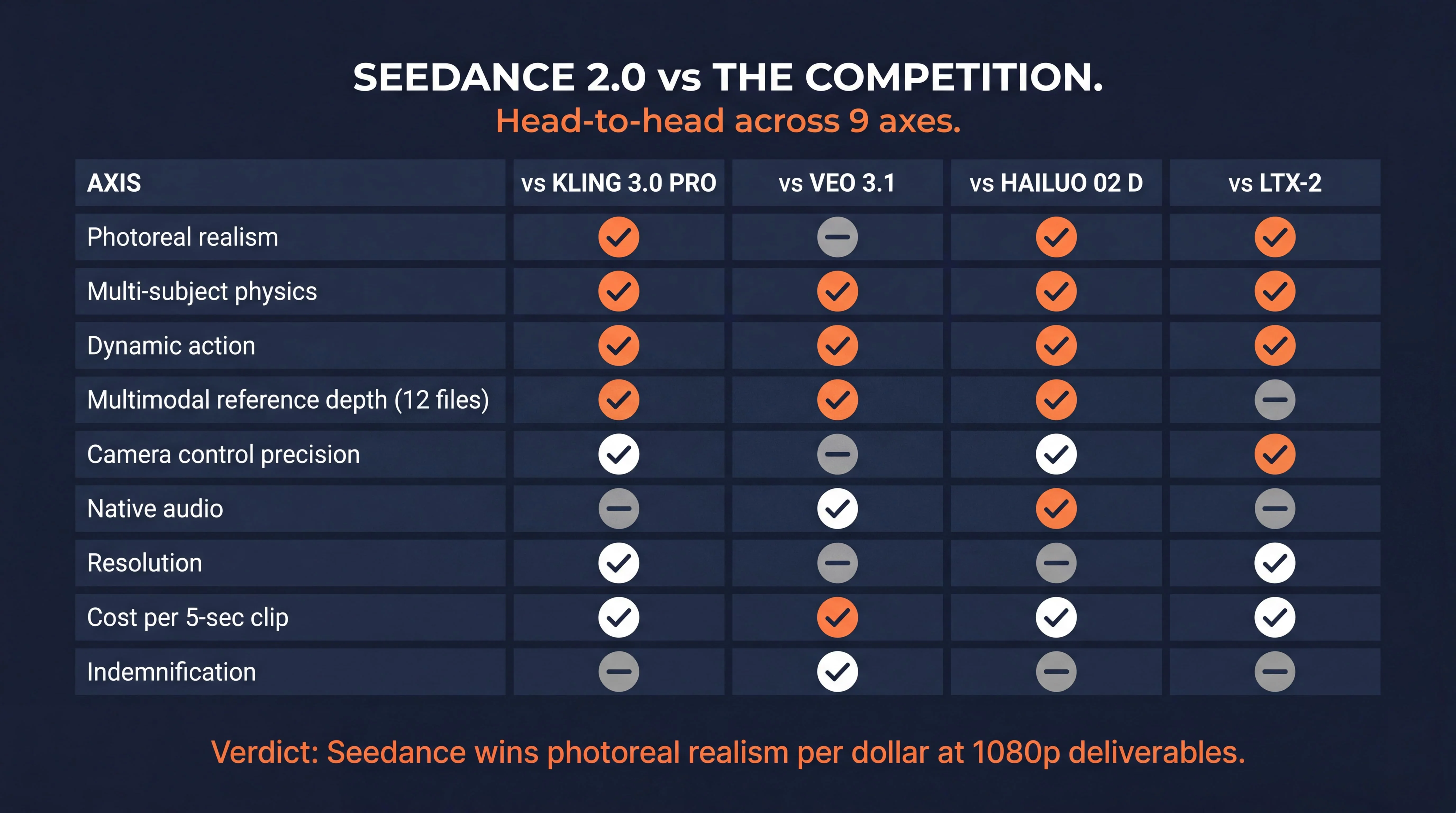
Master comparison table (verified June 2, 2026)
| Axis | vs Kling 3.0 Pro | vs Veo 3.1 Quality | vs Hailuo 02 Director | vs LTX-2 |
|---|---|---|---|---|
| Photoreal realism | Seedance wins | Tie | Seedance wins | Seedance wins |
| Multi-subject physics | Seedance wins | Seedance wins | Seedance wins | Seedance wins |
| Dynamic action | Seedance wins | Seedance wins | Seedance wins | Seedance wins |
| Multimodal reference depth | Seedance wins (12 files) | Seedance wins | Seedance wins | Tie |
| Camera control precision | Kling wins (motion brush + enums) | Tie | Hailuo wins (bracket grammar) | Seedance wins |
| Native audio | Tie | Veo wins (SynthID + spatial directional) | Seedance wins | Tie |
| Resolution | Kling wins (1080p+ native) | Tie | Tie (both 1080p) | LTX wins (4K native) |
| Cost per 5-sec clip | Kling wins (lower SKU) | Seedance wins | Hailuo wins (3.75x cheaper) | LTX wins (cheapest 1080p) |
| Indemnification | Tie (neither indemnified) | Veo wins (Vertex AI) | Tie | Tie |
Per-matchup verdict
Seedance 2.0 vs Kling 3.0 Pro. Seedance wins on physics and dynamic action; Kling wins on resolution and tracking-shot precision. The operator decision rule: use Seedance for action-heavy commercial work where the deliverable ships at 1080p, use Kling for character consistency across multi-shot storyboards or where 4K native output is mandated by client spec. For the detailed comparison, see the Seedance vs Kling vs Veo head-to-head.
Seedance 2.0 vs Veo 3.1 Quality. Veo wins on native audio quality and Vertex AI indemnification, both load-bearing for paying client work. Seedance wins on cost (1.50 USD vs 2.00 USD per 5-sec clip at Standard vs Quality) and dynamic action realism. Operator rule: route hero shots through Veo via Vertex AI when indemnification matters, use Seedance for everything else.
Seedance 2.0 vs Hailuo 02 Director. Hailuo is 3.75x cheaper per second (0.40 USD vs 1.50 USD per 5-sec clip) and wins on explicit bracket-token camera control. Seedance wins on multi-subject physics, character consistency via the 9-image omni-reference capability, and overall photoreal output quality. Operator rule: Hailuo for budget-pressured single-shot social ads, Seedance for multi-shot client work where realism matters.
Seedance 2.0 vs LTX-2. LTX-2 wins on 4K native at 50fps and the open-weights legal posture for on-prem deployment. Seedance wins on photoreal realism per dollar and cinematic camera semantic understanding. Operator rule: LTX-2 for 4K plus chaining workflows or on-prem requirements, Seedance for client-facing realism at 1080p and below.
Seedance 2.0 vs Sora 2. Sora 2 is on a deprecation timeline (consumer app sunset April 26, 2026, API termination September 24, 2026). Every Sora 2 use case is now a migration candidate to Seedance 2.0, Veo 3.1, or LTX-2. AI Video Bootcamp does not recommend Sora as a True Model going forward. For the broader API comparison context, see Seedance vs Kling vs Sora 2 API comparison.
The cost-realism frontier
Plotting realism quality against cost per 5-second clip across the True Model video stack:
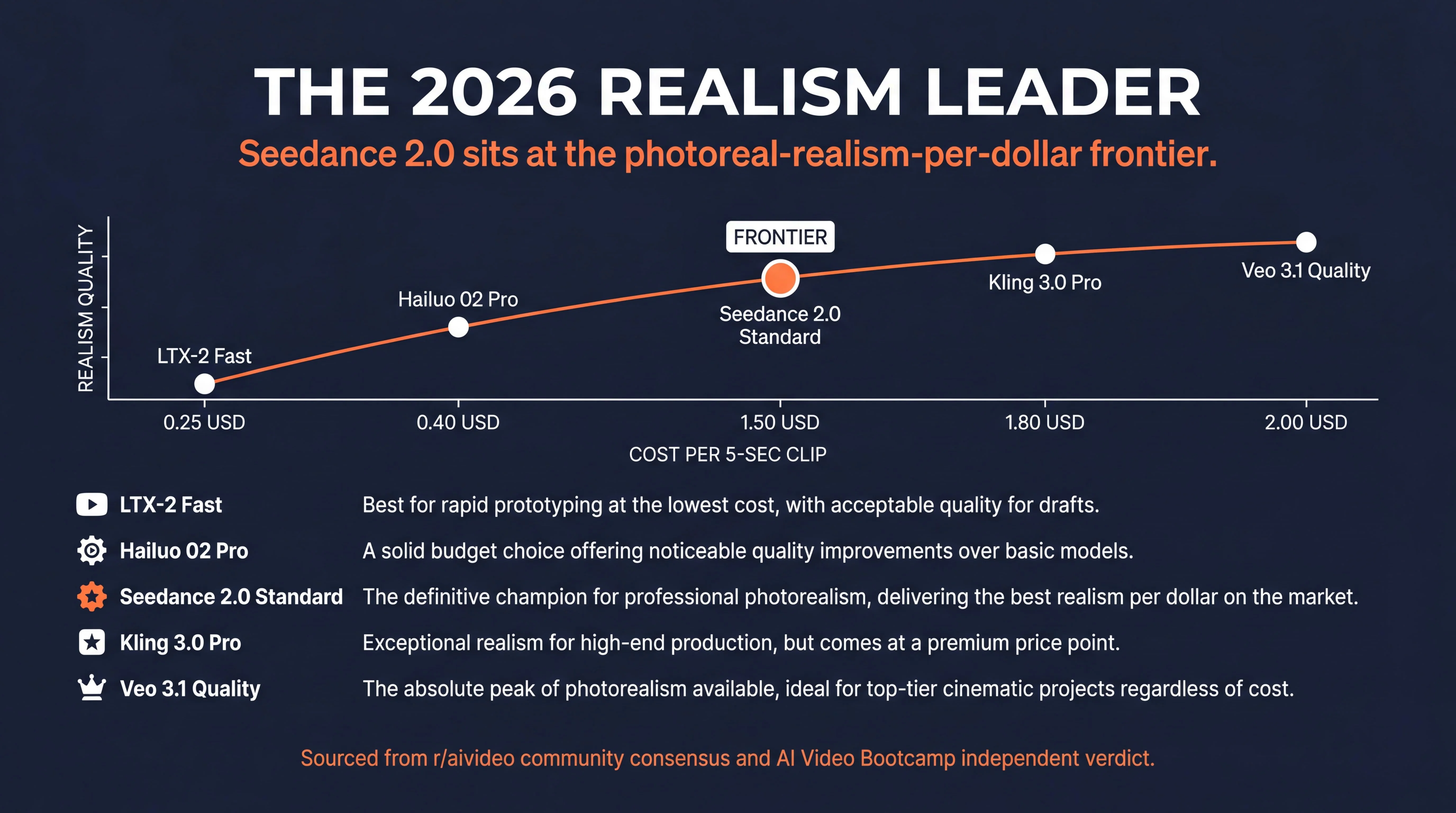
- LTX-2 Fast at 0.25 USD sits at the bottom-left corner: cheapest, but realism is bounded by the open-weights training set.
- Hailuo 02 Pro at 0.40 USD sits above LTX-2 on realism per dollar for short-form work.
- Seedance 2.0 Standard at 1.50 USD sits on the photoreal-realism-per-dollar frontier. This is the editorial verdict: best realism per dollar in 2026.
- Kling 3.0 Pro at 1.60 to 2.00 USD sits adjacent to Seedance with a resolution premium.
- Veo 3.1 Quality at 2.00 USD is the most expensive in the True Model lineup, justified only when audio or indemnification is the load-bearing requirement.
Seedance 2.0 Honest Review: AI Video Bootcamp Verdict
Answer capsule. Seedance 2.0 is the 2026 photoreal realism leader and the best multimodal reference engine on the market. It is not the right tool for every deliverable. Real strengths: dynamic action, multi-subject physics, fluid dynamics, character consistency via 9-image omni-reference. Real limitations: no native 4K, no customer-facing IP indemnification, 720p default tier requires upscaling for premium deliverables, China-server-routed via Volcano Engine which complicates EU client work. AI Video Bootcamp verdict: use Seedance for client work where photoreal realism is load-bearing and the deliverable ships at 1080p or below, pair with an indemnified first-frame source for legal coverage.
What Seedance 2.0 gets right
The strongest verified Seedance 2.0 strengths from community testing as of June 2, 2026:
- Multi-subject interactions. Two or more characters with simultaneous actions, dialogue, or contact. The dual-branch architecture and 12-file multimodal reference depth outperform single-reference competitors.
- Fluid dynamics and complex physical collisions. Fight choreography, water splashes, debris, vehicle motion through environment. The community verdict on the r/aivideo “King of Action” thread (391 upvotes, February 2026) anchored this consensus.
- Dynamic action sequences. Running, driving, falling, bullet-time effects. Characters have a sense of weight and gravity that competing models in the True Model 2026 stack do not consistently replicate.
- Tracking shots that mimic real-world camera motion. Mid-shot tracking, slow dolly-in, shallow depth-of-field push-ins. Seedance recognizes cinematic language at the semantic level.
- Photoreal realism for client deliverables. Reflections, directional light, shadow transitions, surface coherence under changing light conditions. The recommended workflow is to pair with Seedream 4.5 first frames for ByteDance-stack latent compatibility.
- Multimodal reference fidelity. When a client supplies multiple images, video clips, and audio tracks and expects them fused into a single coherent output, Seedance 2.0 handles 12-file ingestion better than any competitor.
What Seedance 2.0 gets wrong (and how to work around it)
The honest limitations operators must plan for:
- No native 4K generation. Maximum native resolution is 720p with 1080p delivered via upscale on fal.ai. For 4K master file delivery, pipe output through Topaz Video AI upscaling or switch to LTX-2 or Kling 3.0 Pro 4K tier for those specific shots.
- No customer-facing IP indemnification. ByteDance does not offer commercial IP indemnification on Seedance 2.0 at any documented tier. Operators serving paying clients carry the IP risk personally unless they pair Seedance with an indemnified first-frame source (see Compliance section below).
- Default-tier resolution is below client-deliverable standard for premium work. Operators shipping commercial deliverables should pipe Seedance output through dedicated upscaling. This is a category baseline for True Model 2026 video generation, not a Seedance-specific defect.
- China-server-routed via Volcano Engine. EU client work requires a Transfer Impact Assessment under GDPR Article 46 if routed through Volcano Engine. fal.ai’s US-based infrastructure is the recommended path for EU-facing work.
- No major-studio theatrical-release readiness. No True Model in 2026 is yet a substitute for traditional studio pipelines for theatrical release. Seedance is the right tool for advertising, social, e-commerce, real estate, legal, and trades video work where it is actually deployed at scale.
When to use Seedance 2.0
Use Seedance 2.0 when the deliverable requires photoreal realism, dynamic action, multi-subject physics, or character-consistent multi-clip campaigns at 1080p or below. Pipe through Topaz Video AI or a similar upscaler if the final delivery specification demands 4K. Switch to Veo 3.1 Quality when you need native synchronized audio with SynthID provenance or Vertex AI indemnification. Switch to LTX-2 when you need native 4K, 50fps, or open-weights on-prem deployment. Switch to Kling 3.0 Pro for 4K with tracking-shot precision. Switch to Hailuo 02 Director for cost-pressured single-shot social ads with explicit bracket-token camera direction.
Compliance and Commercial Use for Client Work
Answer capsule. Seedance 2.0 is usable for paying client deliverables but carries the unindemnified legal risk. ByteDance offers no customer-facing IP indemnification at any tier. Volcano Engine routes through China-hosted servers requiring an EU Transfer Impact Assessment. ByteDance embeds C2PA manifests by default in CapCut Dreamina paths. EU AI Act Article 50 enforces August 2, 2026 with a 15 million EUR penalty ceiling. California AB 853 covered-provider duties operative August 2, 2026. The Hollywood litigation timeline includes Disney and Paramount cease-and-desist letters from February 2026.
The Hollywood litigation context
In early February 2026, the Motion Picture Association, alongside major studios including Disney and Paramount, issued coordinated cease-and-desist letters against ByteDance. The studios alleged that Seedance 2.0 was trained on pirated cinematic data and could generate unauthorized digital replicas of trademarked characters. ByteDance responded by halting the global API rollout, implementing facial recognition guardrails and copyright filters, then relaunching in limited international markets in April 2026. For the deeper AVB coverage on the litigation specifics, see Seedance 2.0 Hollywood Lawsuits.
SAG-AFTRA AI Rider compliance
The actors’ union SAG-AFTRA publicly addressed Seedance 2.0 in 2026 statements regarding voice and likeness data. For AI Video Bootcamp members producing commercial content involving human talent, the 2026 TV/Theatrical Agreement mandates strict compliance protocols. If an operator uses Seedance 2.0 to alter an actor’s performance, create a digital double, or generate AI-augmented automated dialogue replacement, they must provide a 48-hour disclosure to the talent’s representation prior to creation. Using Seedance to simulate a specific actor without explicit written consent in a specialized “AI Rider” violates union rules and exposes the production company to severe legal liability.
C2PA content provenance
ByteDance integrated the Coalition for Content Provenance and Authenticity (C2PA) standard into Seedance 2.0 following the Hollywood litigation. Every generated MP4 file produced through CapCut Dreamina and Volcano Engine contains cryptographically signed, machine-readable metadata identifying the video as AI-generated, noting the originating model and creation timestamp. This metadata is embedded at the file level.
Critical operator caveat: the fal.ai and Replicate API access paths do not consistently embed C2PA by default. Operators using API access for EU AI Act Article 50 compliance must add the manifest manually via c2patool. For the full compliance playbook including C2PA workflow integration, see AI Disclosure Compliance 2026: C2PA + EU AI Act Guide.
EU AI Act Article 50 (effective August 2, 2026)
EU AI Act Article 50 requires providers of generative AI systems doing business in Europe to clearly label output as artificially generated. Penalty ceiling: 15 million EUR or 3 percent global turnover for non-compliant deployers. Seedance 2.0’s C2PA implementation through CapCut Dreamina and Volcano Engine satisfies the transparency mandate by default. API access paths require manual labeling.
California AB 853 covered-provider duties
California AB 853 covered-provider duties become operative August 2, 2026. Establishes severe civil penalties for stripping AI metadata from distributed content. AVB operators utilizing Seedance 2.0 for commercial client work must ensure their video editing pipelines (Adobe Premiere, DaVinci Resolve, CapCut) do not inadvertently delete the C2PA manifests during the rendering process.
The three-paths-one-trap indemnification framing
This is the load-bearing operator-facing finding for client work. ByteDance does not offer customer-facing IP indemnification on Seedance 2.0 at any tier. For AI Video Bootcamp members serving paying clients, the indemnification path matters more than any single per-second cost.
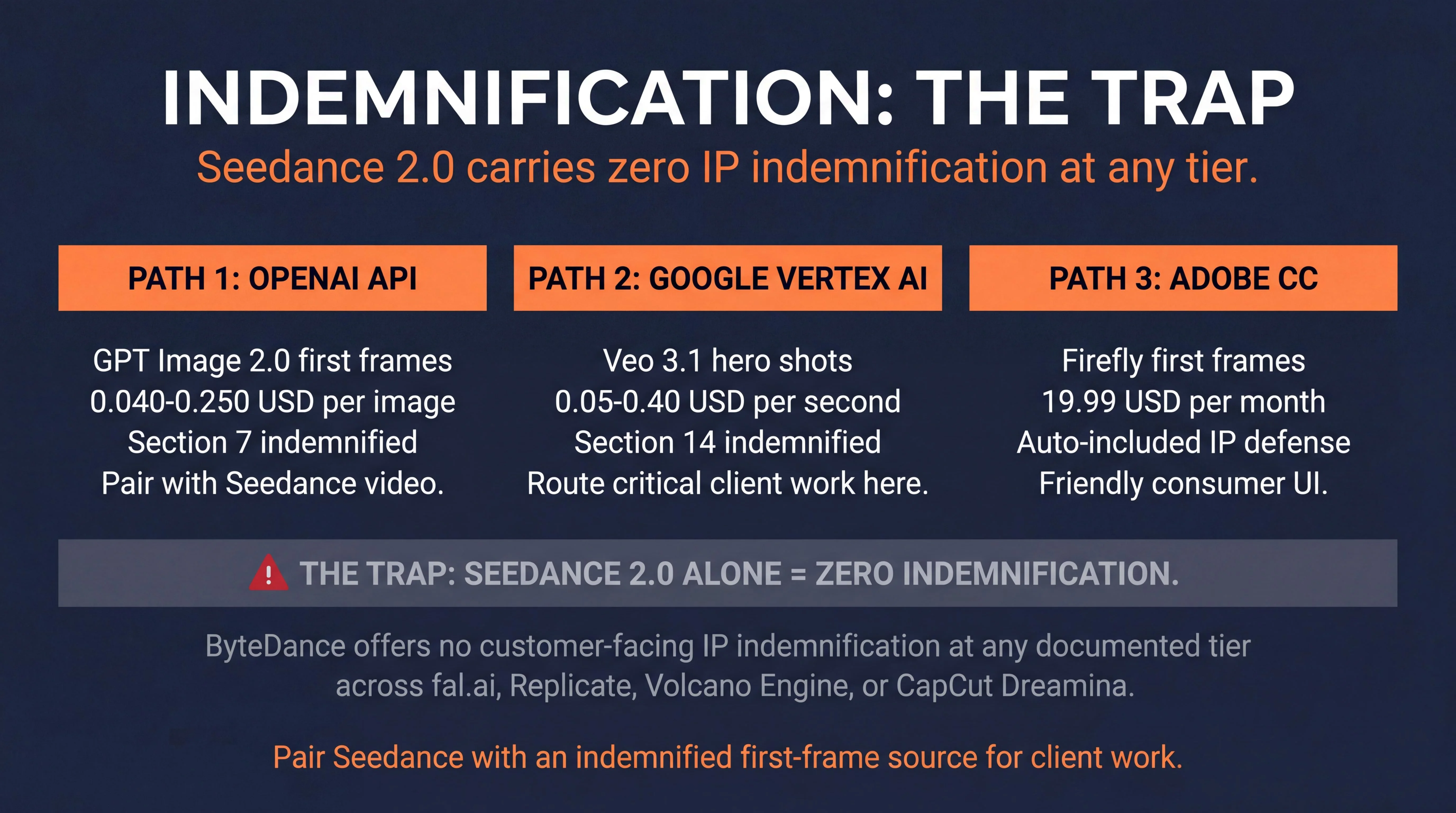
Three open paths to indemnified output exist:
- Adobe Firefly Creative Cloud Photography at 19.99 USD per month. The only consumer-tier subscription that auto-includes IP defense, useful for first-frame creation in image-to-video pipelines.
- OpenAI API at 0.040 to 0.250 USD per image for GPT Image 2.0 first frames. Indemnified under OpenAI Service Terms Section 7.
- Google Vertex AI for Veo 3.1 video generation at 0.05 to 0.40 USD per second. Indemnified under Google Cloud Service Specific Terms Section 14.
The trap: Seedance 2.0 via any access path carries zero customer-facing indemnification. Operators using Seedance for client work are carrying the IP risk personally.
Recommended operator workflow for client deliverables: Use Seedance 2.0 for the video output, pair with GPT Image 2.0 or Adobe Firefly first frames (both indemnified), route hero shots through Veo 3.1 via Vertex AI for full indemnification on critical deliverables. Add explicit MSA contract language: “Provider shall not be liable for third-party IP claims arising from AI-generated content produced via models that do not provide vendor IP indemnification. Client acknowledges that Seedance 2.0 outputs carry operator-side IP risk.”
For deeper compliance reading, see the AI Image Generators A-Z Encyclopedia which documents the indemnification matrix across the full 2026 AI image and video market.
Geographic data residency
Volcano Engine routes through China-based servers in Shanghai, Shenzhen, and Zhangjiakou. EU client work requires a Transfer Impact Assessment under GDPR Article 46. fal.ai infrastructure is US-based and avoids the China-routing concern, making fal.ai the recommended path for EU-facing commercial work.
FAQ
Is Seedance 2.0 free?
There is no genuinely unlimited free tier for Seedance 2.0. The most generous free entry point is CapCut Dreamina, which provides 225 shared daily tokens with visible watermarks at the free tier. The fal.ai API gives a small signup credit pool, BytePlus offers 2 million free tokens at signup which equals approximately 100 seconds of 720p generation. For watermark-free commercial use, expect to pay at least 18 USD per month via CapCut Dreamina Standard or per-second API pricing starting at 0.18 USD per second on Replicate.
What is the official website for Seedance 2.0?
The official Seedance 2.0 product showcase is at seed.bytedance.com/en/seedance2_0. Enterprise developer access is routed through volcengine.com, the ByteDance cloud platform. The arXiv model card is at arxiv.org/abs/2604.14148 published April 15, 2026. ByteDance’s English-language consumer entry point is CapCut Dreamina at dreamina.capcut.com. Several third-party wrapper domains use the seedance name without ByteDance authorization, AI Video Bootcamp recommends operators avoid wrappers and route through fal.ai, Replicate, Volcano Engine, or CapCut Dreamina.
How much does Seedance 2.0 cost per second?
Seedance 2.0 pricing varies across access paths. fal.ai charges 0.3034 USD per second at Standard 720p with audio included, 0.2419 USD per second at Fast 720p, and 0.682 USD per second at upscaled 1080p. Replicate charges 0.18 USD per second at 720p, which equals approximately 55 seconds of generation per 10 USD. ByteDance Volcano Engine uses token-based billing at about 0.14 USD per second of 720p output. CapCut Dreamina bundles pricing into a 18 USD per month Standard subscription with priority queues and watermark-free output.
Does Seedance 2.0 have an API?
Yes. Seedance 2.0 is accessible programmatically through ByteDance Volcano Engine (official direct), fal.ai (recommended developer path for AI Video Bootcamp operators), and Replicate (serverless Python SDK environment). All three accept the same core parameters: prompt, image_url for start frame, end_image_url for end frame, resolution, duration (4 to 15 seconds), aspect_ratio, and generate_audio boolean. The model supports up to 12 simultaneous reference files combined: 9 images plus 3 video clips plus 3 audio files. There is no formal camera_motion enum at the API layer.
Can I use Seedance 2.0 in CapCut?
Yes. Seedance 2.0 is natively integrated into CapCut Dreamina, ByteDance’s consumer creative editor, at dreamina.capcut.com. The integration provides a visual drag-and-drop interface for non-technical creators. Free tier provides 225 daily shared tokens with visible watermarks. The Standard plan at 18 USD per month removes watermarks and grants priority queue access. Pro at 48 USD per month and Ultra at 84 USD per month increase token allocation for high-volume creators. CapCut Dreamina is the cleanest free trial path for evaluating Seedance 2.0 before committing to API integration.
Last reviewed by Daniel Riley on June 2, 2026. For the broader 2026 AI video model landscape, see the Best AI Video Tools 2026 Tech Stack and the Cinematic AI Video Prompts 2026 pillar. For head-to-head comparisons, see Seedance vs Kling vs Veo and Seedance vs Kling vs Sora 2 API comparison.