
The X-Native Distribution Wedge
Answer capsule. Grok Imagine is the only top-tier video generator with first-party publishing into a 600 million plus MAU social network in the same app session. The Grok mobile app ships a prompt-to-published-X-post video in 90 to 180 seconds and a still image in 25 to 45 seconds. No other True Model in the AI Video Bootcamp tech stack matches this single-session prompt-to-publish path.
Every other top-tier video tool in the AI Video Bootcamp tech stack ends at the same friction point: the operator generates a clip, downloads the MP4, opens a separate social-network composer, uploads, writes the caption, and posts. That round trip burns 3 to 8 minutes per asset and strips any provenance metadata the original tool may have embedded.
Grok Imagine collapses that loop. The Grok mobile app on iOS and Android exposes a long-press share sheet on every generated asset with “Post to X” as a native option. The asset uploads with the Grok app providing the source attribution to X’s content pipeline. There is no download step, no separate composer, no metadata-stripping round trip.
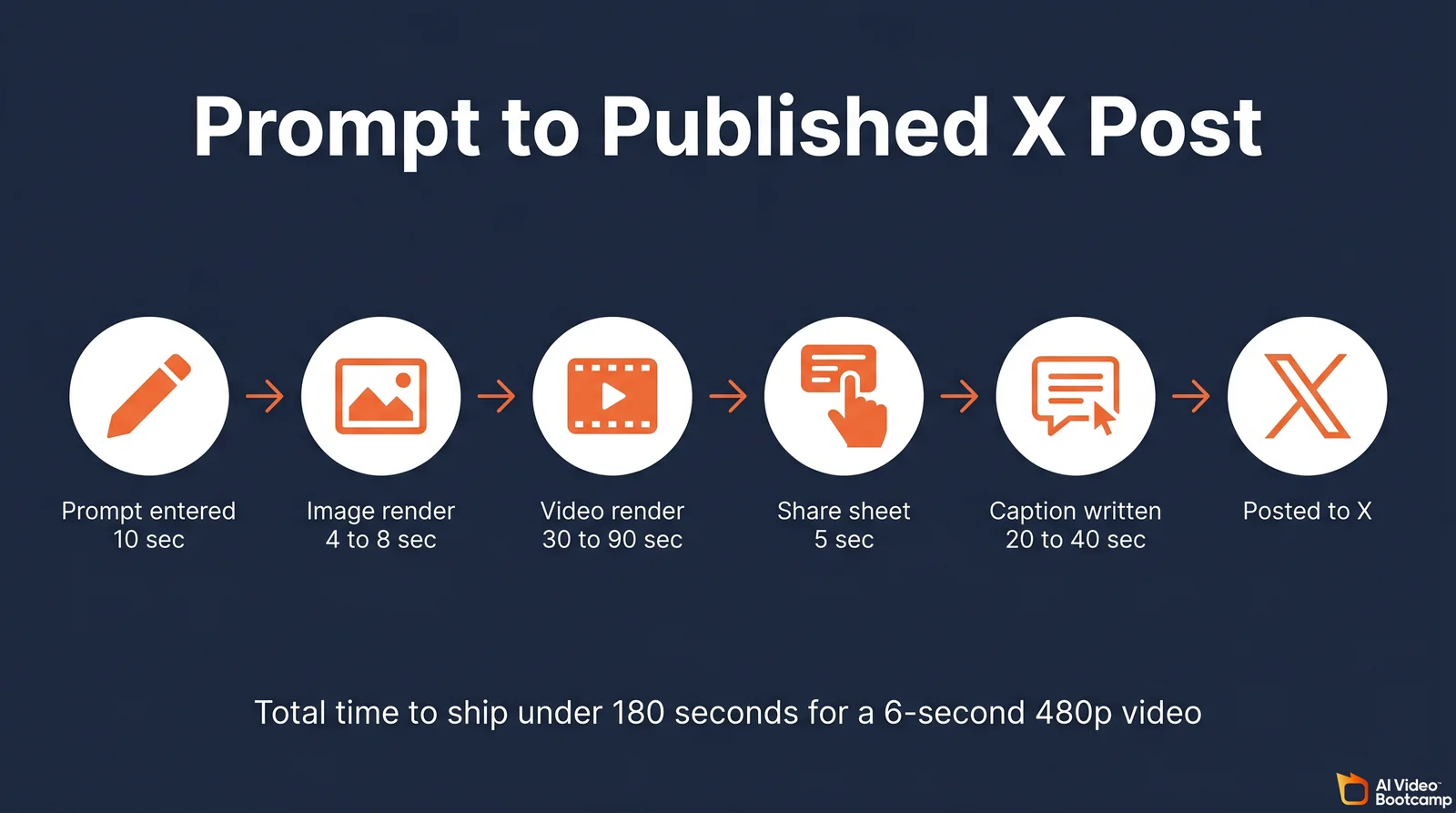
For an AI Video Bootcamp operator running short-form social pipelines, the implications are operational. A documented mobile workflow runs prompt to published X post in under 180 seconds for a 6-second 480p video: 10 seconds to enter the prompt, 4 to 8 seconds for the still render, 30 to 90 seconds for the video render, and 20 to 40 seconds for the caption and post. Stills compress to 25 to 45 seconds total. Across a session of 20 social posts per day, the time saving versus a Veo-plus-CapCut-plus-X workflow is 60 to 90 minutes.
The wedge does not extend to web. The grok.com web Imagine surface does not expose the in-app Post to X button in most regions as of May 2026. Web users typically download the asset, open x.com, and upload manually, which is the same friction loop as every competing tool. Operators chasing the X-native distribution advantage should keep the workflow on mobile.
There is no native scheduling inside the Grok app. Scheduled posting requires the X Premium scheduler, which means downloading out of Grok, uploading inside the X composer, and using the Schedule control. That round trip removes the inline-attribution advantage and any embedded C2PA metadata.
The C2PA labeling gotcha
X reads C2PA Content Credentials when content is uploaded and applies a “Made with AI” badge when it detects an authenticated provenance manifest. Independent testing in early 2026 found inconsistent behavior. ChatGPT outputs uploaded to X received the AI label, while Grok and Gemini outputs sometimes did not, despite Aurora image generation embedding C2PA per xAI documentation. The implication for operators serving European audiences: do not rely on X’s auto-label to satisfy EU AI Act Article 50 disclosure duties. Manual on-image text or a prominent in-caption tag is the only safe assumption.
The same caveat applies to programmatic posting. Operators who chain the xAI Imagine API to the X API v2 to fully automate publishing lose the C2PA manifest at the X-upload step because X API v2 does not currently accept or preserve C2PA on programmatic uploads. The one-tap mobile flow preserves the manifest. The two-API programmatic flow strips it.
Verified Grok Imagine Pricing, May 2026
Answer capsule. Consumer entry to Grok Imagine is X Premium at 8 USD per month for in-app access. SuperGrok at 30 USD per month is the standalone path with full caps. SuperGrok Heavy at 300 USD per month adds priority routing and parallel agent execution. The Imagine API is prepaid credits at 0.05 USD per second of 480p video, 0.07 USD per second of 720p, and 0.02 to 0.07 USD per image, verified directly from docs.x.ai/developers/pricing dated May 27, 2026.
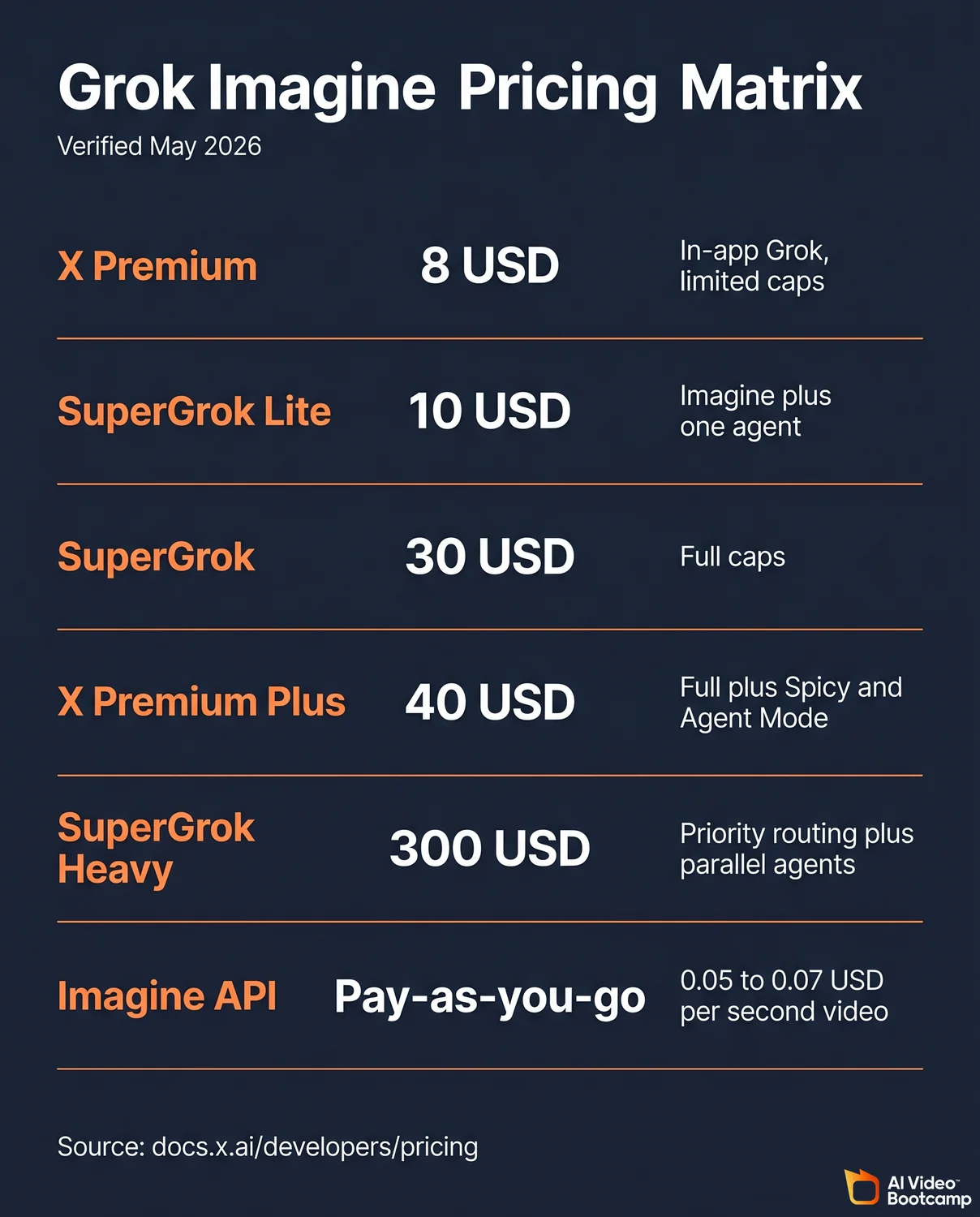
The xAI product ecosystem has gone through multiple rebundling phases in late 2025 and early 2026, and several aggregator sites publish outdated tier tables. The numbers below are verified against the live grok.com and docs.x.ai pages where xAI publishes primary documentation. Where the live consumer tier page did not return through automated fetch, the figure is flagged.
Consumer access tiers
| Tier | Monthly USD | Annual USD | Grok Imagine access | Spicy Mode | Agent Mode | API included |
|---|---|---|---|---|---|---|
| Free Grok | 0 | 0 | Limited, app-side rate-capped (no image gen since March 2026) | No | No | No |
| X Basic | 3 to 4 | Varies | Blocked, no Grok at all | No | No | No |
| X Premium | 8 web | 84 web | Yes, in-app Grok including Imagine, lower caps | No | No | No |
| X Premium+ | 40 web | 395 web | Yes, expanded caps, priority access to new Grok features | Yes (iOS or Android, age-verified) | Yes (web beta) | No |
| SuperGrok Lite | 10 | Not published | Yes, includes Grok Imagine plus one agent | No | No | No |
| SuperGrok | 30 | 300 (about 17 percent off) | Yes, full Imagine access | Yes (iOS or Android, age-verified) | Yes (web beta) | No |
| SuperGrok Heavy | 300 | Not published | Yes, top-priority routing, parallel agent execution | Yes | Yes | No |
| Imagine API | Pay-as-you-go prepaid credits | Not applicable | Full programmatic access | Not exposed via API | Not applicable | Yes |
X Basic price has been reported at both 3 USD and 4 USD per month across secondary sources in 2026. Verify the live x.com/i/premium page before quoting clients. The tier blocks Grok entirely, so the distinction is academic for AI Video Bootcamp operators.
API pricing
API pricing is verified directly against the official xAI pricing documentation dated May 27, 2026.
| Model identifier | Capability | Input cost | Output cost |
|---|---|---|---|
| grok-imagine-image | Text or image to image (fast) | 0.002 USD per source image | 0.02 USD per image at 1K or 2K |
| grok-imagine-image-quality | Text or image to image (premium) | 0.01 USD per source image | 0.05 USD per image at 1K, 0.07 USD per image at 2K |
| grok-imagine-video | Text-to-video, image-to-video, edit, extend, reference-to-video | 0.002 USD per source image, 0.01 USD per source second of video | 0.05 USD per second at 480p, 0.07 USD per second at 720p |
Worked numbers an operator will actually see. A 6-second 480p image-to-video clip costs 0.002 plus 6 times 0.05, which is 0.302 USD. A 10-second 720p image-to-video clip costs 0.702 USD. A 2K hero image from the quality model with one reference costs 0.08 USD. Per minute of finished output: 720p video with audio is 4.20 USD per minute, 480p video is 3.00 USD per minute.
The video extension endpoint bills only the appended portion at the standard per-second rate. The original portion is not re-billed. Source: docs.x.ai/developers/model-capabilities/video/extension.
The hidden cap and how to handle it
xAI does not publish per-tier daily image and video caps for Imagine on the consumer side. The official rate-limits page states: “Rate limit tiers apply to text and embedding models. For increases to Voice and Imagine API limits, contact [email protected].” Source: docs.x.ai/developers/rate-limits.
Secondary blog coverage reports approximate consumer caps of about 100 image generations per 24 hours on X Premium and roughly 100 per 2 hours on SuperGrok, with SuperGrok Heavy unlocking 4,000 plus fast images per 24 hours and 80 plus videos per 24 hours. These numbers are sourced from third-party aggregators and Reddit megathreads rather than xAI itself. Operators should verify the cap inside their own account before architecting a workflow around it. There is no documented hard image-per-month or video-per-month figure on any consumer tier as of May 2026.
The API path is different. Cumulative-spend tiers govern API rate limits: Tier 0 starts at 0 USD, Tier 1 at 50 USD, Tier 2 at 250 USD, Tier 3 at 1,000 USD, Tier 4 at 5,000 USD. Imagine concurrency increases require an email to [email protected] rather than automatic tier bumps. The 0.05 USD violation fee applies per request that is rejected by the safety filter before generation.
For operators comparing the unit economics to the rest of the AI Video Bootcamp tech stack, Grok at flat 30 USD per month is the cheapest unlimited path to short-form vertical video with native audio. The per-second API rate of 0.05 to 0.07 USD is competitive with Veo 3.1 Fast (0.15 USD per second) and meaningfully cheaper than Veo 3.1 Quality (0.40 USD per second).
Technical Capabilities and Limits
Answer capsule. Grok Imagine generates 1K and 2K images, 480p and 720p video up to 15 seconds long, with native synced audio. The model supports text-to-image, image-to-video, video editing on inputs up to 8.7 seconds, and “Extend from Frame” video appending of 2 to 10 seconds per call. The Aurora engine ships 13 image aspect ratios and 7 video aspect ratios. Output frame rate is 24 fps per secondary sources.
The Imagine product surface covers five endpoints documented at docs.x.ai. Operators must understand the precise limit of each modality to design reliable production workflows.
Text-to-image and multi-image edit
Source: docs.x.ai/developers/model-capabilities/images/generation dated May 14, 2026.
The text-to-image model supports up to 10 images per request via the n parameter on grok-imagine-image-quality. Resolutions are 1K and 2K, controlled by resolution. Aspect ratios cover 1:1, 16:9, 9:16, 4:3, 3:4, 3:2, 2:3, 2:1, 1:2, 19.5:9, 9:19.5, 20:9, and 9:20, plus an auto-select option. That is 13 explicit ratios.
Output format defaults to a URL with a temporary signed link to the JPEG. Switch response_format to b64_json for inline base64 if the consumer is a backend pipeline. Multi-image editing accepts up to 3 source images per request for compositing and style transfer.
Text-to-video and image-to-video
Source: docs.x.ai/developers/model-capabilities/video/generation dated May 13, 2026.
Clip length range is 1 to 15 seconds via the duration parameter. Aspect ratios cover 1:1, 16:9 (default), 9:16, 4:3, 3:4, 3:2, and 2:3. Resolutions are 480p (default, faster) and 720p (HD). Native audio is generated alongside visuals with no post-production step. Frame rate is not stated on the primary docs page. Multiple secondary sources cite 24 fps but xAI itself has not published the number.
Image-to-video uses the source image as the first frame. Default output matches the source’s aspect ratio. The aspect_ratio parameter overrides and stretches the image to fit. Pricing adds a flat 0.002 USD input charge to the standard per-second video rate. Image-to-video render time is reported at approximately 17 seconds for a 6-second 480p clip per secondary operator testing. Verify the timing in your own account before architecting a real-time workflow around it.
Video editing
Source: docs.x.ai/developers/model-capabilities/video/editing dated April 2, 2026.
The maximum input video duration for the editing endpoint is 8.7 seconds. The output preserves the input’s duration, aspect ratio, and resolution, capped at 720p. The duration, aspect_ratio, and resolution parameters are ignored for edits. Input must be MP4 with H.264, H.265, or AV1 codecs.
The 8.7-second cap is the single most constraining limit in the Grok Imagine surface. Operators editing client deliverables longer than 8.7 seconds must split the source, edit each segment separately, and re-stitch in a non-linear editor.
Video extension, “Extend from Frame”
Source: docs.x.ai/developers/model-capabilities/video/extension dated April 2, 2026.
Input duration must be 2 to 15 seconds. Extension duration is 2 to 10 seconds, with the system defaulting to 6 seconds if unspecified. Aspect ratio and resolution inherit from the input and cap at 720p. The duration parameter governs only the appended segment. A 10-second source plus duration=5 returns a 15-second clip.
The docs do not publish a hard chain limit. Operators report that chaining multiple extensions sequentially is the practical path to longer narratives. AI Video Bootcamp operators planning short-film stitching should test the chain in their own account before pricing a client engagement around it.
What Grok Imagine cannot do
The product has clean limits worth knowing in advance. There is no equivalent to ControlNet pose or depth conditioning. There is no documented seed-based reproducibility on the consumer product (the API may expose seeds for batch consistency, but the docs do not detail the parameter). There is no character-reference system equivalent to Midjourney’s --cref. The maximum image-edit input is 3 source images. There is no batch image generation endpoint outside the n parameter on text-to-image. There is no lip-sync API surface documented for dialogue, though community evidence suggests the video pipeline produces serviceable lip sync on prompted dialogue.
For comparison context against the rest of the stack, see the Seedance vs Kling vs Sora 2 API guide and the Veo 3.1 Lite pricing breakdown.
Agent Mode Walkthrough, May 2026 Beta
Answer capsule. Agent Mode is xAI’s May 2026 web-only beta that replaces chat-prompt workflows with an infinite canvas. Four preset templates (Create Worlds, Short Film, UGC Product Stories, Brand Identity) plan 6 to 12 storyboard panels per project, then stitch 6-second clips into longer films with auto-transitions. Access requires a paid Grok account. xAI has not posted a dedicated docs page as of May 29, 2026, so capability claims below are secondary-sourced.
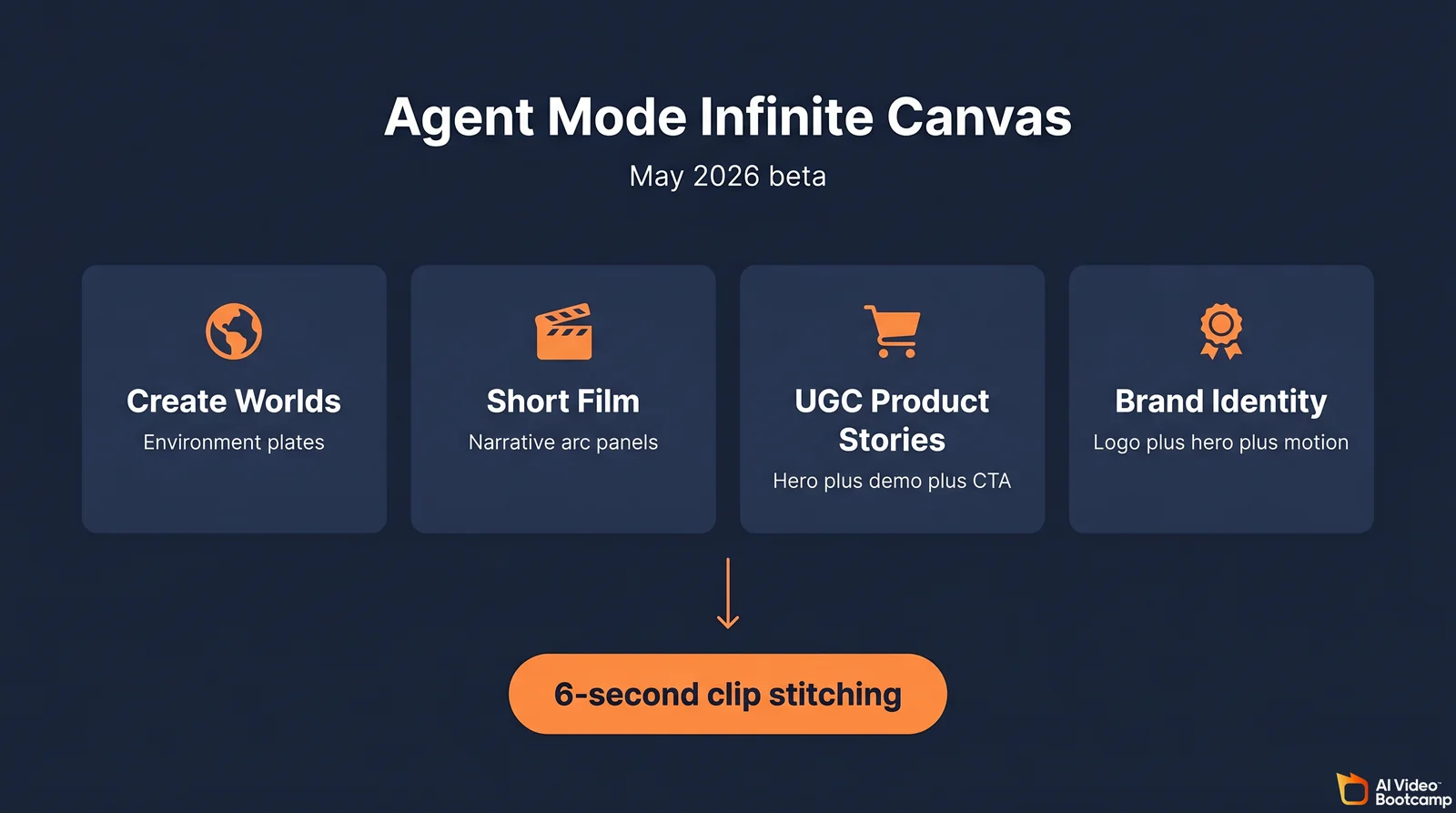
The shift from chat prompting to canvas workflow is the most significant Grok Imagine product change of 2026. The chat model treats each prompt as an isolated render. Agent Mode treats the project as a multi-step planning surface where storyboard generation, panel editing, and clip stitching share a single workspace.
The infinite canvas mechanic functions as a visual whiteboard. Operators zoom out to view every story concept, every generated panel, and every animated clip in one cohesive layout. The agent plans sequences of 6 to 12 storyboard panels that serve as keyframes for the eventual short film. Character consistency improvements happen at the storyboard layer rather than the per-prompt layer, which is the workflow improvement that creators on r/grok and X have been pointing to as the May 2026 differentiator.
The four templates
The four launch templates each map to a specific deliverable type that an AI Video Bootcamp operator might ship.
Create Worlds is the environment-design template. It plans an establishing-shot panel set plus camera-pull options. Practical use case: location plates for a faceless YouTube channel that needs cinematic backdrops without on-location shoots.
Short Film is the narrative-arc template. It plans a beginning-middle-end panel set with consistent character framing. Practical use case: a 30 to 60 second branded mini film for a paying client where character continuity across multiple shots matters.
UGC Product Stories is the ecommerce template. It plans a product hero shot, a demonstration panel set, and a wrap with a call to action. Practical use case: paid-ad creative for DTC brands where the product hero must retain logo persistence across all panels.
Brand Identity is the asset-system template. It plans a logo, hero shot, secondary visual, and motion frame designed to share a single color palette and stylistic signature. Practical use case: small-business brand kits priced at 1,500 to 3,000 USD per package.
The 6-second stitching mechanic
The clip-stitching workflow is the operational unlock. After planning the storyboard panels, operators select panels chronologically across the whiteboard. The agent merges the selected panels into a single timeline, adjusts the global aspect ratio, and exports a compiled video file to the device. The base unit is a 6-second clip per panel. Three panels yield an 18-second short, six yield a 36-second sequence, and so on.
The community pulse on Agent Mode in May 2026 is mixed. The bullish read from r/grok and the X creator community treats Agent Mode as the best video-generation tool launched in 2026. The bearish read from r/StableDiffusion notes that the canvas does not replace ControlNet for granular per-shot control and that the closed-weight policy still rules out self-hosted pipelines.
For AI Video Bootcamp operators, the pragmatic position is that Agent Mode is the cheapest way to ship a 30 to 60 second mini film from a single prompt without leaving one canvas. The output is best for short-form social content. For client work that requires deterministic camera control across shots, Veo 3.1 Quality remains the safer choice (covered in detail in the AI Video Bootcamp tech stack pillar).
Voice agents, TTS, STT in the broader ecosystem
Agent Mode composes with xAI’s other surfaces. Voice agents at 0.05 USD per minute, text-to-speech at 15 USD per 1 million characters, and speech-to-text at 0.10 USD per hour (REST batch) are billed separately from Imagine and are not bundled into a single Grok Imagine pipeline by default. Operators chaining Agent Mode visuals with ElevenLabs or with xAI’s native voice surface need to architect the integration manually for now.
Grok Imagine vs Veo, Kling, Seedance, and Sora
Answer capsule. Grok Imagine is the cheapest path to vertical social video with native audio. Veo 3.1 Quality at 0.40 USD per second wins on 1080p polish and SynthID provenance. Kling 3.0 Pro wins on character consistency. Sora 2 Pro wins on 25-second long-form storytelling with C2PA-tagged output. Hailuo 02 Pro is the budget alternative for cinematic 1080p. LTX Video 2.0 is the open-weight self-hosted path. The right tool depends on the deliverable.
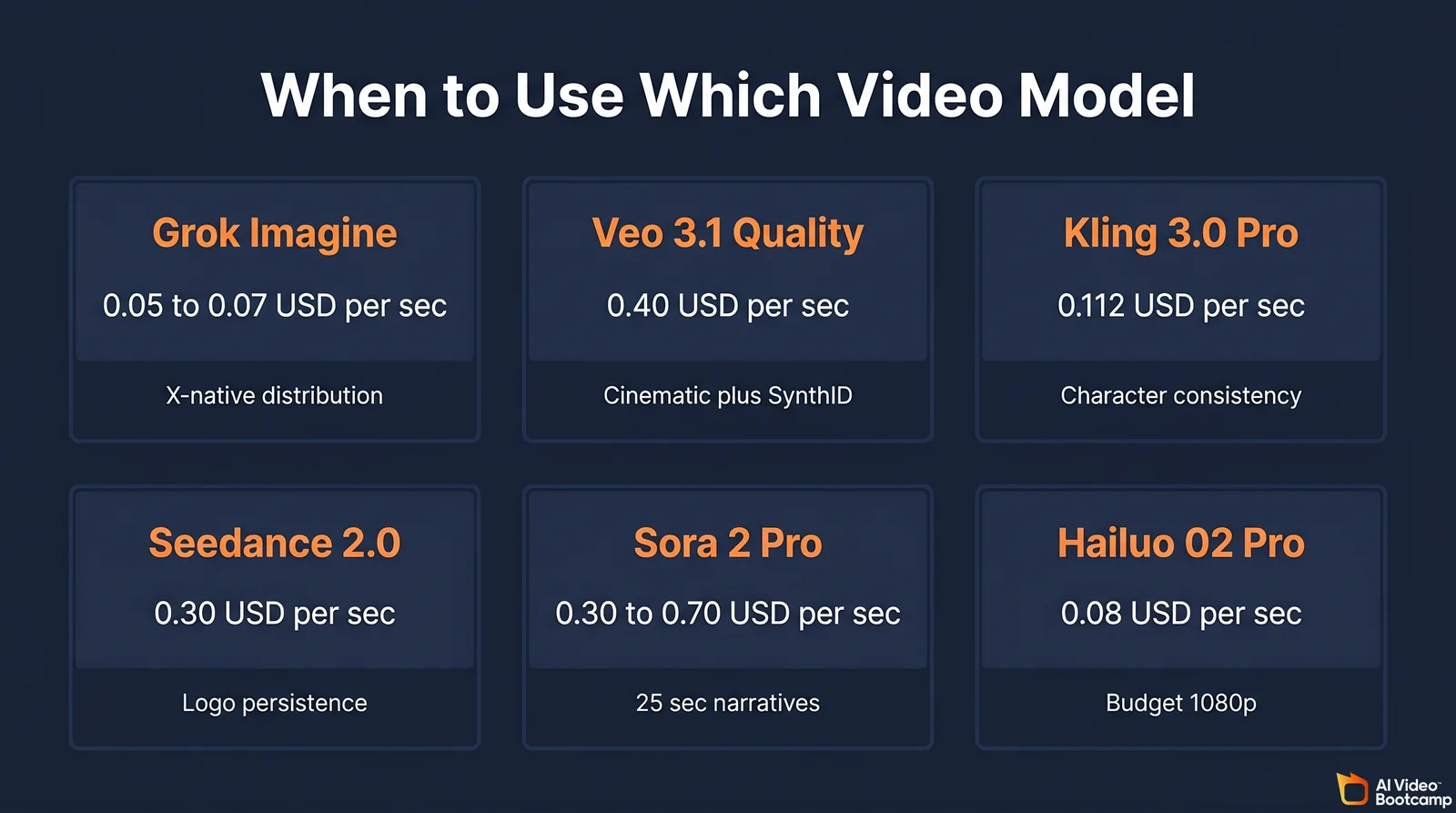
The head-to-head matrix below scores six True Models on the dimensions an AI Video Bootcamp operator cares about. The full 15-model matrix sits in the Tech Stack pillar; the focus here is the six direct video-generation competitors.
| Model | Per-second API cost | Max clip | Native audio | Video extend | Real-time web | C2PA / SynthID | Indemnification | First-party distribution |
|---|---|---|---|---|---|---|---|---|
| Grok Imagine | 0.05 USD (480p) to 0.07 USD (720p) | 15 sec | Yes | Yes, 2 to 10 sec | Yes (X live data via chat) | None disclosed | Enterprise only | X app + grok.com + API |
| Veo 3.1 Quality | 0.40 USD (1080p w/ audio) | 8 sec, Extend to about 2.5 min | Yes | Yes, Extend feature | No | SynthID always-on | Via Google Cloud | YouTube, Vertex AI |
| Veo 3.1 Fast | 0.15 USD (1080p w/ audio) | 8 sec | Yes | Yes | No | SynthID | Via Google Cloud | YouTube, Vertex AI |
| Kling 3.0 Pro | 0.112 USD | 10 sec, Extend to about 3 min | Yes (3.0 plus) | Yes | No | None | No | fal.ai, Kling app |
| Seedance 2.0 | 0.30 USD (720p T2V) | 12 sec | Yes | Yes | No | None | No | fal.ai, ByteDance |
| Sora 2 Pro | 0.30 USD (720p), 0.70 USD (1080p) | 25 sec | Yes | Limited | No | C2PA + visible watermark | Enterprise only | OpenAI API |
| Hailuo 02 Pro | 0.08 USD (1080p) | 10 sec | Partial | Limited | No | None | No | fal.ai, MiniMax |
Decision rule
Use Grok Imagine when the deliverable is a 5 to 15 second vertical clip with synced audio for X, TikTok, or Reels, when first-party X distribution is the unlock, when 30 USD per month flat unit economics matter at high volume, and when the subject is fictional or your brand has tolerance for moderation volatility. Agent Mode is the cheapest path to stitching 6-second clips into a 60-second mini film without leaving one canvas.
Use Veo 3.1 Quality when the deliverable is a polished cinematic clip for a client, when audio must hold up at 1080p on a television, and when SynthID provenance is a procurement requirement. The full breakdown is in the Veo 3.1 Lite guide.
Use Kling 3.0 Pro for character consistency across multiple shots, particularly in fashion and product. The deeper Kling versus Veo versus Seedance breakdown is in the Seedance vs Kling vs Veo comparison and the API-focused Seedance vs Kling vs Sora 2 guide.
Use Sora 2 Pro for 25-second long-form storytelling with C2PA-tagged outputs and when enterprise-tier indemnification is non-negotiable.
Use Hailuo 02 Pro when budget is the dominant constraint and 1080p quality is acceptable.
For still images, the AI Video Bootcamp stack continues to lead with Nano Banana Pro for editing fidelity, GPT Image 2.0 for text rendering and complex composition, and Midjourney V7 for aesthetic. Grok Imagine still images are best used as a starting frame for the image-to-video pipeline, not as a standalone image tool. The next section runs the actual head-to-head test that backs up that recommendation.
4 Prompts Tested: Grok Imagine vs GPT Image 2.0 vs Nano Banana Pro
Answer capsule. AI Video Bootcamp ran four diagnostic prompts through Grok Imagine, GPT Image 2.0, and Nano Banana Pro on May 30, 2026. Results: GPT Image 2.0 wins photoreal portraits, Nano Banana Pro wins non-Latin script rendering, Grok Imagine wins literal physical-instruction adherence (embossed vs debossed), and all three models struggle with text-heavy ad layouts when font-size tokens are taken literally. The pattern is more nuanced than marketing copy suggests.
The tests use diagnostic prompts that stress one specific capability each: face fidelity, product logo persistence, typography layout, and non-Latin script accuracy. Each tool was given the same prompt, the closest available aspect ratio, and two generation attempts (the better of two was chosen). Operator verdicts come from the AI Video Bootcamp editorial team’s first-pass review of the outputs.
Test 1: Photoreal portrait (face fidelity)
Prompt: “Editorial portrait of a 32-year-old Korean woman, soft sidelight from the left, slate-blue knit sweater, gold hoop earrings, shallow depth of field, 85mm lens look, sharp focus on the eyes, natural skin texture.” Target aspect 2:3.
| GPT Image 2.0 | Nano Banana Pro | Grok Imagine |
|---|---|---|
 |  | 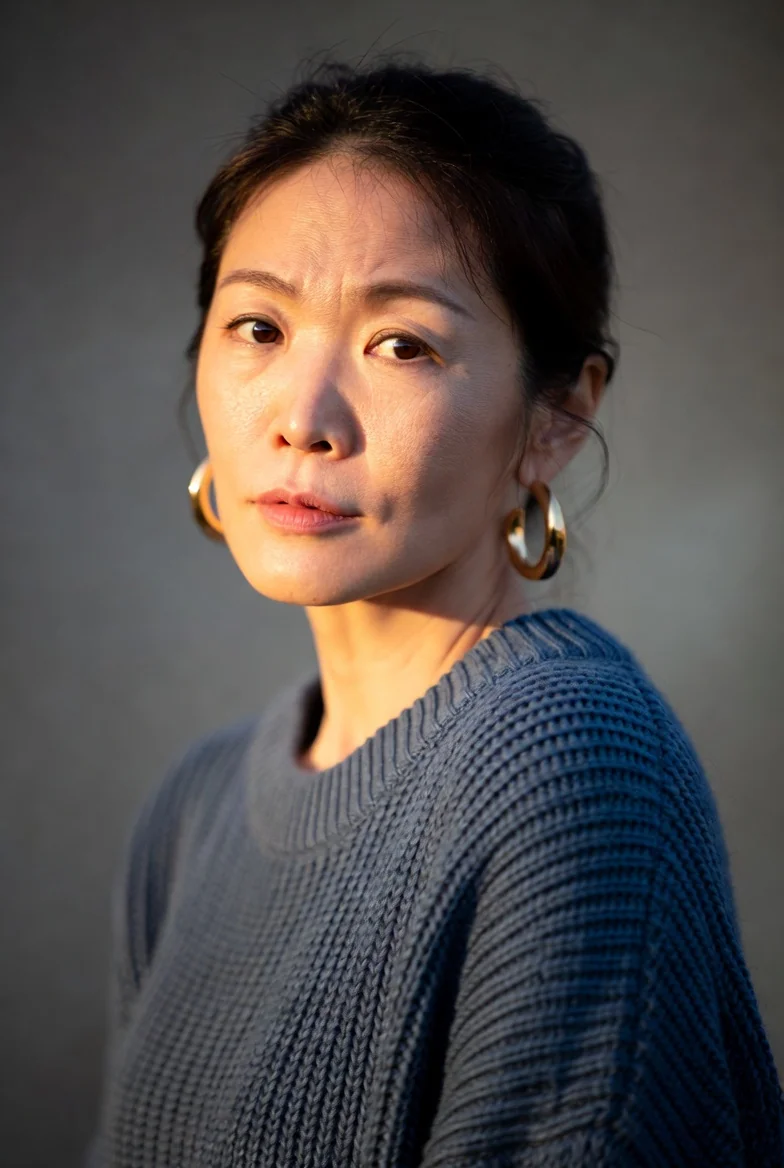 |
Verdict: GPT Image 2.0 won this round on overall photoreal quality and faithful skin texture. Nano Banana Pro came second, with very close rendering of the prompt details. Grok Imagine aged the subject up by roughly three years (closer to 35 than the prompted 32), which is the only practical operator concern. For client deliverables requiring specific subject ages, expect to run multiple Grok generations or use a different model.
Test 2: Product hero shot, embossed logo (physical-instruction adherence)
Prompt: “Wide-angle hero shot of a matte black ceramic coffee mug, single front-light, white seamless background, the brand name ‘AURORA’ embossed in 8pt sans-serif type on the side of the mug, photorealistic studio photography.” Target aspect 16:9.
| GPT Image 2.0 | Nano Banana Pro | Grok Imagine |
|---|---|---|
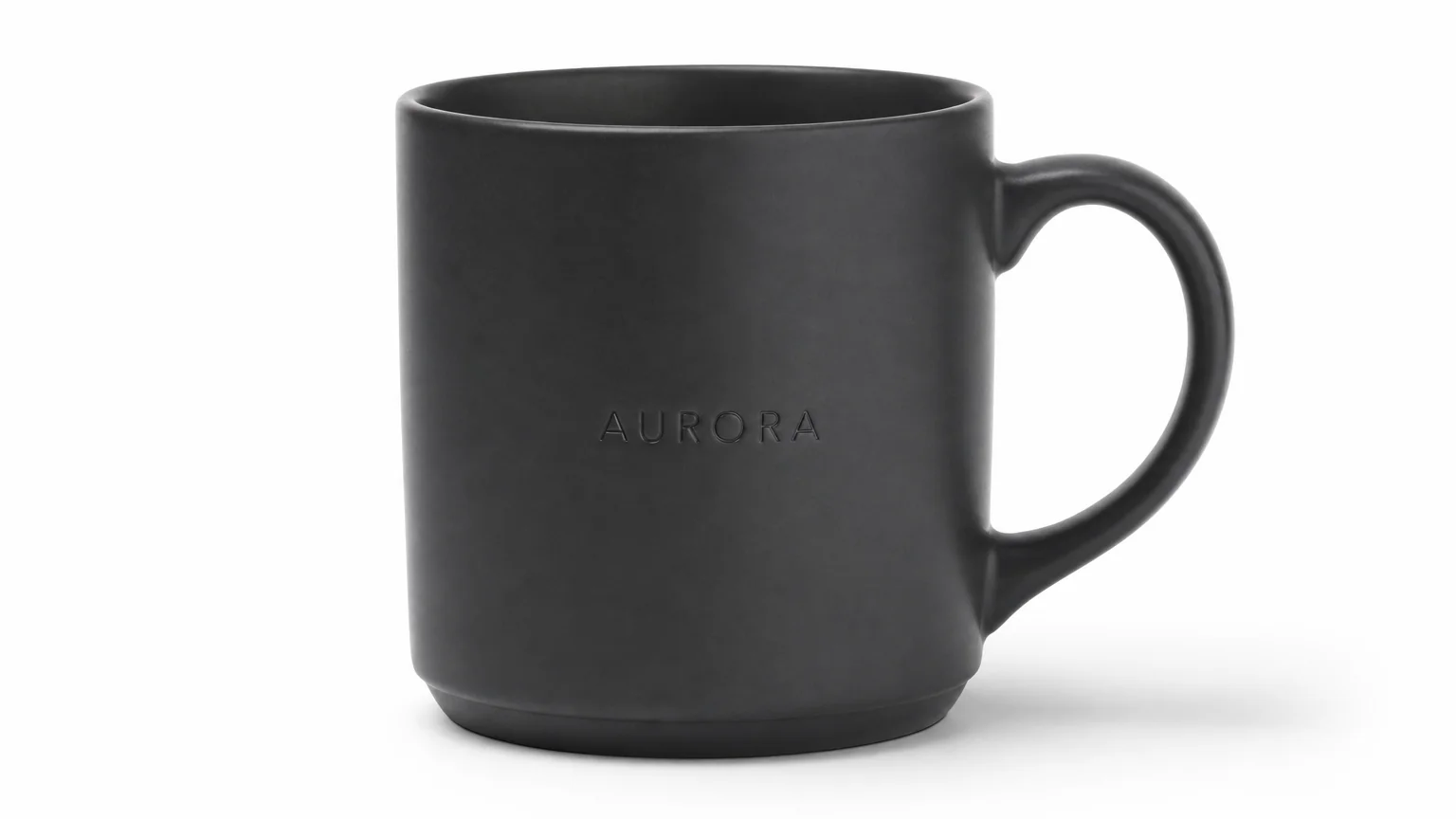 | 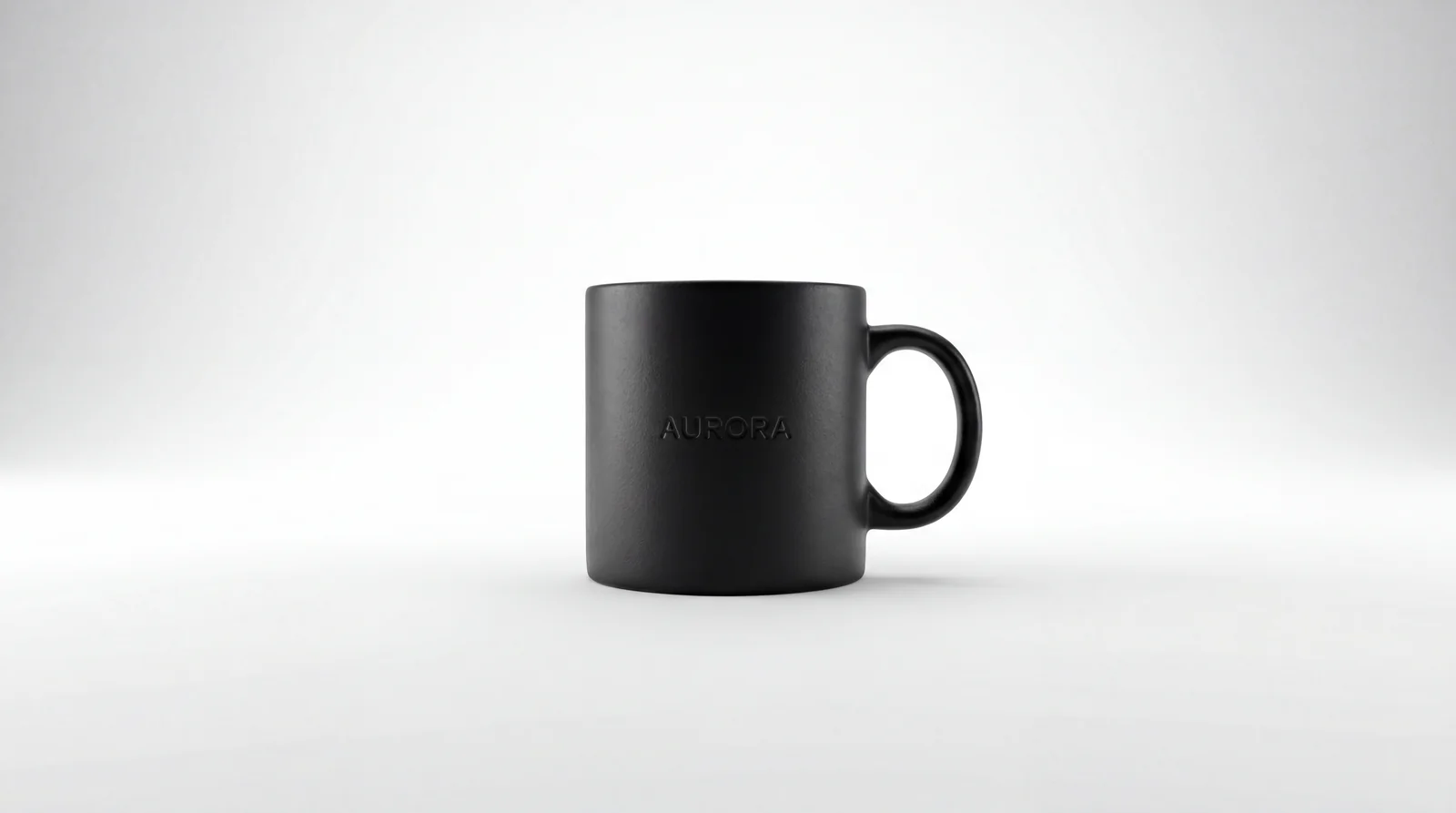 |  |
Verdict: Grok Imagine was the only model that rendered “embossed” correctly as raised type. Both GPT Image 2.0 and Nano Banana Pro rendered debossed (recessed) type instead, a subtle but unmistakable failure of the literal prompt instruction. Grok’s overall photorealism quality came in lower than the other two. Practical implication: for product hero shots where a specific physical instruction must be honored, Grok is worth a test pass even though its aesthetic ceiling is lower. For aesthetic-only product photography without literal physical constraints, GPT Image 2.0 or Nano Banana Pro remain the cleaner choices.
Test 3: Text-heavy ad layout (typography and composition)
Prompt: “Premium running shoe advertisement poster. Athletic figure in shadow on the left side, mid-stride pose. Right side reads ‘BREAK THE LINE’ in 96pt bold sans-serif white type on a deep navy background. Subhead ‘SS26 ULTRA SERIES’ in 18pt below the headline.” Target aspect 4:5 for GPT Image 2.0 and Nano Banana Pro, 2:3 for Grok Imagine (Grok did not honor the requested aspect ratio).
| GPT Image 2.0 | Nano Banana Pro | Grok Imagine |
|---|---|---|
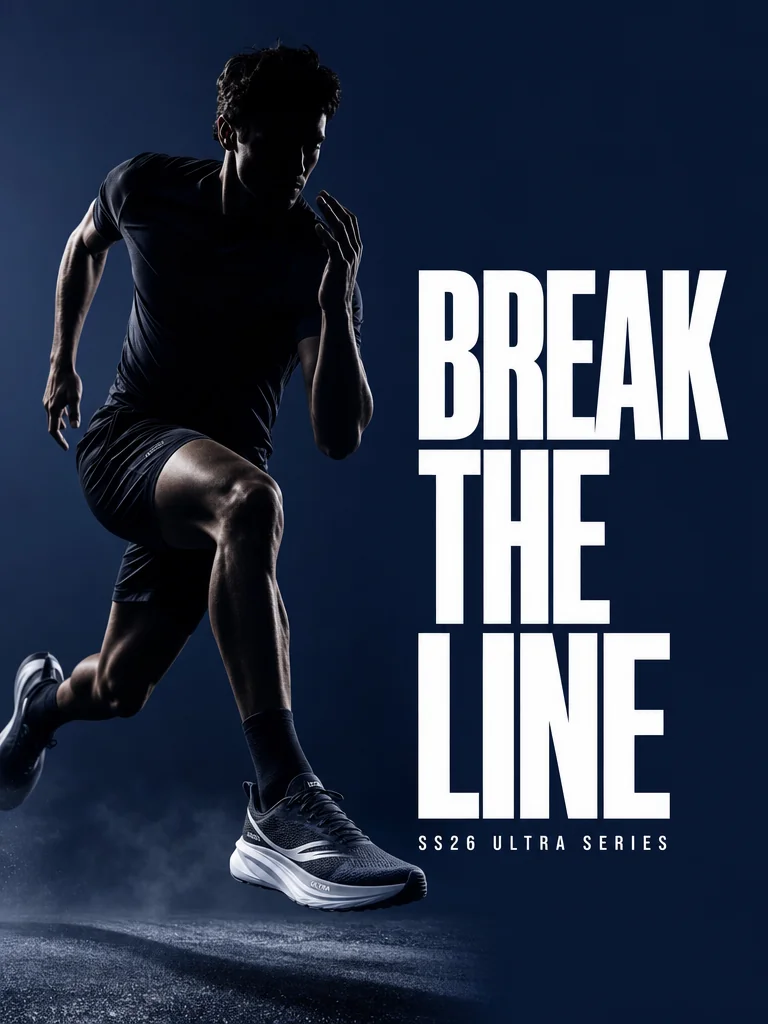 | 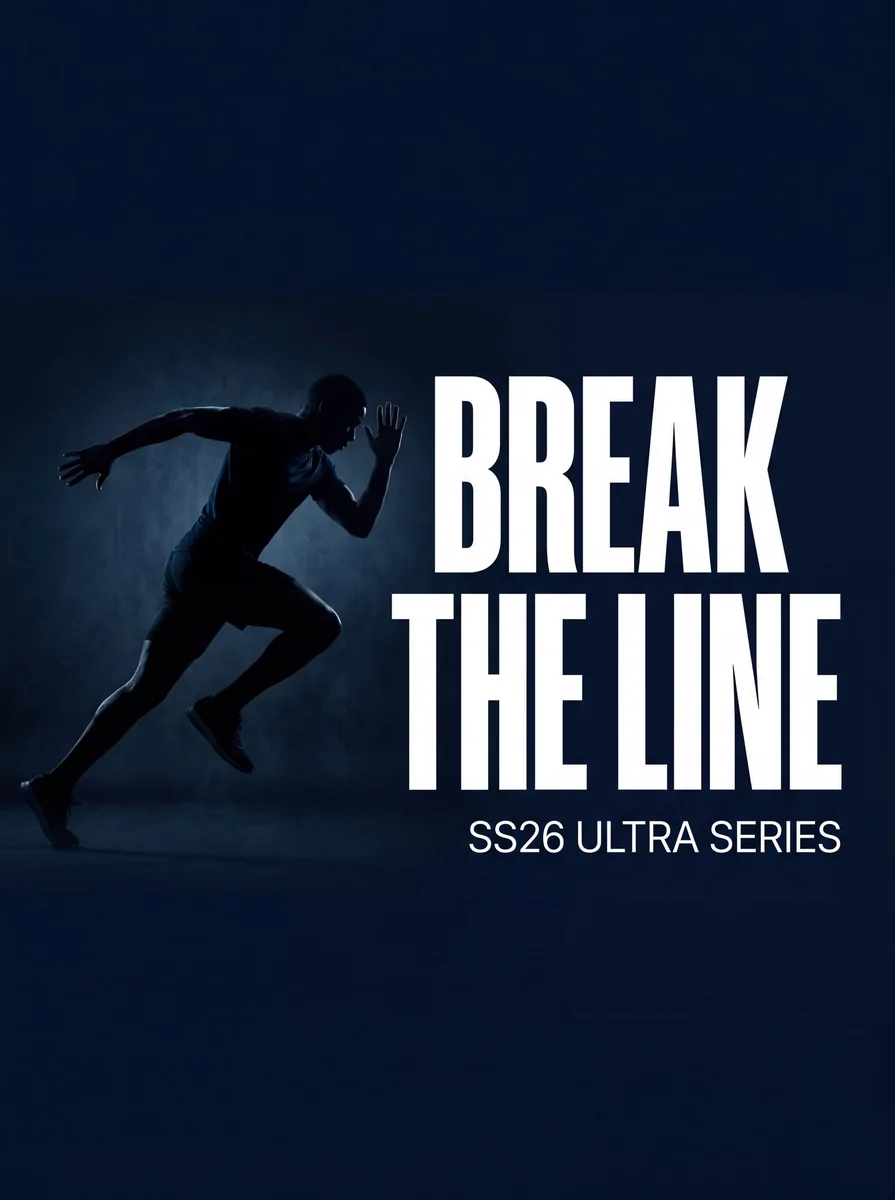 | 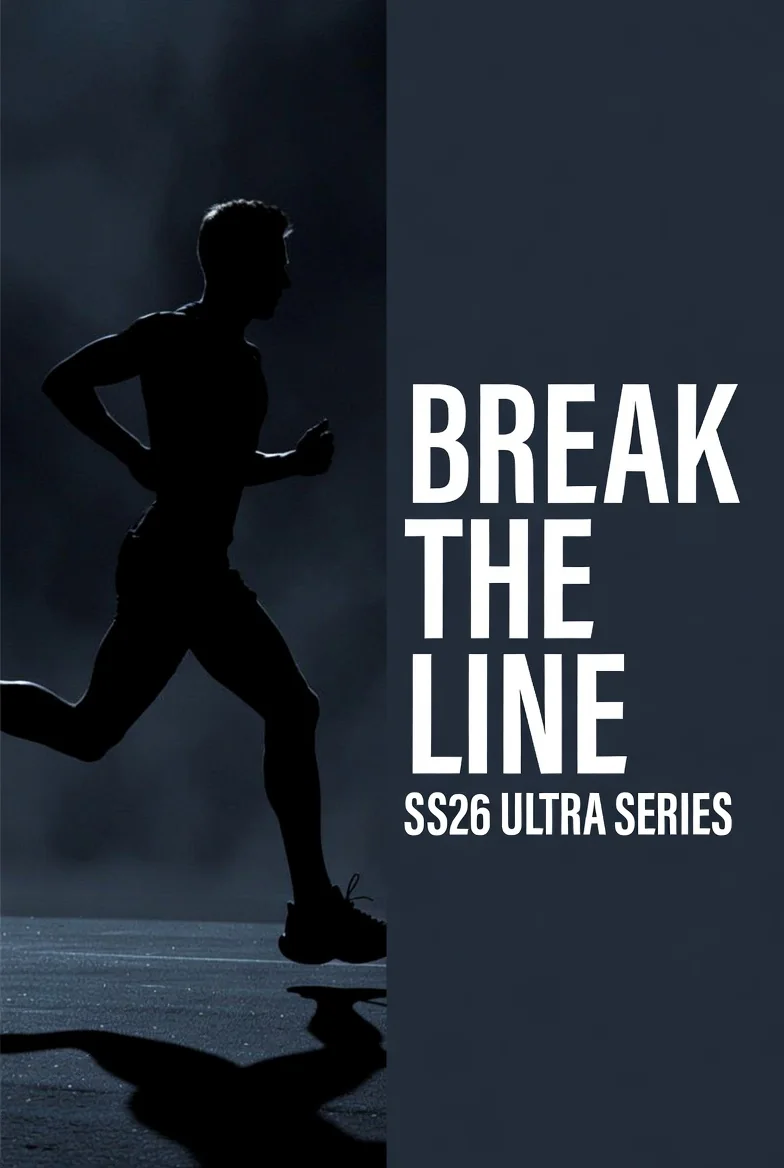 |
Verdict: GPT Image 2.0 produced the cleanest professional ad layout with proper typography hierarchy and a believable shoe product. Nano Banana Pro came in second with strong typography but a more abstract figure composition. Grok Imagine produced output that looks more like a stock photo with a Canva text overlay than a finished ad, plus it did not honor the requested 4:5 aspect ratio. A secondary failure mode: both Grok and Nano Banana literally rendered the words “18pt” into the image, taking the font-size instruction as visual text rather than a metadata directive. Operators using these tools for text-heavy ads should strip explicit font-size tokens from the prompt and specify font scale through descriptive language (“small subhead” rather than “18pt subhead”).
Test 4: Bilingual neon sign (non-Latin script rendering)
Prompt: “A neon sign on a dark brick wall at night. The sign features the English word ‘OPEN’ in blue neon, and directly below it the Japanese characters ‘営業中’ in red neon. Wet pavement reflection in foreground.” Target aspect 16:9.
| GPT Image 2.0 | Nano Banana Pro | Grok Imagine |
|---|---|---|
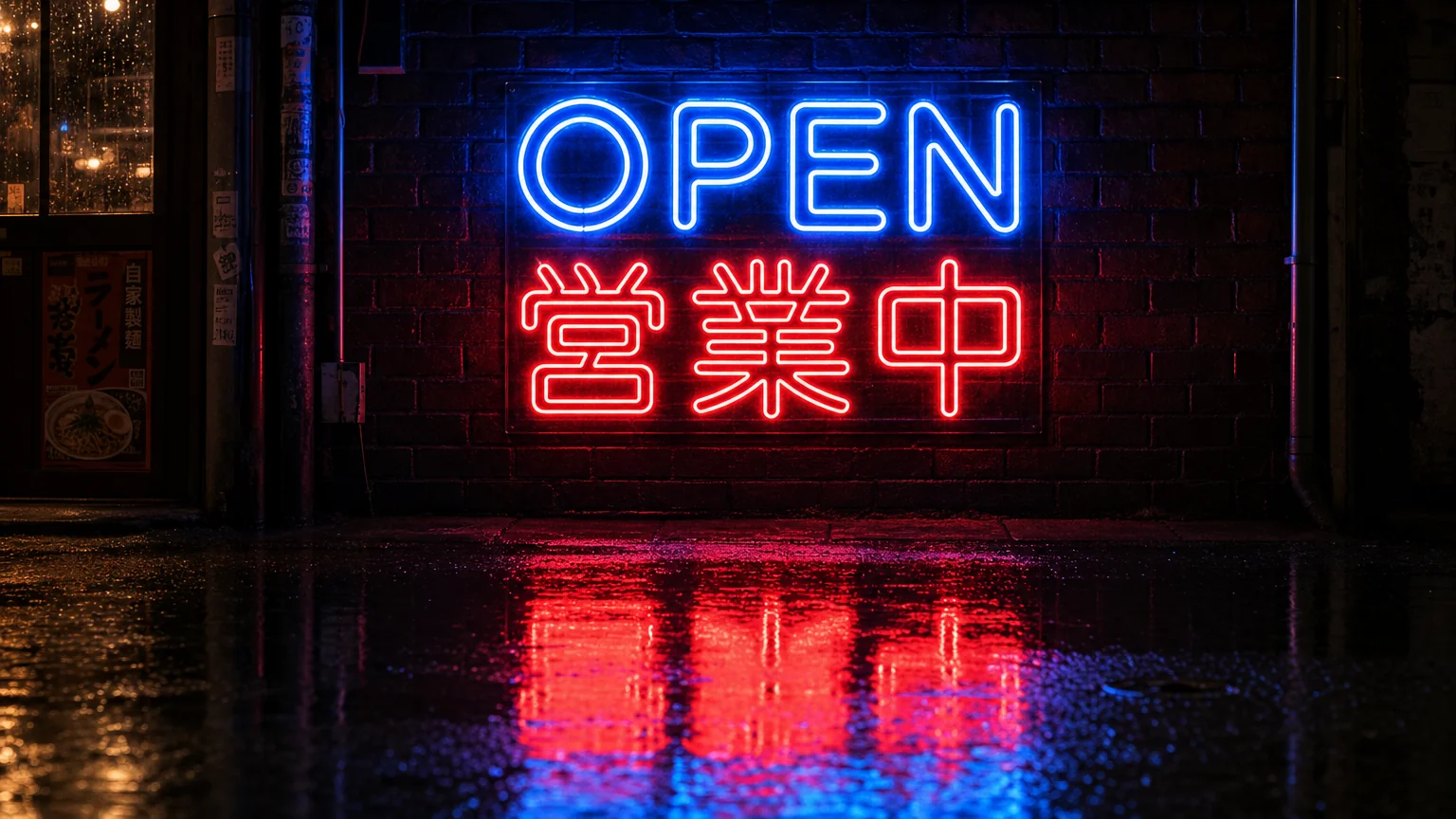 | 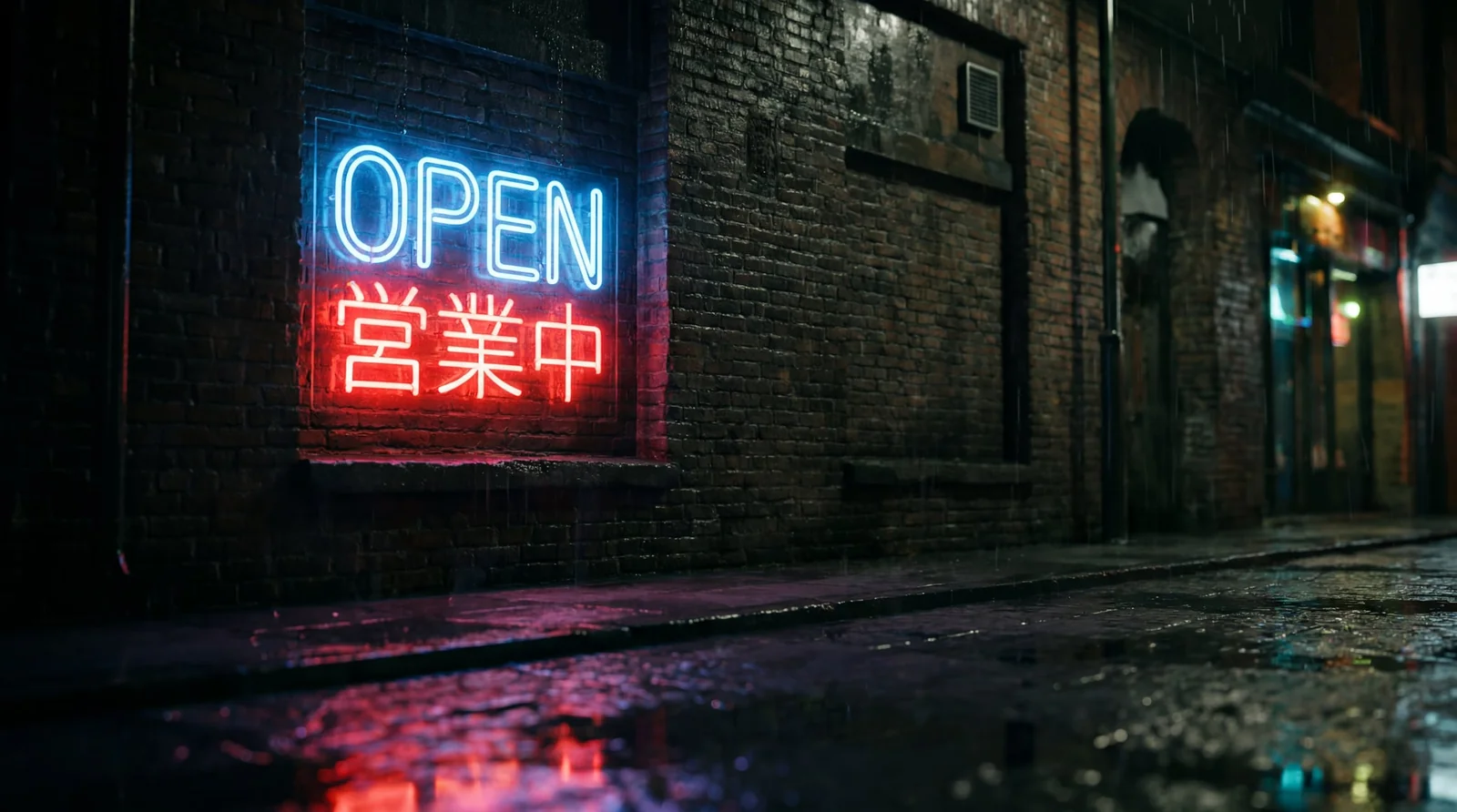 | 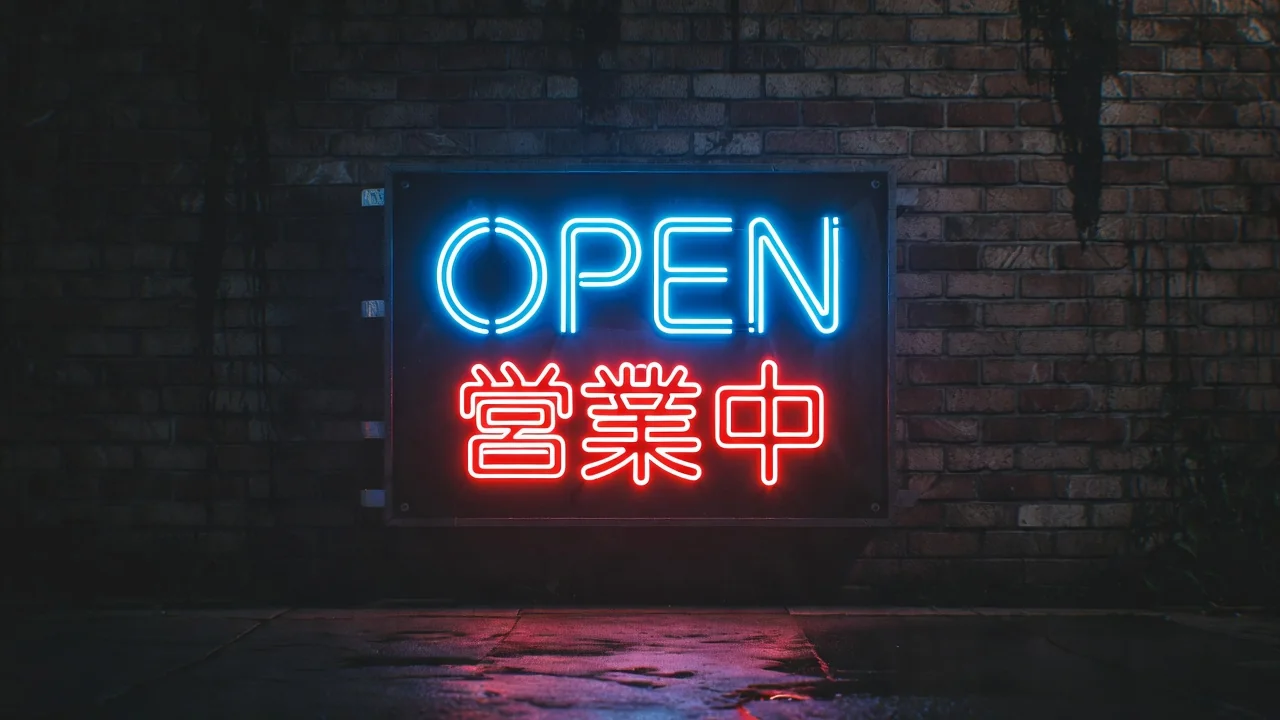 |
Verdict: Nano Banana Pro produced the most accurate Japanese kanji rendering on the first attempt. This is notable because GPT Image 2.0’s marketed Late 2025 upgrade specifically targeted non-Latin script accuracy (including Chinese, Japanese, Korean, Hindi, and Arabic), yet GPT rendered one character incorrectly in this test. Grok Imagine produced a correct Japanese spelling in approximately one of many attempts, which is a real-world consistency problem. The composition and overall scene quality came in close for Grok and Nano Banana, with GPT Image 2.0 producing the most cinematic scene framing despite the script error.
What the 4 tests actually reveal
Three operator rules drop straight out of these tests, and each one contradicts a commonly repeated assumption about the three tools.
First, Grok wins on literal prompt adherence to physical instructions where the larger models guess wrong. This is the embossed-versus-debossed pattern. Conventional wisdom holds that GPT Image 2.0 and Nano Banana Pro are higher-fidelity prompt-followers across the board, but they failed a subtle physical-direction instruction here. The takeaway: for any prompt that includes a specific physical state (embossed, recessed, transparent, beveled, etched), include Grok in your A/B testing even if it is not your primary tool.
Second, GPT Image 2.0’s marketed non-Latin script upgrade does not consistently outperform Nano Banana Pro in real testing. Operators producing East Asian, Arabic, or Hindi-script deliverables should treat Nano Banana Pro as the default and use GPT Image 2.0 as the backup, not the other way around.
Third, all three models fail when font-size tokens are passed literally in prompts. The “18pt” rendering bug on the BREAK THE LINE test is not a Grok-specific issue. Describe font scale through visual language (“small subhead,” “large display type”) rather than passing point sizes the model may render as visual text.
For the most up-to-date head-to-head benchmark across all three image tools across a deeper prompt set, see the GPT Image 2.0 vs Nano Banana Pro 10-prompt benchmark.
How to Use the Grok Imagine API
Answer capsule. Sign in at console.x.ai, generate an API key, purchase prepaid credits, and call the three endpoints: /v1/images/generations (synchronous), /v1/videos/generations (asynchronous with request_id polling), and /v1/videos/extensions. Default poll cadence is 5 seconds. New developer accounts receive 25 USD in promotional credit valid for 30 days. The API is also available via fal.ai and Replicate at effectively identical output pricing.
The three-property hierarchy
xAI runs three separate consumer and developer properties. Only one issues API keys.
| Property | Purpose | Issues API keys |
|---|---|---|
| grok.com | Consumer chat and Imagine UI | No |
| X (Twitter) | Social network, in-app Grok via X Premium | No |
| console.x.ai | Developer console under the xAI org | Yes |
The grok.com session and the X Premium session are unrelated to API billing. An X Premium+ subscriber who wants API access still has to create a separate console.x.ai team. Conversely, an API customer who wants Spicy Mode in the app must subscribe to SuperGrok or X Premium+ on the consumer side.
Sample cURL: text to image
curl -X POST https://api.x.ai/v1/images/generations \
  -H "Content-Type: application/json" \
  -H "Authorization: Bearer $XAI_API_KEY" \
  -d '{
    "model": "grok-imagine-image-quality",
    "prompt": "Wide-angle product hero shot of a matte-black ceramic coffee mug, cinematic studio lighting, shallow depth of field",
    "aspect_ratio": "16:9",
    "resolution": "2k",
    "n": 1
  }'
The response returns a URL with a temporary signed link to the rendered JPEG. Switch response_format to b64_json for inline base64 if the consumer is a backend pipeline.
Sample cURL: image to video (asynchronous)
REQUEST_ID=$(curl -s -X POST https://api.x.ai/v1/videos/generations \
  -H "Content-Type: application/json" \
  -H "Authorization: Bearer $XAI_API_KEY" \
  -d '{
    "model": "grok-imagine-video",
    "prompt": "Slow cinematic dolly forward, golden hour lighting, gentle steam rising",
    "image": {"url": "https://example.com/source-frame.png"},
    "duration": 6
  }' | jq -r '.request_id')

while true; do
  RESULT=$(curl -s https://api.x.ai/v1/videos/$REQUEST_ID \
    -H "Authorization: Bearer $XAI_API_KEY")
  STATUS=$(echo "$RESULT" | jq -r '.status')
  if [ "$STATUS" = "done" ]; then
    echo "$RESULT" | jq -r '.video.url'; break
  fi
  sleep 5
done
Image-to-video is asynchronous. The first request returns a request_id. The caller polls /v1/videos/{request_id} every 5 seconds until status becomes done. Statuses include in_progress, done, failed, and expired.
Sample cURL: video extension
curl -X POST https://api.x.ai/v1/videos/extensions \
  -H "Content-Type: application/json" \
  -H "Authorization: Bearer $XAI_API_KEY" \
  -d '{
    "model": "grok-imagine-video",
    "prompt": "The shot pans to an over-the-shoulder perspective. Calm controlled scene.",
    "duration": 10,
    "video": {"url": "https://example.com/source-clip.mp4"}
  }'
Constraints (per docs.x.ai): input MP4 must be H.264, H.265, or AV1, between 2 and 15 seconds. Extension duration is 2 to 10 seconds, default 6. The aspect_ratio and resolution parameters are not configurable on extensions; they inherit from the input and cap at 720p.
Billing, spend caps, and middleware
The default and easier path is prepaid credits purchased through the console. Auto top-up triggers a fresh purchase when balance falls below a configurable threshold. Monthly invoiced (postpaid) billing is available on request via [email protected]. The prepaid balance itself is a hard cap, which protects operators from runaway-script overage.
The data-sharing program offers up to 150 USD per month in additional credits in exchange for retention of inference traffic for model improvement. The footnote for any AI Video Bootcamp operator generating client work and worried about training-data leakage: leave data sharing off and accept the higher net cost.
xAI does not advertise traditional callback webhooks. Video endpoints expose two patterns instead: polling on request_id (documented), and an output: { upload_url: string } pattern where xAI uploads the finished MP4 to a customer-controlled signed URL via HTTP PUT. The upload-URL pattern is the closest equivalent to a webhook for backend pipelines that do not want to poll. It is documented in the REST reference but is not yet broadly exposed in the JavaScript and Python SDKs.
Middleware routing through fal.ai or Replicate adds at most 0.002 USD per input image and zero markup on output. The reason to route through fal.ai is not cost; it is infrastructure. Operators running unified billing across Veo, Kling, Seedance, and Grok with a single SDK should keep fal.ai. Operators going all-in on Grok should hit api.x.ai directly to avoid an additional Terms of Service layer.
Commercial Use, Indemnification, and 2026 Compliance
Answer capsule. xAI’s consumer Terms of Service permit commercial use of Grok-generated content but offer zero IP indemnification. Only the Enterprise Customer Agreement defends customers against third-party copyright, trademark, or publicity claims. EU AI Act Article 50 enforces August 2, 2026 with up to 15 million EUR penalty. New York S.8420-A enforces June 9, 2026 with 1,000 to 5,000 USD per violation. California AB 853 applies to xAI as covered provider starting August 2, 2026.
This section is load-bearing for AI Video Bootcamp member protection. The most important legal finding for paying-client work is the indemnification split between consumer and enterprise tiers.
Consumer ToS vs Enterprise Customer Agreement: the indemnification gap
The consumer Terms of Service permit commercial use of Grok-generated output across Free, X Premium, SuperGrok, and SuperGrok Heavy. The customer retains ownership of generated output regardless of personal or commercial use. Source: x.ai/legal/terms-of-service.
What the consumer ToS does not include is IP indemnification. If a Grok-generated image or video triggers a third-party copyright, trademark, publicity, or other IP claim, the consumer-tier user is solely responsible for the resulting liability. The consumer ToS also requires the user to indemnify xAI and its affiliates against claims arising from the user’s use of the service.
The Enterprise Customer Agreement is materially different. It states: “xAI shall indemnify and defend the customer against third-party claims of patent, copyright, trademark, or other intellectual property infringement arising from the customer’s authorized use of the Services.” Source: xAI Enterprise Customer Agreement, GSA-approved version June 26, 2025.
Operator implication for AI Video Bootcamp members. Any operator taking Grok Imagine output into a paying client deliverable on the consumer tier is carrying the full IP indemnity risk personally. Members who route client work at scale should move to the Enterprise Customer Agreement for the indemnity coverage. The pricing differential is contract-negotiated and meaningful; the legal exposure differential without it is larger.
This is the same shape as the CassetteAI commercial-license gap covered in the Stable Audio 3.0 complete guide. The pattern across multiple True Model vendors in 2026: ownership rights yes, indemnification only at enterprise tier.
Real public figures, brand logos, and the “Image is moderated” error
xAI’s Acceptable Use Policy prohibits violating right of publicity and depicting likenesses in a pornographic manner. The published refusal pattern for non-Spicy Imagine requests on public figures is intermittent rather than categorical, and xAI has not published a named-public-figure denylist analogous to OpenAI’s policy.
The model’s actual refusal text on flagged prompts is the exact string: “Image is moderated.” This appears on real-public-figure prompts, on certain branded imagery, and on a meaningful number of false positives that the January 2026 moderation tightening introduced. Subtle prompt revisions can trip the filter even on benign content. There is no documented override for AI Video Bootcamp operators on the consumer tier.
Practical operator stance: assume any Grok Imagine output depicting a recognizable real person without that person’s documented written consent carries publicity-rights exposure in California (Civil Code 3344), New York (Civil Rights Law 50 and 51), and most US jurisdictions, plus criminal exposure under state non-consensual intimate imagery laws if the output is sexual. Do not deploy in client work.
The same posture applies to brand logos and trademark imagery. The Acceptable Use Policy prohibits using the service to violate copyright or trademark law, but enforcement is inconsistent. The model will frequently generate trademark-like imagery on request. Operators producing client logos should use Grok Imagine as a sketch tool only and clear final marks through a USPTO TESS search before deployment.
The 2026 compliance matrix
Four regulatory frameworks apply to AI Video Bootcamp operators deploying Grok Imagine output in 2026.
| Framework | Effective date | Trigger | Penalty ceiling |
|---|---|---|---|
| EU AI Act Article 50 | August 2, 2026 | Deepfake or synthetic media for EU audiences | 15 million EUR or 3 percent global turnover |
| New York S.8420-A | June 9, 2026 | Synthetic performer in commercial advertising in NY | 1,000 USD first, 5,000 USD subsequent |
| California AB 853 | August 2, 2026 | Covered provider duties (applies to xAI as provider, not directly to operator) | Compliance obligation, not direct fine on operator |
| FTC 16 CFR Part 255 | In force | Undisclosed synthetic endorser in paid ads | Up to 53,088 USD per violation |
EU AI Act Article 50. Any Grok Imagine content depicting realistic persons, events, or scenes constitutes a deep fake under the Act’s definition and triggers the disclosure duty. Disclosure must be machine-readable and presented in a way that does not hamper enjoyment for evidently artistic or satirical content. Given X’s inconsistent C2PA label rendering, members should add explicit caption disclosure on EU-facing posts: “AI-generated” or “Created with Grok Imagine.”
New York S.8420-A. The Act defines a synthetic performer as a digital asset created by computer using generative AI, intended to give the impression that the asset is in an audio, audiovisual, or visual performance of a human performer when it is not recognizable as any identifiable natural performer. AI Video Bootcamp operators running paid ads in New York featuring Grok Imagine-generated humans need on-content or in-ad-caption disclosure starting June 9, 2026. The Act excludes audio-only ads and pure language translation of a real performer.
California AB 853. Applies to covered providers, defined as persons that create a generative AI system with over 1 million monthly users publicly accessible in California. xAI qualifies. Covered-provider duties include offering a free public AI detection tool and providing manifest disclosure options. AI Video Bootcamp members are not direct duty-bearers, but xAI is. After August 2, 2026, members should check whether xAI exposes the mandated detection tool publicly.
FTC 16 CFR Part 255. The Endorsement Guides require clear and conspicuous disclosure of material connections between an endorser and advertiser. Operators producing AI UGC ads using Grok Imagine talent for paying clients must disclose two facts when the content is paid: the material connection (operator is paid) and the synthetic nature of the performer when it reads as a real consumer endorser. The TruHeight Vitamins case (December 2024) is the closest existing precedent for synthetic-endorser deception and is covered in detail in the AI Video Bootcamp e-commerce pillar.
Spicy Mode posture
This article does not endorse Spicy Mode for commercial deployment. The existing dedicated AI Video Bootcamp coverage of NSFW AI workflows lives at the Grok NSFW AI Influencers and Adult Content Guide for members who want the full operator-side analysis of that segment.
For the pillar audience: Spicy Mode generates explicit content of fictional and (intermittently) real figures. Documented commercial harm includes Taylor Swift non-consensual intimate imagery cases reported in 2025 and 2026. The first NY S.8420-A enforcement actions are likely to target synthetic-performer ads rather than Spicy Mode outputs because S.8420-A applies to advertising, but the FTC and state publicity-rights exposure is independently material. Do not deploy in client work. Restrict Spicy Mode to non-commercial personal experimentation if used at all.
For an AI Video Bootcamp member preparing client work that touches synthetic-performer regulation, the Law Firm Marketing pillar covers the parallel compliance framing for owner-avatar versus synthetic-performer in regulated verticals.
What the Community Actually Says
Answer capsule. Across 90 days of monitored discussion on r/aivideo, r/grok, r/StableDiffusion, r/singularity, and X creator communities, the dominant Grok Imagine sentiment is “cheapest fast loop for vertical social content with audio, but do not use it for client deliverables that require provenance, 1080p polish, or guaranteed asset retention.” The dominant comparison opponent is Veo 3.1, with Sora 2 second after the April 26, 2026 consumer-app sunset.
Top three positive signals
Generation speed on SuperGrok flat pricing. Operators repeatedly cite 30-second generation times on SuperGrok versus minute-plus waits on Sora and Veo, which compounds when running 20 to 40 variations per session. Latent Space treats the January 28, 2026 API launch as the inflection point where Grok became a workflow tool rather than a toy.
Native synced audio at 720p. Most posts that show off Grok output keep the sound on, which is rare for Kling or Seedance demos