
The Complete 2026 AI Video Tech Stack at a Glance
Answer capsule. The 2026 AI video tech stack is 15 cloud-only tools split across four layers: video generation (Kling 3.0, Veo 3.1, Seedance 2.0, Gemini Omni, LTX Video, Hailuo 02), image generation (Nano Banana Pro, Seedream 4.0, Flux 2 Pro, GPT Image 2.0), audio (ElevenLabs, CassetteAI), and assembly plus presenters (HeyGen Avatar IV, CapCut Pro, DaVinci Resolve Studio). No GPU. No local model installs. Monthly cost runs from 60 dollars Starter to 2,500 plus Agency.
The most expensive mistake new AI video operators make in 2026 is buying tools before they understand the stack. The market has consolidated around 15 cloud-native platforms that cover every step from script to shipped video, and the boundary between hobby-tier experimentation and client-ready output is now defined by which combination of these tools an operator runs, not by hardware.
The single biggest architectural shift since 2024 is the death of local inference. ComfyUI workflows, self-hosted Stable Diffusion installs, and 24GB VRAM rigs are no longer competitive. Every tool in the 2026 stack runs through an API or a hosted web interface, which means a 1,000 dollar laptop can produce identical output to a 5,000 dollar workstation. For deeper context on why the cloud-only shift won, the AI Video Bootcamp team has documented the full transition in How to Learn AI Video in 2026.
The verified master pricing table (May 2026)
The table below reflects pricing pulled directly from each tool’s official documentation or pricing page on May 22, 2026. Where multiple billing structures exist (monthly versus annual, web UI versus API), both are shown so operators can pick the routing that fits their volume.
| Tool | Entry tier | Mid tier | Scale tier | Pay-per-use API |
|---|---|---|---|---|
| Kling 3.0 | Free (66 credits/day) | 6.99/mo (660 credits) | 29.99/mo (3,000 credits) | 0.168/sec (Pro O1) |
| Veo 3.1 | 19.99/mo (Google AI Pro) | 99.99/mo (Google AI Ultra) | API only at scale | 0.05/sec (Lite) to 0.40/sec (Quality) |
| Seedance 2.0 | Free / 18.00/mo (Basic) | 42.00/mo (Standard) | 84.00/mo (Advanced) | 0.022/sec (Fast via fal.ai) |
| Gemini Omni | 7.99/mo (Google AI Plus) | 19.99/mo (Google AI Pro) | 99.99/mo (Ultra) | 0.25 per 1M input tokens |
| LTX Video | 15.00/mo (Lite, 8K creds) | 35.00/mo (Standard, 28K creds) | 125.00/mo (Pro, 110K creds) | 0.06/sec (Fast) to 0.10/sec (Pro) |
| Hailuo 02 | 9.99/mo (1,000 credits) | 34.99/mo (4,500 credits) | 199.99/mo (20,000 credits) | ~0.625 per generation |
| Nano Banana Pro | Free (3/day via app) | 16.66/mo (18,000 credits) | 199.99/yr annual | 0.139/img (2K), batch 50% off |
| Seedream 4.0 / 4.5 | Free trial | Package-based | Package-based | 0.018/img (4.0), 0.03/img (4.5) |
| Flux 2 Pro | API only | API only | API only | 0.031/img via fal.ai, 0.055 via Replicate |
| GPT Image 2.0 | API only | API only | API only | 0.053 (Medium) to 0.211 (High) |
| Midjourney | 10/mo (Basic) | 30/mo (Standard) | 60/mo (Pro) | No direct API |
| Recraft V3 | Free tier | 12/mo (Basic) | 33/mo (Pro) | 0.04/img |
| Ideogram V3 | Free tier | 8/mo (Basic) | 20/mo (Plus) | 0.08/img |
| ElevenLabs | 5.00/mo (Starter) | 22.00/mo (Creator) | 99.00/mo (Pro) | 0.10 per 1,000 chars |
| CassetteAI | Free tier | 3.99/mo Pro (or 40/yr at 3.33/mo) | Custom | 0.02/min music, 0.01/SFX |
| HeyGen Avatar IV | Free (3 vids/mo, watermark) | 29.00/mo (Creator) | 149.00/mo (Business) | 4.00 per minute |
| CapCut Pro | Free | 9.99/mo (Standard) | 19.99/mo (Pro 4K) | None |
| DaVinci Resolve | Free | 295.00 (one-time Studio) | Hardware-bundled | None |
The pricing math hides the most important number in the table: the HeyGen Avatar IV credit burn rate. The Creator tier provisions 200 premium credits per month, but Avatar IV consumes 20 credits per generated minute per HeyGen’s official credit-based pricing documentation, which yields exactly 10 minutes of premium output per billing cycle. Operators using older non-Avatar-IV models on the same tier stretch to roughly 30 minutes because legacy avatars cost fewer credits per minute. Either way, scaling client work requires the HeyGen API at 4.00 per minute or the Business tier at 149.00 per month.
Why this is “the stack” and not just “a list of tools”
The 15-tool list is not arbitrary. Each tool occupies a non-overlapping slot in the production pipeline. Kling 3.0 handles dynamic motion that other models cannot match. Veo 3.1 owns temporal stability for long-form cinematic shots. Nano Banana Pro is the only image model with logo persistence reliable enough for ecommerce hero shots. CassetteAI fills the instrumental music slot that ElevenLabs deliberately does not cover. HeyGen Avatar IV is the synthetic presenter layer. CapCut Pro and DaVinci Resolve Studio handle assembly. Pull any single tool out and the stack develops a gap that operators have to backfill with worse alternatives.
The tools deliberately not in the stack are equally important. Open-weight workflows (ComfyUI, Wan, local Stable Diffusion installs), legacy aggregators, and consumer-grade platforms with weak commercial licensing are excluded because they either (1) require hardware that violates the cloud-only mandate, (2) lack the prompt adherence needed for client-ready output, or (3) carry copyright risk that breaks under client liability review. The 15 tools above are the smallest set that covers every production step without forcing operators into worse alternatives.
How to Choose Your Tools: Three Decision Frameworks
Answer capsule. Three frameworks narrow the 15-tool stack to the 4 to 6 tools an operator actually uses daily. Pick by output format (TikTok versus YouTube versus DTC reel), by financial deployment tier (60/mo Starter to 2,500/mo Agency), or by creator persona (faceless YouTube operator, DTC agency, real estate solo, cinematic specialist). Most operators apply all three filters in sequence to converge on their working stack.
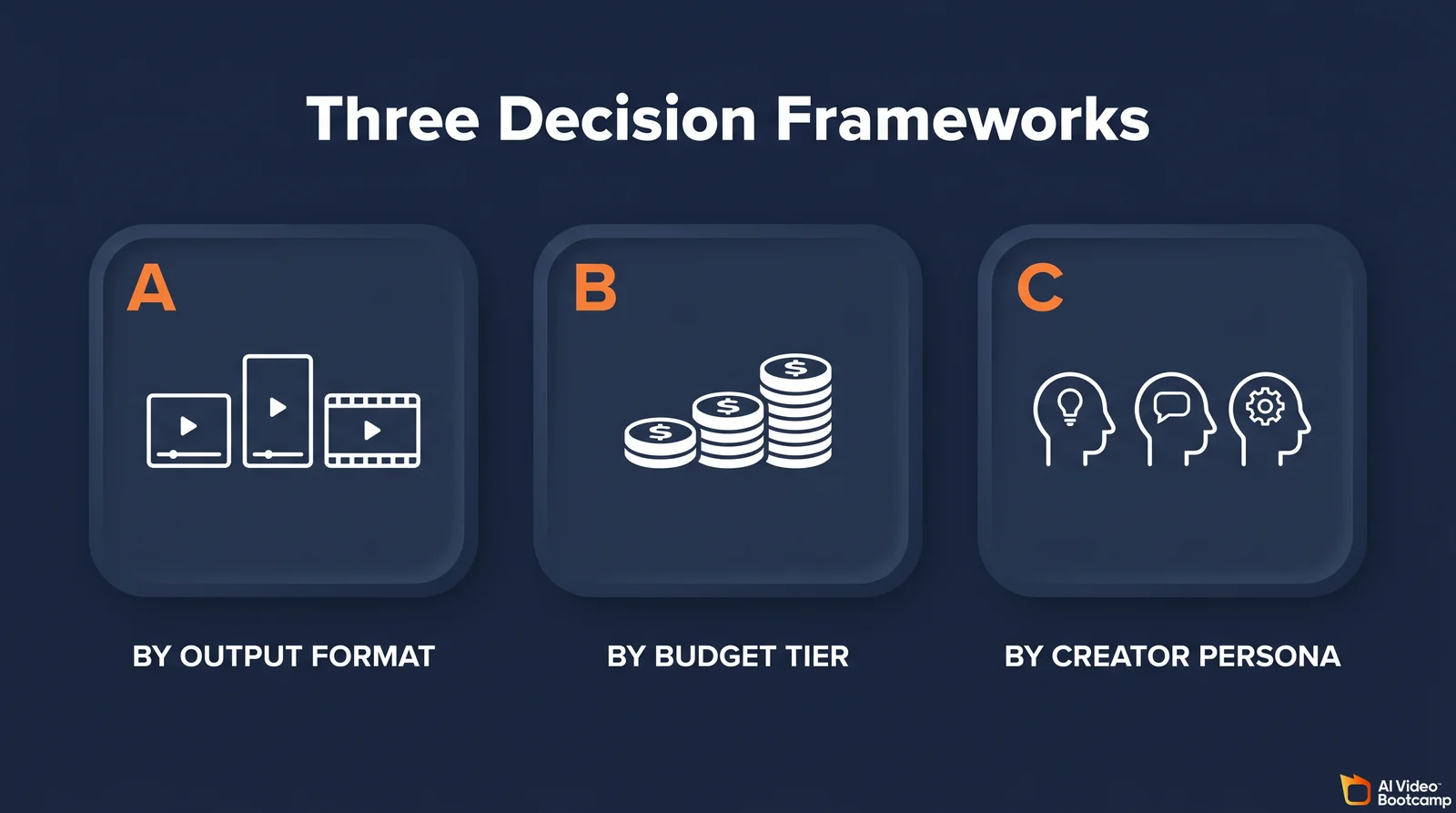
The mistake operators make on day one is buying every subscription at once. The right move is to apply these three filters in order. The output format filter rules out tools that do not match the dominant deliverable. The budget filter caps the stack at sustainable spending. The persona filter aligns daily workflow with business model. The remaining 4 to 6 tools become the operator’s working stack for the next 90 days.
Framework A: Selection by output format
Different output formats require different primary tools. The matrix below maps the seven most common deliverables to their primary tool, secondary support tool, and budget alternative.
| Output format | Primary tool | Secondary support | Budget alternative |
|---|---|---|---|
| TikTok / Reels (under 60s) | Kling 3.0 | Seedance 2.0 | CapCut Free |
| YouTube long-form (5 to 15 min) | Veo 3.1 | Kling 3.0 | LTX Video |
| DTC ecommerce reels | Nano Banana Pro | Flux 2 Pro | Seedream 4.0 |
| Real estate listings | Veo 3.1 | Hailuo 02 | Kling 3.0 Standard |
| Explainer / avatar content | HeyGen Avatar IV | ElevenLabs | CapCut Pro |
| Music videos (with vocals) | ElevenLabs Music | Veo 3.1 | CassetteAI |
| Faceless YouTube content | LTX Video | GPT Image 2.0 | Seedream 4.0 |
| Cinematic commercials | Veo 3.1 | Kling 3.0 Pro | DaVinci Resolve |
Short-form vertical advertising on TikTok and Meta Reels selects for Kling 3.0 as the primary engine. Kling’s willingness to execute aggressive camera motion and sweeping cinematic blocks captures viewer attention in the first three seconds of playback, which is the only window that matters on short-form platforms. Seedance 2.0 takes the secondary slot specifically when the ad requires strict logo or typography persistence across frames.
YouTube long-form selects for Veo 3.1 because architectural stability over multi-minute sequences is non-negotiable. Veo 3.1’s spatial and temporal consistency is engineered to prevent environment warping during extended narrative beats. Kling 3.0 supplements as B-roll. LTX Video at 0.06 per second via fal.ai becomes the cost-optimized B-roll alternative once volume exceeds the Veo subscription credit allocation.
DTC ecommerce reels select for Nano Banana Pro because product accuracy and brand logo persistence are the operator’s primary KPIs. Flux 2 Pro provides bulk demographic variation testing via the fal.ai API for paid-ad iteration cycles. Seedream 4.0 at 0.018 per image is the budget alternative when bulk variation matters more than absolute fidelity.
Framework B: Optimization by financial deployment tier
Financial constraints dictate stack composition more than capability does. The three tiers below cover the realistic budget range for solo operators through agencies. Each tier covers every production step (script, image, video, audio, assembly) within budget.
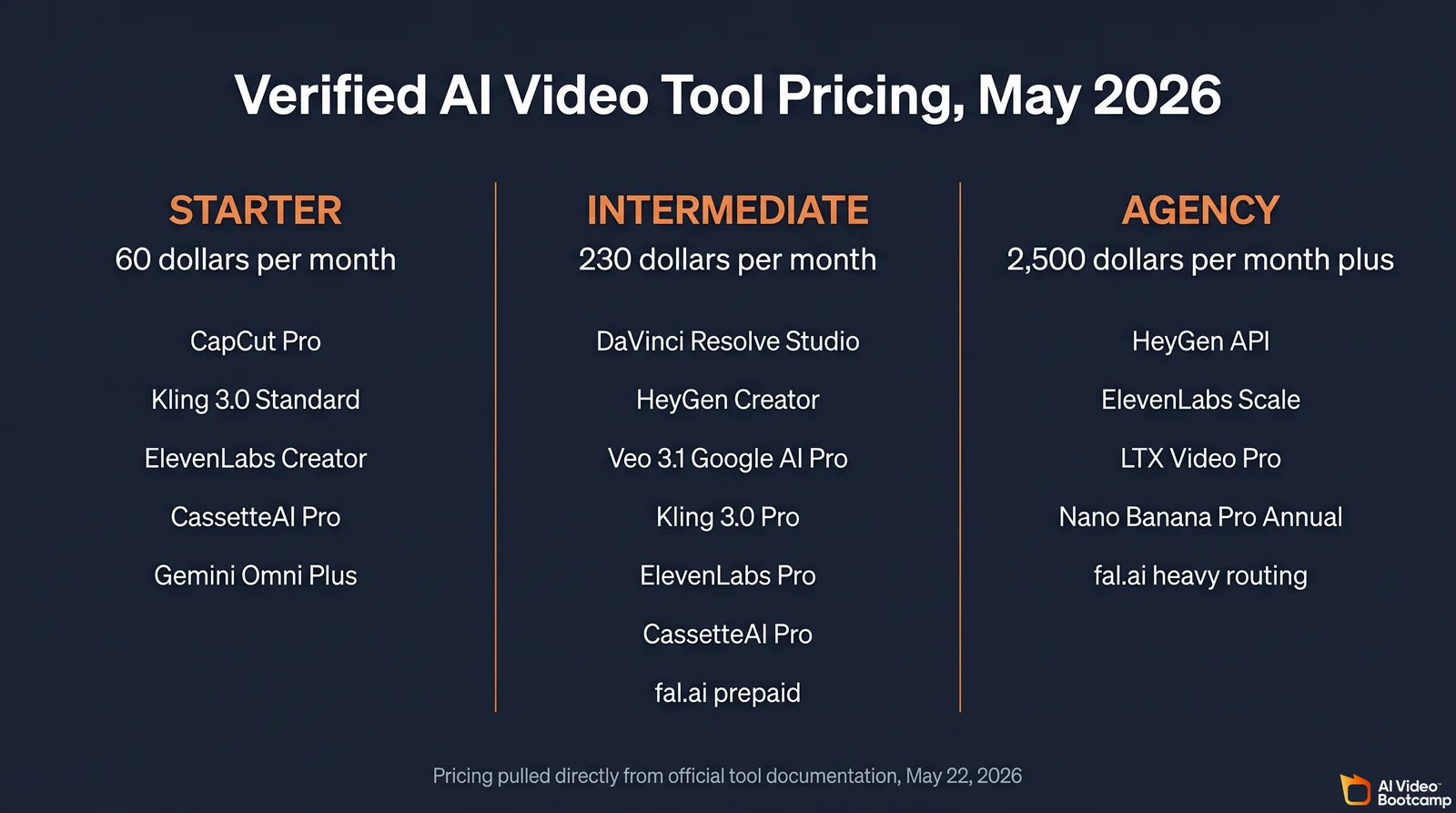
Starter Tier (30 to 120 per month, typically 60). Tailored for creators in their first 90 days who prioritize subscription predictability over API flexibility. Configuration: CapCut Pro (19.99) for assembly, Kling 3.0 Standard (6.99) for video, ElevenLabs Creator (22.00) for voice, CassetteAI Pro (3.99 or 3.33 annual) for music, and Gemini Omni Plus (7.99) for scripting. Total: approximately 60.74 per month.
Intermediate Tier (150 to 400 per month, typically 230). For operators with consistent client retainers who need multi-model variation. Configuration: DaVinci Resolve Studio (295 one-time, amortized), HeyGen Creator (29.00), Veo 3.1 via Google AI Pro (19.99), Kling 3.0 Pro (29.99), ElevenLabs Pro (99.00), CassetteAI Pro (3.99), plus a 50.00 prepaid fal.ai balance for Flux 2 Pro and LTX Video API calls. Total: approximately 232 per month recurring.
Agency Tier (500 to 2,500 plus per month). Engineered for high-volume production with delegated teams. Configuration shifts aggressively toward APIs to bypass UI rate limits: HeyGen API at 400 plus per month, ElevenLabs Scale at 330, LTX Video Pro at 125, Nano Banana Pro Annual at 16.66, and a 1,000 plus per month fal.ai balance. Add Frame.io Pro at 15 per month per user for cloud review cycles. Total: typically 1,800 to 2,500 per month at moderate agency scale.
Framework C: Alignment by creator persona
The same budget supports very different daily workflows depending on what the operator actually ships. The five personas below cover the dominant business models AI Video Bootcamp operators run.
The Side-Hustle Beginner operates under severe time constraints (under five hours per week) and lives on the Starter Tier. Daily flow: generate visual hooks in Kling 3.0 Standard, layer CassetteAI Pro instrumental beds, assemble in CapCut Pro on mobile or desktop. Time to first paying client averages 6 to 9 months.
The Faceless YouTube Operator runs an industrial assembly line driven by volume. They route prompts to the LTX Video API at 0.06 per second for bulk B-roll generation, generate striking thumbnails via GPT Image 2.0, and rely on ElevenLabs Pro for emotive voiceovers that bypass the robotic cadence of legacy text-to-speech engines.
The DTC Ecommerce Agency Operator prioritizes rapid variation testing for paid acquisition channels. They lean heavily on Flux 2 Pro via fal.ai to generate demographic variations at scale, use Nano Banana Pro for hero shots with strict logo persistence, and deploy HeyGen Avatar IV for interchangeable direct-to-camera hooks across ad sets.
The Real Estate Solo operator focuses on a single-vertical niche and reuses templates across listings. They lean on Veo 3.1 Lite for high-fidelity property walkthrough interpolations per the official Veo 3.1 Lite pricing guide, Seedance 2.0 for architectural motion, and DaVinci Resolve Studio for batch color grading across entire property shoots. The full real estate workflow is covered in AI Video Tours for Real Estate.
The Cinematic Brand Specialist demands premium retainers from high-end clients and cannot tolerate visual hallucination or audio clipping. They employ Veo 3.1 Quality at 0.40 per second for flawless establishing shots, use ElevenLabs extensively for bespoke sound design, and finish in DaVinci Resolve Studio’s Fairlight page for broadcast-compliant audio mixing.
Cloud-Only Setup: Hardware, Accounts, and Billing Safeguards
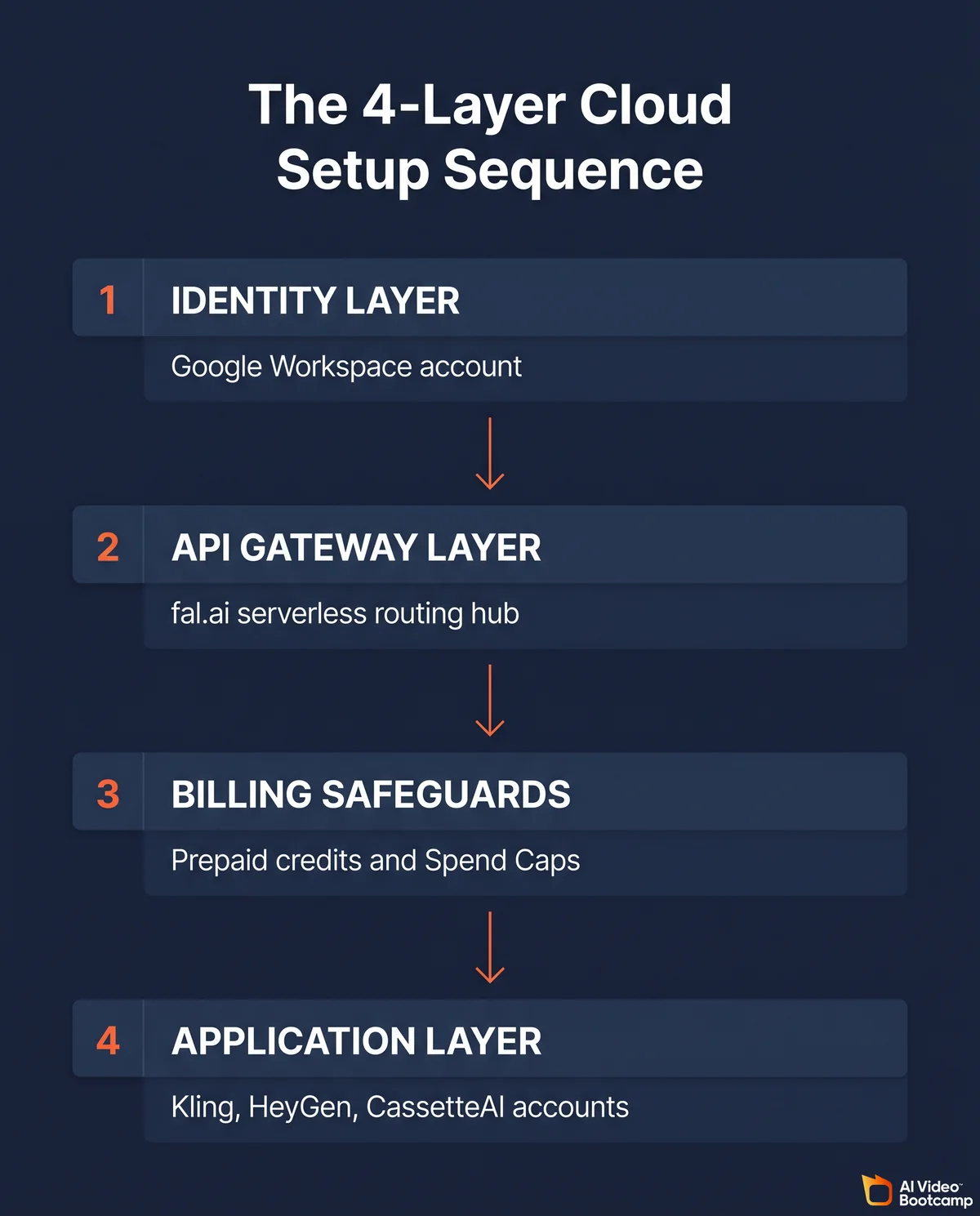
Answer capsule. A cloud-only stack needs only an editing-grade laptop and a strict four-layer account setup. Hardware floor is Apple Silicon Mac with 32GB RAM (64GB recommended) or Windows PC with RTX 3060 plus 64GB RAM, NVMe SSD storage, and 500 Mbps internet. Account sequence is Identity Layer (Google Workspace), API Gateway Layer (fal.ai), Billing Safeguards (prepaid credits plus Google Cloud Spend Caps), and Application Layer (UI accounts).
Minimum hardware for the editing layer only
Generation runs entirely in the cloud, which means local hardware exists only to run DaVinci Resolve Studio and CapCut Pro without bottlenecking during the upload and download cycles of large 4K files.
Mac environments hold the stability advantage for professional non-linear editing because Apple’s unified memory architecture lets CPU and GPU share resources seamlessly per the Puget Systems DaVinci Resolve hardware recommendations. For DaVinci Resolve operators, an Apple M-series processor (M2 Max, M3 Pro, or newer) with 32GB of RAM minimum is the floor. 64GB is strongly recommended to prevent the system from swapping during Fusion node processing or dense timeline scrubbing, per community reporting on DaVinci 64GB ceiling exhaustion.
Windows operators need an Intel Core i7 or i9 (or AMD Ryzen Threadripper for heavy background rendering) paired with an NVIDIA RTX 3060 or higher with at least 8GB of VRAM, plus 64GB system RAM. Both platforms require NVMe SSD storage for cache retrieval, plus a stable 500 Mbps symmetrical internet connection. The deeper editing-tool comparison lives in Best AI Video Editing Tools 2026.
Cloud storage: why local drives fail in week two
A single hour of raw 4K AI footage can exceed 20 gigabytes, which means local SSDs reach capacity within days at any meaningful output volume. Consumer cloud backup services (iCloud, Google Drive consumer tier, Dropbox Personal) are insufficient for collaborative review.
Frame.io is the industry-standard cloud storage layer for client review workflows. The Pro tier costs 15.00 per month and provides 2 terabytes of active storage plus frame-accurate collaborative commenting natively integrated into DaVinci Resolve’s interface per official Frame.io pricing. This is the baseline configuration for any operator running paid client work.
The four-layer account setup sequence
The administrative setup of these platforms requires a strict sequence to prevent disjointed billing, lost assets, and workflow friction.
Layer 1: Identity. Create a dedicated Google Workspace account specifically for tool registrations. Mixing personal email accounts with professional API infrastructure leads to lost password recoveries, tangled billing receipts, and account-recovery deadlocks when team members change.
Layer 2: API Gateway. Create an account on fal.ai. This platform routes critical models including Flux 2 Pro, LTX Video, Seedance 2.0, and CassetteAI through a single serverless hub with a unified billing dashboard. Generate the secure API key per the official fal.ai documentation before configuring any automation scripts.
Layer 3: Billing Safeguards. This is the layer that prevents catastrophic financial liability from misconfigured automation. On fal.ai, the prepaid credit model means the system simply halts when the balance reaches zero per fal.ai pricing documentation. On Google AI Studio (which routes Veo 3.1 and Gemini Omni), the default is post-paid billing, which requires immediate configuration of project-level Spend Caps per the Google Cloud Spend Caps documentation. Spend Caps pause API traffic the moment a predetermined budget is hit, which protects the operator from unexpected overage invoices.
Layer 4: Application Layer. Only after the first three layers are locked down, create user-interface accounts for Kling, HeyGen, Nano Banana Pro, CassetteAI, Midjourney, Recraft V3, Ideogram V3, and the rest of the application stack using the established Workspace identity.
The 5 Production Pipelines Operators Actually Ship
Answer capsule. Five pipelines cover roughly 90 percent of the deliverables AI Video Bootcamp operators ship in 2026: the 30-second TikTok ad, the 5-minute YouTube long-form, the 10-variation Meta ad batch, the talking-head explainer, and the product reel with motion. Each pipeline has a documented tool sequence, time-to-ship range (45 minutes to 6 hours), and compute cost (1.50 to 25 dollars).
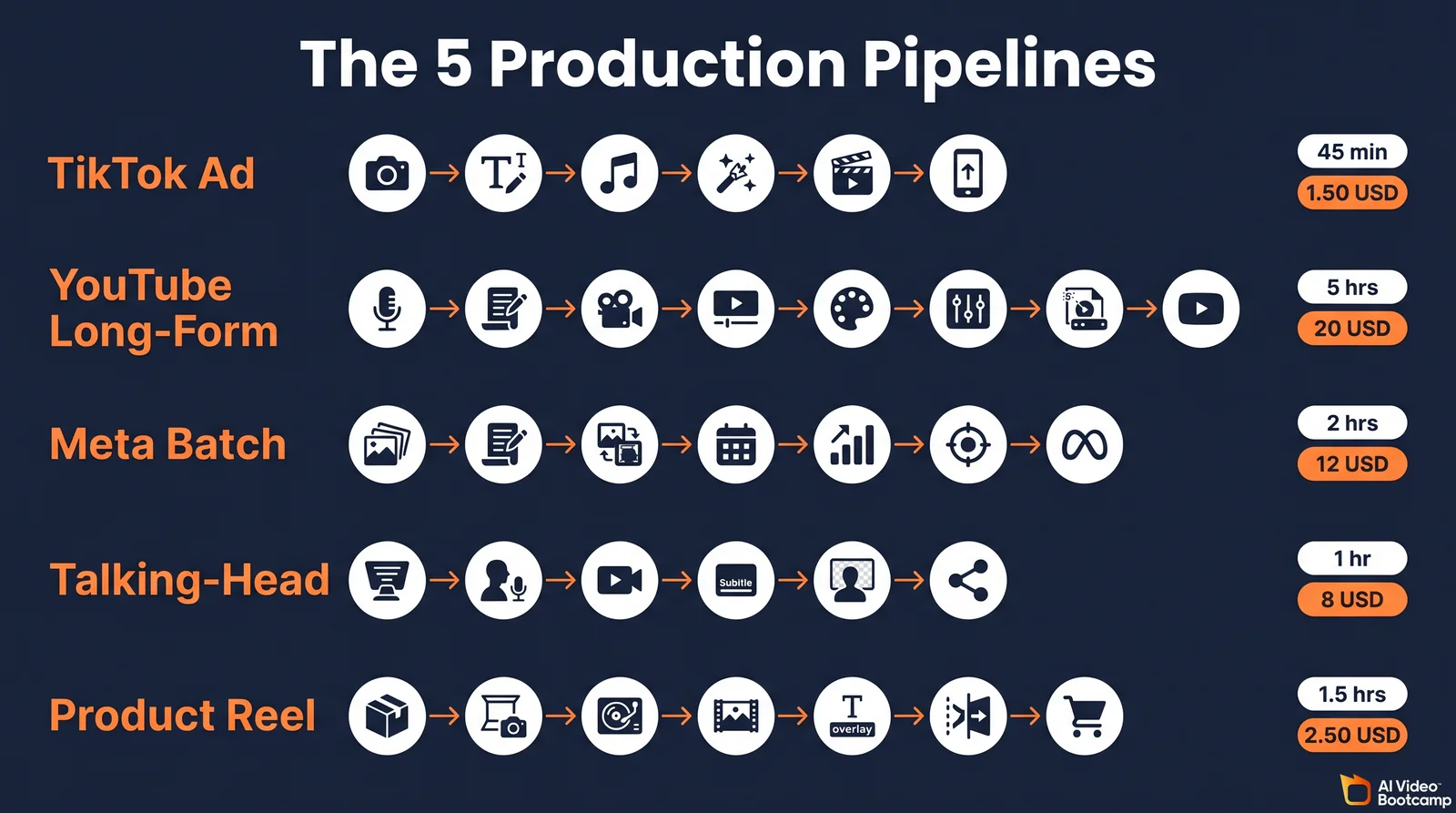
The five pipelines below are the standard integration patterns. Operators who internalize them stop reinventing workflows on every project and start shipping on schedule. Each pipeline lists the tool sequence, time-to-ship range, compute cost, target audience, and the failure mode that breaks the workflow most often.
Pipeline 1: The 30-Second TikTok Ad
Engineered for rapid, high-impact vertical creation under 60 seconds.
| Step | Tool | Purpose |
|---|---|---|
| 1 | Nano Banana Pro | Photorealistic product hero shot with logo persistence |
| 2 | Kling 3.0 (image-to-video) | High-energy motion translation from hero image |
| 3 | ElevenLabs | Energetic voiceover (high-retention script) |
| 4 | CassetteAI | 30-second instrumental at target BPM |
| 5 | CapCut Pro | 9:16 timeline assembly + auto-captioning |
Time to ship: Under 45 minutes from concept to export. Compute cost: Approximately 1.50 in API and credit burn. Target audience: Social media managers and solo agency operators. Most common break: Aspect ratio failure. If the operator does not explicitly prompt Kling 3.0 for 9:16 output, the resulting 16:9 widescreen video requires severe center-cropping in CapCut, which destroys product framing.
Pipeline 2: The 5-Minute YouTube Long-Form
Prioritizes narrative stability and cinematic quality over rapid turnaround.
| Step | Tool | Purpose |
|---|---|---|
| 1 | Gemini Omni | Narrative script + shot list |
| 2 | GPT Image 2.0 | YouTube thumbnail with text overlay |
| 3 | Veo 3.1 (Quality) | A-roll establishing shots |
| 4 | Kling 3.0 | Dynamic B-roll |
| 5 | ElevenLabs Pro | Long-form voiceover |
| 6 | CassetteAI | Continuous 3-minute ambient track |
| 7 | DaVinci Resolve Studio | Color matching + Fairlight audio leveling |
Time to ship: 4 to 6 hours of focused assembly. Compute cost: 15.00 to 25.00, heavily dependent on Veo 3.1 Quality duration per the official Veo 3 documentation in Google AI Studio. Target audience: Documentary creators, video essayists, and premium content channels. Most common break: Media management chaos. Generating hundreds of distinct B-roll clips without strict bin naming conventions and metadata tagging in DaVinci Resolve leads to timeline paralysis.
Pipeline 3: The 10-Variation Meta Ad Batch
Designed for programmatic scalability and rigorous A/B testing frameworks.
| Step | Tool | Purpose |
|---|---|---|
| 1 | fal.ai + Flux 2 Pro | Ten demographic image variations at 0.03/img |
| 2 | Kling 3.0 | Background motion animation |
| 3 | HeyGen Avatar IV | Ten direct-to-camera hook variations |
| 4 | CassetteAI | Tempo-distinct stems per variation |
| 5 | CapCut Pro | Template-based batch packaging |
Time to ship: Approximately 2 hours, mostly API processing wait time. Compute cost: Approximately 12.00 total. Target audience: Performance marketers and DTC advertising agencies. Most common break: Runaway API execution. Uncapped fal.ai loops can drain prepaid credits in minutes if the iteration structure has a logic error.
Pipeline 4: The Talking-Head Explainer
Synthesizes human presence with synthetic generation for corporate or educational content.
| Step | Tool | Purpose |
|---|---|---|
| 1 | HeyGen training | Two to three minute consent recording |
| 2 | ElevenLabs | Professional Voice Clone (bypasses HeyGen native voice) |
| 3 | HeyGen Avatar IV | Lip-sync over high-fidelity ElevenLabs audio |
| 4 | CapCut Pro | Trim + CassetteAI undercurrent for silence masking |
Time to ship: Approximately 1 hour. Compute cost: Approximately 8.00, driven primarily by HeyGen premium credit consumption per the HeyGen Avatar IV Complete Guide. Target audience: Course creators, corporate trainers, and executive branding specialists. Most common break: Auditory desynchronization. If high-fidelity ElevenLabs audio is uploaded into HeyGen using a heavily compressed format, the lip-sync algorithm drifts.
Pipeline 5: The Product Reel with Motion
Engineered to bring static commercial photography to life dynamically.
| Step | Tool | Purpose |
|---|---|---|
| 1 | Nano Banana Pro | Photorealistic product shot in aspirational environment |
| 2 | Seedance 2.0 | Camera panning + environmental physics |
| 3 | CassetteAI | Energetic track with stem separation |
| 4 | ElevenLabs | Voiceover |
| 5 | CapCut Pro | Audio ducking on CassetteAI stems |
Time to ship: Approximately 1.5 hours. Compute cost: Approximately 2.50. Target audience: Ecommerce brand owners and social media managers. Most common break: Chromatic drifting. Nano Banana Pro and Seedance 2.0 use different latent spaces, so brand colors on the product may shift slightly during motion interpolation, requiring secondary color correction.
For deeper prompting mechanics across these pipelines, see How to Write AI Video Prompts That Actually Work and The AI Video Skill Stack 2026.
Cost Arbitrage: How to Cut Your AI Video Bill 17 to 43 Percent
Answer capsule. Three arbitrage moves stack to roughly 40 dollars per month in savings for moderate-volume AI Video Bootcamp operators. Route Flux 2 Pro through fal.ai (0.031/img) instead of Replicate (0.055/img) for 43 percent savings. Use Nano Banana Pro batch API for 50 percent off bulk image runs. Route B-roll through LTX Video (0.06/sec) instead of Veo 3.1 Quality (0.40/sec) for 85 percent per-second savings. Total arbitrage savings: roughly 17 percent at typical operator volume.
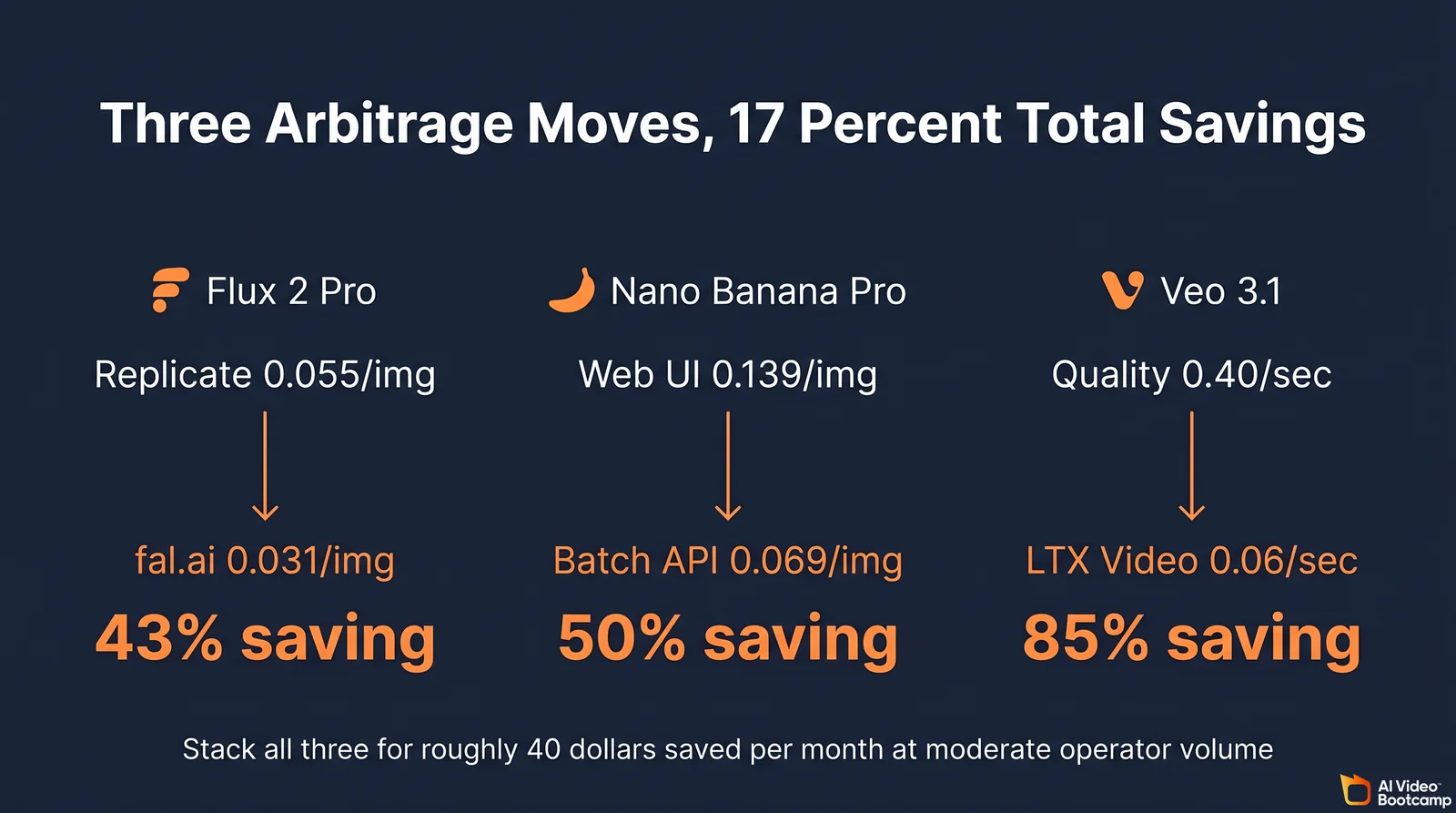
The long-term financial viability of an independent AI video practice hinges on API arbitrage. The arbitrage table below summarizes the five highest-leverage routing moves with their cost differentials.
| Workflow scenario | Default route | Arbitrage route | Cost differential |
|---|---|---|---|
| High-volume image generation | Nano Banana Pro Web UI (0.139/img) | Nano Banana Batch API via Google | 0.069/img (50% reduction) |
| Variation testing (images) | Flux 2 Pro via Replicate (0.055/img) | Flux 2 Pro via fal.ai (0.031/img) | 43% cheaper per image |
| Background B-roll generation | Veo 3.1 Quality (0.40/sec) | LTX Video Fast API (0.06/sec) | 85% cost reduction per second |
| Audio voiceover production | ElevenLabs Creator (22/mo, 100K chars) | ElevenLabs Pro (99/mo, 500K chars) | Lower cost-per-character at scale |
| Background music | Per-track royalty-free licensing (15+/track) | CassetteAI Pro (3.99/mo) | Breakeven at zero tracks |
1. Nano Banana batching mechanics. Operators running extensive ecommerce variations should use the batch mode API pathway. By accepting a 12 to 24 hour queue processing time, the cost per 4K image drops from 0.24 to 0.12 per community-verified pricing analysis on r/Bard. At an operator running 500 variations per month, batching saves approximately 60 dollars.
2. Multi-vendor routing for Flux 2 Pro. The exact same foundational model is hosted by competing providers. Running identical prompts through Replicate costs 0.055 per megapixel, whereas routing through fal.ai costs 0.031 per the Flux 2 Pro pricing comparison on PricePerToken. Hardcoding fal.ai endpoints for all Flux generation provides an instant 43 percent operational saving with zero quality difference.
3. Model routing by quality tier. Profitable operators reserve Veo 3.1 Quality at 0.40 per second strictly for client-facing cinematic establishing shots. For rapid prototyping, background motion, or transition filler footage, prompts route to the LTX Video architecture via fal.ai at 0.06 per second per the LTX Video API pricing documentation. At 5 minutes of B-roll per week, this single routing decision saves roughly 100 dollars per month.
4. ElevenLabs tier-upgrade math. Operators on the 22.00 Creator plan receive 100,000 characters per ElevenLabs official pricing. If they consistently incur overage at 0.15 per 1,000 characters, they should upgrade to the 99.00 Pro plan with 500,000 characters. The mathematical breakeven point occurs at roughly 3.5 hours of audio generation per month.
5. CassetteAI versus traditional licensing. Because CassetteAI Pro costs 3.99 monthly or 3.33 monthly on annual billing (40/yr total), the breakeven point against per-track royalty-free licensing is immediate. The moment an operator needs a single stem separation, MIDI export, or commercial-use license, the Pro upgrade has paid for itself per the official CassetteAI Pro page.
For non-commercial experimentation before committing to paid arbitrage routes, see Free AI Video Tools 2026.
CassetteAI vs ElevenLabs: When to Use Each Audio Tool
Answer capsule. Use CassetteAI Pro (3.99/mo) for instrumental music beds, sound effects, MIDI export, and stem separation. Use ElevenLabs Creator (22/mo) for voice generation, dialogue, voice cloning, and any audio with vocals. The two tools are complementary, not competitive. CassetteAI generates a full three-minute instrumental track in under 10 seconds at 0.02 per minute via the fal.ai music generator endpoint.
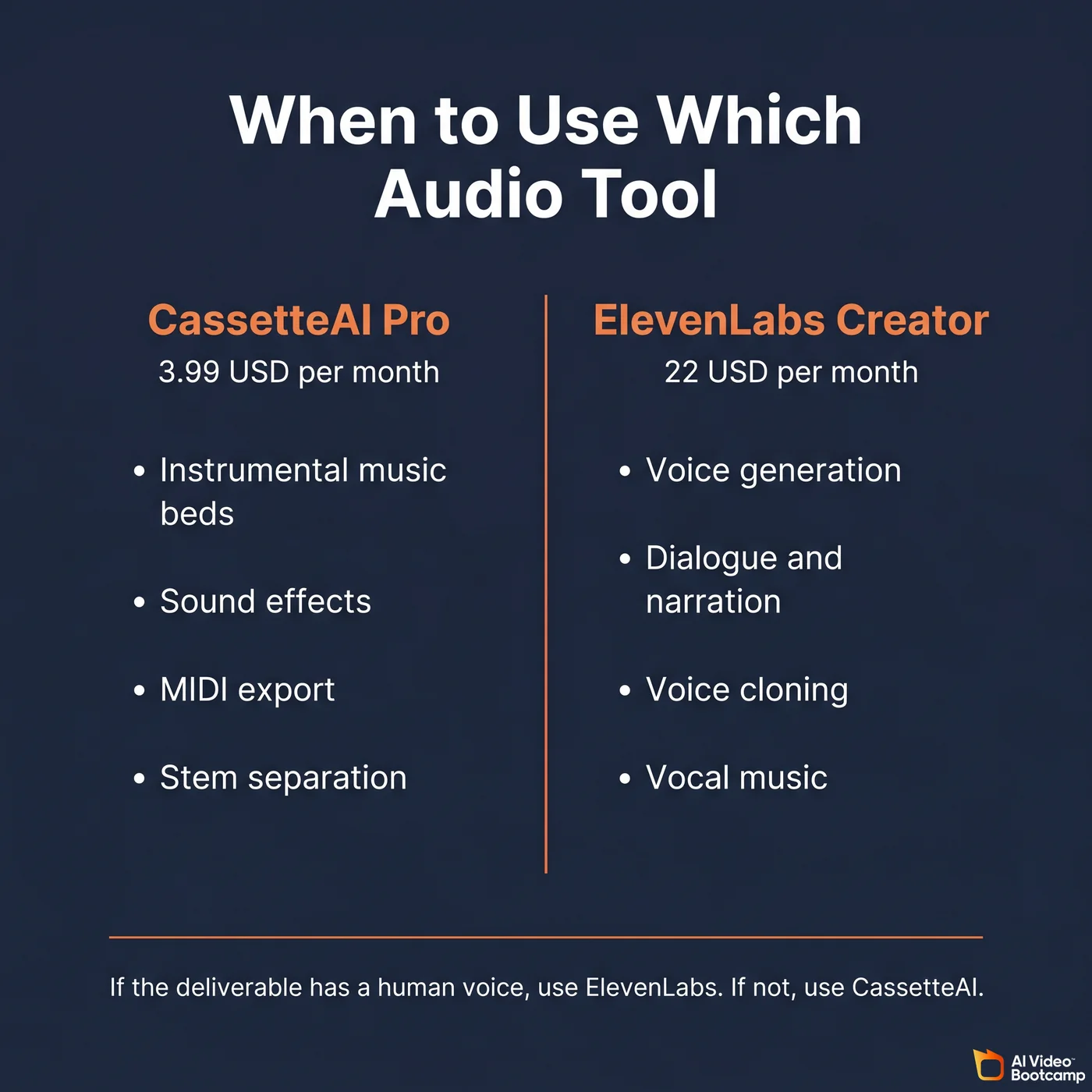
The split between CassetteAI and ElevenLabs is the single most misunderstood decision in the audio layer. They are not competitors. They serve adjacent slots in the audio production stack.
CassetteAI specs verified May 2026. Output is 44.1 kHz stereo audio with no squeaking or digital artifacting common in earlier audio models. A 30-second sample renders in under two seconds; a complete three-minute track renders in under 10 seconds per the official CassetteAI specifications. The Pro tier at 3.99 per month (or 3.33 monthly on the 40-per-year annual plan) unlocks the commercial-use license, stem separation, and MIDI export. The Free tier is for preview only and is not licensed for commercial use. The underlying Latent Diffusion Model was trained on a library of over 200,000 publicly available or explicitly licensed audio files per the Cassette App Store provenance disclosure.
The CassetteAI commercial-license caveat. The Pro tier grants a commercial-use license, but the published Terms of Service do not include an indemnification clause protecting the operator if a generated output happens to overlap with third-party copyrighted material. This is a meaningful difference from licensed stock music libraries that do provide indemnification. For high-stakes client work (broadcast TV, paid streaming ads, or contracts that specifically require indemnified music), pair CassetteAI with a fully-licensed library or have the client sign a clause acknowledging the indemnification gap.
ElevenLabs specs verified May 2026. ElevenLabs excels at high-fidelity vocal tracks, dialogue, complex lyrical compositions, and voice cloning at industry-leading intonation per the ElevenLabs music capabilities documentation. The Creator tier at 22.00 per month provides 100,000 characters; the Pro tier at 99.00 provides 500,000.
The decision rule. If the deliverable contains a human voice (voiceover, dialogue, vocal music), use ElevenLabs. If the deliverable needs instrumental music, sound effects, or audio elements that move into DaVinci Resolve’s Fairlight workspace for stem-level mixing, use CassetteAI. Most professional pipelines use both, layered together in CapCut Pro or DaVinci Resolve. For the full music model deep dive, see the Stable Audio 3.0 complete guide.
7 Setup Traps That Burn New Operators
Answer capsule. First-time AI video operators reliably trip over the same seven traps in their first 30 days: tool saturation, credit burn miscalculations, API billing surprises, aspect ratio chaos, storage collapse, commercial license violations, and ignoring the brand foundation document. Each has a documented mitigation that turns a recurring 200 to 2,000 dollar mistake into a one-time lesson.
Trap 1: Tool saturation and decision paralysis. Attempting to learn all 15 tools simultaneously results in subpar output across every model. Mitigation: Master CapCut Pro and Kling 3.0 first. Integrate APIs only after the basic web UIs are fluent.
Trap 2: Credit burn miscalculations. Buying the HeyGen Creator tier (29/mo) and casually running Avatar IV tests at 20 credits per minute exhausts the entire monthly budget in 10 minutes. Mitigation: Use cheaper avatar models for script-timing and visual-framing tests. Switch to Avatar IV only for final client-ready renders.
Trap 3: API billing surprises. Generating high-volume image batches on fal.ai or Google AI Studio without project-level Spend Caps allows a syntax error to accumulate thousands of dollars in usage fees overnight. Mitigation: Strict adherence to prepaid infrastructure (fal.ai) or hard-coded Spend Caps (Google Cloud) before generating any API key.
Trap 4: Aspect ratio rendering chaos. Generating video assets natively in 16:9 then force-cropping to 9:16 for TikTok destroys framing and degrades pixel density. Mitigation: Prompt models explicitly for their target aspect ratio before execution.
Trap 5: Storage and file management collapse. Generating 200 unlabeled .mp4 variations from Seedance 2.0 makes assembly in DaVinci Resolve a logistical nightmare. Mitigation: Use a strict nomenclature system (ModelName_Date_PromptKeyword_Version) and actively archive rejected generations to Frame.io.
Trap 6: Commercial license violations. Delivering client assets sourced from free tiers that prohibit commercial application exposes both operator and client to copyright liability. Mitigation: Mandatory upgrade to the lowest paid tier of any tool used for client work. This is non-negotiable for CassetteAI, HeyGen, and Midjourney specifically.
Trap 7: Ignoring the brand foundation document. Generating isolated assets across Nano Banana Pro, Seedream 4.0, and Kling 3.0 without a centralized document outlining hex codes, typography, and negative prompts results in visual inconsistencies DaVinci Resolve cannot color-correct. Mitigation: Establish a unified brand bible before opening any generation interface.
What the Community Actually Recommends in 2026
Answer capsule. Across 90 days of monitored discussion on r/aivideo, r/StableDiffusion, r/singularity, r/midjourney, and X/Twitter AI creator communities, three platforms generate the strongest positive signal: Kling 3.0 for accessible high-motion video, Veo 3.1 for photorealistic cinematic consistency, and Flux 2 Pro for prompt-adherent rapid image variations via API. The dominant starter stack consensus mirrors the AI Video Bootcamp Starter Tier exactly.
The dominant starter stack consensus
Community consensus heavily favors a streamlined entry point and rejects complex multi-node setups for beginners. The recommended baseline across the largest AI video subreddits is: CapCut Pro for assembly, Kling 3.0 for video generation, and ElevenLabs for voice synthesis. This matches the AI Video Bootcamp Starter Tier almost exactly and represents the lowest viable barrier to professional output.
The Kling 3.0 versus Veo 3.1 debate
The most rigorous current technical debate centers on Kling 3.0 versus Veo 3.1. Advanced operators note that Kling 3.0 exhibits superior dynamic motion and is willing to “take risks” with aggressive camera movements, which makes it ideal for high-energy content. However, this freedom occasionally produces background artifacting. Veo 3.1 is praised for strict temporal and spatial consistency and is the preferred choice for controlled cinematic output where visual hallucination is unacceptable. For the full head-to-head, see Seedance vs Kling vs Veo 2026.
Publicly admitted operational mistakes
Experienced operators frequently lament their early failure to secure robust cloud storage. Reports of local SSD burnout from the constant cycle of writing and deleting uncompressed AI renders are common. A second cluster of regret focuses on overpaying for UI-based subscriptions long after generation volume necessitated transitioning to programmatic API endpoints. The combined lesson: route to APIs (fal.ai specifically) once monthly UI generation hits 80 percent of credit allocation.
Tools generating the strongest skepticism signal
Three tools in the stack draw the most critical community signal as of May 2026: LTX Video for inconsistent output between Fast and Pro tiers, Hailuo 02 for variable pricing depending on API provider routing, and Gemini Omni for friction integrating with non-Google tools. None of these are reasons to exclude the tools from the stack; they are simply the tools where operators should expect a steeper learning curve.
For the full ranked breakdown across every generator in the stack, see AI Video Generators Ranked 2026.
FAQ
What are the best AI video tools to start with in 2026?
The c