
A faceless YouTube channel lets you build an audience and earn ad revenue without ever showing your face: AI voice, generated visuals, and a real editorial point of view. It is a legitimate way to make money with AI, and this is the honest, followable playbook for doing it in 2026.
Read this part before anything else, because it is what most guides hide: this is not passive income on autopilot, and YouTube spent the last year actively cracking down on low-effort AI channels. Most new channels earn nothing for 6 to 12 months, many never get monetized at all, and in July 2025 YouTube changed its rules specifically to demonetize mass-produced AI slop. The good news is that the crackdown is aimed at lazy templates, not at AI itself. Channels that use AI as a tool and add genuine value are welcome, and they are the ones that make money. That single distinction runs through this entire guide.
This is one spoke of our wider how to make money with AI guide. If you want narrative, film-style channels specifically, pair it with our AI filmmaking guide.
What a faceless channel is, and the honest landscape
A faceless channel monetizes attention without an on-camera host. The voice is AI or your own, the visuals are generated or licensed, and the value comes from the script, the research, and the edit. Think finance explainers, tech breakdowns, history documentaries, or how-to lessons, narrated and illustrated, with no face.
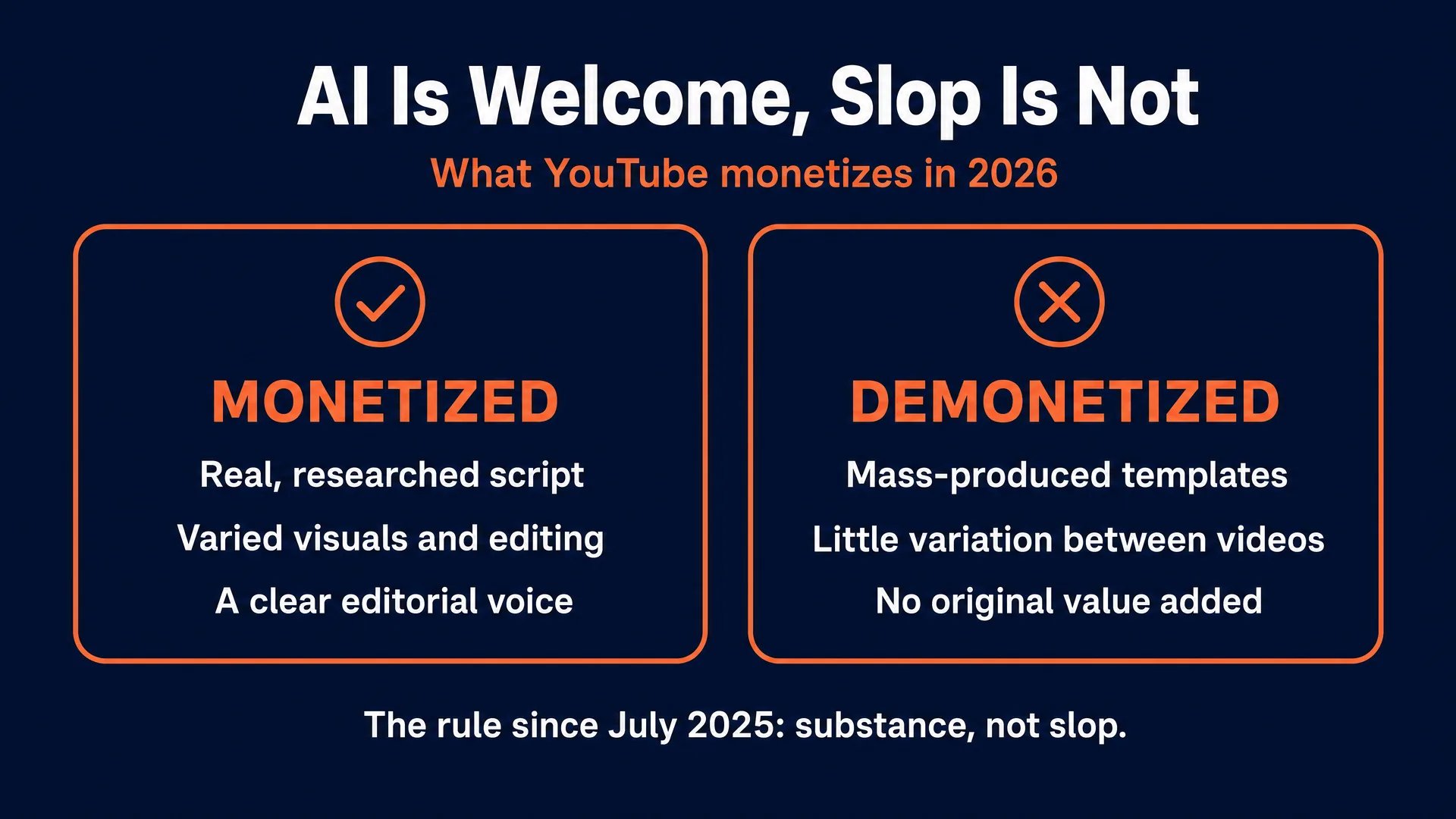
The rule that changed everything. On July 15, 2025, YouTube renamed its “repetitious content” policy to “inauthentic content” and made the target explicit. In its own words, inauthentic content “looks like it’s made with a template with little to no variation across videos, or content that’s easily replicable at scale,” and it names AI directly: “AI-generated content made with generic templates… without adding the creator’s original, authentic insights or perspective” (YouTube monetization policies). This applies to your whole channel, so one slop pattern can demonetize everything you have made.
But AI is welcome. The same policy says plainly: “If the average viewer can clearly tell that content on your channel differs from video to video, it’s fine to monetize.” YouTube’s Creator Liaison confirmed that channels using AI “remain eligible for monetization” as long as you add “significant original commentary, modifications, or educational or entertainment value.” The line is not AI versus no AI. It is substance versus slop.
Disclosing AI does not hurt you. YouTube requires you to disclose realistic altered or synthetic content, and it states directly: “Disclosing AI content won’t limit a video’s audience or impact its eligibility to earn money” (YouTube AI disclosure). Non-realistic animation, AI scripts, and cloning your own voice do not even need disclosure. Hiding realistic AI, on the other hand, risks removal or suspension.
The outlier everyone quotes, in context. Fortune verified, against his AdSense payout records, that a 22-year-old named Adavia Davis runs a faceless AI network earning roughly 40,000 to 60,000 dollars a month, about 700,000 a year, at around 85 percent margin. His flagship channel, Boring History, publishes six-hour AI-narrated history documentaries made to fall asleep to, with scripts and visuals from Claude and narration from ElevenLabs (Fortune, Dec 2025). Two things make this an outlier, not a plan: he had an early-mover advantage with custom-built automation, and he himself thinks the window for solo creators closes around 2027.
The counter-signal is just as real. Research from Kapwing found that roughly one in five videos recommended to a brand-new account is AI slop, and that hundreds of pure-slop channels split an estimated 117 million dollars a year, meaning the typical slop channel earns almost nothing. And the platform risk is not theoretical: The Hollywood Reporter (June 2026) reported that one operator lost 250,000 dollars a month when YouTube took his faceless channels down over a copyright dispute, and quoted an established creator saying that faceless copycats of his content “most of them are getting demonetized” (The Hollywood Reporter).
The honest takeaway: this can absolutely make money, but only as a real media operation with an editorial voice, over 6 to 12 months, not as a one-click content farm.
Pick a profitable niche
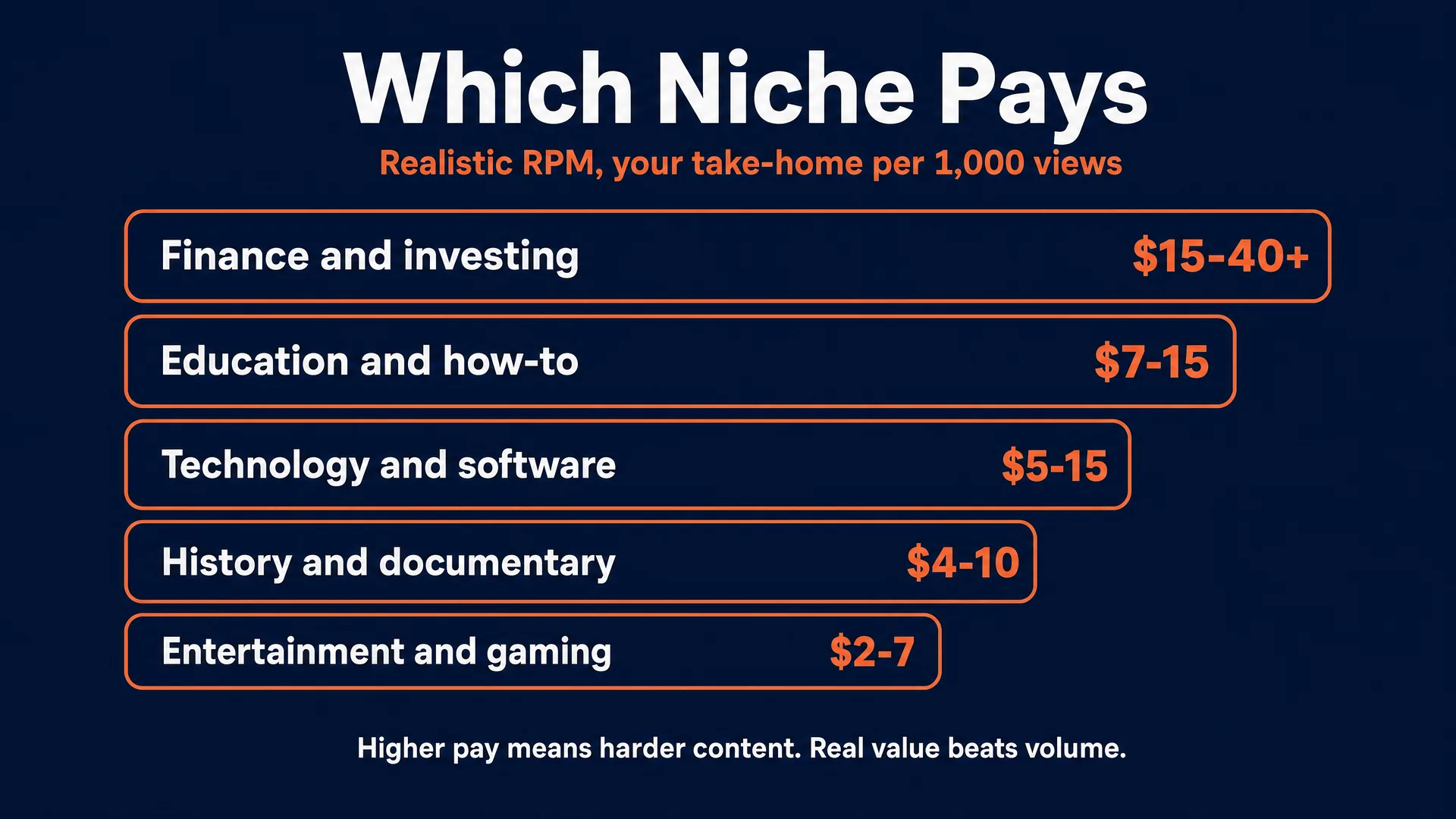
Your niche decides your income more than anything else, because not all views are worth the same. You earn on RPM (your take-home per 1,000 views after YouTube’s cut), and advertisers pay far more to reach finance and business viewers than entertainment viewers. YouTube does not publish niche RPM, so the numbers below are dated third-party aggregates: directional ranges, not guarantees. Your own Analytics is the only true figure, and geography swings RPM 3 to 10x on its own.
| Niche | Realistic RPM | Difficulty | Saturation | Survives the AI-slop bar? | Best first video |
|---|---|---|---|---|---|
| Personal finance, investing, business | 15 to 40+ | High | High, but value wins | Yes, if genuinely researched | A specific, sourced explainer |
| Technology, software, reviews | 5 to 15 | Medium | Medium | Yes, with real tutorials | A hands-on how-to |
| Education, how-to, test prep | 7 to 15 | Medium | Medium | Yes, with clear teaching | A structured lesson |
| History, documentary | 4 to 10 | Medium | Medium | Yes, with a distinct narrative | A researched deep-dive |
| Entertainment, compilations | 2 to 7 | Low | Very high | Risky if templated | Only with real editorial voice |
| Gaming | 3 to 5 | Low-Med | High | Depends on commentary | Commentary-led, not raw clips |
The tradeoff. High-RPM niches (finance, tech, education) pay several times more per view but demand real accuracy and are exactly where YouTube’s inauthentic-content review bites hardest, because shallow AI advice is easy to spot. Easy niches (motivational quotes, AI scary stories, untransformed Reddit-story readings, compilation loops) are fast to mass-produce but map directly onto YouTube’s own “not allowed” examples and are already flooded. Avoid those “niche traps.” The winning move for a beginner is a genuinely researched, per-video-distinct channel in a mid-to-high-RPM niche, not a template farm.
The production pipeline, step by step
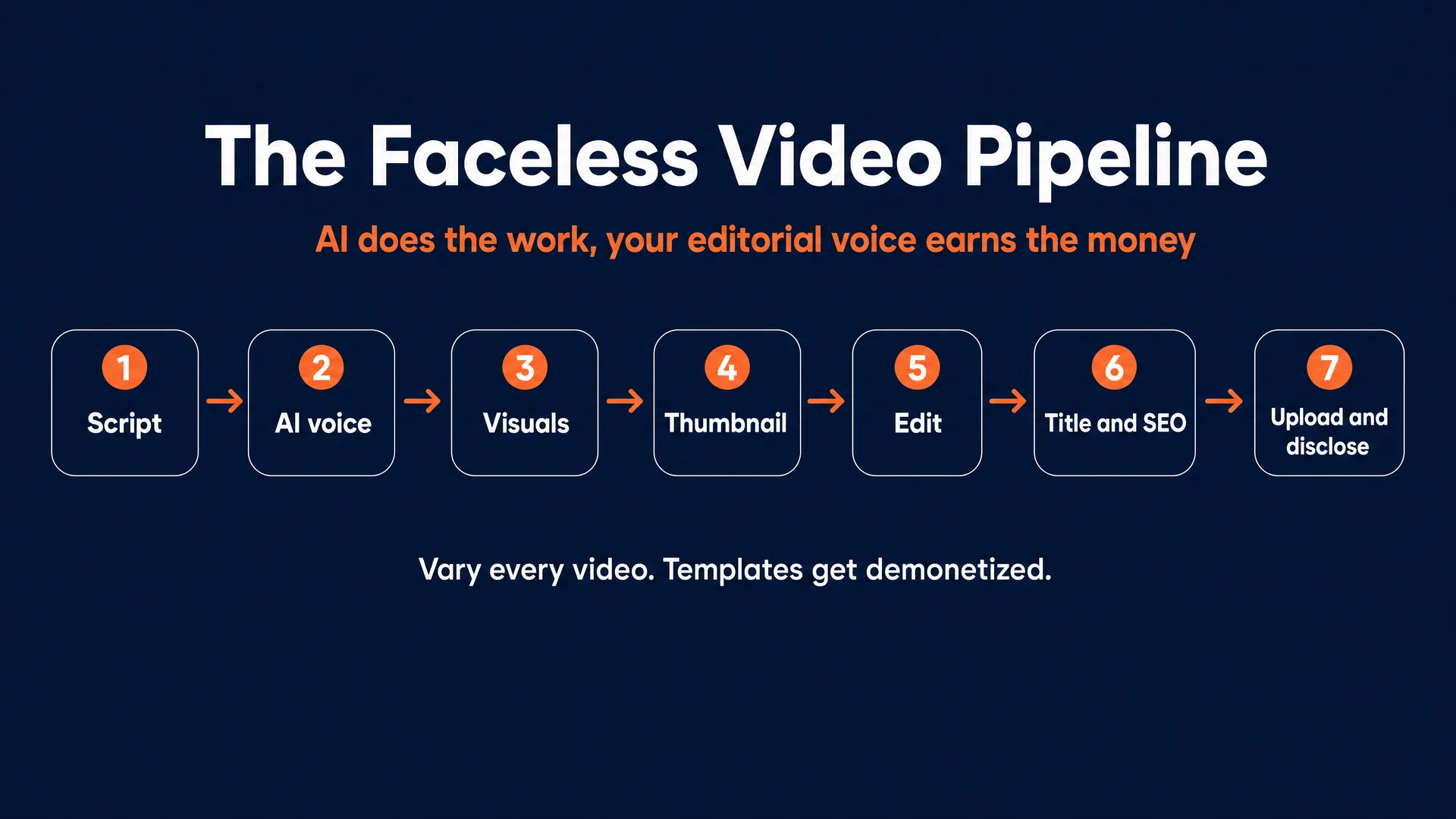
The whole game is using AI to execute a real idea faster, not to replace the idea. You can run the generation models on fal.ai or Replicate (web interface or API); we are not affiliated with either, and prices are similar. If your outputs are not sellable quality yet, start with our guide to learning AI video.
- Research and script (ChatGPT, Claude, or Gemini). Do not ask a model for a whole video in one prompt. Research a real topic, then use the model to shape a tight narrative. Open with a strong hook in the first 15 seconds (grab attention, make the topic clear, tease the payoff, per YouTube’s own creator guidance), then write a conversational script with a fresh beat every 20 to 40 seconds. This is where your editorial voice lives, and it is what keeps you monetizable.
- Voiceover (ElevenLabs). The voice replaces the parasocial bond a face usually creates, so it matters. Pick a voice that fits the niche, adjust stability and style so it does not sound robotic, and use the pronunciation dictionary for names and technical terms. Commercial use requires a paid tier.
- Visuals (Seedance or Kling, plus GPT Image 2.0 or Nano Banana Pro). Generate B-roll and scenes with Seedance or Kling, and stills or backgrounds with GPT Image 2.0 or Nano Banana Pro. Match each visual to a beat in the script, and vary the style so no two videos feel stamped from the same template. Use stock footage where you need real-world accuracy (real places, products, archival) that generation renders inconsistently.
- Thumbnail (Ideogram 4.0 or GPT Image 2.0). The thumbnail decides your click-through rate, which decides whether the video gets shown at all. Build the image with GPT Image 2.0 or Nano Banana Pro, then add crisp, readable text with Ideogram 4.0. Target 3840 by 2160, 16:9, keep on-image text to 3 to 5 big high-contrast words, keep the focal point centered because mobile feeds crop the edges, and keep the file comfortably within YouTube’s size limit. This one skill is valuable enough to sell on its own: see how to make money with AI thumbnails.
- Edit and pace (CapCut or DaVinci Resolve). Assemble the audio, video, and stills. Cut to the script, change the visual every few seconds to hold attention, add clean captions (CapCut’s auto-captions are free), and score with royalty-free music mixed under the voice. This edit is where genuine value gets injected and where you clear the inauthentic-content bar.
- Title, description, tags. Write a curiosity-driven title under about 60 characters that complements the thumbnail rather than repeating it, a genuine hook-forward description, and a few relevant tags. The algorithm cares far more about your click-through rate and average view duration than tags.
- Upload, disclose, schedule. Upload in YouTube Studio, set the AI-content disclosure if your visuals are realistic (again, it does not hurt reach or monetization), and schedule for when your audience is active.
Expect one 8 to 10 minute video to take 8 to 14 hours when you start, dropping to 4 to 6 hours once you build a reusable template and batch by stage (script several, then voice them all, then generate all visuals, then edit). Raw generation cost per video runs about 5 to 9 dollars.
The tools and the cheap starter stack
| Job | Tool | Cost (verified 2026) |
|---|---|---|
| Script | ChatGPT, Claude, or Gemini | Free tiers work to start; Pro ~20/mo |
| Voice | ElevenLabs | Free tier is non-commercial; Starter ~5 to 6/mo unlocks commercial use |
| B-roll / video | Seedance or Kling (fal.ai or Replicate) | Kling 2.6 Pro ~0.07/sec audio off; Seedance ~0.30/sec at 720p |
| Stills / thumbnails | GPT Image 2.0 or Nano Banana Pro | ~0.05 to 0.15/image |
| Thumbnail text | Ideogram 4.0 | ~0.03 to 0.10 per image |
| Edit | CapCut or DaVinci Resolve | CapCut free (auto-captions free); DaVinci free, Studio 295 one-time |
The most important line: ElevenLabs’ free tier is non-commercial, so you need a paid plan the moment your channel earns money. Otherwise a beginner can genuinely start near free: chat and editor on free tiers, ElevenLabs Starter, and a few dollars of pay-as-you-go generation. A realistic budget while you learn is roughly 15 to 30 dollars a month; publishing several long videos a week it scales to about 45 to 80. Do not buy “faceless automation” wrapper tools that mass-produce templated videos; that is exactly the output YouTube demonetizes.
How the money actually works
The threshold. To earn ad revenue you need the YouTube Partner Program: 1,000 subscribers plus either 4,000 valid public watch hours in the past 12 months, or 10 million valid public Shorts views in the past 90 days (YPP eligibility). There is a lower “expanded” tier at 500 subscribers that unlocks only fan-funding (memberships, Super Thanks), not ads. Review takes about a month.
The split. You keep 55 percent of long-form ad revenue, 45 percent of your share of the Shorts pool, and 70 percent of fan-funding revenue.
The streams. Ads are the base. Sponsorships are usually the bigger money and are priced off your average views, not your subscriber count, commonly 20 to 50 dollars per 1,000 views and much higher in finance. Affiliate links (software, financial products) convert well in high-intent niches, and your own products (a course, templates) carry near-total margin once you have trust.
The honest trajectory. Zero for the first 6 to 12 months, often longer just to reach 1,000 subscribers. Past the threshold, low hundreds a month is typical. By month 12 to 18, a genuinely good channel in a mid-to-high-RPM niche earning steady views can realistically reach the low-to-mid thousands a month. Ten thousand a month and up is a real but minority outcome that usually takes one to three years or a breakout video. One creator in a gaming-education niche reported a single deeply-researched video that took about a month to make earning roughly 6,000 dollars across its first million views (r/PartneredYoutube), a useful reminder that even “good” outcomes come from real work, not volume. Davis’s 40 to 60k a month is the verified ceiling, not the median.
The rules that keep you monetized and legal
This is practical guidance, not legal advice, and the full legal layer is in our AI disclosure and compliance guide.
- Beat the inauthentic-content policy with real value. This is the one that ends most faceless channels. Templated, minimal-variation content is demonetized channel-wide. Stay eligible by making each video substantively different, with original commentary and a real editorial voice, so the average viewer can tell your videos apart. AI narration is completely fine when the script and edit are genuinely yours.
- Disclose realistic AI, and know it does not cost you. Use the Studio AI toggle for realistic synthetic content. It does not reduce reach or monetization; hiding it risks penalties.
- Respect copyright and music. Use only the YouTube Audio Library or properly licensed music, and never republish third-party footage without significant transformation (the separate reused-content policy). Wholly original AI visuals sidestep Content ID because there is nothing to match.
- Disclose sponsorships (FTC). Put the disclosure in the video itself, clearly, not just the description; say “ad” or “sponsored,” and check YouTube’s paid-promotion box.
- Never clone a real person’s voice or likeness without consent. ElevenLabs enforces this (you can only clone your own voice), and laws like Tennessee’s ELVIS Act protect voice, including AI simulation.
Your first 12 months
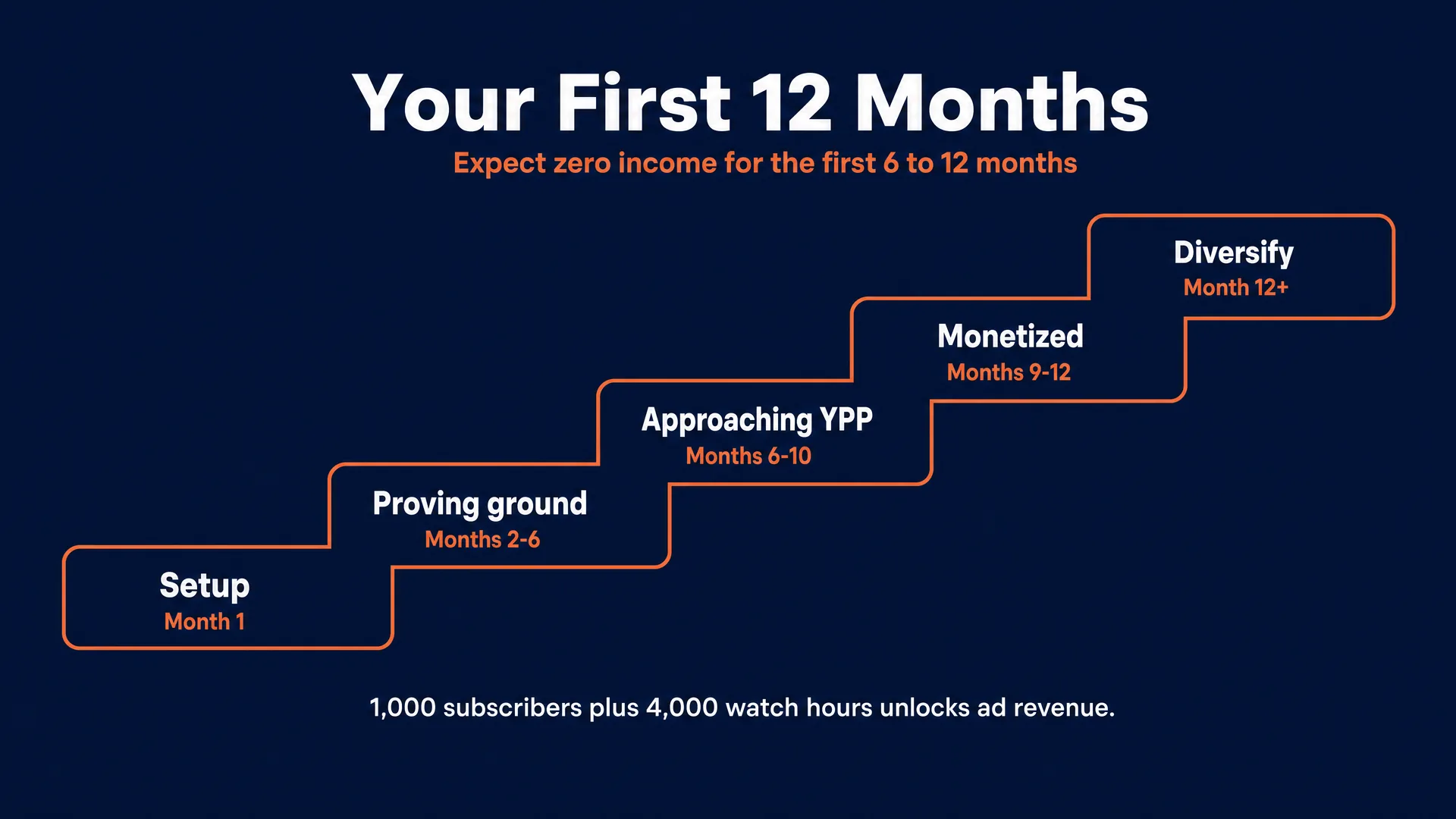
| Phase | What to do | Timeline | Milestone |
|---|---|---|---|
| Setup | Pick a high-value niche, brand the channel, build one repeatable template | Month 1 | First 3 videos live |
| Proving ground | Publish videos 4 to 15, study retention graphs, iterate on hooks and thumbnails | Months 2 to 6 | Impressions rising, earnings still zero |
| Approaching YPP | Double down on your best sub-topic, tighten pacing, push toward 1,000 subs and 4,000 hours | Months 6 to 10 | Cross the threshold |
| Monetized | Apply to YPP, keep disclosures clean, publish consistently | Months 9 to 12 | Ad revenue turns on |
| Diversify | Add a first sponsor and an affiliate or product once views are steady | Months 12+ | A second income stream beyond ads |
Start this month
Pick one niche you can genuinely say something about. Build one repeatable template: an intro style, a voice, a thumbnail layout. Then make your first three videos with a real script, a good hook, varied visuals, and a tight edit, and disclose the AI. Publish, study the retention graph, and improve the next one. Do that for six months before you judge whether it is working, because the algorithm needs that long to learn who your channel is for.
That is the whole strategy. The channels that die are the ones chasing volume with templates. The ones that earn treat AI as leverage on a real editorial idea and outlast the 6 to 12 month climb.
That is exactly what we build inside the AI Video Bootcamp community: the scripting, voice, and visual workflows for faceless channels, real member examples, personal feedback, and an Opportunity Hub. Membership is 9 dollars a month, but the tools are already open in your browser, so the most important thing is to publish your first video this month.
Written by Mateo for AI Video Bootcamp. Income figures are real, dated ranges, never guarantees; results depend on your niche, your editorial quality, and your consistency. Tool prices and YouTube policies were verified 2026 and will change.