
You become an AI UGC creator by making short, creator-style video ads with AI instead of filming yourself, then getting brands to pay for them. No camera, no on-screen face, no studio. In 2026 you can generate a whole ad, a believable person holding a product and talking to the camera, as a single video clip, and you can make your first one this weekend with tools already open in your browser.
Here is the honest version, because it separates the people who earn from the people who quit: making the clip is the easy part. Brands are not paying for a rendered avatar, they are paying for a scroll-stopping hook and an ad that actually sells. So the real skill is direct-response marketing, and the real work is landing the client. Keep that in mind and everything below works.
This is the beginner on-ramp. It takes you from “what even is AI UGC?” to “I made a credible ad, I know the rules, and I can pitch a paid test.” When you want the advanced operator layer, the deep pricing packages, the full stack, and scaling to a real income, we hand you off to our AI UGC ads freelancer playbook. This is one spoke of our wider how to make money with AI guide.
What AI UGC actually is (and why brands pay for it)
AI UGC is short, creator-style video advertising, the casual “here is why I love this product” format, made with generative tools instead of a filmed human. The goal is identical to old-school UGC: native-feeling content for TikTok, Instagram Reels, and YouTube Shorts that drives sales. The “UGC” part is about the style and the platform fit, not about literal user-shot footage.
Brands, especially direct-to-consumer e-commerce brands, pay for it because ad platforms reward whoever feeds them the most fresh, varied creative, and paying human creators for that volume is slow and expensive. AI lets a brand test a dozen angles for the cost of one filmed video. Demand is real and rising: Fiverr reported AI UGC video-ad searches up sharply in 2026, Upwork listed AI video creation as its fastest-growing skill, and both now have dedicated AI UGC categories.
Now the honest income picture. A complete beginner with no portfolio and no proven results earns nothing, because the market does not pay for assembling a video, it pays for the hook, the retention, and the conversion. Once you can show a brand you understand those, realistic beginner rates run 50 to 150 dollars per video on marketplaces, and 150 to 250 for direct clients, climbing into retainers only after you can prove your ads lower a brand’s cost per sale. Landing clients, not making the clip, is the hard part.
The one mindset that makes AI UGC work: raw, not polished
This is the most important idea in the whole article, and it is exactly what we teach inside AI Video Bootcamp. Brands do not want a glossy commercial. They want something that looks like a real person filmed it on their phone: selfie-style, a little imperfect, real energy, a face talking to the camera. The moment your ad looks like a high-budget TV spot, it stops feeling like UGC and it stops converting.
And here is the counterintuitive part that most beginners get wrong: realism does not come from a better tool, it comes from better prompting. The same model can produce plastic, obviously-AI output or something that looks genuinely filmed, and the difference is the words you use. That is why the workflow below leans so hard on specific realism cues. Get those right and a cheap generation looks real; get them wrong and an expensive one looks fake.
The tools you actually need
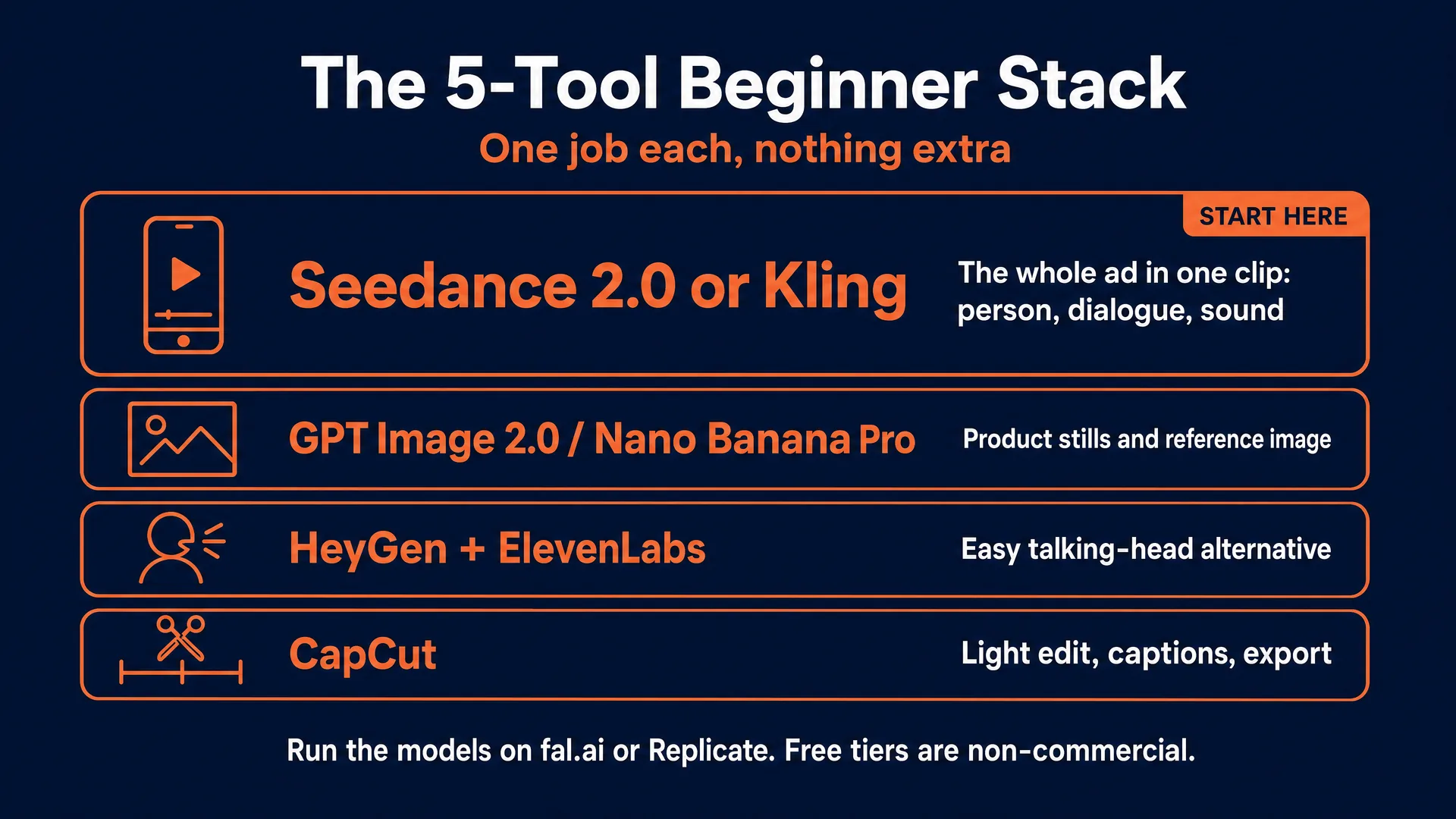
You need a small stack, and the star of it is a video model that can generate the whole ad in one go. You can run the models two ways, straight from the browser or through an API, on two popular hosts, fal.ai and Replicate. We are not affiliated with either and their prices are similar, so use whichever you like.
| Job | Tool | Notes and cost (verified June 2026) |
|---|---|---|
| The whole ad in one clip (person + dialogue + sound) | Seedance 2.0 (or Kling) | Generates video, spoken dialogue, lip-sync, and ambient sound in one pass. On fal.ai: Fast tier ~0.022/sec (a 15-sec clip is about 33 cents), Standard 720p ~0.30/sec. Same price with audio on or off. |
| Product stills / reference image | GPT Image 2.0 or Nano Banana Pro | For a clean product image to feed the video, or to fix a background. GPT Image ~0.01 to 0.41/image; Nano Banana Pro 0.15 (1K/2K). |
| Easy talking-head alternative | HeyGen + ElevenLabs | Pick a stock avatar, paste a script, add a voice. Simpler but more “spokesperson” than raw UGC. HeyGen Creator ~29/mo, ElevenLabs Starter ~6/mo. |
| Light edit, captions, export | CapCut | Trim, add captions (most people watch muted), export 9:16. Free tier is fine to start. |
Two things to burn into memory. First, the free tiers of HeyGen and ElevenLabs are non-commercial by their terms, so the moment you make an ad for a client you need the paid tier. Second, you do not need thirteen tools. Seedance or Kling for the clip, an image model for the product shot, and CapCut for a light edit is enough to make money. A realistic starter budget is a few dollars of generation per ad, plus the paid avatar tools only if you use the talking-head route.
If your outputs are not sellable quality yet, spend a week on fundamentals first with our guide to learning AI video.
Make your first AI UGC ad (the modern one-clip method)
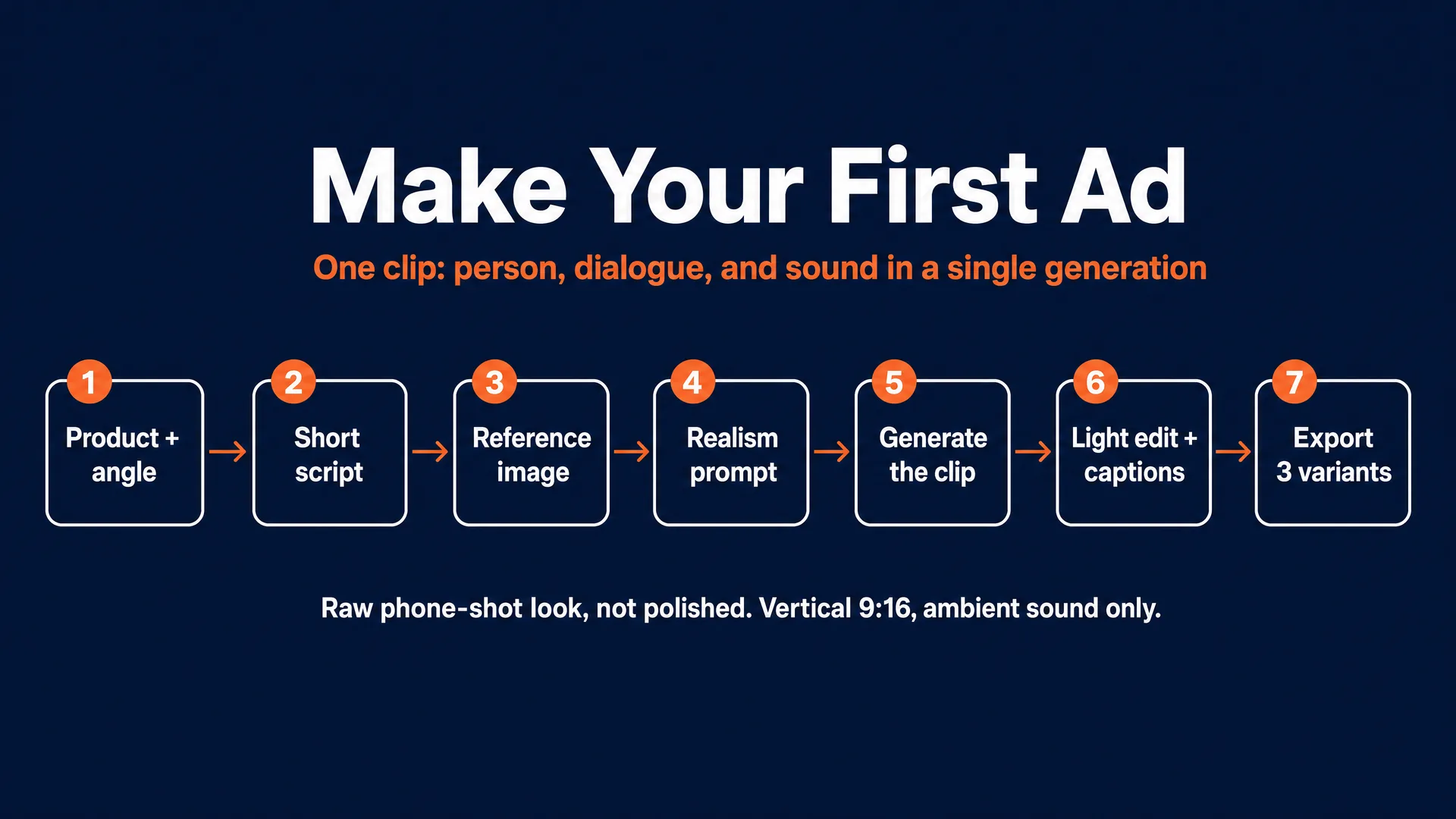
The target is one 15 to 20 second vertical (9:16) ad that looks like a real person filmed it on their phone. Here is the workflow, the same shape we teach in the community.
1. Pick one product and one angle. Choose something with an obvious use case: a desk gadget, a kitchen tool, a simple beauty product. Then pick your advert angle, because a clear angle is what makes an ad persuasive instead of generic. The five that work:
- Authority or expert (“as an esthetician, this is the one I recommend”)
- Before-and-after (the transformation)
- Problem-solution (the classic)
- Comparison (“I tried five, this won”)
- Founder story (“why we made this”)
One ad, one angle, one buyer.
2. Write a short script. Keep it conversational, like a voice note, not a sales pitch, in a problem-product-payoff shape: a scroll-stopping first line, a relatable problem, a quick proof or demo, and a soft call to action. Strip out anything medical, absolute, or unprovable and replace it with soft proof (“easy to use,” “customers mention”). Modest beats hyped; synthetic UGC falls apart the moment it sounds like an over-excited affiliate.
3. Prepare a product reference image. If you do not have a clean product photo, generate one with GPT Image 2.0. If you have one but the background is wrong, fix it with Nano Banana Pro. You will feed this into the video model so your real product stays accurate.
4. Write the video prompt with realism cues. This is where the “raw, not polished” mindset becomes concrete. Describe the person, the environment, the action, and the exact dialogue, and load it with the specific cues that make AI look filmed:
Include: vertical 9:16, hyper-realistic phone-shot UGC style, a believable everyday location, natural daylight or realistic indoor lighting, handheld camera movement, imperfect framing, realistic hand movement and product interaction, natural skin texture and pores, exact product preserved from the reference image, ambient sound only.
Avoid: glossy commercial lighting, studio backgrounds, perfect model-like skin, fake AI-looking hands, floating product shots, warped labels, exaggerated claims, background music, voiceover, on-screen text.
A simple, usable example you can adapt:
Ultra-realistic vertical 9:16 video that looks like a real person filmed it on their phone. A woman in her late twenties stands in a bright everyday kitchen holding [product], talking casually to the camera. Natural daylight, handheld movement, slightly imperfect framing, natural skin texture. She says: “[your hook line], and honestly [one quick proof line].” Realistic hand movement and product interaction, exact product shape preserved from the reference image. Ambient room sound only. No music, no voiceover, no on-screen text.
5. Generate the clip. Run it on Seedance 2.0 (or Kling) via fal.ai or Replicate. Because the model produces the dialogue, lip-sync, and ambient sound in the same pass, you get a complete talking ad, not just b-roll. Use the cheap Fast tier to find a version you like, then regenerate the winner on the standard tier for the final. Expect to run it several times; that is normal, and at a few cents per try it is affordable.
6. Light edit in CapCut. You often need very little: trim the top and tail, add captions (most people watch muted), drop in the CTA text frame, and check the pace. Keep it tight.
7. Export three variants. From the same base, make version A with a different hook, version B with a different CTA, version C with a different first frame. This is the highest-leverage move in the whole process, because you are not selling one clip, you are selling controlled creative variation, which is exactly what brands pay for.
The easy alternative: the talking-head route
If writing a detailed video prompt feels like too much for your very first ad, start simpler: generate a talking-head with HeyGen (pick a casual stock avatar, paste your script, set 9:16), give it a natural voice with ElevenLabs, add your product stills and a little b-roll, and assemble in CapCut. It is more “spokesperson” than raw UGC, but it is the gentlest on-ramp, and you can graduate to the one-clip method once you are comfortable.
(Inside AI Video Bootcamp, members get the full Phase 6 prompt banks plus a done-for-you generator that writes the entire video prompt and ten viral hook ideas from a single product photo. This article gives you the method; the community gives you the shortcut.)
Build a portfolio before you have any clients
Brands cannot judge a beginner on follower count, so they judge the work. A spec ad is a sample you make for a real product you like, unpaid, purely to prove skill.
Make three to five spec ads in one niche. Three ads in one lane look like a service; three ads in three random lanes look like a hobby. Brands reviewing your reel are not checking resolution, they are checking judgment: the hook, the pacing, the clarity of the benefit, and whether it feels native rather than like a glossy commercial.
Package it with zero friction. A free Notion page or Canva site with the videos linked beats a PDF or a raw Google Drive folder, because a brand needs to forward it internally with one click and no login. Then post your spec work publicly on TikTok or Reels with context (“POV: I made a UGC ad for [product category]”) so you get discovered while your outreach runs. Upgrade to a real website only after you land a few paid jobs.
Land your first paying brand (and what to charge)
Do this in order.
1. Pick a buyer type. A Shopify founder, an Amazon brand expanding to TikTok, a local service business with weak short-form, or a small DTC brand that posts but rarely runs native-looking ads. Avoid giant brands; you want someone who can say yes fast.
2. Build a prospect list of 30. For each: brand name, a real contact person (find the marketing manager on LinkedIn or Instagram, not a generic inbox), the product, and one creative weakness you noticed.
3. Record a free 30 to 60 second mini-audit for your top prospects. Structure: one thing they do well, one thing that is not working, one angle you would test, one line on what you would deliver. Sell the result, not your process.
4. Send a short first message. For example:
Hi [Name], I made a 40-second creative audit for [Brand] because I think your product could work well in AI-assisted UGC style. Short version: I would test one creator-style hook, a proof-driven middle, and a cleaner CTA. Happy to send the video and a sample concept.
5. Follow up twice, once after 3 days, once after 7. Two is enough.
6. Offer a small starter package, not a custom proposal. A single test ad, or a three-ad starter pack from one angle set. Removing risk is your whole pitch: you are the cheap, fast, low-commitment way for a brand to test creative.
7. On the call, ask five questions: what product to push first, where it will run, whether they have images/reviews/approved claims, what style they want, and what they would want next if the first test works. Then recommend the starter pack so they get variations instead of betting on one clip.
8. Take 50 percent upfront, 50 percent on delivery, with one revision round and a written scope.
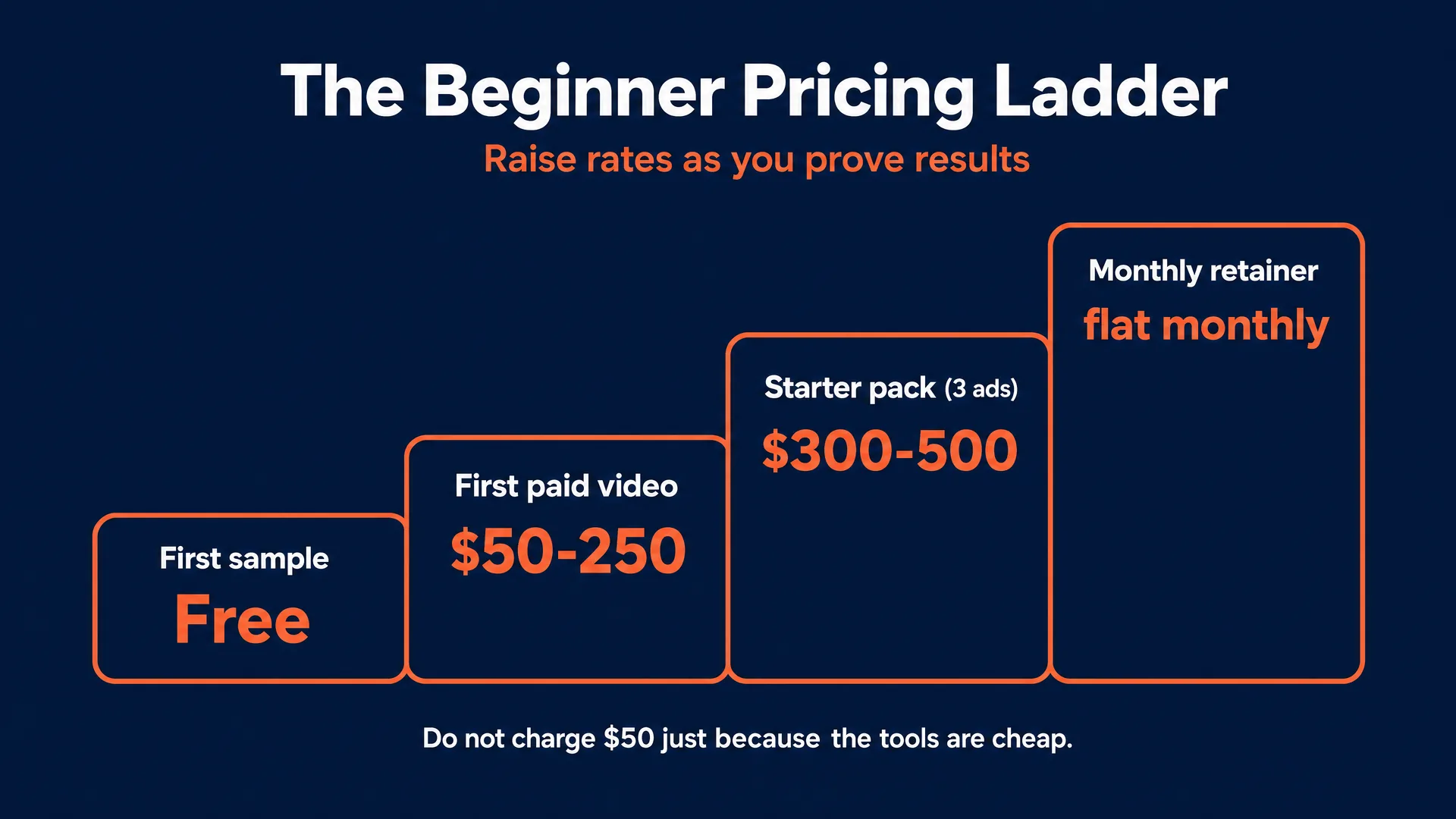
On pricing, here is the honest picture. Beginner marketplace rates (Fiverr, creator platforms) floor around 50 to 150 dollars per video. For direct clients aim higher, roughly 150 to 250 for a single ad and 300 to 500 for a three-ad starter pack, because you are solving a real problem, not just rendering a file. Do not charge 50 dollars just because the tools are cheap, and do not quote 2,000-dollar retainers with no proof. Raise your rates once you have a few completed jobs plus a repeat client or a testimonial.
| Stage | Realistic price | What the brand gets | What you need to show |
|---|---|---|---|
| First sample | Free (local) or cheap (DTC) | 1 ad | Nothing yet; this breaks the trust barrier |
| First paid video | 50 to 150 (marketplace), 150 to 250 (direct) | 1 ad, ready to upload | A tight spec reel |
| Starter pack | 300 to 500 | 3 ads, one angle set, captions | 1 to 2 completed jobs |
| First retainer | flat monthly for a set number of videos | recurring test creative | a repeat client or documented result |
Advanced client acquisition, productized packages, and scaling live in the freelancer playbook. This article stops at your first paid client and first small retainer.
The rules you cannot skip
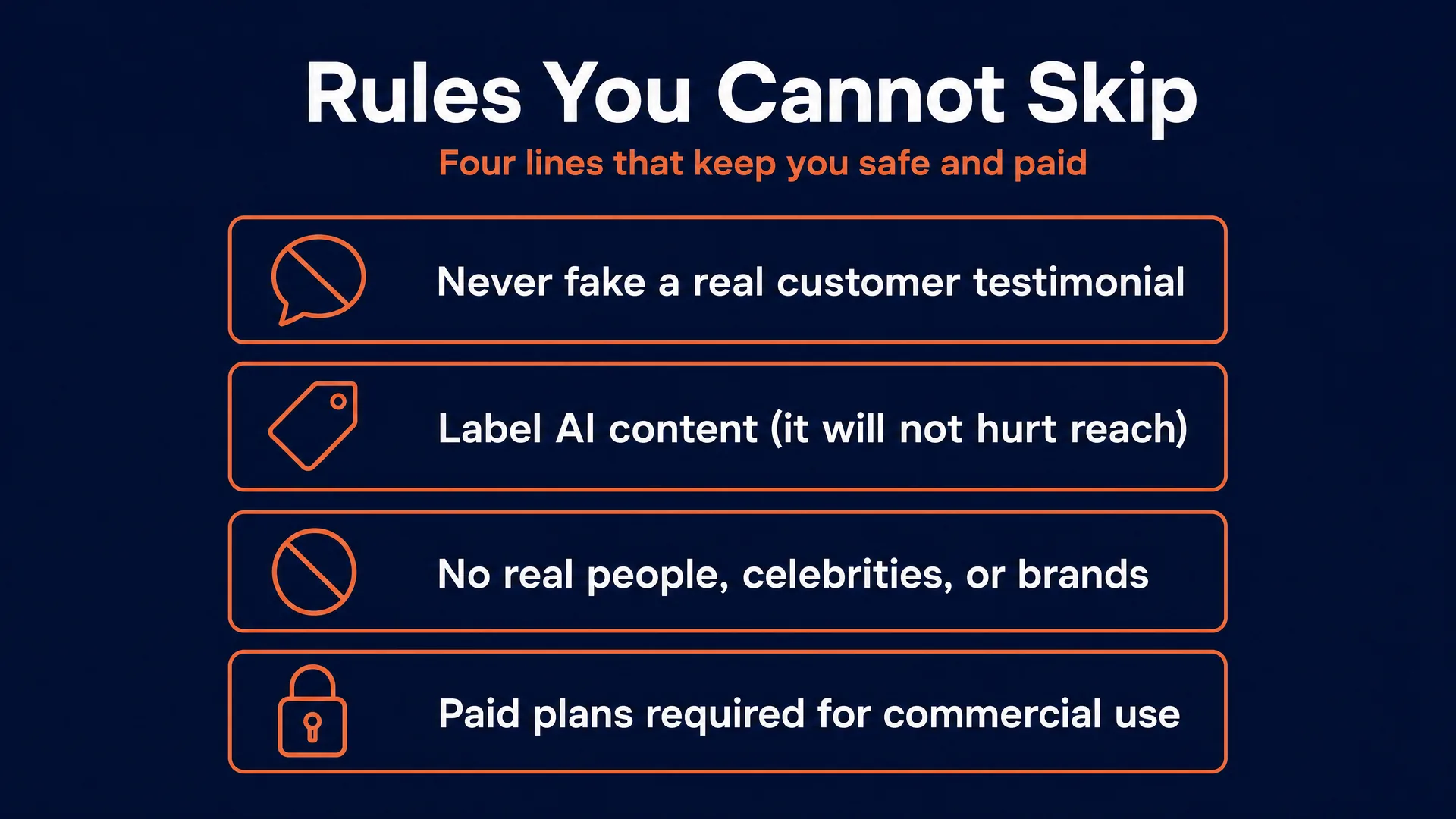
Synthetic media has real rules, and breaking them burns trust and gets accounts banned. This is practical guidance, not legal advice, and the full legal layer is in our AI disclosure and compliance guide.
Never pass an AI creator off as a real customer. The FTC’s fake-reviews rule bans testimonials by someone who does not exist or did not actually use the product, and AI-generated fake testimonials are named explicitly. An AI person saying “I used this for three weeks and my skin cleared up,” when no real person did, is deceptive, and a tiny “results not typical” line does not fix it. Frame AI UGC as a spokesperson, a demo, or an explainer, never as a fabricated first-person customer review. And if the content is sponsored, the FTC says the disclosure belongs in the video itself, not buried in the caption.
Label AI content, and know it does not kill your reach. TikTok and YouTube both require disclosing realistic AI content and both state plainly that disclosing it does not reduce your distribution or monetization. Meta adds an “AI info” label. Use the built-in toggle; it is the safe, expected move.
Never use a real person or a brand you do not own. No celebrity likenesses, no “make it look like [public figure],” no cloned founder voice without written approval, no trademarked characters or logos. If you use the talking-head route, HeyGen’s terms require explicit consent to build a custom avatar of a real person, so stick to its licensed stock avatars or your own face and voice. Laws are tightening fast (Tennessee’s ELVIS Act on voice, New York’s synthetic-performer ad-disclosure law in force as of mid-2026), so treat it as a hard line.
Get on the paid plans before you bill anyone. Commercial rights on HeyGen and ElevenLabs start on their paid tiers; the free tiers are non-commercial by their terms.
Your first 30 days
| Days | Focus | The milestone |
|---|---|---|
| 1 to 7 | Learn the stack, make one full practice ad | One finished 9:16 ad start to finish |
| 8 to 14 | Make 3 to 5 spec ads in one niche | A no-login portfolio (Notion or Canva) |
| 15 to 25 | Build a list of 30, send audits and DMs, post spec work publicly | First real conversations |
| 26 to 30+ | Deliver a free or cheap sample, convert it | First paid job at 50 to 250 |
It is completely normal to make zero dollars in month one while still doing everything right. It is also plausible to land a first small test if your outreach is consistent and your niche is narrow. Any guide that treats the first client as the easy part is not being honest with you.
Start this week
Pick one product tonight. Make one ad this weekend using the one-clip method: one angle, a short conversational script, a product reference image, a realism-loaded prompt, and a quick CapCut edit. Then make two more in the same niche, put them on a simple page, and send ten honest audits to small brands you actually like. Disclose that it is AI, price it in the beginner band, and watch what happens.
That is the whole game. Most people stop at “I made a video.” The ones who get paid put a finished, native-feeling ad in front of a real buyer, fast, and make the next order easy to say yes to.
That is exactly what we build inside the AI Video Bootcamp community: the full Phase 6 prompt banks, the done-for-you script-and-hook generator, real member ad examples, personal feedback, and an Opportunity Hub that tracks brands actively looking for this work. Membership is 9 dollars a month. But the tools are already open in your browser, so the most important thing is to make your first ad this week. When you are ready to go pro, the freelancer playbook is your next stop.
Written by Mateo for AI Video Bootcamp. Income figures are real, dated ranges, never guarantees; results depend on your niche, your hooks, and your consistency landing clients. Tool prices and platform policies were verified June 2026 and will change.