
There is a number that makes this whole opportunity obvious. A boutique brand shooting twenty new products the old way pays a studio, a lighting tech, and a retoucher, and waits three weeks, often for well over a hundred dollars an image. You can deliver the same catalog and lifestyle set in an afternoon for pennies of compute. That gap is the business.
But there is a catch that separates the people who build a real income from the ones who get a client’s listing suppressed, and it is the first thing you need to understand.
The honesty wedge (this is the whole method)
A product image is not art. It is a legal claim about what the buyer will receive. If your image makes the product look bigger, a different color, smoother, or loaded with a feature it does not have, that is deceptive, and it is a problem for you, your client, and the platform they sell on.
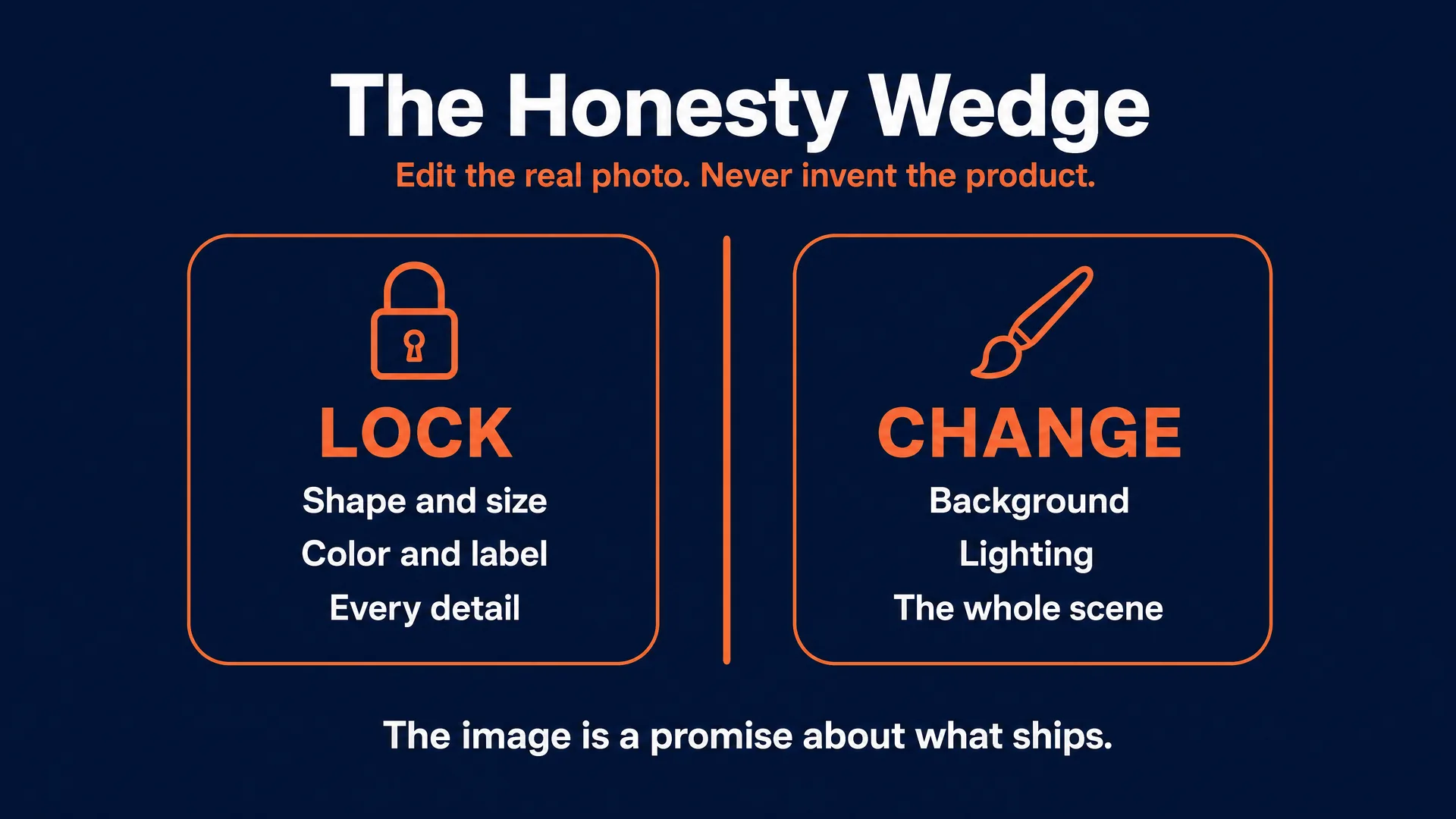
AI is very good at building clean backgrounds and believable lifestyle scenes. It is terrible, left unconstrained, at respecting reality: it will quietly change a logo, restyle a label, invent a reflection, or “improve” the product into something that is not for sale. So the entire professional workflow is built on one discipline: you edit the client’s real product photo and keep the product itself mathematically identical. You change the background, the lighting, and the scene around it. You never regenerate the product from a text prompt.
That discipline is not a limitation. It is your selling point. Sellers have been burned by cheap AI tools that mangled their products, so the operator who can say “your product stays pixel-for-pixel identical, the only thing that changes is the setting” is the one who gets hired and keeps the client. This is method five in our make-money-with-AI pillar.
Who buys, and the honest money
Your clients are e-commerce sellers and small brands: Amazon, Etsy, and Shopify stores, direct-to-consumer brands, and the agencies that serve them. There are millions of them, most with weak photos, and better images are pure upside on a listing that already sells. They range from a solo Etsy maker to a brand manager juggling fifty SKUs.
The honest income picture:
- Per image: background replacement and clean catalog edits run $10 to $30; lifestyle scenes and hero composites run $50 to $150. The commodity floor on Fiverr is $5, and you should not live there.
- Per SKU: a package (one main shot, two or three lifestyle scenes, a feature graphic) runs roughly $150 to $300.
- Retainer: stores that add products regularly pay a monthly fee. One operator doing exactly this described charging $50 to $100 per image and locking in a $639 per month retainer for fifty images (self-reported). Retainers commonly land in the $500 to $2,000 a month range.
The arbitrage is the story: a traditional shoot is $25 to $500 per image, your raw compute is a few cents to about fifteen cents per image, and Upwork’s own data puts hourly photo-editing rates at $10 to $25. Price per deliverable and per SKU, never per hour, or AI speed works against you.
Two hard limits to be honest about. First, quality: AI still produces “pasted-in” results and fails on transparent glass, mirror-finish metal, fine jewelry, intricate weave, and exact brand-color matching. Second, and non-negotiable: the truthful-representation rule above. Get either wrong and the client fires you or their listing gets pulled.
What you sell, and what fights the AI
The deliverable menu:
- White-background catalog / main image: the product isolated on pure white, no props. The baseline every listing needs.
- Lifestyle scene: the product placed in a styled setting (a counter, a shelf, outdoors). Secondary slots; lifts conversion.
- Hero composite: a dramatic lead visual for a storefront, brand page, or ad.
- Model-on-product: the item worn, held, or applied by a model (apparel, cosmetics, accessories).
- Feature-callout / infographic: the product plus readable text and icons for specs and benefits.
- Social / ad static: sized for paid social, for continuous creative refresh.
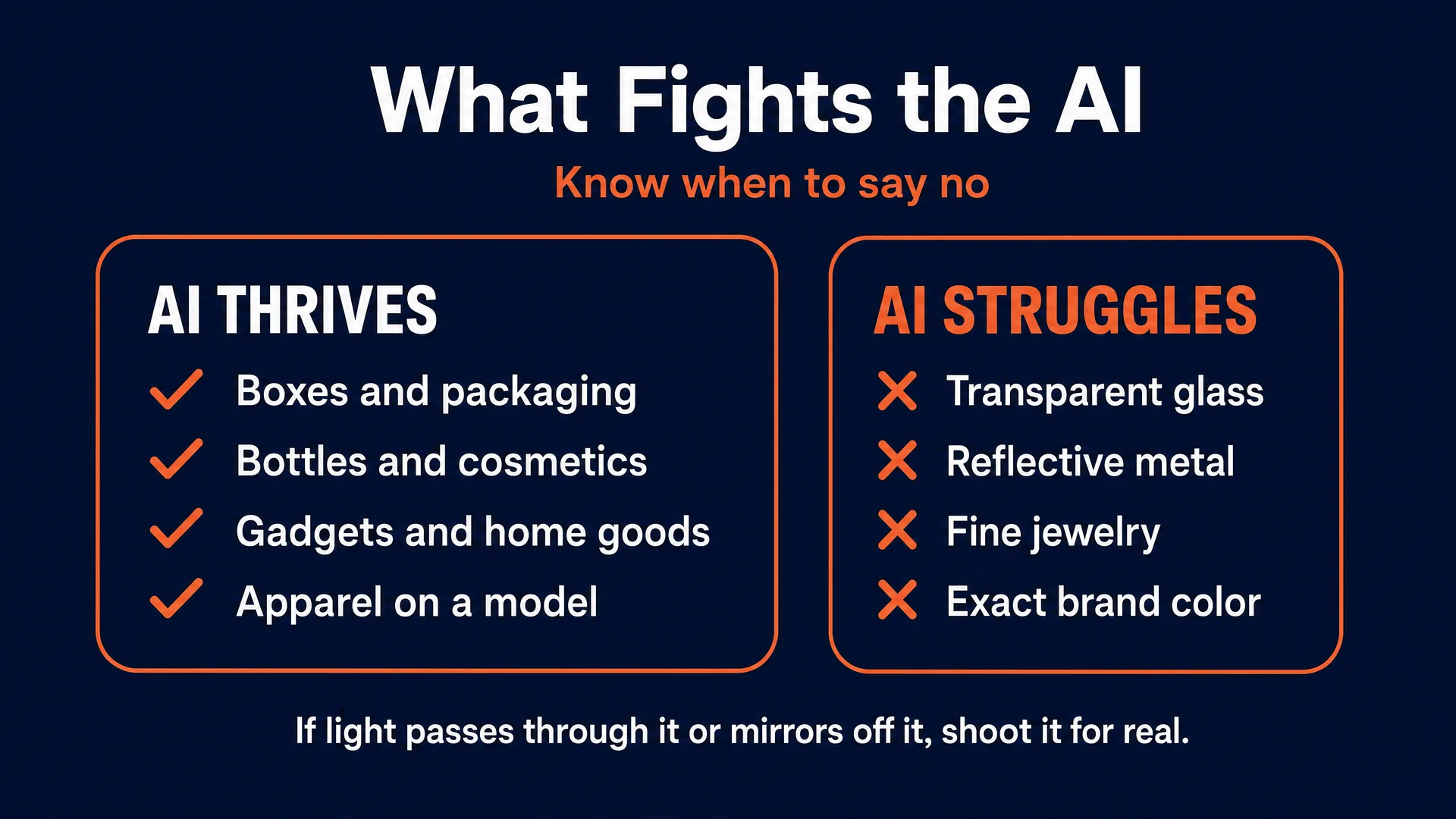
Not every product cooperates. Match the job to the material:
| Product category | AI difficulty | Best approach | When to decline |
|---|---|---|---|
| Packaged goods, boxes | very low | isolate, swap background, add shadow | rarely |
| Matte cosmetics, bottles | low | soft relight, simple lifestyle scenes | fine embossing lost in a low-res source |
| Apparel on-model | moderate | inpaint over a synthetic model, lock the fabric | chaotic patterns the model “standardizes” |
| Electronics, gadgets | low to moderate | clean catalog plus feature graphics | mirror-finish surfaces |
| Home goods, furniture | low to moderate | lifestyle composites | reflective glass or metal parts |
| Transparent glassware | high | recommend a real shot | color and clarity-critical listings |
| Reflective metal, jewelry | very high | recommend a real shot | faceted gems and fine detail |
The rule of thumb: if it is matte and opaque, AI thrives. If light passes through it or mirrors off it, be honest with the client that a real photo is the better tool. Turning down the wrong job protects your margin and your reputation.
The marketplace rules (know these cold)
The rules differ by platform, and getting them right is part of what you are selling.
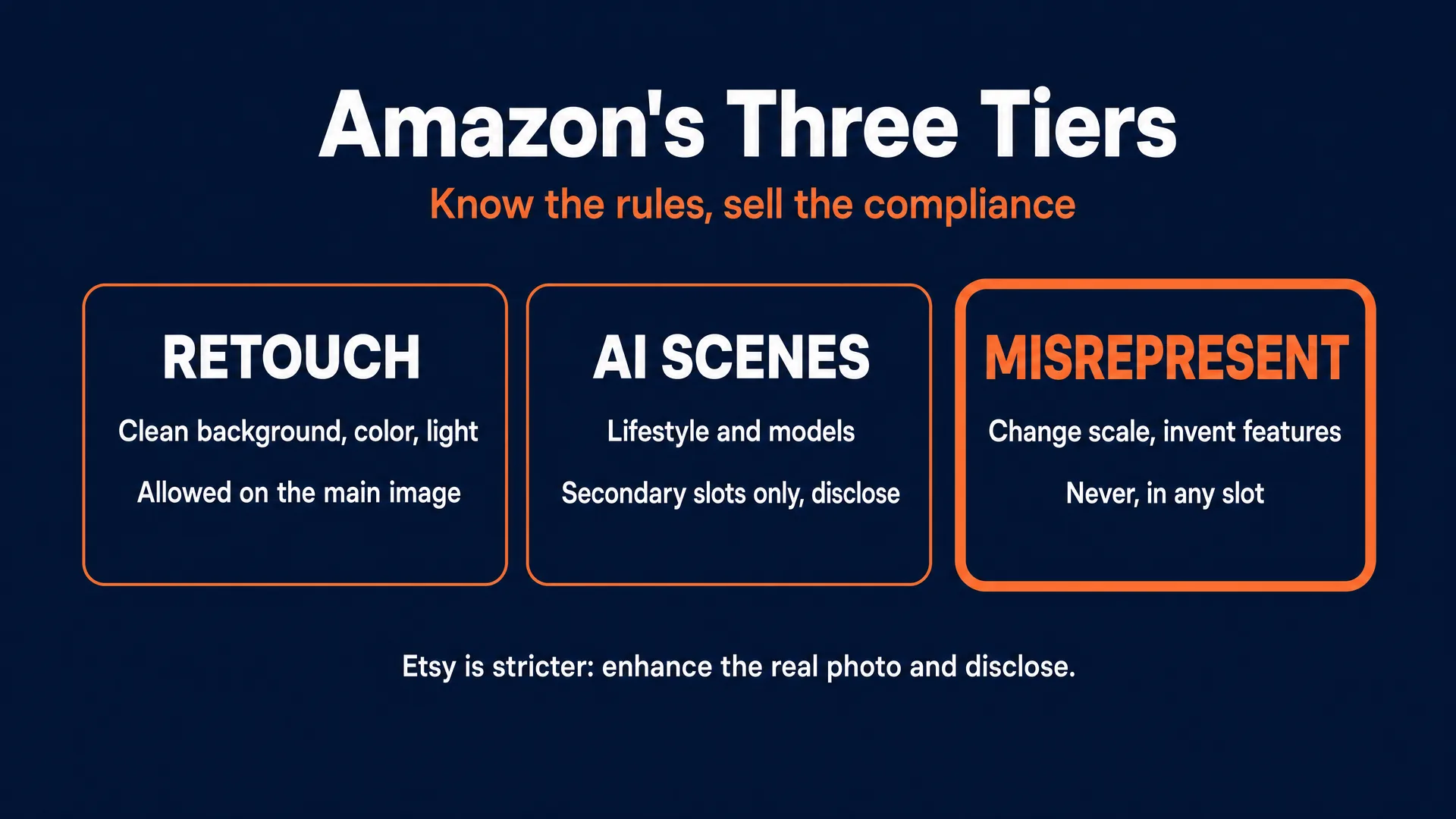
Amazon is the strictest on specs and treats AI in three practical tiers. Minor retouching (background cleanup, color correction, lighting) is allowed on the main image as long as the product itself is unchanged. Substantially AI-generated scenes, lifestyle renders, and models belong in the secondary slots, not the main image, and substantial AI edits should be disclosed. Misrepresentation, altering scale, inventing accessories, or smoothing away defects, is never allowed in any slot, and a disclosure does not save a listing that misrepresents the product. Amazon’s automated systems suppress listings that break these rules. Per Amazon’s product image guide, the main image needs a pure white background (RGB 255, 255, 255), the product filling about 85 percent of the frame, at least 1000px on the longest side (2000 to 3000px is better and unlocks zoom), sRGB color, JPEG, and no text, logos, or props.
Etsy is the strictest on AI itself. Etsy’s marketplace runs on original, handmade authenticity, its policies lean toward the seller’s own photos and disclosing AI use, and its buyers are actively hostile to synthetic-looking listings (more on that below). So on Etsy, stay in the safe lane: enhance the seller’s real photo, disclose the AI edit, and do not sell wholesale AI-generated product renders. Per Etsy’s image requirements, aim for about 2000px on the shortest side, square or landscape (portrait gets cropped in the grid), and keep files small.
Shopify is the most flexible, because the seller owns their own store. Shopify recommends 2048 by 2048, supports up to 5000 by 5000 and 20MB, and auto-serves WebP. Keep a consistent aspect ratio across the catalog so the grid looks clean.
The workflow and five prompts you can run today
Which model for which job:
- Nano Banana Pro is the hero here: it edits an existing photo while keeping the subject consistent, so it is your tool for identity-preserving cutouts, background swaps, relighting, and compositing. This is where the fidelity discipline lives. On fal.ai it runs about $0.15 per image.
- GPT Image 2.0 is strongest at building a full photoreal scene or a dramatic hero concept and following long instructions.
- Ideogram 4.0 renders clean, readable on-image text, so it is for feature-callout and infographic secondary images.
You run these through fal.ai or Replicate (AVB is not affiliated with either; check fal.ai first). If you would rather not juggle hosts, PromptWise runs Nano Banana Pro and GPT Image 2.0 (plus Flux.2 Pro and Seedream) in one studio; reach for Ideogram on fal.ai or Replicate, since PromptWise does not carry it. Compute is trivial: one image plus a couple of variants is well under a dollar, against a $30 to $150 invoice.
The workflow, start to finish: get the client’s real photo, isolate and clean the product, build the background or scene around it, relight so it sits naturally (matching shadow direction and color temperature), add feature text only on secondary images, upscale to marketplace resolution, and export square at the right size. Verify the label, color, shape, and proportions are unchanged after every step.
Now the five prompts. Each names the model and bakes in the fidelity mandate. Swap the bracketed parts for the real product.
Every image below this line is a real output, not a stock illustration. We took one deliberately bad phone photo of a supplement bottle we own, on a dark cloth, under a single dim lamp, and ran these exact prompts on it. Nothing was retouched by hand afterwards. One bad photo, five deliverables, under a dollar of compute.
1. White-background catalog / main image (Nano Banana Pro, image edit, 1:1, 2048x2048)
Edit this product photo of [the client's product]. Keep the product completely identical to the input: exact shape, proportions, colors, materials, label text, and logos, all pixel-accurate and unchanged. Remove the existing background, clutter, and shadows. Place the identical product centered on a pure white background (RGB 255, 255, 255), filling about 85 percent of a square frame. Apply even, soft, shadowless studio lighting that restores the product's natural texture, and add a soft realistic contact shadow anchoring its base. CRITICAL: do not restyle, relabel, recolor, or invent any product detail.Follow-ups: confirm the label and color are unchanged; upscale to 2000px+ for Amazon zoom; export JPEG sRGB. Cost: about $0.15.
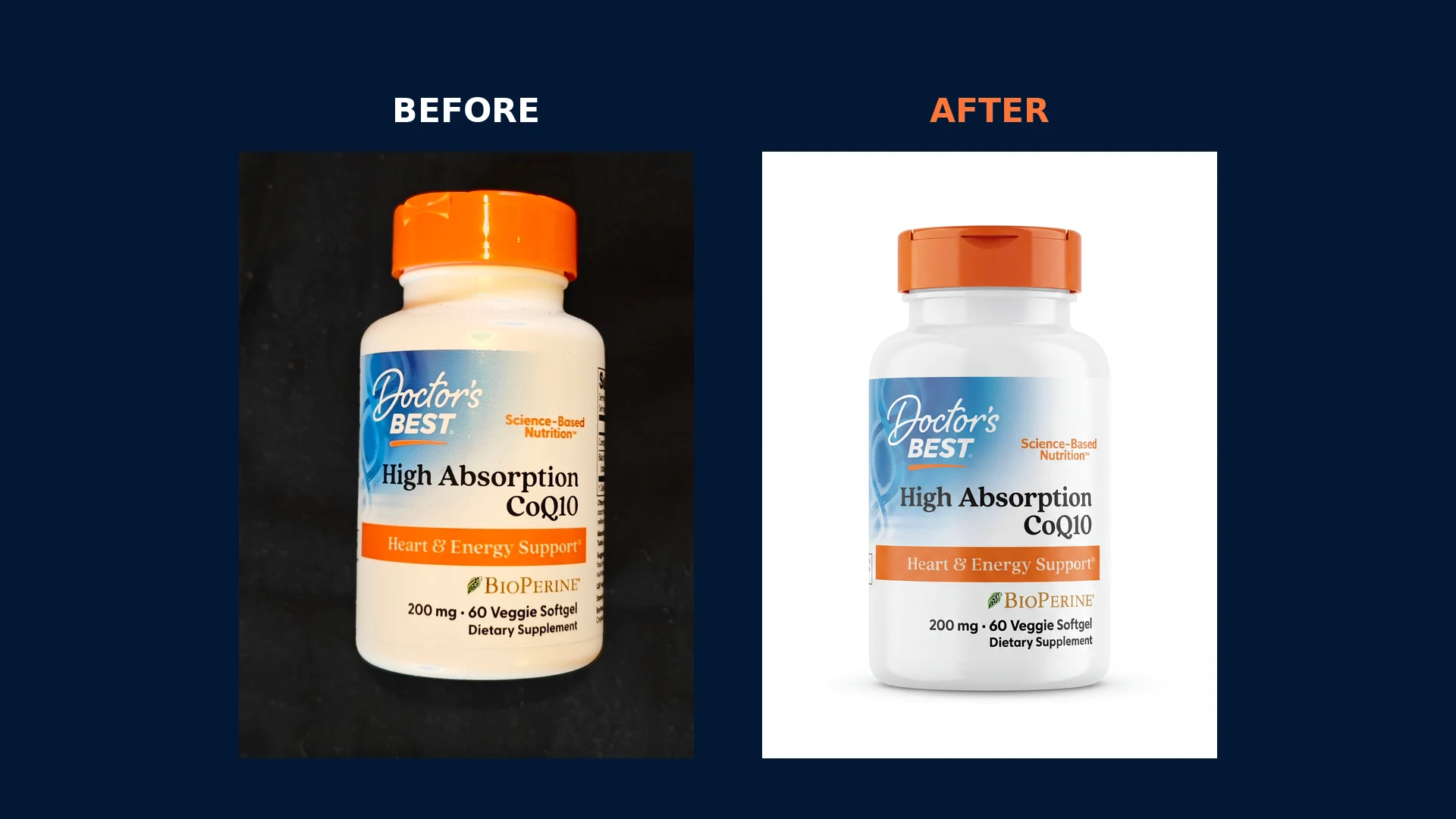
That is the whole business in one image. The bottle is the same bottle. The brand name, the product name, the “Heart & Energy Support” banner, the BioPerine mark, and the “200 mg · 60 Veggie Softgel” dosage line all survive intact. Only the background and the light changed. That output is a compliant Amazon main image, and it cost about fifteen cents.
One technique doubled our hit rate, and it is not in the generic prompt above: type the label’s exact text into the prompt. Instead of “keep the label unchanged,” we listed every line on the bottle, top to bottom, and told the model to reproduce it character for character. It gives the model a target to check itself against rather than leaving it to improvise. The dosage number is the single most likely thing to drift, so spell it out and then go back and read it.
2. Lifestyle scene composite (Nano Banana Pro, image edit, 1:1)
Using the attached product cutout, keep the product exactly identical (shape, label, geometry, color) and do not alter it. Build a scene around it: SUBJECT: the product resting on [a lightly veined white marble vanity]. SCENE: [a bright, minimal, modern bathroom], with [soft morning light from an out-of-frame window] and a couple of out-of-focus props ([a folded linen towel, a small plant]). LIGHTING: cast a physically accurate soft shadow to the lower left, and match the scene's light and exposure to the product so it does not look pasted in. CAMERA: 85mm, shallow depth of field, sharp focus on the product. CRITICAL: do not modify the product or add reflections or hotspots to it.Follow-ups: check the shadow direction matches the light; this is a secondary-slot image, never the Amazon main. Cost: about $0.15.
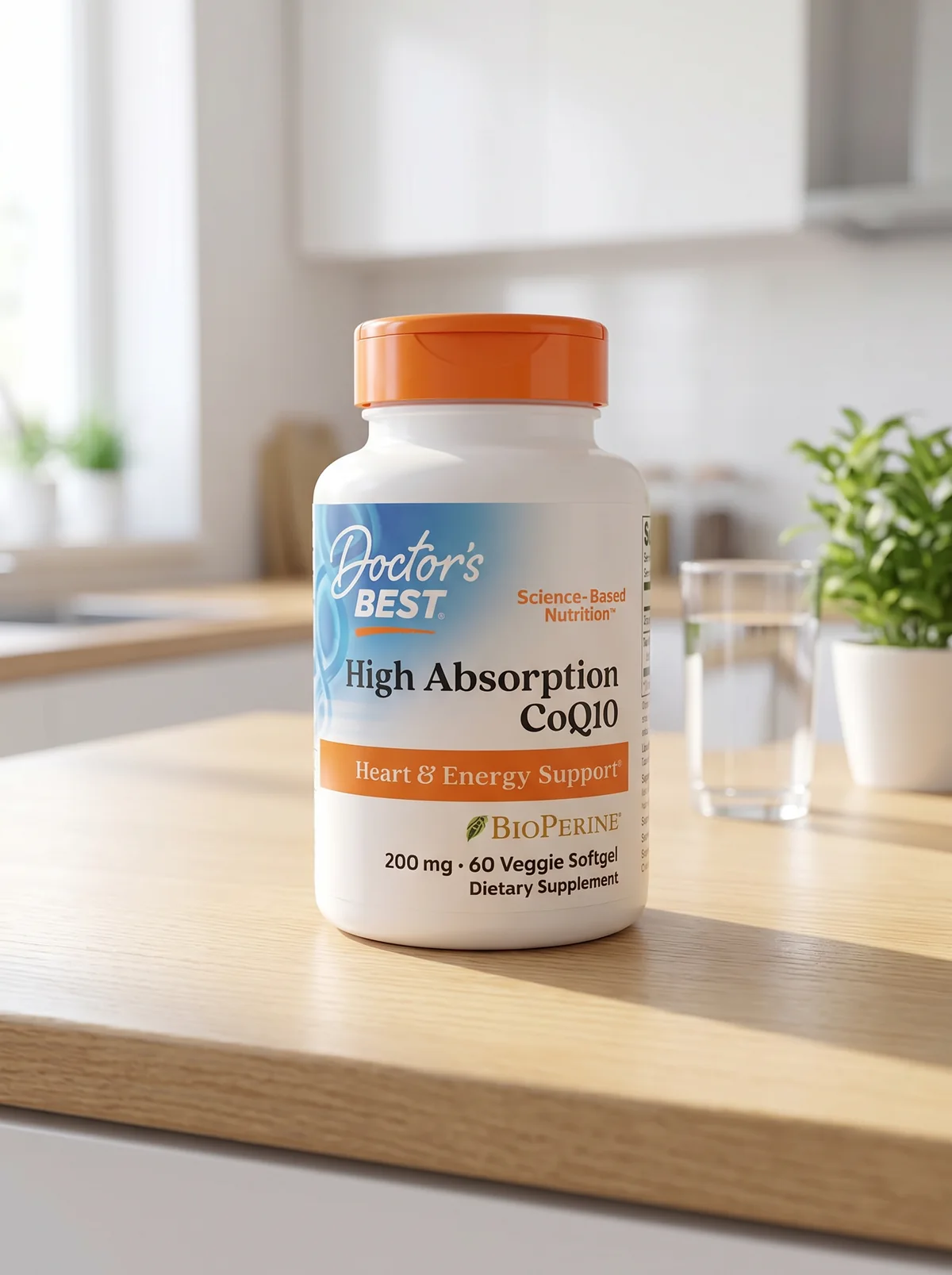
Same source photo, same bottle, a different room. This is the $50 to $150 deliverable, and it is the one that separates you from the seller’s own phone.
3. Model-on-product for apparel or cosmetics (GPT Image 2.0, 4:5)
Create a photorealistic on-model shot. A [natural, relaxed adult model] [wearing / holding / applying] the attached product, shown accurately with its real color, design, and details unchanged. SCENE: [a sunlit city street with softly blurred background]. LIGHTING: natural daytime, realistic skin, no heavy smoothing. The product is the clear focus and fully visible. CRITICAL: the fit, drape, and exact color of the product must match the input; do not invent seams, logos, or patterns.Follow-ups: the model is AI-generated and fictional, so no consent issue, but never use a real, identifiable person without written permission, and disclose that the model is simulated if it could read as a real customer testimonial. Cost: about $0.05 to $0.21.
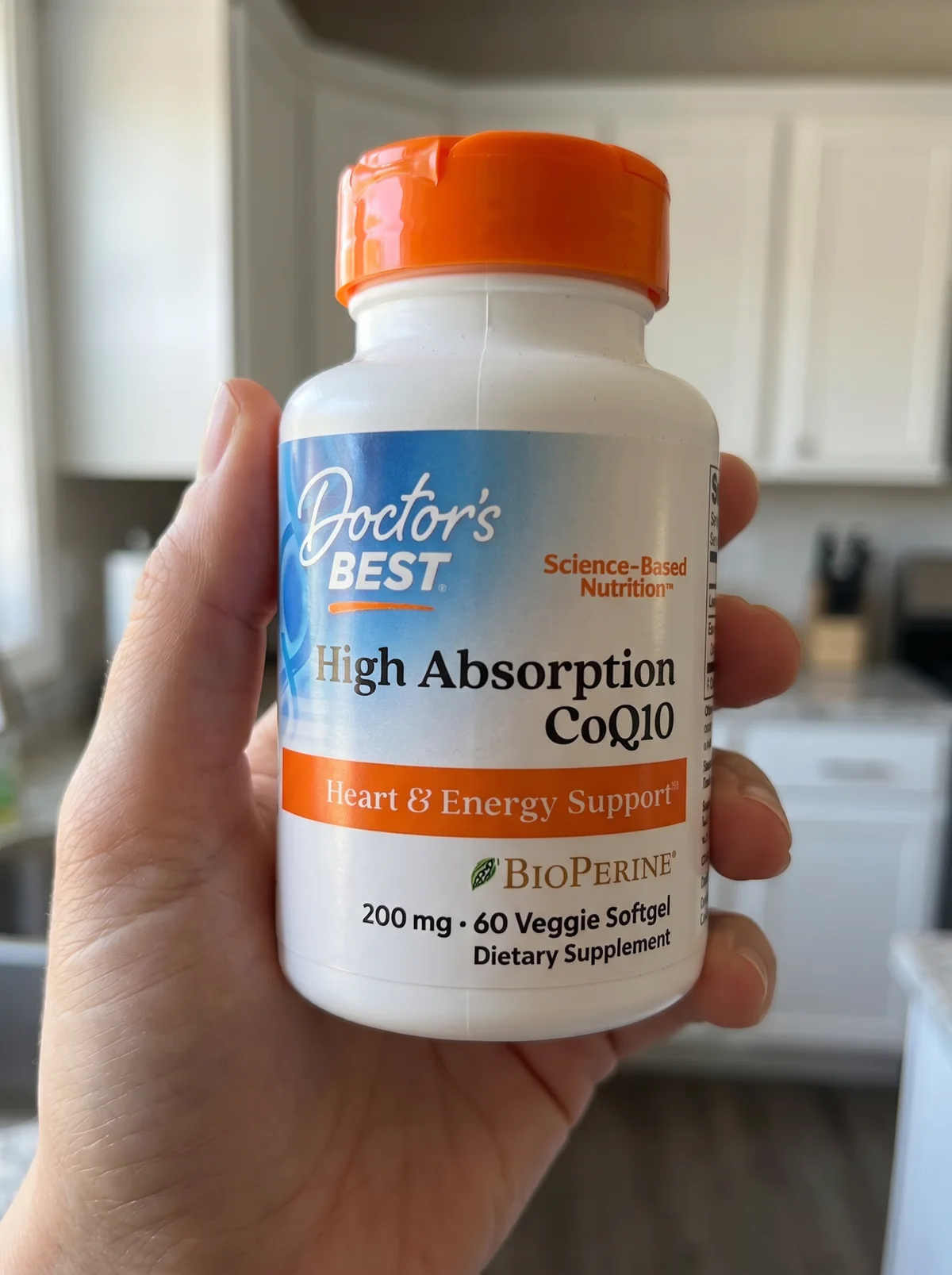
For a bottle rather than a garment, reframe this one as a hand holding the product, and tell the model explicitly that the fingers must not cover any label text. The hand is synthetic; the bottle is not.
4. Dramatic hero composite (GPT Image 2.0, 16:9 or 1:1)
Produce a dramatic hero image of the attached product, shown accurately with its real shape, color, and label. SUBJECT: the product centered on [a dark reflective pedestal]. SCENE: [a moody studio with subtle atmospheric mist] and a [neon-blue rim light] separating it from the background. LIGHTING: a sharp overhead spotlight, high contrast, rich shadows, commercial advertising style. CRITICAL: maintain exact product dimensions, typography, labeling, and color; do not distort the product to force perspective.Follow-ups: for storefronts, brand pages, and ads, not the plain Amazon main image. Upscale for banner resolution. Cost: about $0.05 to $0.21.
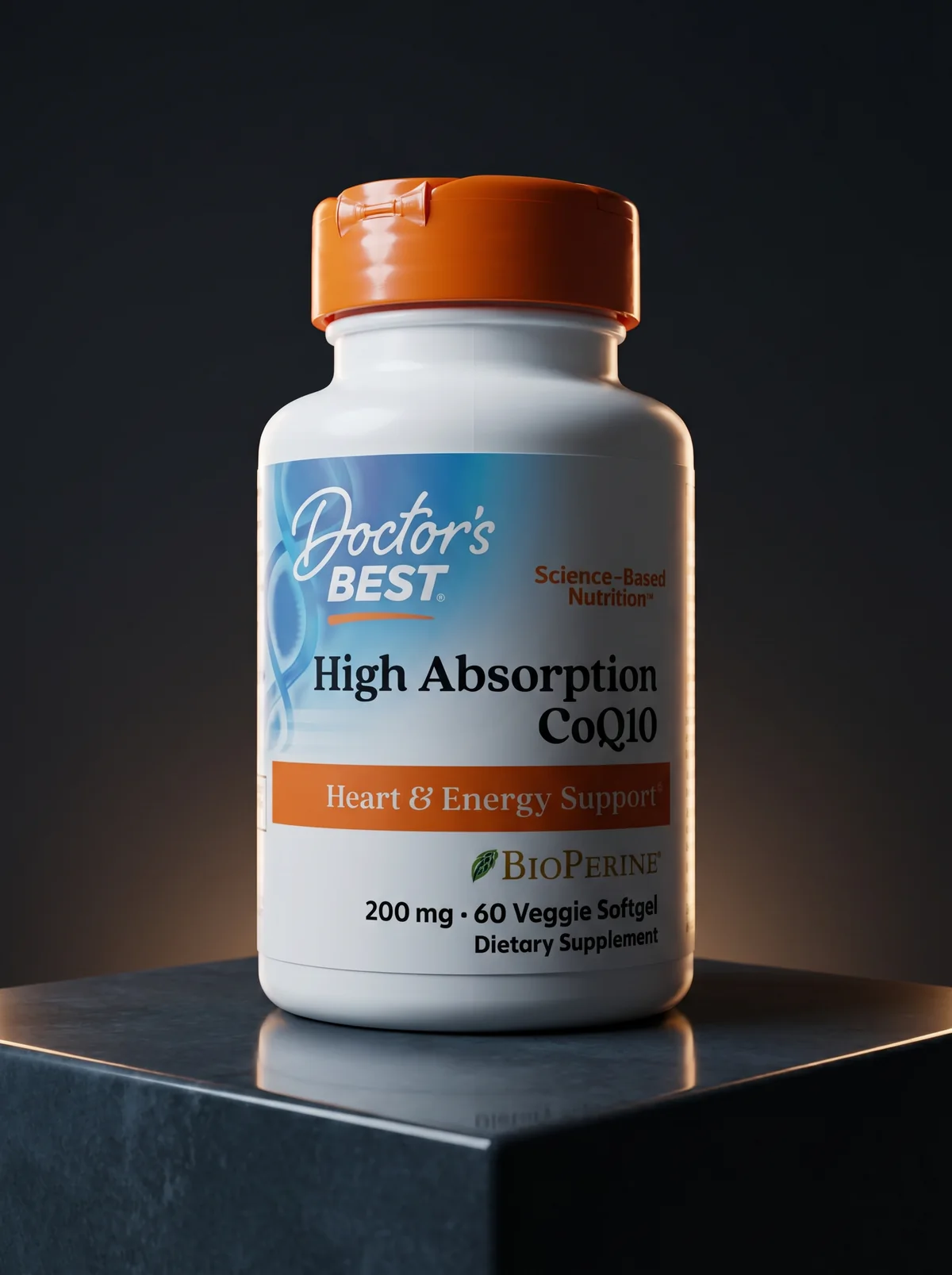
The same fifteen-cent bottle, now doing brand work. Nothing here belongs on an Amazon main image, and everything here belongs on a storefront banner.
5. Feature-callout infographic (Ideogram 4.0, 1:1)
Design a clean e-commerce feature-callout image using the attached product image as the base. Apply a subtle semi-transparent panel on [the left third] for text readability without covering the product. Overlay this exact text in a crisp modern sans-serif: HEADLINE "[100% Organic Ingredients]", then three short callouts with small check icons: "[Paraben-free]", "[Cruelty-free]", "[Made in USA]". CRITICAL: keep the text perfectly legible and spelled exactly as written, and do not alter, regenerate, or obscure the actual product.Follow-ups: keep callout text short (long strings and tiny legal text still break); composite the real product with Nano Banana Pro if needed. Secondary slot only. Cost: about $0.06 per MP.
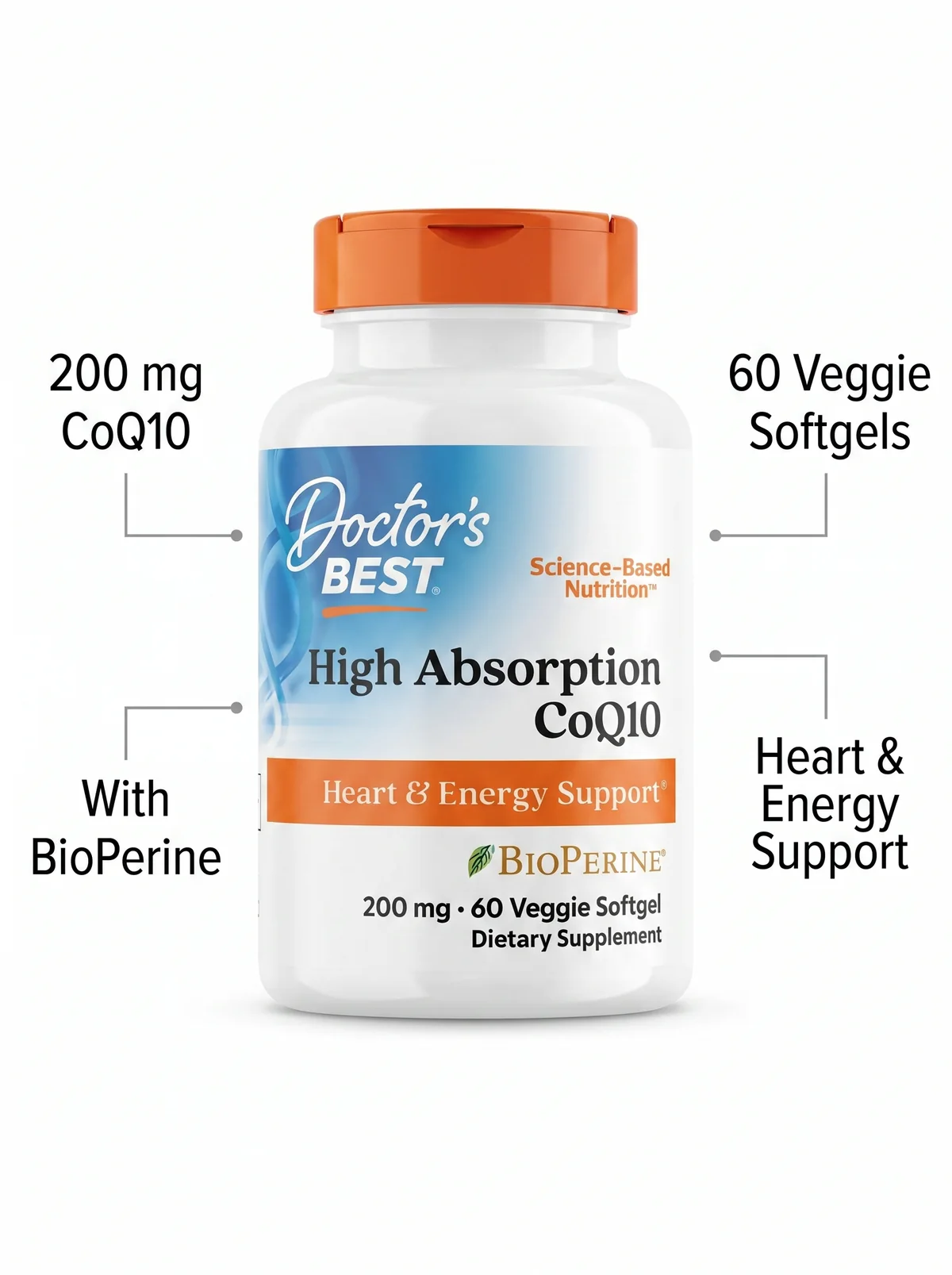
Note what this one is fed. It does not take the client’s messy phone photo; it takes the clean white-background image you produced in prompt 1. It is a chain, not a fresh edit.
And note what the four callouts say. Every one of them is a claim already printed on the real bottle. The moment you let the model write “Boosts Energy 3x” or “Doctor Recommended” because it balanced the layout nicely, you have handed your client an FTC problem and put their listing at risk. A callout may restate the label. It may never extend it.
Save a per-client template (their product, palette, and preferred scenes) so each new SKU is a fast reskin.
A note on the bottle in those five images: we bought it, we photographed it, and we edited it only to demonstrate the workflow. AI Video Bootcamp is not affiliated with the brand shown and was not paid by them. The product itself was never altered, which is the entire point.
Pricing, packaging, and stacking
Anchor your price to the value, not the fifteen cents of compute.
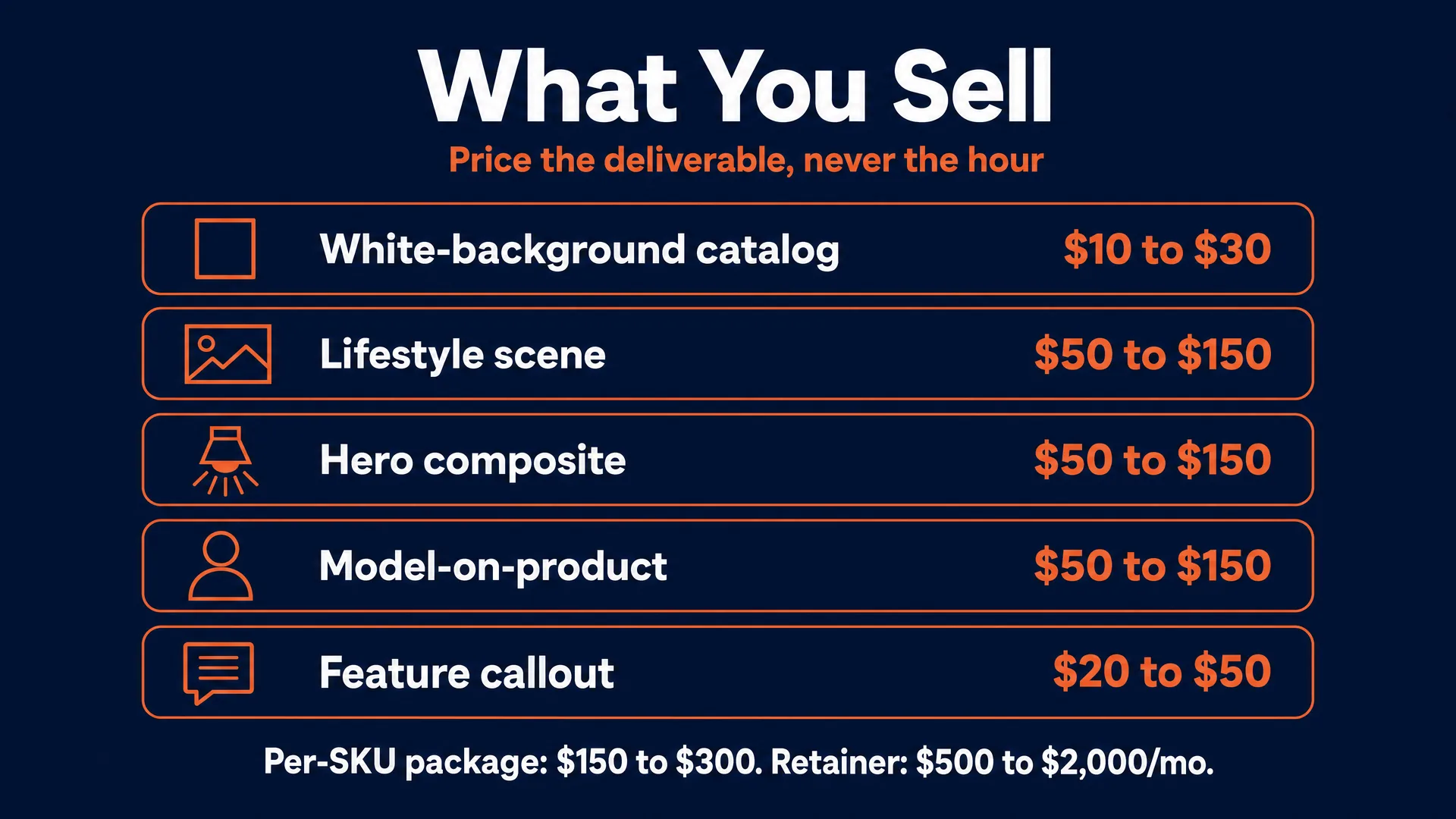
The honest bands:
- Background replacement / clean catalog edit: $10 to $30 per image.
- Lifestyle scene or hero composite: $50 to $150 per image.
- Feature-callout graphic: $20 to $50 per image.
Then package to raise the average order and smooth your cash flow:
- Per-SKU package: one main shot plus two or three lifestyle scenes plus a feature graphic, roughly $150 to $300 per product. This is the offer that closes, because it solves the whole listing in one transaction.
- Monthly catalog retainer: for stores adding SKUs regularly, $500 to $2,000 a month for a set volume, with overages per SKU.
- Upsells: rush delivery, extra angles, seasonal variants, and paid-social sizing.
Escape the Fiverr basement by niching. “AI product photography” is a race to the bottom; “Amazon-compliant cosmetic product images” or “Shopify lifestyle imagery for supplement brands” justifies premium pricing and filters out buyers who want infinite revisions for ten dollars. Cap revisions at two rounds in writing.
How to land your first client
The fastest path is to show up with the finished work, not a pitch. A six-step playbook:
1. Build a spec portfolio. Pick three to five real listings with good reviews but weak photos, and run their images through your pipeline into a clean catalog shot and a lifestyle scene, shown side by side with the original. Demonstrate the honesty wedge: dramatically better lighting and scene, zero change to the product.
2. Find prospects. Target medium Amazon sellers, independent Shopify stores, Etsy makers, and DTC brands with ten to fifty SKUs, strong reviews, and amateur photography (dark, cluttered, low-res, or non-compliant main images). Reviews prove demand exists, so better photos are upside, not a gamble.
3. Send a free redo. Reach the owner off-platform (email or social DM, not the marketplace’s internal messaging, which is against their rules) with one finished, processed image of their actual product:
“I noticed your flagship product’s photos could convert better, so I enhanced one shot using an Amazon-compliant, non-destructive pipeline. It is yours to use right now, no strings. If you want the rest of the catalog to this standard, my per-SKU rates are attached.”
4. Carve a niche. Position as the specialist for one category or platform, not a generalist. It is what lets you charge real rates.
5. Run the sales conversation. Sellers fear that AI will alter their packaging or trip a marketplace suspension, so address it head-on: explain the non-destructive workflow and the platform rules, and steer toward a per-SKU package that solves their whole listing.
6. Scale with retainers and referrals. Convert happy clients into monthly retainers for their next product drops, and ask for introductions, since e-commerce owners cluster in tight communities. Expect weeks of consistent outreach and rejection before the first yes; a small, personalized list with a free sample beats a big blast.
The rules that keep you and your client out of trouble
This is not legal advice, but these guardrails matter.
Truthful representation, first and always. The FTC’s truth-in-advertising standard requires that an image accurately represent what the buyer receives, and the agency has been explicit that there is no AI exemption, running active enforcement through Operation AI Comply. Do not change color, scale, or contents, invent features, or smooth away defects.
Marketplace policies. Follow Amazon’s three tiers and its main-image rules, keep Etsy work to enhanced real photos with AI disclosed, and respect each platform’s specs. A misrepresenting image gets the listing suppressed, which loses your client money and loses you the client.
Synthetic models and endorsements. An AI-generated model is fine, but if a synthetic person could read as a real customer giving a testimonial, disclose that the model is simulated. Never depict a real, identifiable person without written consent.
IP and ownership. Use the product’s own brand and label when working for that brand; never insert third-party logos, other brands, or copyrighted scene elements. Pure AI output may not be copyrightable, so put an assignment-on-payment clause in your contract that transfers your human-added editing work to the client.
Tools and disclosure. Use commercial-licensed tools on paid tiers. There is no blanket US law forcing an “AI-generated” label on a product image, so do not overstate it, but Nano Banana Pro embeds an invisible SynthID watermark, Etsy expects disclosure, and tagging edits as AI on the backend is a sensible, cheap hedge. For the deeper picture, see our AI disclosure and compliance guide.
What success and failure look like
The honest read is that the demand is real and the failure mode is specific.
Demand is proven: whole companies sell AI product shots, freelancers run real retainers, and Upwork and Fiverr are full of paid product-editing work. The opportunity is not hypothetical.
The failure mode is the fake-looking image. On Etsy especially, buyers openly call out listings where “the image looks AI”, and they treat physically impossible scenes and hallucinated details as scam signals (self-reported, 2025-2026). That tanks trust and drives returns. When an operator ignores the honesty wedge and ships pasted, impossible, or misrepresenting images, the client suffers reputational damage and fires them. The operators who last treat AI not as a fantasy machine but as a rigid, controlled utility for processing reality. Everything in this guide is built to keep you on that side of the line.
Your first-week action plan
- Pick one niche and platform (for example, supplement brands on Amazon).
- Build three before-and-after spec samples from real, weak listings.
- Run the five prompts so the fidelity workflow is muscle memory.
- Make a list of 20 to 30 sellers with good reviews and bad photos.
- Send your first free redo, off-platform, leading with the finished image.
The tools are genuinely the easy part. The business is being the operator a seller trusts with their real product, and turning “I can edit a photo” into “I keep five brands’ catalogs clean and compliant every month.”
If your clients also want motion, product video is the natural upsell; see our AI video for e-commerce guide. And if you want to package this alongside other services on retainer, that is the generative AI agency path.
Want the full system, the prompt library, and a community of people landing e-commerce clients right now? That is what we build inside AI Video Bootcamp. You learn the workflow, practice on real briefs, and get your work in front of buyers. Start with AI Video Bootcamp.