
Seedance 2.5 is ByteDance’s latest AI audio-video model, and it is live right now, on the fal.ai API and in creator apps like PromptWise. The upgrades that matter are real: it makes a full 30 seconds of video in a single pass, holds a character or product steady across up to 50 references, and generates synchronized audio and lip sync in the same shot. This guide is the complete picture: what is new, how to prompt it well, what it actually costs, how it stacks up against Kling and Veo, and the honest limits, including the one spec the launch coverage keeps getting wrong.
Whether you are trying Seedance 2.5 for the first time or deciding if it belongs in your workflow, this is meant to be the only guide you need. Everything here is checked against the model’s own pages as of August 2026, so the specs and prices are the ones you will actually see when you use it, not the ones in the marketing.
Is Seedance 2.5 out yet?
Yes. Seedance 2.5 is live as of late July 2026. ByteDance announced it on June 23, 2026 at its Volcano Engine FORCE event, launched it publicly on July 31, and it is now available through PromptWise, the fal.ai API, and ByteDance’s own BytePlus ModelArk. So this is not a preview or a waitlist. You can generate with it today.
What is Seedance 2.5?
Seedance 2.5 is a text-to-video, image-to-video, and reference-to-video model built by ByteDance, the company behind TikTok, CapCut, and the Seedance and Seedream model families. BytePlus, ByteDance’s enterprise company, points to its official Seedance 2.5 page as the authoritative source for its specs. Its defining trait is that it treats video and audio as one problem: sound and picture are generated together in a single pass rather than stitched in post, which is why the lip sync and impact timing line up natively.
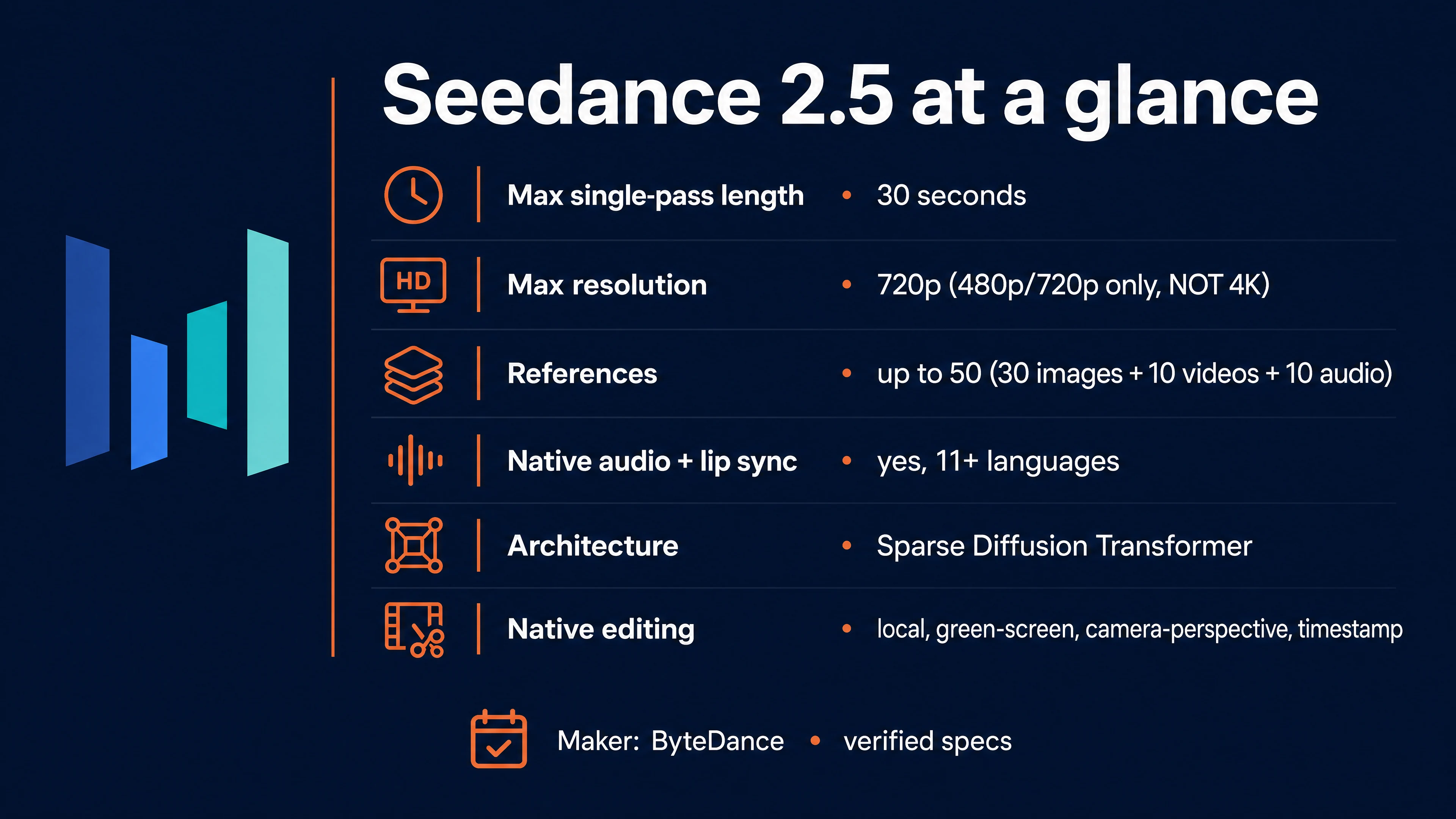
A quick word on how it works, since the term shows up a lot in the coverage. BytePlus describes Seedance 2.5 as a Sparse Diffusion Transformer. In plain language, a diffusion model is one that starts from visual static and gradually cleans it into a picture, and the transformer is the same family of architecture that powers tools like ChatGPT, here steering that clean-up, an approach first laid out in the Diffusion Transformer research. The sparse part is an efficiency trick: instead of every piece of the video paying attention to every other piece, which becomes astronomically expensive across a full 30 seconds, the model concentrates its attention only where it matters, the kind of sparse-attention approach researchers have been building for video generation. The practical payoff is exactly what lets it hold one coherent 30-second shot together in a single pass instead of stitching short clips.
For creators who already know Seedance 2.0, the simplest way to frame 2.5 is as a trade. Version 2.0 could reach 1080p and even 4K through a dedicated endpoint, but capped a single clip at 15 seconds. Version 2.5 doubles the single-pass length to 30 seconds and quadruples the reference budget, but tops out at 720p on the API. It is built for length and consistency, not for maximum resolution (and if you do need a sharper file, you can always upscale the result afterward with any of the many AI upscalers out there, Topaz being a popular one).
How we verified this, and what BytePlus told us directly
Here is something you will not find in the other Seedance 2.5 write-ups: we did not just read the docs, we asked the people who built it. For this guide we put our open questions directly to Will Jin, a GenAI Solution Architect at BytePlus, ByteDance’s enterprise company, and his answers settled several points the rest of the internet is still guessing at, from the real output resolution to how the 30-second shot is actually made. Keep one of his lines in mind before you trust another roundup: “A commonly misreported point about Seedance 2.5 is that it supports native 4K output, which is not currently the case.” Everywhere below that you see “BytePlus confirmed” or a quote from Will Jin, that is a first-hand answer from inside the company, not a recycled press release.
On top of that, every spec, price, and limit here was checked against the model’s own live pages and cross-checked against two independent research passes, so the figures are the ones that actually appear in the product rather than launch-day marketing. And instead of judging the model only on paper, we studied real clips made by working creators, which you can watch further down alongside the exact prompts that produced them.
What is new in Seedance 2.5 versus 2.0?
Here is the verified delta, taken from the model’s own pages rather than launch marketing.
| Spec | Seedance 2.5 | Seedance 2.0 |
|---|---|---|
| Max resolution (API) | 720p (480p or 720p) | 1080p, plus a 4K endpoint |
| Max single-pass duration | 30 seconds | 15 seconds |
| Multimodal references | Up to 50 (30 images + 10 video + 10 audio) | Up to 12 |
| Control references | Clay-render (white model), motion, style | Limited |
| Native audio | Yes, generated with the video | Yes |
| Lip sync | Native for spoken dialogue | Limited |
| Editing | Native local, green-screen, camera-perspective, and timestamp editing | Video-to-video edit |
| Frame rate | 24 fps | 24 fps |
| Output | MP4 (H.264, AAC audio) | MP4 |
The two upgrades that matter in daily work are the 30-second single pass and the 50-reference system; the rest is refinement. One spec on that list tends to surprise people, so it is worth a short, clear answer before we move on to what the model can do.
Does Seedance 2.5 really do 4K?
No. The Seedance 2.5 API outputs 720p at most. The model’s live pages list exactly two resolution options, 480p and 720p, with 720p in the standard 16:9 case being 1280 by 720 pixels. There is no 1080p option and no 4K option on the model itself.
So where did “native 4K” come from? Two places. First, the launch announcement paired Seedance 2.5 with a separate 4K upgrade to the older Seedance 2.0, and a wave of blogs attached the 4K claim to the wrong model. Second, some consumer apps and roundups advertise “4K” by quietly adding an upscaling step on top of the base model, so an exported 4K file does not mean the model itself rendered every frame at 3840 by 2160. The honest rule, until ByteDance publishes a native 4K spec for 2.5, is to treat any 4K as an upscaling step layered on afterward, not a native model capability.
The practical consequence is simple. If your deliverable has to be sharp on a large screen, 720p from 2.5 will look soft on tight close-ups, and you will want an upscaling pass or a different model. If your deliverable is social, vertical, or web video, 720p is fine and the length and consistency wins are worth it.
A creator trick worth knowing here, shared with us by @aimikoda: generate at 480p and upscale afterward with a dedicated tool such as Topaz, rather than generating at 720p. It sounds backwards, but fast action often looks cleaner at 480p, while the same prompt at 720p can come back noticeably blurrier or noisier. Generating small and upscaling to 2K can beat a native 720p render on action shots, and it costs less per second while you are at it (our internal editors are still testing this method).
None of this is our guesswork on the resolution ceiling. We put it straight to Will Jin, a GenAI Solution Architect at BytePlus (ByteDance’s enterprise company), and his answer was blunt: 480p and 720p are the shipping defaults, and 1080p and 4K are not natively supported at this time. That is the official word behind everything above.
The 50-reference system: directing instead of prompting
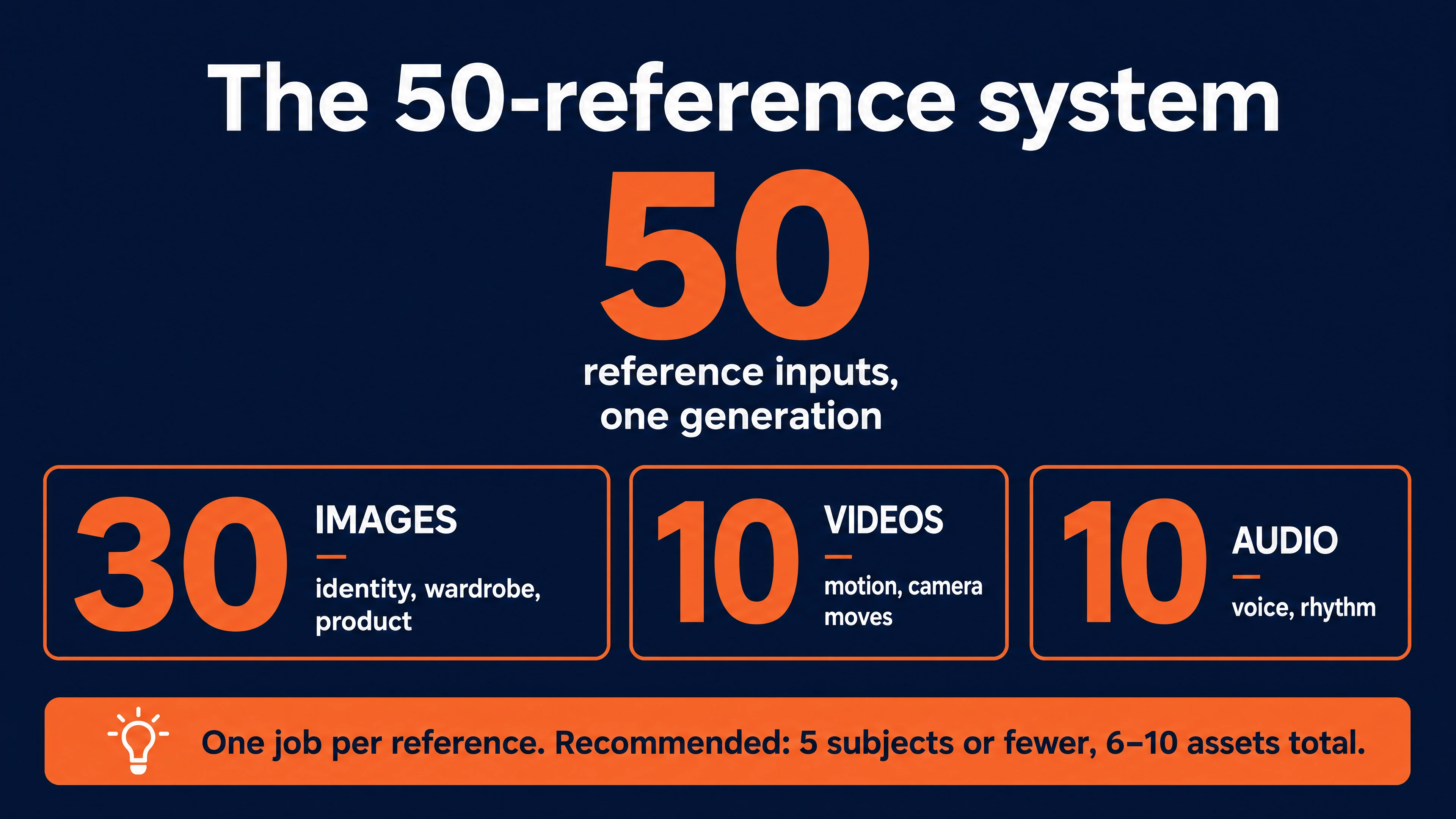
The headline feature of Seedance 2.5 is that a single generation can take up to 50 reference inputs, up from 12 in Seedance 2.0. You reference them positionally in the prompt, for example [Image1] for a character, [Video1] for a motion, [Audio1] for a rhythm. This is what turns text-to-video from a slot machine into something closer to directing: you can lock a face with a character sheet for character consistency, lock wardrobe with a second image, lock motion with a video clip, and let the prompt describe how they combine.
BytePlus confirmed the exact breakdown to us: the 50 references split into 30 images, 10 videos, and 10 audio clips, and all of this is a native capability of the model rather than a platform add-on. So when you plan a shot, you can budget up to 30 stills for identity and wardrobe, up to 10 clips for motion, and up to 10 audio files for voice or rhythm.
For the record, the official limits from ByteDance’s guide are: up to 30 images (under 30 MB each, up to 4K), up to 10 video clips (mp4 or mov, under 200 MB each, 2 to 30 seconds each and 30 seconds total), and up to 10 audio clips (under 15 MB each, same duration limits). It also supports an audio-only reference for sound-driven work. ByteDance’s own recommendation, though, is to stay well under the ceiling: keep to five subjects or fewer, use roughly six to ten reference assets, and give each subject one clear view.
Beyond plain images, video, and audio, ByteDance’s launch post highlights a few specialised reference types that add real directorial control. The standout is the clay-render reference, also called a white model: you feed in a textureless 3D blockout, and the model reads its spatial layout, character poses, motion paths, and camera angles, then renders your finished scene on top of that structure, complete with realistic, physics-based lighting derived from the blockout. Motion references and style references work the same way, letting you lock a camera choreography or an art direction from one asset and apply it to another. This is the feature that pushes 2.5 from “type and hope” toward something closer to a previs-to-final pipeline.
Here is where it gets genuinely powerful for real filmmakers. That 3D blockout does not have to come from a game engine or a proprietary tool, it can come from Blender, the free, open-source 3D animation software that a huge number of indie directors already use. You animate a rough grey-model version of your shot in Blender, moving the camera exactly how you want it, then export that render and hand it to Seedance 2.5 as a video reference. Seedance 2.5 plus Blender turns into a surprisingly advanced filmmaking pipeline, and it is aimed squarely at directors who think in shots rather than sentences. The payoff is control over camera movement: a slow push-in, a crane up, an orbit around a subject, a whip-pan into a crash, all of that is far easier to show with a Blender camera move than to describe in words, and words are exactly where text-to-video usually falls apart. If you want the model to take only the camera path from your render and nothing else, be explicit in the prompt: @video1 as camera movement reference only. That one line stops it from copying the grey textures or blocky geometry and keeps just the motion you designed. For anyone serious about AI filmmaking, this Blender-to-Seedance route is the closest thing yet to directing a real camera.
The counterintuitive rule, and the one that trips people up, is that more references is not better. Every reference should have exactly one job. If you feed 30 images with slightly different lighting or contradictory clothing, the model averages them into a blurry, muddy result that satisfies none of them. Trim reference videos to only the seconds that carry the motion you want, because extra footage adds noise and increases cost. Use the minimum number of references needed to lock your variables, and let the prompt do the rest.
Native audio and lip sync
Seedance 2.5 makes the sound at the same moment it makes the picture, in a single pass, which means dialogue, sound effects, and background noise all come out already lined up with the action rather than added afterward. To get spoken dialogue and matching lip movement, you simply put the line in double quotes inside the prompt, and the model generates both the voice and the mouth movement to match. Audio generation is on by default and does not cost extra tokens, so there is no reason to disable it unless you specifically need silence. The model supports major languages including English, Chinese, Spanish, Japanese, Korean, Arabic, Portuguese, and several Southeast Asian languages.
The honest limitation is vocal quality. The synchronization is genuinely good, but the voice timbre can still sound artificial, especially on longer lines. For scratch tracks, ambient beds, and social content this is fine. For high-end commercial dialogue, many teams still replace the generated voice with a proper voiceover and sound pass in post. Worth knowing before you promise a client broadcast-ready audio straight from the model.
One clarification, because it is widely confused: native lip sync applies to dialogue the model itself generates. Taking an existing clip of a real person and re-syncing their lips to new audio is a different, separate tool (an avatar or talking-head feature), not this model’s native behavior.
Can Seedance 2.5 make 3-minute videos?
Not in a single pass, but going longer is a real model feature, not a workaround. The native ceiling for one generation is 30 seconds, and BytePlus’s Will Jin confirmed the mechanism: Seedance 2.5 uses a Sparse Diffusion Transformer that produces the full 30 seconds in one inference pass, with no stitching, which is what keeps the scene coherent from first frame to last. To go beyond that, the model uses native multi-round extension: you continue from the previous clip and generate another segment, and ByteDance’s launch post says the model holds character, environment, and pacing consistent across those rounds, so you can build videos several minutes long in one continuous audiovisual language instead of manually splicing footage.
So the honest picture is actually better than most guides claim. Thirty seconds is the single-pass limit, but multi-minute output through native extension is a genuine capability of the model, not a consumer-app trick. The specific “up to 180 seconds” number you will see is a platform-set cap on top of that native extension, so the exact maximum depends on where you generate; the underlying extend-and-continue behavior is the model’s own.
Editing, extending, and directing the shot (all native)
This is where Seedance 2.5 pulls ahead of most models, and it changes the economics of AI video: you can fix and reshape a clip instead of re-rolling it from scratch. Per ByteDance’s own launch post, all of the following are native capabilities of the model, not features bolted on by a particular app.
Local editing. Feed a finished clip back in and describe a change in words, “replace the coffee cup with a blue energy cell, keep the lighting and hand movements the same,” and the model modifies just that element while preserving the motion, camera, and everything else. One honest clarification: at the model level this is prompt-driven, not a paint-a-region mask. The point-and-click “draw a box on the frame” interface some apps offer is their front-end on top of the native capability.
Green-screen editing. Replace the whole background and drop your subject into a new world, and the model adapts the subject to it physically: clothing flutter, hair, gait, and lighting all respond to the new scene rather than looking pasted on. This is what makes “one performance, many deliveries” realistic for ad work.
Camera-perspective editing. Keep the characters, action, and style of an existing clip exactly as they are and change only the camera, its movement, shot size, and blocking, without regenerating the performance. Useful when the take is right but the coverage is wrong.
Timestamp control. You can direct pacing by time inside the prompt (“0 to 4s… 4 to 10s…”) and make targeted edits to specific time windows afterward. Be realistic about what this is, though: timestamps guide roughly when things happen, they are not frame-accurate cut points, so use them to allocate beats and do the fine cutting in a normal editor.
Reference-based editing and extension. You can edit using reference material, and you can extend a clip forward or backward with the native multi-round extension described earlier, filling transitions and bridging between shots while keeping the world consistent.
How platforms package all of this. The capabilities above belong to the model; different tools just expose them under different names, which is worth knowing so you are not thrown when you switch platforms. You will commonly see them grouped into four modes: a reference mode (combine images, video, and audio, each with a role), a keyframe mode (set a first and, optionally, a last frame and let the model fill the motion between), an edit mode (change an existing clip from a prompt), and an extend mode (continue a clip forwards or backwards). Those are interface labels for the same native features, so pick whichever tool exposes the ones your project needs.
How much does Seedance 2.5 cost?
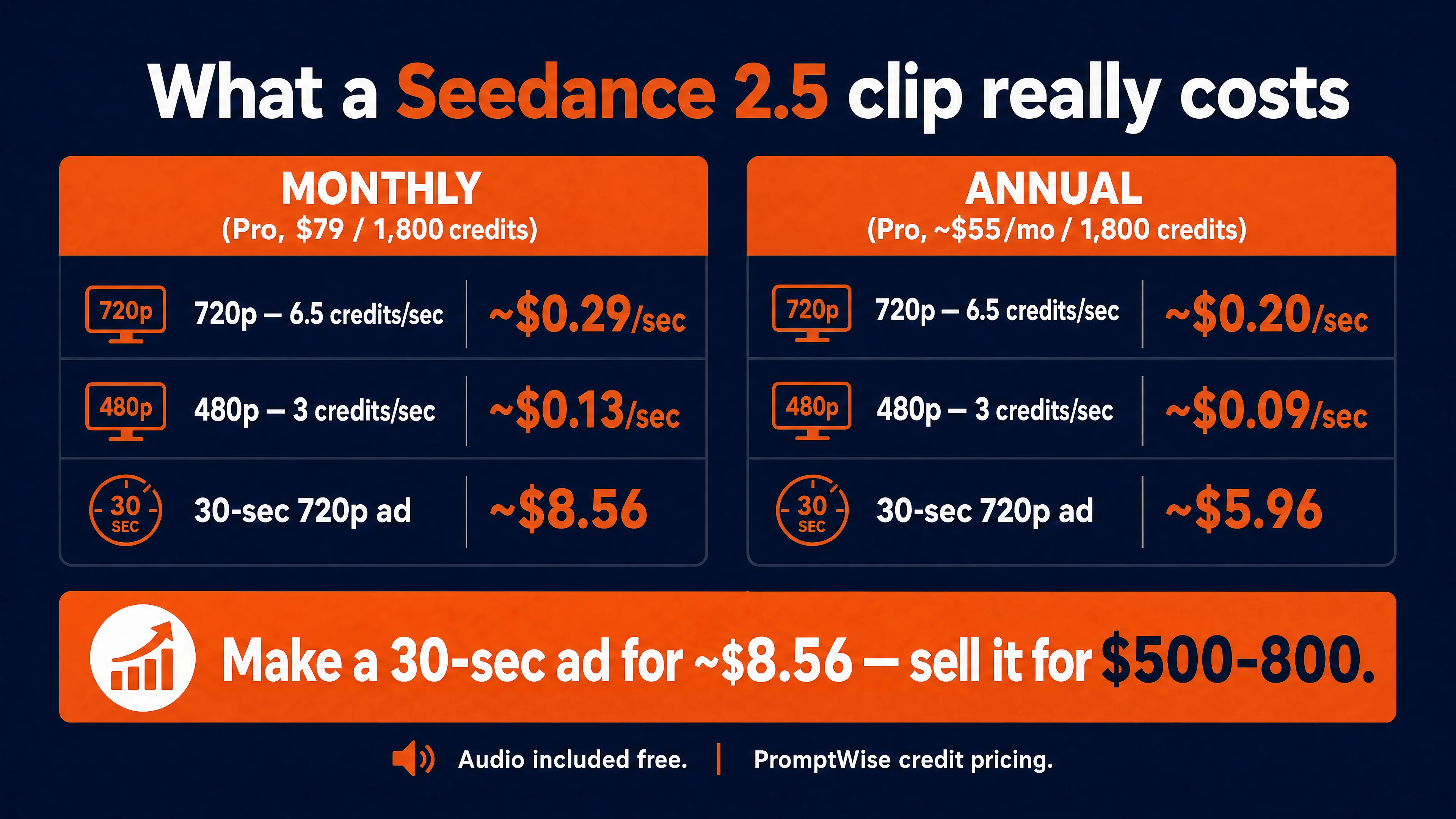
There is no single price, because it depends on where you run it, but here is the practical picture. On PromptWise, Seedance 2.5 is priced in credits: 6.5 credits per second at 720p and 3 credits per second at 480p, with audio included free and no surcharge for the higher bitrate, so you never pay extra for sound or for better quality. On our Pro plan, which is $79 (a 20% discount at the moment) for 1,800 credits, that comes to roughly $0.29 per second at 720p. In plain money:
| Generation on PromptWise (720p unless noted) | Credits | Approx cost, Pro plan |
|---|---|---|
| 5-second style test | 32.5 | ~$1.43 |
| 30 seconds, full length | 195 | ~$8.56 |
| 30 seconds at 480p | 90 | ~$3.95 |
That cheap 5-second test matters more than it looks, for a reason we come back to in a second. If instead you are a developer calling the model through the raw fal.ai API, the underlying token price runs about $0.47 per second at 720p (roughly $13.87 for a full 30-second clip), which is the model’s raw cost before any platform wraps it in a friendlier interface. There are cheaper places to generate it as well, but they are raw API services aimed at developers, so you need to be comfortable with code to use them. PromptWise is the ready-to-use option for everyone else, no programming required.
Here is why those numbers should get your attention if you do client work. Seedance 2.5 is already good enough that you can generate a polished 30-second ad at 720p from a single prompt and sell it to a client for $500 to $800, depending on your market. Your input cost to make it on PromptWise is about $8.56. So you spend under nine dollars and, with a client in hand, you comfortably clear several hundred in margin on a single clip. That is the real story of this pricing: not that generations are cheap, but that they are almost nothing next to what finished video is worth.
One note on the plan numbers above: those prices are for the monthly subscription. If you commit to an annual plan instead, it drops further, our Pro plan lands at about $55 a month for the same 1,800 credits, which works out to roughly $0.20 per second at 720p (about $5.96 for a full 30-second clip) and roughly $0.09 per second at 480p. Same model, same credits, lower cost per second, so if you generate regularly the annual route quietly improves your margins even more.
The hidden cost is re-rolls. There is no partial regeneration: if second 22 of a 30-second clip is wrong, you re-render all 30 seconds and pay for them again. Because a 30-second generation is a real financial commitment, the practical move is to nail your style and staging with cheap 4 to 5 second tests first, then scale up to the full length once the look is locked. Budget for a rejection rate, not a one-shot.
How to access Seedance 2.5
If you are new to all this, the first real question is usually just how you get to it and whether it will cost you anything. Seedance 2.5 is not a program you download and install; it lives in the cloud, and you reach it through a website that runs the model for you. A nice side effect is that where you live rarely matters, with one exception worth knowing: ByteDance’s own business platform, BytePlus, is not available in the United States, so American creators simply use one of the other routes.
The simplest place to start is PromptWise, which is our own platform, and it is only fair to say that plainly since we built it. It runs Seedance 2.5 next to the other leading video models under a single login, and it gives you 50 free credits to try before you pay anything, so you can make a few clips and judge the model for yourself without opening several accounts. Credits work a bit like arcade tokens: each clip spends a few, and the pricing section just below shows exactly how many. We point you there because it is the easiest on-ramp for someone starting out, not because it is the only door in.
If you write code and want to build Seedance 2.5 into your own software, the fal.ai API gives you the raw model directly, which is simply a way for developers to plug it into their own apps. And whichever route you choose, one honest note: there is no permanently free, unlimited version. Once you are past a trial, everything runs on credits or a subscription.
Commercial use, ownership, and IP risk
If you are using Seedance 2.5 for client or commercial work, read this section before you quote a job. Under ByteDance’s current terms, you own the output you generate, and ByteDance states it will not train its models on your inputs or outputs unless you opt in. Those are genuinely good terms.
The area to understand is IP indemnification, which is the vendor’s promise to stand behind you if someone later claims your video copied their work. This is not our reading of the fine print, it comes straight from the company: Will Jin, the GenAI Solution Architect at BytePlus we quoted earlier, gave us the current position directly. ByteDance does offer IP exemption support, but it is conditional. It applies to customers with Advanced Creation Rights who have obtained proper IP authorization for their materials, and their sales team can start an internal process to clear IP blocks on that authorized content. In practice that means there is a real path to IP cover, but it is set up for authorized, higher-tier commercial customers, not something a casual creator gets automatically. If you have not arranged it, treat the default as: you carry the IP risk yourself.
On provenance, Will Jin confirmed that Seedance 2.5 ships with what BytePlus describes as a complete IP protection system, including C2PA watermarking and content filters for provenance and copyright compliance, so your outputs carry embedded content credentials that mark them as AI-generated. One more practical note on inputs: generating recognizable real human faces requires identity and likeness verification, and on many platforms uploading a real person’s photo or a copyrighted character as a reference is simply rejected, so for a stand-in you will often need an illustrated or AI-generated face instead.
Seedance 2.5 versus Kling, Veo, and 2.0
There is no single best AI video model, only the right tool for the shot. Here is how the current flagships line up, using verified specs.
| Model | Max single-pass length | Max resolution | Best for |
|---|---|---|---|
| Seedance 2.5 | 30s | 720p (API) | Long, consistent, multi-reference shots with native audio |
| Seedance 2.0 | 15s | 1080p (4K endpoint) | 1080p delivery and video-to-video editing at lower cost |
| Kling 3.0 | ~15s | 720p / 1080p | Directed multi-shot work with predictable credit pricing |
| Veo 3.1 | 4 to 8s per generation | true 4K | Premium short shots that must finish in 4K |
Seedance 2.5 wins when you need a long, continuous take that keeps a specific character or product consistent across the whole clip, which is exactly the requirement in advertising, product demos, and narrative scenes. (For a deeper head-to-head, see our full Seedance vs Kling vs Veo comparison and the standalone Kling guide.) Its other real standout is realism. ByteDance’s launch post says the model systematically optimises textures, skin and eye detail, lighting, and color so the results “closely resemble the cinematic quality of live-action footage,” and in practice, for lifelike real-world footage of people, products, and physical environments, Seedance 2.5 produces some of the most convincing output available right now. That is what makes it a strong choice when you want a shot to look like genuine live-action film rather than obvious AI, so if you are building a realistic movie or drama scene, this is the model to reach for. BytePlus clearly bets on that strength too: it produced an official Seedance 2.5 spot starring football legend Michael Owen, which is worth a watch as a benchmark for the production quality the model can hit.
The official BytePlus ad, made with Seedance 2.5, is on BytePlus’s X post.
Where Seedance 2.5 gives ground is resolution, since Seedance 2.0 still reaches 1080p and Veo 3.1 reaches true 4K, and it is not the cheapest per second. For a deeper head-to-head, see our Seedance vs Kling vs Veo comparison and the Kling complete guide.
One note on Sora, since older comparisons still list it: OpenAI has discontinued the Sora app and is winding down its API, so it is a legacy reference now, not a tool to build a new workflow around.
It is also worth being honest that Seedance 2.5 is tuned hard for mainstream commercial subjects (people, products, vehicles, lifestyle scenes) and is weaker on imaginative or fantasy subjects, where it tends to default to generic results. If your work is stylized or fantastical, test carefully before committing.
How to prompt Seedance 2.5: the template that actually works
The single most useful shift with Seedance 2.5 is to stop writing a description and start writing a production plan. Because the model reasons about the whole clip at once, the prompts that consistently work read like a shot list: they set the format, break the action into timed beats, direct the camera separately from the subject, give every reference a job, and lock the ending. Reverse-engineered from a large public batch of working Seedance 2.5 prompts, the pattern below is remarkably consistent, and once you see it you can reuse it for almost any video. Reassuringly, it lines up almost exactly with the formula ByteDance publishes in its own Seedance 2.5 prompt guide: subject, plus action or event, plus scene and environment, plus visual style, plus camera movement, plus audio.
The six building blocks
Every strong Seedance 2.5 prompt is built from the same six parts, roughly in this order.
First, the format line. Open with duration, style, aspect ratio or resolution, and mood in a single sentence. This is your brief, for example “a cinematic 30-second 3D motion-graphics sequence in a steampunk style, continuous orbiting camera, epic fantasy-adventure mood.”
Second, timed beats. Break the clip into time ranges (0-10s, 10-20s, 20-30s, or finer) and describe each one. This is the single most important habit, because without it the model compresses everything into the first few seconds.
Third, camera described separately from action. State what the camera does (slow dolly-in, orbit, rear follow, tilt down) as its own instruction, distinct from what the subject does. The best examples treat these as two separate tracks.
Fourth, references as control signals. Point each reference at one job: identity, motion, texture, or composition. Do not leave references as vague inspiration.
Fifth, dialogue and audio inline. Put spoken lines in quotes in the beat where they happen, and name sound cues (underwater bubbles, beat-matched transitions, a soft confirmation chime) in the beat they belong to.
Sixth, quality constraints and the ending frame. Close with the look (hyper-real textures, shallow depth of field, consistent lighting) and stability rules (no flicker, natural transitions, temporal consistency), then state exactly how the shot ends, whether that is a product hero frame, a logo on black, or a held close-up.
The master template
[FORMAT LINE: duration + style + aspect/resolution + overall camera behavior + mood]
[0-Xs]: [camera move]. [subject action]. [environment/lighting]. [transition out]
[X-Ys]: [camera move]. [subject action]. [environment/lighting]. [transition out]
[Y-Zs]: [camera move]. [subject action]. [environment/lighting]. [ending]
[Dialogue in quotes and audio cues placed in the beats where they occur]
Technical: [texture, color, depth of field, motion quality]. [stability constraints]. Ends on [final frame].
Fill every bracket, cut what you do not need, and you have a prompt that behaves.
Four variations for four jobs
Narrative and cinematic. Use the timed beats as the spine. Give each beat one camera move and one main action, and let the environment shift between beats (day to night, season to season). End on a held, meaningful frame rather than a hard cut. Best for story shots, brand films, and music-driven pieces.
Product and brand. Keep the hero object fixed and consistent, then rotate the world around it. List the scenes the product appears in, tie the cuts to a rhythm (beat-matched transitions), specify material and lighting precisely, and always finish on a clean product or logo frame.
Reference-guided. The official method, straight from ByteDance’s Seedance 2.5 prompt guide, is to upload each asset and then point to it with an @ tag, immediately followed by a sentence that says exactly what it contributes. So you write “@Image1 defines the woman’s face and hairstyle, do not use the background,” “@Video1 defines the pacing and camera movement,” and “@Audio1 defines the voice.” Writing that one-line role for every reference, and adding a “do not use…” exclusion wherever a stray background or extra person might leak in, is what keeps the bindings stable. If several images show different angles of the same object, say so explicitly (“all four images define one lamp, the output must contain only one lamp”). One platform note: the raw fal.ai API uses square brackets like [Image1] instead of @Image1, but the idea is identical. Then weave those references into the timed beats where they apply.
Editing (lock, then change). The editing prompts follow one rule that makes them controllable: say what must stay the same before you say what changes. Open by locking the source (“keep the character, environment, camera movement, composition, motion rhythm, and duration of Video 1 unchanged”), then describe the exact change (add an object, remove an object and inpaint the gap, replace clothing or the whole scene, or apply a style), and close with stability constraints (“avoid smearing, flicker, and ghosting; keep temporal consistency; look like original footage”). Reverse that order and the edit drifts.
A worked example
Here is the full template filled in for a 25-second cinematic action shot, a 1990s Tokyo motorcycle chase that ends in a crash. Notice how every layer of the template is present: a format and mood line up top, a locked identity for the rider and the bike, timed beats that each carry one camera move and one action, embedded audio and dialogue syntax, and a technical constraints block at the end.
Format: A gritty 25-second cinematic action sequence, 16:9, shot on grainy 1990s film stock, teal-and-sodium-orange night palette, anamorphic lens flares, handheld urgency.
Identity lock: A lone rider in a scuffed red leather jacket and matte-black full-face helmet on a battered 1990s sport motorcycle. Keep the rider, jacket, helmet, and bike identical in every beat.
0-6s: Low tracking shot chasing the rear wheel as the motorcycle tears through a rain-slicked Shibuya backstreet at night, neon signage smearing past, reflections rippling on wet asphalt. Engine scream and (tense, pulsing synth score builds in the background).
6-13s: Fast whip-pan to a front three-quarter shot as the rider glances over the shoulder, headlights of a pursuing car flaring behind. The rider mutters through the helmet {We are not going to make it.} <tires screech on wet pavement>.
13-19s: The bike leans hard into a tight alley, sparks flying as the footpeg scrapes the ground, crates and steam vents blurring past. Camera swings to a wide low angle. Music swells.
19-25s: The front wheel clips a curb, the motorcycle slides out and crashes in a shower of sparks, the rider tumbling and rolling across the tarmac into a skid. Camera settles to a slow push-in on the rider, dazed but alive, neon reflected in the visor. <metal grinding and glass shattering> then sudden near-silence, only rain and a distant siren.
Technical: hyper-real motion blur, believable physics on the slide and crash, consistent rider and bike across all beats, film grain and gate weave, shallow depth of field, no flicker, continuous motion. End on the held push-in of the rider on the ground.
That is the whole method: a plan, not a paragraph. A few habits make it work better in practice. Give every reference exactly one job. Leave audio on, since it is generated in the same pass at no extra cost, and put any dialogue in quotes to trigger lip sync. And because there is no partial re-roll, lock your style on a cheap 4 to 5 second test before you commit to the full 30 seconds.
The official audio and text syntax (most people miss this)
Tucked inside ByteDance’s official prompt guide is a small syntax that most creators never find, and it gives you much tighter control over sound and on-screen text. You can always write in plain language, but when you want to be explicit, wrap each kind of audio or text in its own brackets:
- Music goes in round brackets:
(soft, rhythmic piano music plays in the background) - Sound effects go in angle brackets:
<a bell rings in the distance> - Spoken dialogue goes in curly braces:
{Hello, welcome back.} - On-screen subtitles go in corner brackets:
【Chapter One: Departure】
For dialogue in any language other than the default, name the language first so the model does not slip out of it, for example “the girl says softly in Japanese: {もう大丈夫です}.” You can push it further for a specific accent using the pattern language, then regional variety, then delivery, then speaker, then the line in braces, as in “Dialogue language: American English. The girl says in natural, conversational American English: {I thought you weren’t coming.}” This is the kind of small control that separates a rough draft from a finished, on-brand clip, and almost no other guide mentions it.
Five copy-paste starting points
Here are five ready-made prompts, each exercising a verified capability and each following the template above. On an end platform like PromptWise you just paste the prompt text and choose your settings; the versions below are written in the fal.ai developer format, with the endpoint and JSON, for anyone calling the raw API, but the wording of the prompt is the part that matters and it works anywhere. Resolution is always 480p or 720p, and audio is on by default.
1. Text-to-video, native 30 seconds with chronological staging
{
  "prompt": "0 to 10s: Wide aerial shot of a dense pine forest at dawn, thick mist rolling through the trees, ambient wind and distant birds. 10 to 20s: The camera pushes down through the canopy to a lone hiker in a bright red jacket on a dirt trail, boots crunching on gravel. 20 to 30s: The hiker stops, turns to camera and says \"The trail ends here.\" Crisp lip sync, cinematic lighting, 24fps.",
  "duration": "30",
  "resolution": "720p",
  "aspect_ratio": "16:9",
  "generate_audio": true,
  "end_user_id": "client_id_001"
}
Endpoint: bytedance/seedance-2.5/text-to-video. Approximate cost: $13.87.
2. Reference-to-video, character and motion lock
{
  "prompt": "The man from [Image1], wearing the exact suit from [Image1], performs the martial arts sequence from [Video1] in a dimly lit warehouse. Keep his facial identity and clothing identical to the image. Dramatic overhead lighting, heavy shadows.",
  "image_urls": ["https://example.com/character_sheet.jpg"],
  "video_urls": ["https://example.com/motion.mp4"],
  "duration": "10",
  "resolution": "720p",
  "aspect_ratio": "16:9",
  "generate_audio": true,
  "end_user_id": "client_id_002"
}
Endpoint: bytedance/seedance-2.5/reference-to-video. Approximate cost: ~$2.80 for a 10-second input (video inputs get a 0.6 price multiplier but add billable input seconds).
3. Image-to-video, first-frame anchor into a 30-second move
{
  "image_url": "https://example.com/vintage_car.jpg",
  "prompt": "The vintage car starts with a mechanical roar, exhaust smoke billowing. The camera runs a slow continuous 30-second dolly arc from the rear bumper to the front grille. Late afternoon sun creates dynamic lens flares.",
  "duration": "30",
  "resolution": "480p",
  "aspect_ratio": "auto",
  "generate_audio": true,
  "end_user_id": "client_id_003"
}
Endpoint: bytedance/seedance-2.5/image-to-video. Approximate cost: $6.61 at 480p.
4. Local edit, replace one element
{
  "prompt": "Edit [Video1]. Replace the coffee cup on the table with a glowing blue energy cell. Keep the lighting, background, and the actor's hand movements exactly the same.",
  "video_urls": ["https://example.com/coffee_scene.mp4"],
  "duration": "auto",
  "resolution": "720p",
  "aspect_ratio": "adaptive",
  "generate_audio": false,
  "end_user_id": "client_id_004"
}
Endpoint: bytedance/seedance-2.5/reference-to-video. Cost scales with input length. Keep duration on auto and aspect ratio adaptive for edits.
5. Extension, build past 30 seconds
{
  "prompt": "Extend [Video1] forward. The camera continues through the hallway doors into a bright server room, rows of machines blinking green, a low mechanical hum fading in.",
  "video_urls": ["https://example.com/hallway.mp4"],
  "duration": "15",
  "resolution": "720p",
  "aspect_ratio": "adaptive",
  "generate_audio": true,
  "end_user_id": "client_id_005"
}
Endpoint: bytedance/seedance-2.5/reference-to-video. Cost scales with input length plus the new 15 seconds.
See it in action: real creator prompts and clips
The fastest way to learn the template is to watch it work in prompts that produced real videos. Below are seven Seedance 2.5 examples from creators, each with the clip and the exact prompt that made it. One thing you will notice: every creator prompts a little differently. Some use something close to our master template, some write in free-flowing paragraphs, and some paste in structured JSON generated by an LLM. We have tried all of it, and for us the master template, with time sequences, camera description, subject action, and environment and lighting spelled out, is what works best and most repeatably. But that is our finding, not a law. Try the different styles and keep whichever one actually gets you the shot in your head. Credit to each creator is linked.
1. Hawaii tropical travel vlog
A timed-beat narrative with a locked identity. Notice the explicit 0-4s, 4-8s, 8-12s beats and the long negative-prompt tail that guards against the model’s usual failures. Made by @Just_sharon7.
Create a cinematic 30-second tropical travel vlog featuring the same 20-year-old East Asian woman with dark hair throughout every scene. Keep her facial identity, hairstyle, natural makeup and body proportions consistent. Use authentic handheld travel-diary movement, candid performance, soft golden-hour light, natural skin texture, shallow depth of field, warm vintage colour and subtle 35mm grain. 0-4s: follow her through a bright palm-lined Hawaiian street, then move into a windblown close-up. 4-8s: barefoot shoreline walk with low-angle footprints, ocean reflections and volcanic mountains. 8-12s: look up through palms into lens flare, then cut to her profile beside a rocky ocean cliff. 12-16s: quiet beachfront cafe details and a tropical drink by the window. 16-20s: water-level orbit as she floats and laughs on a surfboard in turquoise water. 20-24s: handheld night-market exploration with fruit skewers, local food, lanterns and neon bokeh. 24-27s: wide silhouette at an orange-pink ocean sunset. 27-30s: hotel balcony over tropical city lights, ending on an intimate peaceful close-up. Preserve documentary realism and natural autofocus changes. No CGI look, plastic skin, identity drift, distorted anatomy, duplicate people, oversaturation, blurry face, text or logos.2. 1990s Tokyo motorcycle chase and crash
A masterclass in the reference-guided pattern. Every element, both characters, both vehicles, and the era mood, is pinned to a named reference sheet before the action is directed shot by shot. Note the reference tokens here use an @name style, a reminder that the token syntax varies by platform even though the structure does not. Made by @VictorInFocus.
Preserve the exact identity and wardrobe of the male target @target_character_sheet and the female assassin @assassin_character_sheet. Use @landcruiser_sheet as the identity reference for the black 1990s Toyota Land Cruiser. Use @kawasaki_ninja_sheet as the identity reference for the green Kawasaki Ninja motorcycle. Use @tokyo_street_mood_1990s and @chase_moodboard_1990s to ground the environment and chase tone. Cinematic anamorphic high-stakes movie chase scene. Begin in the middle of the chase with both vehicles already travelling at full speed through dense 1990s Tokyo traffic. The male target drives the black Toyota Land Cruiser. The female assassin follows closely behind on the green Kawasaki Ninja motorcycle. This is the climax of the chase. The Land Cruiser loses control in traffic, crashes violently, rolls, and explodes in a huge fireball. Because the assassin is following so closely behind, she is suddenly thrown into danger as well. She has only a split second to react. She swerves hard to avoid colliding with the crashing Land Cruiser and the flying debris, narrowly misses the wreck, briefly loses stability, then fights the motorcycle back under control and continues forward at speed. Create maximum perceived speed from the first frame. Use low road-level angles, front-quarter vehicle shots, wheel-level inserts, over-the-shoulder motorcycle pursuit views, compressed telephoto traffic shots, and one brief interior insert of the target reacting inside the Land Cruiser. The camera is repeatedly overtaken by the vehicles, falls behind them, then is rushed past as the crash unfolds. Traffic, barriers, road markings, lights, and water spray pass close to the lens, creating intense foreground parallax and rapid scale changes in frame. Build the scene as one escalating chain of high-speed pursuit, violent crash energy, rolling vehicle momentum, sparks, debris, smoke, and explosion. Keep the Land Cruiser heavy and physical. Keep the assassin fast, precise, and under real pressure as she reacts at the last possible moment, swerves through the danger, stabilises the motorcycle, and emerges clear of the wreck. Compose the action with strong cinematic geometry and visual hierarchy. Use opposing diagonals, asymmetrical subject placement, layered traffic, deep road perspective, compressed depth, and foreground wipes. Let the Land Cruiser dominate the frame during the crash, then shift the visual emphasis to the assassin and the motorcycle as she recovers control and becomes the clear focal point. End with a front-facing tracking shot of the assassin riding toward the camera at speed just after regaining control, still carrying the energy of the evasive move, with the huge explosion of the Land Cruiser behind her. Her posture should show intensity and effort, as if she has only just recovered from the near collision. Firelight, rain haze, neon spill, sodium streetlights, and glossy wet-road reflections. Cinematic anamorphic high-stakes movie chase climax. No music.3. Japanese idol private vlog
A casual, identity-consistent day-in-the-life with native Japanese dialogue and no subtitles. Note that it asks for a full minute, which the model reaches by extending past its 30-second native pass rather than in one generation. Made by @bubblebrain.
Create a one-minute Japanese-style idol personal vlog following the same young performer through a private day. Keep her face, hairstyle, wardrobe logic and personality consistent. The footage should feel self-shot or casually filmed by a close friend: handheld phone framing, small focus misses, ordinary room light, natural pauses, playful reactions and clean native ambience. Structure the minute as a personal diary: a direct-to-camera morning greeting at home; relaxed breakfast and getting-ready details; a candid moment playing with her fluffy cat; a quick convenience-store or cafe food stop; handheld travel between locations; rehearsal-room preparation and short performance fragments; an unguarded backstage break; and a quiet nighttime sign-off. Let her occasionally address the camera in natural Japanese, but avoid subtitles and on-screen text. Preserve believable lip sync, room tone and changes in acoustic space. No commercial posing, glamour-ad lighting, face drift, duplicate subject, plastic skin, distorted hands, floating props, logos or captions.4. Urban cyclist (JSON-structured prompt)
The JSON approach, where subject, scenes, camera work, and style are written as structured fields. One useful teaching point: this prompt requests 8K in its render settings, but the API caps at 720p, so that line is aspirational, not what comes out. It is a clean reminder that the prompt cannot exceed the model’s real ceiling. Made by @Kashberg_0.
{
  "video_generation": {
    "subject": {
      "character": "Young urban man, high flat-top fade, goatee, neck and arm tattoos, silver hoop earrings, geometric reflective sunglasses",
      "clothing": "White and beige varsity jacket with '38' on sleeves, black shorts, white socks",
      "vehicle": "Matte black fixed-gear bicycle"
    },
    "scenes": [
      "Close-up of a hand holding a smartphone displaying a glowing red heart.",
      "Character sips a pink iced drink, smirks, and gets on his bicycle.",
      "Aggressive, fast-paced cycling through sunlit city streets, weaving through traffic.",
      "Character rides quickly down a flight of concrete stairs.",
      "High-speed navigation through a crowded Asian street food market, bumping a man and causing noodles to fly in slow motion.",
      "Riding up stairs and launching off a dirt jump ramp with a city skyline in the background.",
      "Character skids to a perfect stop in front of a modern glass building where a woman is waiting."
    ],
    "camera_work": "Dynamic tracking shots, fast-paced action, brief slow-motion emphasis during the food spill",
    "style": "Ultra-realistic 3D animation, cinematic lighting, vibrant colors, motion blur",
    "render_settings": { "resolution": "8K", "quality": "Cinematic, high-detail", "aesthetic": "Hollywood movie" }
  }
}
5. Forgotten home video from the early 2000s
Style-driven realism. The whole prompt is engineered to imitate an early-2000s camcorder, autofocus hunting, exposure pumping, sensor noise, over timed beats with authentic-audio-only direction. This is how you get the model to look deliberately imperfect. Made by @Goodmanprotocol.
Create a 30-second ultra-realistic candid home-video sequence of a young Korean woman in her early 20s living an ordinary late morning in a quiet Korean residential neighborhood. SUBJECT: Young Korean woman, natural everyday appearance, realistic skin texture, minimal makeup, black wavy hair in a messy side ponytail with wispy bangs. Faded charcoal-grey sleeveless crop top, loose high-waisted light-wash jeans, black canvas sneakers, simple black cord necklace. Warm, relaxed personality. Keep her face, body, hairstyle, clothing, and appearance perfectly consistent throughout. SETTING: Authentic Korean residential neighborhood, narrow concrete alleys, low-rise homes, small terraces, potted plants, laundry lines, bicycles, utility poles, overhead wires and mature trees. Quiet, lived-in atmosphere. No shops, advertisements, crowds, cafes, or commercial activity. VISUAL STYLE: Ultra-realistic documentary home-video footage from an early-2000s consumer DV camcorder. Imperfect handheld operation, natural camera shake, awkward framing, occasional reframing, autofocus hunting, slight lens breathing, exposure pumping between sunlight and shade, subtle motion blur, mild rolling shutter, faded colors, soft contrast, slight digital compression and sensor noise. No stabilization, no cinematic camera moves, no modern color grading. Everything must feel genuinely captured, not AI-generated. TIMELINE: 00:00-00:05, Outside her small house, she sits on a low concrete wall adjusting her messy ponytail. Wind moves loose strands of hair. She casually smiles while the camera struggles to lock focus. 00:05-00:10, She walks into a narrow residential alley. A stray cat approaches. She crouches naturally, pets it and gently feeds it. Autofocus shifts imperfectly between her face and the cat. 00:10-00:15, In a small front yard, she hangs laundry on a clothesline. Fabric moves naturally in the breeze while sunlight and cloud shadows subtly change the exposure. 00:15-00:20, She sits on a quiet terrace with a simple ceramic coffee cup, casually watching the neighborhood and brushing loose hair behind her ear. Handheld side angle with natural camera drift. 00:20-00:25, Close side profile. Someone off-camera casually greets her. She turns, smiles warmly, raises her hand and naturally says, "Annyeong." The camera reacts slightly late. 00:25-00:30, She walks slowly down a tree-lined residential lane holding her coffee. She notices the camera, gives a small genuine smile, then looks away and continues walking. The recording abruptly cuts to black mid-motion like an old camcorder being switched off. AUDIO: Only authentic location sound: birds, distant motorcycles, light wind, rustling leaves, faint neighborhood chatter, cat sounds, footsteps on concrete, laundry moving on the clothesline and subtle residential ambience. Natural Korean speech only. No music, narration, cinematic sound effects, or artificial sound design. GOAL: Make it feel like a forgotten personal home video from the early 2000s, intimate, spontaneous, imperfect, warm, mundane and deeply believable. Prioritize realistic human motion, natural facial expressions, physical interaction, environmental detail and consistent identity over cinematic beauty.6. Reference-image travel vlog
A reference-image-driven travel vlog with an identity lock held across timed beats. This is the “use the woman from the reference image, keep her exact identity” pattern applied to a full day arc. Made by @BubbleBrain.
A realistic handheld travel vlog filmed by a friend following the main character throughout the day. Use the woman from the reference image as the main subject. Maintain her exact facial identity, hairstyle, facial features, and body proportions throughout the entire video. The camera feels like a real personal vlog camera, not a commercial production. Natural handheld movement, casual framing, imperfect human camera motion, authentic everyday atmosphere. No scripted acting. The woman behaves naturally, interacting with the environment like a real travel vlog. 0-5s: Morning departure. The woman leaves a cozy apartment with a small backpack. She checks her phone, smiles at the camera, adjusts her hair, and starts walking outside. The camera follows her from behind, slightly shaky like a friend filming. Morning sunlight, quiet neighborhood streets, people starting their day. 5-12s: Exploring the city. The camera follows her walking through local streets. She visits a small cafe, buys a drink, briefly talks to the camera, laughs naturally. She walks through a street market, looks at small shops, takes casual photos. The camera stays close, capturing spontaneous moments. 12-20s: Arriving at the beach. She takes public transportation or walks toward the coast. The environment gradually changes from city streets to a seaside town. Ocean breeze moves her hair. She looks excited when she sees the ocean. The camera follows her walking along the beach. She picks up a seashell, watches waves, and interacts naturally with people nearby. 20-27s: Summer beach afternoon. She meets friends at the beach. Everyone chats, laughs, plays near the water. The camera moves naturally between people, capturing real candid moments. She looks back at the camera and smiles. 27-30s: Ending moment. Golden hour sunset. She sits near the ocean, holding a drink, watching the sunset. The camera slowly moves backward, revealing the beach, waves, and the peaceful evening. A feeling of a real personal travel memory. Visual style: Authentic travel vlog footage. Realistic smartphone or mirrorless camera look. Natural daylight. Casual handheld movement. Slight camera shake. Real human reactions. Documentary realism. No cinematic commercial look. No dramatic posing. No artificial transitions. No text overlays. No logos. No face changes. No identity changes.7. Desert lizard grapefruit ad (ByteDance’s own example)
The product and brand pattern, taken from ByteDance’s official documentation: an image reference plus text, timed beats, a voice-over slogan, and a clean brand end-frame. Note the reference token style, a triple-bracket form, differs again from the fal.ai and @name styles above. From ByteDance’s official Seedance 2.5 docs.
3D animated advertisement style, bright and transparent colors, with strong freshness and impact in the fruit flesh and juice. The overall feeling should be like a high-quality commercial animated short with a little exaggerated humor. The desert horned lizard character is cute, lively, and expressive, based on <<<image_1_1>>>. The visual texture should reference the soft natural light, delicate fuzz/skin texture, dreamy macro depth of field, and realistic yet playful feeling in the reference image.
0-3s: A sun-scorched desert. The air is distorted by heat, the sand is hot, and the distance looks smoky. A tiny desert horned lizard crawls slowly, looking exhausted and thirsty.
3-8s: The lizard discovers a giant grapefruit half-buried in the sand. The orange fruit flesh glows with juicy freshness. The lizard's eyes widen dramatically.
8-14s: It bites into the grapefruit. Juice bursts out like a small fountain. The desert sand around it instantly becomes cool and wet, with fruit pulp and droplets flying in slow motion.
14-20s: The fruit juice expands into a sparkling orange sea. The lizard is splashed into the water and pops up with a confused expression. The sea surface glitters like juice lit by sunlight. Use exaggerated splashing and wave sounds with comic timing.
20-23s: Sudden cut to a white screen. Centered brand text and slogan: "Seedance Grapefruit: bite into the flesh, and summer pours out." The voice-over reads the whole line. Add a clean refreshing brand sound.
23-29s: Cut back from white. The desert horned lizard now lounges on a floating grapefruit, wearing tiny sunglasses and holding a straw cup, drifting slowly across the "juice sea" on vacation. Orange pulp, small ice cubes, and cool splashes float around. The sky turns bright blue and the mood changes from survival to holiday.
29-30s: The lizard leans back contentedly on the grapefruit. The camera pulls away and freezes on a refreshing, bright summer composition.
The common thread across all seven is the same one the template teaches: the strongest results come from locking identity and directing the shot, not from piling on adjectives.
Limits and failure modes
Seedance 2.5 is strong, but it is not magic, and knowing where it breaks saves credits. From documented hands-on testing, these are the recurring issues:
- Fast motion causes morphing. In high-speed action the model can produce impossible geometry or subjects that mutate mid-shot. It prefers scenes that breathe over rapid one-second cuts.
- Old prompts break. Prompts tuned for Seedance 2.0 often produce glitchy results on 2.5. Expect to relearn your prompting (AI Video Bootcamp community source).
- Voice and accent can drift when the voice is inferred from image references rather than specified.
- Faces soften on tight push-ins at 720p, the resolution ceiling showing itself.
- Latency is unpredictable, with generation times swinging widely even for identical settings, so it is not built for live client review.
- No partial re-rolls, so one bad moment means paying to regenerate the whole clip.
The verdict: should you switch to Seedance 2.5?
Seedance 2.5 moves generative video from random rolls toward directed, repeatable shots. The native 30-second take, the 50-reference control system, and joint audio-visual output give you the kind of consistency that advertising and narrative work actually need. That is a real step forward.
So if you already use the older Seedance 2.0 and are wondering whether 2.5 is worth the move, here is the plain answer: for most people making social clips, ads, and short stories, yes. Switch to 2.5 if you make long, character-consistent, multi-reference shots and can live with 720p, which covers most social, ad, and web work. Stay on Seedance 2.0 if you need 1080p delivery today, or true video-to-video editing (feeding in real footage and having the model transform it) at a lower cost. Reach for Veo 3.1 if the deliverable must finish in 4K, or Kling 3.0 for cheaper directed multi-shot sequences. And whatever you choose, test on short clips first, because the no-partial-re-roll economics punish guessing.
Seedance is a core part of the toolkit we teach inside AI Video Bootcamp, where creators learn to combine it with the rest of the modern stack and turn these skills into paid work. If you want the workflow, not just the spec sheet, that is where to go next. You can also see it in action in our guides to making money with AI music videos and AI ad creative.